The renewal email lands and the number on it is $299. For a year. For the app you opened twice since spring to sharpen one gaming clip.
That email is where the search for a Topaz Video AI alternative usually begins. Topaz Labs stopped selling perpetual licences on 3 October 2025, so anyone arriving now rents the software by the month or the year. The useful question is narrower than "what replaces Topaz". It is which of Topaz's jobs you actually do, because a free browser upscaler covers one of them, a per-second cloud model covers another, and Topaz itself still owns the third.
We read Topaz's pricing page, its system requirements and its staff replies on the company forum in September 2026, then ran our own clips through the browser tool and priced the hosted model run by run.

Key Takeaways
- Topaz Labs stopped selling perpetual licences of Topaz Video AI on 3 October 2025. New users subscribe, and a Topaz staff reply on the company forum says access ends when the subscription does.
- The free AI video upscaler runs a 2x pass inside your browser on clips up to 12 seconds, with no account, no watermark and no upload.
- It is built for clips up to 320 pixels wide, because the clip is scaled to the chosen edge before the model runs. Treat it as a sharpening pass for small social and game captures.
- Footage up to 53 seconds moves to the hosted video upscaler, which outputs 1080p or 2K, keeps the source frame rate and bills per second of input.
- Topaz still fits hour-long restorations, 4K and 8K output, frame interpolation and stabilisation on a machine with at least 6 GB of VRAM. The browser tool fits the clips you would never open a desktop app for.
Why People Search for a Topaz Video AI Alternative in 2026
The search spike traces back to one date. CG Channel's report on 30 September 2025 said Topaz Labs would stop selling perpetual licences of Photo AI, Gigapixel and Video AI, and put the deadline in one line: "If you want to buy perpetual licenses of the apps, you have until 3 October 2025 to do so." The perpetual Video AI licence cost $299 at the time. After that Friday, the option was gone.
Topaz staff had framed the change on the company forum a few weeks earlier: "Subscriptions are being introduced to let us deliver improvements and new features more quickly, rather than bundling them into larger paid upgrades every year or two." Digital Production's follow-up piece on 2 October 2025 added the line that matters to existing owners: "Existing perpetual licences continue to function, but users will need a subscription for updates and new features."
Topaz Video, the name the app carries today, is $299 a year on the pricing page we read in September 2026. That is $25 a month if you pay upfront, $39 a month on an annual commitment billed monthly, or $59 a month with no commitment. The Pro tier is $699 a year, and the pricing page says you need it for "full commercial rights" once your organisation passes $1 million in annual revenue. The Topaz Studio bundle of the company's apps is $399 a year.
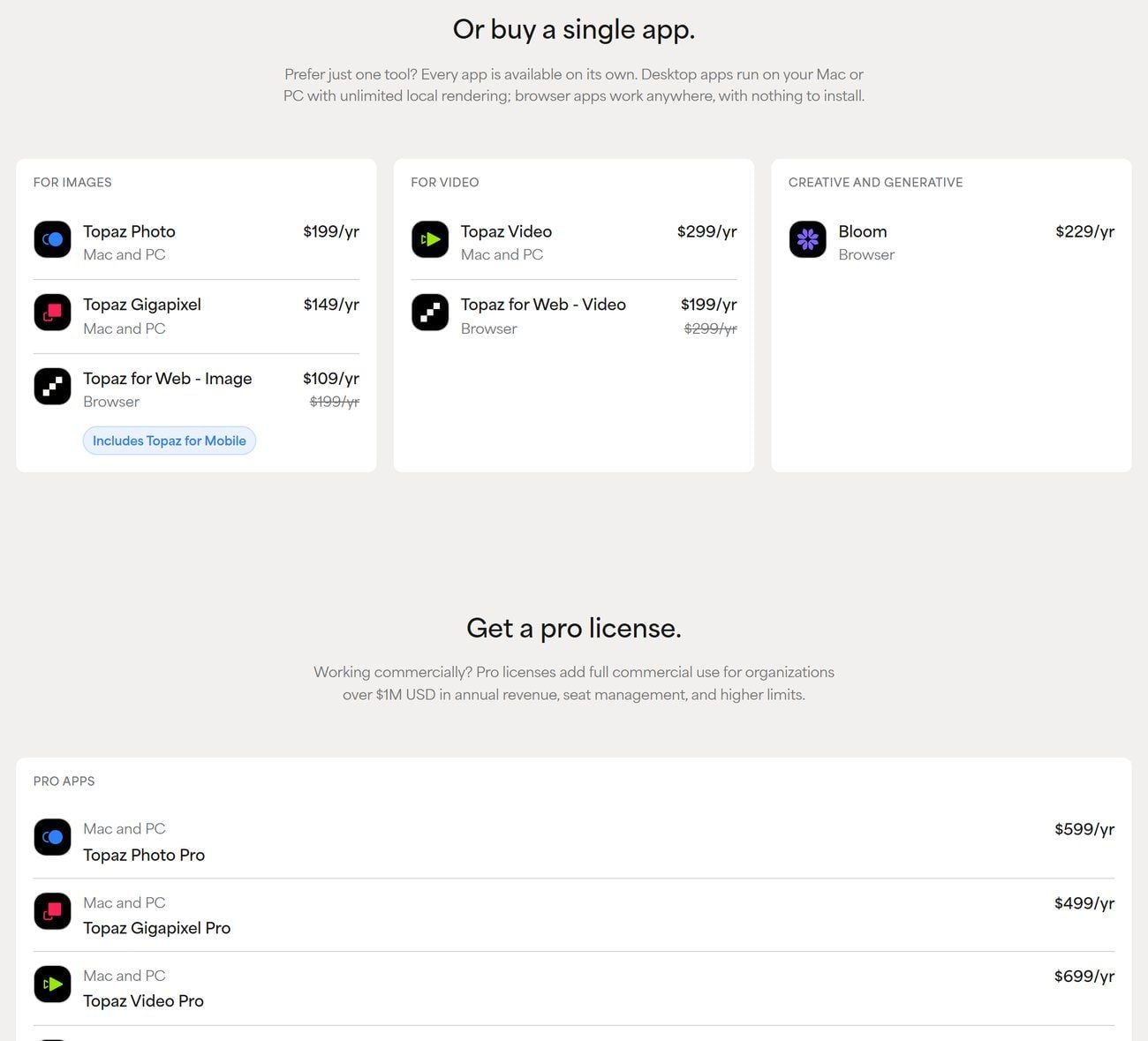
Screenshot from Topaz Labs' official pricing page, September 2026.
Three details on Topaz's own pages explain why the switch stings more than a price rise. A Topaz staff member answering a confused subscriber in a forum thread opened in November 2025 wrote that "when a subscription is canceled or expires a user is no longer able to access that app". A second staff reply from December 2025 confirmed that "Topaz Video does not offer a free trial for the current desktop version".
The refund policy gives you two days: "refunds are available only during the first 2 days", because "Access to our software is delivered instantly." Annual-commitment plans cannot be cancelled during the 12 month term without an extra fee.
Then there is the machine. The current system requirements ask for 16 GB of RAM, a graphics card with 6 GB of VRAM and 45 GB of disk space as the Windows minimum, with 32 GB of RAM and an RTX 30 series card recommended. On Mac the app runs on M series chips, and the page states that "Intel-based Macs are not currently supported". Activation and model downloads need an internet connection.
If the Topaz bill you are staring at was for Gigapixel rather than Video, the photo side has its own free routes, and our free image upscaler roundup covers them.
Where Topaz Video Enhance AI Still Earns Its Subscription
Before dropping Topaz, be clear about what you would be dropping. The product many people still search for as Topaz Video Enhance AI has grown into a full restoration suite, and for some of its jobs there is no browser shortcut.
The product page's own description promises upscaling "up to 4K and 8K", which is where a broadcast master or a print-sized still frame comes from. Frame interpolation creates new frames so a 24 fps clip plays as smooth slow motion at 60 or 120 fps. A stabilisation pass steadies handheld footage after the fact, and an SDR to HDR mode remaps old footage for HDR displays.
The model list is the other half of the case. Starlight Precise, Proteus, Iris, Nyx, Rhea and their siblings run locally on your GPU, with cloud rendering for the heavier Starlight variants. The system requirements page notes that Starlight Precise 2.5 wants 16 GB of NVIDIA VRAM on Windows. That is the profile of a tool built to grind through an evening of tape.
If your work looks like that, an archive of family tapes, a documentary master, a client who wants 4K deliverables, the subscription is the price of the right tool, and nothing below will talk you out of it.
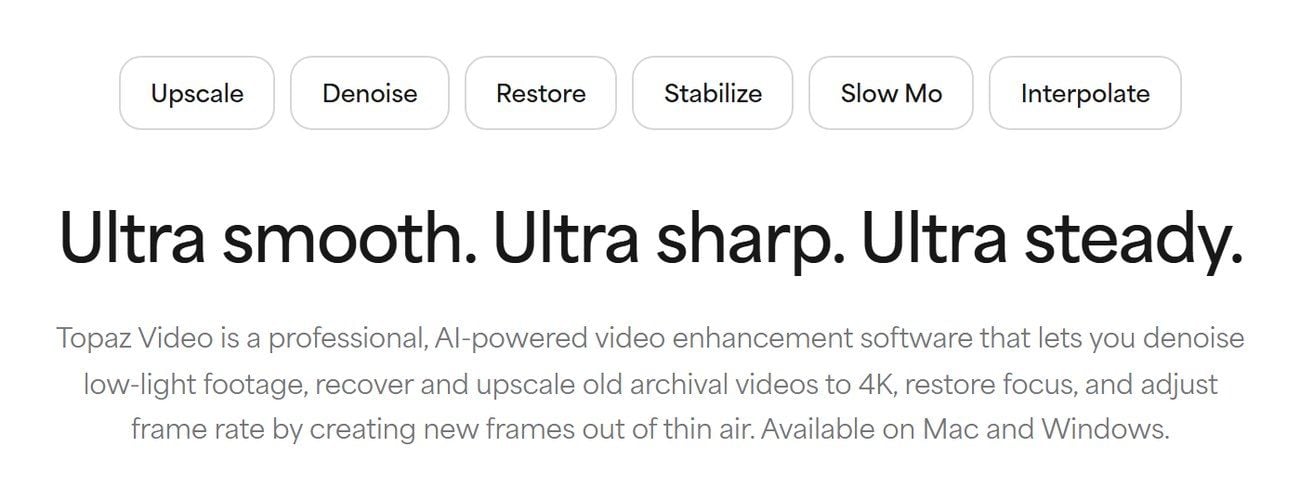
Screenshot from Topaz Labs' official Topaz Video product page, September 2026.
The Free Topaz Video AI Alternative: A 2x Video Upscaler in Your Browser
Many of the people typing Topaz Video AI alternative into a search box have a 7 second game capture, a 2019 phone clip of the dog, or a vertical export that came back from a messaging app looking soft. For that slice, Atlas Cloud runs a small group of free AI tools inside the browser, and its free video upscaler is the one built for this clip.
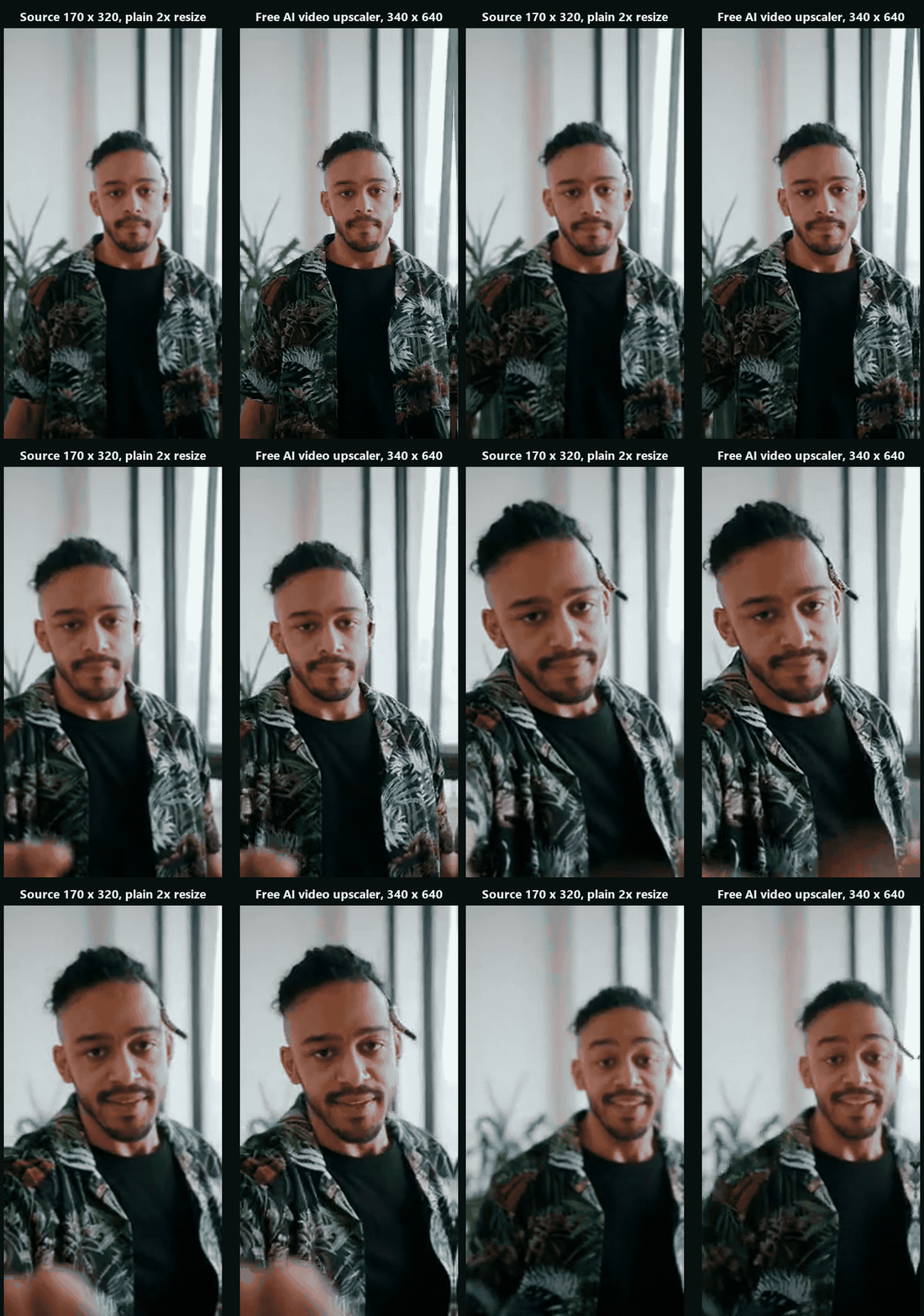
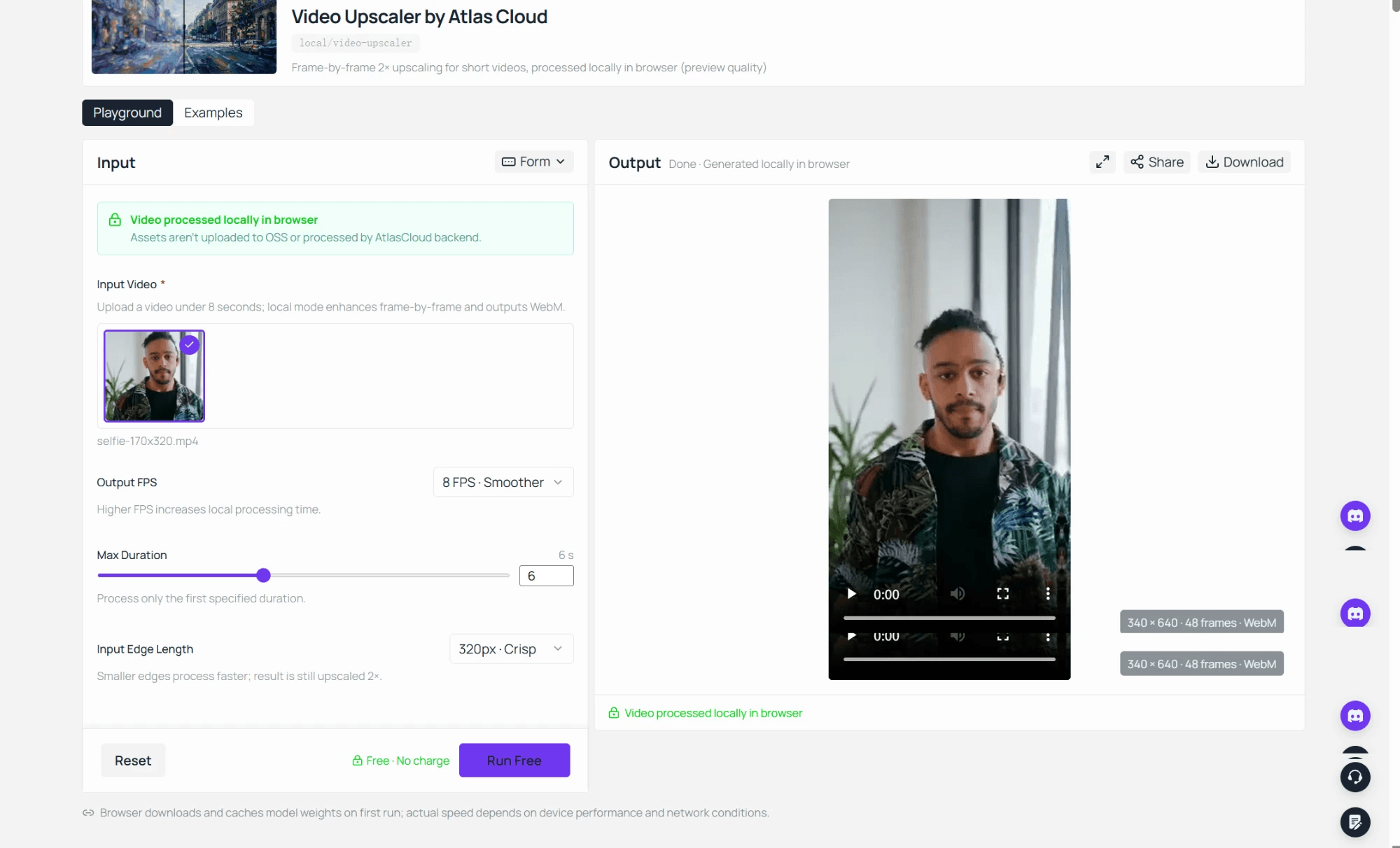
That clip went in at 170 by 320 and came back as a 340 by 640 WebM, 48 frames for 6 seconds, with the run marked "Free · No charge" on the button.
The page describes what happens after you press upscale in one sentence: "Your clip is decoded, upscaled, and re-encoded on your own device using WebGPU, without ever leaving your browser tab." The AI model downloads once and your browser typically keeps it cached, so the second clip starts faster than the first. There is no account, the download carries no watermark, and the FAQ says the tool "doesn't cap the number of clips you run through it".
The edge setting tells you which clips this tool is for. The clip is scaled to the chosen long edge before the model runs, and the output is twice that edge, so a 256 setting returns a 512 pixel clip and 320 returns 640. Treat it as a sharpening pass for footage up to 320 pixels wide: small game captures, old phone clips and reaction clips headed back into a chat. Our guide to fixing blurry video shows which kinds of blur a resolution pass can repair.
How to Upscale Video to 1080p or 2K When the Clip Runs Longer
The browser pass stops at short, small clips by design. The moment a Topaz refugee has a 40 second clip that needs a real 1080p output, the free tool's own FAQ points to the next step: "Atlas Cloud's paid video-upscaling API handles longer footage at up to 1080p or 2K resolution, with 4K planned for a later release."
That hosted model is atlascloud/video-upscaler. It takes a video URL and a target resolution, and its readme spells out the limits:
| Target resolution | Pixel tier | Longest input | Frame cap |
|---|---|---|---|
| 1080p | 1920 x 1080 | 53 seconds | 1,590 |
| 2K | 2560 x 1440 | 23 seconds | 690 |
Input frame rate has to be 30 fps or lower, and the workflow keeps the source timing rather than inventing frames. The server probes the clip's metadata before it bills anything, so a clip over the limit is rejected up front. Billing is per second of input, and the playground shows the exact figure before you run.
Method 1: Run the Video Upscaler in the Atlas Cloud Playground
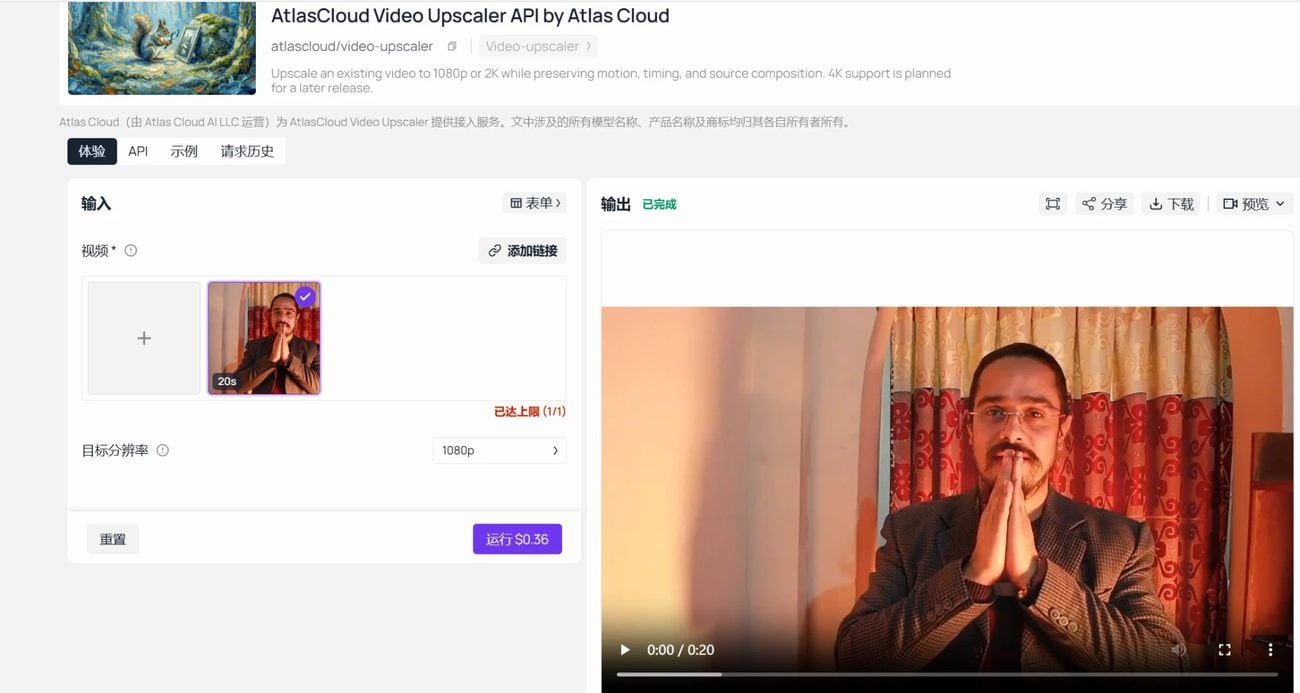
Open the video upscaler model page and sign in. The form has two fields that matter: the video input, which turns a local file into a link, and the target resolution selector. Pick 1080p for anything up to 53 seconds, or 2K for a clip under 23 seconds, run it, and download the result from the output panel when the status turns to completed.
Method 2: Call the Video Upscaler API
Fifty highlight clips from a season of streams call for a loop.
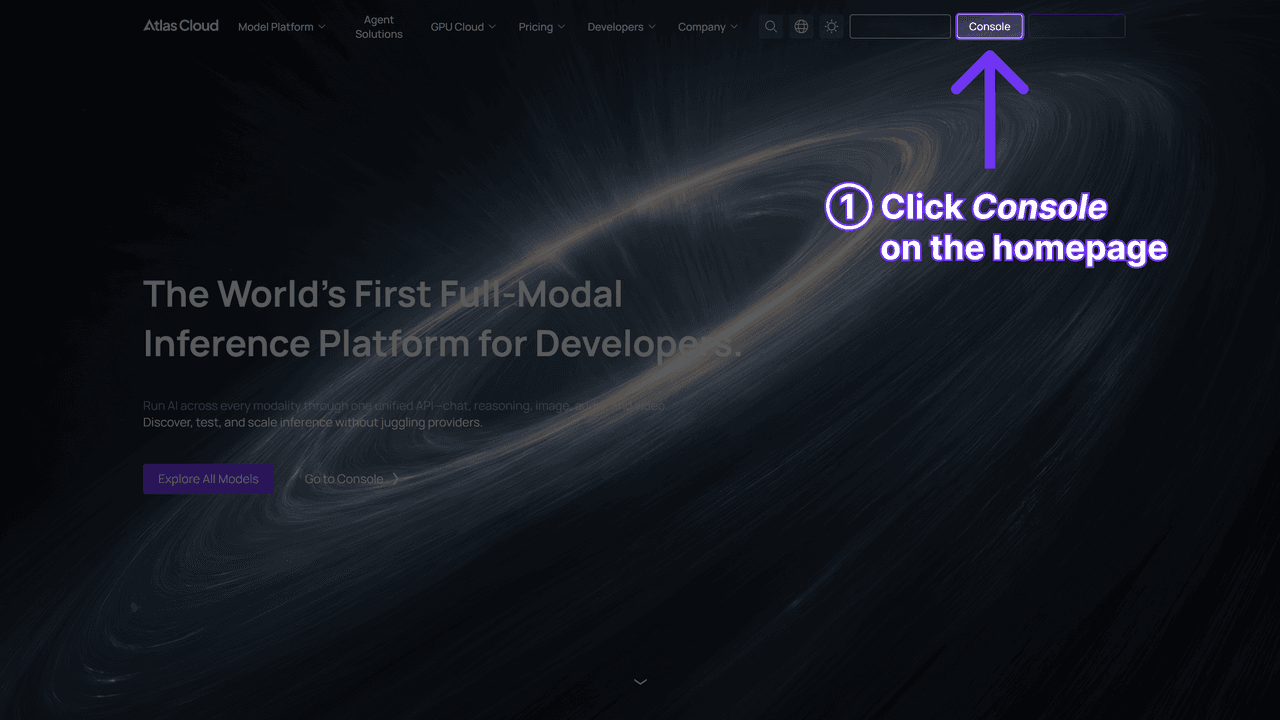
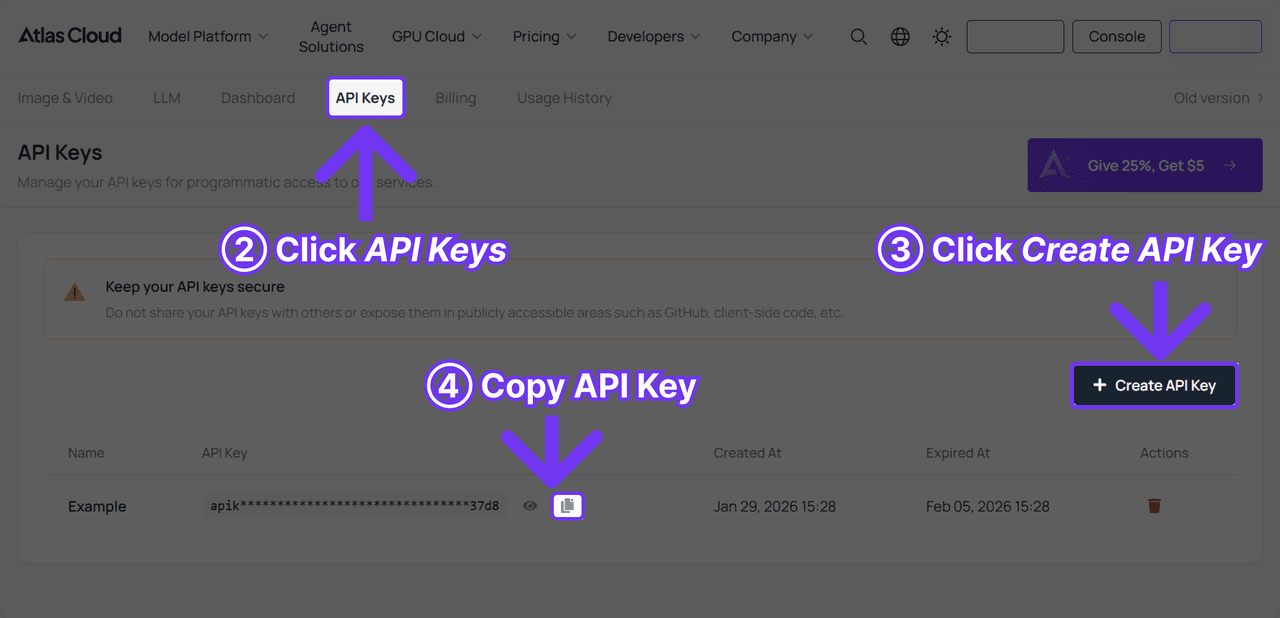
Step 1: Create an API key. Generate one in the Atlas Cloud console. It is a server-side key, and one key covers every model on the platform.
Step 2: Check the request shape. The API documentation lists the fields this model accepts, and the API tab on the model page shows the same request filled in with a working example. The input is one video URL per call, so batching happens in your own loop.
Step 3: Send the request and poll. Submit the clip, then poll the prediction id that comes back:
plaintext1curl -X POST https://api.atlascloud.ai/api/v1/model/generateVideo \ 2 -H "Content-Type: application/json" \ 3 -H "Authorization: Bearer $ATLASCLOUD_API_KEY" \ 4 -d '{ 5 "model": "atlascloud/video-upscaler", 6 "video": "https://your-cdn.com/highlight-014.mp4", 7 "target_resolution": "1080p" 8 }'
plaintext1curl -s https://api.atlascloud.ai/api/v1/model/prediction/<PREDICTION_ID> \ 2 -H "Authorization: Bearer $ATLASCLOUD_API_KEY"
When status reads completed, the upscaled file sits in outputs. The same key, endpoint and polling loop drive every video model on the platform, so swapping the model string is all it takes to send the same clip through a different model later.
Topaz Video AI vs Atlas Cloud, Side by Side
One table holds both sides. The Topaz column comes from its pricing, product and system requirements pages and from staff replies on its forum; the Atlas Cloud columns come from the tool page, the model readme and our own runs, all read in September 2026.
| Topaz Video AI | Atlas Cloud free browser upscaler | Atlas Cloud hosted video upscaler | |
|---|---|---|---|
| Licence | Subscription, $299 a year or $59 a month. Perpetual sales ended 3 October 2025 | No account, no plan, no cap on clips | Pay per second of input, price shown before each run |
| Free trial | None for the current desktop version, per Topaz staff | Not needed, the tool has no paid tier | A browser run of the same clip works as a rehearsal |
| Install | Desktop app, 45 GB of disk, 6 GB VRAM and 16 GB RAM minimum | A current browser with WebGPU, such as Chrome | None, playground or API |
| Where the video is processed | On your GPU, with optional cloud rendering | On your own device, inside the browser tab | On Atlas Cloud servers |
| Output ceiling | Up to 4K and 8K, per the product page description | Twice the working edge, up to 640 pixels | 1080p or 2K at 2560 x 1440 |
| Clip length | Long-form footage | The first 12 seconds of a clip | 53 seconds at 1080p, 23 seconds at 2K |
| Beyond upscaling | Frame interpolation, stabilisation, SDR to HDR, denoising | A 2x sharpening pass | Upscaling with the source timing kept |
| Mac support | M series chips only | Any Mac running a WebGPU browser | Any device with a browser or a terminal |
| Refund window | 2 days | Nothing to refund | Nothing to refund on a run you did not start |
Read down the middle column and the same trade shows up row after row: the browser tool gives up ceiling and gets rid of friction. It has no plan to cancel, no installer and no GPU requirement beyond a browser that supports WebGPU, and in exchange it works on small clips at twice their size.
The right column is the bridge. It lifts the ceiling to 1080p or 2K and the clip length to 53 seconds without bringing back a subscription, because the meter runs per second of the clip you submit. Whether that beats $299 a year is a question of how many seconds you upscale in a year, and the FAQ below puts numbers on it.
Should You Switch From Topaz Video AI?
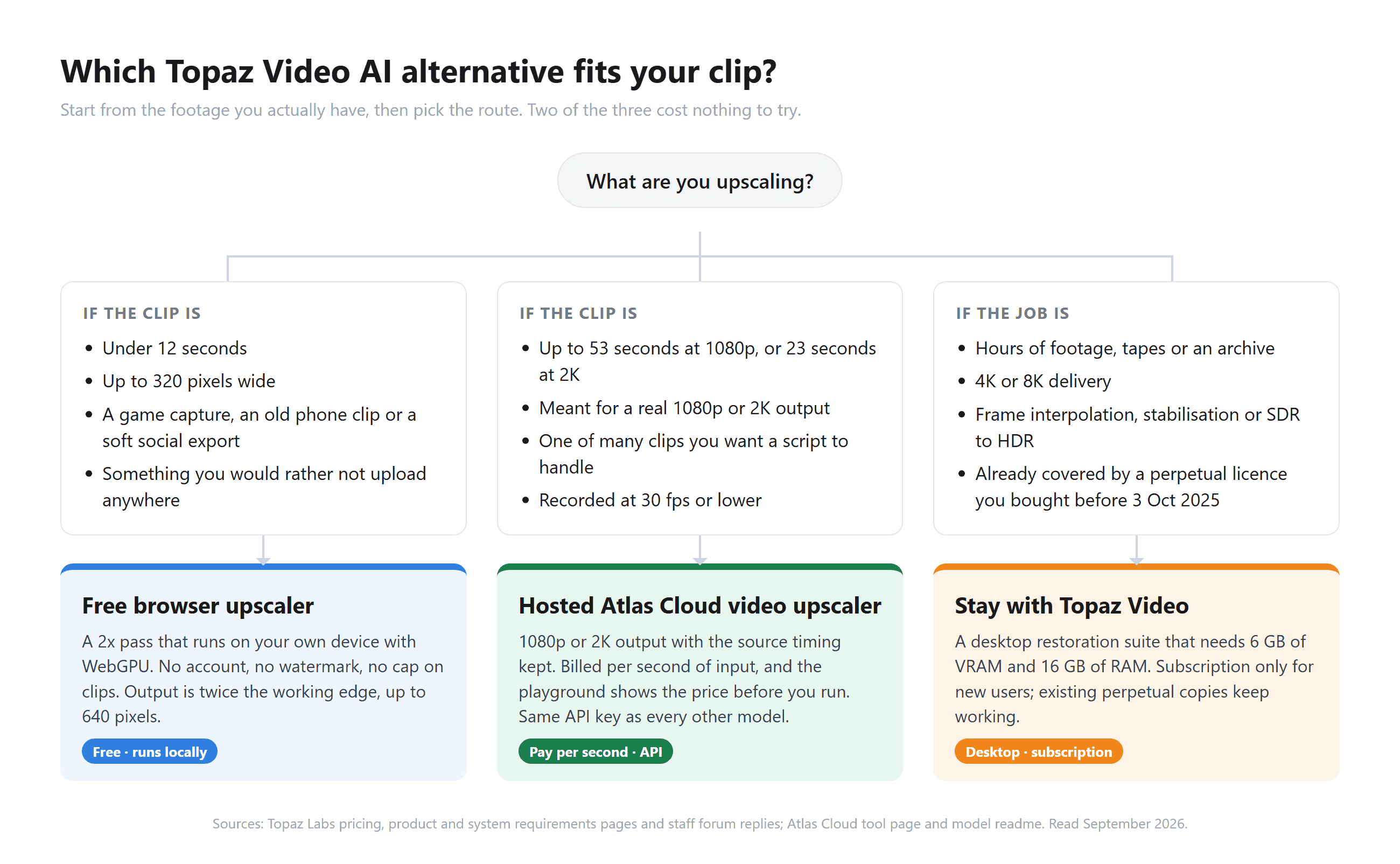
The people who should stay with Topaz Video AI are easy to name. You already own a perpetual licence bought before 3 October 2025, which a Topaz staff member described on the forum as "yours to continue using". Your deliverable is 4K or 8K. You need frame interpolation, stabilisation or SDR to HDR on the same footage. Or you restore hours of material a month on a machine that already clears Topaz's VRAM floor. None of those needs fits a browser tab.
The browser upscaler is the answer when the clip is short and small: a game capture for a Discord post, an old phone video of the kids, a soft vertical export you want to send once more at twice the size. It costs nothing to find out, and the clip stays on your device while you do.
The hosted model sits between the two. It is for the person with a 20 to 50 second clip that has to come out at a real 1080p or 2K, or the developer who wants fifty clips processed by a script. If you want to see how a wider field of tools splits the same three jobs, our video upscaler roundup ranks ten of them.
Frequently Asked Questions
Is there a free Topaz Video AI alternative with no watermark?
Yes, for short clips. The browser video upscaler from Atlas Cloud runs a 2x pass on the first 12 seconds of a clip, asks for no account and hands back a WebM file with nothing stamped on it. It is sized for clips up to 320 pixels wide, so a longer or larger clip belongs on the hosted model instead.
Does Topaz Video AI still have a free trial?
Not for the current desktop app. A Topaz staff member confirmed on the company forum in December 2025 that the current desktop version has no free trial, and pointed people who want to evaluate it toward the legacy Video AI builds instead. The pricing cards carry no trial button either, so the practical substitute is the two day refund window.
How much does Topaz Video AI cost after the subscription change?
The Personal plan is $299 a year, or $59 a month if you skip the annual commitment, and the Pro plan with full commercial rights is $699 a year, all per the pricing page we read in September 2026. Before 3 October 2025 the same app sold as a $299 perpetual licence, so the yearly figure is what used to be the one-time figure. After the two day refund window an annual plan runs its full term.
What does the Atlas Cloud video upscaler cost per clip?
The hosted model bills the input duration rounded up to whole seconds, with a 5 second minimum: $0.018 per second at 1080p and $0.024 per second at 2K, so the smallest possible run is $0.09 or $0.12. A 30 second clip at 1080p comes to $0.54. We confirmed those figures against the platform's price calculator in September 2026, and the playground shows the same number on the Run button before you commit.
Can a browser upscaler match Topaz Video Enhance AI on 4K output?
No, and it does not try to. The browser tool returns twice its working edge, up to 640 pixels, and the hosted model tops out at 2K today with 4K noted in its readme as planned for a later release. If 4K or 8K is the deliverable, Topaz's upscaling modes are the tool for that job, and the two Atlas Cloud routes are for the clips that were never going to a 4K screen.
Do I keep Topaz Video AI if I bought a perpetual licence before October 2025?
Yes. Topaz staff told owners on the company forum that a perpetual licence bought before the change stays usable, including the models and tools that shipped with that release, and Digital Production reported that updates and new features now require a subscription. If the version you own already does what you need, the licensing change alone is no reason to switch.
Conclusion
The $299 email is a good moment to ask what you were paying for. Topaz Video AI is a restoration suite for people with an archive and a GPU, and the subscription model Topaz adopted in October 2025 prices it for exactly that person. If that is you, the decision is already made, and it is not the browser.
For everyone else the answer splits by clip. A short capture under 320 pixels wide gets a free 2x pass in the browser, with no account and no upload. A clip up to 53 seconds that needs 1080p or 2K goes to the hosted model at a per-second price you see before you run it. Pick the route that matches the clip in front of you, and the search for a Topaz Video AI alternative ends with the footage you actually have.





