

The video above holds three pieces: a 90s disposable camera snapshot, a storybook pumpkin village, and a golden-hour rim-lit editorial portrait. None of them touched editing software.
Every one of them came from a set of optical camera specs plus a modular prompt formula, rendered in a single pass.
This post takes the whole workflow apart: how to drop guessing adjectives like "cozy", how to control diffusion models with real optical physics, and the exact copy-paste prompt formulas for four viral autumn aesthetics.
The Creative Shift from Generic Prompts to Viral AI Pumpkin Patch Aesthetics
Prompting 'cozy girl in a pumpkin patch' leaves you with waxy skin and neon orange leaves. Mood words give the generator too much slack to guess. To get a shot that looks like real life, drop the descriptive adjectives and name a 35mm lens with natural overcast light.
Basic autumn snapshots get buried on Pinterest and TikTok. Prompts that just stack girls, pumpkins, and fall leaves produce flat, lifeless renders. Take camera control instead: lock the focal length, pick a single light angle. Dial in your depth of field, direct the shot, don't catalog the scene.
| Prompting Style | Input Focus | Visual Result |
| Descriptive | Scene props ("cozy sweater, hay bale, autumn leaves") | Harsh midday exposure, muddy shadows, waxy skin |
| Aesthetic | Optical physics ("85mm lens at f/1.8, Kodak Portra 400, low golden rim light") | Natural depth of field, realistic fabric weave, soft roll-off |
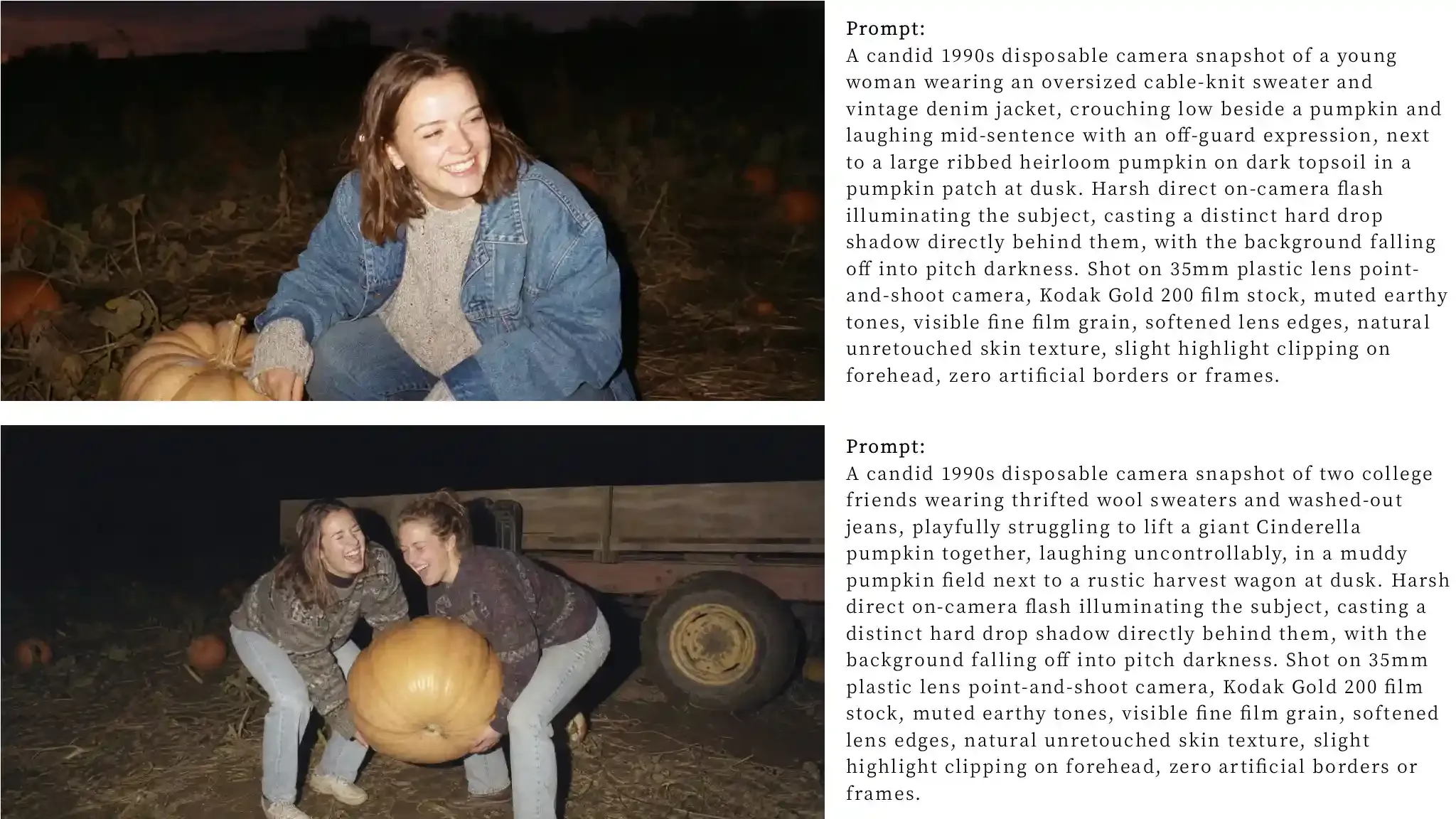
1. Capturing the 90s Disposable Camera Flash and Retro Autumn Film Grain
Real point-and-shoot snapshots rely on two mechanical limits:
- Direct on-camera flash: Fire the strobe straight from the camera body. Skip diffusion. The flash hits the subject hard, while the background drops into pitch black.
- Cheap plastic glass: Ditch sharp modern optics. Blow out bright highlights. Let the outer frame soften. Finish with coarse, consumer C-41 color grain.
Don't polish it. The flaws sell the shot.
Deconstructing the Flash-Lit Autumn Aesthetic
At dusk, a disposable flash hits the subject hard and leaves the pumpkin patch behind them to fall into pitch black.
| Technical Element | Digital AI Default | 90s Analog Target | Generative Token |
| Light Source | Soft ambient fill | Harsh direct on-camera flash | direct on-camera xenon flash, hard falloff drop shadow |
| Color Cast | Hyper-saturated HDR orange | Muted drugstore C-41 processing | Kodak Gold 200, muted greens, warm amber wash |
| Optical Clarity | Ultra-sharp digital sensor | Soft plastic 35mm lens | subtle optical edge softness, ISO 400 film grain |
| Posing | Posed commercial smile | Candid off-guard movement | candid unposed snapshot, motion blur on hands |
Copy-Paste Prompt Formula:
Build prompts using a structured slot hierarchy rather than conversational descriptions:
A candid 1990s disposable camera snapshot of <SUBJECT_WARDROBE>, <CANDID_ACTION>, <SETTING_PROPS> at dusk. Harsh direct on-camera flash illuminating the subject, casting a distinct hard drop shadow directly behind them, with the background falling off into pitch darkness. Shot on 35mm plastic lens point-and-shoot camera, Kodak Gold 200 film stock, muted earthy tones, visible fine film grain, softened lens edges, natural unretouched skin texture, slight highlight clipping on forehead, zero artificial borders or frames.
Let’s take a look at the results, using ChatGPT Image 2.0 as an example (The following test examples all use ChatGPT):
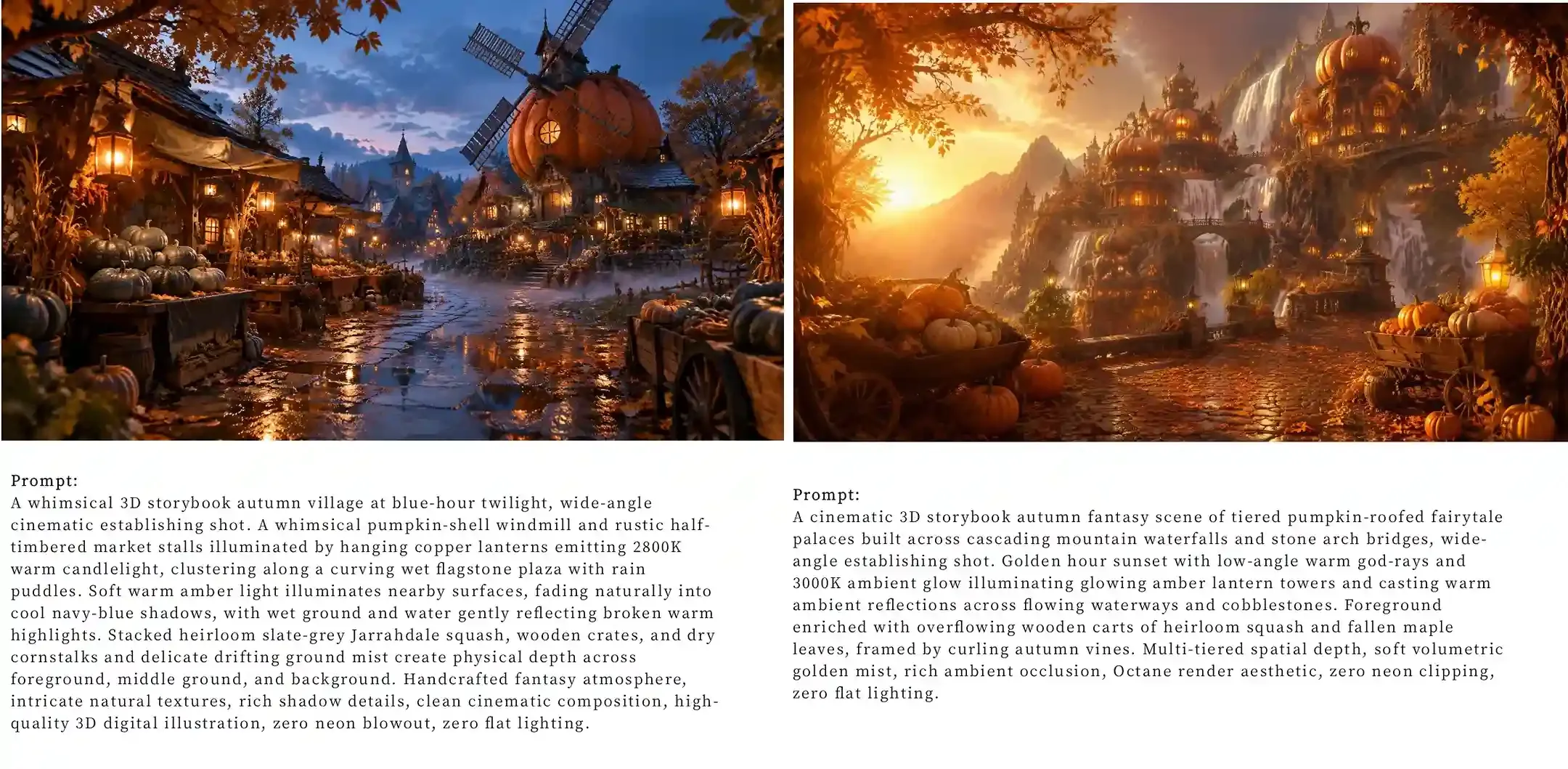
2. Crafting Whimsical Pumpkinlight Village and Golden Lantern Fantasies
To prevent glowing pumpkins from blowing out the frame, isolate the light sources: anchor warm highlights to the gourds and stone paths, while forcing the background into soft, dark contrast.
Atmospheric Elements for Storybook Environments
For a storybook pumpkin village, contrast a cool blue twilight sky with warm light from individual windows, lanterns, and carved pumpkins. Keeping these light sources localized helps preserve the shape of buildings, foliage, and pathways.
| Environmental Layer | Visual Role | Core Prompt Tokens |
| Sky and Horizon | Deep contrast foundation | indigo dusk, deep twilight blue sky, fading horizon silhouette |
| Primary Lighting | Localized warm focal points | 2800K candlelight bounce, glowing hand-carved lanterns, volumetric mist |
| Ground Geometry | Physical depth and reflection | wet cobblestone paths, reflective riverbank puddles, giant hollowed pumpkin cottages |
| Atmospheric Particles | Soft light dispersal | drifting woodsmoke embers, illuminated dew on vines, floating lanterns |
Copy-Paste Prompt Formula:
To construct a coherent whimsical autumn fantasy, balance village architecture with natural agricultural foliage. Specifying exact Kelvin color temperatures prevents warm light sources from bleeding into the cool blue tones of the evening sky:
A whimsical 3D storybook autumn village at blue-hour twilight, wide-angle cinematic establishing shot. <VILLAGE_ARCHITECTURE> illuminated by <CRAFTED_LIGHT_SOURCE>, clustering along <PATHWAY_WATERWAY>. Soft warm amber light illuminates nearby surfaces, fading naturally into cool navy-blue shadows, with wet ground and water gently reflecting broken warm highlights. <FOLIAGE_AGRICULTURAL_ELEMENTS> and delicate drifting ground mist create physical depth across foreground, middle ground, and background. Handcrafted fantasy atmosphere, intricate natural textures, rich shadow details, clean cinematic composition, high-quality 3D digital illustration, zero neon blowout, zero flat lighting.
Let’s take a look at the results:
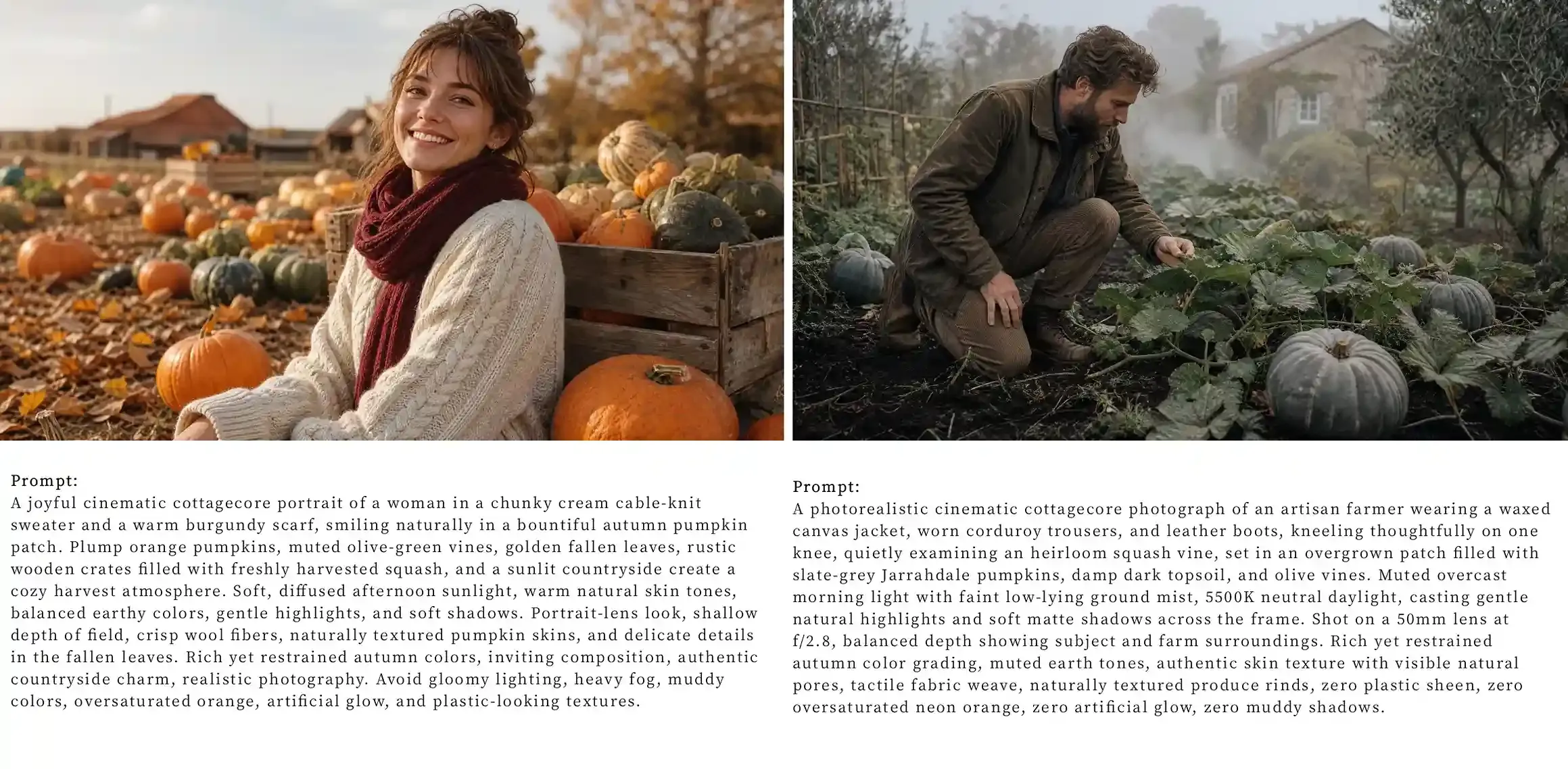
3. Achieving Moody Cinematic Cottagecore and Desaturated Harvest Tones
A moody cottagecore pumpkin patch depends on soft, overcast light rather than intense golden-hour sunshine. Diffused daylight keeps skin tones natural, preserves detail in pale pumpkins, and brings out the textures of damp soil, dark foliage, and layered knitwear.
Environmental Tokens and Color Harmony
Build a cohesive harvest palette by combining muted greens, cool blue-grey pumpkins, deep burgundy fabrics, and weathered natural materials. Describe the actual colors and surfaces you want to see instead of relying on vague instructions such as “moody” or “desaturated.”
| Scene Element | Over-Saturated Default | Cinematic Cottagecore Alternative |
| Sky and Light | Harsh golden hour sun | Diffused overcast skylight, soft morning mist |
| Foliage and Crops | Neon pumpkin rinds, yellow leaves | Slate-grey Jarrahdale squash, forest pine vines |
| Wardrobe Fabrics | Flat modern cotton | Coarse cable-knit wool, ribbed charcoal scarves |
| Props and Textures | Plastic takeout cup | Steaming matte ceramic mug, weathered dark wood |
Optical Isolation and Tactile Detailing
Isolate the subject against busy pumpkin rows using a fast portrait lens. Keep the knitwear and facial features crisp against a softly blurred field, and call out coarse wool threads and damp leaf textures to eliminate waxy skin.
Copy-Paste Prompt Formula:
Use this modular prompt to secure balanced tones and eliminate synthetic glow:
A photorealistic cinematic cottagecore photograph of <SUBJECT_WARDROBE>, <POSE_EXPRESSION>, set in <SETTING_CROPS>. <LIGHTING_WEATHER>, casting gentle natural highlights and soft matte shadows across the frame. <CAMERA_PERSPECTIVE>. Rich yet restrained autumn color grading, muted earth tones, authentic skin texture with visible natural pores, tactile fabric weave, naturally textured produce rinds, zero plastic sheen, zero oversaturated neon orange, zero artificial glow, zero muddy shadows.
Let’s take a look at the results:
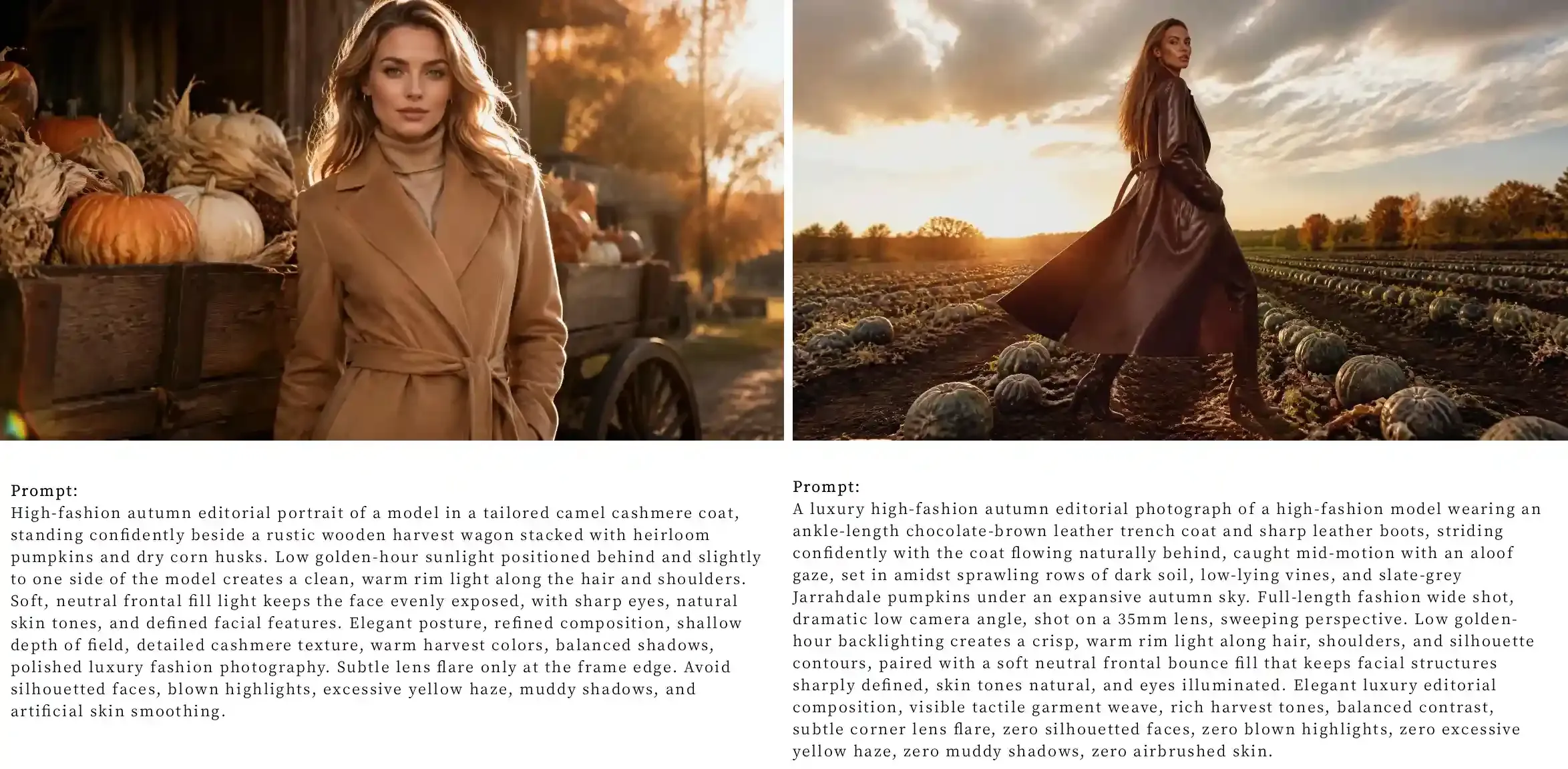
4. High Fashion Autumn Editorial and Sunset Rim Lighting
Golden-hour backlighting can give an autumn fashion portrait a striking editorial look, but excessive backlight may turn the subject into a silhouette or wash out facial details. The key is to use the low sun to define the subject's outline while keeping the face naturally exposed.
Optical Physics of Sunset Rim Lighting and Staging
For a polished autumn editorial, position the setting sun behind and slightly to one side of the subject. This creates a golden edge along the hair and shoulders, separating dark clothing from hay bales, harvest wagons, and rustic farm textures. Soft, neutral fill light on the face preserves natural skin tones without overpowering the rim light.
| Lighting Element | Common Generation Flaw | Editorial Staging Solution |
| Sun Angle | Blazing center background wash | Low off-axis rim light behind the shoulders |
| Shadow Fill | Pitch-black underexposed skin | Subtle reflector bounce fill on the face |
| Staging | Passive sitting in dirt | Standing architectural pose beside harvest crates |
| Lens Control | Wide-angle distortion | 105mm telephoto lens at f/2.5 with controlled flare |
Preserving Facial Clarity Against Backlight
Specify gentle frontal fill light to keep the eyes, facial contours, and skin texture visible. The face should remain naturally exposed while the warmer rim light defines the hair, shoulders, and coat.
The Copy-Paste Editorial Sunset Formula
Use this modular golden hour pumpkin patch prompt to lock in directional highlights and maintain clean facial likeness:
A luxury high-fashion autumn editorial photograph of <SUBJECT_WARDROBE>, <POSE_STYLING>, set in <ENVIRONMENT_PROPS>. <SHOT_COMPOSITION_ANGLE>. Low golden-hour backlighting creates a crisp, warm rim light along hair, shoulders, and silhouette contours, paired with a soft neutral frontal bounce fill that keeps facial structures sharply defined, skin tones natural, and eyes illuminated. Elegant luxury editorial composition, visible tactile garment weave, rich harvest tones, balanced contrast, subtle corner lens flare, zero silhouetted faces, zero blown highlights, zero excessive yellow haze, zero muddy shadows, zero airbrushed skin.
Let’s take a look at the results:
The 5-Tier Modular Prompt Formula for Photorealistic Fall Renders
Most fall AI prompts fail the same way. You ask for a pumpkin patch. The model gives you plastic skin, neon orange mush, and a melted background.
Stop stacking adjectives. Break the prompt into five concrete jobs:
1. Subject: Action and texture
Drop "beautiful woman." It triggers heavy skin smoothing.
Show physical contact. Have them sit on a crate, lean against a fence or carry a heavy squash.
Name coarse fabrics. Call for thick cable-knit wool or waxed cotton. Detail on the clothes forces detail on the face, skin pores appear, stray hairs render.
2. Ground: Kill the neon orange
Default prompts generate identical orange spheres. It looks fake.
Name real cultivars. Add slate-blue Jarrahdale pumpkins, flat fairytale squash or pale ghost gourds.
Ground the scene. Call for damp dark dirt, tangled vines, and trampled straw. Real farms are messy.
3. Light: Pick one vector
Never mix lighting styles. Conflicting tags create muddy midtones. Dialing in advanced lighting and composition techniques requires committing to a single vector rather than blending moods.
Pick one source:
- Sunset? Low-angle backlight and long ground shadows.
- Overcast? Diffused sky and soft contact shadows.
- Gritty editorial? Direct on-camera flash.
One direction. Stop there.
4. Camera: Back off the blur
Don't write f/1.8. The model uses it as an excuse to melt the entire farm into soup. Use a 35mm or 50mm lens at f/4.0 or f/5.6. Keep the pumpkin rows legible and show the environment.
5. Color: Force cool contrast
The model wants to oversaturate fall colors. Don't write "moody"—it just crushes your shadows to black.
Force cool tones into the prompt. Add weathered gray wood, sage-green foliage, washed navy denim.
If you tag film, know the trade-off: Portra 400 stabilizes skin tones, Fuji cools down greens. Both add grain. If you want clean digital, describe the exact colors instead.
Optical and Environmental Setting Reference
| Visual Style | Focal Length & Aperture | Lighting Profile | Key Environmental Details |
| Candid Golden Hour | 85mm at f/1.8 | Low-angle sunset backlighting with warm rim light | Scattered fairytale pumpkins, dry stalks, dust particles |
| Overcast Moody Field | 50mm at f/2.2 | Diffused skylight, zero direct sun | Wet soil, dark green vines, mist, pale ghost gourds |
| Direct Retro Flash | 35mm at f/4.0 | On-camera direct strobe, sharp falloff | Weathered wooden crates, loose straw, dense patches |
| Editorial Fashion | 105mm at f/2.0 | High-contrast side lighting with subtle bounce fill | Symmetrical pumpkin rows, clean furrow lines, distant tree line |
Troubleshooting Common AI Pumpkin Patch Artifacts and Visual Flaws
Word bloat kills prompt control. Target the exact error, rather than rewriting the entire prompt.
Defect 1: Orange Color Bleed
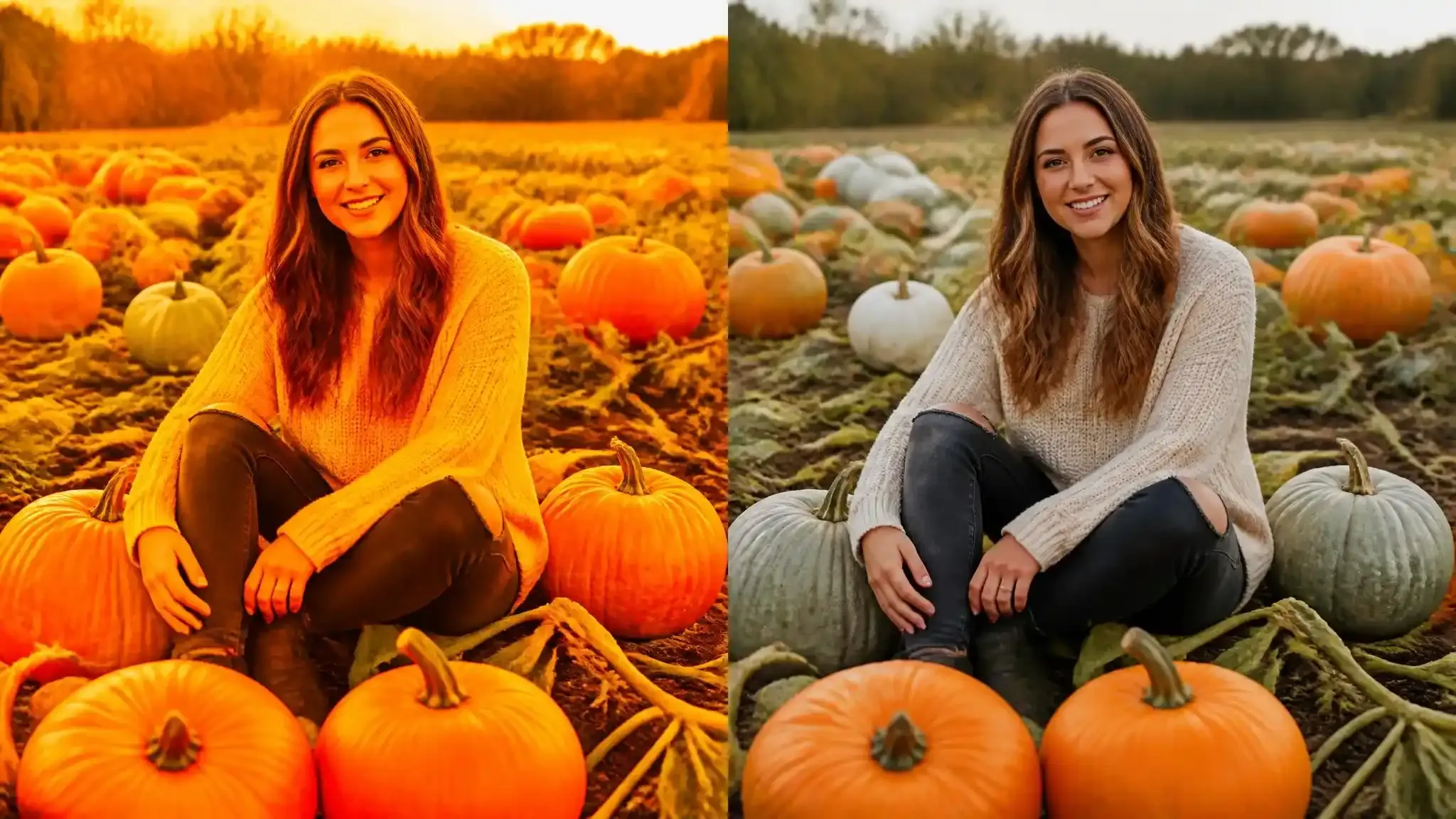
Neon orange spreads fast. Pumpkins glow like plastic. Skin turns orange with them. Don't strip out autumn colors. Counter them. Lock the lighting first. Call for neutral daylight. Specify natural skin tones.
If it still too warm, force cool objects into the frame. Add slate-blue Jarrahdale pumpkins, dusty olive foliage, weathered gray timber. Cool surfaces break the color bleed. The pumpkins keep their fall look. The skin stays human.
Defect 2: Deformed Hands and Spatial Contact Failures
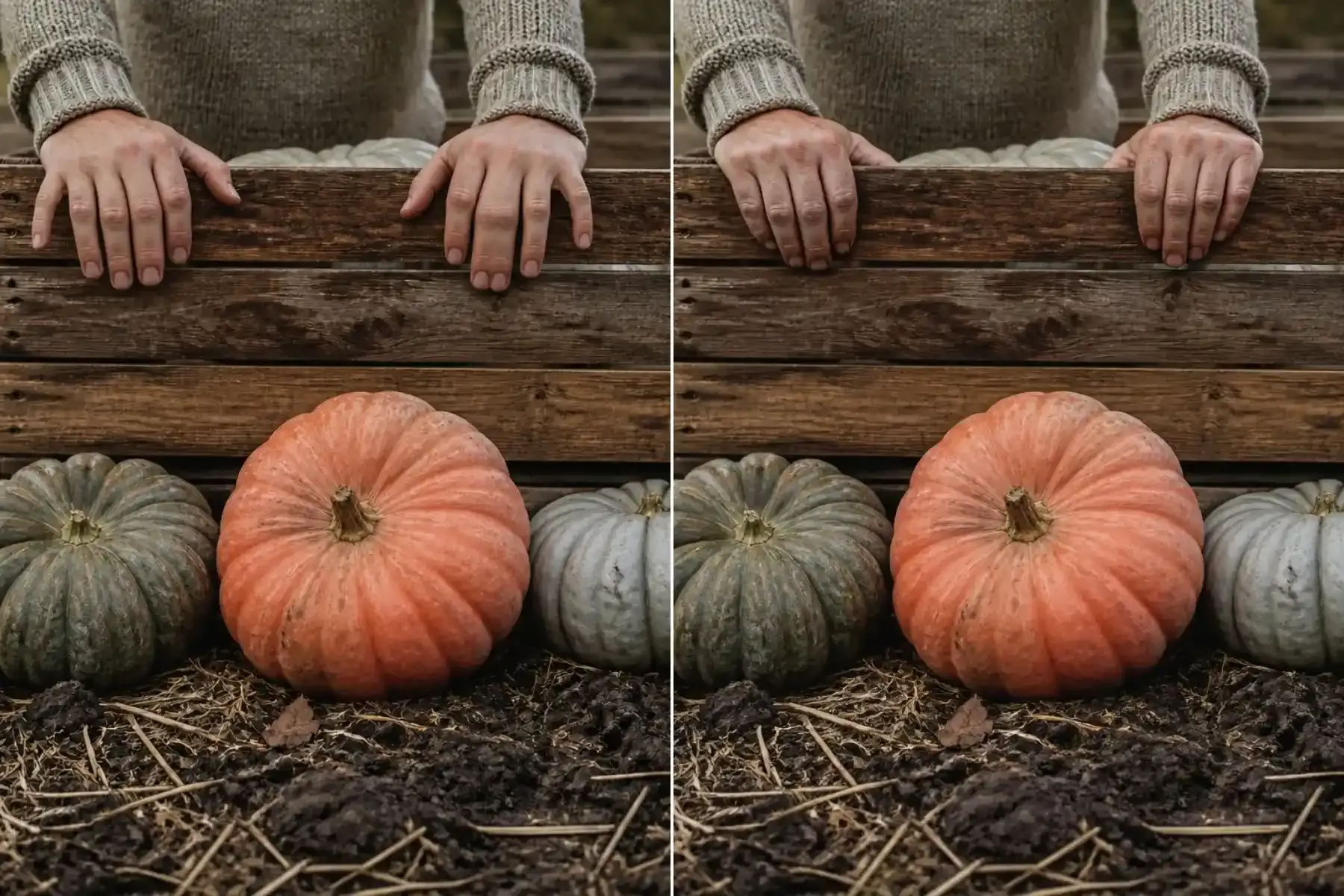
Models fail at contact points. Extra fingers (polydactyly), blend knuckles, or fuse flesh directly into wood grain.
- Define Hand Contact: Never leave hands idle or loosely resting. Specify exact grip dynamics.
- Anchor the Geometry: Give props physical weight so they don't drift into hands.
If you are running SDXL or Flux / Midjourney, lock down negative prompts. Cut out floating objects, detached stems, and fused limbs.
Defect 3: Waxy Skin and Lost Texture
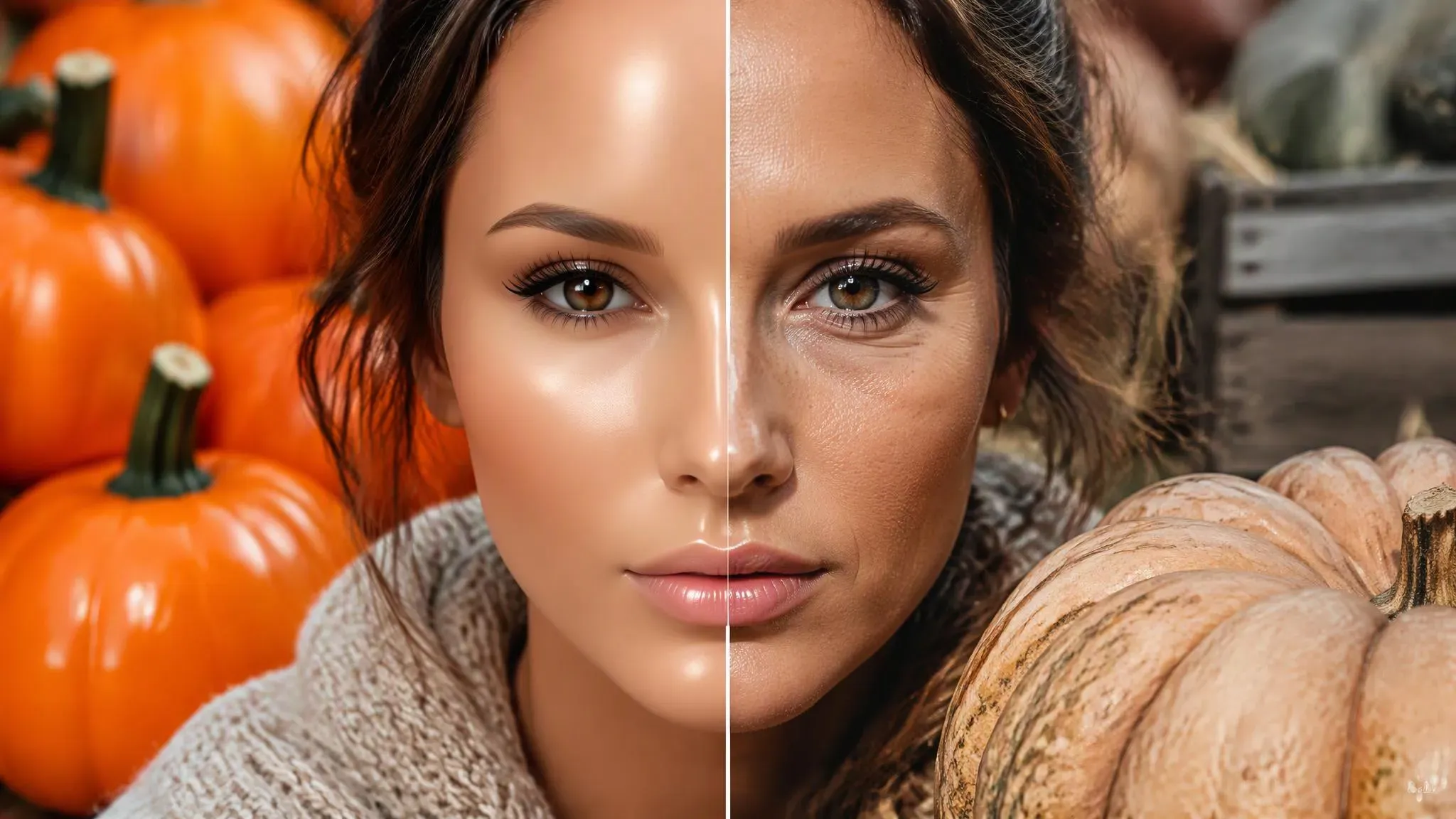
Drop "photorealistic." The word does nothing. When your goal is to make AI portraits look more realistic, build physical texture instead.
- For the subject: Call for visible skin pores, subtle peach fuzz, and flyaway hair.
- For the pumpkins: Specify matte rinds, surface blemishes, and dried dirt marks.
If still looks airbrushed, strip beauty tags. Cut glamour lighting, porcelain skin, and soft-focus cues. Don't treat film grain as a lazy fix. Add it only when the shot genuinely calls for analog film.
Social Media Formatting and Aspect Ratio Specifications for Autumn Trends
Using native generation dimensions prevents awkward post-render cropping and preserves fine agricultural details across social feeds. Matching your workflow to the right social media ai photo formats guarantees maximum screen coverage.
| Platform Destination | Recommended Ratio | Native Export Canvas | Key Compositional Focus |
| Pinterest Feed | 2:3 vertical | 1000 x 1500 px | Vertical leading lines, foreground pumpkins, upper negative space |
| Instagram Feed | 4:5 vertical | 1080 x 1350 px | Eye level at upper third, tight subject framing |
| TikTok & Reels Covers | 9:16 vertical | 1080 x 1920 px | Full-bleed subject isolation, centered action zone |
Preserving Sharpness Without Edge Halos
Automated mobile upscalers often destroy organic textures by sharpening noise into glaring white halos around hair and knitwear. To maintain clean sharpness:
- Avoid Aggressive Enhancers: One-click mobile apps invent synthetic edge ringing and over-smooth skin pores.
- Use Latent Upscaling with Low Denoise: Run an upscale pass at 0.25 to 0.35 denoising strength with a 4x model.
- Set Native Ratios First: Set your target autumn photoshoot aspect ratio in the initial generation such as
--ar 2:3or--ar 4:5rather than cropping later.
Autumn Campaign Execution Checklist
- Lock camera optics and lighting variables before running batch generations.
- Render natively at 2:3 Pinterest or 4:5 Instagram to protect frame composition.
- Inspect skin pores, pumpkin contact points, and hair edges at 100% zoom before upscaling.
- Run latent upscaling with low denoising (0.25–0.35) to eliminate edge ringing.
- Compress output files into WebP format under 5MB for fast mobile loading.
Create Your Own AI Pumpkin Patch Photos This Fall
Great renders start with intent. Not prompt bloat. Choose one lane up front: gritty direct flash, storybook dusk, or clean editorial portrait. Lock the style, then tweak light, camera, and color one variable at a time.
Now, pick one aesthetic formula above, replace the bracketed tokens with your subject details, and lock the optical parameters before generating.





