A puffer jacket, a gold chain, a fan of cash, and a cartoon guy rocking side to side on a white screen. Then a white flash, and the next one takes his place. If your For You page has looped that since late October, you have met the wassup in a minute trend.
Below: where the sway, the song and the art came from, which CapCut templates copy it, and how we turned one selfie into our own swaying character.
Key Takeaways
- The wassup in a minute trend sets Atlanta Lock anime characters swaying on white to a jersey club beat.
- The sound iszbee's January 2026 jersey club remix of Drake's From Time, looping Jhené Aiko's hook.
- The busiest CapCut template we found for it, in a minute wassup, passed one million uses within a week.
- One selfie and two runsinthe Atlas Cloud video generator turn you into a swaying Atlanta Lock character.
- Name each move by the second in your prompt, so winks and money tosses land without breaking the sway.
What Is the Wassup in a Minute Trend? Atlanta Lock Characters Swaying to Drake
It is a 14-second edit of hand-drawn streetwear characters, each bobbing in place on a white background for about three and a half seconds before the next one cuts in.
The post that named it went up on October 23, 2026, captioned "Wassup in a minute" with the art credited to Zayy. It had 2.6 million plays when we checked on November 2. Here is how its four characters line up:
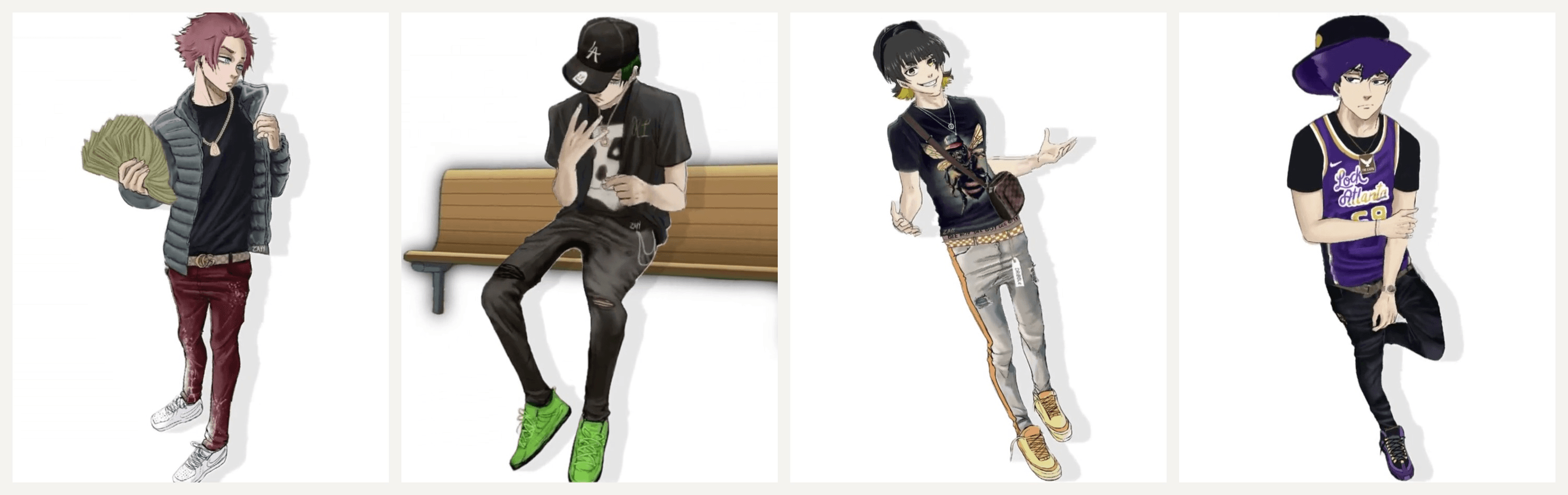
Frames from the original edit. Art by Zayy .
Nothing else moves. Each character sways from the feet, nods on the beat and does one thing with its hands. That stillness is why one clean image is enough to join in.
The Wassup in a Minute Song Is a Drake From Time Remix
The beat is a jersey club flip of "From Time", the 2013 Drake track with Jhené Aiko from Nothing Was the Same. Producer zbee posted the remix on January 14, 2026. It chops Aiko's hook into a short loop that many people hear as "wassup, been a minute", which is how the trend got its name and its spellings.
Two sounds carry the trend on TikTok, counted on November 2:
| Sound | Who posted it | Videos using it | Top posts on the sound page |
|---|---|---|---|
| from time jerseyclub prodzbee | zbee, January 14 | 22,100 | Real-life sways and cosplay, plus some anime edits |
| original sound | The animator behind the October 23 edit | 8,799 | Mostly anime character edits |
How It Went From Real-Life Sways to Anime Edits
The remix sat on TikTok for nine months before the cartoons showed up. People were already swaying to it on camera by mid-October. One of those clips, posted October 12, has 2.9 million plays.
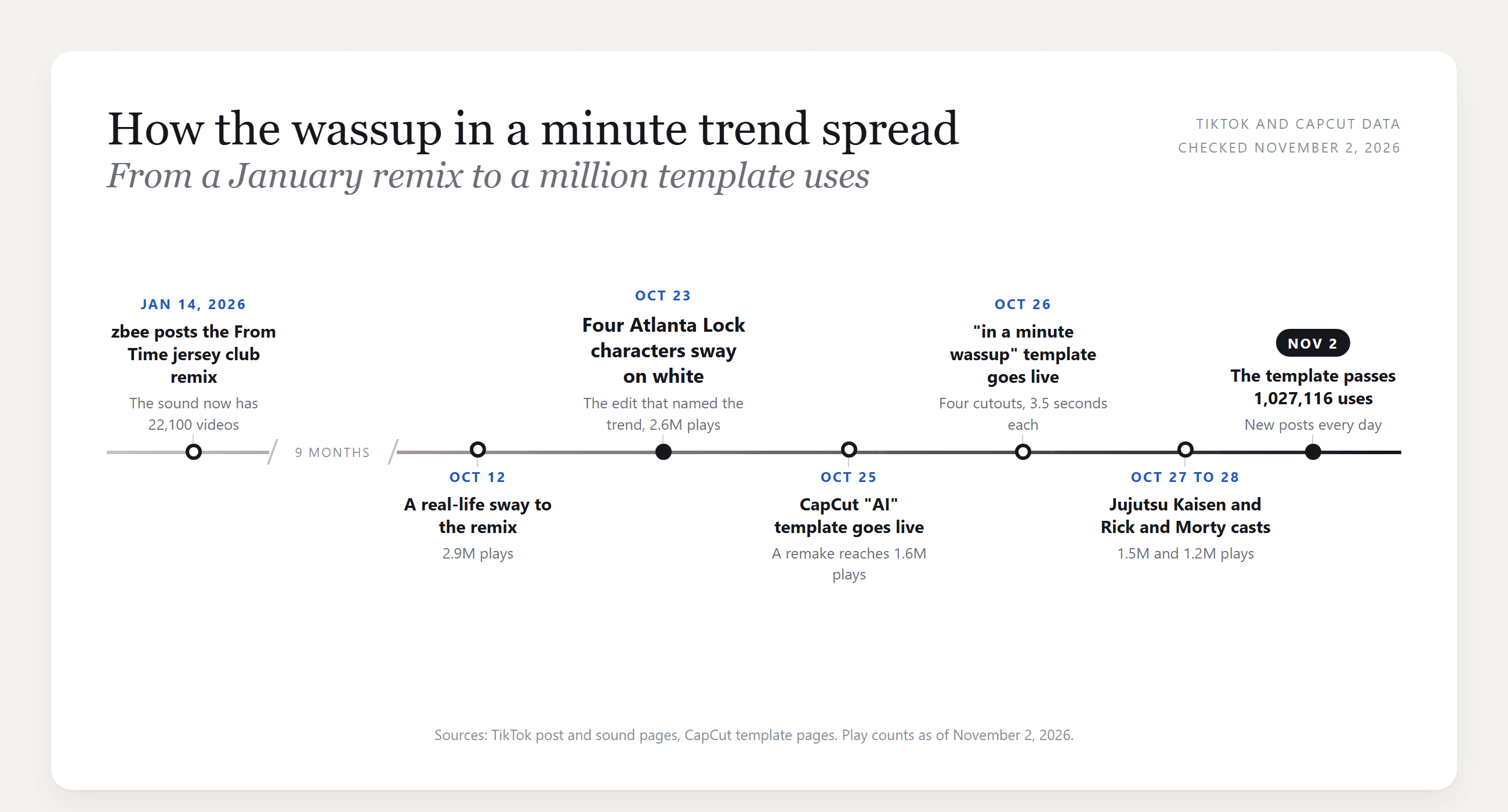
After October 23, the format spread across fandoms in days. A remake posted on October 25 has 1.6 million plays. A Jujutsu Kaisen cast followed on the 27th, then Rick and Morty on the 28th. On October 29, a live-action take that copies the drawn characters outfit for outfit passed 1.8 million plays.
How to Do the Wassup in a Minute Trend With AI
To put yourself in the edit, you need a drawing of you, and that drawing swaying.
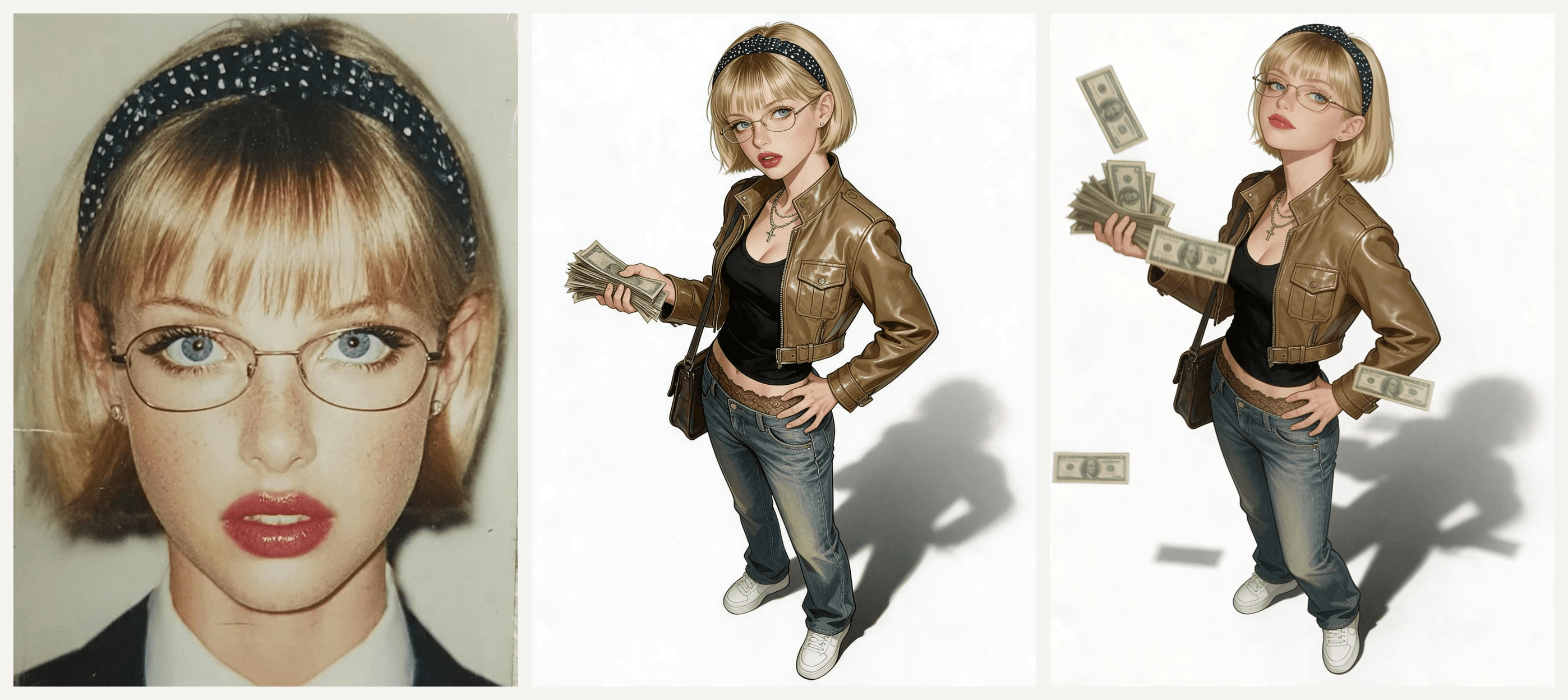
Atlas Cloud does both in one workspace. Seedream 5.0 Pro redraws a selfie as a full-body character. Then Seedance 2.5 uses that drawing as the first frame and animates the sway. Here is our version, made from the studio portrait in the hero image:
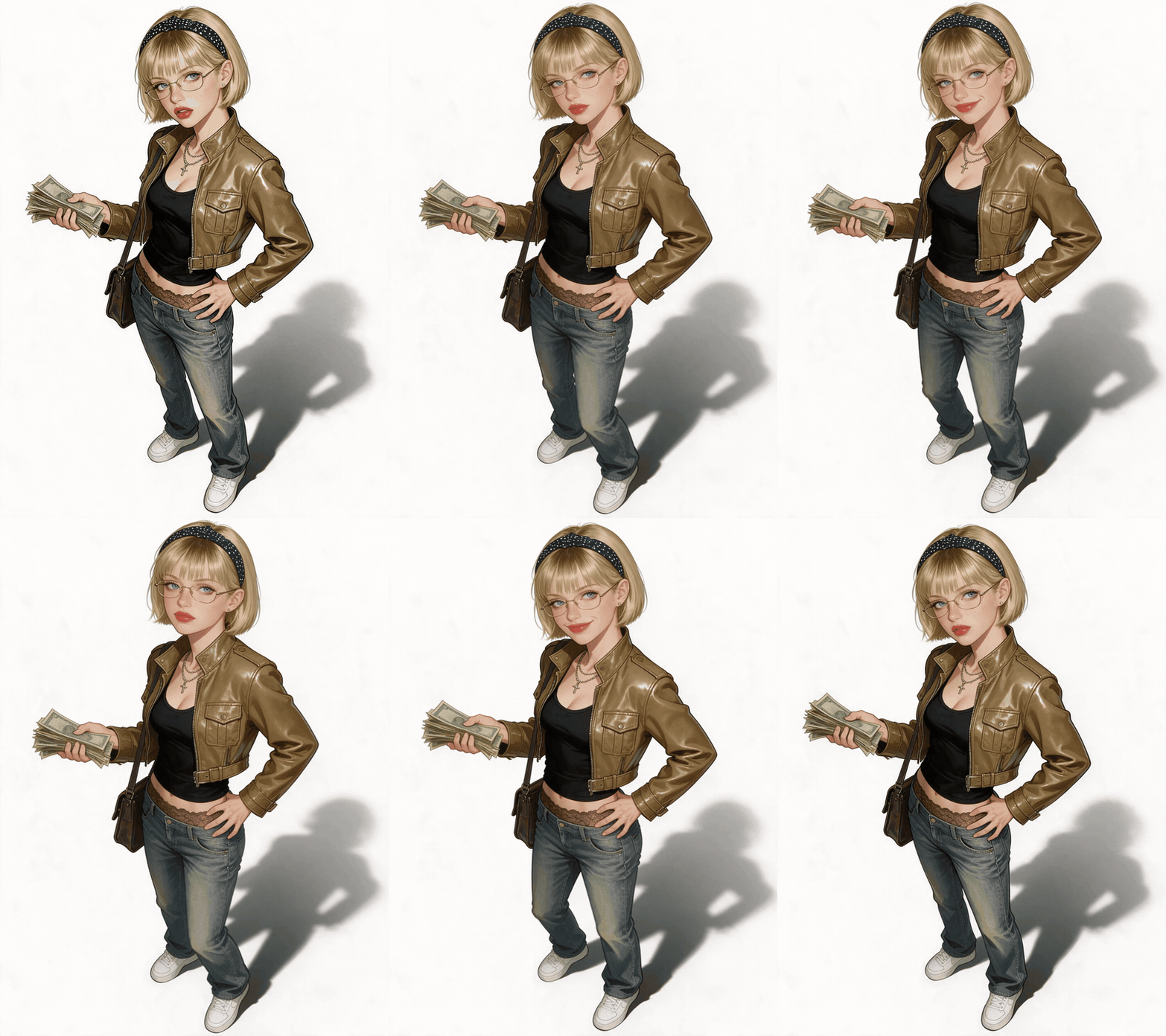
She sways for all ten seconds, flicking cash between winks and smirks, and her glasses never slip. The song is not part of the generation: we laid zbee's remix over the clip afterward, the same way you would add a sound in TikTok.
Method 1: Draw Yourself in the Atlas Cloud Generator, Then Make It Sway
Sign in to the AI video generator. The image tools sit in the same left menu.
Part 1: turn your selfie into a character. Open Image Generator, then follow the numbers:
- Open the Image Edit tab.
- Pick Seedream v5.0 Pro.
- Upload a clear, front-facing photo of yourself.
- Paste the character prompt below.
- Under Settings, pick 3:4, which shows as 1776*2368.
- Click Run.
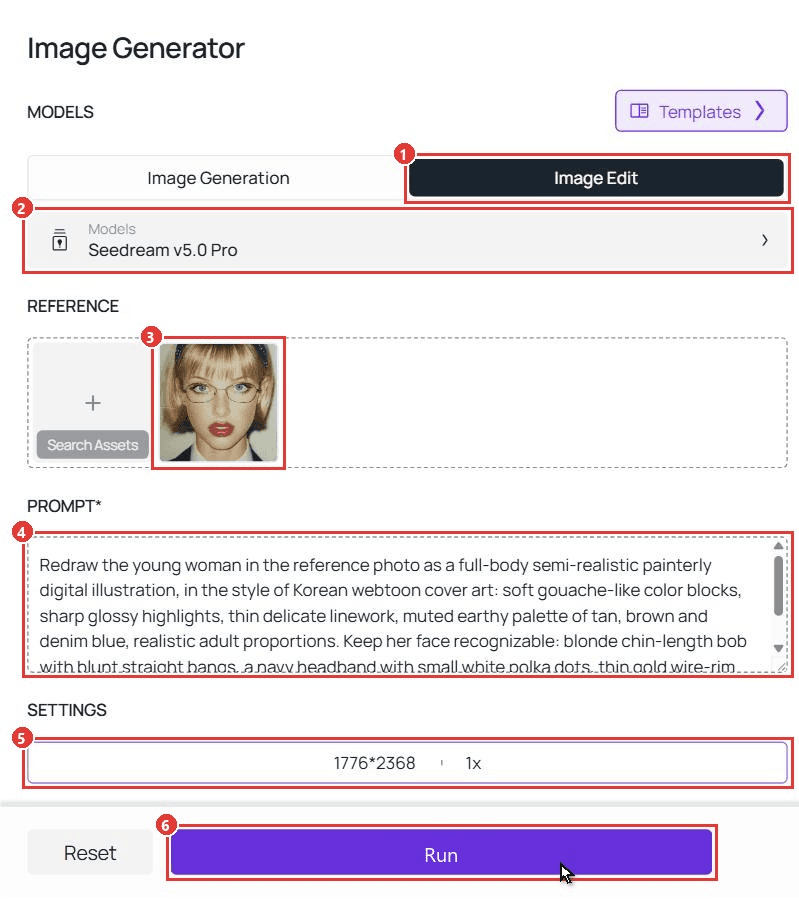
plaintext1Redraw the young woman in the reference photo as a full-body semi-realistic painterly digital illustration, in the style of Korean webtoon cover art: soft gouache-like color blocks, sharp glossy highlights, thin delicate linework, muted earthy palette of tan, brown and denim blue, realistic adult proportions. Keep her face recognizable: blonde chin-length bob with blunt straight bangs, a navy headband with small white polka dots, thin gold wire-rim oval glasses, light blue eyes, faint freckles, bold red lips, small stud earrings. Expression cool and distant, eyes glancing sideways out of frame, lips slightly parted. Outfit: cropped tan-brown leather moto jacket with a stand collar, chest flap pockets, zip details and a buckled waist tab, worn open over a fitted black tank top; layered silver chains with a small cross pendant; low-rise faded blue straight-leg jeans with a strip of brown lace trim showing at the waistband; chunky white low-top sneakers with no logos; a dark leather messenger bag on a long strap over one shoulder. Pose: three-quarter turn, weight on one hip, one hand fans a thick stack of worn green banknotes at chest height, the other hand rests on her hip. Full body from hair to shoes, feet fully visible, a soft grey cast shadow falling to the back right, pure white background, no text, no logos, no watermark.
Swap the face line for your own features. Keep "full body from hair to shoes" and "pure white background", since the sway needs both feet in frame.
Part 2: make the character sway. Switch to Video Generator:
- Open the Video Generation tab.
- Keep Seedance 2.5 under Models.
- Upload your character image to First Frame.
- Paste the sway prompt below.
- Pick 1080p.
- Type 10 in the Duration box.
- Turn Audio off, since the song gets added when you post.
- Click Run.
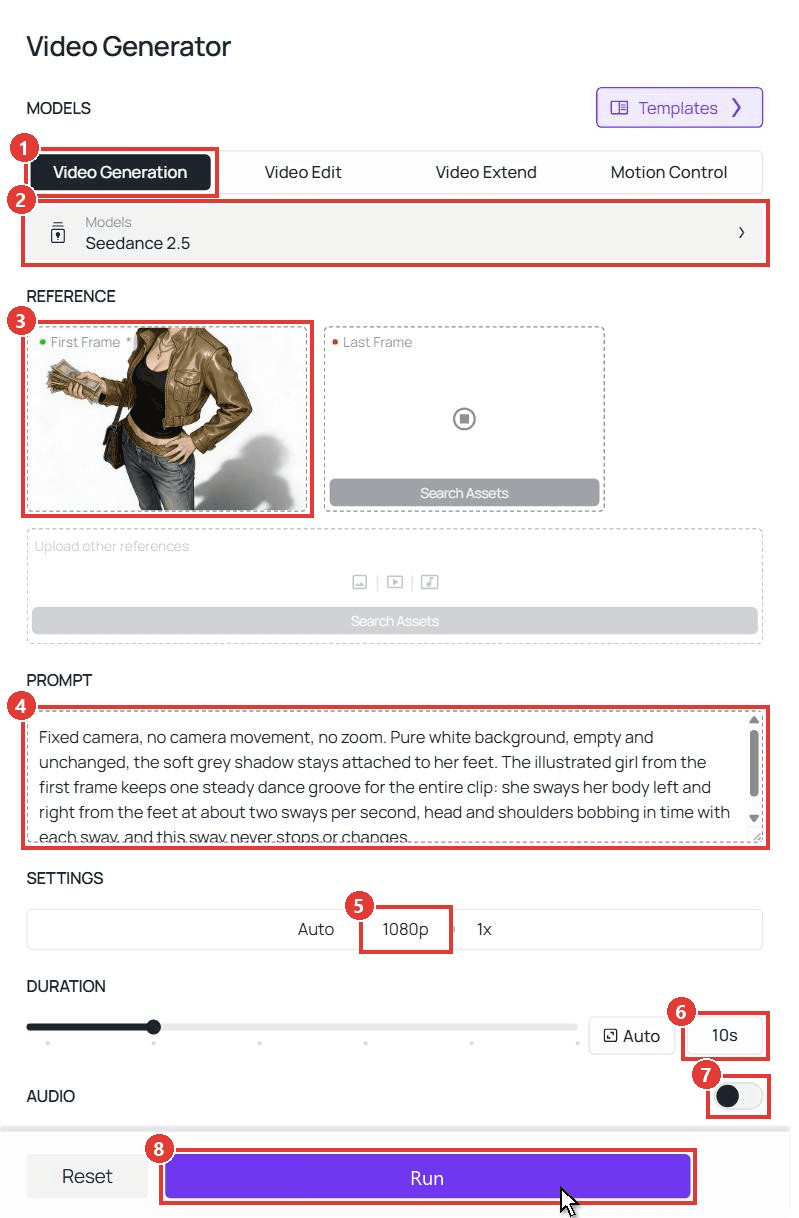
plaintext1Fixed camera, no camera movement, no zoom. Pure white background, empty and unchanged, the soft grey shadow stays attached to her feet. The illustrated girl from the first frame keeps one steady dance groove for the entire clip: she sways her body left and right from the feet at about two sways per second, head and shoulders bobbing in time with each sway, and this sway never stops or changes. On the downbeat at 1, 3, 5, 7 and 9 seconds she flicks the stack of banknotes sharply upward, and each flick sends a few loose bills fluttering up above her head and drifting slowly down around her; the thick stack always stays in her hand and never runs out. Between the flicks she adds small playful accents: at 2 seconds a slow cocky wink at the camera; at 4 seconds a quick eyebrow raise and a one-sided smirk; at 6 seconds a sharp chin flick with a little head tilt; at 8 seconds another wink. Otherwise her expression stays cool and unimpressed. Her mouth never talks or lip-syncs, only smirks. The other hand stays on her hip. Her hair, the chains and the messenger bag swing slightly with the sway, and the falling bills land and disappear out of frame below. Keep the semi-realistic painterly illustration look of the first frame. Her glasses, headband and messenger bag stay on the whole time. Outfit, face and background never change, she never leaves the frame, and the last frame returns to the same pose as the first frame so the clip loops.
Here's the thing: every accent gets its own second, and the line "this sway never stops or changes" holds the groove underneath. In our run the winks and flicks came in roughly the order we wrote them.
Want a calmer take? Use fewer cash flicks and more winks:
For more on timing lines like these, see our guide to writing Seedance 2.5 prompts. The missed train dance tutorial uses the same second-by-second method for a 15-second story, and the Wyw My Sweetie dance guide covers a two-person routine.
Method 2: Run Both Steps Through the API
Making characters for a whole group chat, or building this into an app? The API chains the same two models.
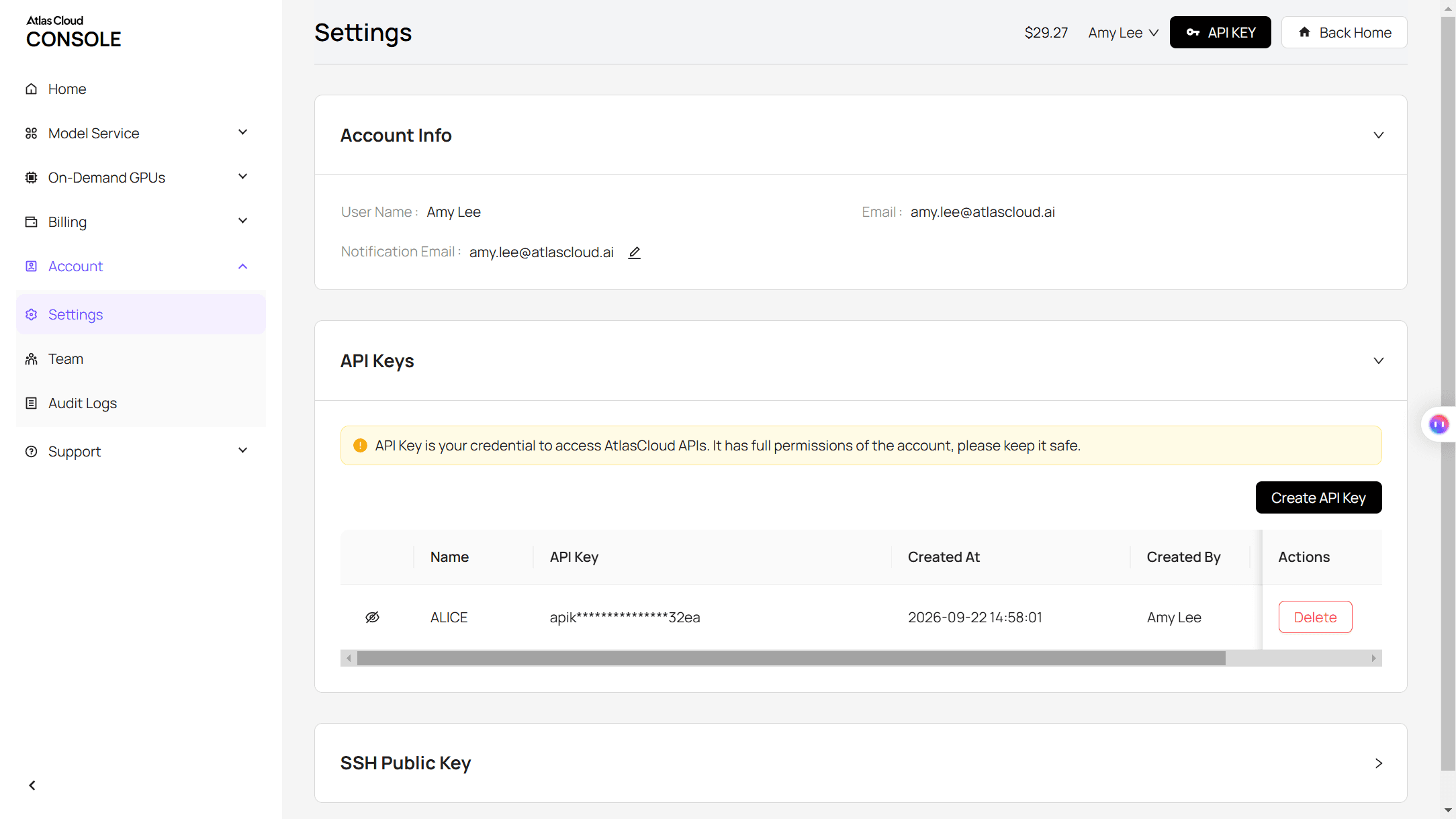
Step 1: Create an API key. In the console, open Settings and create a key under API Keys. One key works for every model.
Step 2: Check the request format. The Atlas Cloud docs cover authentication. The Seedance 2.5 image-to-video model page lists every video parameter in its API tab.
Step 3: Send the requests and poll. First, the character:
plaintext1curl -X POST https://api.atlascloud.ai/api/v1/model/generateImage \ 2 -H "Authorization: Bearer $ATLASCLOUD_API_KEY" \ 3 -H "Content-Type: application/json" \ 4 -d '{ 5 "model": "bytedance/seedream-v5.0-pro/edit", 6 "prompt": "<paste the character prompt here>", 7 "images": ["https://your-cdn.com/your-selfie.jpg"], 8 "size": "1776*2368" 9 }'
Poll the prediction ID until it reads completed, then take the image URL from outputs:
plaintext1curl https://api.atlascloud.ai/api/v1/model/prediction/<prediction_id> \ 2 -H "Authorization: Bearer $ATLASCLOUD_API_KEY"
Then send that image URL as the first frame:
plaintext1curl -X POST https://api.atlascloud.ai/api/v1/model/generateVideo \ 2 -H "Authorization: Bearer $ATLASCLOUD_API_KEY" \ 3 -H "Content-Type: application/json" \ 4 -d '{ 5 "model": "bytedance/seedance-2.5/image-to-video", 6 "prompt": "<paste the sway prompt here>", 7 "image": "<character image URL from the first request>", 8 "duration": 10, 9 "resolution": "1080p", 10 "generate_audio": false 11 }'
Poll it the same way. The video keeps the 3:4 shape of the character image. Both calls share one key and one base endpoint, so switching models on Atlas Cloud means changing one string.
Atlanta Lock: The Blue Lock Fan Art Behind the Look
Atlanta Lock is a fan nickname for Blue Lock's soccer players redrawn as Atlanta rappers: puffers, chains, slim jeans and cash. It predates the sway. The oldest Atlanta Lock post we found on TikTok is from March 2025.
The drawings in the original edit are by Zayy, and many remakes credit them in the caption. Early remakes were often tagged #bluelock, so Blue Lock fans saw it first.
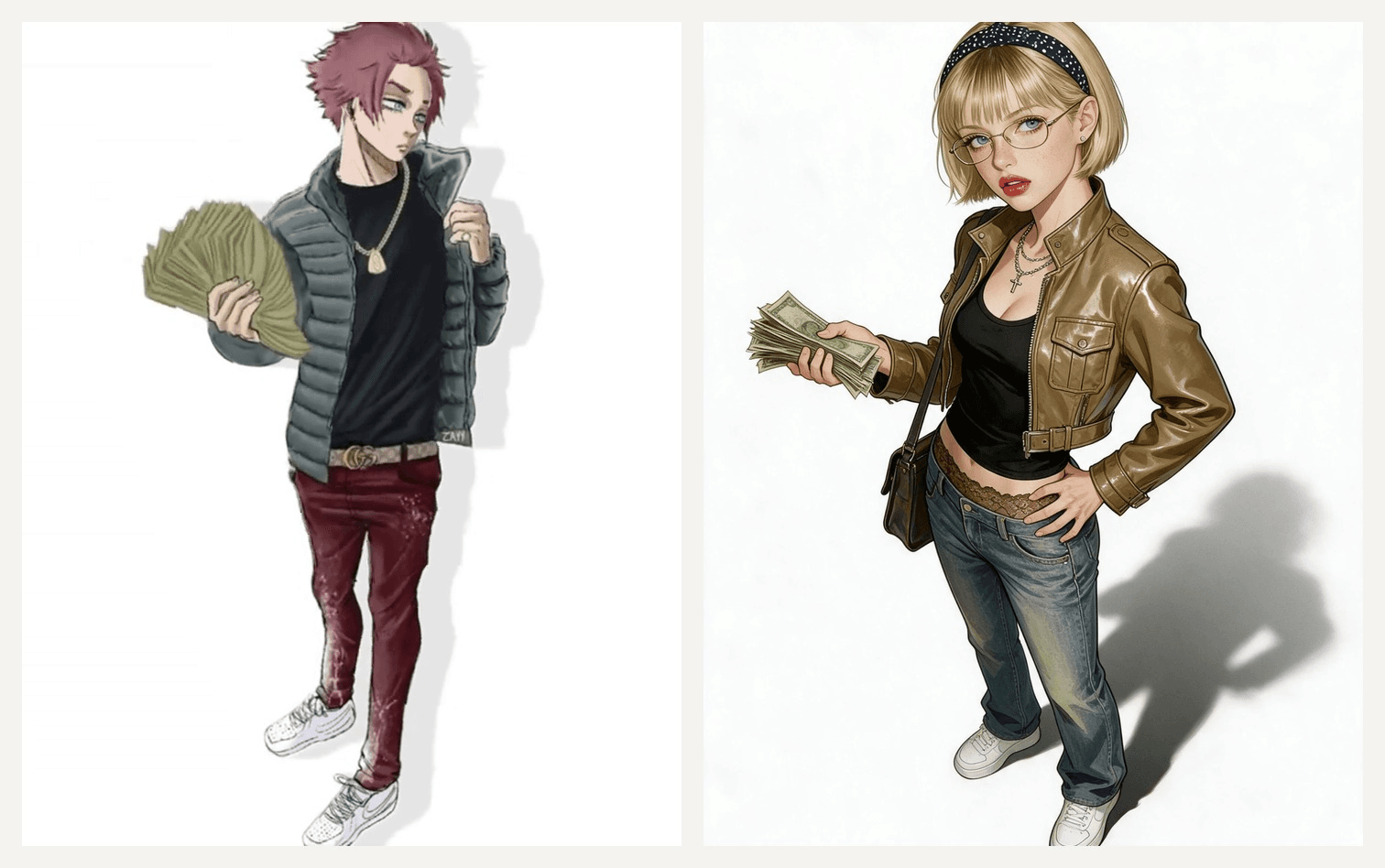
Left: frame from the original edit , art by Zayy. Right: our Seedream 5.0 Pro character.
You do not have to copy the inked manga look. Ours is painterly, and the pose, white space and cash still read as the trend.
Blue Lock Drip: Puffers, Chains and a Fan of Cash
Each character in the original wears one clear outfit. Borrow the pieces for your character prompt:
| Character in the original | Words to put in your prompt |
|---|---|
| The cash fanner | "open grey quilted puffer, black tee, gold rope chain, dark red jeans, fans a stack of cash" |
| The bench sitter | "sits on a wooden bench, black cap, black tee, neon green sneakers" |
| The arms-out swayer | "black tee, baggy grey pants, orange sneakers, both arms spread wide" |
| The bucket hat | "purple bucket hat, oversized purple basketball jersey, black pants" |
The Wassup in a Minute CapCut Template, and the AI One People Mix Up
The CapCut links on the trend posts we checked point to three templates. We opened each preview on November 2, 2026:
| Template | Created | Uses | What it does |
|---|---|---|---|
| in a minute wassup | Oct 26, 2026 | 1,027,116 | Four cutout images sway in turn, about 3.5 seconds each, synced to the remix |
| AI | Oct 25, 2026 | 31,576 | Adds the sway to one image you upload, 7 seconds |
| Wasup Dance TREND | Oct 29, 2026 | 85,152 | Same four-cutout structure as in a minute wassup |
The in a minute wassup template is the one that copies the original's rhythm. Its preview uses four cutout photos, so images with clean backgrounds work best.
The template named "AI" is easy to misread. Tutorials promise it turns a selfie into Blue Lock art, but its preview only animates an image that is already a drawing. It adds the motion, not the style. That is the gap Part 1 of Method 1 fills.
So the CapCut template works when you have the drawings. A prompt works when you want to be the drawing.
Frequently Asked Questions
How much does a wassup in a minute AI video cost on Atlas Cloud?
On November 2, 2026, a 10-second Seedance 2.5 image-to-video clip cost about $5.98 at 1080p and $3.04 at 720p. Turning a selfie into the character with Seedream v5.0 Pro Edit cost $0.072 at 2K. All three are 20% off list prices of $7.47, $3.80 and $0.09. The generator shows the exact video price before each run.
Is it "wassup in a minute" or "wassup, been a minute"?
The audio loops part of Jhené Aiko's hook from From Time, which many people hear as "wassup, been a minute". "Wassup in a minute" is the misheard version that became the hashtag, and "wassup wait a minute" and "wasala" are the same loop heard differently.
Can I post Atlanta Lock fan art in my edit?
Many trend posts credit the artist in the caption, as in "art by Zayy". Do the same, and ask first if you plan to earn money from the video. Drawing yourself as your own character skips the question.
Can I make the four-character version from one selfie?
Yes. Run Part 1 four times with the same photo and four different outfits from the Blue Lock drip table. Drop the four images into the in a minute wassup template, or run Part 2 on each and cut the clips together at about 3.5 seconds each.
Conclusion
The trend is simple on purpose. One loop of a nine-month-old remix, one character every few seconds, and a white background that hides nothing. That is why it crossed from Blue Lock fans to other fandoms in less than a week.
Your version needs one good selfie, a character prompt and a sway prompt with every wink and money toss pinned to a second. Add the sound when you post, and you have your own take on the wassup in a minute trend.


