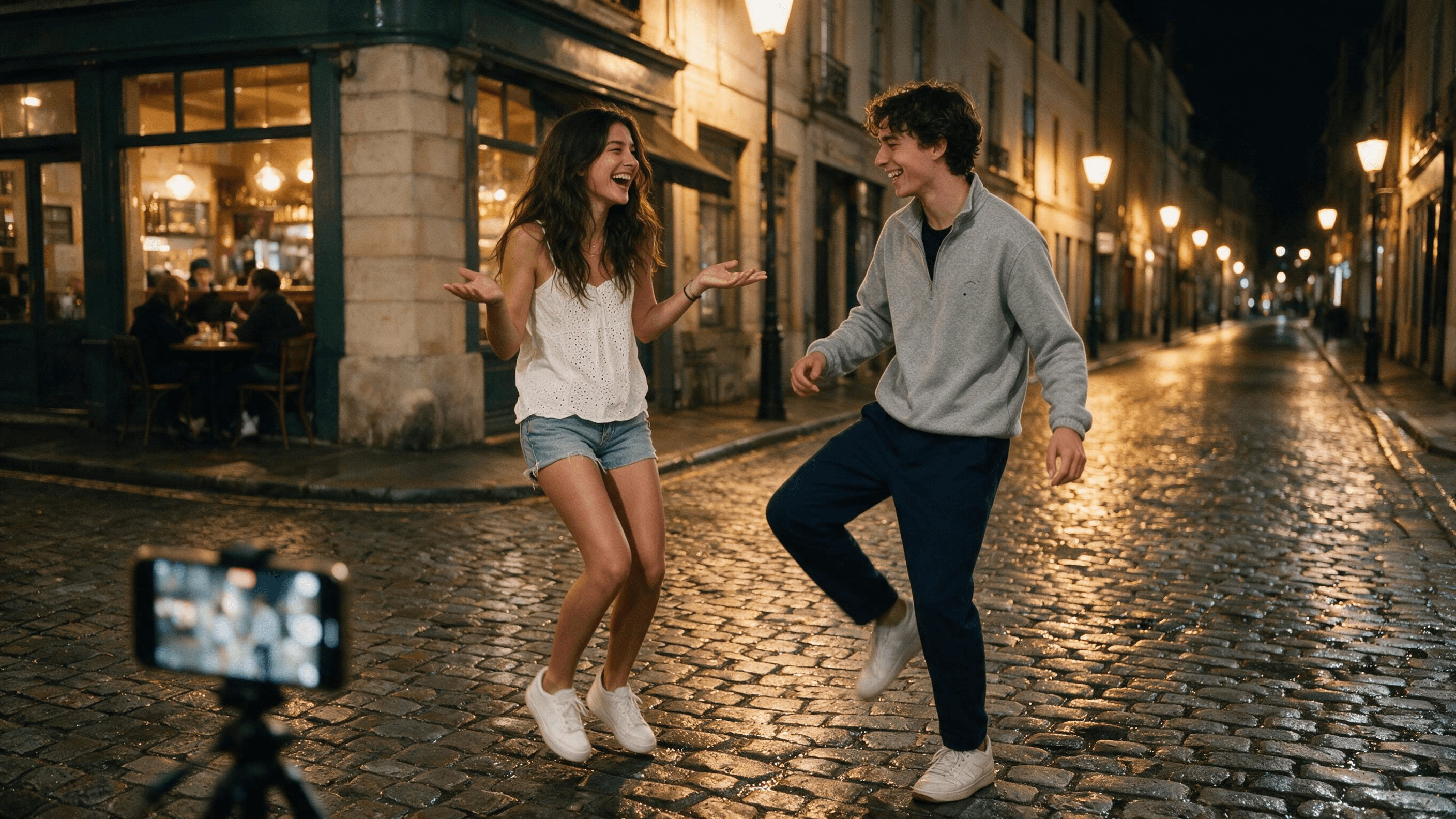
A girl in a hoodie bounces on her toes, throws one arm at the ceiling, hides her face in her elbows, then flips both palms up as if to ask where you went. Twenty seconds later the clip loops and you realize you have watched it four times. That is the wyw my sweetie dance, and since mid-September it has moved from one hoodie-and-sweatpants bedroom clip to couples on night streets everywhere.
You don't need to learn the footwork to join in. We fed one full-body photo and a 20-second reference clip into Atlas Cloud and got the whole routine back on a person who has never danced it, then did the same with two photos for the couple version. Below: what the trend is, which AI templates actually copy it, and the exact settings we used.
Key Takeaways
- The Wyw My Sweetie dance is a Jersey Club routine;thechoreography post that starteditwent up on TikTok on September 17, 2026.
- "Wyw" stands for "where you at," and the same trend also travels under the tag "come back and back."
- MakeViral sells solo and duo AI versions,Viberotonly a duo, and CapCut's version is a regular edit template with no AI.
- Atlas Cloud's Motion Control tab copies the routine from a reference clip onto one full-body photo.
- Thecoupleversion comes from Seedance 2.5, which takes two photos plus the reference dance and renders both people in sync.
What Is the Wyw My Sweetie Dance?
It is a 20-second Jersey Club routine danced to a slowed edit of a track called "Wyw my sweetie." Jersey Club is the bouncy club style out of New Jersey, so the whole thing rides on small tiptoe bounces, with a new gesture dropping on almost every bar. It works alone in a bedroom and it works with two people on a sidewalk, which is why both versions spread at once.
Wyw My Sweetie Meaning and Song
"Wyw" is shorthand for "where you at." The sweetie is whoever you are looking for, hence the palms-up shrug that anchors the routine. The facts below come from the TikTok pages themselves, checked on October 27, 2026.
| Item | Detail |
|---|---|
| Sound | "Wyw my sweetie #JerseyClub - Slowed," credited to nissi & 25Hzz on its TikTok sound page |
| Choreography post | @akanenmiyoshi, September 17, 2026, captioned "my sweet WYA?", 3.7 million plays by October 27 |
| Biggest celebrity cover | ENHYPEN's EVAN, October 7, 2026, 7.1 million plays by October 27 |
| Other names | "come back and back" dance, "my sweet where you at" dance |
One detail trips people up: the choreography post runs on the creator's own original sound, so searching the nissi track on TikTok shows you covers before it shows you the source.
The Come Back and Back Moves, Step by Step
We pulled these frames from our own AI clip, so the order below is the order the model reproduced. The routine is roughly 20 seconds and loops cleanly.
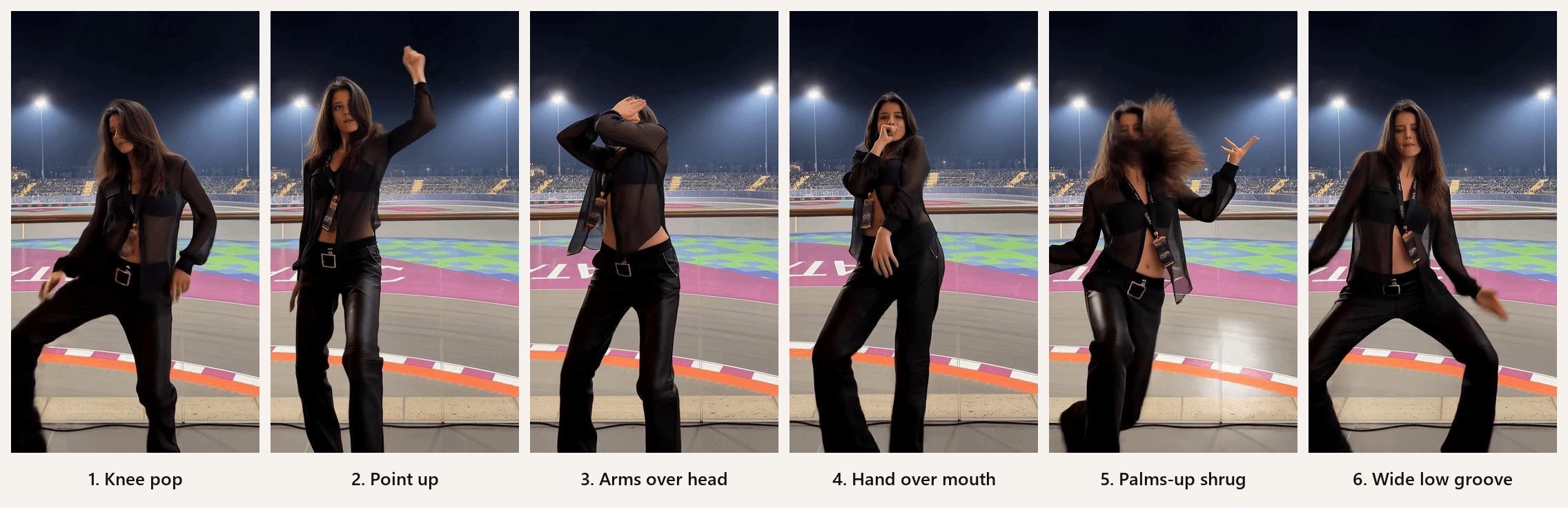
- Knee pop. Bounce on the balls of your feet and pop one knee inward on the first beat.
- Point up. Shoot one arm straight at the ceiling, then let it swing down.
- Arms over head. Tilt your head back and wrap both arms over it, hiding your face.
- Hand over mouth. Cover your mouth with one hand and sway your hips, other hand on your waistband.
- Palms-up shrug. Open both palms at your sides on the beat, twice. This is the "where you at?" moment and the frame everyone screenshots.
- Wide low groove. Drop into a wide stance, rock side to side, lift a knee and kick toward the camera.
The last four seconds run both hands back through your hair and land them on your chest, which sets up the loop. In the couple version both people do the same six moves side by side, in sync, usually filmed from a phone at waist height.
Which AI Templates Do the Wyw My Sweetie Dance?
Three products put the trend's name on a template. Two of them are AI, and they run on models you can use directly. The details are from each product's own page on October 27, 2026.
| Template (vendor's name) | Solo or duo | Photos needed | What it runs on | Length and frame |
|---|---|---|---|---|
| "Wyw My Sweetie Dance" (MakeViral) | Both | 1 full-body photo for solo, 2 for duo | Solo: Kling 3.0 Motion Control. Duo: Seedance 2.5 | Solo about 13 seconds at 9:16; duo 10 seconds, listed as 9:16 on the card and 4:5 in the FAQ |
| "AI Wyw My Sweetie Dance" (Viberot) | Duo only | 2 photos | Not named | 10 seconds; Standard 720p costs 167 credits, and the free monthly credits cover image effects only |
| "Wyw my sweetie" by Jhn.edt (CapCut) | Neither | Your own footage | No AI; a 17-clip edit template at 3:4 | 10.4 seconds, 3,137 uses by October 27 |
The useful takeaway is in column four. MakeViral's solo template is Kling 3.0 Motion Control and its duo template is Seedance 2.5. Both models are on Atlas Cloud, so you can run the same job without a template, choose your own reference clip, your own length and your own frame, and keep the sound.
How to Make a Wyw My Sweetie AI Dance Video on Atlas Cloud
Here is what the solo run gave us from one photo of a woman standing at a racetrack rail. She had never done the routine; the moves came from the reference clip.
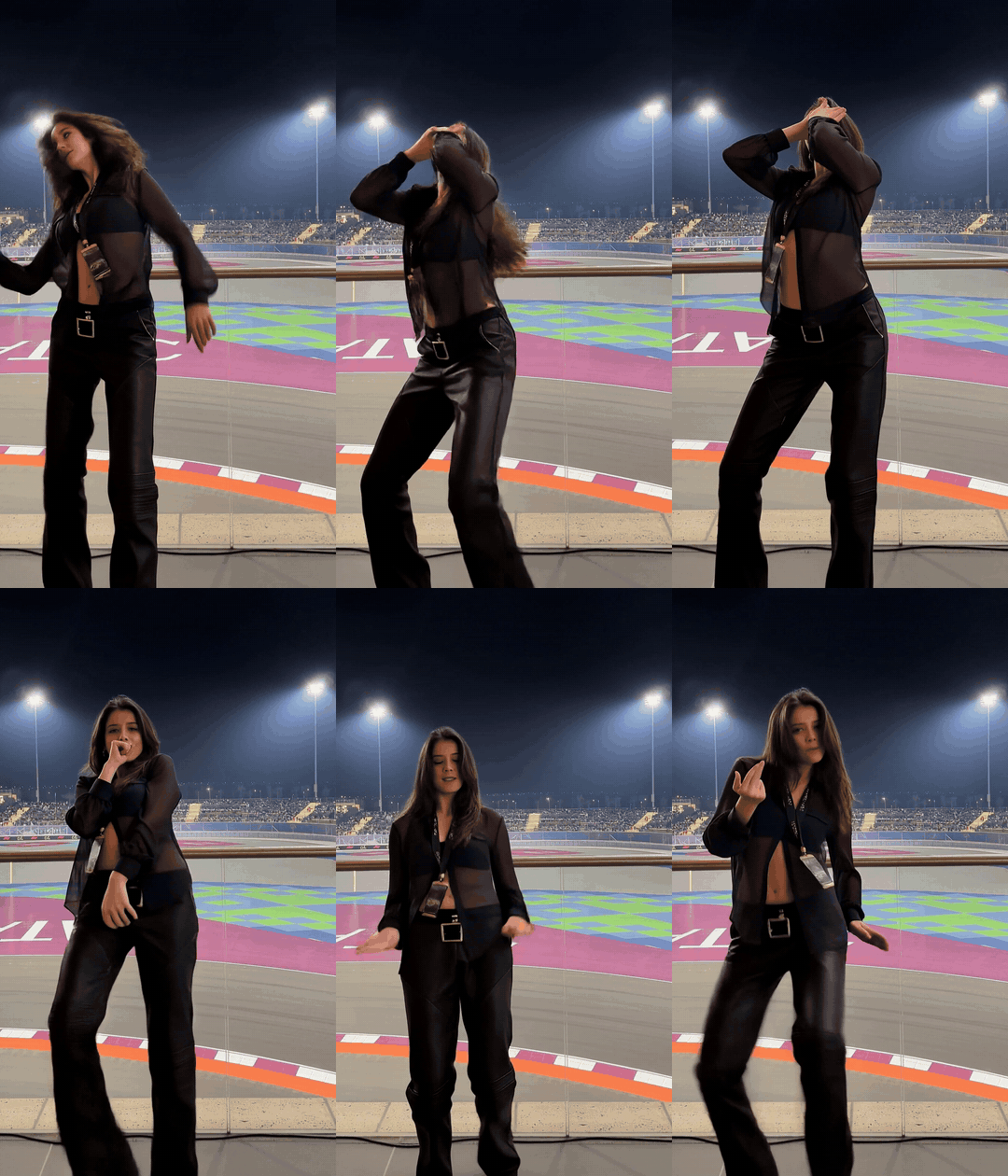
Atlas Cloud hosts both models the paid templates use, and two inputs are all either one needs: a photo of the person and a video of the dance. For the reference clip, film yourself or a friend doing the routine from a fixed phone at waist height, full body in frame, one continuous take. Twenty seconds covers a full loop.
Method 1: Do the Solo Wyw My Sweetie Dance With Motion Control
Sign in, open the Video Generator, and follow the numbers in the screenshot.
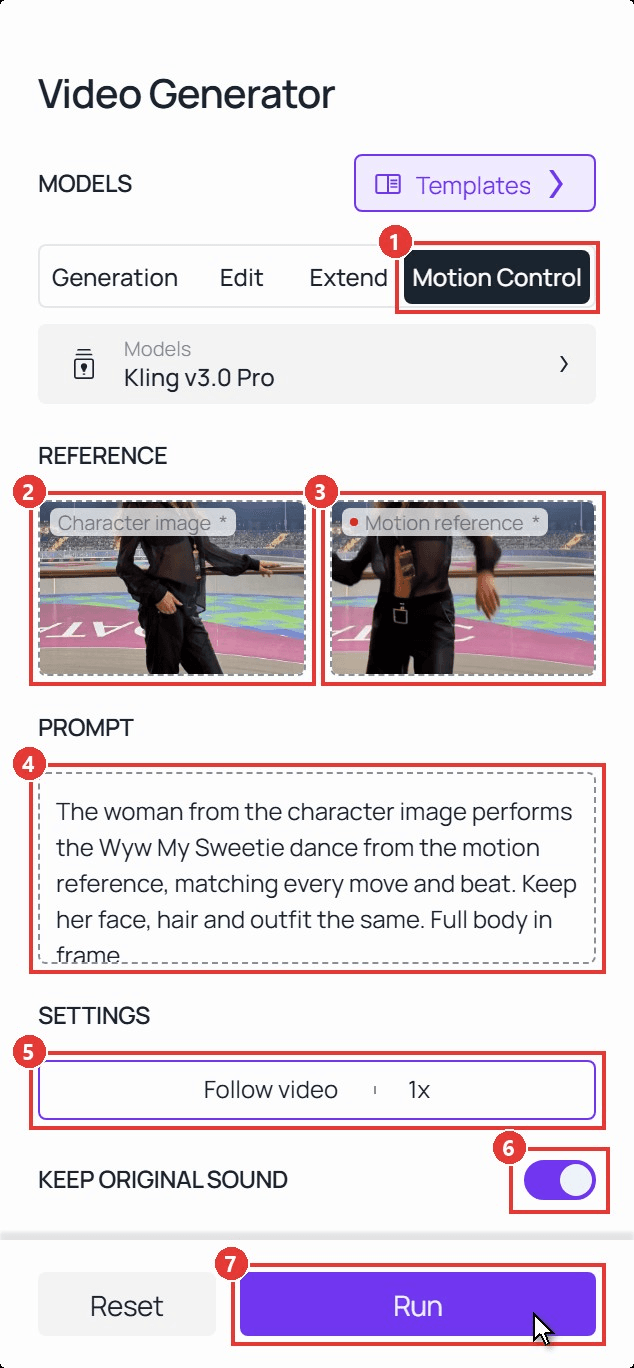
- Click the Motion Control tab. The model defaults to Kling v3.0 Pro, the newest in the Kling V3 family.
- Upload your Character image: a JPG or PNG under 10 MB with the whole body visible. The output keeps this photo's framing, so a head-to-toe shot gives you a head-to-toe dance.
- Upload your Motion reference, an MP4 or MOV under 10 MB.
- Write a short prompt. Ours:
plaintext1The woman from the character image performs the Wyw My Sweetie dance from the motion reference, matching every move and beat. Keep her face, hair and outfit the same. Full body in frame.
- Open Settings and set Character orientation to Follow video. Follow image is for clips up to 10 seconds; Follow video takes the full 20-second loop and lets the dancer turn with the routine.
- Leave Keeporiginal sound on so the clip comes back with the reference audio already in time with the moves.
- Click Run. Ours took a few minutes and returned a 20-second vertical clip at 1088 by 1904.
Our guide to Kling AI Motion Control goes deeper on how the model reads a reference clip, and the ILLIT dance tutorial shows the same tab on a horizontal, fictional character.
The Wyw My Sweetie Couple Dance: Two Photos, One Routine
Motion Control takes one character. For two people dancing together, switch to Seedance 2.5 Reference-to-Video, which accepts up to 30 reference images and 10 reference videos in a single request and renders everyone from the same clip.
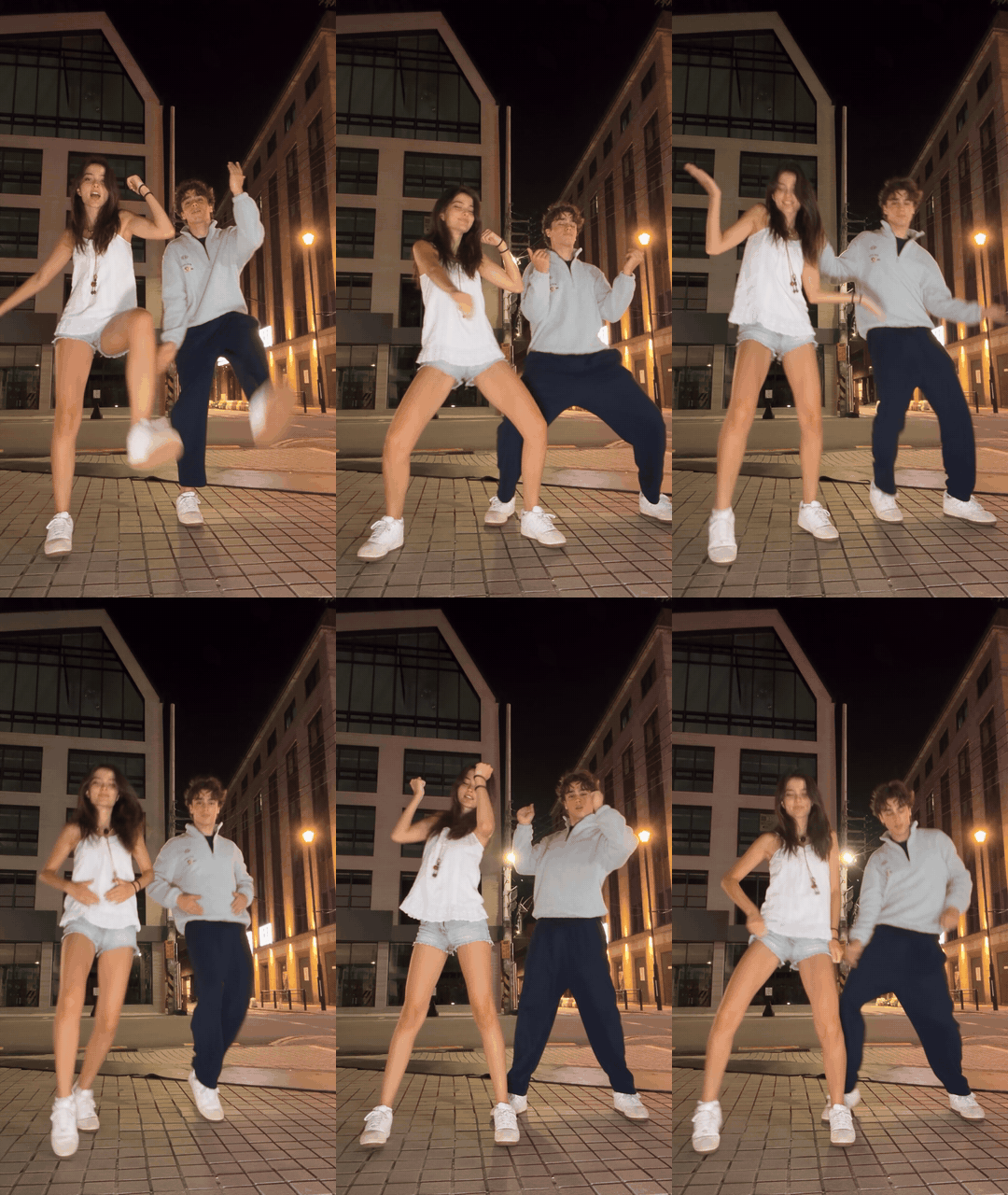
Open the Seedance 2.5 Reference-to-Video playground, add the woman's photo first and the man's second, then add the reference clip. In the prompt, @Image1 and @Image2 point at the photos in that order and @Video1 at the clip. This is what we sent:
plaintext1@Image1 is the woman and @Image2 is the man. Create a new video of these two people standing and dancing side by side in perfect sync, copying the choreography, timing and fixed low camera of @Video1. The woman from @Image1, same face, long dark brown hair, white camisole top, light blue denim shorts and white sneakers, stands on the left. The man from @Image2, same face, curly brown hair, grey half-zip sweatshirt, navy trousers and white sneakers, stands on the right. They do every move together on the beat: knee pops, palms-up "where you at" shrugs, a wide low groove, arms wrapped over the head, hands on the chest. Both fully in frame from head to feet, a city street at night with warm street lights, 9:16 vertical. Do not copy the faces or outfits of the people in @Video1.
Set duration to 20, ratio to 9:16 and resolution to 1080p, then run. Describe each person's outfit in words even though the photo shows it; that is what kept the sweatshirt grey and the shorts denim through all 20 seconds.
The woman's photo was a seated half-body shot, and the model stood her up and dressed the lower half from the prompt. More prompt patterns live in our Seedance 2.5 prompt guide.
Method 2: Run the Same Dance Through the API
If you want to turn every photo a customer uploads into a dance clip, the same two models sit behind one endpoint.
Step 1: Create and copy an API key. Open Settings in your Atlas Cloud console, click Create API Key, and copy it once; the list masks it afterwards.
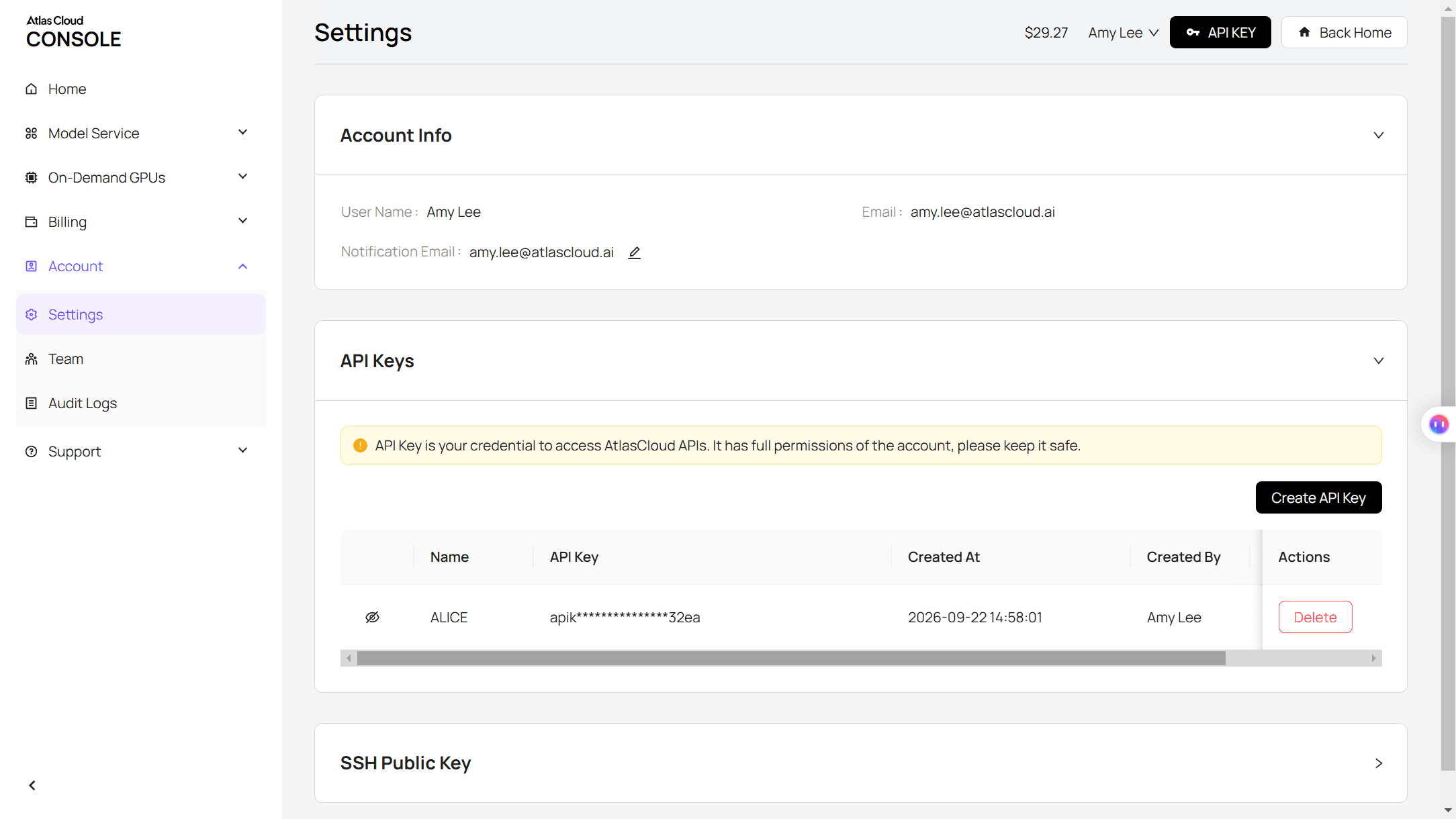
Step 2: Check the request format. The API docs list every field for both models, and the fields match the playground names used above.
Step 3: Submit the job and poll for the result. The solo request mirrors Method 1:
plaintext1curl -X POST https://api.atlascloud.ai/api/v1/model/generateVideo \ 2 -H "Authorization: Bearer $ATLASCLOUD_API_KEY" \ 3 -H "Content-Type: application/json" \ 4 -d '{ 5 "model": "kwaivgi/kling-v3.0-pro/motion-control", 6 "image": "https://your-cdn.com/dancer.png", 7 "video": "https://your-cdn.com/wyw-reference.mp4", 8 "character_orientation": "video", 9 "keep_original_sound": true, 10 "prompt": "The woman from the character image performs the dance from the motion reference, matching every move and beat. Full body in frame." 11 }'
The response carries a prediction ID. Poll it until the status reads completed and the clip URL appears in the outputs array:
plaintext1curl https://api.atlascloud.ai/api/v1/model/prediction/<prediction_id> \ 2 -H "Authorization: Bearer $ATLASCLOUD_API_KEY"
For the couple version, keep the endpoint, the key and the polling loop, change the model string to bytedance/seedance-2.5/reference-to-video, and send reference_images, reference_videos, prompt, duration and ratio instead of image and video. One API, two routines.
Why Your AI Wyw My Sweetie Video Looks Off
Most misses trace back to the two inputs. Fix the input and rerun; the settings rarely need to change.
| What you see | What usually caused it | What to change |
|---|---|---|
| The dancer stays cropped at the waist | The character image was cropped at the waist | Use a head-to-toe photo, or switch to Seedance 2.5 and describe the lower half in the prompt |
| Moves land late or skip a gesture | The reference clip has a cut, a zoom or a camera move | Film one continuous take from a fixed phone |
| Feet disappear at the bottom of the frame | The reference was filmed too close | Step back until the whole body plus a little floor is in the frame |
| The couple clip borrows clothes from the reference dancers | The prompt never said what each person wears | Name each outfit, and end the prompt with "do not copy the outfits of the people in @Video1" |
| The run stops with a 10-second duration message | Character orientation is on Follow image with a longer clip | Switch to Follow video, or trim the reference to 10 seconds |
| The second person stands on the wrong side | @Image1 and @Image2 are in a different order than the prompt assumes | Upload the photos in the order the prompt names them, or say "stands on the left" and "stands on the right" |
Frequently Asked Questions
Does the AI video include the wyw my sweetie song?
Motion Control includes whatever audio is on your reference clip when Keep original sound is on, so a reference filmed to the track comes back with the track. Seedance 2.5 generates its own audio instead. Either way, the simplest route for TikTok is to post the clip muted and pick the official sound in the app, which also files your video under the trend.
Is wyw my sweetie an AI song?
Nobody has confirmed that. The sound page credits nissi & 25Hzz and says nothing about how the track was made, and "who made the wyw my sweetie song" is itself a suggested search on TikTok, which tells you how open the question still is. Treat the AI-song rumor as unverified until one of the credited names says so.
Can the two photos come from different places?
Yes. Seedance 2.5 builds a new scene from the prompt, so the photos only need to show each face clearly. Ours came from a golf course and a city street and ended up on the same night sidewalk. Matching light helps less than matching size: two photos where the faces fill a similar share of the frame give the model an easier job.
How much does an AI wyw my sweetie dance video cost?
The Run button shows the estimate before you commit, so you never guess. Kling v3.0 Pro Motion Control is billed per second of output: it lists $0.168 per second and was showing $0.143 per second with a 15% discount at the time of writing, so a 20-second solo runs about $2.86.
Seedance 2.5 Reference-to-Video is priced by length and resolution. Our 20-second couple clip was quoted around $3.60 at 720p and about $7.09 at 1080p with the 20% discount shown then, which is why a 720p test run before the 1080p final is worth the habit.
Do I need to label it as AI on TikTok?
Yes, if it looks real. TikTok's September 19, 2023 announcement of its AI-generated content labels says its policy "requires people to label AI-generated content that contains realistic images, audio or video," and the label, a sticker or a caption all count. A photo of a real person doing a dance they never did is exactly that case, so toggle the label on at upload.
Conclusion
The trend is a 20-second loop with six gestures, and both AI versions of it come down to the same two files: a photo and a reference clip. Motion Control turns one full-body photo into the solo routine, Seedance 2.5 turns two photos into the couple version, and the paid templates that carry the trend's name run on those same models.
So film the routine once, pick a photo with the feet in it, and let the model learn the moves. By the time you have watched the result loop four times, you will have your own wyw my sweetie dance ready to post.





