A camera drifts across a dark street toward the only lit window in the building. Someone inside is halfway through a burger. They look up, keep chewing, stare at you like you are the problem, and close the curtain. That is the window peeper AI trend, all over TikTok since October 20, 2026. The original caption calls it a filter. It isn't one. Below: which templates make it, and a prompt that rebuilds the shot from one photo.
Key Takeaways
- The window peeper trend took off after an October 20, 2026 TikTok post that showed off a CapCut template.
- CapCut's Window Peeper template, with about 153,000uses, turns one photo into an 8-second AI clip.
- Every clip here was made with Seedance 2.5 from a single photo, no template needed.
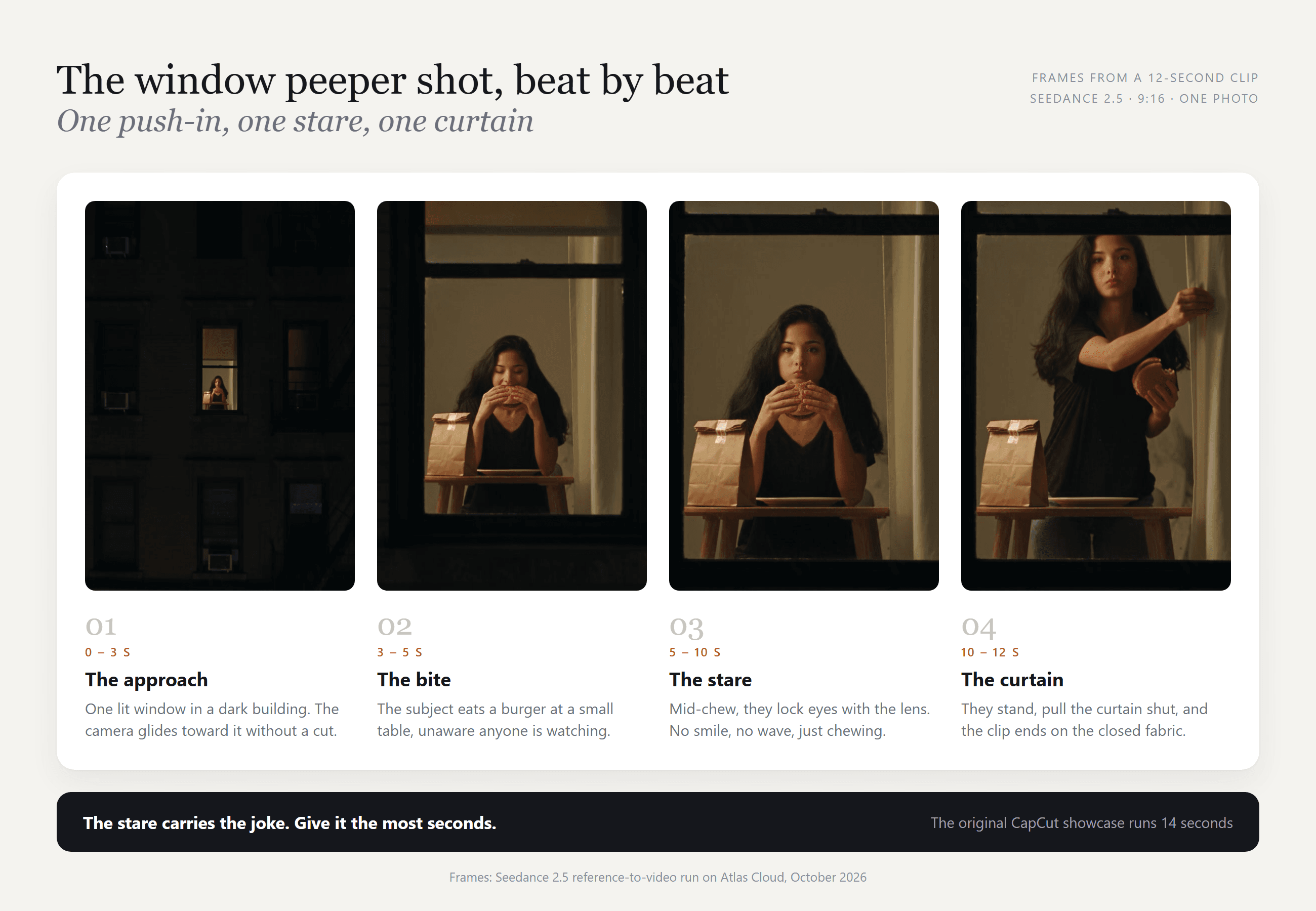
- Three beats carry the joke: one continuous push-in, a deadpan stare, then the curtain.
- One photo and a time-coded prompt recreate it with a person, a pet or a Halloween character.
What Is the Window Peeper AI Trend?
The earliest viral version we could trace went up on TikTok on October 20, 2026, as a CapCut template showcase. In 14 seconds, a night camera closes in on one lit window, where Mr Bean is eating a burger. He notices the lens, keeps chewing while he stares, then gets up from the table.
The caption says "Try this filter yourself." By October 27 it had about 2.6 million views. The trend also goes by burger thru window and the Mr Bean window filter.
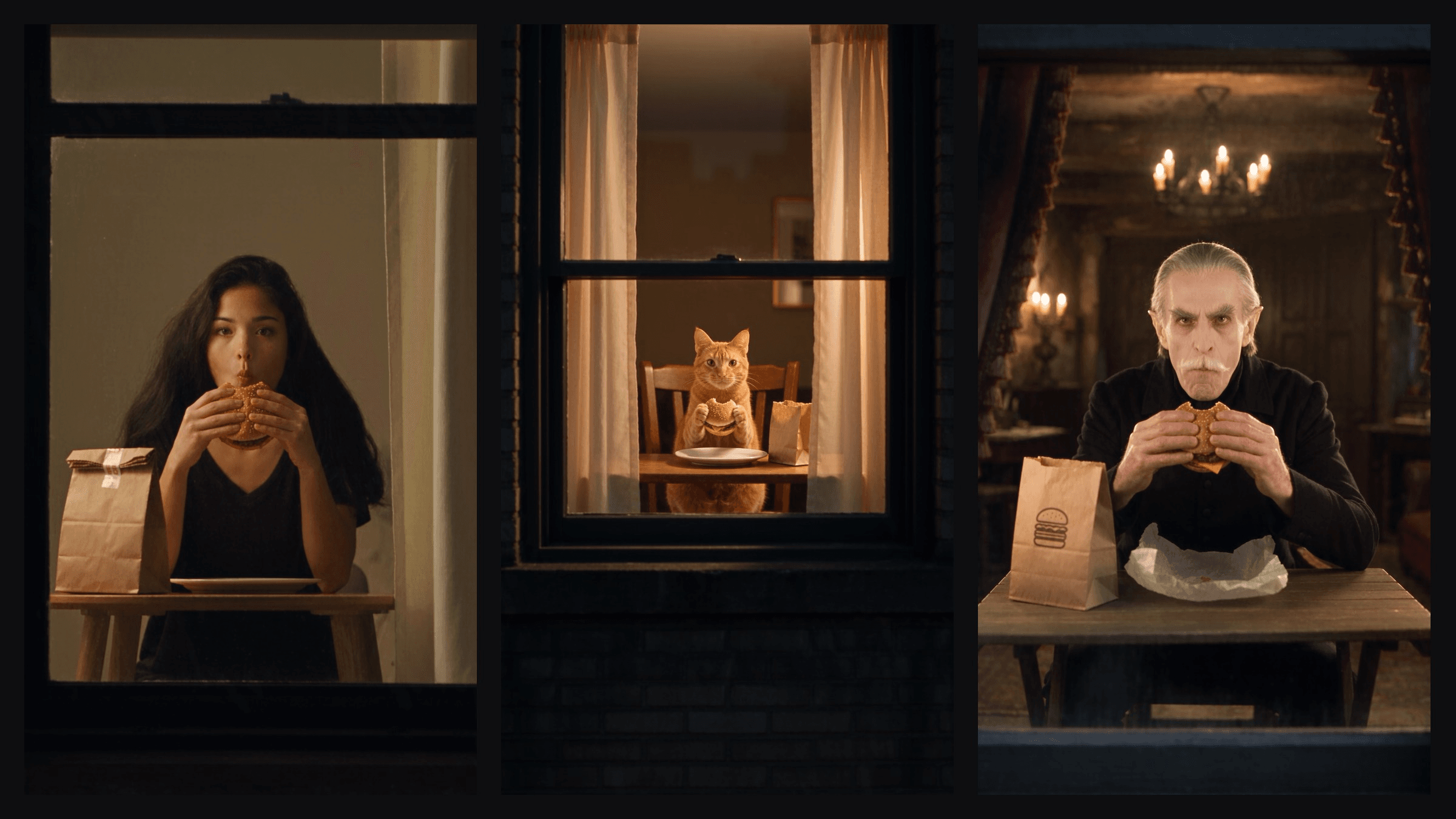
Swap the person, the room and the food, and the same four beats still land:
Is There a Window Peeper Filter, or Only Templates?
The versions going around come from CapCut templates and AI template sites. Here is what each does with your photo, checked on October 27, 2026:
| Tool | Template name | What you upload | Output | Model named on the page |
|---|---|---|---|---|
| CapCut | Window Peeper | One photo | About 8 s, 720p, 9:16 | CapCut's built-in AI, no model named |
| MakeViral | Window Peeper Filter | One photo, person or pet | 10 s, 720p, 9:16 | Seedance 2.5 |
| Viberot | Window Peeper AI | One photo, person or pet | 10 s, 480p to 1080p | Not stated |
| Renoise | Window Peeper AI | One photo | 8 s at 480p by default | Seedance 2.0 Mini |
| AI Photo Animator | Window Peeper AI | One photo | 15 s, 480p, 9:16 | Wan 3.0 |
Credit prices move fast during a trend, so compare specs. We found no public template page on PixVerse, Higgsfield, Kling or Hailuo, though that can change within days.
What the Window Peeper CapCut Template Actually Does
The CapCut template titled Window Peeper had about 153,000 uses by October 27. It takes one photo and runs it through CapCut's built-in AI. Its 8-second preview skips the street approach: it opens at the window, then goes straight to the burger, the stare and the curtain.
The template sites in the table work the same way, with a set prompt behind one upload button. Write the prompt yourself and you decide the push-in, how long the stare lasts and who sits at the table.
How to Make a Window Peeper AI Video With Seedance 2.5
Atlas Cloud runs the Seedance 2.5 lineup with reference-image input, so a single portrait can carry the whole scene. Here is the 12-second clip it made from one photo and the prompt below:
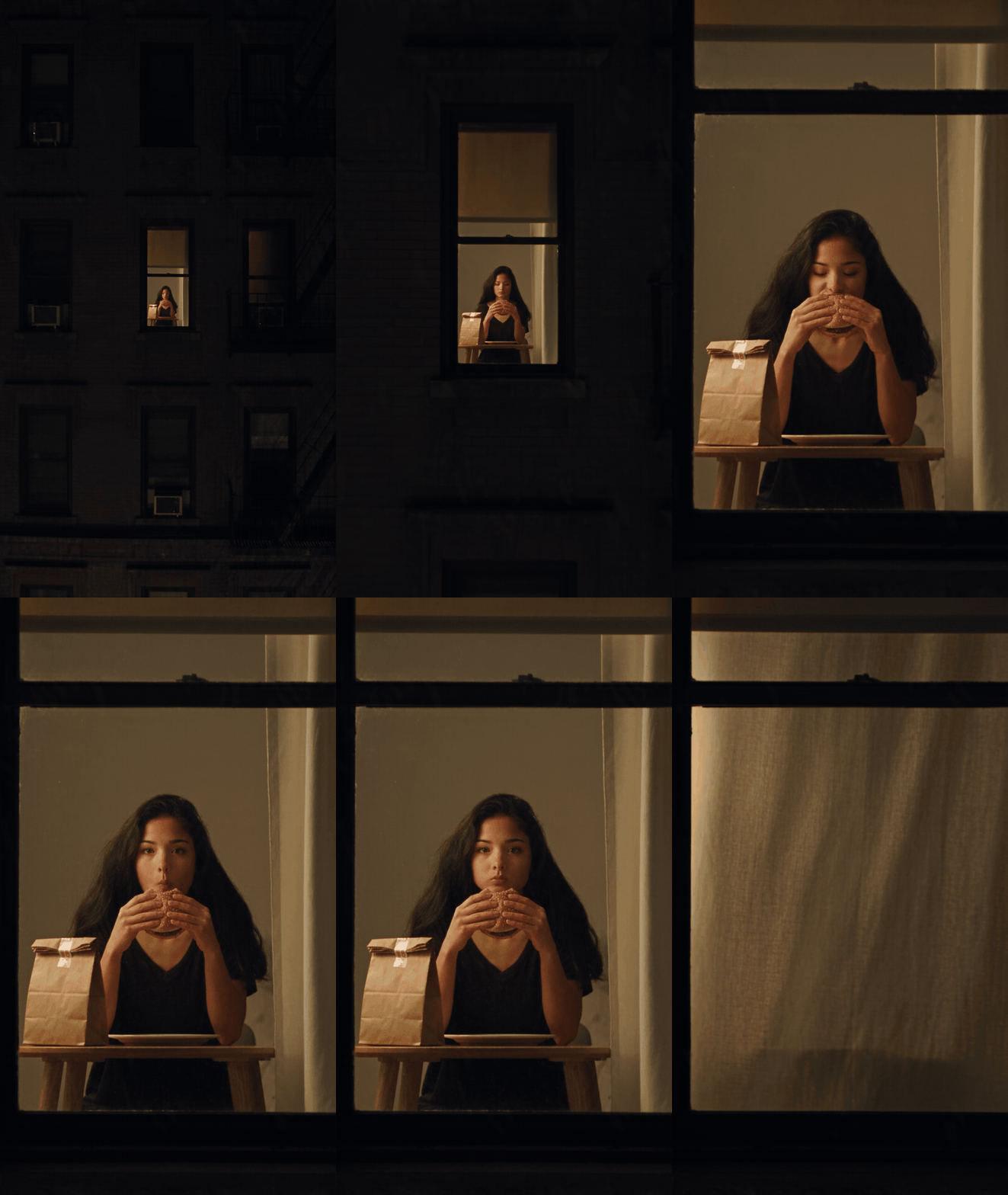
The push-in never cuts, her face and black top match the photo to the last frame, and the stare runs about four seconds. You can pick Seedance 2.5 in the AI video generator, or use the reference-to-video playground below.
Method 1: Run the Window Peeper Prompt in the Playground
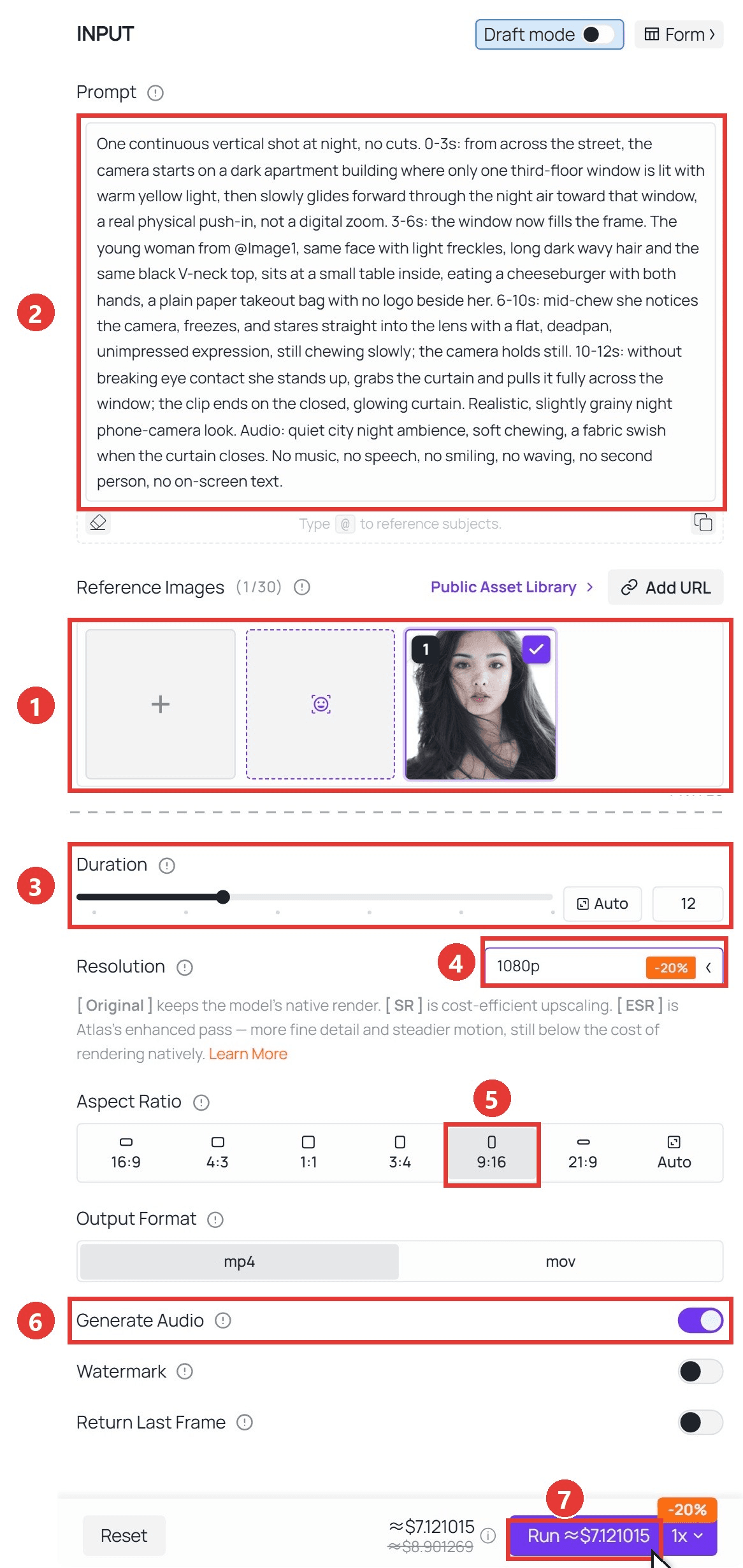
Sign in, open the Seedance 2.5 reference-to-video playground, and follow the numbers on the screenshot:
- Under Reference Images, delete the sample images, then upload one clear, front-facing photo you have the right to use.
- Paste the prompt below. "@Image1" points at your photo.
- Set Duration to 12 seconds.
- Pick 1080p, or 720p for a quick draft.
- Choose 9:16.
- Leave Generate Audio on.
- Click Run.
plaintext1One continuous vertical shot at night, no cuts. 0-3s: from across the street, the camera starts on a dark apartment building where only one third-floor window is lit with warm yellow light, then slowly glides forward through the night air toward that window, a real physical push-in, not a digital zoom. 3-6s: the window now fills the frame. The young woman from @Image1, same face with light freckles, long dark wavy hair and the same black V-neck top, sits at a small table inside, eating a cheeseburger with both hands, a plain paper takeout bag with no logo beside her. 6-10s: mid-chew she notices the camera, freezes, and stares straight into the lens with a flat, deadpan, unimpressed expression, still chewing slowly; the camera holds still. 10-12s: without breaking eye contact she stands up, grabs the curtain and pulls it fully across the window; the clip ends on the closed, glowing curtain. Realistic, slightly grainy night phone-camera look. Audio: quiet city night ambience, soft chewing, a fabric swish when the curtain closes. No music, no speech, no smiling, no waving, no second person, no on-screen text.
Change the description after "@Image1" to match your own photo: hair, top, anything visible.
Method 2: Generate Window Peeper Clips Through the API
Running a trend account? The API turns a folder of photos into a batch of clips.
Step 1: Create an API key. In the console, open Settings and create a key under API Keys. Keep it server-side; one key covers every model.
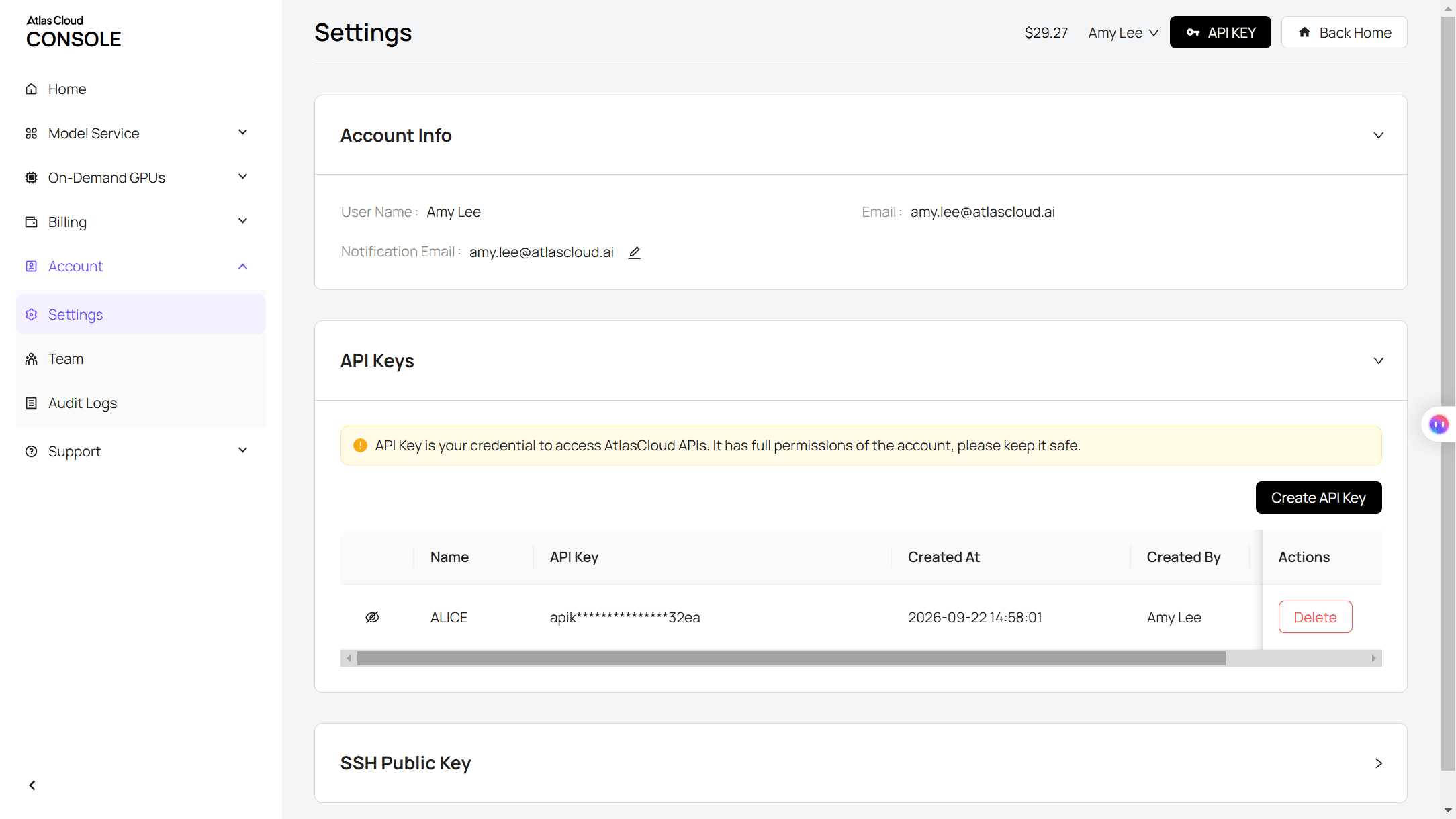
Step 2: Check the request format. The Atlas Cloud docs cover authentication, and the playground's API tab lists the fields.
Step 3: Send the request and poll. Reference images go in an array, and "@Image1" in the prompt maps to the first one:
plaintext1curl -X POST https://api.atlascloud.ai/api/v1/model/generateVideo \ 2 -H "Authorization: Bearer $ATLASCLOUD_API_KEY" \ 3 -H "Content-Type: application/json" \ 4 -d '{ 5 "model": "bytedance/seedance-2.5/reference-to-video", 6 "prompt": "One continuous vertical shot at night, no cuts. ... The young woman from @Image1 ... the clip ends on the closed, glowing curtain.", 7 "reference_images": ["https://your-cdn.com/your-photo.jpg"], 8 "duration": 12, 9 "resolution": "1080p", 10 "ratio": "9:16", 11 "generate_audio": true 12 }'
Poll the returned prediction ID until the status reads completed, then grab the clip from the outputs array:
plaintext1curl https://api.atlascloud.ai/api/v1/model/prediction/<prediction_id> \ 2 -H "Authorization: Bearer $ATLASCLOUD_API_KEY"
Same endpoint, same key for every video model: trying another one means changing one string.
Writing a Window Peeper Prompt That Stays One Shot
Seedance 2.5 follows time codes, so write one sentence per beat with seconds attached. If a run misses, check which beat broke. These lines keep each one intact:
| What goes wrong | Line that prevents it |
|---|---|
| The camera cuts or snaps in | "no cuts" and "a real physical push-in, not a digital zoom" |
| The subject smiles or waves | "deadpan, unimpressed expression" plus "no smiling, no waving" |
| The stare is too short | Give it 4 to 5 seconds, the longest beat |
| A stranger walks in | "no second person" |
| A brand appears on the bag | "a plain paper takeout bag with no logo" |
| The clip stops early | End with "the clip ends on the closed, glowing curtain" |
Describe only what the photo shows. A prompt that says cream sweater over a photo in a black top makes the model choose. More on time codes in our guide to writing Seedance 2.5 prompts.
Window Peeper Ideas Beyond the Burger
Two of the template sites above take pet photos, and the prompt barely changes. Replace the person with "the ginger tabby cat from @Image1" and put the burger on a plate. Ours rose on its hind legs and pulled both curtains closed:
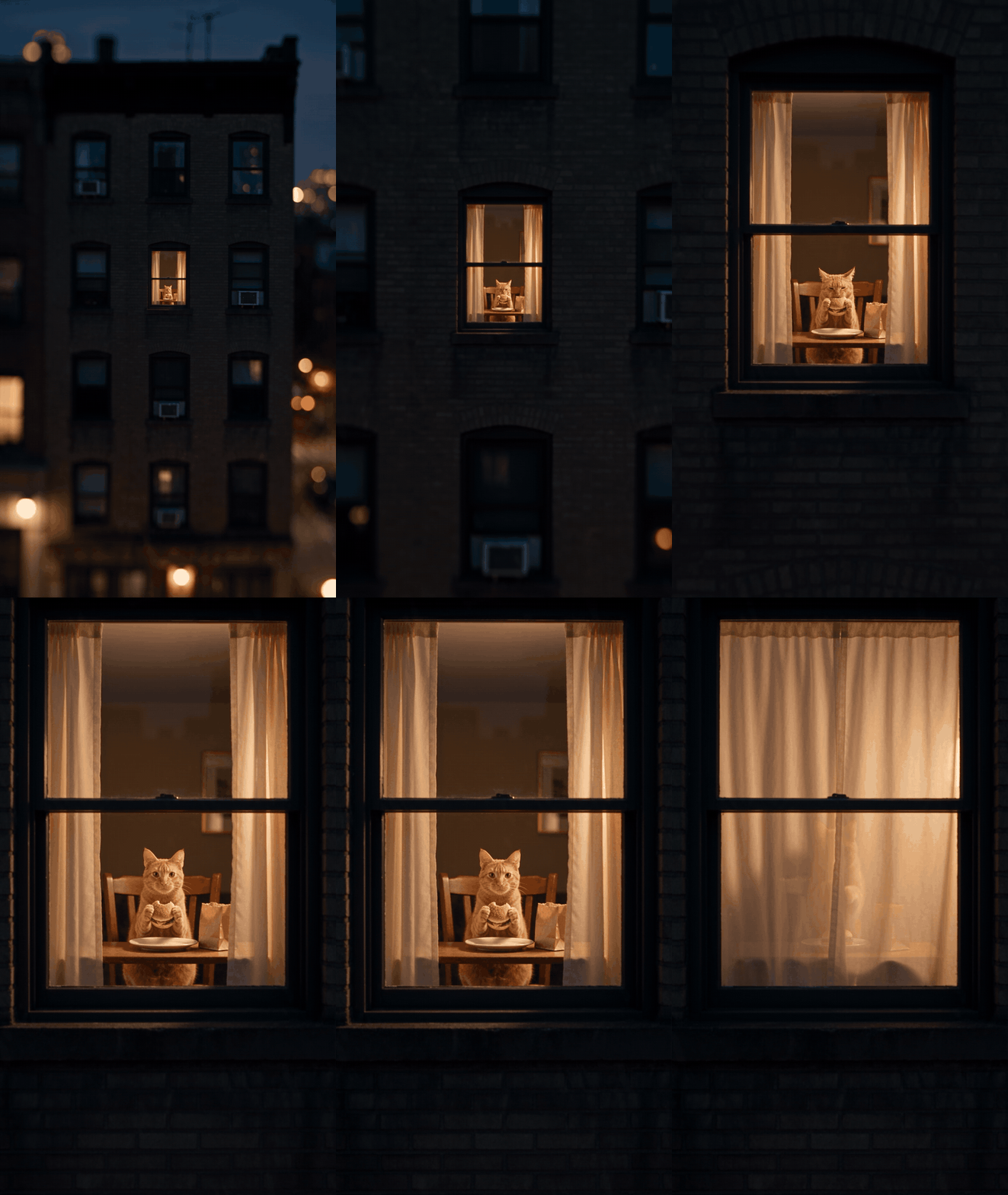
Cat reference photo by Mauro Lima on Unsplash.
For Halloween we cast Count Dracula, described from Bram Stoker's public-domain 1897 novel (white moustache, plain black coat) rather than a film costume. One added line, "closes his lips over his teeth," keeps the stare deadpan:
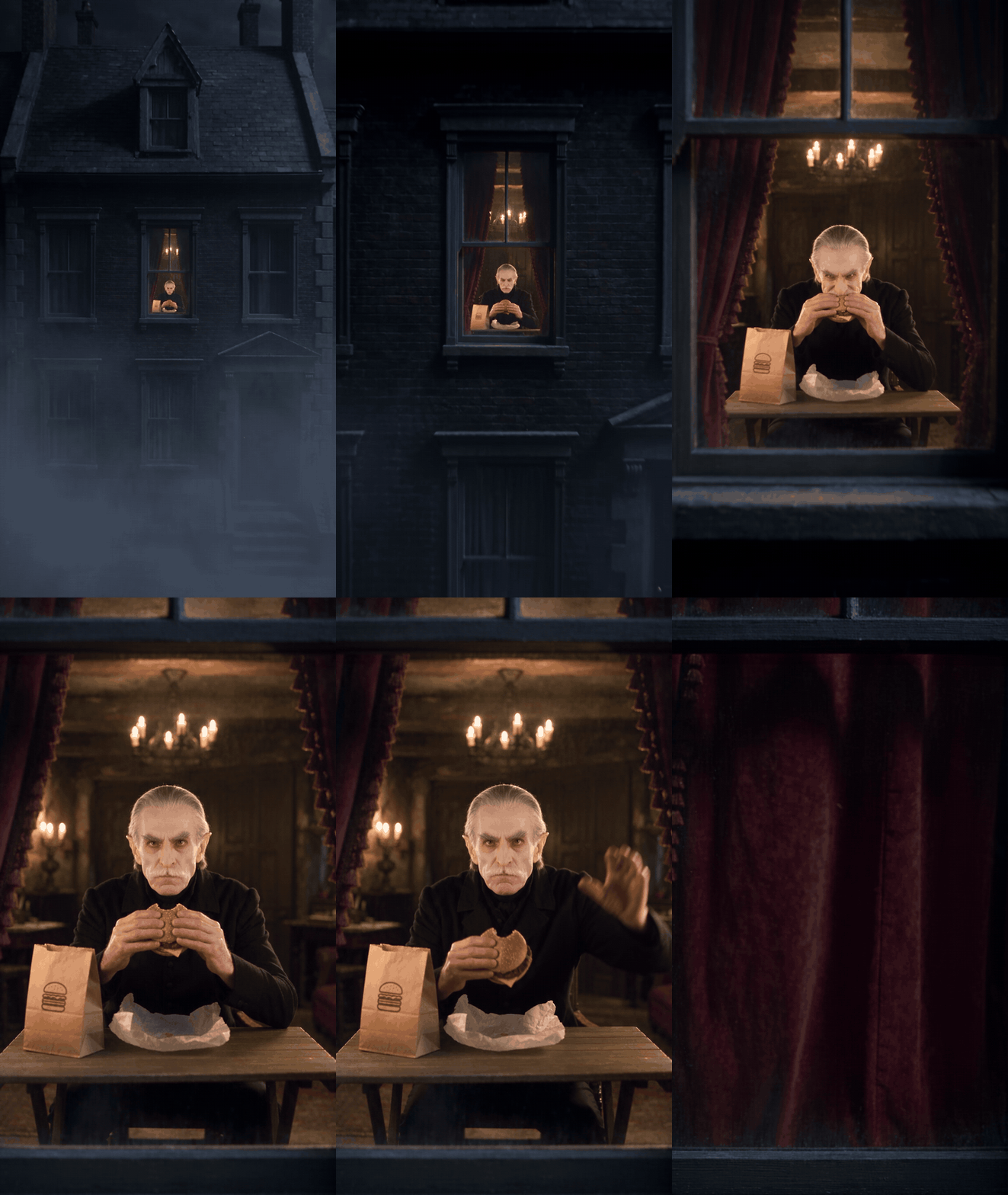
Ramen or birthday cake works in place of the burger, and so does a mascot you designed. For the reverse angle, looking out from the window, our Cat in the Hat guide builds that version.
Frequently Asked Questions
Is there an official TikTok or Instagram window peeper filter?
We did not find one in either app. The original post promotes a CapCut template.
What sound do these videos use?
The original TikTok uses the poster's own original sound rather than a licensed track. Seedance 2.5 generates audio from the prompt, so write the sounds you want, such as street hum, chewing and a curtain swish.
Can I make one with my dog or cat?
Yes. Use a sharp, front-facing pet photo and give the animal an action it can believably do, like standing on its hind legs to pull the curtain.
How much does a window peeper AI video cost?
On Atlas Cloud, a 10-second Seedance 2.5 clip at 720p with one reference photo costs $3.02, and a 12-second 1080p clip like ours costs $7.12. Both include a 20% discount running on October 27, 2026 (list prices $3.77 and $8.90).
Is the window peeper trend the same as the Scary Peeper Halloween prop?
No. The Scary Peeper is an older Halloween window decoration shaped like a lurking figure. The trend shares the words, not the joke.
Do I have to label the clip as AI on TikTok?
On TikTok, if it looks real, yes. Its rules require "clear labeling when AI or editing is used to realistically depict people or scenes" (TikTok's integrity rules).
Conclusion
The whole joke is one lit window, one bite, one long stare and one curtain. Templates do it for you with beats someone else wrote, and the CapCut version skips the approach. Write the prompt yourself and you choose the subject, the food and how long the stare lasts.
Pick a clear photo, paste the prompt, match the description to your subject, and run it at 9:16. If a beat misses, fix that one line and run again. That is all a good window peeper AI clip takes.


