Sie ziehen eine „transparente" PNG auf eine dunkle Folie und ein weißes Rechteck kommt mit. Die Datei war im Editor in Ordnung. Was ist also passiert? Die Antwort liegt in einem vierten Kanal, dem kaum jemand Beachtung schenkt. Jedes Pixel in einem Bild trägt Rot-, Grün- und Blauwerte, und in manchen Formaten einen vierten Wert namens Alpha-Kanal, der angibt, wie viel von diesem Pixel sichtbar sein soll.
Dieser Leitfaden erklärt, was dieser Wert speichert, welche Formate ihn behalten (PNG und WebP), welche ihn auf einen Schalter reduzieren (GIF), welche ihn verwerfen (JPG) und warum SVG nach anderen Regeln spielt. Unterwegs lesen wir den Alpha-Kanal von sieben echten Freistellern Pixel für Pixel aus, sodass die folgenden Zahlen aus Dateien stammen und nicht aus der Theorie.

Eine PNG, vier Hintergründe. Der Sneaker ist eine KI-generierte Testeingabe, freigestellt mit dem Atlas Cloud Hintergrundentferner; die Datei wurde unverändert auf jeden Hintergrund gesetzt.
Die wichtigsten Erkenntnisse
- Ein Alpha-Kanal ist ein vierter Kanal, der die Deckkraft für jedes Pixel speichert, von 0 (vollständig durchsichtig) bis 255 (vollständig deckend) in einem 8-Bit-Bild.
- PNG und WebP behalten einen vollständigen Alpha-Kanal. GIF kann nur eine Palettenfarbe als transparent markieren. JPG speichert überhaupt keine Transparenz.
- Der kostenlose KI-Hintergrundentferner von Atlas Cloud liefert eine transparente PNG in der Pixelgröße zurück, die Sie hochgeladen haben, verarbeitet direkt in Ihrem Browser.
- In sieben gemessenen Freistellern waren nur 0,7 % bis 2,2 % der Pixel teilweise transparent. Dieser schmale Streifen ist die kantengeglättete Kante, die Haare und Umrisse natürlich aussehen lässt.
- Eine PNG, die in einem Betrachter einen weißen oder schwarzen Hintergrund zeigt, hat ihren Alpha-Kanal meist nicht verloren. Prüfen Sie sie auf einem dunklen oder schachbrettartigen Hintergrund, bevor Sie irgendetwas neu exportieren.
Was ein Alpha-Kanal in jedem Pixel speichert
Fragt man, was ein Alpha-Kanal ist, bekommt man meist eine Metapher. Hier ist stattdessen die Zahl. Die PNG-Spezifikation des W3C definiert ihn in einem Satz: „The alpha sample determines a pixel's degree of opacity, where zero means fully transparent and the maximum value means fully opaque." In einem 8-Bit-Bild ist das Maximum 255, was 256 Stufen zwischen durchsichtig und deckend ergibt.
PNG erlaubt außerdem 16-Bit-Alpha. Die Spezifikation erlaubt Bittiefen von 8 oder 16 für beide alpha-tragenden Farbtypen, Graustufen mit Alpha und Echtfarbe mit Alpha, und ein 16-Bit-Alpha-Kanal hat 65.536 Stufen. Außerhalb von Compositing-Pipelines begegnet Ihnen 8 Bit.
Ein RGBA-Pixel besteht also aus vier Zahlen. Drei beschreiben die Farbe, eine beschreibt die Abdeckung. Ändern Sie nur die vierte, bleibt die Farbe gleich, während das Pixel verblasst. Das ist der ganze Trick hinter weichen Haaransätzen, Schlagschatten und Glas, das einen Hintergrund durchscheinen lässt.

Das Wort „transparent" verbirgt eine wichtige Trennung. Manche Formate speichern einen vollständigen Alpha-Wert pro Pixel, sodass ein Pixel zu 37 % sichtbar sein kann. Andere speichern ein einziges Ja-oder-Nein-Flag: Dieses Pixel wird gezeichnet, jenes übersprungen. Beides wird Transparenz genannt, und nur das erste kann eine Kante verblassen lassen. Behalten Sie diese Unterscheidung im Kopf, denn sie ist der Grund, warum GIF-Sticker gezackt aussehen und PNG-Freisteller nicht.
Ein weiterer Begriff, der Ihnen in Video- und Spiele-Tools begegnet: prämultipliziertes Alpha. In einer geraden (oder nicht prämultiplizierten) Datei werden die Farbwerte in voller Stärke gespeichert und Alpha skaliert sie zur Anzeigezeit. In einer prämultiplizierten Datei wurden die Farbwerte bereits mit Alpha multipliziert, sodass ein halb sichtbares rotes Pixel als halbstarkes Rot gespeichert wird. PNG verwendet die gerade Art; die Spezifikation stellt fest, dass Farbwerte „are not premultiplied by the alpha value".
Die Idee hat eine Papierspur. Alvy Ray Smiths Memo von 1995 zur Geschichte von Alpha schreibt sich selbst und Ed Catmull das Konzept in den 1970er Jahren am New York Institute of Technology zu und Porter und Duffs Arbeit von 1984 die Grenzziehung zwischen den beiden Konventionen. Für alltägliche Web- und Druckarbeit können Sie den Unterschied ignorieren; Ihr Editor erledigt das.
So speichern Sie eine PNG mit transparentem Hintergrund
Viel Ärger mit „mein Export ist nicht transparent" entscheidet sich, bevor sich der Speicherdialog öffnet. Drei Regeln decken das ab. Die Hintergrundebene muss ausgeblendet oder gelöscht werden, sodass die Arbeitsfläche im Editor ein Schachbrett zeigt. Das Format muss eines mit Alpha-Kanal sein, was in der Praxis PNG oder WebP bedeutet.
Und die PNG-Option sollte die Art mit 8 Bit pro Kanal sein, oft als PNG-24 oder 32-Bit bezeichnet, statt einer Palettenversion, die manche Exporter auf An-Aus-Transparenz reduzieren. Die PNG-Spezifikation erlaubt einem indizierten Bild zwar, „the alpha table that associates an alpha sample with each palette entry" zu tragen, aber Sie können sich nicht darauf verlassen, dass jedes Tool dies nutzt.
Die folgenden Menüpfade stammen aus der jeweiligen Herstellerdokumentation.
| Software | Wo der transparente PNG-Export zu finden ist |
|---|---|
| Atlas Cloud Hintergrundentferner | Klicken Sie auf Download; der Alpha-Kanal ist bereits vorhanden, es gibt also keine Formateinstellung, die man falsch machen könnte |
| Photoshop | Datei > Exportieren > Exportieren als, wählen Sie PNG als Format und erlauben Sie Transparenz in den Formateinstellungen |
| GIMP 3.0 | Datei > Exportieren als, benennen Sie die Datei .png; die Option „Save color values from transparent pixels" gilt nur für Einzelebenen-Bilder |
| Figma | Wählen Sie den Frame, fügen Sie einen PNG-Export in der rechten Seitenleiste hinzu; wenn der Frame eine Füllung hat, deaktivieren Sie „Show in exports" im Bereich „Fill" |
| PowerPoint | Bildformat > Hintergrund entfernen, dann Rechtsklick auf das Bild, Als Bild speichern, und wählen Sie PNG in der Liste „Dateityp speichern unter" |
Welches Tool Sie auch verwenden, sehen Sie sich das Ergebnis auf einem Schachbrett an, bevor Sie es herunterladen. Das Atlas-Ergebnispanel zeigt genau das, sodass Sie den Alpha-Kanal arbeiten sehen können, bevor die Datei überhaupt auf Ihrer Festplatte landet.

Verwandeln Sie jedes Bild mit einem Klick in eine transparente PNG
Der schnellste Weg zu einer Datei mit einem echten Alpha-Kanal ist, ein Segmentierungsmodell einen erstellen zu lassen. Atlas Cloud betreibt ein Hintergrundentferner-Tool direkt im Browser-Tab, eines einer kleinen Gruppe von kostenlosen KI-Tools auf der Website, die kein Konto benötigen. Sie ziehen ein Foto hinein, klicken auf „Run Free" und laden das Ergebnis herunter.

Das Modell läuft lokal über WebGPU, mit einem WASM-Fallback auf Maschinen ohne WebGPU, und wir haben eine Freistellung mit getrennter Netzwerkverbindung abgeschlossen. Es gibt kein Wasserzeichen und keine Anmeldung.
Die Motive sind nicht auf Porträts beschränkt. Im Test kamen ein Gruppenfoto, ein langhaariger Hund, ein weißer Sneaker, eine handschriftliche Unterschrift, ein Strichlogo und ein weißes Hemd, das vor einer weißen Wand fotografiert wurde, jeweils als brauchbarer Freisteller zurück, das Logo mit offenem Negativraum. Wenn der Freisteller, den Sie benötigen, für einen großen Druck bestimmt ist, kombinieren Sie ihn mit dem kostenlosen Bild-Upscaler-Vergleich, den wir durchgeführt haben, da der Alpha-Kanal mit dem Bild skaliert.
In einem echten Freisteller: Wo die weichen Pixel sind
Wir haben sieben dieser Ausgaben in Python geöffnet und jedes Pixel nach seinem Alpha-Wert gezählt. Das Muster war in allen sieben gleich. Zwischen 60,6 % und 98,4 % der Pixel waren vollständig transparent, je nachdem, wie viel des Bildausschnitts das Motiv ausfüllte.
Die teilweise transparenten Pixel, also die mit Alpha zwischen 8 und 250, machten 0,7 % bis 2,2 % des Bildes aus. Das ist ein Streifen von 1 bis 3 Pixeln Breite, der um den Umriss verläuft, und er leistet die gesamte Kantenglättungsarbeit.

Der reine Schleier lehrte uns etwas, was die Definition allein nicht vermittelt hätte. Der Alpha-Kanal kann Durchscheinbarkeit speichern, doch der Schleier kam mit nur 0,73 % teilweise transparenten Pixeln zurück, demselben dünnen Umriss wie der Sneaker. Der Stoff selbst wurde als deckend geschrieben, mit dem Grün dahinter in seine Farbe eingebacken. Form bewahrt, Durchscheinbarkeit verloren. Dass eine Datei einen Alpha-Kanal hat, sagt nichts darüber aus, ob ein Modell sich entschieden hat, die Mitte des Bereichs zu nutzen.
Eine kleine technische Beobachtung für Neugierige: In allen sieben Dateien liegen die deckenden Motivpixel bei Alpha 254 statt 255, ein Unterschied, den kein Display zeigen kann. In den vollformatigen PNGs, die wir untersucht haben, trägt jedes vollständig transparente Pixel denselben Farbwert, reines Schwarz, sodass die Datei keinen versteckten Hintergrund speichert, der als Saum zurücklecken könnte.
Welche Bildformate Transparenz unterstützen
Fünf Formate decken fast jede Datei ab, die Ihnen je in die Hände fällt. Sie speichern Transparenz auf vier verschiedene Arten, und der Unterschied entscheidet, ob eine Kante verblassen kann, ob die Datei animiert sein kann und wie groß sie am Ende wird.
| Format | Wie Transparenz gespeichert wird | Stufen | Weiche Kanten | Animation |
|---|---|---|---|---|
| PNG | 8- oder 16-Bit-Alpha pro Pixel, oder ein tRNS-Chunk für indizierte und Einfarbtransparenz | 256 oder 65.536 | Ja | Ja (APNG, heute Teil der PNG-Spezifikation) |
| WebP | 8-Bit-Alpha pro Pixel, sowohl im verlustbehafteten als auch im verlustfreien Modus | 256 | Ja | Ja |
| GIF | Ein Palettenindex als transparent markiert | 2 (an oder aus) | Nein | Ja |
| SVG | Vektorformen ohne Hintergrund; Deckkraft pro Element festgelegt | Kontinuierlich | Ja | Ja |
| JPG | Keine | 1 | Nein | Nein |
Unterstützt JPG Transparenz?
Nein. MDNs Bildformat-Leitfaden stellt es unmissverständlich fest: „JPEG does not support an alpha channel." Das Format speichert drei Farbkanäle und sonst nichts, sodass der Editor ein geschichtetes Bild beim Speichern als JPG zuerst auf eine Farbe reduzieren muss, meist Weiß. Dieses Weiß sind dann gewöhnliche Pixel, und es reist mit dem Motiv, wohin die Datei auch geht.

Das ist auch der Grund, warum ein Download einer „transparenten JPG" nicht das ist, was er verspricht. Entweder ist die Datei in Wahrheit eine PNG mit der falschen Endung, oder das Schachbrett, das Sie sehen, ist in die Pixel gemalt. Eine .jpg in .png umzubenennen ändert das Etikett auf der Schachtel, nicht den Inhalt. Wenn Sie Transparenz benötigen, muss die JPG geöffnet, der Hintergrund entfernt und das Ergebnis in einem Format gespeichert werden, das einen Alpha-Kanal aufnehmen kann.
Transparentes GIF: eine Farbe, harte Kanten
GIFs Transparenz stammt aus der 89a-Revision des Formats, und ihr Alter ist sichtbar. Die GIF89a-Spezifikation fügt eine Graphic Control Extension mit einem Transparency Index hinzu, so beschrieben: „The Transparency Index is such that when encountered, the corresponding pixel of the display device is not modified and processing goes on to the next pixel." Ein Eintrag in der Farbtabelle wird für durchsichtig erklärt. Jedes andere Pixel wird in voller Stärke gezeichnet.
Das macht GIF-Transparenz zu einer 1-Bit-Angelegenheit. Ein Pixel wird entweder übersprungen oder gemalt, und mit einer Palette von höchstens 256 Farben ist kein Platz für eine halb sichtbare Kante. Setzen Sie einen GIF-Freisteller auf einen Hintergrund, der sich von dem unterscheidet, auf dem er erstellt wurde, und der Umriss stufelt wie eine Treppe, oft mit einem blassen Saum, wo kantengeglättete Pixel auf deckend gerundet wurden.

Wir haben den Sneaker-Freisteller mit einem Alpha-Schwellenwert von 128, dem üblichen Standard, in GIF konvertiert und denselben Bereich des Schnürsenkels dreifach vergrößert. Die 8-Bit-Seite verblasst über zwei oder drei Pixel. Die GIF-Seite besteht nur aus rechten Winkeln. Wenn Sie ein transparentes GIF für einen Kunden benötigen, der nichts anderes akzeptiert, bauen Sie es auf der Hintergrundfarbe auf, auf der es sitzen wird, damit der Saum passt statt zu leuchten.
WebP-Transparenz in verlustbehafteten und verlustfreien Dateien
WebP ist das Format, das der verlustbehafteten Kompression endlich einen Alpha-Kanal gab. Googles Kompressionsdokumentation beschreibt „another WebP mode that allows lossy encoding for RGB channels and lossless encoding for the alpha channel", und die cwebp-Referenz setzt die Standard-Alpha-Qualität auf 100, was bedeutet, dass die Alpha-Ebene verlustfrei gespeichert wird, sofern Sie nichts anderes verlangen.
Googles Übersichtsseite gibt verlustfreies WebP mit 26 % kleiner als PNG an, sagt, dass Transparenz etwa 22 % an Bytes hinzufügt, und gibt verlustbehaftetes WebP mit Transparenz als typischerweise 3x kleiner als PNG an.
Unsere eigenen Zahlen lagen in dieser Nachbarschaft. Wir nahmen einen 2048 x 1152 großen Freisteller direkt aus dem Hintergrundentferner, eine 1.211 KB große PNG, und speicherten ihn mit Pillow mit Standardeinstellungen neu.

Verlustfreies WebP kam auf 660 KB, 46 % kleiner, und jeder Alpha-Wert stimmte exakt mit der PNG überein. Verlustbehaftetes WebP bei Qualität 80 kam auf 124 KB, und seine Alpha-Ebene war noch byteweise identisch mit dem Original. Das Einzige, was sich änderte, waren die Farbdaten. Für die Web-Auslieferung von Freistellern ist das meist die Datei, die Sie wollen. Für eine Masterkopie, die Sie weiter bearbeiten möchten, bleiben Sie bei PNG oder verlustfreiem WebP.
SVG transparenter Hintergrund: Kein Hintergrund zu entfernen
SVG hat keinen Hintergrund, der transparent gemacht werden müsste, weil es nie einen hatte. Eine SVG-Datei ist eine Liste von Zeichenanweisungen: Zeichne diesen Kreis hier, fülle ihn mit dieser Farbe. Nichts in dieser Liste bemalt die Arbeitsfläche, es sei denn, Sie fügen ein Rechteck hinzu, das sie abdeckt. Wenn ein SVG einen weißen Hintergrund zu haben scheint, sehen Sie die Seite oder den Betrachter dahinter.
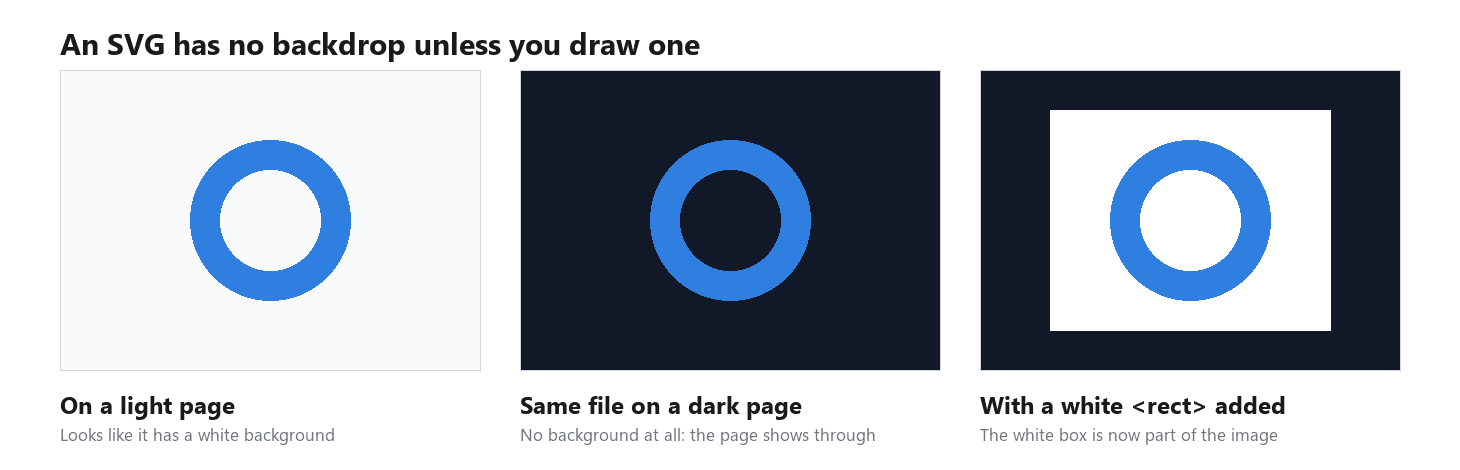
Transparenz innerhalb eines SVG wird pro Element festgelegt. MDNs Referenz beschreibt den Füllwert none als keine Füllung malend, sodass das Innere einer Form klar bleibt. Das Attribut fill-opacity lässt nur die Farbe innerhalb einer Form verblassen, während opacity das ganze Element verblassen lässt, einschließlich Kontur.
Zwei Dinge bringen Leute zum Stolpern. Ein Rasterfoto, das über ein image-Element in ein SVG eingebettet ist, behält den Alpha-Kanal, den das Foto hat, sodass ein JPG innerhalb eines SVG seinen weißen Kasten weiterhin trägt. Und ein Foto durch einen Raster-zu-SVG-Konverter laufen zu lassen entfernt keinen Hintergrund; es zeichnet den Hintergrund zusammen mit allem anderen in Formen nach.
Warum ist meine PNG nicht transparent?
Führen Sie diese Prüfungen der Reihe nach durch. Eine Datei, die die erste besteht, braucht überhaupt keine Korrektur.
Der Betrachter hat den Hintergrund gemalt. Bildbetrachter müssen etwas hinter transparente Pixel setzen, und viele wählen Weiß oder Schwarz. Die Datei ist unverändert; nur die Anzeige ist es. Öffnen Sie dieselbe PNG in einer Design-App, einem Browser-Tab mit dunkler Seite oder einer Folie mit dunkler Füllung. Wenn der Kasten verschwindet, hören Sie hier auf.

Die Datei hat keinen Alpha-Kanal. Eine in .png umbenannte JPG, ein Screenshot eines transparenten Bildes oder eine Datei, die durch eine Messaging-App oder ein CMS lief, das sie neu kodiert hat, sehen alle deckend aus, weil sie es sind. Prüfen Sie den Bildmodus. In Photoshop sollte das Kanal-Bedienfeld einen Alpha-Kanal auflisten; unter Windows zeigt Eigenschaften > Details eine Bittiefe von 32 für eine RGBA-PNG statt 24; in Python gibt Image.open("file.png").mode RGBA zurück. Wenn Alpha fehlt, gehen Sie zurück zum geschichteten Original und exportieren erneut.
Die Kante ist hart oder gesäumt. Ein treppenartiger Umriss deutet auf 1-Bit-Transparenz hin, und ein blasser oder farbiger Saum deutet auf Randpixel hin, die noch die alte Hintergrundfarbe tragen. Unser Rotwand-Test zeigte, wie das passiert: Bei einem weißen Hemd vor einer gesättigten roten Wand neigten 69 % der halbtransparenten Randpixel ins Rote, und auf einem neuen Hintergrund liest sich dieser Streifen als Saum. Die Lösung ist ein Neu-Export mit 8-Bit-Alpha und ohne Mattierungsfarbe und, bei Freistellern, ein neutraler Hintergrund im Originalfoto oder eine Kontraktion der Maske um 1 Pixel.
Das Schachbrett ist eingebacken. Skalieren Sie das Bild. Wenn die grau-weißen Quadrate mit dem Bild wachsen und schrumpfen, sind sie Pixel. Vorschaubilder von Stock-Websites werden oft so ausgeliefert. Laden Sie die echte Datei herunter oder stellen Sie den Hintergrund erneut frei.

Häufig gestellte Fragen
Ist ein Alpha-Kanal dasselbe wie eine Ebenenmaske?
Sie sind Cousins. Adobes Photoshop-Hilfe beschreibt einen Alpha-Kanal als eine Auswahl, die als bearbeitbare Graustufenmaske im Kanal-Bedienfeld gespeichert ist, und eine Ebenenmaske funktioniert im Editor auf dieselbe Weise. Der Unterschied ist, was den Export übersteht. Eine Ebenenmaske ist ein Bearbeitungswerkzeug, das in der PSD lebt. Der in eine PNG oder WebP geschriebene Alpha-Kanal ist das reduzierte Ergebnis jeder Maske, und er ist die Transparenz, die andere Apps tatsächlich lesen.
Wie viele Transparenzstufen hat ein 8-Bit-Alpha-Kanal?
256, von 0 (vollständig transparent) bis 255 (vollständig deckend). Ein 16-Bit-Alpha-Kanal, den PNG ebenfalls unterstützt, hat 65.536. GIF hat zwei: gezeichnet oder übersprungen.
Kann ich einer JPG einen Alpha-Kanal hinzufügen?
Nicht, solange sie eine JPG bleibt, da das Format keinen Platz hat, einen zu speichern. Öffnen Sie die Datei, trennen Sie das Motiv vom Hintergrund und speichern Sie das Ergebnis als PNG oder WebP. Das browserbasierte Freistellungs-Tool auf Atlas Cloud erledigt die Konvertierung in einem Schritt: JPG rein, transparente PNG raus, kostenlos nutzbar und ohne Anmeldung.
Funktioniert WebP-Transparenz in jedem Browser?
Aktuelle Versionen der großen Browser rendern WebP mit Alpha, und MDNs Kompatibilitätstabelle für das Format ist der Ort, um die Unterstützung für jede ältere Version zu bestätigen, die Sie noch bedienen müssen. Wenn ein Legacy-Publikum wichtig ist, liefern Sie PNG als Fallback über ein picture-Element aus.
Warum hat meine transparente PNG einen weißen Hof?
Die Pixel entlang der Kante sind teilweise transparent, und ihre Farbe trägt noch den Hintergrund, aus dem sie freigestellt wurden. Bei einem weißen Original sieht dieser Streifen wie ein weißer Hof aus, sobald Sie den Freisteller auf etwas Dunkles setzen. Exportieren Sie neu mit 8-Bit-Alpha und Mattierung auf none, oder kontrahieren Sie die Auswahl um ein Pixel, bevor Sie speichern.
Fazit
Transparenz ist eine Zahl. Jedes Pixel in einer RGBA-PNG oder WebP trägt einen Alpha-Wert von 0 bis 255, und sobald das Klick macht, sortieren sich die anderen Formate von selbst: GIF hat ein einziges An-Aus-Flag, JPG hat nichts, und SVG hat von vornherein keinen Hintergrund zu entfernen. Die sieben Freisteller, die wir gemessen haben, brachten die gesamte kantengeglättete Kante in einem Streifen von 0,7 % bis 2,2 % des Bildes unter, genau der Teil, den ein 1-Bit-Format verwirft.
Wenn Sie hierhergekommen sind mit der Frage, was ein Alpha-Kanal ist, weil eine Datei sich weigerte, transparent zu werden, prüfen Sie zuerst den Betrachter, dann den Modus der Datei, dann die Kante. Und wenn Sie einen sauberen Alpha-Kanal benötigen, ohne einen Editor zu öffnen, liefert Ihnen ein browserbasierter Hintergrundentferner einen in einer einzigen PNG, in der Pixelgröße, mit der Sie begonnen haben.





