API Key
创建和管理 Atlas Cloud API 身份验证密钥
API Key 用于验证你对 Atlas Cloud API 的请求身份。每次 API 调用都需要有效的 API Key。
创建 API Key
- 前往 API Keys
- 点击创建 API Key
- 复制新的 API Key 并安全存储
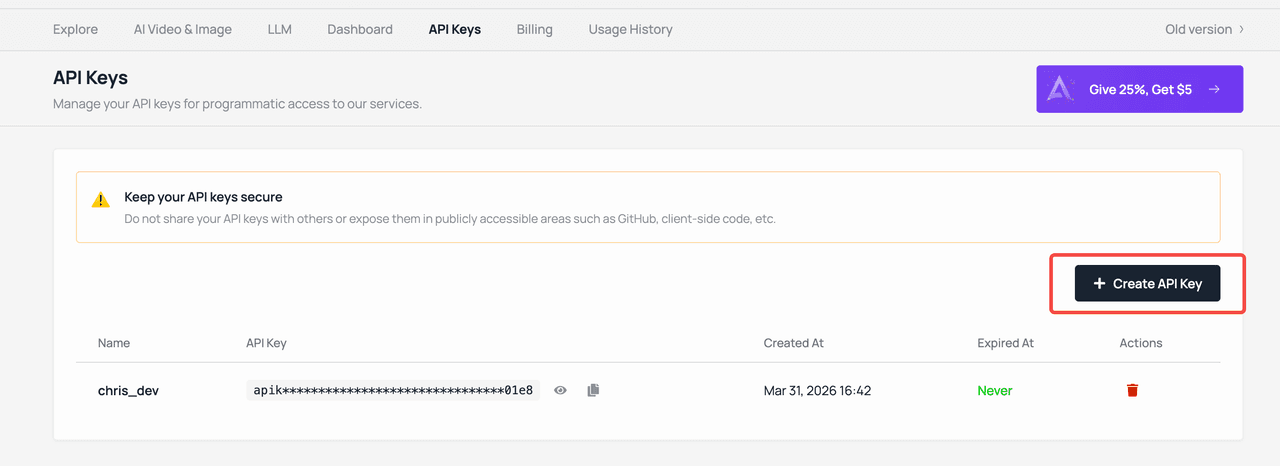
API Key 仅在创建时显示一次。如果遗失,需要重新创建。
使用 API Key
在每个 API 请求的 Authorization 头中包含你的 API Key:
Authorization: Bearer your-api-keyLLM / 对话补全(兼容 OpenAI)
Base URL: https://api.atlascloud.ai/v1
from openai import OpenAI

client = OpenAI(
    api_key="your-api-key",
    base_url="https://api.atlascloud.ai/v1"
)

response = client.chat.completions.create(
    model="deepseek-v3",
    messages=[{"role": "user", "content": "Hello!"}]
)
图像 / 视频生成
Base URL: https://api.atlascloud.ai/api/v1
import requests

response = requests.post(
    "https://api.atlascloud.ai/api/v1/model/generateImage",
    headers={"Authorization": "Bearer your-api-key"},
    json={
        "model": "seedream-3.0",
        "prompt": "A cat sitting on a rainbow"
    }
)
上传媒体文件
import requests

response = requests.post(
    "https://api.atlascloud.ai/api/v1/model/uploadMedia",
    headers={"Authorization": "Bearer your-api-key"},
    files={"file": open("photo.jpg", "rb")}
)

# 返回临时 URL,可用于生成任务
print(response.json())
第三方工具集成
你可以在任何兼容 OpenAI 的工具或应用中使用 Atlas Cloud API Key。常用选项包括:
| 工具 | 类型 | 配置方式 |
|---|---|---|
| Chatbox | 桌面应用 | 将 API Host 设置为 https://api.atlascloud.ai/v1 |
| Cherry Studio | 桌面应用 | 添加为自定义 OpenAI 供应商 |
| OpenWebUI | Web UI | 配置 OpenAI 兼容端点 |
| Cursor | IDE | 通过 MCP Server 使用 |
| Claude Code | CLI | 通过 MCP Server 或 Skills 使用 |
配置第三方工具时:
- API Host / Base URL:
https://api.atlascloud.ai/v1(必须包含/v1后缀) - API Key:你的 Atlas Cloud API Key
- 模型名称:模型库中的任意模型
安全最佳实践
- 不要分享你的 API Key 或将其提交到版本控制系统
- 使用环境变量存储 API Key:
export ATLASCLOUD_API_KEY="your-api-key" - 定期轮换密钥 —— 删除旧密钥并创建新密钥
- 开发和生产使用不同的密钥
- 在控制台中监控使用情况,以检测未授权的使用
密钥管理
你可以在账户设置中管理 API Key:
- 创建 —— 根据需要生成新的 API Key
- 删除 —— 撤销不再需要或可能已泄露的 API Key
- 查看用量 —— 监控每个密钥的 API 使用量和费用
限流
API 限流因账户等级和模型类型而异。如果遇到限流错误(429 Too Many Requests),可以考虑:
- 在请求之间添加短暂延迟
- 使用指数退避策略进行重试
- 联系 [email protected] 获取更高限额
Last updated on