Vous déposez une photo sur le détourage d'arrière-plan d'Adobe et la page vous demande de vous connecter avant que quoi que ce soit ne se produise. Ou l'import échoue, parce que le fichier provient d'un appareil photo et non d'un téléphone.
Ni l'un ni l'autre n'est un bug, et Adobe documente les deux. Le détourage d'arrière-plan gratuit dans Firefly fonctionne avec un compte Adobe et une allocation quotidienne, tandis que la page d'aide pour les actions rapides photo bloque l'import à 40 Mo et 4k x 4k. Ce que les gens recherchent sous le nom de Adobe background remover correspond à trois outils partageant un seul nom, et chacun d'eux s'arrête à un endroit différent.
Cet article confronte ces points d'arrêt à un outil de navigateur auquel nous avons soumis une photo de 8192×4608. Le fichier est revenu en 8192×4608 sans qu'aucun compte n'intervienne. Adobe conserve un terrain que l'outil gratuit ne peut pas toucher, et cela fait l'objet d'une section dédiée plus bas.

Points clés
- La page d'aide d'Adobe pour les actions rapides photo bloque l'import à 40 Mo et 4k x 4k. Le parcours via l'éditeur Express accepte des fichiers jusqu'à 65MP.
- La page Firefly d'Adobe indique que le détourage d'arrière-plan gratuit nécessite un compte Adobe et fonctionne avec des générations quotidiennes gratuites.
- Un PNG transparent issu d'Adobe Express demande deux étapes supplémentaires : définir l'arrière-plan sur Aucun remplissage, puis choisir PNG transparent au téléchargement.
- Notre fichier de test 8192×4608, 37,75 MP, est revenuentaille réelle depuis ledétoureur d'arrière-plan IA gratuitsur Atlas Cloud, sans compte et sans filigrane.
- Adobe conserve le remplacement d'arrière-plan par prompt, la vidéo et le traitement par lots en entreprise. L'outil gratuit laisse un voile à l'intérieur des mailles fines comme les rayons de bicyclette.
Le détourage d'arrière-plan Adobe est-il gratuit ? La réponse d'Adobe elle-même
C'est gratuit avec deux conditions, et Adobe énonce les deux clairement.
La première condition est un compte. La page du détoureur d'arrière-plan d'Adobe Firefly répond à la question dans sa FAQ : « Oui, vous pouvez détourer des arrière-plans dans Adobe Firefly gratuitement avec un compte Adobe. » Le tutoriel de la même page commence par « connectez-vous à Adobe Firefly avec votre Adobe ID ou créez un compte gratuit si vous n'en avez pas ». Nous avons consulté cette page le 14 septembre 2026.
La seconde est le volume. La formulation d'Adobe : « Les utilisateurs gratuits bénéficient de générations quotidiennes gratuites dans Adobe Firefly qu'ils peuvent utiliser pour détourer des arrière-plans », et « Vous pouvez débloquer une utilisation illimitée de cette fonctionnalité avec un forfait Adobe Firefly payant ». Aucun chiffre n'est associé à cette allocation quotidienne nulle part sur la page, vous découvrez donc où elle s'arrête en la heurtant.
| Ce qu'Adobe propose gratuitement | Formulation d'Adobe | Ce que cela signifie avant de téléverser |
|---|---|---|
| L'outil lui-même | « détourer des arrière-plans dans Adobe Firefly gratuitement avec un compte Adobe » | Un e-mail, un mot de passe et une session qui vous suit |
| La quantité disponible | « générations quotidiennes gratuites » | Un compteur invisible, qui se recharge le lendemain |
| Lever le plafond | « utilisation illimitée de cette fonctionnalité avec un forfait Adobe Firefly payant » | Le travail volumineux se situe côté payant |
La page du Centre d'aide Adobe consacrée au forfait gratuit Adobe Express liste ce que couvre une adhésion gratuite : des modèles, « plus de 4 000 polices issues de la collection Adobe Fonts », « des outils standards de retouche photo, vidéo et document », la planification sur les réseaux sociaux et une bibliothèque Stock, avec 5 Go de stockage et 10 jours d'historique des versions.
Background Remover n'y figure pas. La page Firefly reste la réponse la plus claire sur le prix, et la réponse qu'elle donne est un compte plus un décompte.
Il vaut la peine de le dire clairement : rien de tout cela ne rend l'outil d'Adobe mauvais. Cela signifie simplement que la réponse à « est-ce gratuit » change selon la surface Adobe sur laquelle vous atterrissez, et il y en a trois.
Adobe Express Remove Background : trois points d'entrée, trois règlements
Cherchez Adobe et détourage d'arrière-plan et vous atterrissez sur l'une des trois surfaces. Elles partagent une marque et presque rien d'autre.
Dans l'éditeur Express, le détourage est un bouton de panneau. L'article du Centre d'aide Adobe « Remove background from images » le situe à « Dans le panneau Image de gauche, sélectionnez Remove Background », avec une ligne complémentaire pour l'annuler : « Pour restaurer l'arrière-plan, sélectionnez l'image et sélectionnez à nouveau Remove Background. »
Les fichiers atteignant cet éditeur suivent les limites de téléversement de la page « Minimum image requirements » : « Web sur ordinateur : 80 Mo » et une « résolution d'image maximale » de « 65MP (par exemple, 8K x 8K ou 16K x 4K) ». 65MP est le plafond de pixels le plus élevé qu'Adobe publie pour cette fonctionnalité, toutes surfaces confondues.
Les actions rapides photo sont les pages à usage unique, celles qui acceptent un fichier sans ouvrir de projet. La page « Photo quick action file requirements » d'Adobe couvre Remove background entre autres, et son plafond est plus bas : « Taille de fichier maximale 40 Mo » et « Résolution maximale à l'import 4k x 4k ».
Ce même tableau liste les fichiers pris en charge comme « JPG, PNG et SVG » tout en listant les formats pris en charge comme « .jpg, .png, .bmp ». Les deux lignes ne concordent pas.
La page Firefly est l'entrée publique gratuite. Sa zone de téléversement indique « Le fichier doit être au format JPEG (JPG), PNG ou WEBP et jusqu'à 40 Mo ». Faites défiler jusqu'à la FAQ de cette même page et le chiffre change : « Le détoureur d'arrière-plan Adobe Firefly accepte les fichiers JPEG, PNG et WEBP jusqu'à 100 Mo. » Une page, deux plafonds, rien n'indiquant lequel le serveur applique.
| Point d'entrée | Plafond de taille de fichier | Plafond de pixels | Source |
|---|---|---|---|
| Téléversement dans l'éditeur Express | 80 Mo sur le web sur ordinateur | 65MP | Centre d'aide Adobe, « Minimum image requirements » |
| Action rapide photo | 40 Mo | 4k x 4k à l'import | Centre d'aide Adobe, « Photo quick action file requirements » |
| Page du détoureur d'arrière-plan Firefly | 40 Mo dans la zone de téléversement, 100 Mo dans la FAQ | Non indiqué | Page du détoureur d'arrière-plan Firefly d'Adobe |
Une ligne supplémentaire sur la page des actions rapides interpelle quiconque se soucie de la confidentialité : « Le mode privé n'est pas pris en charge pour les navigateurs web de bureau et mobiles comme Safari et Firefox. » Une fenêtre de navigation privée n'est pas un moyen pris en charge de l'exécuter.
Le plafond 4k x 4k sur les actions rapides photo
Adobe écrit 4k et s'en tient là. Le terme couvre deux largeurs courantes et la page n'en définit aucune, donc la lecture honnête est une fourchette. À 3840, le plafond revient à 14,7 mégapixels. À 4096, il revient à 16,8.
Chacun de ces nombres est inférieur à ce que produit un appareil photo actuel. Faites le calcul sur des fichiers que les gens possèdent réellement :
| Fichier | Grand côté | Mégapixels | Au-delà de la ligne d'import 4k ? |
|---|---|---|---|
| Photo de téléphone 12 MP, 4032 × 3024 | 4032 | 12,19 | Au-delà de 3840, sous 4096 |
| Fichier d'appareil photo 24 MP, 6000 × 4000 | 6000 | 24,00 | Au-delà dans tous les cas |
| Notre fichier de test 4000 × 2250 | 4000 | 9,00 | Au-delà de 3840, sous 4096 |
| Notre fichier de test 6000 × 3375 | 6000 | 20,25 | Au-delà dans tous les cas |
Une photo de téléphone standard de 12 MP frôle déjà la ligne sur son grand côté. Tout ce qui est pris avec un boîtier hybride la dépasse confortablement. Savoir par laquelle des trois portes vous passez vous fait gagner dix minutes sur un détourage qui n'aurait jamais pu être importé.
L'alternative à Adobe background remover : pas d'Adobe ID, pas de décompte quotidien
Atlas Cloud propose une petite sélection d'outils de navigateur qui s'ouvrent et fonctionnent sans écran de connexion. Le détoureur d'arrière-plan IA gratuit est celui qui remplace la fonctionnalité d'Adobe. Divulgation : Atlas Cloud publie cet article et exploite cet outil.
Déposez le fichier, appuyez sur Run Free, téléchargez le PNG. Voici le plus gros fichier que nous lui avons soumis et ce qui est revenu.
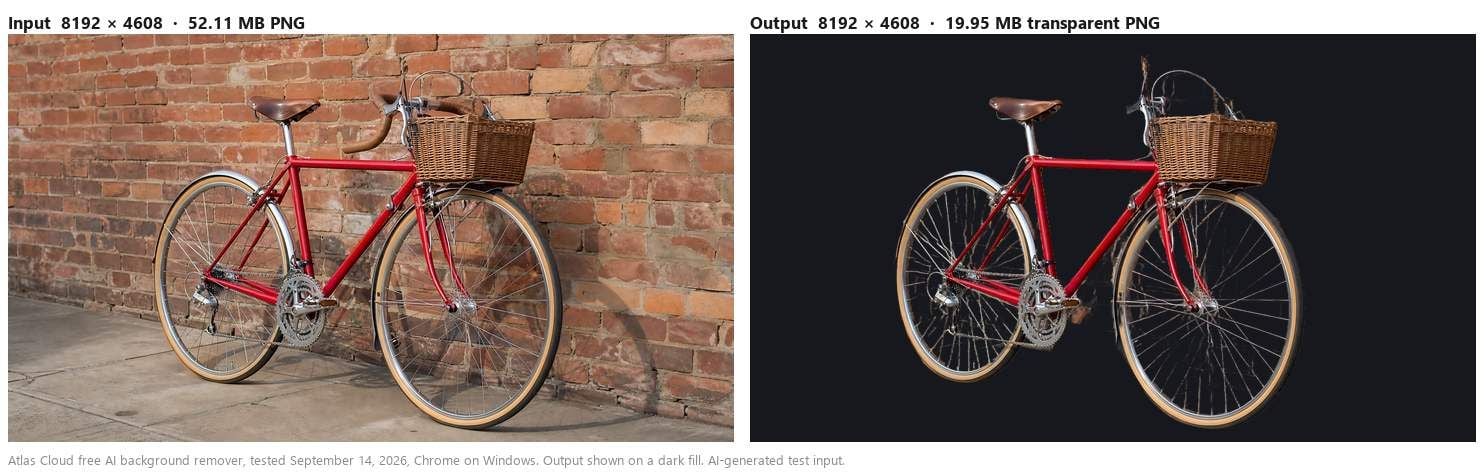
Aucun sélecteur de forfait ne précède cette exécution. Pas d'e-mail, pas de lien de confirmation, pas de compteur qui s'égrène dans le coin.
Le modèle se charge dans l'onglet du navigateur et y travaille, ce qui explique aussi pourquoi l'une de nos exécutions s'est terminée après que nous avons coupé le réseau. Ce test est détaillé dans notre comparaison avec Canva, où il se mesure à un outil dont la page d'aide vous invite à vérifier votre connexion.
Ce que cet outil ne fait pas, c'est prétendre être une suite de design. Il détoure une image par exécution et renvoie un PNG. Tout ce qui suit se passe dans l'éditeur que vous utilisez déjà, Adobe Express compris.
Le plafond 4K face à un fichier de test de 37 MP
Nous avons traité une photo en trois tailles le 10 septembre 2026, puis le fichier du vélo le 14 septembre, le tout dans Chrome sous Windows, et mesuré ce qui est revenu.
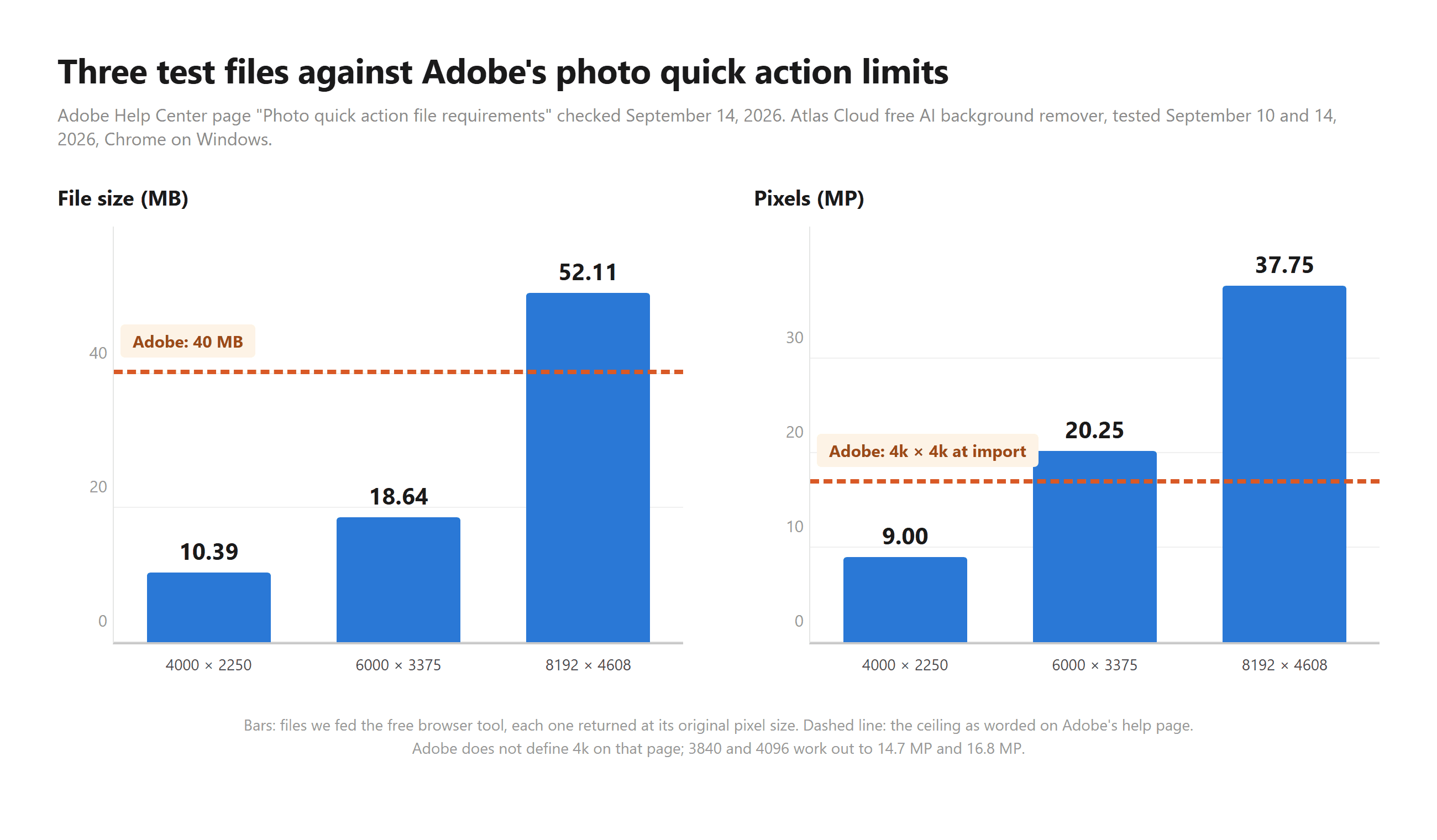
L'entrée 4000 × 2250, 9,00 MP et 10,39 Mo, est revenue en 4000 × 2250 et 3,71 Mo. L'entrée 6000 × 3375, 20,25 MP et 18,64 Mo, est revenue en 6000 × 3375 et 7,22 Mo. Le vélo, 8192 × 4608 à 37,75 MP et 52,11 Mo en entrée, est revenu en 8192 × 4608 sous forme de PNG transparent de 19,95 Mo. Rien n'a été réduit en sortie.
Regardez quelle limite mord en premier. Les deux fichiers les plus petits restent sous les 40 Mo que la page des actions rapides d'Adobe autorise, donc le poids n'a jamais été leur problème, c'était le grand côté. Le vélo échoue sur les deux critères à la fois, et il resterait pourtant dans les 65MP que l'éditeur Express accepte, ce qui correspond à la distinction sur laquelle cet article revient sans cesse.
La qualité de détourage s'est maintenue sur toute la plage également. Sur les trois tailles de cette même photo, les pixels entièrement transparents se situaient entre 79,25 % et 79,27 % du cadre, un écart de deux centièmes de pour cent. Le modèle ne troquait pas la précision des contours contre la résolution à mesure que le fichier grossissait.
PNG transparent : deux étapes supplémentaires dans Adobe Express, un seul téléchargement ici
Détourer un arrière-plan et obtenir un fichier transparent sont deux tâches distinctes dans Adobe Express. L'article du Centre d'aide détaille la seconde : « Pour télécharger une image avec un arrière-plan transparent, cliquez en dehors du canevas, puis sélectionnez Background dans le panneau de gauche et sélectionnez No fill. Lors du téléchargement du fichier, veillez à choisir Transparent PNG comme format de fichier. »
Manquez l'une ou l'autre étape et le téléchargement arrive avec la couleur de la page derrière votre sujet. Cela piège les personnes qui pensaient que le détourage était toute la tâche, et cela explique une bonne partie des questions « pourquoi mon arrière-plan est-il blanc » qui circulent.
La même page d'Adobe fixe aussi les attentes sur le détourage lui-même : « Il peut également supprimer des détails fins ou des zones à faible contraste. Examinez le détourage et restaurez tout élément important avant de finaliser votre image. » Un avertissement honnête de l'éditeur, et qui vaut la peine d'être lu avant un fichier client.
Du côté d'Atlas Cloud, il n'y a rien à configurer. Le téléchargement est un PNG RGBA à la taille en pixels que vous avez téléversée, la transparence déjà en place. Si le terme vous est nouveau, nous avons rédigé une explication simple du canal alpha et de ce qu'il stocke.
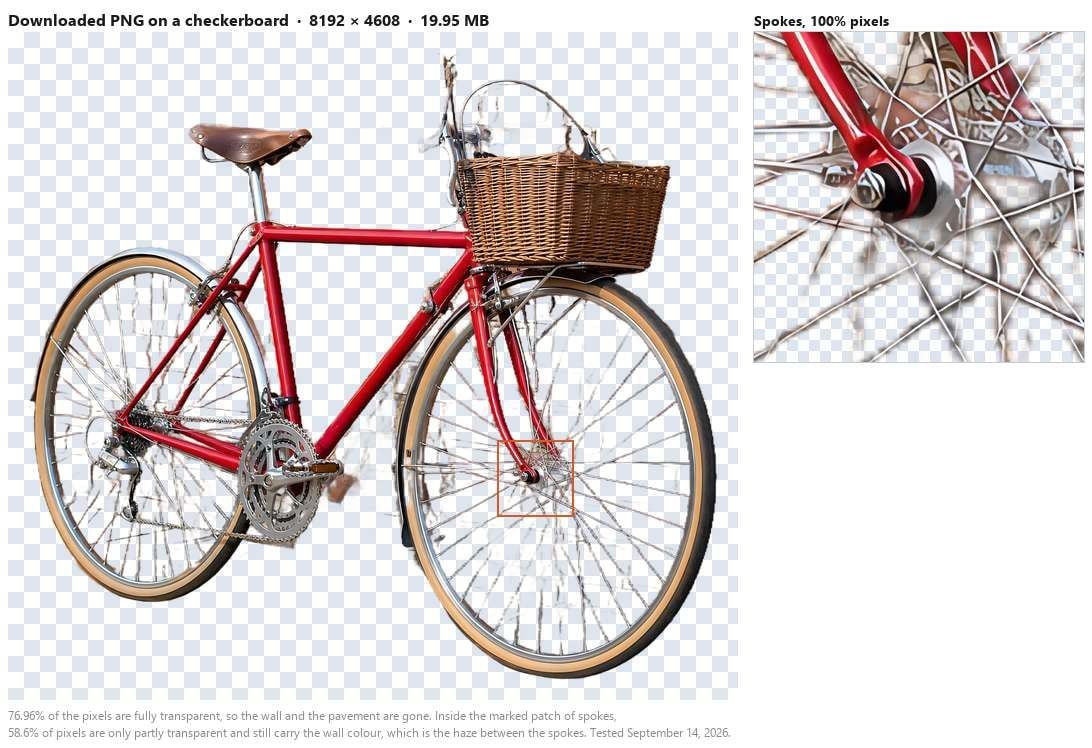
Sur l'ensemble du cadre, 76,96 % des pixels sont revenus entièrement transparents. Le mur et le trottoir ont disparu, et le tressage du panier ainsi que le bord de la selle tiennent à taille réelle.
Le damier montre aussi où ce modèle atteint ses limites. Dans la zone marquée des rayons, 58,6 % des pixels ne sont que partiellement transparents, et leur couleur moyenne, RVB 131, 105, 97, correspond à la brique et au trottoir qui se trouvaient derrière la roue. Les mailles fines conservent un voile de l'ancien arrière-plan. Sur un fond sombre, vous ne le remarquerez pas. Sur un fond clair, si.
Une note technique pour quiconque inspecte ses fichiers. Les pixels du sujet reviennent à un alpha de 254 plutôt que 255, soit environ 99,6 % d'opacité. Dans le fichier du vélo, 692 pixels sur 37,7 millions ont atteint un vrai 255. Personne ne voit cela à l'écran ou à l'impression, et cela se composite normalement. Cela n'apparaît que si vous allez examiner le canal.
Là où Adobe Express gagne encore
Un article honnête sur une alternative doit dire ce à quoi vous renoncez. Cinq choses restent du côté d'Adobe.
Remplacer un arrière-plan en le décrivant. La FAQ d'Adobe le dit clairement : « Une fois qu'Adobe Firefly a supprimé l'arrière-plan, vous pouvez utiliser le Background Generator pour le remplacer par n'importe quelle scène que vous décrivez, ou appliquer un arrière-plan de couleur unie à votre image. » L'outil de navigateur gratuit efface l'arrière-plan et s'arrête là. Tout nouvel élément derrière votre sujet vient de votre propre éditeur.
Rester au même endroit ensuite. La page d'Adobe poursuit : « Générez un nouvel arrière-plan, transformez votre sujet en autocollant ou améliorez la résolution de votre image, le tout sans quitter Adobe Firefly. » Cela compte quand un détourage est la première étape sur cinq.
Le volume. Selon les mots d'Adobe, « Adobe Firefly propose le détourage par lots aux utilisateurs en entreprise, et vous pouvez effectuer un détourage d'arrière-plan par lots avec l'assistant IA Firefly ». Cinquante photos produit via l'outil gratuit, c'est cinquante exécutions individuelles.
La vidéo. Adobe propose une fonctionnalité distincte de détourage d'arrière-plan vidéo à côté de celle pour les images. L'outil de navigateur ne prend que des images fixes.
Le mobile. « Oui, Adobe Firefly fonctionne sur mobile », indique la même FAQ, couvrant le téléversement, le détourage et le téléchargement depuis un téléphone.
Puis trois limites du modèle que nous avons testé, toutes mesurées plutôt que supposées. Un tissu transparent conserve sa forme mais perd sa transparence, de sorte que la couleur de l'ancien arrière-plan reste incrustée dans l'étoffe.
Un sujet pâle devant un mur saturé capte ce mur le long de son contour. Parmi les six entrées que nous avons mesurées le 10 septembre, cette combinaison était celle qui le montrait le plus clairement, et contracter la sélection d'un pixel dans votre éditeur efface cette teinte. Les mailles fines sont la troisième : les roues du vélo de l'exécution ci-dessus sont revenues voilées plutôt que nettement détourées.
| Entrée de test | Ce qui est revenu | Mesuré sur le canal alpha |
|---|---|---|
| Voile transparent devant du feuillage | Forme correcte, tissu opaque | Le voile se situe à un alpha de 254, avec 0,73 % de pixels véritablement semi-transparents |
| Chemise blanche devant un mur rouge profond | Détourage net avec un liseré teinté | 69 % des pixels de contour semi-transparents tirent vers le rouge |
| Golden retriever sur l'herbe | Détourage net | Canal vert en hausse de 16 points au contour, invisible à taille normale |
| Rayons de vélo devant la brique | Cadre et panier nets, roues voilées | 58,6 % des pixels dans la zone des rayons sont partiellement transparents, tirant vers la couleur du mur |
Un dernier écart qui relève de la physique plutôt que de l'outil. Une petite photo source reste petite après le détourage, donc un détourage destiné à l'impression nécessite une passe d'amélioration de résolution. Notre récapitulatif des améliorateurs d'image gratuits couvre ceux qui terminent sans estampiller le résultat.
Adobe Express vs Atlas Cloud : côte à côte
La colonne Adobe reprend les formulations publiées par Adobe, ou « non indiqué » là où ses pages ne disent rien. La colonne Atlas Cloud reprend ce que nous avons mesuré, les affirmations des pages étant marquées comme telles.
| Adobe Express et Firefly | Détoureur d'arrière-plan IA gratuit Atlas Cloud | |
|---|---|---|
| Accès gratuit | « gratuitement avec un compte Adobe » plus « générations quotidiennes gratuites » | Gratuit à utiliser, sans compte (testé) |
| Connexion | Les étapes d'Adobe elles-mêmes commencent par « connectez-vous à Adobe Firefly avec votre Adobe ID » | Aucune (testé) |
| Plafond de taille de fichier | 40 Mo sur les actions rapides, 80 Mo sur le téléversement dans l'éditeur | PNG de 52,11 Mo accepté (testé) ; aucun plafond indiqué sur la page de l'outil |
| Plafond de pixels | « 4k x 4k à l'import » sur les actions rapides, 65MP dans l'éditeur | 37,75 MP renvoyés en taille réelle (testé) |
| Sortie transparente | Définir l'arrière-plan sur No fill, puis choisir Transparent PNG | PNG RGBA à la taille d'entrée, aucun réglage (testé) |
| Navigation privée | « Le mode privé n'est pas pris en charge » sur les actions rapides | Non testé |
| Traitement par lots | Traitement par lots en entreprise et l'assistant IA Firefly | Une image par exécution |
| Vidéo | Fonctionnalité distincte de détourage d'arrière-plan vidéo | Images uniquement |
| Nouvel arrière-plan | Background Generator, décrit par prompt | Aucun ; apportez votre propre éditeur |
| Filigrane | Non indiqué | Aucun (testé) |
| Tissu transparent | Non indiqué | Forme conservée, transparence perdue (testé) |
| Mailles fines | Non indiqué | Voile entre les rayons du vélo (testé) |
Faut-il quitter Adobe Express ?
Si votre travail vit déjà dans l'écosystème Adobe, la réponse est probablement non, et ajouter un second outil est de toute façon la meilleure façon de voir les choses. Un détourage qui alimente directement une génération d'arrière-plan Firefly, un lot qui tourne sous une licence entreprise, un clip vidéo qui a besoin du même traitement : tout cela reste où c'est. La connexion ne vous coûte rien de plus quand vous alliez vous connecter de toute façon.
L'outil gratuit mérite sa place sur les photos que les portes d'Adobe refusent, ou quand la connexion elle-même est le problème. Un fichier d'appareil photo de 24 MP au-delà du plafond des actions rapides, un détourage ponctuel sur un ordinateur emprunté, une image client que vous préférez ne pas attacher à une session de compte. Téléchargez le PNG, puis déposez-le dans Adobe Express comme un téléversement normal et poursuivez le travail de design là-bas.
| Restez avec Adobe si | Ajoutez l'outil gratuit si |
|---|---|
| Vous vous connectez déjà à Adobe tous les jours | Vous voulez un détourage sans créer de compte |
| Vous voulez un nouvel arrière-plan généré à partir d'un prompt | Votre fichier dépasse 4k sur le grand côté |
| Vous traitez des dossiers ou de la vidéo | Vous travaillez une image à la fois |
| Votre détourage alimente un flux Firefly plus long | Vous approchez de la fin des générations gratuites de la journée |
Questions fréquentes
Comment détourer l'arrière-plan d'une image dans Adobe Express ?
L'article du Centre d'aide Adobe « Remove background from images » contient les étapes : ouvrez le design, sélectionnez l'image, puis sélectionnez Remove Background dans le panneau Image de gauche. Le sélectionner à nouveau restaure l'arrière-plan d'origine, et pour un fichier transparent, la même page ajoute les étapes No fill et Transparent PNG au téléchargement.
Suivez ce flux de travail sur les pages d'Adobe elles-mêmes. Cet article couvre ce qui se passe quand votre fichier est plus volumineux que ce que l'outil accepte.
Le détoureur d'arrière-plan Adobe Express est-il gratuit ?
La page Firefly d'Adobe dit oui avec un compte Adobe, sur une allocation quotidienne de générations gratuites, l'utilisation illimitée étant liée à un forfait Firefly payant. La page du forfait gratuit Adobe Express liste des modèles, des polices, des outils de retouche standards, la planification et des stocks, et n'y nomme pas Background Remover.
Pourquoi Adobe a-t-il refusé ma photo ?
Vérifiez le grand côté avant la taille du fichier. Les actions rapides s'arrêtent à « 4k x 4k à l'import » et 40 Mo, donc un fichier d'appareil photo de 6000 pixels dépasse la ligne de pixels tout en restant bien en dessous de la limite de poids. Le parcours via l'éditeur Express autorise davantage, jusqu'à 65MP et 80 Mo sur le web sur ordinateur.
Comment obtenir un arrière-plan transparent sans compte Adobe ?
Faites passer l'image par le détoureur d'arrière-plan IA gratuit sur Atlas Cloud et téléchargez le résultat. Il renvoie un PNG RGBA à la taille que vous avez téléversée, sans connexion et sans filigrane dans nos tests, et la transparence est déjà dans le fichier plutôt qu'un réglage à choisir à l'export.
L'alternative gratuite appose-t-elle un filigrane sur le téléchargement ?
Aucun filigrane n'est apparu sur les fichiers que nous avons téléchargés lors des tests du 10 septembre 2026. La page de l'outil se décrit comme gratuit à utiliser sans compte, et nos exécutions concordaient avec cela.
Peut-il traiter un dossier d'images ou une vidéo ?
Non dans les deux cas. Il prend une image fixe par exécution. Le travail sur dossiers et le détourage d'arrière-plan vidéo sont les domaines où les paliers payants et entreprise d'Adobe conservent un véritable avantage, et nous préférons le dire plutôt que de prétendre le contraire.
Conclusion
Le détourage d'arrière-plan d'Adobe est bon, et il est clôturé. Les clôtures sont publiées sur les propres pages d'Adobe : un compte et une allocation quotidienne sur la voie Firefly gratuite, 40 Mo et 4k x 4k sur les actions rapides photo, 65MP et 80 Mo via l'éditeur Express, plus deux clics supplémentaires avant qu'un téléchargement ne soit véritablement transparent. Aucun des guides de classement que nous avons lus en préparant cet article ne mentionne l'ensemble intermédiaire de chiffres, là où les fichiers d'appareil photo se font réellement arrêter.
Notre fichier de test 8192×4608, 37,75 mégapixels et 52,11 Mo, est revenu depuis un onglet de navigateur en 8192×4608 sans qu'aucun compte n'y soit attaché. C'est l'affirmation étroite que fait cette alternative à Adobe background remover. Il ne génère pas de nouvelle scène derrière votre sujet, il ne touche pas à la vidéo, il travaille sur une image à la fois, et il laisse un voile à l'intérieur des mailles fines comme les rayons de bicyclette. Pour un détourage en taille réelle sans rien à signer, ouvrez l'outil et glissez-y le fichier.





