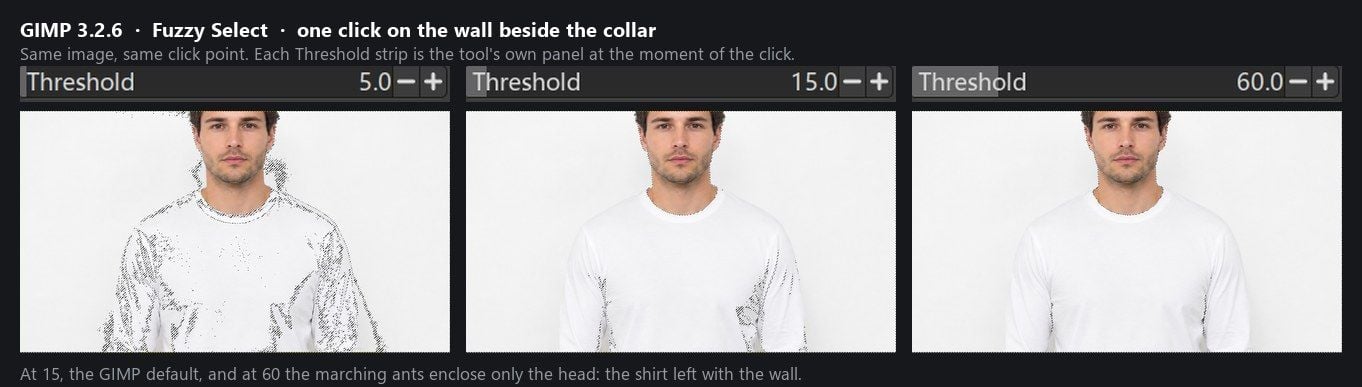
Vous cliquez sur le mur à côté du col avec l'outil Sélection floue, et les fourmis en marche entourent la tête de l'homme. Tout en dessous entre dans la sélection : la chemise et le mur ensemble. Réduisez le seuil à un tiers de sa valeur par défaut et la sélection se transforme en confettis, déchirant des trous sur la poitrine tandis que des plaques de mur restent.
Chaque guide de suppression d'arrière-plan GIMP que nous avons lu commence avec les deux mêmes outils : Sélection floue et Sélection par couleur, et les deux font exactement ce que dit le manuel de GIMP : sélectionner les pixels selon la proximité de leur couleur avec celle sur laquelle vous avez cliqué. Une chemise blanche devant un mur blanc ne leur laisse aucune distance à mesurer.
Cet article soumet cette photo à GIMP 3.2.6 et à un outil de navigateur gratuit qui construit son masque d'une autre manière, puis répète l'exercice avec des cheveux et un voile transparent. GIMP remporte plusieurs victoires. La chemise blanche n'en fait pas partie.
Points clés
- Les outils de Sélection floue et de Sélection par couleur de GIMP choisissent les pixels selon la proximité de leur couleur avec celle de votre clic, comme le dit le manuel GIMP 3.2. Une chemise blanche devant un mur blanc ne leur donne rien à séparer.
- Lesuppresseur d'arrière-plan IA gratuitd'Atlas Cloud a découpé cette même photo blanc-sur-blanc dès la première tentative, sans compte et sans filigrane (testé le 10 septembre 2026).
- Les cheveux sont une affaire que les deux côtés peuvent gérer. Sur notre portrait, l'outil gratuit a renvoyé le bord le plus doux de tout ce que nous avons testé, une bande partiellement transparente environ quatre fois plus large que celle donnée pour la chemise blanche.
- Le tissu transparent conduit les deux : la sortie IA a conservé la forme du voile mais l'a renvoyée opaque, et dans GIMP la même zone nécessite un masque de fusion peint à la main.
- GIMP conserve tout ce qui nécessite un éditeur complet : calques, tracés, pinceaux, travail de bureau hors ligne. L'outil gratuit traite une photo par exécution et pas de vidéo.
Pourquoi les sélections de suppression d'arrière-plan GIMP se bloquent sur le blanc sur blanc
GIMP propose quatre voies pour une découpe, et trois d'entre elles partent de la couleur. La page du manuel sur la sélection floue décrit l'outil comme « conçu pour sélectionner des zones de la couche ou de l'image en fonction de la similarité des couleurs ». Son curseur Seuil définit jusqu'où s'étend cette similarité : « plus le seuil est élevé, plus la sélection résultante est grande ».
Sélection par couleur effectue la même comparaison et supprime la règle selon laquelle les pixels doivent se toucher, donc elle capture chaque pixel similaire sur toute la couche. Le menu déroulant Sélection par qu'ils ont en commun énumère Composite, Rouge, Verte, Bleu, Teinte HSV, Saturation HSV, Valeur HSV, Luminosité LCh, Chroma LCh, Teinte LCh et Alpha. Chaque entrée est un composant de couleur. Il n'y a pas de réglage pour « la chemise ».
La sélection de premier plan est la troisième route. Vous lasso approximativement le sujet, tracez des traits sur ce qui doit être conservé, et un moteur de calcul de masque développe le masque à partir de ces traits. Il reste dépendant de la différence entre les couleurs peintes et les couleurs environnantes, c'est pourquoi le manuel vous avertit de garder le pinceau hors des pixels de fond. La quatrième voie, Tracés, est dessinée point par point à la main et n'a aucune affinité avec la couleur.
Maintenant, placez la chemise blanche sur le mur blanc. Nous avons mesuré notre photo de test : la luminosité médiane du mur est de 242 et celle du coton éclairé de 241. Pour éliminer la chemise de la sélection, l'outil devrait résoudre un écart inférieur à un niveau. Les plis d'ombre de la chemise, quant à eux, descendent à 27 niveaux plus sombres que sa teinte moyenne. Tout seuil assez généreux pour maintenir la chemise unie inonde le mur et tout ce que le mur touche, et la chemise touche le mur. C'est une propriété de la méthode plutôt que de votre patience. Le manuel dit autant à propos de l'outil : avec lui « plus vous êtes frustré par la difficulté de sélectionner exactement ce que vous voulez ».
Voici ce clic, exécuté trois fois à trois réglages.
L'alternative de suppression d'arrière-plan GIMP : découpe IA gratuite dans le navigateur
Atlas Cloud est une plateforme de modèles qui propos une courte liste d'outils navigateur que n'importe qui peut ouvrir sans compte. Le suppresseur d'arrière-plan IA dans cette liste est l'outil auquel cet article compare GIMP. Mention : Atlas Cloud publie cet article et exploite l'outil.
Il n'y a pas de curseur Seuil sur la page, car le masque n'est pas construit avec une couleur que vous cliquez. Trouve la photo de la chemise blanche qui bloque la sélection floue, et ce qui revient.
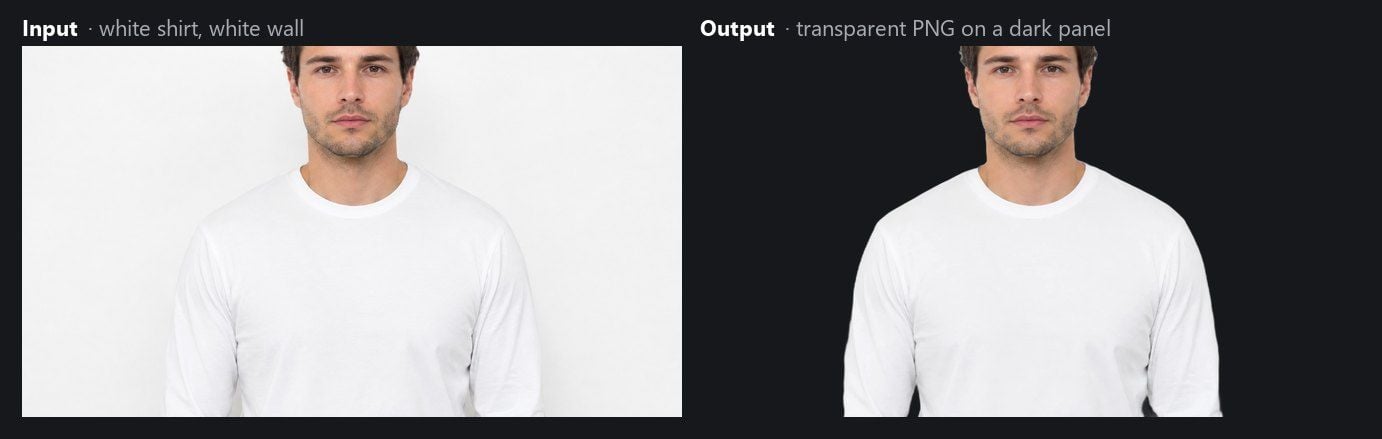
Le mur a disparu et la chemise est entière, testé le 10 septembre 2026 dans Chrome sur Windows. En comptant les pixels de ce PNG transparent selon la valeur alpha : 60,61 % sont totalement transparents, la chemise est solide, et 0,88 % se situent entre les deux. Ce dernier groupe est la bande d'anti-aliasing d'un à trois pixels le long du contour. Ces pixels de bordure se placent en dessous du corps de la chemise et ne portent aucune teinte du mur, donc pas de frange à nettoyer ensuite.
Trois étapes couvrent l'exécution. Déposez la photo sur la page, ou appuyez sur Ctrl+V avec une capture d'écran dans le presse-papiers puis relâchez. Cliquez sur Exécuter gratuitement. Téléchargez le PNG. Le modèle s'exécute dans l'onglet du navigateur, point que nous avons détaillé longuement dans un article séparé et ne répéterons pas ici.
À en juger par le résultat blanc sur blanc, le modèle sépare le sujet par sa forme plutôt que par contraste de couleur avec le fond. C'est toute la différence avec les outils GIMP ci-dessus, et c'est pourquoi la chemise survit.
Test des cheveux : la sélection de premier plan GIMP contre l'alternative IA
Le blanc sur blanc est le cas que le GIMP ne peut atteindre. Il peut atteindre les cheveux, ce qui fait de cette section un sujet sur l'effort et la qualité du bord plutôt que sur la possibilité ou non de découper.
Dans GIMP 3.2.6, le chemin est la sélection de premier plan. Le manuel note que l'un de ses moteurs, le matting Levin, est actuellement supprimé sous Windows à cause de plantages, alors une installation WindowsUtilise le Global Matting. Lasso de la tête avec une marge, peinture des traits sur les cheveux et le visage, basculement de l'aperçu, clic sur Sélectionner, puis Calque > Transparence > Ajouter un canal alpha, Sélection > Inverser, Supprimer, et Exporter sous PNG. Dans l'outil navigateur, les étapes sont les mêmes trois que pour la chemise.
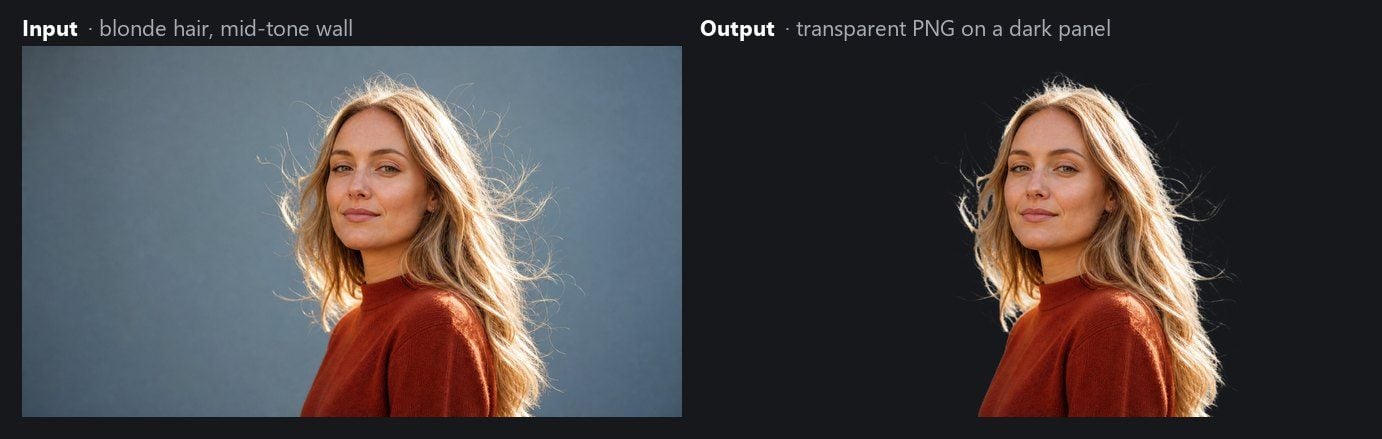
Nous avons compté les pixels de la sortie de l'outil de la même manière que ceux de la chemise. Sur la photo des cheveux, 4,05 % des pixels sont intermédiaires entre pleinement transparent et pleinement opaque. La chemise en présentait 0,88% et le voile 0,73%. Cette bande est là où la découpe cesse d'être une découpe et tourne au mélange, car un filament éclairé par l'arrière est réellement partie intégrante du fond. Quatre fois la bande signifiant que les mèches perdues autour de sa tête viennent avec de la lumière qui les mélange plutôt qu'en un paquet homogène aux bords nets.
GIMP arrive au même endroit par un chemin plus long. La sélection de premier plan nécessite le dépend de la sélection, les traits, un aperçu et généralement plusieurs cycles de passage en Dessiner l'arrière-plan pour repousser le mur entre les mèches. Le manuel parle clairement du coût : l'outil « a besoin de mémoire importantes pour certaines images » et « est connu pour des ralentissements sur les images plus grandes ». Le Matting Levin, moteur qu'il appelle le plus précis des deux, est « temporairement supprimé sur Windows à cause de plantages », donc une installation Windows retombe sur le Matting Global.
Tissu transparent : la limite partagée entre l'alternative et GIMP
Un voile devant une végétation sombre est la photo qui nous rend tous les deux humbles. Chaque pixel du tissu est un mélange du filet et des feuilles derrière. Un seuil de couleur ne peut pas séparer les deux, car le mélange est une seule couleur. Le premier plan a le même problème : le « premier plan » que vous peignez est déjà à moitié fond.
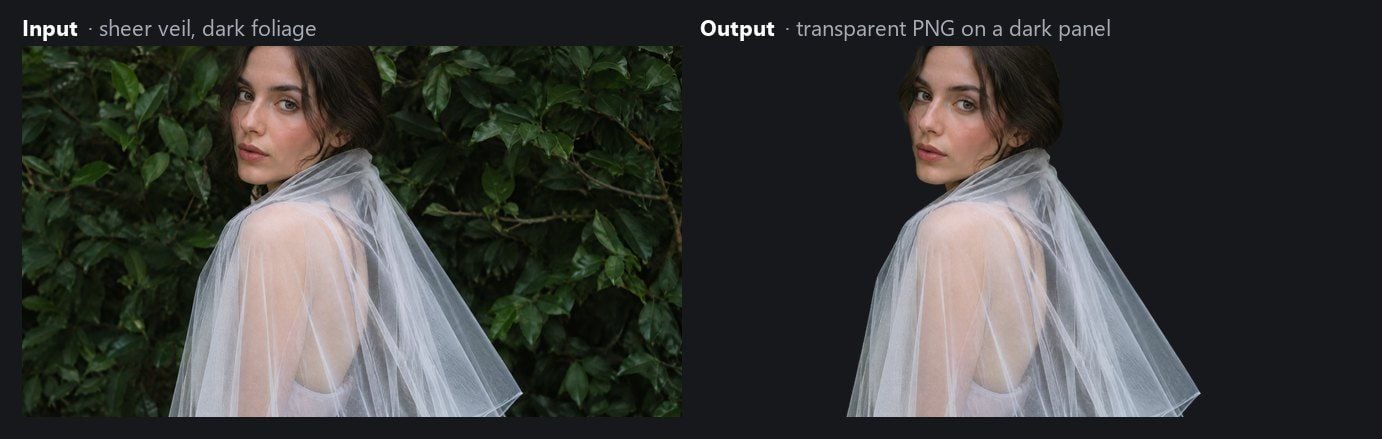
L'outil IA ne l'a pas résolu non plus. Le voile est revenu avec sa forme intacte et sa transparence perdue. Sur les pixels de sortie, 66,38 % sont entièrement transparents et seulement 0,73 % sont partiellement transparents, la même fine bande de contour que la chemise. Sur la jupe du voile, la zone visible en transparence dans l'original, 99,6 % des pixels revenus opaques. La végétation est nettement invisible, et la translucidité du tissu a disparu : il est maintenant une forme gris pâle continue qui ne laisse rien voir au-delà.
Dans GIMP, la solution honnête pour cette photo est un masque de fusion peint à la main avec des nuances de gris, afin que le masque note la translucidité, pas la couleur du pixel. C'est un véritable travail d'édition, et c'est le genre de travail pour lequel l'outil navigateur n'a pas de pinceau.
Rendre le fond transparent : ce que tient le PNG issu de GIMP Vs l'alternative
Supprimer le fond dans GIMP ne le rend pas transparent de lui-même. Un fichier JPG s'ouvre comme couche sans canal alpha, et la page du manuel Ajouter un canal alpha explique pourquoi : « Le canal alpha représente la transparence d'une couche ». Sans lui, la suppression ne fait que remplir la sélection avec la couleur de fond. Le remède est Couches > Transparence > Ajouter un canal alpha avant de supprimer, puis Exporter sous sous un nom .png. Enregistrez en JPG et la transparence est à nouveau perdue.
L'outil navigateur retire ces deux décisions. Sa sortie est un PNG avec canal alpha intégré, à la taille de pixel que vous lui fournissez. Voici ce que ce canal contenait dans les deux fichiers de test.
| Fichier de test (sortie de d'outil) | Complètement transparent (alpha 0) | Sujet solide | Bande de bordure partiellement transparente |
|---|---|---|---|
| Chemise blanche sur mur blanc | 60.61 % | 38.51% | 0.88% |
| Voile transparent sur feuillage | 66.38 % | 32.89% | 0.73 % |
La bande de bord est ce qui permet à la découpe de se fondre dans un nouvel arrière-plan sans bord dentelé. Si ces notions vous sont inconnues, notre explication sur ce qu'est un canal alpha couvre pourquoi un JPG ne peut en contenir. Une petite note technique pour les curieux : les pixels entiers se situent à alpha 254 plutôt que 255, une différence qu'aucun écran ne peut montrer.
Là où GIMP dépasse encore l'alternative
Rien de tout cela ne fait de GIMP un mauvais outil pour le travail graphique. Cela en fait un mauvais outil pour une seule tâche sur un seul type de photo. Pour les travaux ci-dessous, GIMP reste le bon.
| Tâche | GIMP 3.2.6 | Outil gratuit Atlas Cloud |
|---|---|---|
| Do you rely on a cutout edge by hand | Peindre sur un masque de fusion, affiner avec des tracés, palper la sélection | Aucun pinceau ; Le masque est définitif |
| Sujets semi-transparent si | Masque de fusion en niveaux de gris porte leur translucidité | Forme conservée, translucidité perdue (testé sur le voile) |
| Composition sur une nouvelle scène | Calques, modes de fusion, outils de coul en même temps | Téléchargéon PNG, ouvrir un autre éditeur |
| Travailler sans connexion | Application de bureau, rien ne quitte pour quitter la machine | Page navigateur ; le modèle s'exécute dans l'onglet (déclaration) |
| Plusieurs photos en une séance | Ouvrir plusieurs images, répéter le flux de travail par image | Une image par exécution |
| Vidéo | Tout éditeur de vidéo | Non pris en charge |
Si votre soirée est en tout cas est destinée à finir dans GIMP, la combinaison judicieuse est de laisser l'outil navigateur produire le masque et finir la composition dans GIMP. Le PNG s'ouvre comme une couche déjà dotée d'alpha.
GIMP contre surveilleur d'arrière-plan Atlas Cloud : comparaison
La colonne GIMP ci-dessous contient le texte même du manuel ou notre propre test 3.2.6. La colonne Atlas Cloud contient ce que nous avons testé le 10 septembre 2026, avec les déclarations de la page signalées comme telles.
| - | GIMP 3.2.6 | Atlas Cloud gratuit IA de suppression d'arrière-plan |
|---|---|---|
| Construction du masque | Sélection floue et Sélection par couleur : similarité des couleurs dans un seuil. Sélection premier plan : matting à partir des traits de vos | Sortie du modèle ; aucun seuil de couleur à régler |
| chemise blanche sur mur blanc | Chemise sélectionnée avec le fond au seuil 15 et 60; éclatée à 5 (testé) | Réussite au premier test |
| Aussi | Forgéaire avec lasso plus traits / Matting Global sous Windows (selon le manuel) | 4,05% de bordure partiellement transparente, la plus large de notre jeu (testé) |
| Tissu | Masque peint à la main sur pièce | Forme conservée, transparence perdue (testé) |
| PNG transparent | Ajouter un canal alpha, puis exporter en .png | PNG RGBA à la taille d'entrée (testé) |
| Compte | Aucun, logiciel de bureau | |
| Filigrane | Néant | Néant (testé) |
| Lot | Par image dans la encore | Une image par exécution |
| Vidéo | Pas un éditeur vidéo | Non pacceptée |
| Prix | Logiciel libre | Gratuit à l'usage (déclaration) |
Dois-je abandonner GIMP pour la suppression d'arrière-plan ?
Si vous vivez déjà dans GIMP et votre sujet est une bouteille sombre sur un balayage blanc, continuez. La sélection floue sur un fond lisse est l'exemple même du manuel comme sont de cas réussis, et le résultat se place dans la pile de couches là où vous le souhaitez.
Changez le chemin quand la photo est le problème plutôt que vos réglages : un sujet clair sur une paroi claire, un animal sur de l'herbe du même manteau tone, une collection de portraits où une mèche de cheveux nécessite des traits. Passez ces images dans l'outil navigateur, téléchargez le PNG, puis ouvrez-le dans GIMP s'il reste de la composition à faire. Pour un portrait destiné à arrière-plan uni, notre guide des coups de headshot li (les valeurs qui se photographie.
| Restez avec GIMP si | Utilisez le gratuitement si |
|---|---|
| Le sujet et le fond divergent nettement en couleur | Le sujet et le fond partagent une couleur |
| Vous devez peindre ou affiner le bord du masque | Vous voulez que le masque se fasse avant d'ouvrir un éditeur |
| Le sujet est du verre, un voile, de la fumée et nécessite un masque gris | La photo est une personne, un animal, un produit ou une signature |
| La composition se fait de toute façon dans GIMP | Le PNG est le produit fini |
Foire aux questions
Comment retirer l'arrière-plan tué dans GIMP ?
Choisissez un outil de sélection adapté : Sélection flou ou par couleur pour un fond un qui diffère du sujet, Premier plan pour les cheveux, Tracés pour pour les bords durs. Ajoutez un canal alpha depuis le menu Couche > Transparence, inversez la sélection, cliquez sur Supprimer, puis exportez en PNG. Le chapitre Outils de sélection détaille chaque possibilité.
Pourquoi la sélection floue GIMP saisit-elle toute l'image ou le sujet au lieu du fond ?
Chacune est l'issue du seuil. L'outil sélectionne les pixels contigus dans une gamme de coul distinguée du clic. Un élevé au-delà des couleurs proches, un faiblesârête à la première ombre. Quand le sujet et le fond partagent un même ton, aucune valeur entre eux ne les distingue, comme le cas de la chemise blanche.
GIMP rend-il automatiquement le fond transparent ?
Non. GIMP exige couche alpha sur la couche pour que les pixels supprimés deviennent trèspennigus, et le fichier puis exporté en PNG plutôt qu'en JPG. Les couches sans canal alpha apparaissent en gras dans la dialogue des couches.
L'alternative GIMP est-elle gratuite et nécessite-t-elle un compte ?
Sur nos tests de septembre 10, 2026, l'outil Atlas Cloud n'a pas demandé de compte et n'ajouté aucun motif d'eau. La page suppresseur d'arrière-plan du navigateur se décrit comme gratuite. Nous la décrivons de même et ne répondons pas sur le prix dans le futur.
L'alternative peut-elle transformer un dossier de photos ou une vidéo ?
Non. Elle prend une image par clause unique et renvoie une per PNG, et elle n'accepte pas la vidéo. Ces deux usages restent sur un éditeur de bureau ou un dédié.
Conclusion
Les outils de sélection de GIMP sont fondés sur la similarité des coulisses, et le manuel le fait dès la première de la page Sélection flou. Ce choix sert la plupart des photos et échoue pour une famille d'entre elles par principe : objet qui partage sa couleur avec le fond. Notre chemise blanche sur mur blanc fait partie de cette famille. Un modèle navigateur qui lit la forme du sujet l'a découpé dès la première passe, puis a écrit un rendu sûrer dans une forme opaque, ce qui est la limite commune à ce qu'il partage avec tout outil qui ne basse que sur la couleur de pixels.
Gardez GIMP pour les corrections de masque, travail des couches et des compositions. Pour la photo où aucune valeur de seuil ne marche, le très court chemin de suppression d'arrière-plan GIMP passe parfois par un onglet navigateur, et le PNG qu'il remet s'ouvre dans GIMP avec le canal alpha déjà en place.





