A late-night colour suite, six monitors showing six different shots of the same silver-haired singer_Six_ shots, one artist, one song. Generated with openai/gpt-image-2/text-to-image .
Suno users generate about 7 million songs a day, roughly a full Spotify catalogue every two weeks (TechCrunch, February 2026). Almost none of them will ever have a picture attached. Not because the picture is impossible, but because the traditional route runs through four tools: generate stills, animate them, run a separate lip-sync pass, then fix everything in an edit. Every hop loses the face, the wardrobe, or the beat.
So I skipped the hops. I dropped an 8-second slice of a chorus straight into the reference slot of a video model and pressed Run. It charged me nothing for the audio.
Then I pulled the finished mp4 apart to answer the one question nobody on the internet answers straight: is the sound coming back out of the model my song, or something it made up that just sounds similar? I measured it. The answer is not what I expected, and it changes how you should cut the thing.
Key takeaways
- Reference audio is free. MiniMax H3 bills output seconds only. My four 8-second reference slices added $0.00 to the bill. Reference video is the expensive one.
- 15 seconds is a per-generation ceiling, not a per-project one. Slice the song, shoot one slice per shot, concatenate. My 32-second cut is four generations.
- Write the hook at 120 BPM. One bar is exactly 2.000 seconds, so H3's whole-second
durationvalues land on bar lines with no manual nudging. 8s = 4 bars.- The output audio is your track, sample-aligned. I measured 0.892 waveform correlation at zero lag between my input slice and H3's delivered stereo mix. It is not regenerated. You still want to lay the master back for the final cut, for a different reason (below).
- Total real spend: $7.53 across nine generations including the failures. The four shots that made the final cut plus the song and the base frame came to $4.80.
The MiniMax H3 Music Video I Cut From One 32-Second Hook
Sound on. This is four separate generations, concatenated with no transitions, with the original 32-second master laid back over the top.
"MIRA", 32 seconds, 2560x1440, 24 fps. Four minimax/h3/reference-to-video generations at 8 seconds each, $1.12 per shot. The song went in as reference audio and cost $0.00.
Four generations, four completely different lighting worlds, one face. Nothing was retouched between them.
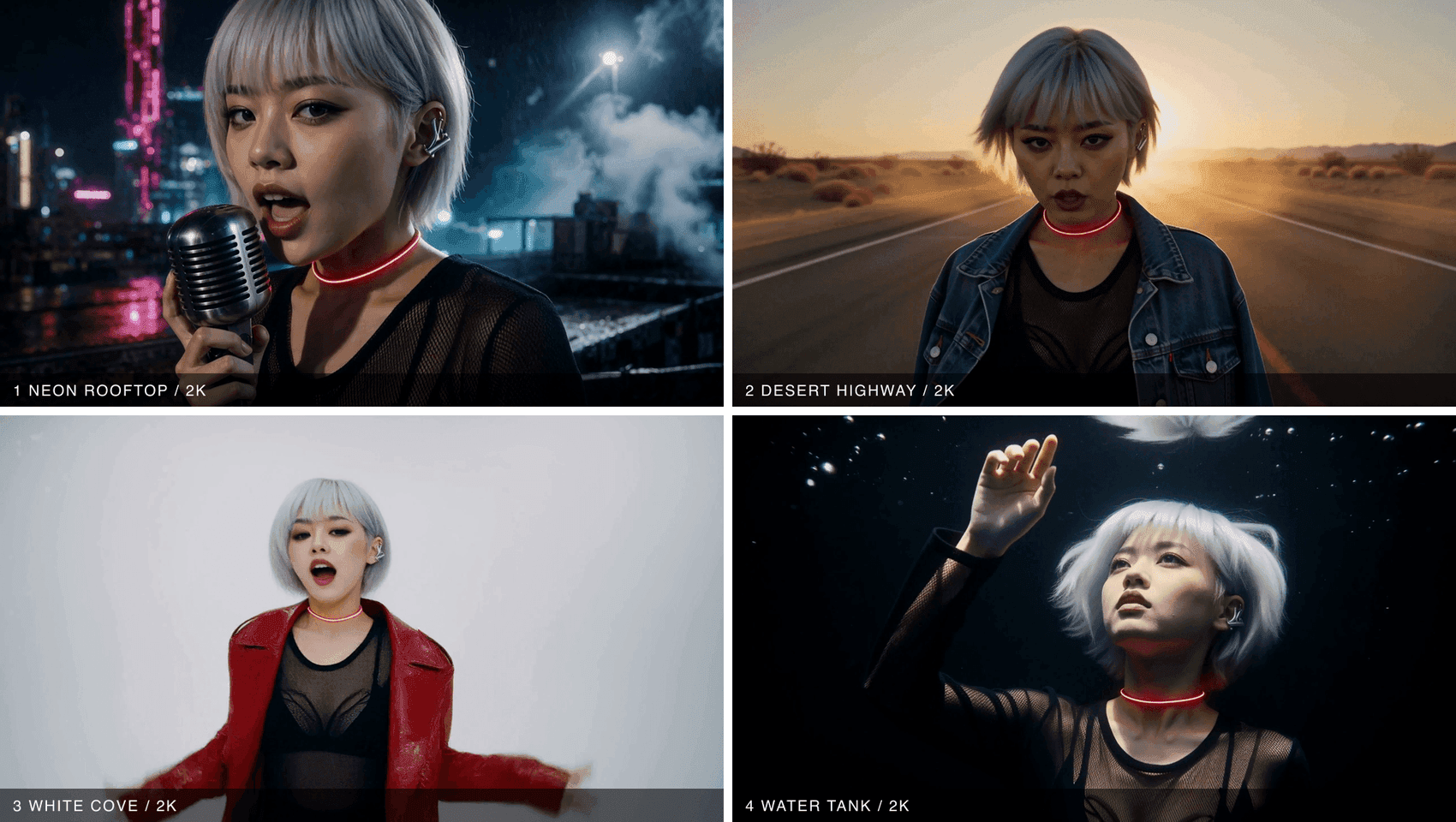
Four frames from the four shots showing the same singer in a neon rooftop, a desert highway, a white studio and a black water tank_One_ frame pulled from each delivered clip. Same hair, same mesh top, same red LED choker across rain, low sun, flat high-key and underwater.
Why Most MiniMax H3 Music Video Attempts Fall Apart at Second Sixteen
Three failure modes, all of them avoidable.
One: treating 15 seconds as the project limit. H3 caps a single generation at 15 seconds. People read that, conclude "no music videos", and quit. But a music video was never one shot. A real one cuts every 4 to 8 seconds anyway. The cap only forces you to do what an editor would have done regardless.
Two: describing rhythm in words. "Upbeat, energetic, dancing to the beat" gives the model nothing to lock to. It invents a tempo, and your cut points land half a beat off forever. Handing it the actual audio removes the guessing.
Three: letting the wardrobe drift. Every shot needs the same reference image and the same wardrobe wording, verbatim. Change "black mesh top" to "dark mesh shirt" between shots and you get a different person.
Here is what the two routes actually cost you:
| Traditional four-tool chain | Single H3 reference call | |
|---|---|---|
| Tools per shot | Image model, video model, lip-sync tool, NLE | One endpoint, then an NLE at the end |
| Manual steps per shot | 4 handoffs, 3 file exports | 1 submit |
| What holds the character | Manual re-prompting and luck | One reference image reused verbatim |
| Picture and sound | Rendered separately, aligned later | Generated in the same pass, 32 kHz stereo |
| Cost per 8-second shot | Four separate meters | $1.12 at 2K, $0.80 at 768P |
To be fair to the old route: it is not a fantasy. Japanese creator Arata Fukoe took a Project Odyssey bronze with a fully AI music video, and both Queen and Linkin Park have shipped official AI-assisted videos. Those chains just ran through four or five tools, which is exactly the thing an independent artist with one song does not have time for.
What Reference Audio Actually Buys a MiniMax H3 Music Video
This is the part worth understanding before you spend anything.
H3 generates picture and sound in one pass rather than dubbing audio onto finished frames. When you hand it a reference track, the track is not a mood note. I compared my input slice against the audio stream inside the delivered mp4, at the waveform level, on an 8 kHz mono downmix:
- Envelope correlation: 0.956 at zero lag
- Raw waveform correlation over a 2-second window: 0.892 at zero sample offset
That is not a model reproducing a similar song. That is your file, sample-aligned, with the ambience the prompt asked for layered on top and one round of AAC re-encoding. For comparison, the same measurement against a control take generated with no reference audio came back at 0.26, which is the noise floor.
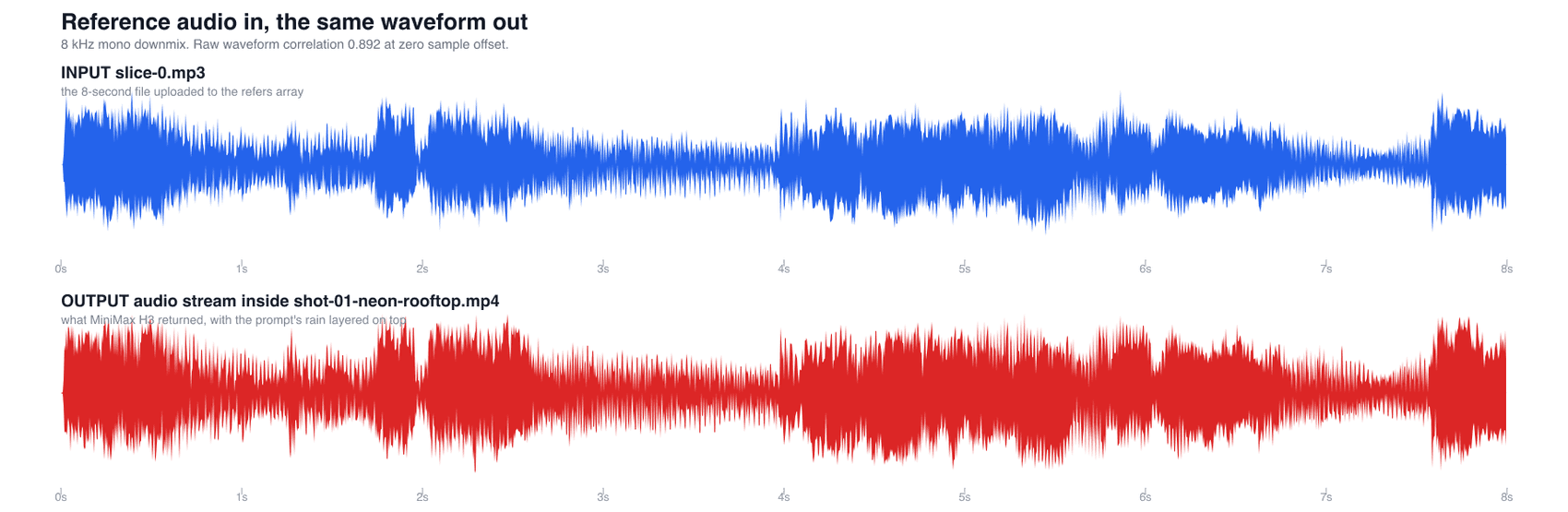
Waveform of the input slice above, the audio H3 delivered below, aligned at zero offset_Top: the 8-second mp3 I uploaded. Bottom: the audio stream inside the mp4 H3 returned. Same peaks, same positions, no offset._
The input limits are strict, and they are enforced at submit time rather than silently:
| Reference input | Limit | Billed |
|---|---|---|
| Images | up to 9 | free on Atlas Cloud's H3 endpoints |
| Videos | up to 3, each 2-15s | billed at the output rate |
| Audio | up to 3, each 2-15s, 15s total across all clips | $0.00 |
| Audio alone | rejected, needs at least one image or video | n/a |
I tested the total-audio ceiling on purpose by sending three 8-second slices in one call. It failed in 5.8 seconds with invalid params, total audio duration 24138 ms exceeds 15000 ms and was not billed. Good news: H3 does not quietly drop the extra file and charge you anyway.
One more trap I hit before that. If you pass audio as a base64 data URL, the MIME type decides the extension the API infers. data:audio/mpeg is rejected with audio format ".mpeg" not allowed. data:audio/mp3 sails through. Four submits died on that before I noticed, all of them free.
The MiniMax H3 Music Video Workflow, and What Each Second Costs
Everything below runs through one API key on Atlas Cloud, which is where I ran and billed all of it. Three models, one browser tab.
| Step | Model | What it does | Price I was actually billed |
|---|---|---|---|
| Write the hook | minimax/music-2.6 | Full song from a style prompt plus lyrics, mp3 up to ~5 min | $0.15 per song, flat |
| Lock the artist | openai/gpt-image-2/text-to-image | One base frame that every shot inherits | $0.1745 at quality high, 2048x1152 |
| Shoot each shot | minimax/h3/reference-to-video | Image plus audio in, beat-locked clip with stereo sound out | $0.14/s at 2K, $0.10/s at 768P. Audio input $0.00 |
Two notes on that table, because the listed numbers lie in both directions. GPT Image 2 shows a $0.009 floor in the catalogue; that is the bottom token tier, and a real 2048x1152 high render bills $0.1745. H3's catalogue entry shows $0.10, which is the 768P tier only; my 8-second 2K jobs each billed exactly $1.12, which is $0.14 per second.
If you want a first-frame lock instead of subject references, [minimax/h3/image-to-video](https://www.atlascloud.ai/models/minimax/h3/image-to-video?utm%5Fsource=blog&utm%5Fmedium=article&utm%5Fcampaign=minimax-h3-music-video) takes the same rates, and [minimax/h3/text-to-video](https://www.atlascloud.ai/models/minimax/h3/text-to-video?utm%5Fsource=blog&utm%5Fmedium=article&utm%5Fcampaign=minimax-h3-music-video) covers pure prompt shots.
The correction worth making: an earlier version of this plan assumed you had to bring your own song because there was no whole-song generator on the platform. There is one now. minimax/music-2.6 writes the track, so the whole chain, song included, runs in one place.
How to Make a MiniMax H3 Music Video, Step by Step
Step 1: Write a 120 BPM Hook and Cut It Into Per-Shot Slices
Ask for 120 BPM explicitly. At 120 BPM one bar is exactly 2.000 seconds, so H3's whole-second duration enum lands on bar lines for free: 4s = 2 bars, 6s = 3 bars, 8s = 4 bars, 10s = 5 bars. Your cuts fall on the downbeat without you touching a single marker.
Model: minimax/music-2.6. Settings: format: mp3, sample_rate: 44100, bitrate: 256000, is_instrumental: false.
Style prompt:
Plain1Synth-pop at exactly 120 BPM, straight four-on-the-floor kick, bright analog 2sidechained pads, clean female lead vocal sitting forward in the mix, wide 3stereo chorus, no rap, sustained open vowels, cinematic and slightly 4melancholy, radio-ready master
Lyrics:
Plain1[Chorus] 2Hold the line, hold the light 3I am running out of night 4Say my name into the rain 5And I will burn again
It returned a 70-second track in 75 seconds for $0.15. I then checked the tempo instead of trusting it, by running an onset-novelty autocorrelation over the file. The strongest lag came back at exactly 0.500 s, which is 120 BPM, and the beat grid starts at 0.24 s into the decoded file rather than at zero. That offset matters: cut from 0.24 and every slice starts on a downbeat.
Bash1# 32-second master, starting on the downbeat at 0.24s 2ffmpeg -ss 16.24 -t 32 -i hook-master-raw.mp3 -c:a libmp3lame -b:a 256k hook-master.mp3 3 4# four 8-second slices, one per shot, each 4 bars and well under the 15s cap 5for i in 0 8 16 24; do 6 ffmpeg -ss $i -t 8 -i hook-master.mp3 -c:a libmp3lame -b:a 192k slice-$i.mp3 7done
If you already have your own track, skip this step entirely. That is the normal case, and it is the cheapest one.
Step 2: Lock the Artist With One GPT Image 2 Base Frame
Every shot references this single file. Whatever is wrong here is wrong four times, so spend the $0.17 and look at it properly.
Model: openai/gpt-image-2/text-to-image. Settings: quality high , size 2048x1152 (16:9).
Plain1Cinematic music-video still, waist-up portrait. A 25-year-old East Asian female 2synth-pop singer with silver-white cropped hair and a straight-cut fringe, a matte 3black mesh top, a thin red LED choker glowing against her collarbone, and a single 4silver ear cuff. She stands on a rain-soaked rooftop at night holding a vintage 5chrome handheld microphone close to her mouth. Behind her, out-of-focus magenta 6and cyan neon signage, fine rain caught in a hard backlight, steam drifting from a 7vent. Shot on 35mm anamorphic, shallow depth of field, teal-and-magenta grade, 8visible film grain. Her face is sharp and evenly lit by a soft key from camera 9left. No text anywhere in the frame.
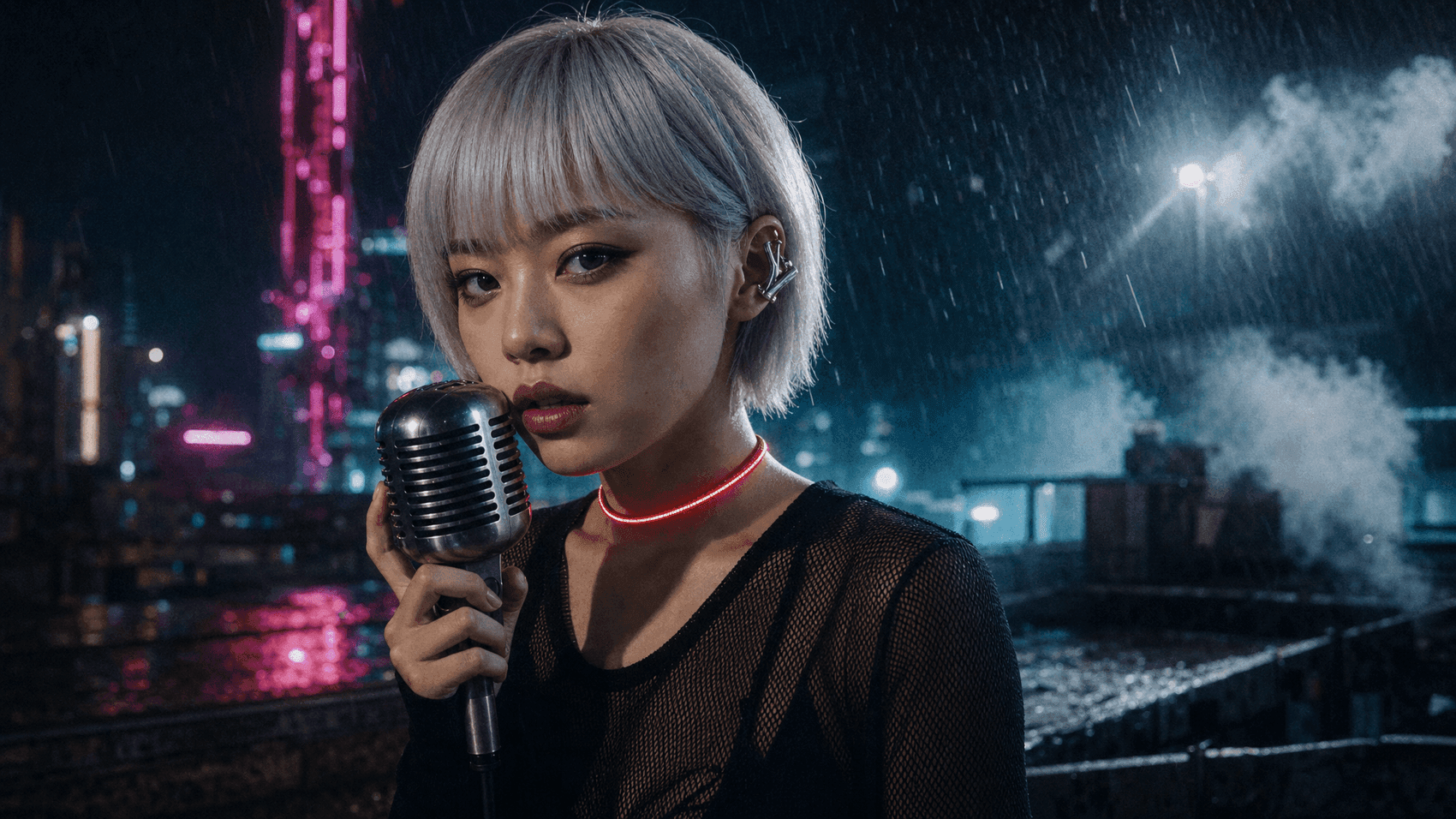
The generated base frame: silver-haired singer with a chrome microphone on a rain-soaked neon rooftop_The_ base frame every later shot inherits. Generated with openai/gpt-image-2/text-to-image , quality high, 2048x1152, billed $0.1745.
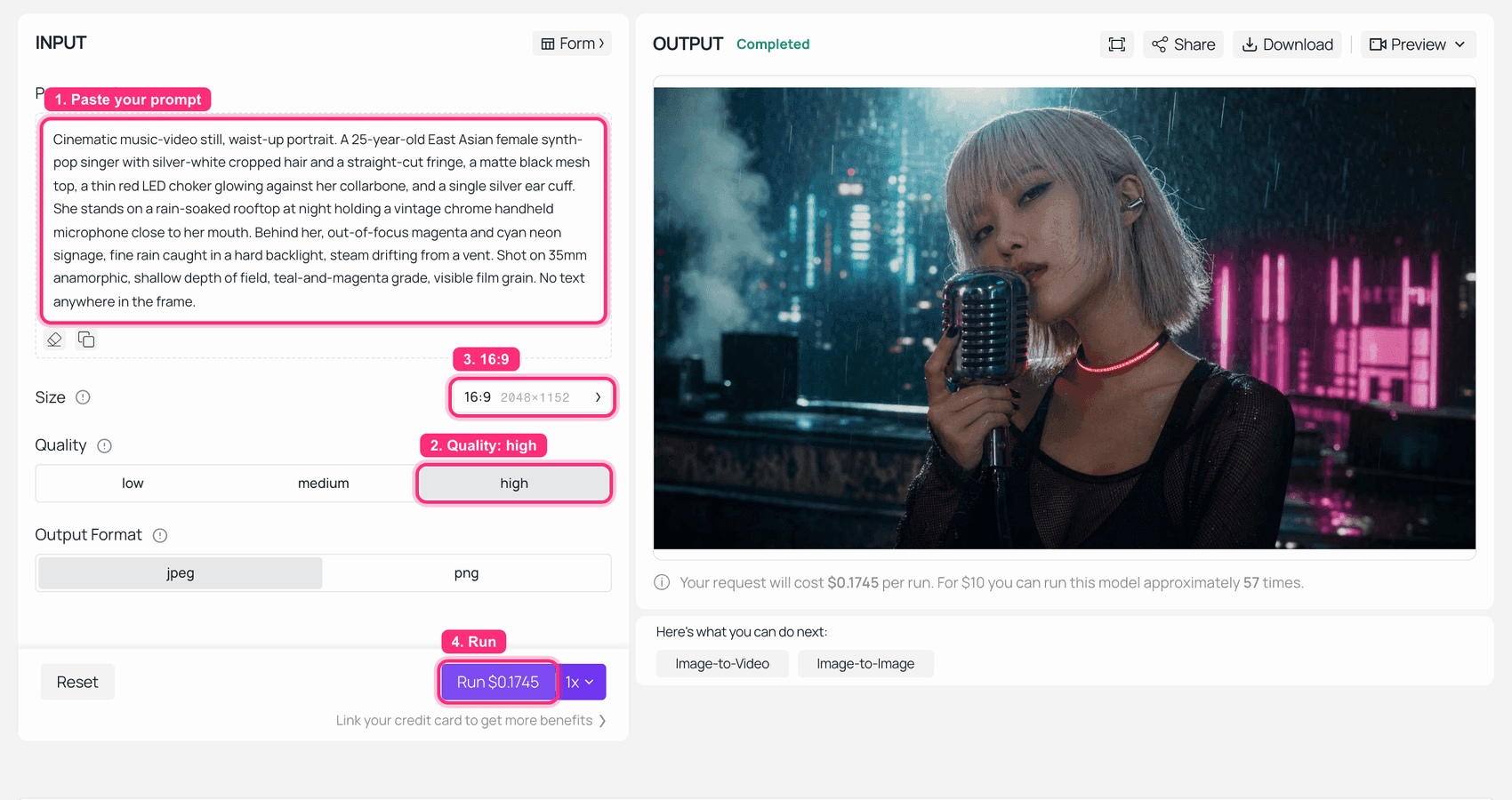
GPT Image 2 running this exact prompt in the Atlas Cloud playground with the finished frame in the output panel
The same prompt in the playground: Size 16:9 at 2048x1152, Quality high, and the Run button quoting $0.1745, which is what the API actually billed me. The catalogue's $0.009 is the bottom token tier, not this one. Same prompt, different seed, so this render is not the exact file above.
The wardrobe words in that prompt (silver-white cropped hair, matte black mesh top, red LED choker, silver ear cuff) get reused verbatim in every prompt below. That repetition is the whole consistency mechanism. Do not paraphrase it.
Step 3: Run the First MiniMax H3 Music Video Shot With Free Reference Audio
Model: minimax/h3/reference-to-video. Settings: refers = the base frame plus slice-0.mp3, resolution: 2K, duration: 8, ratio: 16:9.
Set ratio explicitly. The playground default is adaptive, and the endpoint is much happier when you name the shape you want.
Plain1Music video shot. The woman in the reference image sings the reference track 2straight down the lens on the wet neon rooftop, holding the chrome microphone at 3her mouth. She lands the first line hard on the downbeat, eyes locked to camera, 4then tilts her head back on the sustained note. Slow push-in from waist-up to a 5tight close-up across the eight seconds, handheld micro-drift, rain streaks 6crossing the hard backlight. Her mouth shapes follow the sung vowels of the 7reference audio exactly, she is singing, not speaking. Identical silver-white 8cropped hair, matte black mesh top and glowing red LED choker as the reference 9image. Soundscape: the reference track in stereo, plus faint rain and a distant 10city hum low in the mix.
Shot 1, sound on. 2560x1440, 8.00 s exactly, 24 fps, 32 kHz stereo. 345 seconds from submit to file, billed $1.12. Watch the head tilt back on the sustained note at around 5 s.
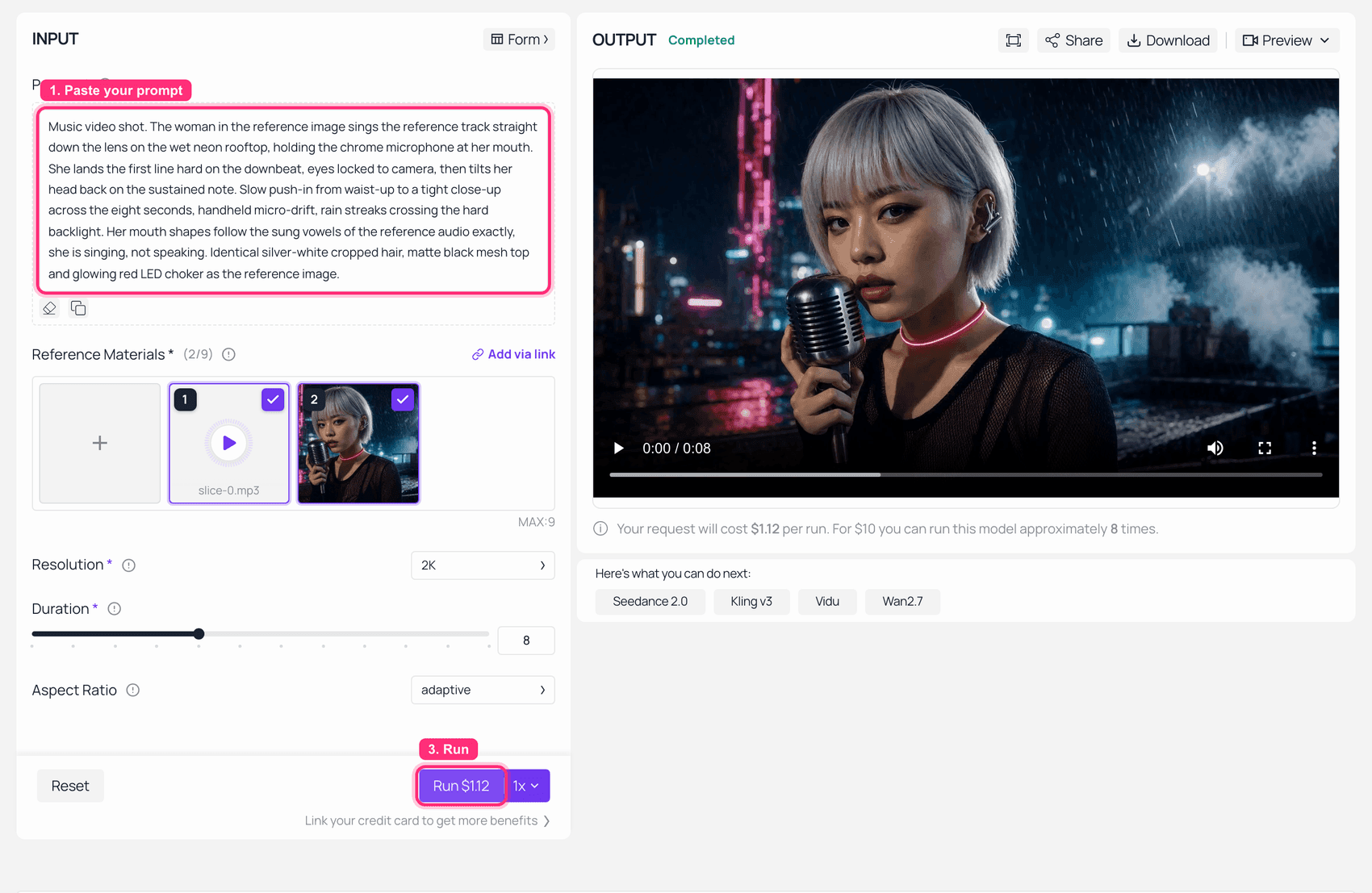
The reference-to-video playground with the base frame and the audio slice loaded and the finished clip in the output panel
Reference Materials reads 2/9: slice-0.mp3 in one slot, the base frame in the other. Resolution 2K, Duration 8, and the Run button quoting $1.12, which is exactly 8 x $0.14. Note the Aspect Ratio dropdown sitting on adaptive , which is the page default; my API calls set ratio to 16:9 explicitly.
One number worth writing down: duration: 8 delivered a container of exactly 8.00 seconds. duration: 4 delivered 4.46 seconds. If you plan to concatenate on bar lines, stay on the durations that come back exact.
Step 4: Shoot Three More Worlds Without Losing the Face
Same base frame, same wardrobe sentence, next audio slice. Everything else changes.
4a. Desert highway at golden hour. refers = base frame + slice-8.mp3, 2K, duration: 8, ratio: 16:9.
Plain1Music video shot. The same woman from the reference image stands on the centre 2line of an empty desert highway at golden hour, no microphone, an open indigo 3denim jacket over the same matte black mesh top, the red LED choker still lit. She 4mouths the chorus of the reference track into the wind while the camera tracks 5backwards low over the asphalt. Heat shimmer off the road, dust lifting, her 6shadow stretching long toward the lens, an anamorphic flare crossing at the 7halfway point. Hair, face and wardrobe identical to the reference image. 8Soundscape: the reference track over open desert wind, wide and airy.
Shot 2, sound on. Same face, opposite colour temperature, and the reference track re-mixed under open wind. 332 s, $1.12.
4b. White infinity cove. refers = base frame + slice-16.mp3, 2K, duration: 8, ratio: 16:9.
Plain1Music video shot. The same woman from the reference image in a pure white 2infinity-cove studio under flat high-key light with no shadows, wearing a glossy 3red vinyl trench coat over the same matte black mesh top, red LED choker visible 4at the collar. She dances four bars to the reference track, silver-white hair 5whipping on each turn. Locked-off wide frame, then a hard snap-zoom to a medium on 6the second downbeat. Small white paper squares fall like confetti through the 7final two seconds. Face and hair identical to the reference image. Soundscape: the 8reference track, dry and close, plus the squeak of shoes on the studio floor.
Shot 3, sound on. Flat shadowless light is the hardest place to hide a face swap, and it held . 8.00 s, $1.12.
4c. Underwater b-roll, no lip sync. refers = base frame + slice-24.mp3, 2K, duration: 8, ratio: 16:9.
Plain1Music video shot. The same woman from the reference image suspended underwater in 2a black tank, silver-white hair floating out around her, the red LED choker 3glowing through the water, the black mesh top billowing slowly. One hard beam of 4light from directly above; bubbles rise past the lens in slow motion. She opens 5her eyes on the downbeat and reaches one hand toward the surface. She does not 6sing and her mouth stays closed. The camera rotates thirty degrees around her 7across the shot. Face identical to the reference image. Soundscape: the reference 8track heard from above the surface, muffled and low-passed, with bubble 9transients.
Shot 4, sound on. The instruction "she does not sing and her mouth stays closed" was obeyed, which is the useful bit: the reference audio drives timing, not a mandatory performance. 329 s, $1.12.
Step 5: Run the Control Take, With the Audio Slot Empty
Same prompt as Step 3, word for word. The only change: refers holds the image and nothing else. 768P, duration: 8.
This one clip explains the entire mechanism better than any paragraph. Listen to it against Step 3.
The control take. Identical prompt, no reference audio, 1344x768, 8.00 s, 200 s, $0.80. H3 wrote its own soundtrack, and the performance is generic "someone is singing" rather than these words.
Measured against my master, the control's audio scores 0.26 envelope correlation. Step 3's scores 0.956. That gap is what the free audio slot buys you.
Step 6: Break the Lip Sync on Purpose
Every model has a syllable ceiling. Finding yours costs $0.40.
I generated a separate double-time rap track (minimax/music-2.6 again, $0.15), cut a 4-second slice running roughly six syllables per second, and fed it into the same rooftop setup at 768P, duration: 4.
Plain1Music video shot. The woman in the reference image raps the reference track 2straight down the lens on the wet neon rooftop, holding the chrome microphone at 3her mouth, delivering every syllable of the fast double-time verse. Locked-off 4medium close-up, slight handheld drift, rain streaks in the hard backlight. Her 5mouth shapes follow the rapped syllables of the reference audio exactly. Identical 6silver-white cropped hair, matte black mesh top and glowing red LED choker as the 7reference image. Soundscape: the reference track in stereo plus faint rain.
The stress test, sound on. 1344x768, 4.46 s, 192 s, $0.40. The mouth stays busy and stays on the beat, but it stops resolving individual consonants and settles into a repeating open-close cycle. Sung lines get distinct vowel shapes; this does not.
My honest read from the delivered files: sustained sung vowels are where H3's mouth work is genuinely convincing, and dense rapped consonants are where it degrades into plausible motion. Plan your close-ups around the sung lines and put the fast bars on b-roll. There is more detail on the speech-versus-singing difference in the lip sync and audio breakdown.
Step 7: Stitch, Mute, and Lay the Master Back Over Your MiniMax H3 Music Video
Four clips of exactly 8.00 seconds concatenate to exactly 32.00 seconds, which is 16 bars at 120 BPM. No trimming.
Bash1# 1. strip each clip's audio 2for f in 01-rooftop 02-highway 03-cyc 04-underwater; do 3 ffmpeg -i $f.mp4 -an -c:v copy $f-mute.mp4 4done 5 6# 2. concatenate in bar order (4 x 8s = 32s = 16 bars @ 120 BPM) 7printf "file '01-rooftop-mute.mp4'\nfile '02-highway-mute.mp4'\nfile '03-cyc-mute.mp4'\nfile '04-underwater-mute.mp4'\n" > shots.txt 8ffmpeg -f concat -safe 0 -i shots.txt -c copy mv-silent.mp4 9 10# 3. lay the original master back 11ffmpeg -i mv-silent.mp4 -i hook-master.wav -c:v copy -c:a aac -b:a 320k -shortest minimax-h3-music-video.mp4
Why bother muting, if the model already gives your track back? Because each clip's stereo mix carries the ambience that clip's prompt asked for: rain on shot 1, desert wind on shot 2, a low-pass underwater filter on shot 4. Lovely per shot, incoherent across a cut. The master gives you one continuous mix at full bitrate with no per-shot re-encode. H3 delivers the performance sync. Your master delivers the song.
Four Variations on the MiniMax H3 Music Video Recipe
Vertical release cuts. Set ratio: 9:16 and you get a Spotify Canvas or a Shorts slice from the same base frame and the same slices. It came back a true 768x1344, so unlike the aspect dropdown in the playground, the API ratio value does stick. Canvas loops are silent by design, so this one ships as a GIF.
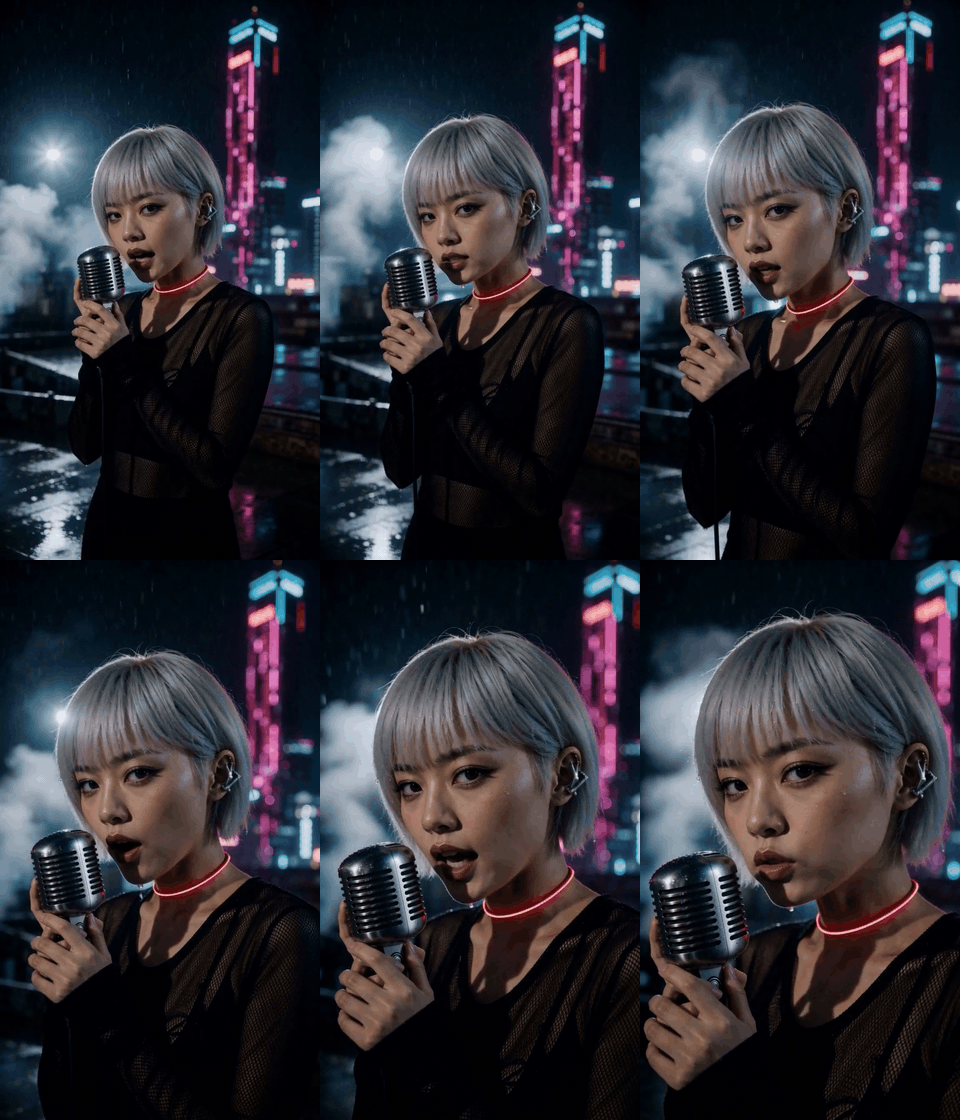
A vertical 9:16 loop cut of the same artist on the neon rooftop_Same base frame, same reference slice,_ ratio: 9:16 at 768P for $0.80. One honest wrinkle: I asked for "not singing" and got singing anyway. With a vocal in the reference slot, the audio wins the argument. If you want a silent performer, feed an instrumental slice.
Reference video instead of reference image. You can hand H3 up to three reference video clips to carry motion and framing rather than describing them. Watch the meter: reference video bills at the output rate, while reference audio is free. That asymmetry is the single most useful pricing fact on this endpoint.
Pure b-roll visualisers. Drop the performer entirely. Feed a product shot, an album cover object or a texture plate plus the audio slice, and prompt camera motion only. No face to hold, no lip sync to break, and you can shoot the whole thing at 768P.
Draft cheap, finish expensive. 768P is $0.10/s against 2K's $0.14/s, and both come back with identical 32 kHz stereo, so the performance you are judging is the same. The saving is not in the keepers, it is in the rejects: every failed 8-second take costs $0.80 instead of $1.12. Roll at 768P until the take is right, then pay the $1.12 once. On a shot that takes three attempts that is $2.72 rather than $3.36. More on the tier difference in the 768P versus 2K comparison, and on how far a single clip can stretch in the clip length guide.
What a Full MiniMax H3 Music Video Actually Cost
Every line below is a real billed figure pulled back from the prediction record after completion, not a list price.
| Line item | Model and settings | Billed |
|---|---|---|
| Hook, 70 s song | minimax/music-2.6, mp3 44.1 kHz | $0.15 |
| Artist base frame | openai/gpt-image-2/text-to-image, high, 2048x1152 | $0.17 |
| Shot 1, neon rooftop | minimax/h3/reference-to-video, 2K, 8 s | $1.12 |
| Shot 2, desert highway | same, 2K, 8 s | $1.12 |
| Shot 3, white cove | same, 2K, 8 s | $1.12 |
| Shot 4, underwater | same, 2K, 8 s | $1.12 |
| Finished video subtotal | $4.80 | |
| Validation probe | 768P, 4 s | $0.40 |
| Control take, no audio | 768P, 8 s | $0.80 |
| Rap track for the stress test | minimax/music-2.6 | $0.15 |
| Lip-sync stress test | 768P, 4 s | $0.40 |
| Vertical Canvas cut | 768P, 8 s, 9:16 | $0.80 |
| Hero image for this article | openai/gpt-image-2/text-to-image, high | $0.17 |
| Over-limit test, 24 s of audio | rejected at submit | $0.00 |
| Four submits with the wrong audio MIME | rejected at submit | $0.00 |
| Reference audio, 4 x 8 s | free input | $0.00 |
| Total spend | $7.53 |
That is $9.00 per finished minute at 2K on the shots that made the cut, before any of my mistakes. Shot entirely at 768P the same minute lands at $6.61. A human MV crew does not quote either of those numbers.
Two operational notes if you are budgeting a longer piece. Submit-time rejections are free, so bad parameters cost you time and nothing else. And the price field on a prediction populates on a delay, so poll the request ID again after the file downloads if you want a real invoice rather than a null.
Whose Song, Whose Face: What to Check Before You Publish
Short, because it matters and does not need a sermon.
You need the rights to the reference track. Free input does not mean free clearance. Feeding a commercially released single in as reference audio, then publishing what comes out, is the fast route to a takedown. Your own recording, a track you commissioned, or something you generated is fine.
Do not build the base frame from a real living artist's face. The consistency mechanism here is very good at holding a face across shots, which is exactly why pointing it at a real person is a bad idea.
Open weights and API access are two different licences. MiniMax published H3's weights on Hugging Face in August 2026, and its community licence currently excludes the EU, UK, South Korea and the US, with a formal licensing channel open for those territories. That restriction attaches to running the weights yourself. Calling the model through a hosted API is a service relationship and does not put you under the weights licence. Worth knowing which situation you are in before you assume either way.
For a wider view on where H3 sits against the alternatives, there is a Seedance 2.5 comparison and a prompt structure guide. For context on why it is worth the trouble at all: on the video editing leaderboard that scores models with audio, H3 currently sits first at 1,126 Elo, ahead of Gemini Omni Flash at 1,119 and Dreamina Seedance 2.0 at 1,027 (Artificial Analysis, checked 10 August 2026). Those scores roll with the votes, so treat them as a snapshot.
MiniMax H3 Music Video: Frequently Asked Questions
Can one MiniMax H3 music video run a full three minutes?
Not in one generation. A single call caps at 15 seconds. But that is a per-generation ceiling, not a per-project one. A three-minute video at 8 seconds a shot is 23 generations, roughly $25.76 at 2K, and each one lands on a bar line if your track is 120 BPM. Slice, shoot, concatenate, lay the master back.
Does a MiniMax H3 music video use my actual song, or does the model regenerate the audio?
It uses your actual song. I measured 0.892 raw waveform correlation at zero sample offset between the 8-second mp3 I uploaded and the audio stream inside the returned mp4, with the prompt's requested ambience layered on top. A control take generated without reference audio scored 0.26 against the same master. You should still lay your master back over the final concatenation, because each clip carries its own per-shot ambience and its own AAC encode, which do not survive a cut cleanly.
Does feeding a song into a MiniMax H3 music video cost extra?
No. My four 8-second reference slices added $0.00 to a $4.48 shot bill. Reference video is the one to watch, because it bills at the output rate. The limits are three audio clips, 2 to 15 seconds each, 15 seconds total, and audio can never be the only reference.
How good is MiniMax H3 lip sync on singing compared with speech?
Sustained sung vowels are its strong suit: distinct mouth shapes, holds that match the note, and the tilt-back on a long note reads as a performance rather than a loop. Dense delivery is where it gives up. My six-syllables-per-second rap test kept the beat but stopped resolving consonants and fell into a repeating open-close cycle. Put the fast bars on b-roll.
How do I keep the same face across every shot of a MiniMax H3 music video?
Three things, all of them boring. One reference image reused in every call, never regenerated. The same wardrobe wording copied verbatim between prompts, not paraphrased. And an explicit "identical to the reference image" clause in each prompt. My four shots crossed rain, low sun, flat high-key and underwater with no drift.
How much does a MiniMax H3 music video cost per finished minute?
$9.00 per finished minute at 2K, based on my real bill of $4.80 for a 32-second cut. Shot entirely at 768P the same minute costs $6.61, and 768P delivers the same 32 kHz stereo, so the performance you are judging is identical. Roll your rejects at $0.80 and pay the $1.12 only on the take that survives the edit.





