The right AI API for Small Businesses removes one repeated job from a real workflow. It does not replace the owner’s judgment, promise customers a result, or turn every inbox message into an experiment. Start with an internal or low-risk task such as sorting enquiries, extracting fields, or drafting a reply for approval.
If your team cannot name the repeated task that loses the most hours each week, pause before buying or building anything. Map that task first. Then give one person ownership, keep a human approval step, and measure the workflow for 90 days.
Key takeaways
- Pick one frequent task with a fixed input and a reviewable output.
- Treat model usage as one line item, alongside setup, automation, and review time.
- Let AI classify, extract, and draft. Keep sending, pricing, refunds, and commitments with people.
- Ship with logs, a spending cap, and a clear stop switch.
Almost 60% of small businesses surveyed by the U.S. Chamber said they use generative AI in 2025, up from 40% in 2024. That signals broad experimentation, not proof that every workflow deserves an API connection (U.S. Chamber of Commerce, 2025). The useful question is smaller: can this workflow produce a cleaner, faster next step without creating a customer or compliance risk?
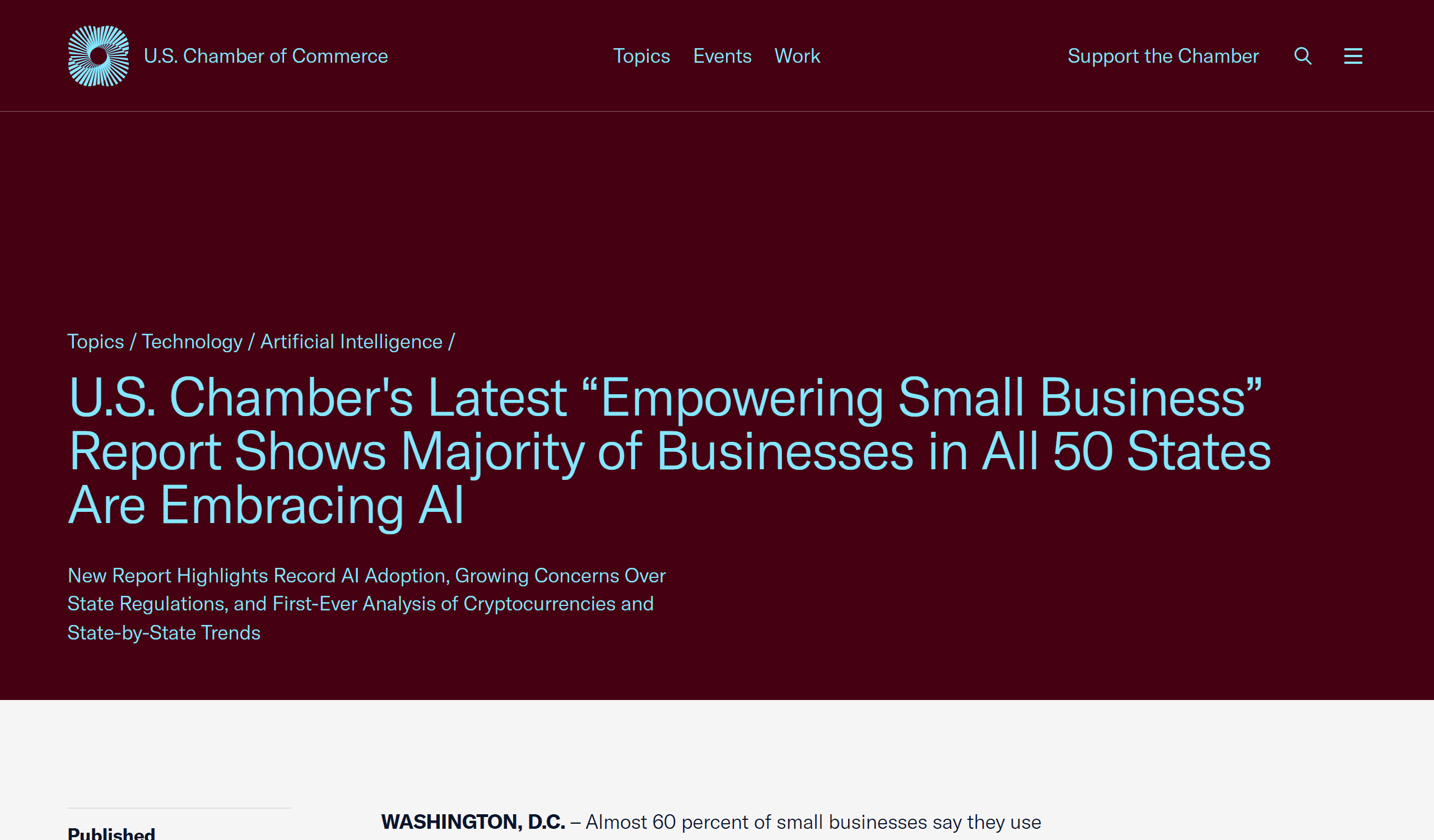
U.S. Chamber source page showing small-business generative AI adoption data
Source evidence for the adoption context: the U.S. Chamber’s 2025 report states that 58% of surveyed small businesses use generative AI.
Do Small Businesses Need an AI API or a Ready-Made Tool?
An API is useful when AI needs to work inside a process you already use: a contact form, shared inbox, CRM, ticket queue, spreadsheet, or internal portal. A chat subscription is often enough for occasional drafting. A ready-made product is usually better when its built-in workflow already matches your needs.
The decision is about control and repeatability, not technical prestige. An API gives your team a way to pass the same business facts and message format into a model every time, then route the structured result to the right human. It also creates a place to log inputs, outputs, costs, and exceptions.
| Option | Best fit | What you control | Watch for |
|---|---|---|---|
| Chat subscription | Occasional writing, brainstorming, or one-off analysis | The prompt in a person’s hands | Work stays manual and may not be logged consistently |
| Ready-made SaaS | A stable need already covered by the product | Settings and templates | It may not match your existing intake or approval process |
| No-code or low-code flow | A narrow pilot across existing tools | Triggers, fields, and routing | Check error handling, permissions, and task fees |
| Custom API workflow | A repeated task that needs your rules and data shape | Prompt, schema, logging, routing, and fallback | Someone must maintain it as the business changes |
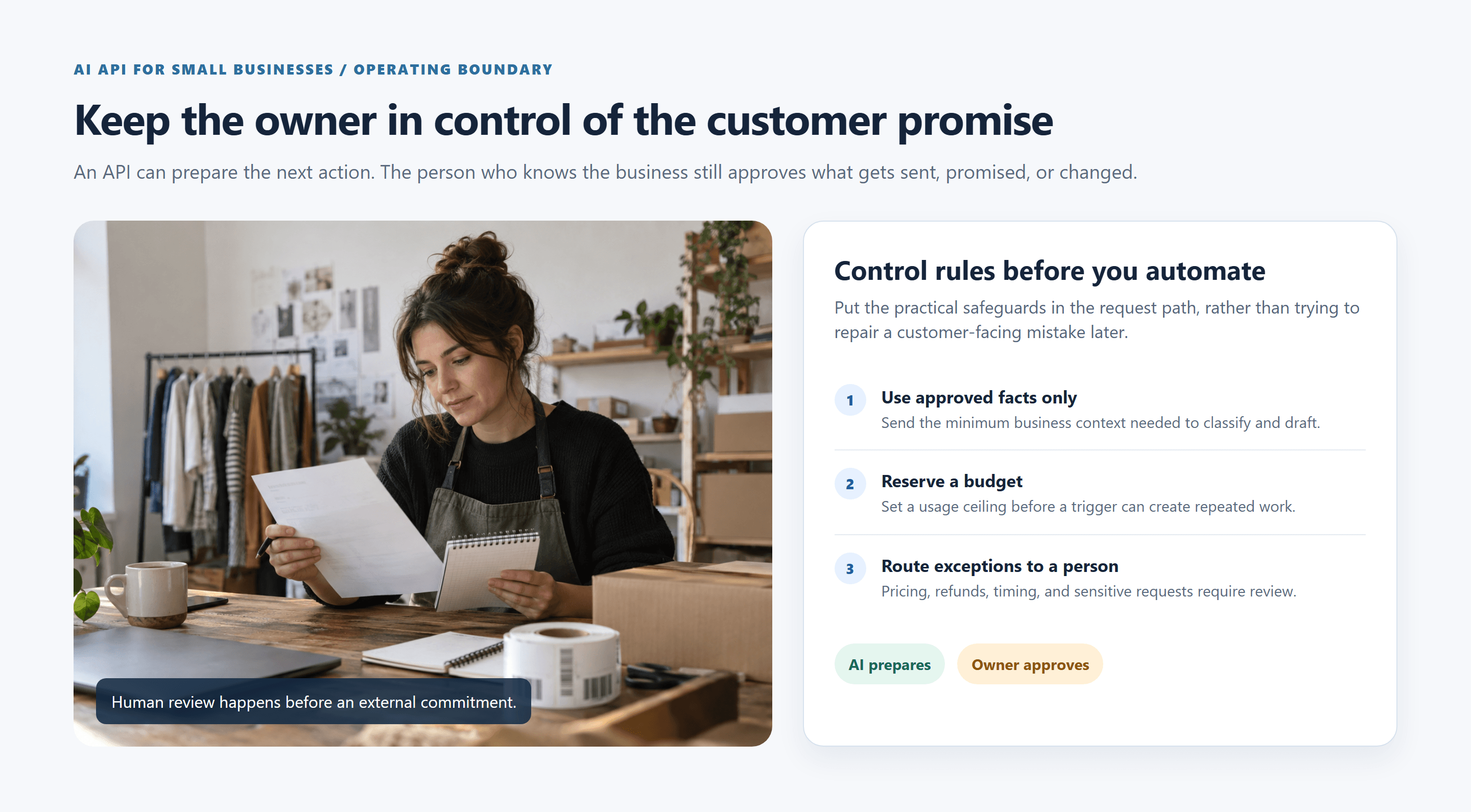
Small-business owner using API control rules to review customer-facing work
Illustrative operating scene: the API prepares a reviewable next action, while the owner controls approved facts, spend limits, and customer commitments.
Skip an API for now if your process changes every week, your source documents conflict, nobody can own the workflow, or the only request is “write better marketing copy sometimes.” Stabilize the work first. A human using a shared prompt template can teach you more than a rushed integration.
The current adoption gap reinforces that point. The Census Bureau reported that AI use differed sharply by company size and industry in its 2026 business survey, while firms with fewer than 20 employees did not show a significant change during the measured period (U.S. Census Bureau, May 2026). Smaller teams should choose the process that fits their actual volume and risk, rather than copying an enterprise rollout.
The AI API for Small Businesses Rule: One Measurable Workflow
Score a candidate workflow against five conditions:
- Frequent: it happens often enough to create a visible baseline.
- Low risk: a wrong draft is inconvenient, not legally, financially, or personally harmful.
- Structured input: the message, form, call note, or document has a repeatable shape.
- Reviewable output: a person can check the result quickly against the original.
- Recordable outcome: you can count time, edits, escalations, missed follow-ups, or errors.
Use a simple screening formula: frequency + low consequence + fixed input + fast review + measurable result. A workflow that meets four or five conditions is a stronger first pilot than an impressive-looking chatbot.
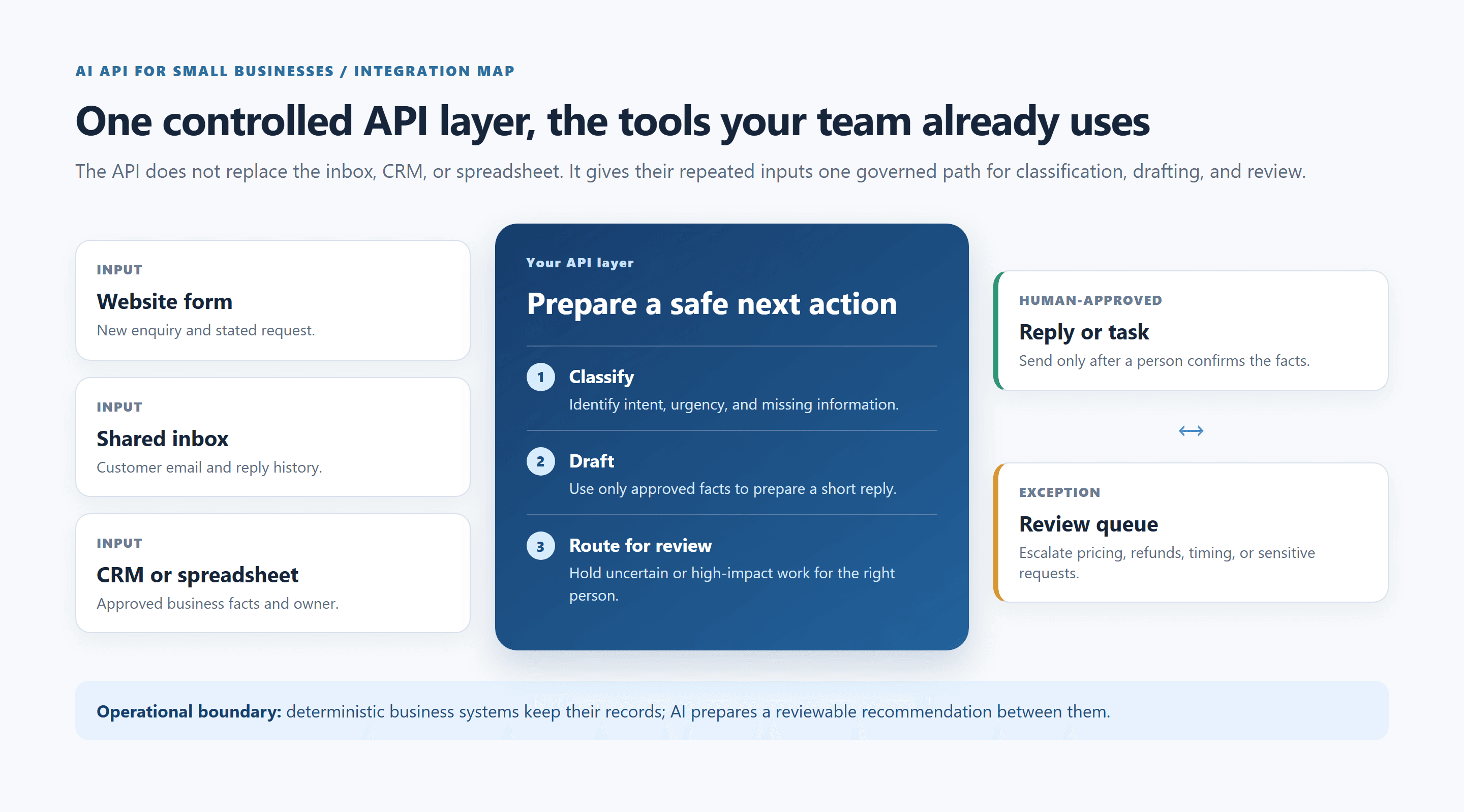 One controlled API layer connecting an existing website form, shared inbox, CRM, and spreadsheet
A governed API layer connects existing inputs to a human-approved reply or review queue; it does not replace the systems where the business already works.
For most teams, start in this order:
- Enquiry or support-ticket classification with a reply draft.
- Structured summaries of long emails, call notes, or web forms.
- Lead-detail extraction and a draft CRM update.
- Internal-document answer drafts that always point a staff member back to source material.
Hold back on automatic quotes, refunds, contract language, medical, legal, or financial advice, outbound calling, and unreviewed cold email. A model can prepare a recommendation in those areas. It should not make the decision or create an external commitment.
AI API for Small Businesses Use Cases, Ranked by Risk
Low-Risk AI API Tasks for Small Businesses
Low-risk work helps a person find the next action faster. The original text remains available, and a reviewer can spot a bad result without special expertise.
| Use case | Input | Output | Human remains responsible for | Useful metric |
|---|---|---|---|---|
| Inbox triage | Customer email or form | Intent, urgency, owner, tags | Checking edge cases and sending | Time from arrival to assignment |
| Field extraction | Lead form or call note | Name, product interest, location, missing fields | Confirming facts before CRM write | Fields completed correctly |
| Meeting summary | Recording transcript or notes | Decisions, tasks, owners, due dates | Correcting the record | Editing time per meeting |
| Internal report draft | Approved source data | First draft with cited inputs | Final interpretation and approval | Draft-to-approved time |
These tasks earn their place because they preserve a person’s control. The output is a work item, not a customer-facing promise.
Medium-Risk AI API Customer Automation
Medium-risk work touches a customer, inventory, pricing preparation, or a shared operating record. Use bounded business facts, require approval before sending, and define an escalation path.
Examples include FAQ drafts based only on an approved knowledge base, enquiry pre-screening, quote preparation that never states a final price, and inventory-exception summaries. The model can flag a missing order number or prepare questions for a customer. A staff member should decide whether the response is complete and accurate.
Give these workflows a narrow answer space. If the facts do not answer the question, the system should say so internally and create a review task. Do not invite the model to fill the gap with a plausible guess.
 Small-business owner reviewing work at a computer before approving an AI-assisted customer action
Illustrative review moment: AI can prepare a recommendation, but a person checks the business context before approving a customer-facing action.
High-Risk AI API Decisions to Keep With People
Do not fully automate decisions that create a financial commitment, determine someone’s rights, or use sensitive personal data. That includes refunds, discounts, appointment availability promises, contract clauses, employment decisions, credit or insurance guidance, medical or legal guidance, and account-access changes.
The distinction matters: automation can recommend; a person must decide. A good workflow sends a concise brief to the right employee, retains the source message, and records the final human action.
Build Your First AI API Workflow in 5 Steps
This is one continuous example: enquiry triage, a reply draft, and human confirmation. It does not claim a customer success story or a guaranteed saving. It gives you a testable operating pattern.
Step 1: Map Your AI API Input and Human Decision
Start with a real inbound message from a form or shared inbox, after removing information you do not need for the pilot. Your workflow should produce these fields:
intenturgencymissing_informationdraft_replyneeds_human_reviewreason_for_review
The human decision is separate: send, edit, ask a follow-up, transfer the message, make a pricing decision, or close the record. Write that boundary in the workflow specification before you connect a live mailbox.
Step 2: Set the AI API System Prompt
Put this prompt on the server side with the approved business facts. Do not place an API key, prompt with private policy detail, or customer data in browser JavaScript.
plaintext1You are an intake assistant for a small business. 2 3Use only the business facts supplied in this request. Do not invent prices, 4availability, policies, delivery times, or guarantees. 5 6Your job is to classify the message, identify missing information, and draft a 7brief reply for human review. Never claim that an action has been completed. 8 9Return valid JSON only: 10{ 11 "intent": "sales | support | billing | urgent | other", 12 "urgency": "low | normal | high", 13 "missing_information": ["..."], 14 "draft_reply": "...", 15 "needs_human_review": true, 16 "reason_for_review": "..." 17} 18 19Set needs_human_review to true for complaints, refunds, pricing, scheduling, 20legal questions, sensitive personal data, or any request not directly answered 21by the supplied business facts.
Step 3: Test the AI API Before Live Customer Data
Use an isolated test payload first. It exercises a billing-related enquiry and a scheduling request, so the correct outcome is a structured draft that requires review.
plaintext1Business facts: 2- Business hours: Monday to Friday, 9:00 AM to 5:00 PM local time. 3- Support team replies within one business day. 4- Pricing and delivery commitments require staff confirmation. 5- Refund requests must be reviewed by a staff member. 6 7Customer message: 8"I need help with an order and would like to know when someone can call me. 9I also have a question about a charge."
For a small text pilot, Atlas Cloud provides an OpenAI-compatible endpoint. Its DeepSeek model directory is a practical place to check the current model listing before you configure the test. Confirm the exact model identifier in your account before deployment, because availability can change.
This minimal server-side cURL request shows the shape of the call. Store ATLAS_API_KEY in server-side environment configuration or a secrets manager. Never expose it in a webpage, mobile app bundle, or client-side automation.
plaintext1curl https://api.atlascloud.ai/v1/chat/completions \ 2 -H "Authorization: Bearer $ATLAS_API_KEY" \ 3 -H "Content-Type: application/json" \ 4 -d '{ 5 "model": "deepseek-ai/deepseek-v4-flash", 6 "temperature": 0, 7 "response_format": {"type": "json_object"}, 8 "messages": [ 9 {"role": "system", "content": "You are an intake assistant. Use only supplied facts. Return valid JSON with intent, urgency, missing_information, draft_reply, needs_human_review, and reason_for_review. Set needs_human_review true for billing, scheduling, refunds, pricing, legal questions, sensitive personal data, or unsupported requests."}, 10 {"role": "user", "content": "Business facts: Support replies within one business day. Pricing, delivery commitments, refunds, and callbacks require staff confirmation. Customer message: I need help with an order and would like to know when someone can call me. I also have a question about a charge."} 11 ] 12 }'
Start with a small batch of known test messages. Check whether every result parses as JSON, whether the urgency and review flags match your policy, and whether the draft avoids claims that the facts do not support. A result that looks fluent but breaks the schema is a failed result.
Step 4: Add an AI API Human Review Queue
The model may classify, extract, and draft. A human may send, promise, edit a customer record, approve a refund, or commit a time slot. Build the queue before you switch on any automation.
Route directly to the review queue when JSON parsing fails, the system times out, required fields are missing, a message contains sensitive terms, or the model’s output conflicts with a business rule. Keep the original message next to the output so a reviewer does not have to reconstruct context.
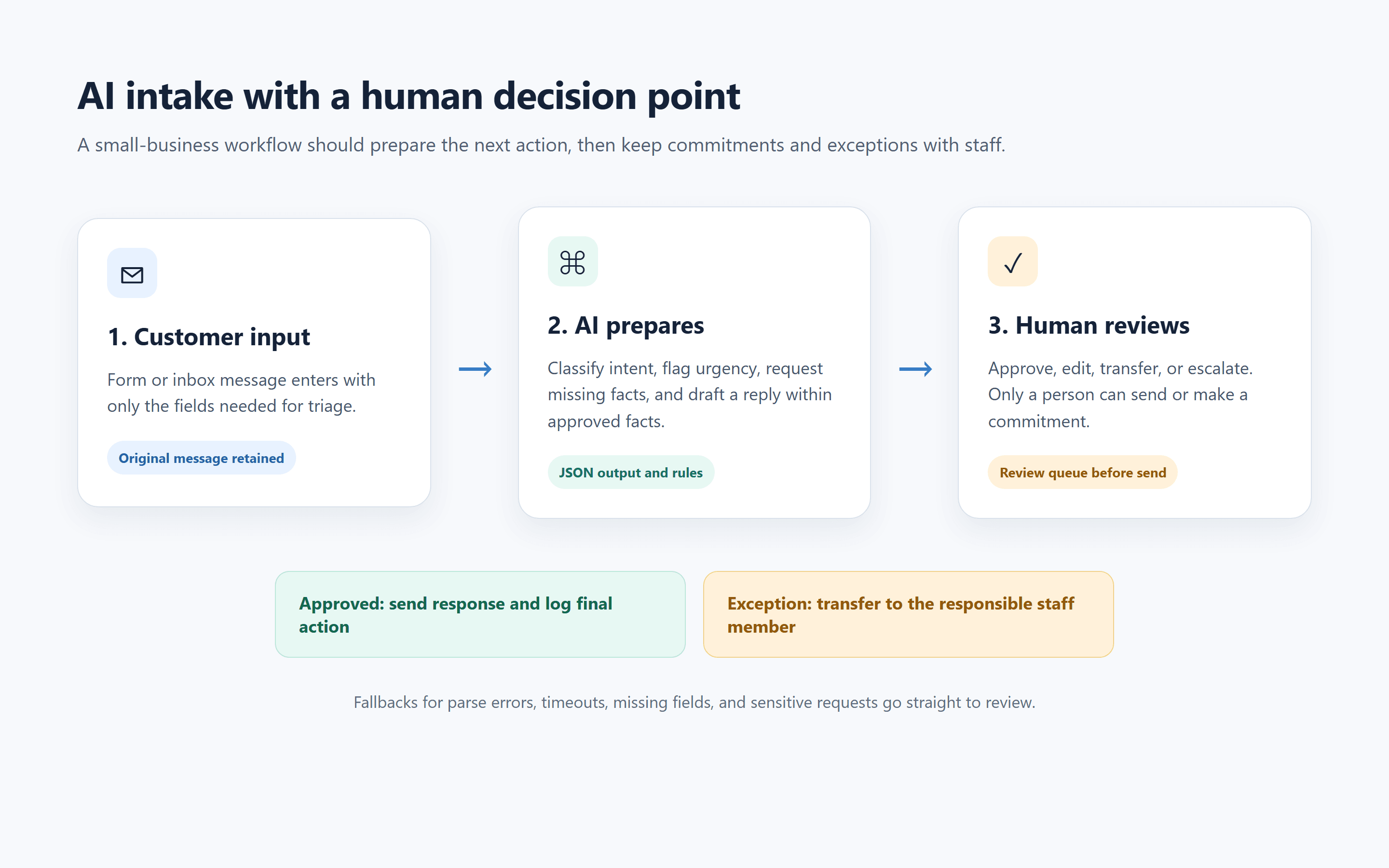
Flow diagram showing customer input, AI classification, human approval or escalation, then sending and logging
A reviewable workflow: AI prepares the next action, while a person approves, escalates, sends, and records the final outcome.
Step 5: Measure the First 30 Days
Measure the workflow against its pre-pilot baseline. Do not claim a return on investment because a few messages received good drafts.
Track these fields for each run:
- Arrival-to-assignment time.
- Human edit rate and the reason for each material edit.
- Escalation rate and categories.
- Confirmed error rate, including incorrect classifications.
- Model cost per processed message.
- Missed or late follow-ups.
At day 30, read a sample of approved and rejected outputs with the staff member who owns the inbox. If the review queue takes longer than the old process, the safe action may be to narrow the task, revise the facts, change the output schema, or stop the pilot.
AI API Cost for Small Businesses: Set a Ceiling
The model bill starts with a straightforward formula:
monthly model cost = input tokens × input rate + output tokens × output rate
Your actual operating cost also includes setup and maintenance time, the automation platform or hosting bill, and the time a person spends reviewing output. Those costs vary by workflow, so use your own volume and review baseline instead of borrowing a generic monthly figure.
Set a monthly hard limit before the first live test. Limit output length. Use a smaller, suitable text model for fixed classification and drafting. Reserve a stronger model for a small number of exception drafts after you have evidence that it improves the human-reviewed result.
Check the current Atlas Cloud Model Library on the day you publish or deploy. Model rates, discounts, identifiers, and availability change. This article intentionally does not lock a promotional claim or a dated price into customer-facing copy.
Use a simple monthly control sheet:
| Control | Starting rule | What it prevents |
|---|---|---|
| Spend ceiling | Stop new automated runs at the agreed monthly limit | A runaway trigger or unexpected volume |
| Output limit | Cap the reply draft to the length a reviewer needs | Extra tokens and long, unhelpful drafts |
| Weekly usage review | Compare requests, tokens, errors, and costs | Surprise bills and hidden failure patterns |
| Exception rule | Upgrade only tagged edge cases | Paying a higher rate for every routine message |
| Manual fallback | Queue errors to a named person | Lost customer messages during an outage |
Make an AI API for Small Businesses Safe Enough to Keep
Safety comes from workflow design, not a sentence asking the model to “be accurate.” Use four layers:
- Minimum data: send only the fields needed for the task. Remove credentials, payment data, and unrelated personal details.
- Bounded sources: provide approved business facts and tell the model to use only those facts.
- Human approval: require a person before customer-facing delivery or record changes.
- Auditable logs: retain a protected record of the source, output, rule triggered, reviewer, and final action for a period appropriate to your policy.
Clean the source material before you connect it. Archive outdated price lists, resolve conflicting return policies, and remove files that the workflow should not access. An AI system cannot reliably repair a knowledge base that has no single correct version.
Be transparent in customer-facing use. Do not let an unreviewed draft imply that a person completed a request. A small-business discussion about building chatbots made the same operational point: reliable customer automation depends more on real business material, clear escalation rules, and human handoff than on a model name (r/smallbusiness discussion, accessed September 2026). Treat that as practitioner experience, not a benchmark.
A Practical AI API Path Beyond One Model
You do not need multi-model routing on day 1. First prove that the text classifier and draft schema hold up under review. Then test another option only against a labelled sample: compare parse success, edit rate, response time, and cost per accepted output.
If a small share of exceptions needs more careful drafting, route only that queue to a second review-oriented model such as DeepSeek V4 Pro 0813, then still require staff approval. Keep the routine path simple.
This is where a unified API can reduce integration churn for a small team. One endpoint and billing surface can let you test a different text model later, then evaluate separate image, audio, or video needs only when a real workflow calls for them. The first workflow here remains text-only because it solves an inbox decision without adding unnecessary media generation.
Your 90-Day AI API Rollout Plan
| Phase | Goal | Required output | Do not do this |
|---|---|---|---|
| Days 1-14 | Find one repeated task | Process map, sample inputs, baseline metrics, named owner | Connect several systems at once |
| Days 15-30 | Prove the test flow | Structured output, review queue, error path | Send customer messages automatically |
| Days 31-60 | Run a limited live pilot | Review logs, spend ceiling, error tags | Expand because one result looked good |
| Days 61-90 | Decide to extend or stop | Metric review and keep, change, or stop decision | Keep a weak workflow for “AI strategy” |
The day-90 decision should be specific. Keep the workflow if it meets its quality and time criteria within the cost ceiling. Change it if a narrow rule or missing fact causes most failures. Stop it if human review, maintenance, or errors erase its value.
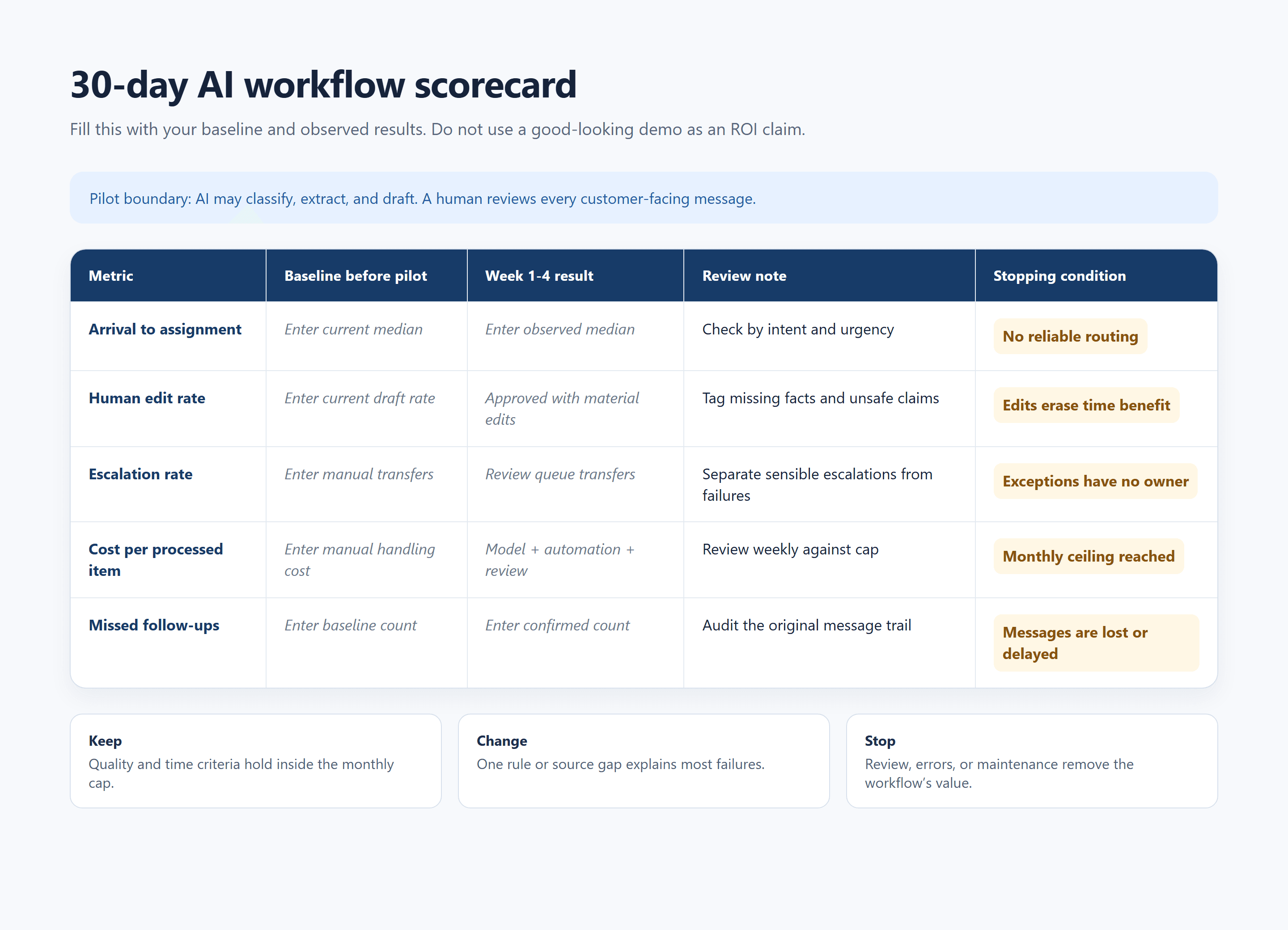 30-day scorecard template with baseline, edit rate, escalation rate, per-item cost, and stopping condition
A blank scorecard for your own pilot. It records operating evidence without inventing a customer ROI figure.
Frequently Asked Questions
Do small businesses need an AI API if they already use ChatGPT?
No. A chat tool is enough for occasional work. Consider an API when the same prompt, facts, and output format must move through a repeatable business process, such as a shared inbox or CRM queue, with logging and a review step.
How much does an AI API cost each month?
It depends on request volume, tokens, model rates, automation fees, and human review time. Start with a spending ceiling, restrict output size, record real usage weekly, and check current rates before publishing a budget.
What is the safest first automation?
Classifying incoming messages and drafting a reply for human approval is a strong starting point. It gives the team a visible output, keeps the original message available, and avoids automatic customer commitments.
Can a small business start without a full-time developer?
Often, yes. A technically confident operator can validate one fixed workflow with a no-code or low-code connector and a server-side secret. Bring in a developer when you need custom data handling, access controls, retries, audit requirements, or a durable integration.
Can AI automate customer support without hurting trust?
It can assist support safely when it handles routing, extraction, and drafts within approved facts, while a person approves outbound communication. Tell customers who is handling a request when that matters, and make handoff easy.
How should a small business protect customer data?
Minimize the data you send, restrict access to approved source material, keep keys on the server, document retention choices, review vendor terms, and log how the workflow handles exceptions. Do not send sensitive data simply because a prompt can accept it.
An AI API for Small Businesses earns its place when it turns one messy, repeatable input into a safer next step that your team can inspect. That is a far better 90-day result than a polished demo nobody owns.





