


Dad knows exactly what the front of his house looks like. That is why an AI Front Door Photo Prank has such a clear setup: take an ordinary photo of the property, add one ridiculous change with AI, and send the picture with an understated message. The house is familiar. The supposed improvement is wildly out of proportion. His response supplies the punchline.
You can start with a still photo. A short animated version can add another reveal, but the essential ingredients are a recognizable home, a joke that fits your family, and a quick explanation once the surprise lands. Below, 3 creator examples show different ways to build that contrast, followed by an original giant-duck image comparison, a finished video, and copyable editing prompts.
Key takeaways
- Preserve the real house, viewpoint, and lighting; change one clearly defined subject.
- Christmas decorations, an oversized slide, and a luxury doghouse illustrate different kinds of exaggeration.
- Make the edited photo first, inspect it, and animate that approved image only if motion adds something.
- Record real replies or label a staged sketch clearly. Reveal the edit promptly and get permission before sharing the reaction.
Why a familiar front door makes the joke work
The location gives the image its personal meaning. An enormous inflatable duck in a random garden is a visual gag. Put it beside the porch your dad painted last summer and the picture becomes a family story: someone appears to have made a questionable decision about his home.
That recognition depends on small details. The garage door, fence posts, path, and plant pots help the recipient place the scene. If an image editor replaces the roof, moves the entrance, or upgrades the whole property, it removes the details that make the change feel personal. Keep the ordinary surroundings visible enough for someone to recognize them immediately.
The message then gives the edit a reason to exist. A short line about a delivery or a decoration connects the ridiculous object to everyday family life. A long explanation asks the recipient to absorb too much before seeing the joke. Write the setup in your own voice, using something your family actually discusses, and let the photo do the visual work.
This also explains the difference between the edited image and the finished social video. A creator can show a still image, then a recorded conversation, all inside a video post. Moving water or a waving inflatable is optional. Generating a video of a house does not automatically produce the conversational part of this format.
The interpretation here is an editorial reading of the examples, rather than a measured claim about what causes views. A public post also cannot establish whether the recipient was unsuspecting, whether messages were rearranged, or whether a response was performed. Study the construction of the joke without treating every reaction video as documentary evidence.
Three creator examples, three ways to exaggerate a home
These examples stay close to the same premise: a familiar property receives an absurd upgrade, and a parent is presented with the result. Each GIF shows the first 15 seconds of its source video, without sound; the analysis also draws on the full creator posts. The Christmas example introduces the front-of-house version, while the other two extend the comparison to the backyard.
Christmas decorations: a normal request taken too far
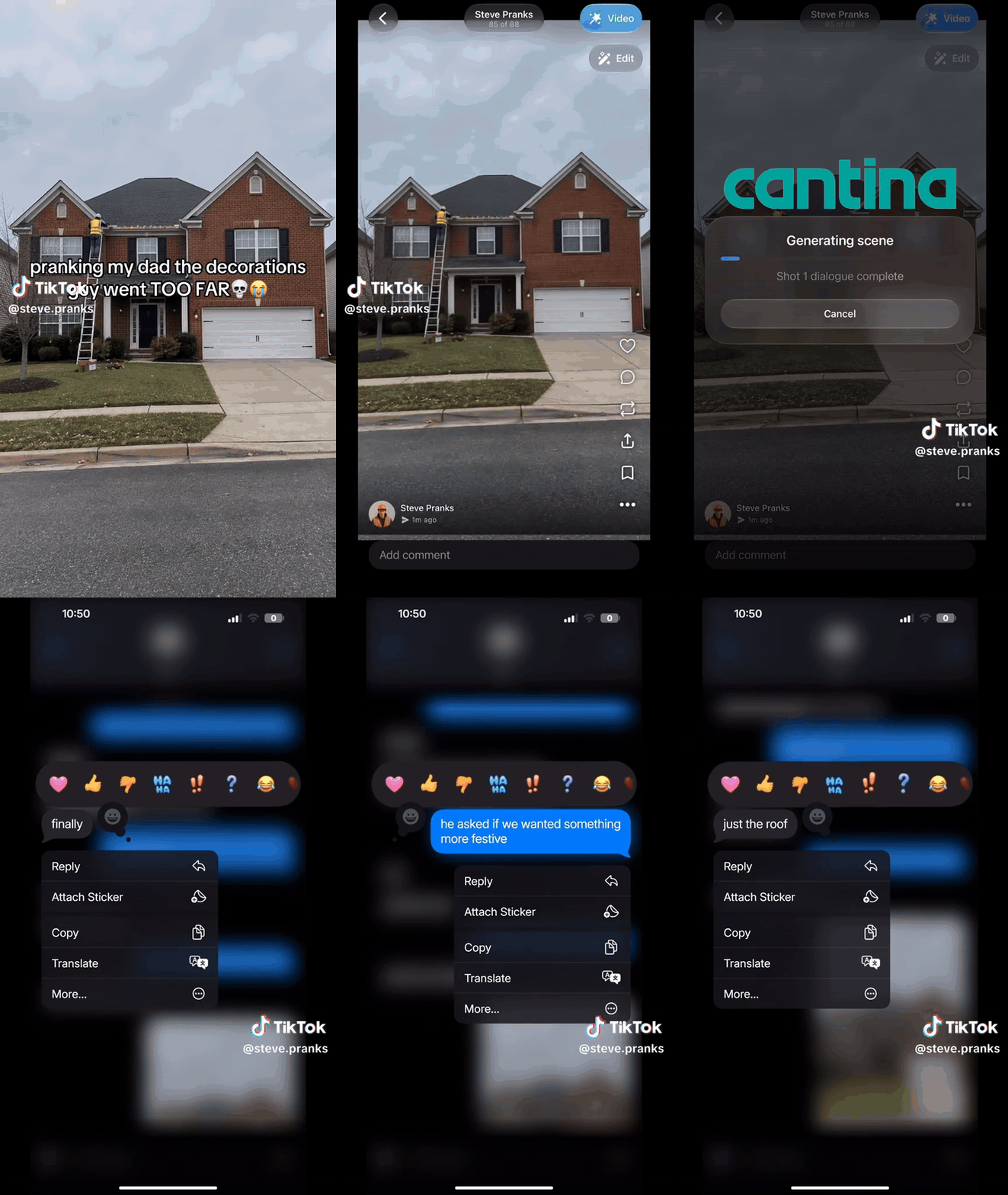
Reference 1: a silent 15-second opening excerpt from @steve.pranks' house-decoration prank. The original post's caption frames Dad's response as a demand to take it down. Source: Steve Pranks on TikTok, reviewed November 2026.
The reel opens with a brick house in overcast daylight, then reveals an illuminated version with a giant Santa above the roof. The conversation starts with a modest decorating brief and escalates after the bigger addition appears. An everyday seasonal task gives the audience a clear expectation to compare against the result.
For a front-door version, think about what remains visible from the street. A clear entrance and recognizable roof give the viewer an anchor while the decoration supplies the excess. Covering every surface until the building disappears makes the picture harder to read and weakens the connection to the actual property.
Notice that the reveal also changes daylight to evening. That supports the lighting display, but it is a separate creative choice. For a same-moment photo prank, preserve the source lighting instead. Borrow the structure of an ordinary request becoming excessive and write a setup that fits your own family.
A giant waterslide: the scale is the punchline
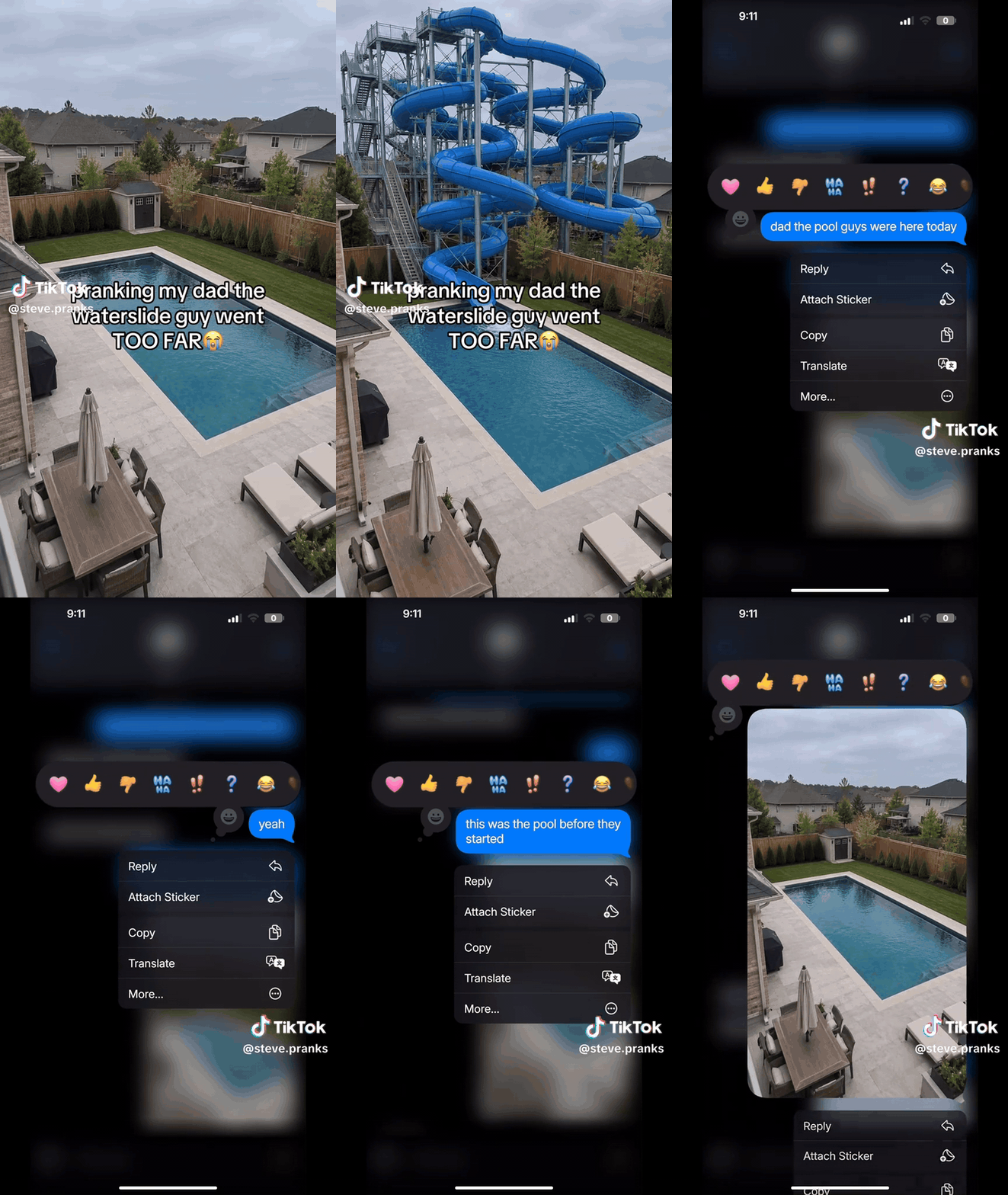
Reference 2: a silent 15-second opening excerpt from @steve.pranks' waterslide post. Its caption contrasts a request for a small slide with the oversized premise. Source: Steve Pranks on TikTok, reviewed November 2026.
The opening compares a backyard pool with a tall blue spiral slide added beside it. Later, the message sequence moves from a small slide to a much larger installation, and the presented parental response objects to its scale. The fence, neighboring roofs, and patio furniture make that excess readable without a measurement label.
The same principle applies to a front-yard photo. Place the unusual object where its footprint can be understood, with visible ground contact and room around it. An object floating above the lawn or intersecting a wall reads as an editing error. A coherent object that is far too large for its setting communicates the intended joke.
If you animate a version of this idea, separate action from structural change. Water can move while the slide and house stay consistent. Asking a video model to build the whole attraction, alter the garden, move the camera, and create a reaction at once gives it several opportunities to lose the original scene.
A luxury doghouse: exaggerate a familiar priority
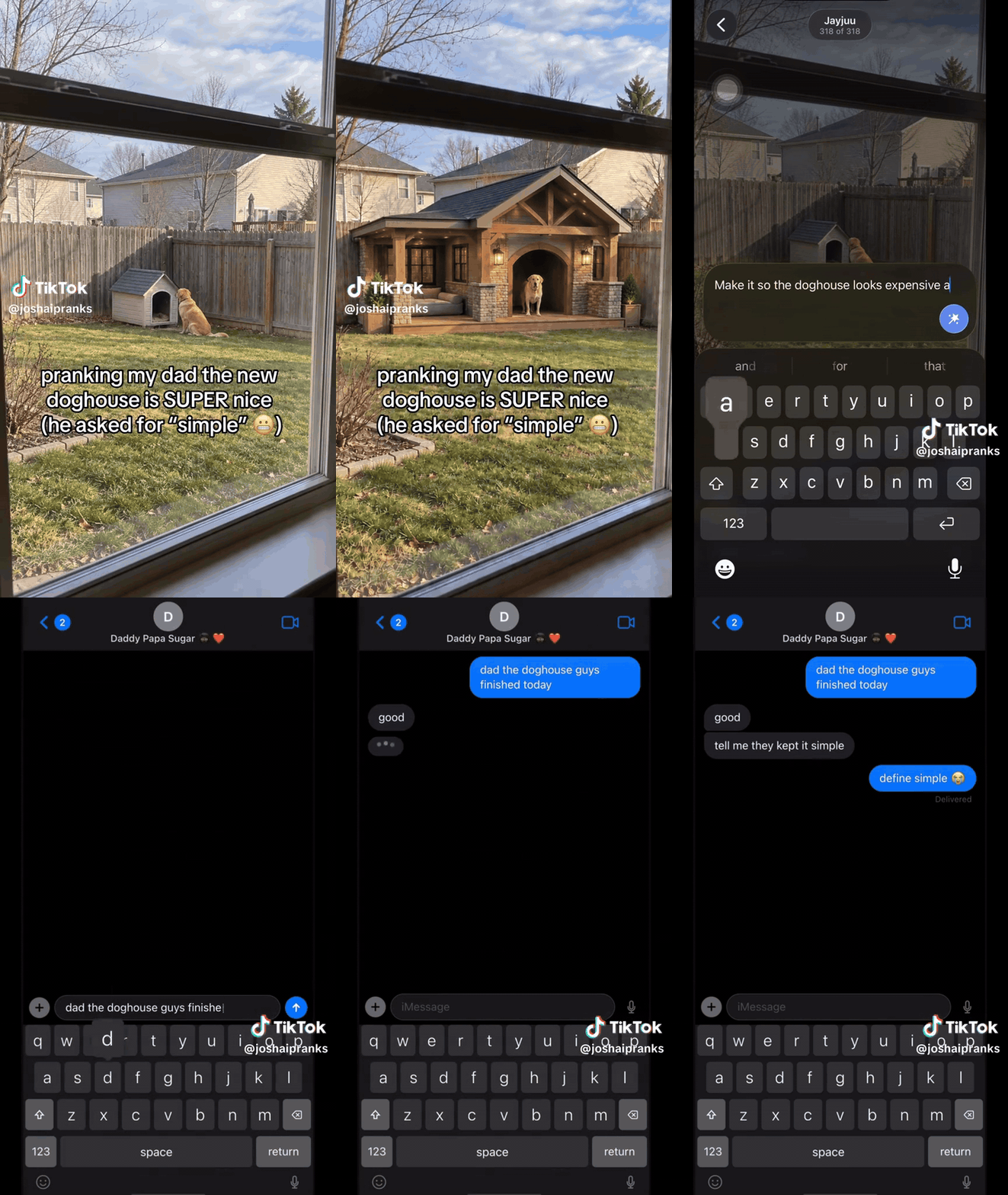
Reference 3: a silent 15-second opening excerpt from @joshaipranks' doghouse-themed post. The pet provides a personal reason for the extravagant upgrade. Source: Josh AI Pranks on TikTok, reviewed November 2026.
The reel replaces a small kennel with a substantial timber-and-stone shelter, seen through the same window. The displayed conversation develops the joke through comparisons to housing, a mortgage, windows, and curb appeal. The excess feels personal because the upgrade serves a familiar pet in a recognizable yard.
This approach suits a family with a recognizable running joke about spoiling a pet. Keep the animal at its natural size, retain the actual yard, and concentrate the edit on the doghouse. Changing the pet, landscaping, and main house together makes it difficult to tell which part is supposed to be funny.
Across the 3 examples, the transferable idea is selective exaggeration. Each premise gives the audience a specific thing to notice. Their different subjects also show why a reusable prompt should describe the original property's fixed features before describing the new addition.
| Example | Familiar starting point | Exaggerated element | Detail to preserve | Lesson for your own edit |
|---|---|---|---|---|
| Christmas house | A seasonal decorating task | The extent of the decorations | Entrance, windows, roof outline | Let the home remain recognizable beneath the joke |
| Waterslide | A modest backyard addition | The attraction's scale | House and garden as size references | Make the excess readable in one glance |
| Luxury doghouse | Improving a pet's space | The extravagance of the upgrade | Pet identity and yard layout | Connect the joke to a family interest |
The front-yard and backyard versions share a practical constraint: the viewer needs an ordinary reference point inside the frame. Preserve that reference while designing the exaggerated subject, and you can adapt the premise without copying a creator's exact scene.
Choose an idea your photo can actually support
Start with the available space in the photograph. A narrow porch can support a stack of oversized parcels or an enormous wreath. A wide lawn gives an inflatable room to sit naturally. A fenced backyard offers scale references for a doghouse or a garden feature. The subject should fit the photograph before you write a detailed prompt.
Consider what your dad will notice first. If he cares about gardening, an excessively elaborate lawn ornament has an obvious personal connection. If the family is discussing decorations, seasonal excess has a ready-made setup. A strange object chosen only because it appeared in another viral post may need more explanation than your own household joke.
The following table is a planning aid, not a ranking of likely engagement. It helps match a concept to an image and identify the detail most likely to break during editing.
| Your source photo | Possible gag | Main editing challenge | Useful check before sharing |
|---|---|---|---|
| Front of house with open lawn | A roof-height inflatable duck | Ground contact and believable scale | Duck stays outside the building; the path is clear |
| Porch with visible steps | An absurdly large gift-wrapped parcel | Occlusion around rails and steps | Steps and door still align with the original |
| House with a clear roofline | Excessive seasonal decorations | Keeping windows and architecture intact | Decorations do not replace the structure |
| Yard with a visible pet shelter | An extravagant doghouse | Preserving the animal and location | Pet anatomy and yard boundaries stay unchanged |
Keep the stakes appropriate to a joke you can explain immediately. An absurd ornament gives everyone a straightforward reveal. A picture implying an actual emergency changes how the recipient may respond and takes the story away from the playful home-upgrade premise.
Build the AI Front Door Photo Prank from one real photo
Use a photo you took or have permission to edit. Stand where your dad normally sees the property, and include enough of the building and ground to establish the location. Match the composition to the joke rather than choosing a dramatic angle that hides the recognizable parts of the house.
Before uploading, crop or obscure address numbers, vehicle plates, and any private details you do not want to share. Keep an untouched copy so you can compare the result against the original. A recognizable home does not require an address to be readable.
For the image stage, Atlas Cloud provides access to image-editing and video workflows. Google Nano Banana 2 Edit accepts reference images and natural-language editing instructions, making it a candidate for this photo-preservation task. Preservation is an instruction to check, not a guaranteed result.
Work in 2 passes. First, ask for the object in the right location and inspect the house. Only after the composition works should you refine texture or small details. If the model moves a window or replaces the fence, return to the original input and strengthen the preservation instructions. Repeatedly editing a drifting result can carry those mistakes forward.
Compare the files at the same size. Check the roof, door, windows, fence, and driveway before examining the new object. Then inspect its contact with the ground, shadow direction, overlaps, and scale. A coherent result should survive that practical comparison without relying on a tiny preview to conceal mistakes.
Animate the approved image only if the new movement adds a reveal. ByteDance Seedance 2.0 Image-to-Video supports a first-frame image and synchronized audio generation. Describe the motion and off-camera dialogue separately, and keep the house and duck consistent throughout the clip. Watch the exported file from beginning to end before using it.
Original example: Dad's tiny garden ornament arrives
This original example adds one front-yard object: a supposedly small decoration becomes a giant yellow inflatable duck. Its rounded shape and familiar material make the scale joke easy to recognize. The comparison starts with an AI-generated house scene, then adds the duck while retaining the recognizable building and path.
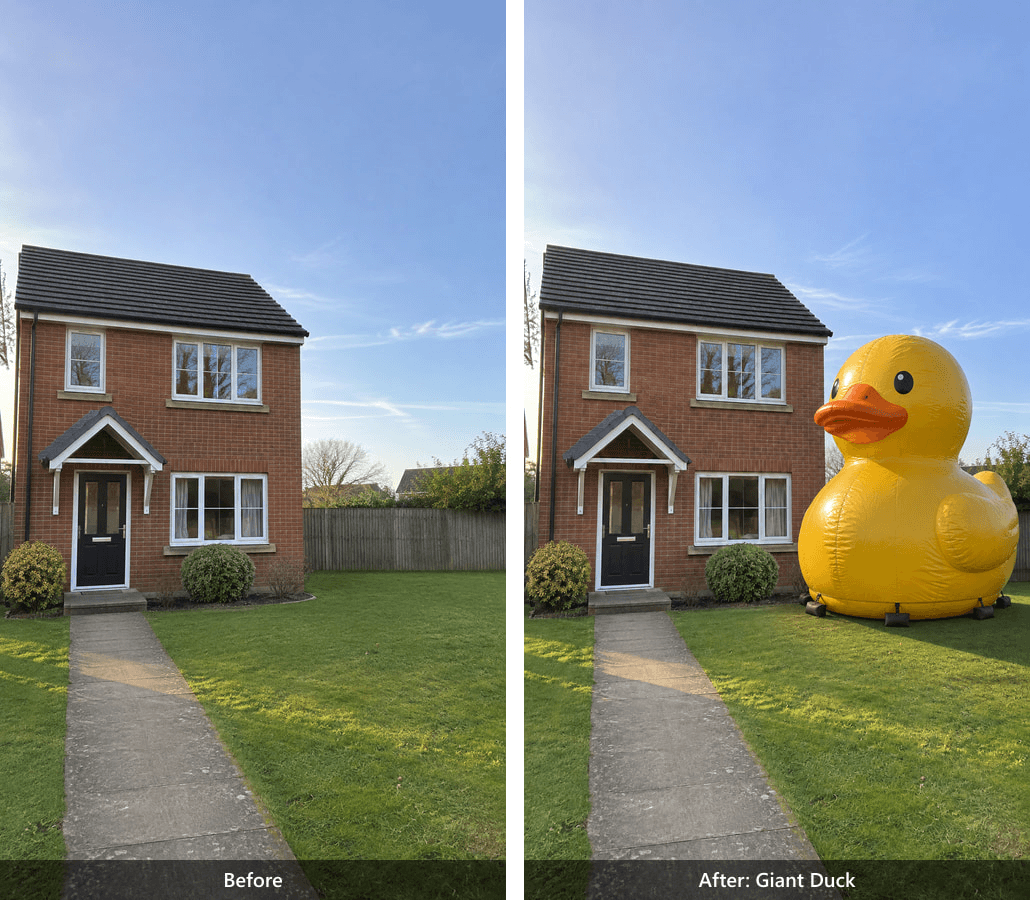 Before and after: the supplied house scene becomes an AI Front Door Photo Prank when a giant inflatable duck fills the lawn beside the entrance. The building and front path remain recognizable.
For your own prank, begin with a property photo you own or have permission to edit, with open lawn beside the entrance. The photo-edit prompt creates the first frame. The video prompt then adds a 15-second action sequence and off-camera dialogue. The supplied completed clip and playground screenshot appear below the prompts.
Photo-edit prompt
Suggested model: Google Nano Banana 2 Edit. Use one reference photo, PNG output, 2K resolution, and the same aspect ratio as the source. Compose vertically only if a 9:16 crop still shows the house and the full object.
plaintext1Edit the uploaded front-of-house photo. Preserve the exact same house, roofline, door, windows, wall colors, fence, driveway, plants, camera position, lens perspective, framing, daylight direction, and ordinary phone-photo texture. 2 3Add one enormous yellow inflatable rubber duck on the open lawn beside the front path. The duck is approximately as tall as the house roof, with an orange beak, small black eyes, visible vinyl seams, subtle wrinkles, and a weighted base resting firmly on the grass. Keep the front door, walking path, driveway, and neighboring property unobstructed. Use the entrance and roof as clear scale references. Match the source photograph's natural lighting, shadows, grain, and restrained colors. 4 5This is an absurd family decoration joke. Preserve the house and garden everywhere except the duck's footprint and physically necessary occlusion and shadow. No people, animals, property damage, emergency scene, extra decorations, signs, captions, logos, interface, or watermark.
The preservation paragraph matters as much as the duck description. If the source has a white gate or a distinctive plant pot, name it explicitly when revising the prompt. If there is too little lawn, choose another photo or a smaller object. Do not force the duck through the wall to satisfy the size request.
Video prompt with off-camera dialogue
Suggested model: ByteDance Seedance 2.0 Image-to-Video. Use the approved duck image as the first frame and enable audio generation for the off-camera dialogue. The completed-run screenshot shows a 15-second duration and 720p selected. The supplied file measures 720 x 1280 at 24 fps, runs for approximately 15.07 seconds, and contains stereo audio. The prompt below matches that resolution and includes the authored dialogue script.
plaintext1Produce a 15-second playful, photorealistic video with synchronized off-camera English dialogue. 2 3REFERENCE AND CONSISTENCY 4Use the supplied image as the exact first frame. A roof-height yellow inflatable rubber duck stands on the lawn beside an ordinary suburban house. Preserve the original house, garden layout, duck design, scale, lighting, and colors. 5 6VISUAL STYLE 7One continuous handheld smartphone take. Natural late-afternoon light matching the reference, restrained colors, realistic phone-camera texture, and subtle handheld movement. 8 9The duck must behave like a large inflatable prop: flexible vinyl, visible seams, moving wrinkles, soft inertia, and believable contact shadows. Its weighted base remains firmly planted throughout. 10 110-3 SECONDS: THE IMPOSSIBLE DELIVERY 12Begin at the reference image's exact viewpoint. The camera holds briefly, then takes a small sideways step. A breeze moves the shrubs and sends a soft ripple through the duck's yellow vinyl. Sunlight catches its seams, shallow wrinkles, and rounded surface. 13 14Off-camera dialogue, approximately 0.3-3.0 seconds: 15"Dad, your little garden ornament arrived." 16 17Speak casually, with subtle playful emphasis on "little," as though showing Dad what has just been delivered. 18 193-7 SECONDS: THE DECORATION COMES TO LIFE 20A stronger gust catches the duck's near wing. The wing lifts and flutters, its enormous belly gently compresses and rebounds, and a rolling wobble travels upward through its flexible neck. 21 22The camera tracks sideways in a shallow arc, revealing convincing parallax between the duck, fence, and house. Keep the weighted base planted and the house architecture stable. 23 24Off-camera dialogue, approximately 3.6-6.5 seconds: 25"Did you order the neighborhood-sized one?" 26 27Sound amused and mildly puzzled. Leave a short natural pause afterward. 28 297-11 SECONDS: AN UNEXPECTEDLY PERSONAL GREETING 30The duck's flexible neck bends forward in a slow, exaggerated bow toward the camera. Its orange beak looms into the upper foreground, with the recognizable house still visible behind it. 31 32The camera operator instinctively takes one short step backward and tilts upward to keep the huge head in frame. The movement feels surprised but controlled. 33 34Off-camera dialogue, approximately 7.5-10.3 seconds: 35"Whoa, whoa... personal space, buddy!" 36 37Begin with a brief surprised breath, then sound amused rather than frightened. Synchronize the delivery with the duck's bow and the camera's backward movement. 38 3911-15 SECONDS: A SATISFYING COMIC FINISH 40The duck springs gently upright, overshoots once, then settles with a smaller head bob. Its near wing gives one final wave-like flutter. 41 42The camera eases back into a clear wide composition showing the entire duck and house. Hold the final view for the last second. 43 44Off-camera dialogue, approximately 11.3-14.7 seconds: 45"Okay... he's part of the family now." 46 47Deliver this warmly and matter-of-factly, accepting the ridiculous situation. 48 49VOICE AND SOUND 50Use one consistent adult English-speaking voice, positioned directly behind the phone. The speaker is the person filming and remains off-screen. 51 52The performance should feel spontaneous, conversational, and lightly teasing. Use natural breathing and small pauses, without an announcer voice, theatrical shouting, or robotic pacing. 53 54Keep the speech clear with believable smartphone-microphone perspective. Include quiet outdoor ambience, leaves rustling, soft vinyl creaks, and a brief rubbery squeak during the bow. Lower background sounds gently beneath the dialogue. 55 56No music, extra speakers, or duck speech. The duck's beak must not move for lip sync. 57 58FINAL CONSTRAINTS 59Preserve the established visual action and camera timing. Speech must not introduce new movements, characters, or reaction shots. 60 61No floating or sliding base, building deformation, collisions, damage, scene cuts, slow motion, digital zoom, subtitles, on-screen text, logos, or watermarks. 62 63Exact duration: 15 seconds. 64Aspect ratio: match the supplied image. 65Target resolution: 720p.
Finished original example: a 15.07-second, 720 x 1280 synthetic duck video at 24 fps, with its supplied stereo audio retained. Watch the wing lift, the bow toward the lens, and the return to the wide view of the house. Play with sound for the accompanying audio.
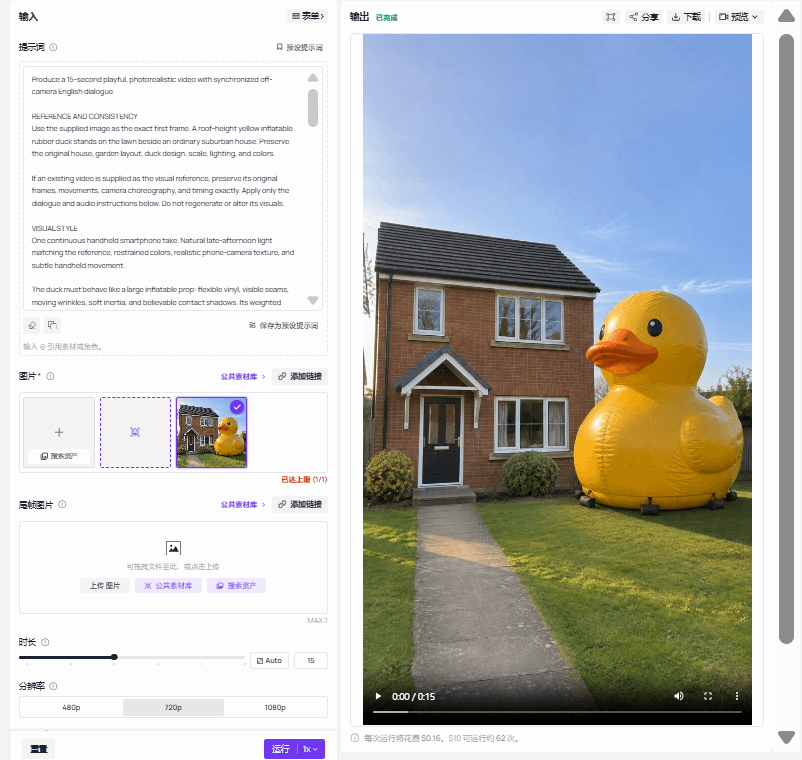 Completed-run screenshot: the uploaded duck image and prompt are on the left, with the finished video on the right. The selected settings are 15 seconds and 720p.
The completed clip makes the inflatable's size readable through movement: the wide view establishes its position beside the house, the bow brings its head close to the lens, and the final wide view restores the scale comparison. These are useful visual beats even before a real family response is recorded.
The understated setup could be, “The little garden ornament arrived.” That is suggested copy for this exercise, not a quote from a real conversation. Send the edited still or finished clip yourself, reveal the AI edit promptly, and use your dad's actual response only with his permission.
Turn the image into a reaction story people can follow
Build the final post around a simple order: establish the original location, reveal the edit, show the response, and explain the joke. Give viewers enough time to understand the house and its supposed upgrade. If the interesting part is a short reply, keep it readable rather than covering it with rapid transitions.
The generated scene and the reaction require different kinds of evidence. Save the actual message thread if you intend to describe a real exchange. If you write the replies yourself, present the result as a staged sketch. A synthetic chat screen cannot establish what a parent said, and an AI model should not invent that evidence for you.
Before sharing, remove contact details from the recording and ask your dad whether he is comfortable with the chosen messages or footage appearing publicly. Let him see the edit you plan to post. That can also help you decide whether the joke still makes sense to someone outside the family.
TikTok requires labels for realistic AI-generated images, audio, and video. Its guidance includes real-world scenes substantially altered with AI, which is relevant to an edited home photo. Use the AI-generated content setting and give the audience clear context. (Source: TikTok Help Center, accessed November 2026.)
Start your AI Front Door Photo Prank with one photo and one ridiculous addition. Check the property before you add motion, keep the reaction honest, and let the reveal end with everyone understanding the joke.
Frequently Asked Questions
Does an AI front door prank need a video model?
No. An edited still can carry the entire visual joke. A social post can combine that still with a recorded reaction. Use image-to-video when the subject has a useful action, such as an inflatable wobbling, rather than adding motion simply because the platform accepts video.
Why does the result look like a different house?
The edit may have changed more of the image than you intended. Return to the untouched photo, specify the features that must remain fixed, and reduce the requested changes to one object. If the editor offers a selection or mask, limit it to the intended edit area and inspect the surrounding structure afterward.
Can I use the creator videos as my own prank?
Keep the original creator credit and source connection when discussing an example. For your own prank, use your own photo, idea, and reaction. Linking to or embedding a public example does not make its footage your original work.
What should I save for the original result?
Keep the unedited source photo, approved edited still, full generated video, full model name including its provider and version, and actual output settings. Place the completed clip beside its prompt, as in the example above, and describe the exported file's measured duration and resolution in the caption.







