The curly hair filter joke is a tiny transformation with an outsized result. Someone looks ordinary for a moment, their hair suddenly springs into a huge mass of curls, and the rest of the frame behaves as though nothing unusual happened. The same idea becomes even stranger when the subject is a horse. Three online clips show the visual grammar of the meme; three original 10-second clips then test it on a man, a bird, and an older adult.
Key takeaways
- The reveal works when the viewer sees the same subject before and after the hair changes.
- The funny variable is the filter's exaggerated speed and volume, not naturally curly hair.
- A 10-second remix needs one visible trigger, one curl transformation, and one distinct reaction while the subject and setting stay consistent.
Three online curly hair filter examples
These are short, silent GIFs of existing online videos. They show what happens on screen; they do not establish who invented the effect or whether one particular app made every version. Watch where the change begins, which details stay fixed, and what the subject does after the new hair appears.
Online example 1: a full-volume hair flip
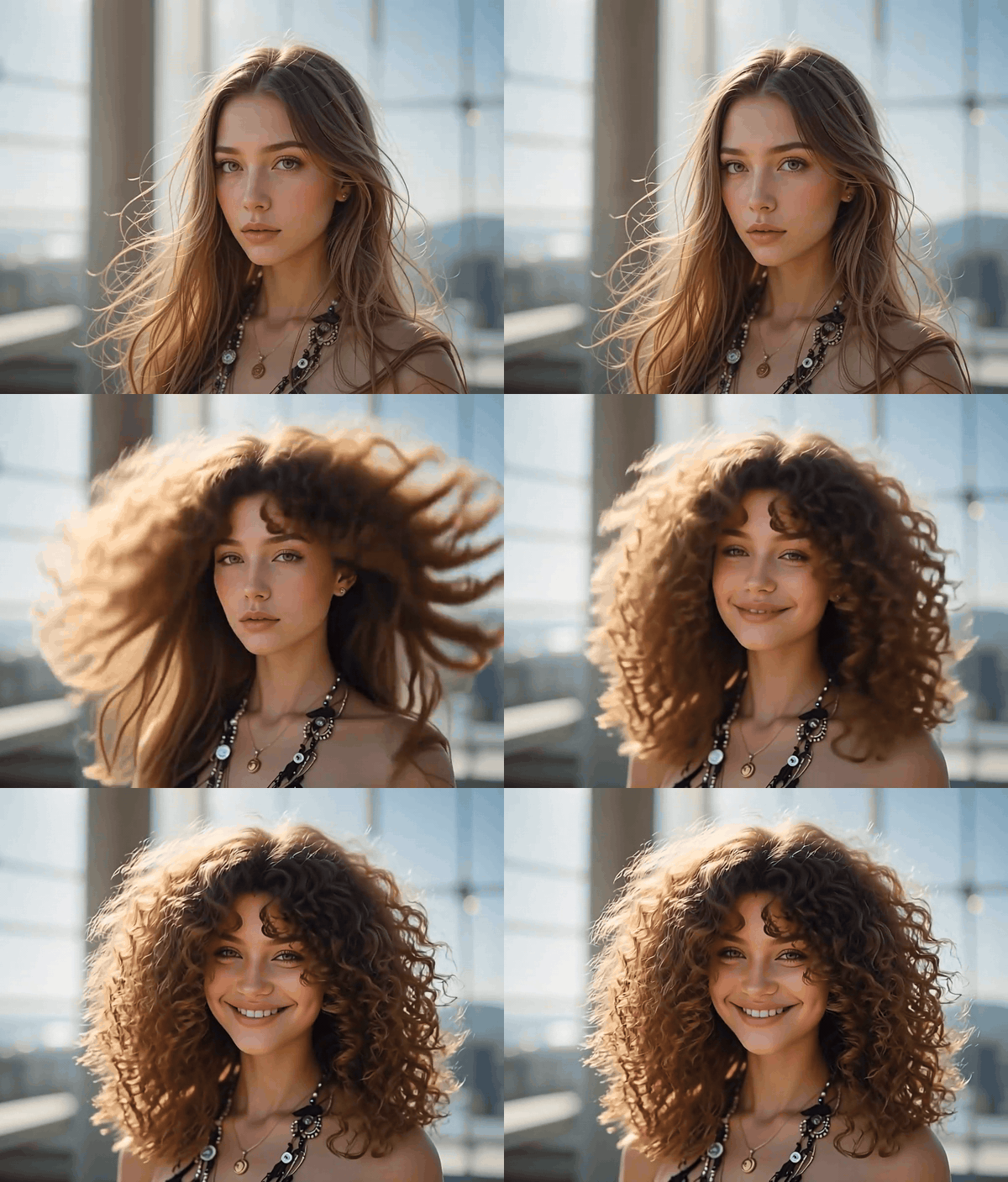
Online example, shown as a silent GIF. The movement creates the transition; the face and clothing remain recognizable as the hair fills the frame.
The first clip starts with long, relatively straight hair. A quick lift and shake turns that familiar outline into an enormous cloud of curls. The change happens during motion, which helps the viewer accept the impossible speed. The expression at the end sells the effect as a playful reveal rather than a hair-care claim.
Online example 2: a shorter, rounder result
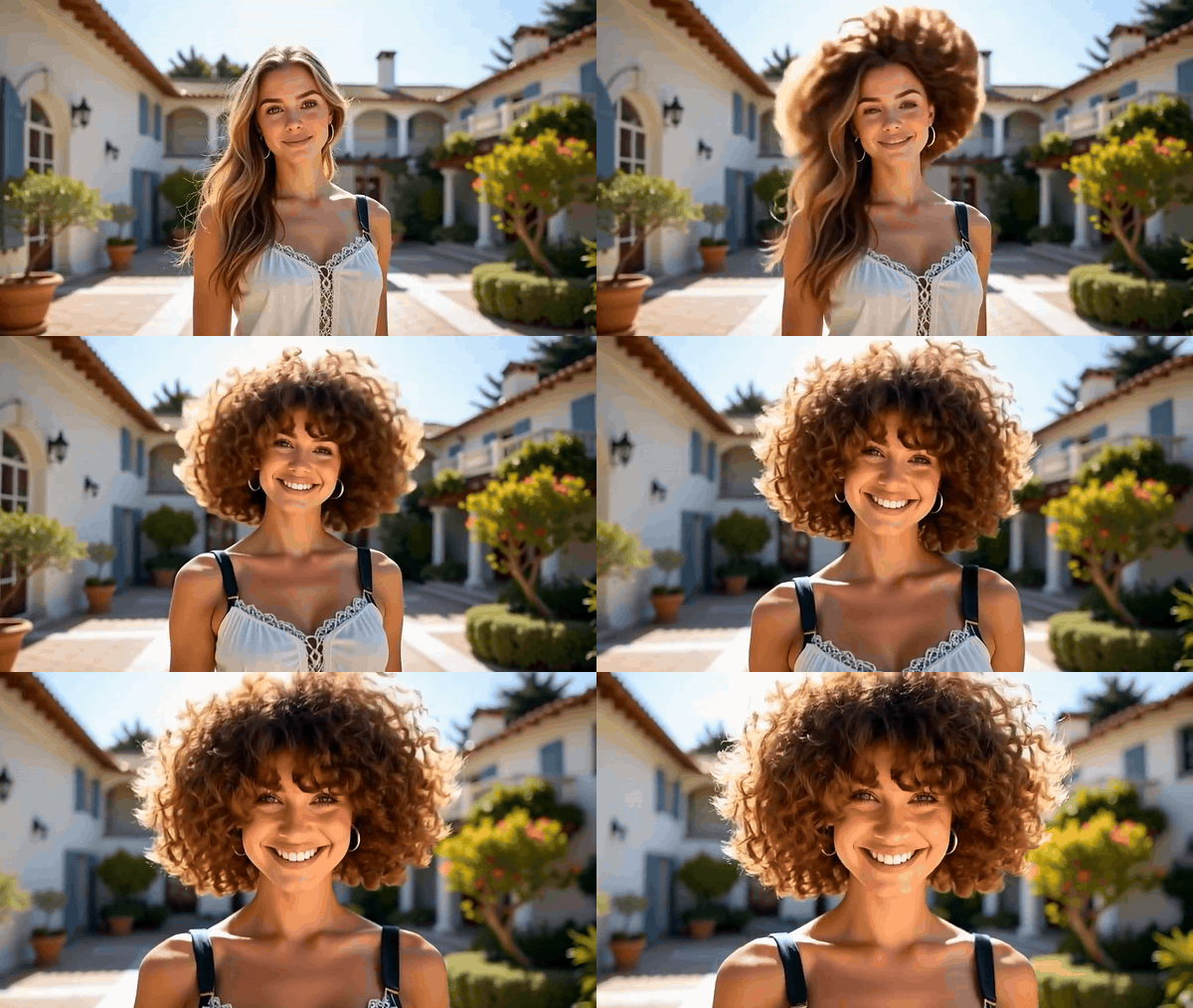
Online example, shown as a silent GIF. This version changes both texture and silhouette, finishing with a shorter, rounder shape.
The second clip keeps a sunny courtyard and a front-facing subject in view. Its payoff is a compact, rounded hairstyle rather than hair that keeps growing outward. That difference matters: “more curls” does not always mean “more length.” A clear silhouette can communicate the joke even on a phone-sized screen.
Online example 3: the horse gets the same treatment
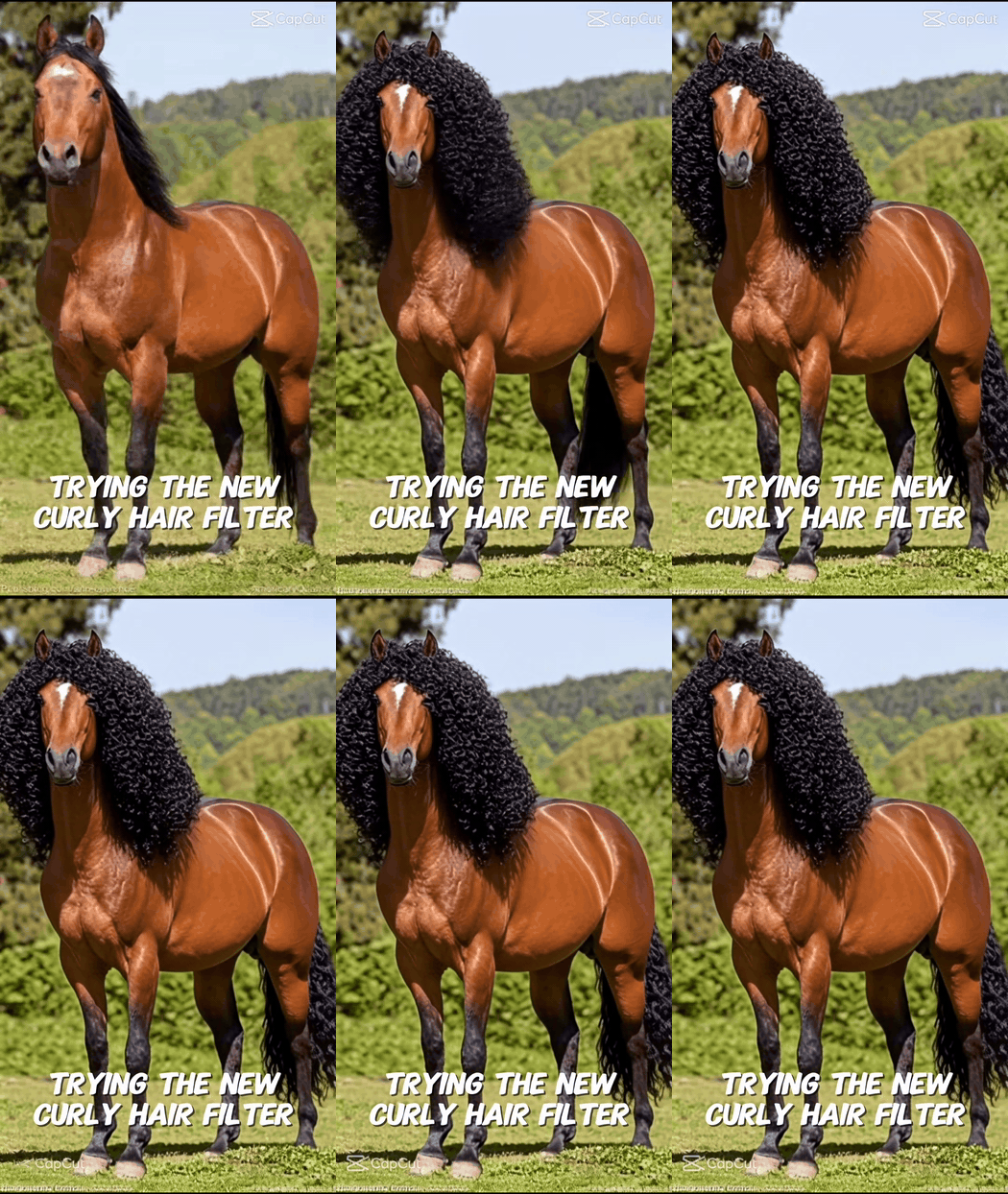
Online example, shown as a silent GIF. A horse's mane receives the same oversized curl reveal while the animal and field remain in place.
The third clip moves the effect away from human hairstyle testing. The horse's new mane is so large that the familiar before-and-after setup turns absurd. The animal's body, white forehead mark, and green field stay readable, so the joke remains “the same horse, suddenly with a dramatic perm.” That is a useful reminder for an original remix: change one conspicuous thing and let the audience recognize everything else.
What is the curly hair filter meme actually doing?
“Curly hair filter” is a loose label for several related edits. Some tools change a still portrait. Some templates take a photo or clip and return a short generated video. A live camera effect, a photo edit, and an AI-generated motion clip can all appear under the same search phrase. The three GIFs above are video examples of the reveal; they should not be mistaken for proof that a live camera filter was running while someone filmed. The official curly hair filter overview describes both photo and video uses.
The meme has a simple visual contract. First, give the viewer a familiar person or animal with a visible hairline or mane. Second, change the hair texture quickly enough to feel magical. Third, hold on the result long enough for a reaction. If the face, clothes, background, and lighting all change at once, the clip reads as a new image rather than a filter applied to the same subject.
That distinction is why the horse clip is funny. It borrows the visual language of a personal makeover, then applies it to an animal that never asked for one. The image is legible in a glance: ordinary horse, oversized curly mane, same field. The joke is the misplaced beauty-filter logic and the cartoonishly large result. Natural curly and coily hair is not the target of the joke.
| Version | What changes | What a viewer learns |
|---|---|---|
| Subtle portrait try-on | Texture and curl pattern | Roughly how a different hairstyle frames one face |
| Exaggerated human reveal | Texture, volume, sometimes length | The fast before-and-after contrast |
| Animal remix | Mane or fur silhouette | The same filter logic becomes absurd on an unexpected subject |
No single clip proves the trend's origin. Template pages and older try-on videos show that versions have circulated over time, while the exact subject and hairstyle vary. Treat this as a reusable meme format rather than a single video with one definitive punchline.
Why do some versions land and others feel like a slideshow?
A useful curly hair filter video has a trigger. The subject scrunches their hair, flips their head, turns toward a mirror, or makes a small gesture that hides the instant of change. The trigger gives the viewer an action to follow. In the first online GIF, the hair moves before it settles into curls. In the second, the new rounded shape is readable against a relatively stable background. In the horse example, the before-and-after contrast carries most of the joke.
The weakest versions simply cut between two unrelated portraits. A model may redraw the nose, move a necklace, change the room, or replace a jacket while it changes the hair. Those extra edits destroy the “same subject” illusion. When you review a generated result, compare stable landmarks frame by frame: eyes, forehead, ears, collar, background edges, and shadows. Hair may expand dramatically; the person or animal should remain identifiable.
Motion matters after the reveal too. A 5-second clip can end when the curls appear. A 10-second clip has room for a second beat: the subject notices, reacts, or tests the new texture. Repeating the same change for the full duration feels like an effect demo. Give each original version a tiny consequence that belongs to its subject, such as a man checking his reflection, a bird shaking out its plumage, or an older adult smiling at an unexpected new silhouette.
Use the frame as a constraint. On a phone, the changed outline needs to read immediately, the subject's reaction must remain visible, and the action must not hide behind captions. A 16:9 frame gives the hair or feathers enough space to expand while keeping the original surroundings in view. The visual joke should work before the audience reads an explanation.
Make three original 10-second curly hair filter reveals
The three online examples teach the same principle: the audience must recognize the subject before the sudden change. The original set below varies the subject, place, clothing, and trigger while keeping that principle intact. Each case has a straight-hair or straight-feather source image, a real screenshot of its completed Atlas run, and a 10-second clip converted to a silent GIF. The source image establishes the “before”; the screenshot records the generation step; the GIF delivers the joke.
For the source images, use Seedream 5.0 Pro text-to-image on Atlas Cloud at a wide 16:9 ratio. Then upload each source image as the first frame in the Seedance 2.5 image-to-video playground and set a 10-second duration. The video model accepts first-frame input and supports that length. Capture each Atlas screen only after the output is complete, with the real prompt and result visible. A rendered imitation of the interface would not document the generation.
Case 1: the man leaves the barbershop with a different silhouette
A straight-haired man in a blue denim overshirt sits in a daylight barbershop, with a mirror and neatly arranged tools behind him. He draws a comb through his hair; defined curls spring outward as he moves. He turns to show the new profile, then smiles toward the camera. The room and clothing stay fixed so the change reads as a filter applied to the same person, not a cut to a different portrait.
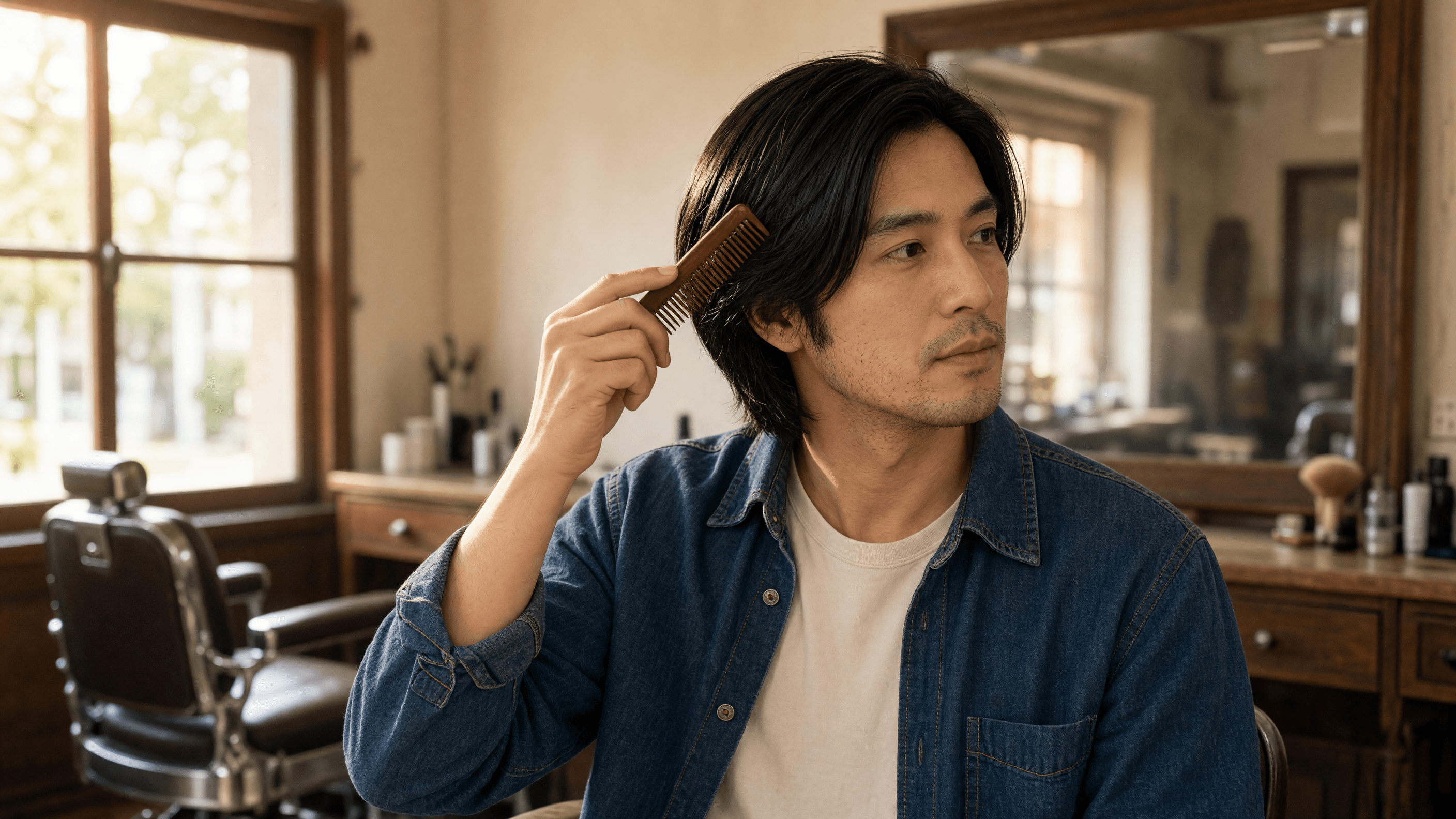
Original image: straight hair, the same face and denim overshirt, before the comb stroke.
The completed Atlas screen shows the written instruction, uploaded first frame, and finished output player. Its player is paused on the opening frame; the GIF below shows the change.
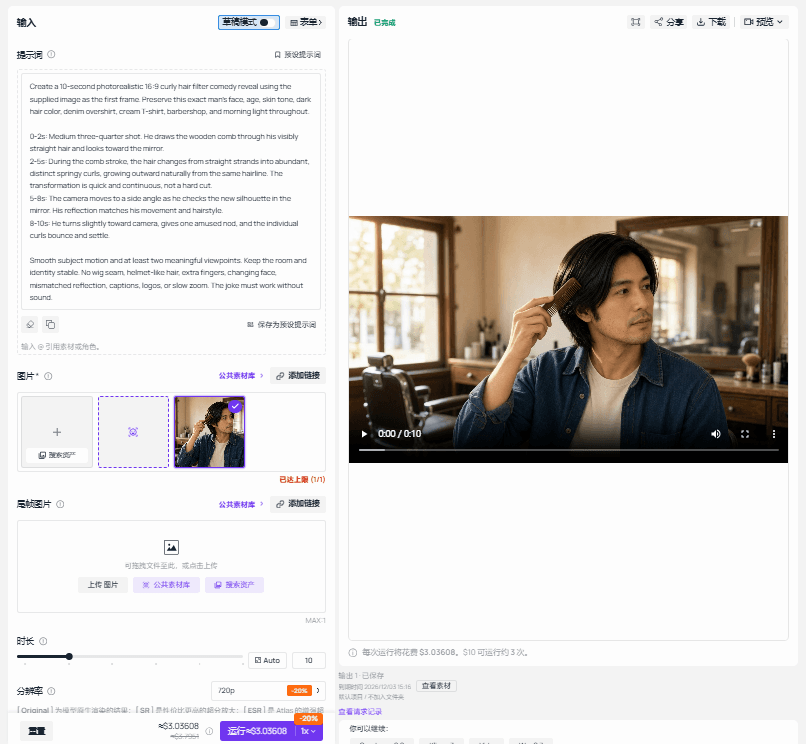 Atlas screenshot: the completed barbershop video run, paused at its first frame.
The 10-second motion moves from the comb stroke to a side view and a final smile. The curls appear as the man moves, rather than through a hard cut, giving the viewer time to register the new silhouette.
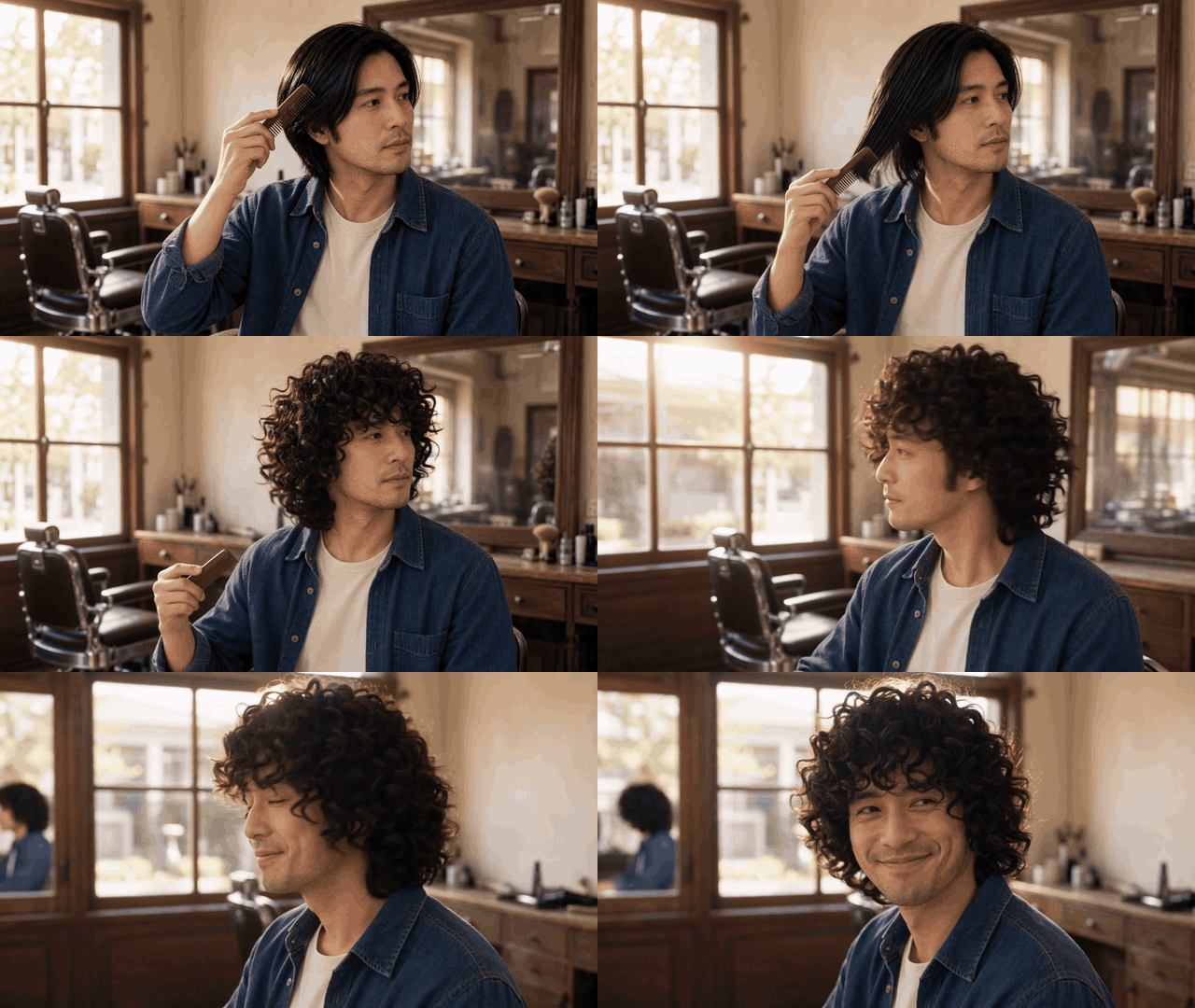
Original case 1, silent GIF: one comb stroke leads to a full curly reveal.
Case 2: a bird shakes out a new set of curls
In a sunlit glasshouse, a small white cockatoo with smooth, straight crest and chest feathers perches on a branch. It wears a narrow cobalt-blue fabric neck ribbon. The bird tilts its head toward a hanging flower, gives one quick whole-body shake, and its visible crest and chest feathers settle into separate soft curls. It hops once and looks back toward the camera. The beak, eyes, wings, ribbon, branch, and leaf shapes remain recognizable; the bird does not turn into a ball of wool.
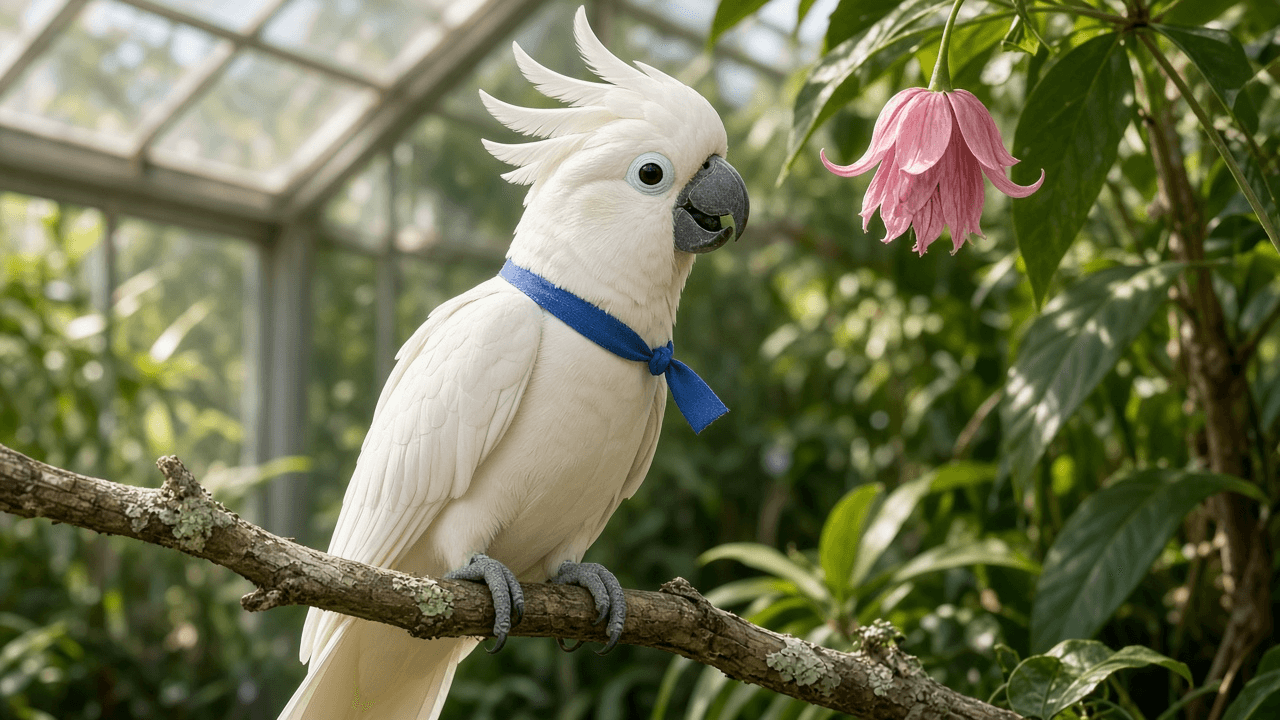
Original image: smooth crest and chest feathers before the bird shakes them out.
The bird's completed Atlas screen shows its own prompt, first-frame image, and output player. The player begins with straight feathers; the GIF below shows the feather change.
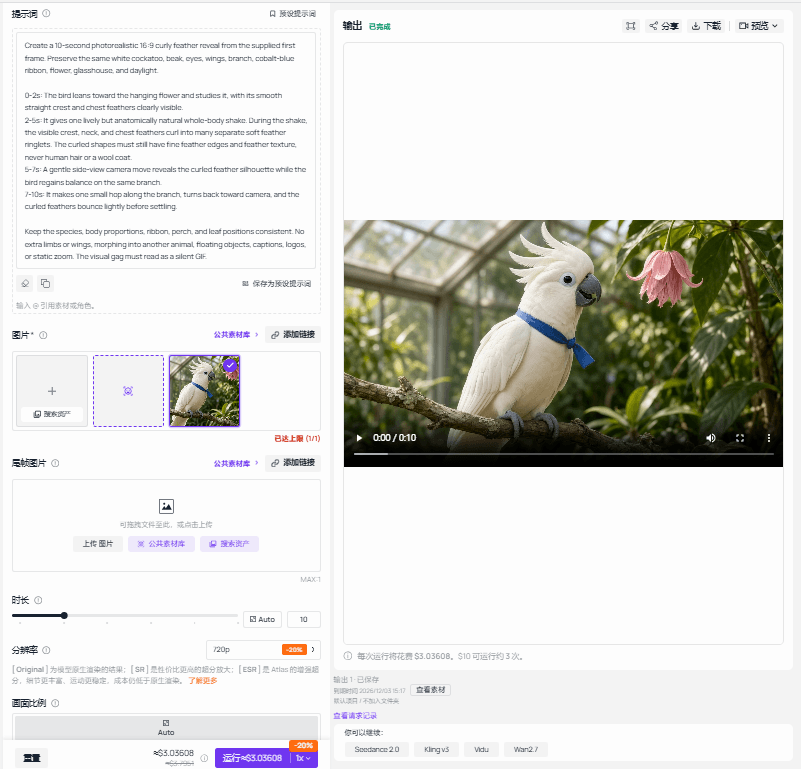
Atlas screenshot: the completed bird video run, paused at its first frame.
The short GIF shows the flower glance, the shake that masks the transformation, and a small step along the perch. A side view reveals curled feather edges without changing the bird's species or body shape.
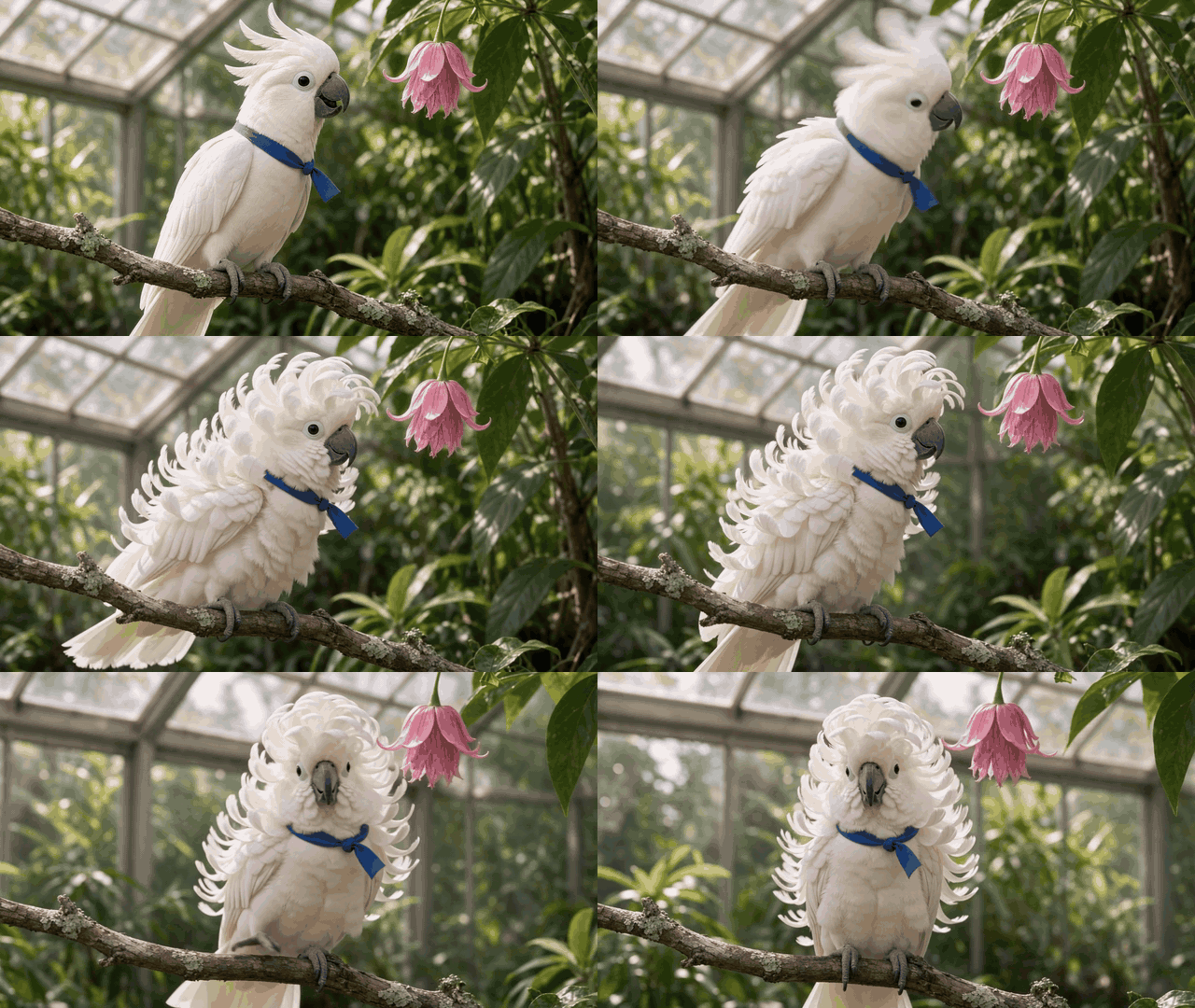
Original case 2, silent GIF: the feather shake turns a familiar bird silhouette into the punchline.
Case 3: an older reader looks up with silver curls
An older woman with straight silver hair stands in a warm independent bookshop. She wears a rust-colored cardigan, a patterned silk scarf, and reading glasses. As she turns a page, her hair lifts and becomes airy silver ringlets. She adjusts her glasses, smiles, and resumes reading. Her age, facial features, hands, scarf pattern, and bookshop remain consistent throughout.

Original image: straight silver hair and an open book establish the before frame.
The final completed Atlas screen records the older reader's prompt, uploaded image, and output player. Its opening frame preserves her straight hair; the GIF below shows the silver ringlets appearing.
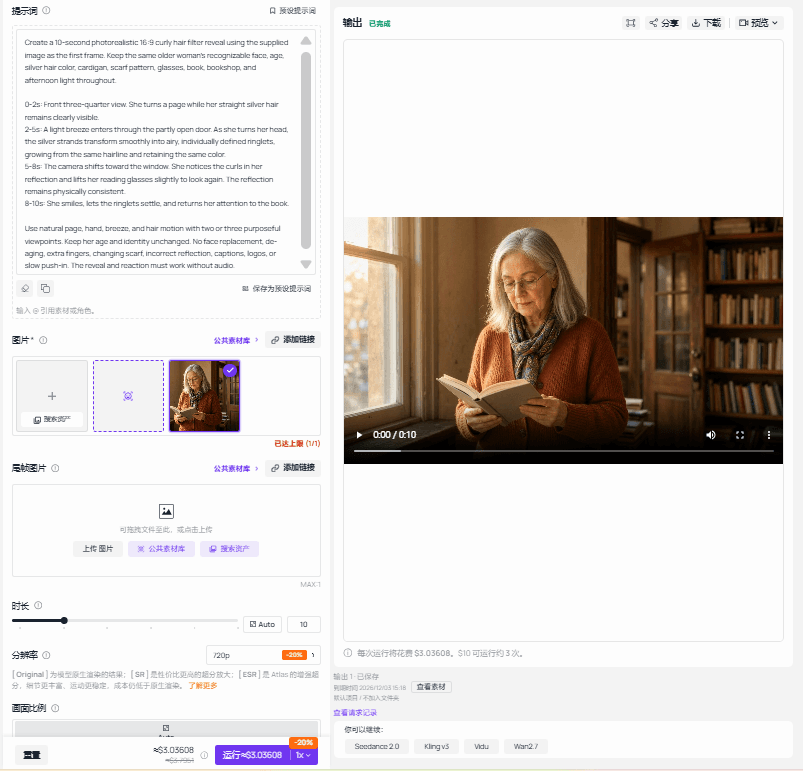
Atlas screenshot: the completed bookshop video run, paused at its first frame.
The page turn and a light movement of air create the trigger. Her hand reaches toward her glasses as the ringlets settle, and her smile over the book closes the joke. The bookshop remains recognizable throughout.

Original case 3, silent GIF: silver curls appear while the reader keeps her place in the book.
Keep each reveal clear at GIF length
Give the viewer a readable “before” in the opening seconds, make the change happen during an action, and reserve the last beat for a reaction. The three scenes use different triggers: a comb stroke, a feather shake, and a page turn with a breeze. Keep the generated subject and background stable from the first frame through the last. Review the finished clips for face drift, extra limbs or wings, frozen curls, and background changes before converting them.
Each finished 10-second clip belongs in the article as one GIF, not as a split sequence. Preserve enough frame rate and width for the curls and expressions to read on a phone. The three online examples near the top are also GIFs because their joke is visual and their original clips are short. The screenshots are evidence of the production step; they are not replacements for the moving result.
If a photorealistic human clip is posted to a platform that requires a label for generated or substantially edited content, use the appropriate disclosure control. TikTok's AI-generated content guidance and YouTube's altered-content guidance explain their respective controls. Use your own image or a consenting adult's likeness, and keep the older subject's reaction warm rather than making age the punchline.
The format works because one conspicuous thing changes while the rest of the scene remains familiar. A man, a bird, and an older reader can each deliver a different payoff without changing that simple rule: recognizable before, quick curl trigger, readable after.
Frequently Asked Questions
Is the curly hair filter one specific live effect?
No. The phrase covers still-photo edits, video templates, and live effects. Check the tool or template you are using before promising a live camera result. The three online examples in this article are short generated or edited video reveals.
Can I make the same joke with an animal?
Yes, if the animal's original look remains clear. The online horse example works because its body and field stay recognizable while the mane changes. In the bird case, the visible feathers curl while the beak, wings, species, and perch remain familiar.
Is 10 seconds enough for a complete curly hair filter joke?
Yes. A clear source frame, one transformation trigger, and a short reaction can fit in 10 seconds. If the shot needs longer to explain itself, simplify the action or improve the opening composition instead of repeating the reveal.
How do I keep the person or bird recognizable during the change?
Start with a source image that shows the hair or feathers clearly, then specify exactly what may change. Compare the finished clip against the first frame: eyes, face or beak, clothing or ribbon, body shape, and background landmarks should remain stable. Reject a take that swaps the subject or changes the room along with the curls.
Why include a real Atlas screenshot beside each GIF?
The original image shows the starting point and the GIF shows the outcome. A screenshot of the completed Atlas run makes the production step inspectable: readers can see the prompt, uploaded first frame, and completed output player. Capture the completed run itself; a mock screen or processing state cannot provide the same evidence.


