The monthly price is easy to find. The harder question is how much work a weekly allowance will cover. Grok Bot Pricing and Usage Limits Explained starts with the practical answer: Grok Bot comes with eligible Premium, Super, and Ultra subscriptions at $30, $100, and $200 per month, respectively. It has no separate standalone monthly fee on the new X Subscription, and its weekly allowance is shared with other eligible Grok and Cursor use. xAI does not publish a universal task count, so check your account’s usage view and extra-spending settings before asking a Bot to run a large job.
Key takeaways
- Premium is $30/month, Super is $100/month, and Ultra is $200/month on the Grok Bot plan page.
- The page lists Super at 3.5× Premium usage and Ultra at 12× Premium usage; those are relative allowances, not promised task counts.
- On the new X Subscription, eligible Grok, Grok Bot, and Cursor use draw from a shared weekly pool.
- Check whether automatic top-ups or legacy on-demand billing are enabled before starting long tasks.
How much does Grok Bot cost in 2026?
Grok Bot is a capability bundled into eligible plans, rather than a separate Bot-only subscription. The current individual plan page lists Premium for $30 per month, Super for $100, and Ultra for $200. The subscription includes Grok Bot’s cloud computer, connections to tools, scheduled routines, and access across desktop and mobile. The higher tiers include everything in the preceding tier and a larger stated usage allowance. (Grok Bot plans)
| Plan | Monthly price | Grok Bot included? | Relative Grok Bot usage shown | Typical decision |
|---|---|---|---|---|
| Premium | $30 | Yes | 1× baseline | Start here if you want Bot access and will measure your workload first. |
| Super | $100 | Yes | 3.5× Premium | Consider it when your own usage view shows Premium is often too tight. |
| Ultra | $200 | Yes | 12× Premium | For sustained or intensive work where the added allowance justifies the higher monthly bill. |
The multipliers on the Grok Bot page are relative to Premium. They do not tell you how many messages, agent steps, or completed projects a plan will cover. Other current account and billing pages may describe the broader X Subscription pool differently, because they include eligible usage across products. Treat the live usage view on your own account as the operational source for your remaining allowance.
The page also lists Teams and Enterprise access. Team plan billing is seat-based, while Enterprise arrangements are handled through sales. Check the current checkout and contract terms for your workspace before budgeting. Taxes, app-store billing, annual plans, or regional pricing can affect the amount charged.
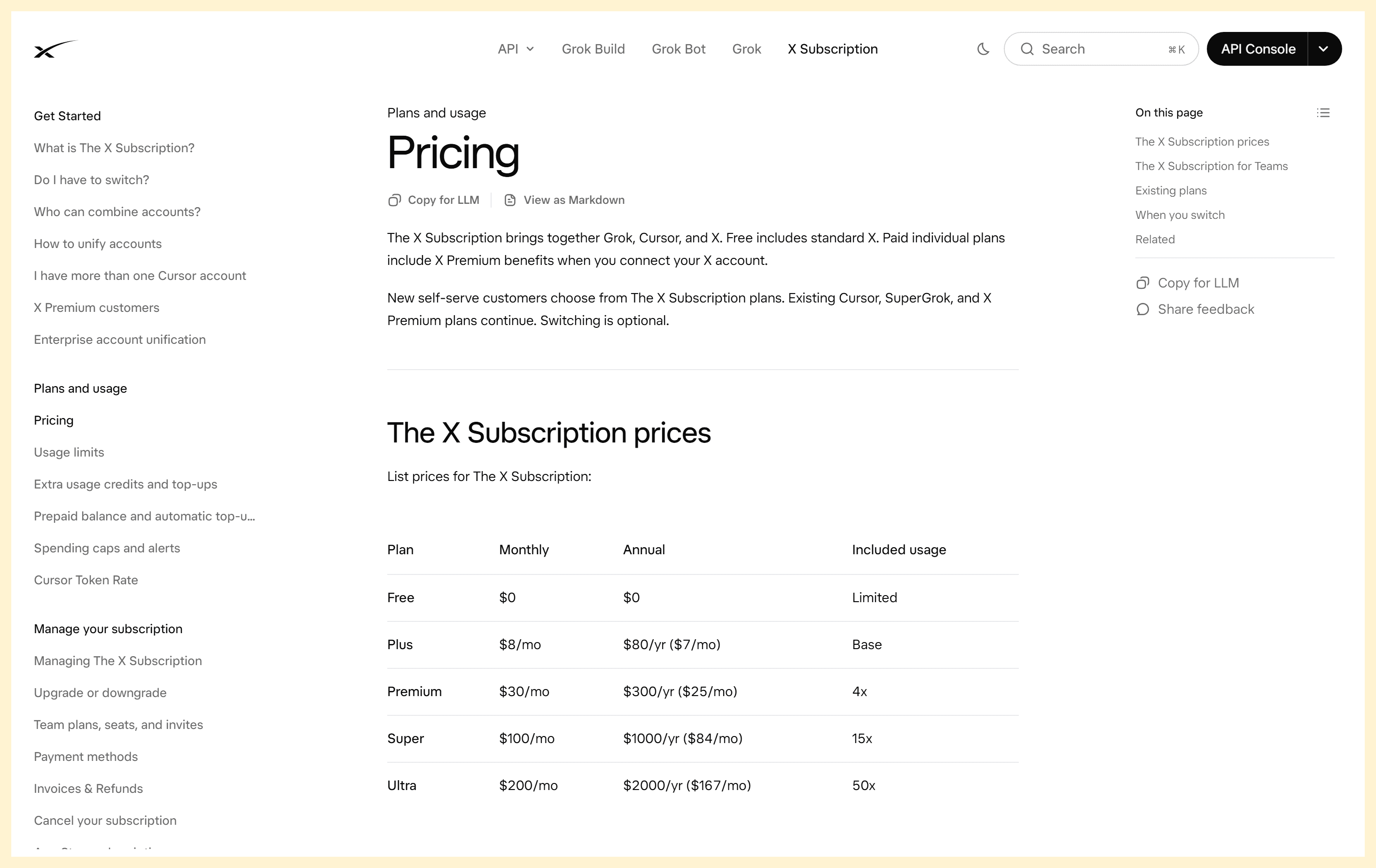
The official pricing table lists the monthly prices for the three plans that include Grok Bot.
A useful purchase check is to compare the full bill you will actually have after subscribing, not only the advertised tier. If you already pay for a Cursor or Grok plan, confirm whether your account is still on a legacy billing path before switching or adding a plan. Do not assume two subscriptions combine their allowances. xAI says account unification moves eligible accounts to the new subscription, and some transitions change billing arrangements.
What are Grok Bot’s usage limits?
Grok Bot includes weekly usage, but xAI does not publish a standard number of tasks or messages that applies to every subscriber. That is why “How many prompts do I get?” is difficult to answer from the list price alone. A short question and a multi-step assignment that browses sites, handles files, retries actions, and checks its own work place different demands on the system.
Think in terms of work performed, not messages sent. One instruction can trigger many agent steps. A task that asks for a brief summary from a supplied file has a narrower scope than a task that asks the Bot to research several sites, compare findings, draft a document, and revise it. The product’s exact accounting is not exposed as a simple per-task price, so do not convert a plan multiplier into a promised number of jobs.
The first week is best treated as a measurement period. Give the Bot a small, bounded task, then look at the usage panel before assigning a longer workflow. Record what kind of work you requested and how the allowance changed. Your own account is more useful for forecasting than another subscriber’s anecdote, because their plan, account path, and task mix may differ.
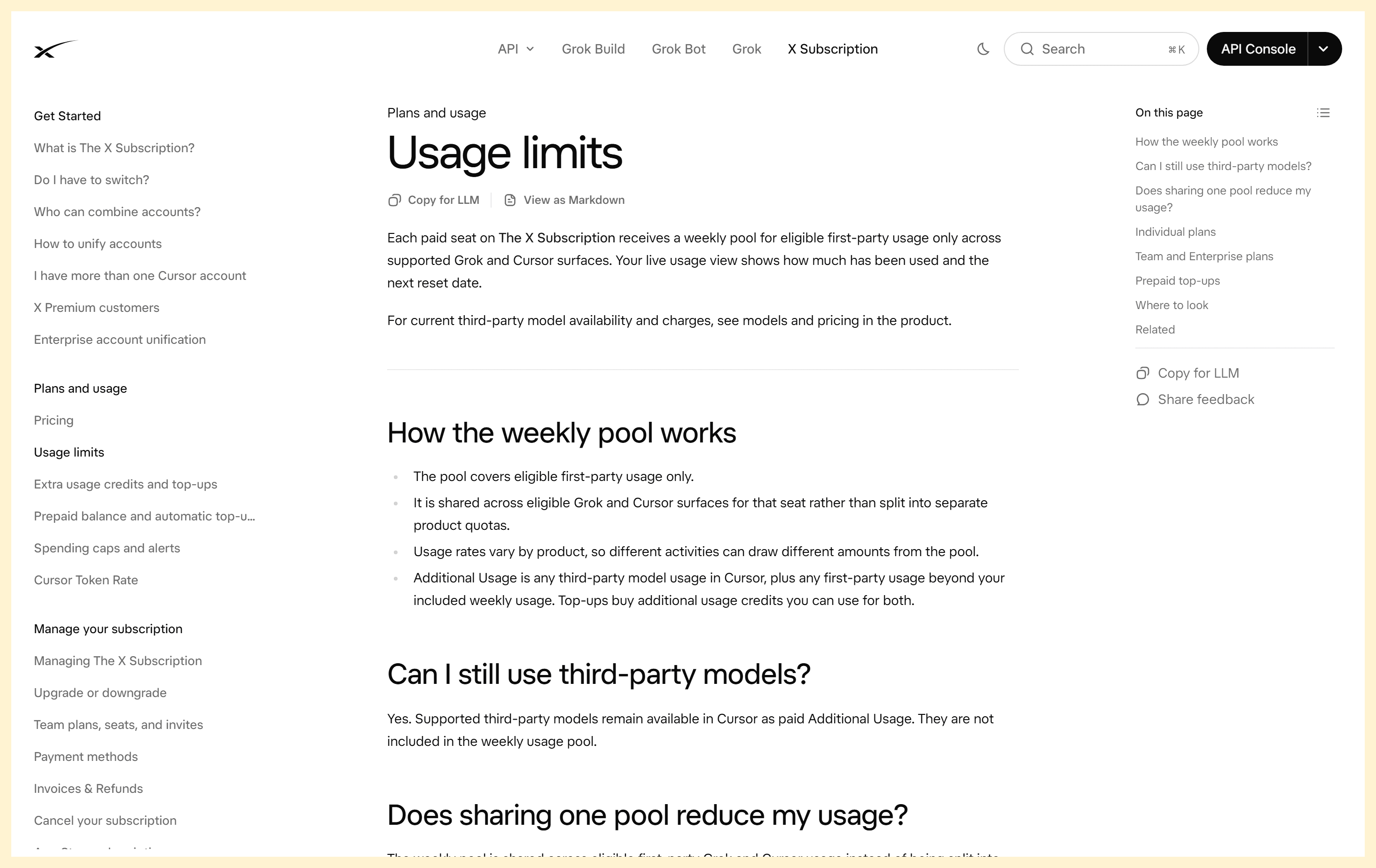
The official usage-limits guide points readers to the live meter and reset date rather than a fixed number of tasks.
The product limits are account-specific enough that another subscriber experience should not be treated as a forecast. Even users on the same tier can submit different task types, use different account paths, or run work at different times in the reset cycle.
For better control, describe the finish line in the task itself. Ask for a fixed number of sources or files, specify the output format, and tell the Bot to stop and report if it encounters a blocker. This helps prevent open-ended work from continuing through unnecessary retries. It does not change the plan’s metering rules, but it makes the task easier to monitor and evaluate.
Is Grok Bot usage shared with Grok or Cursor?
The answer depends on how your account is billed. New customers start on The X Subscription. Under that path, eligible first-party usage across Grok, Grok Bot, and Cursor draws from the same weekly pool. If you spend more of the pool in one surface, less remains for the others until the displayed reset. This is a shared allowance, not three separate full quotas. (Grok Bot on The X Subscription)
| Account path | What shares usage | Where to check | What to keep in mind |
|---|---|---|---|
| New X Subscription | Eligible first-party Grok, Grok Bot, and Cursor use share a weekly pool. | grok.com/dashboard, then Usage | Third-party model use in Cursor is additional usage and may be charged from prepaid credit. |
| Legacy Cursor or linked Grok account | Grok Bot usage follows the legacy Cursor account’s entitlement and billing settings. | Cursor dashboard or Grok Bot Settings → Usage & Billing | Legacy plan behavior differs; check your own account rather than applying new-plan pool rules. |
The distinction matters if you use both the Grok app and Grok Bot. A usage change you see in one place may reflect work in another eligible product. Conversely, a Grok app meter does not necessarily describe the usage of an older Cursor-linked Bot account. Verify the account email, workspace, and invoice source as well as the product name shown in the interface.
If you have more than one account or are considering unification, read the account-specific instructions first. The X Subscription documentation says that some legacy subscriptions can be combined, while existing plans continue if you do not switch. Avoid making a change solely to chase a multiplier until you understand which subscription will be cancelled, how refunds are handled, and which account will own your Bot’s usage.
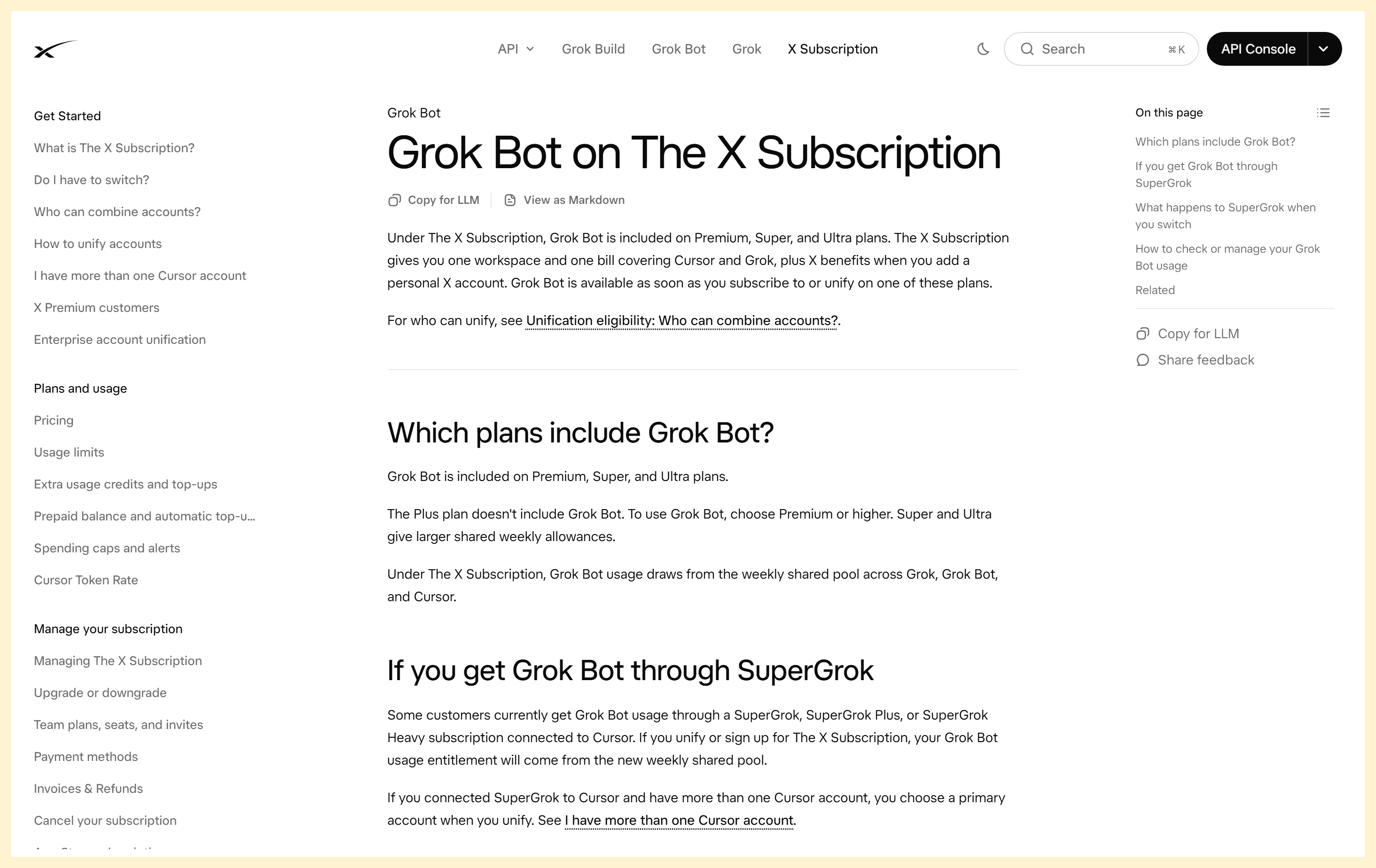
The current X Subscription guide explains which products draw on the shared allowance.
What happens when you hit the weekly limit?
Reaching the included allowance does not always mean the same thing. On the new X Subscription, usage beyond the weekly pool is treated as Additional Usage and comes from prepaid credits, subject to your billing controls. Auto Top-up is optional and only runs if you enable it. A monthly Additional Usage limit can cap paid overage separately from the prepaid balance. Having credit available does not automatically mean you have authorized unlimited spending.
On a legacy Cursor plan, on-demand usage may continue after the included weekly limit if it is enabled. The account may offer a monthly cap. The Bot can run slightly past a cap if a task is already in progress when the limit is reached. Turning off on-demand usage makes the Bot stop after the included allowance runs out, then resume after the weekly reset. These controls and labels differ by account path, so use the matching billing page. (Grok Bot billing FAQ)
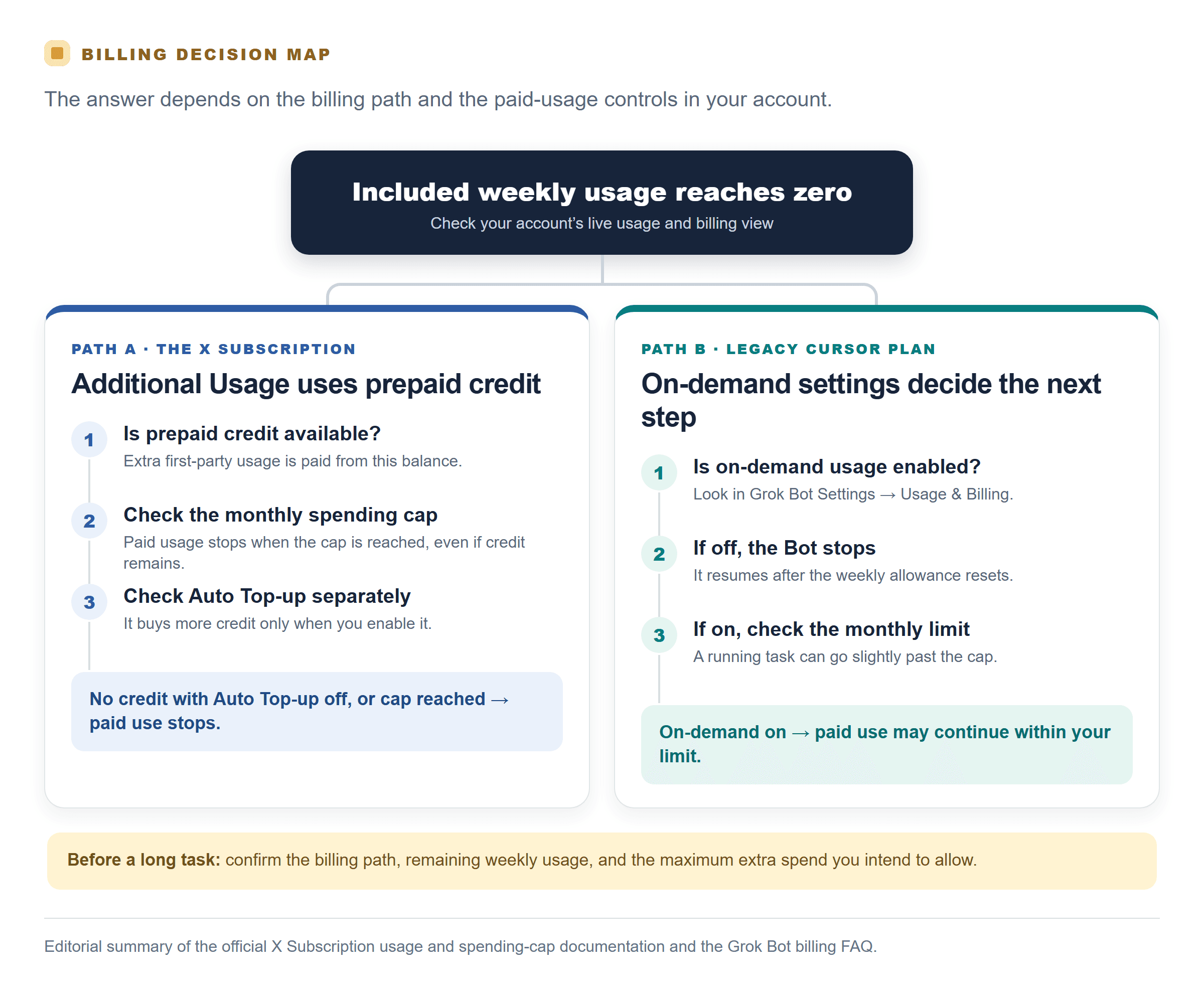
Editorial flowchart based on the X Subscription usage guide, spending-cap rules, and Grok Bot billing FAQ. Check the live settings for your account.
Before starting a long task, check three separate things: remaining included usage, whether paid additional usage is permitted, and the maximum extra amount you are willing to spend. On the new plan, prepaid credit and the monthly spending cap are distinct controls. Auto Top-up is a third setting. On a legacy account, look for on-demand status and its monthly limit. A low prepaid balance does not necessarily protect you if automatic credit purchase is switched on.
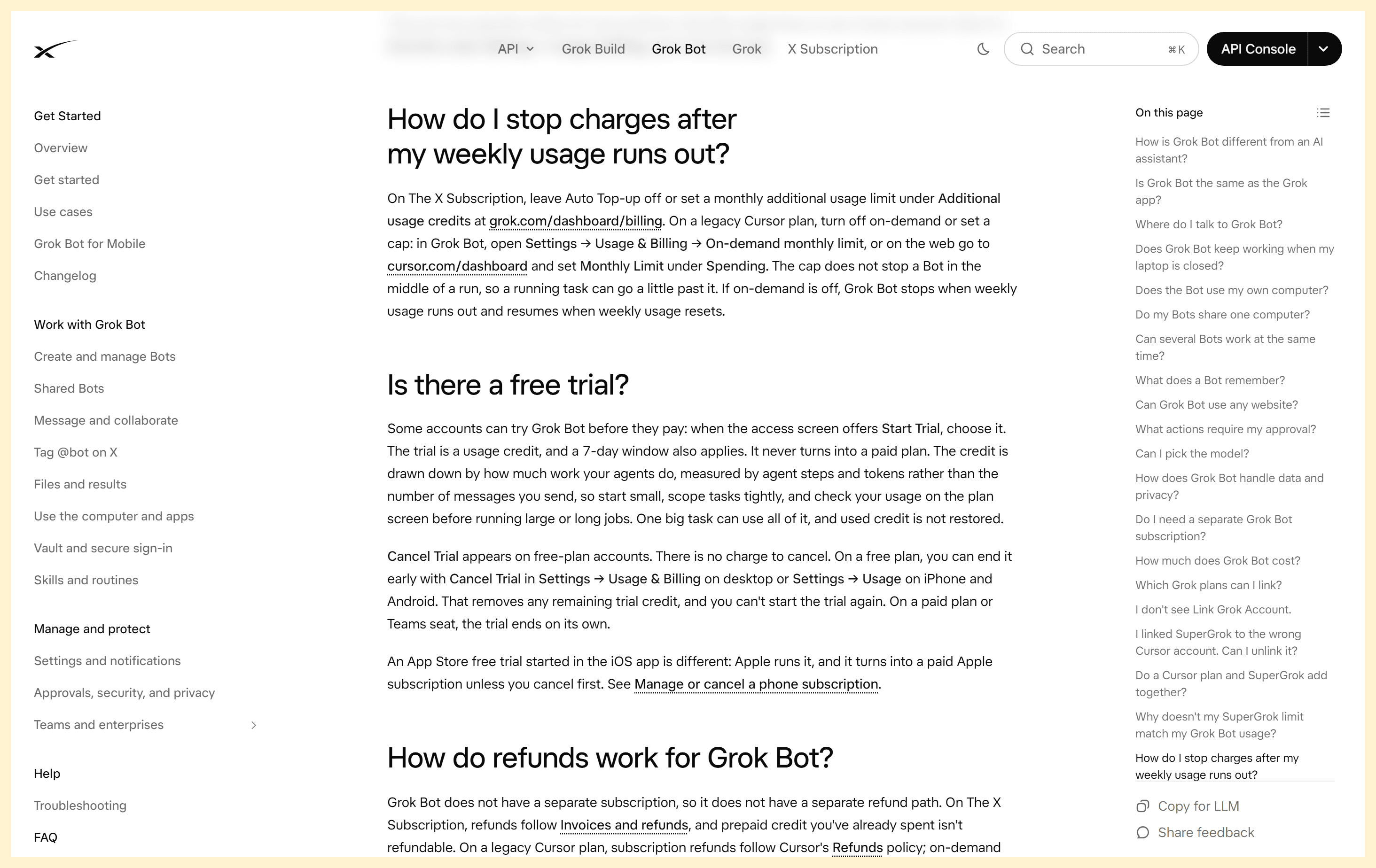
The FAQ distinguishes new-plan prepaid credits from legacy Cursor on-demand usage.
How do you check usage and control Grok Bot costs?
Use this short setup before the first substantial task:
- Identify the billing path. Check whether the account is on The X Subscription or a legacy Cursor plan. Confirm the workspace and the account shown in the invoice.
- Open the matching usage view. For the new subscription, open the Grok dashboard and select Usage. For a legacy account, use the Cursor dashboard or Grok Bot’s Settings → Usage & Billing.
- Note the reset. Record the remaining weekly allowance and the next reset date shown in your account. The reset is account-specific; rely on the displayed schedule rather than assuming a particular day or time.
- Inspect paid usage controls. Check Auto Top-up and the monthly Additional Usage limit for the new plan. On legacy Cursor, check on-demand usage and the monthly limit. Turn off any setting you do not intend to use.
- Run a small task first. Scope the request, review the result and then check how the usage view changed. Use that observation to decide whether a larger job fits this week.
- Pause before upgrading. If you run low, compare the next tier’s recurring price with your actual work pattern and reset timing. Upgrade because your measured usage warrants it, not because another user said a certain plan was necessary.
These checks turn a vague allowance into a visible operating budget. They also reduce a common source of confusion: an account may have a weekly included pool, prepaid credits, an optional spending cap, and automatic top-ups as separate parts of its billing. “I still have credits” and “the Bot can keep working” are not always equivalent if a cap has been reached or on-demand use is disabled.
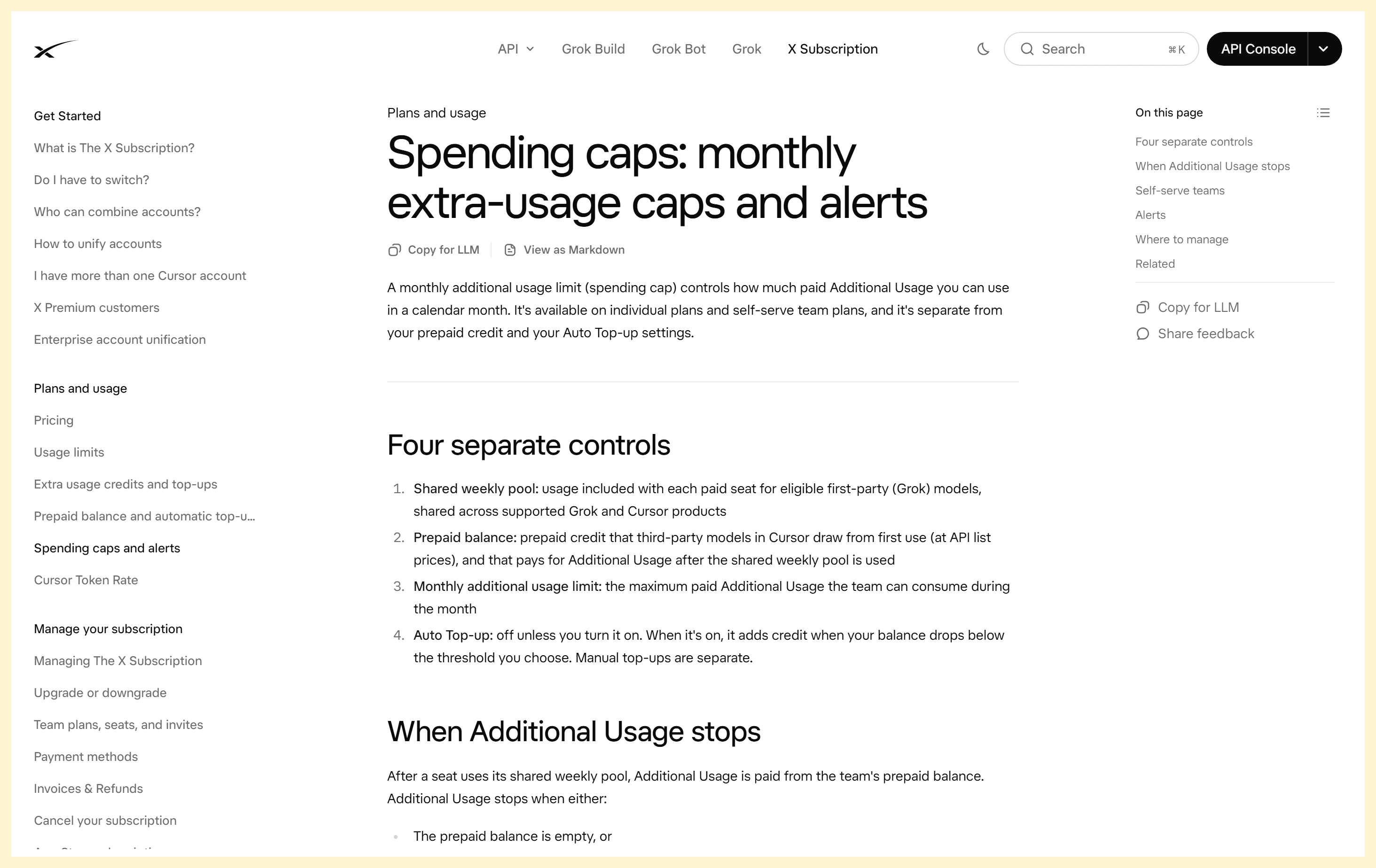
The official spending-caps guide separates the four controls you should check before a long Bot task.
For teams, ask the workspace admin which controls apply to each seat and who can change them. A seat’s included usage and a team’s paid additional-use balance may be managed differently. Do not assume that several team members draw from one shared included weekly pool unless the live plan documentation says so for your plan.
Which Grok Bot plan fits your workload?
Choose based on the work you expect to delegate and what your own usage panel shows. Premium is the sensible starting point for someone who needs Bot access and expects to learn their usage through small, occasional tasks. Super may suit a person who regularly uses the Bot and finds the Premium allowance restrictive. Ultra is aimed at heavier use where its larger stated multiplier is worth the added recurring cost.
These are workload descriptions, not promises about how many jobs each tier can complete. An intensive research task can consume more allowance than several short requests. If your work arrives in bursts, the weekly reset may matter as much as the monthly plan price. If your tasks are predictable, a week of measured use can help you estimate whether a higher tier is justified.
Use this decision sequence:
- Start with the lowest eligible plan that gives you the Bot features you need.
- Keep extra usage disabled or capped while you establish a baseline.
- Review usage after several representative tasks, not just one easy prompt.
- Upgrade only when repeated usage data shows that the current tier interrupts work often enough to justify the price difference.
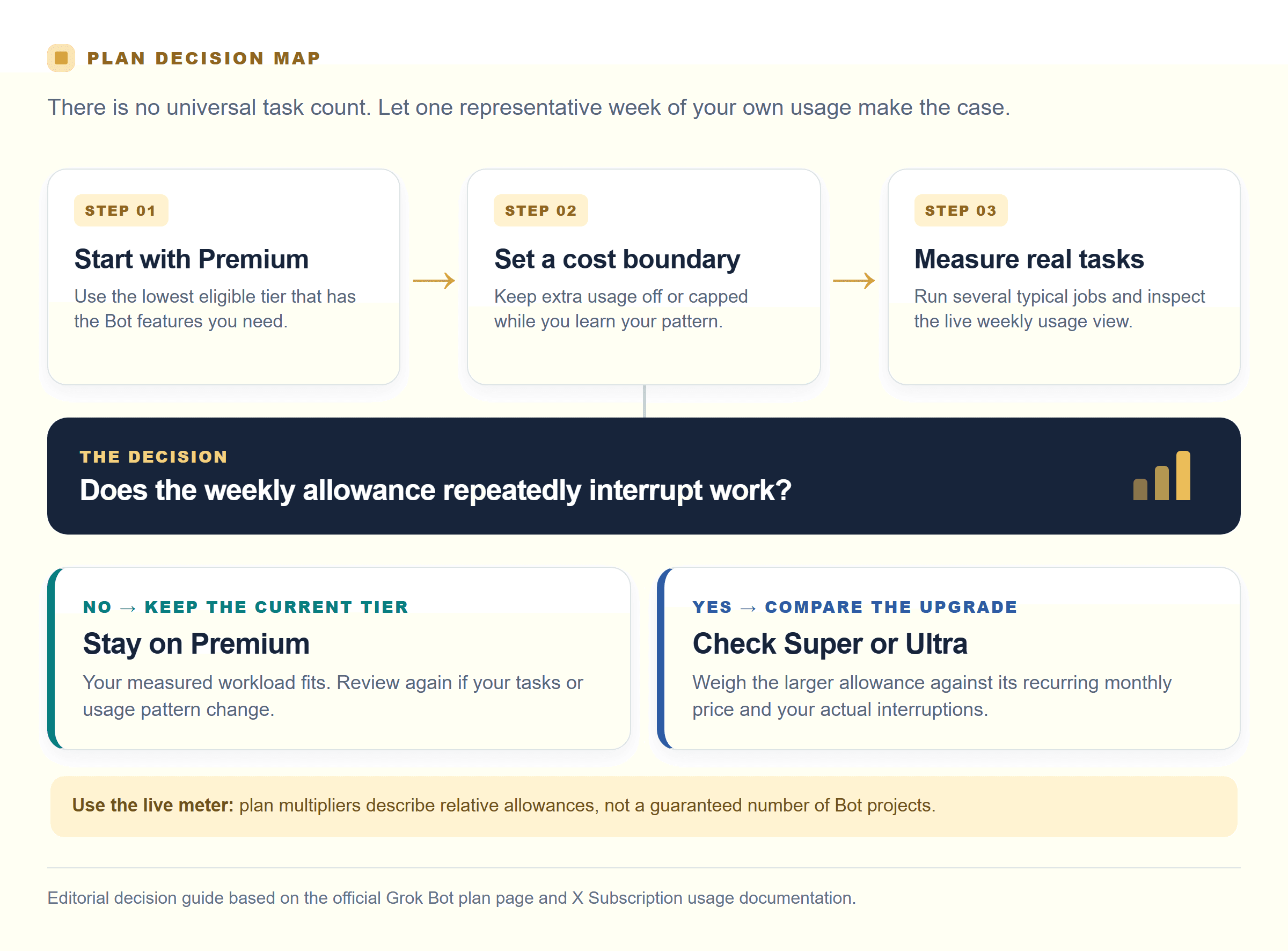
Editorial decision guide: measure representative work on Premium, then compare higher tiers only if the weekly allowance repeatedly interrupts it. See the Grok Bot plan page for current tiers.
This approach is especially useful for solo users and small teams paying out of pocket. It limits the risk of paying for unused capacity while avoiding the false precision of estimating Bot work from message counts.
Grok Bot vs. Grok API: which do you need?
Grok Bot is for delegated work inside a cloud computer. It can use websites and connected tools, work with files, preserve context, and return for your review. Choose it when the outcome requires an agent to carry out a multi-step workflow in an environment, subject to its available tools and approval boundaries.
An API is for developers who want to call a model from their own software. It gives an application a request-and-response interface, with usage and pricing based on the model and current provider terms. An API does not provide Grok Bot’s persistent computer, account integrations, or task-running interface. Compare API pricing with your expected input and output volume, not directly with a Bot subscription.
If you want to integrate an xAI model into an existing OpenAI-compatible client, Atlas Cloud provides an API catalog where you can check currently listed xAI models and their live availability. Confirm the model identifier, rate, and billing conditions on the specific model page before building a budget; availability and prices can change. This is an API route, not a Grok Bot subscription, and it does not grant Bot’s computer-use features. See the Atlas Cloud model catalog for the current listing.
Before subscribing, answer one question: do you need an agent to work in tools, or do you need a model endpoint inside your own product? That distinction will prevent you from buying a plan for a workflow an API should handle, or expecting a plain API call to operate a desktop agent.
Frequently Asked Questions
Is Grok Bot free to use?
The current plan page lists paid individual tiers for Grok Bot. Some accounts may see a trial or promotional access option, but eligibility and terms can vary. Check what your account offers before relying on a trial as an ongoing plan.
Does Grok Bot have a separate subscription?
No separate Bot-only monthly fee is listed for the new X Subscription. Grok Bot is included with Premium, Super, and Ultra. Legacy Cursor accounts can have different entitlements and billing.
How often does Grok Bot usage reset?
The included usage is weekly. Your account’s Usage view shows the next reset date and time, which is the best source for your specific schedule.
Can I stop Grok Bot from using extra credits?
Yes. Leave Auto Top-up off and set an Additional Usage cap on the new subscription, or disable on-demand usage and set a monthly limit on a legacy Cursor account. Check the setting in the same account that bills for your Bot.
Grok Bot Pricing and Usage Limits Explained comes down to three checks: identify the account path, measure your own task usage, and decide in advance whether paid overage is allowed. Do those before choosing a higher tier, and the plan price becomes easier to evaluate against the work you actually need done.


