Grok Bot sales automation examples are most useful when they turn scattered sales context into a reviewable work package: account research, lead sorting, outreach drafts, meeting notes, and customer feedback. xAI's published sales workflows describe bots preparing and staging work while a person approves external messages and commercial decisions. For a small team, that makes a read-only research pilot a sensible first step.
Key takeaways
- Use bots to prepare, summarize, classify, and draft repeatable sales work.
- Give each bot one clear responsibility and explicit skip rules.
- Keep sending, pricing, contracts, and customer promises behind human approval.
- Measure preparation quality and review time before expanding access.
What sales work can Grok Bot take off your plate?
Grok Bot can be configured as an AI teammate that works across connected tools and routines. xAI's sales materials describe research, prospecting, call preparation, inbox triage, follow-up drafts, and pipeline summaries. These examples show proposed workflows and product capabilities; they do not establish that a bot independently closes deals or improves revenue.
The useful unit of automation is a handoff. The bot gathers context and produces a decision-ready package. The rep checks whether the evidence is current, whether the prospect is eligible, and whether the next action makes sense. In the xAI SDR guide (accessed November 3, 2026), the morning routine includes account research, contact filtering, and outbound drafts for human review. Access to a connected tool still depends on the account's setup and permissions. A listed use case does not mean the bot automatically has a team's CRM, email, or lawful basis to contact people.
| Sales stage | Bot can prepare | Rep decides |
|---|---|---|
| Before outreach | Account brief, signals, contact context | Whether the account fits and the signal matters |
| Prospecting | Evidence-backed lead categories and draft copy | Whether to contact, hold, or skip |
| Before and after a call | Meeting brief, recap, proposed next steps | What was agreed and what the customer should receive |
| Customer learning | Themes, objections, approved quote candidates | What is accurate, confidential, and publishable |
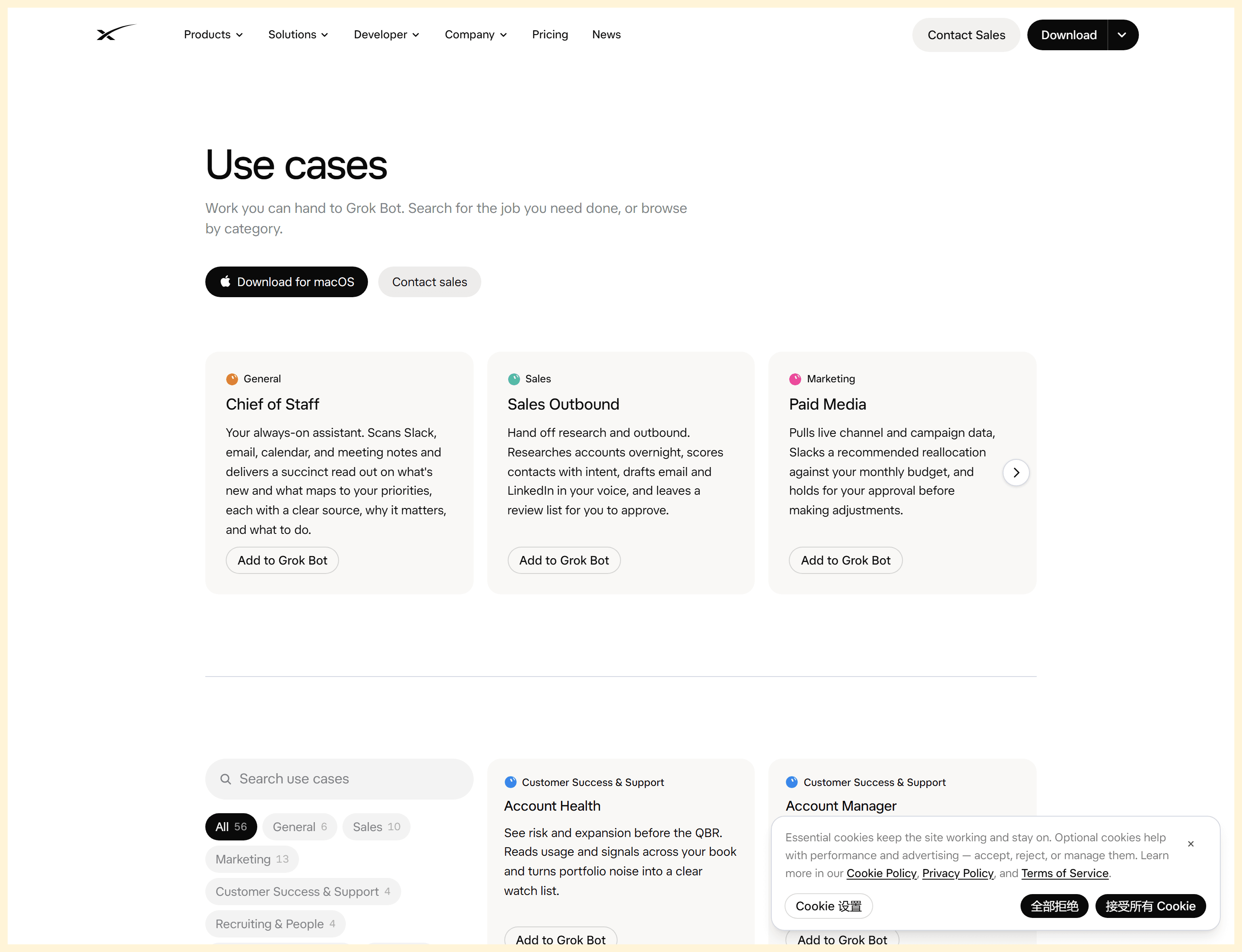
The official directory lists Sales Outbound as a Grok Bot use case (xAI, accessed November 3, 2026).
7 Grok Bot sales automation examples, from prospect to customer
These examples are workflow patterns, not promises of business results. For each one, define what the bot reads, what it returns, what a person checks, and what outcome the team tracks.
1. Build account research briefs before outreach
Trigger: A rep adds a target account to a research queue. Inputs: approved CRM notes, prior conversations, and accessible public company information. Output: a short brief with company context, recent signals, relevant stakeholders, possible needs, dates, and source links.
The rep checks that each signal is current and relevant. A hiring announcement from last year should not justify a message today; a company's broad product category should not be treated as proof of a specific need. Track preparation time and how often the rep has to correct or discard a brief.
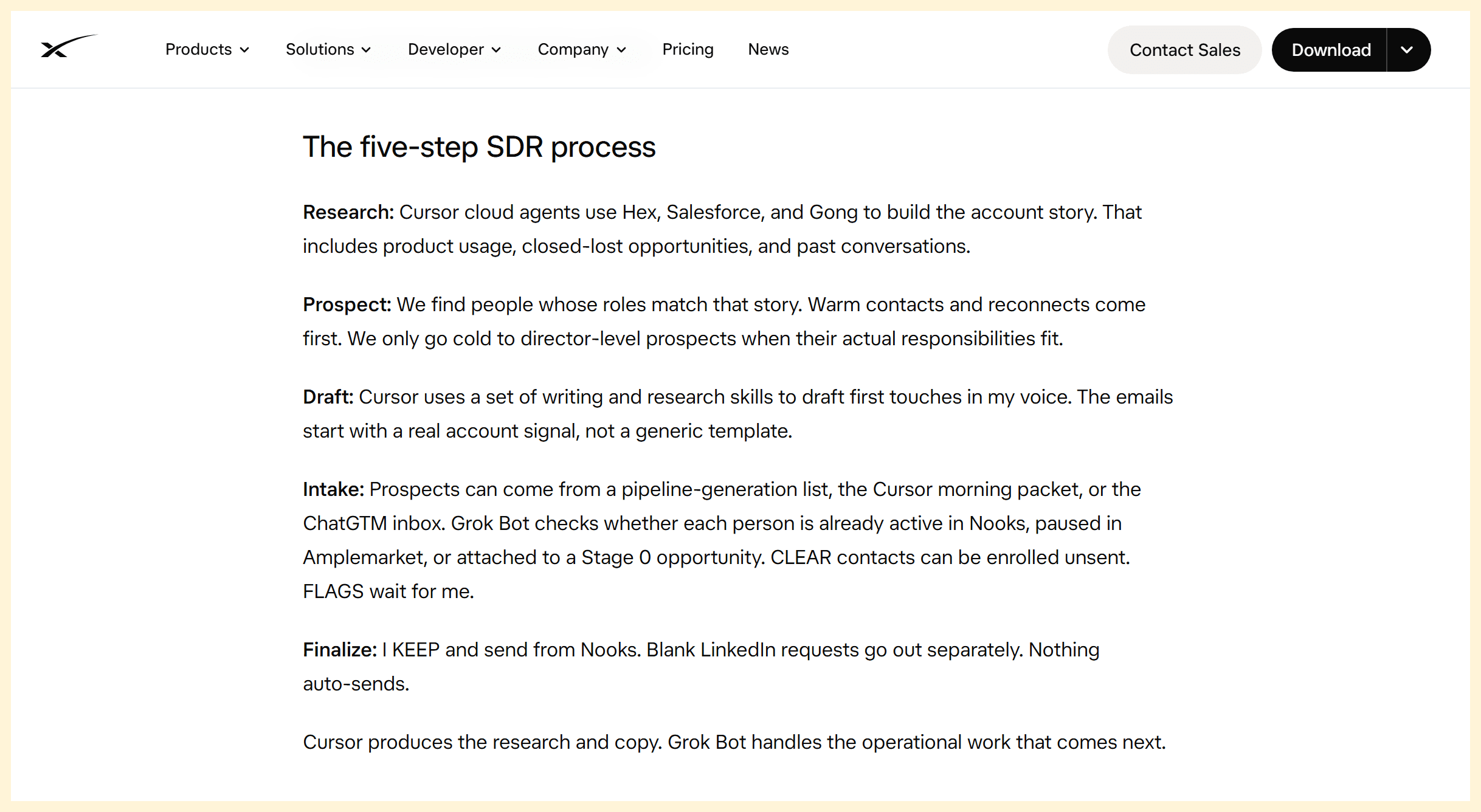
The xAI SDR guide describes the five stages behind a research-to-outreach handoff. This is an official guide excerpt, not a Grok Bot interface screenshot.
2. Rank and qualify leads with a reason
Ask the bot to group records by fit, timely signal, known relationship, and missing information. Require one evidence line for each label and a separate list of unknowns. A useful output might say “HOLD: company size appears to fit, but the cited expansion signal is undated” rather than assign an unexplained high-intent score.
A rep checks edge cases and exclusion lists before any category affects prioritization. Track how often suggested classifications survive review and which evidence fields are most often missing. Do not allow an unsupported score to silently become a CRM fact.
3. Draft personalized first-touch outreach
Give the bot an approved value proposition, a verified account signal, the recipient's role, and a length or tone constraint. Ask it to return four labeled parts: cited signal, opening sentence, relevant value, and a low-pressure next step. Keep source links beside factual claims so the reviewer can verify them quickly.
Before sending, the rep checks the person, company, claim, voice, and applicable contact rules. A tailored opening is only useful if the underlying detail is true. Measure the proportion of drafts that need material factual edits, not just cosmetic rewrites.
4. Prepare an outbound batch and skip risky records
Instead of asking for the largest possible list, have the bot place records in KEEP, HOLD, or SKIP. This makes ineligible and uncertain records visible before a rep spends time reviewing copy.
| Queue | Evidence needed | Next action |
|---|---|---|
| KEEP | ICP fit, a current and relevant reason to contact, no exclusion match | Prepare a draft for review |
| HOLD | Fit or signal may be relevant, but a key fact is missing or stale | Request research or wait for a clearer signal |
| SKIP | Active deal, existing customer, duplicate, do-not-contact record, or clear mismatch | Exclude from this batch and preserve the reason |
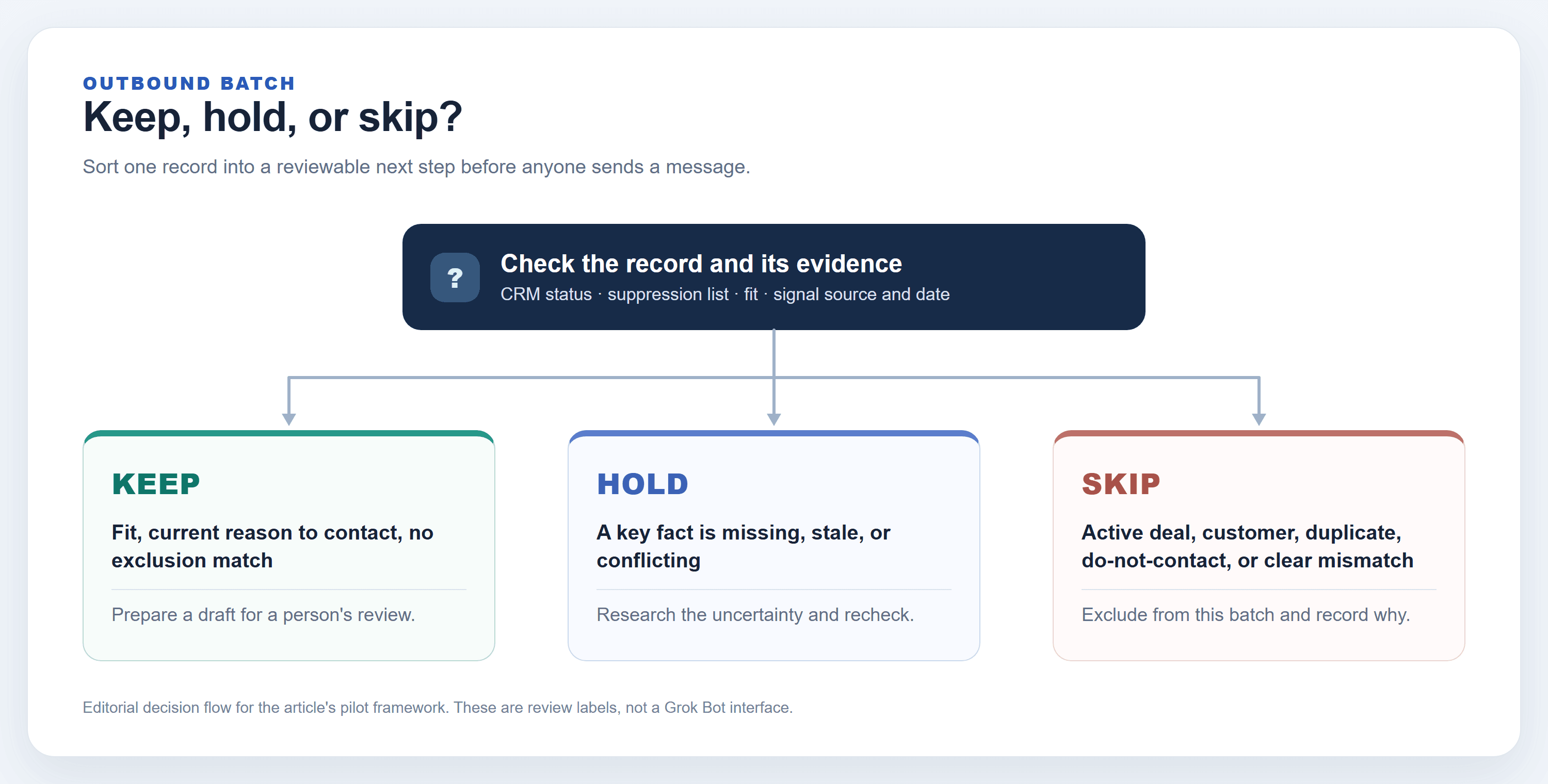
Decision flow for this article's KEEP/HOLD/SKIP pilot framework. It is explanatory, not a Grok Bot interface capture.
The rep checks suppression data and active-deal status against the system of record. The xAI founder-led sales guide (accessed November 3, 2026) describes reading the deal tracker and skipping active deals, customers, and do-not-contact records; it also describes staging a batch for approval. Track exclusion mistakes as a serious quality metric.
During the pilot, decide what happens when records disagree. If the CRM says a contact is active but a spreadsheet says they are new, the bot should HOLD the record and show both values with their source and timestamp. It should not resolve the conflict by silently trusting whichever file it read last. Keep a stable account or contact identifier in the output so a reviewer can spot duplicates across name variations. These details make a daily queue safer to review and easier to audit later. A rep can then correct the source record once instead of repeatedly repairing drafts produced from stale copies.
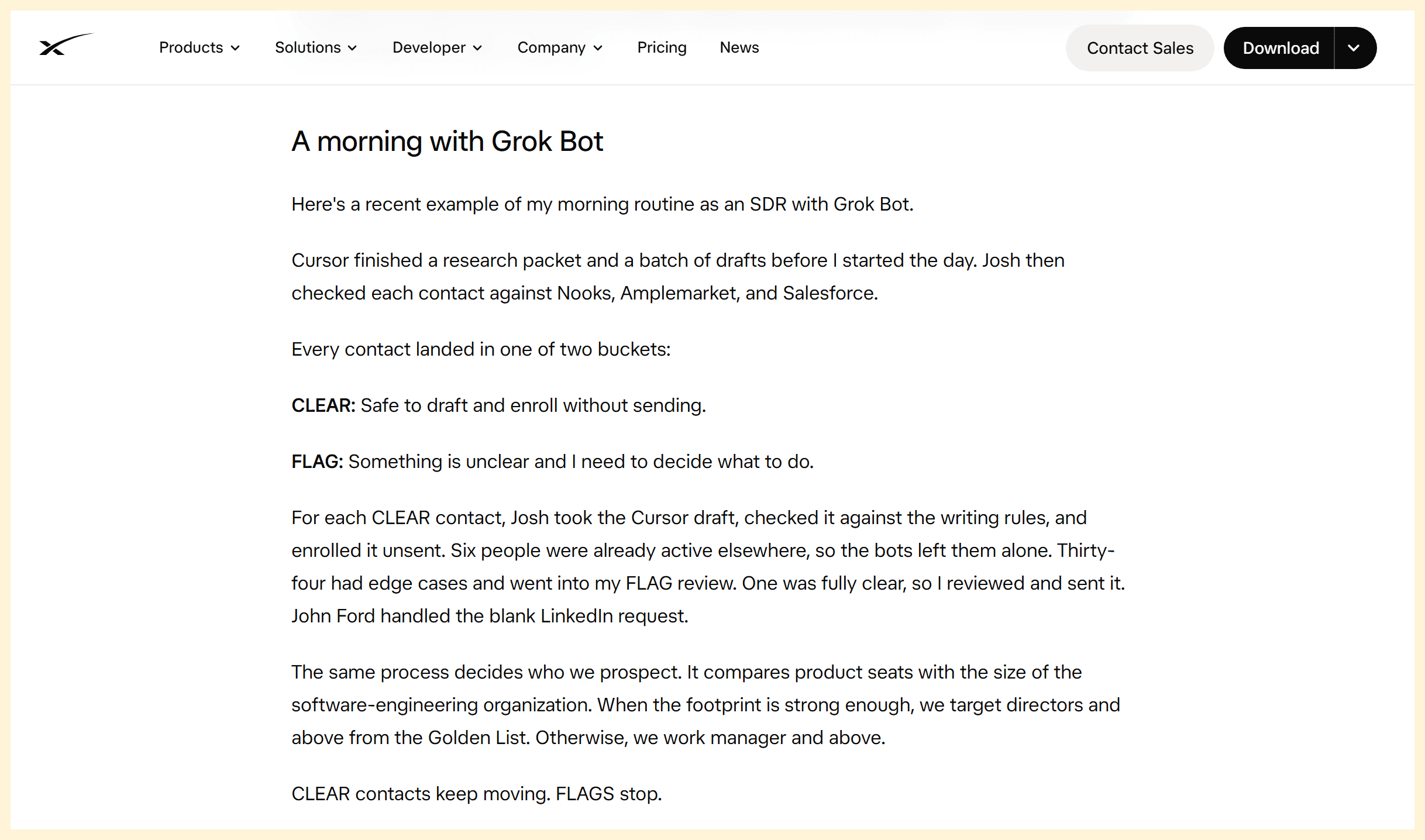
In the xAI SDR guide, CLEAR contacts can be staged without sending, while FLAG contacts wait for a person's decision. The article's KEEP, HOLD, and SKIP labels are its own pilot framework.
5. Prepare sales calls and draft follow-ups
Before a call, combine approved calendar context, previous notes, and stakeholder information into a brief: what the account does, what has been discussed, open questions, and who is expected. Afterward, use the actual meeting notes or transcript to list decisions, objections, owners, and dates, then draft a recap and proposed CRM note.
The rep must correct the record before it goes to a customer. Pricing, contract terms, delivery commitments, and stage changes require explicit confirmation. The official founder-led sales guide says proposals, pricing, and contracts await approval. Track missing action items, inaccurate summaries, and review time per meeting.
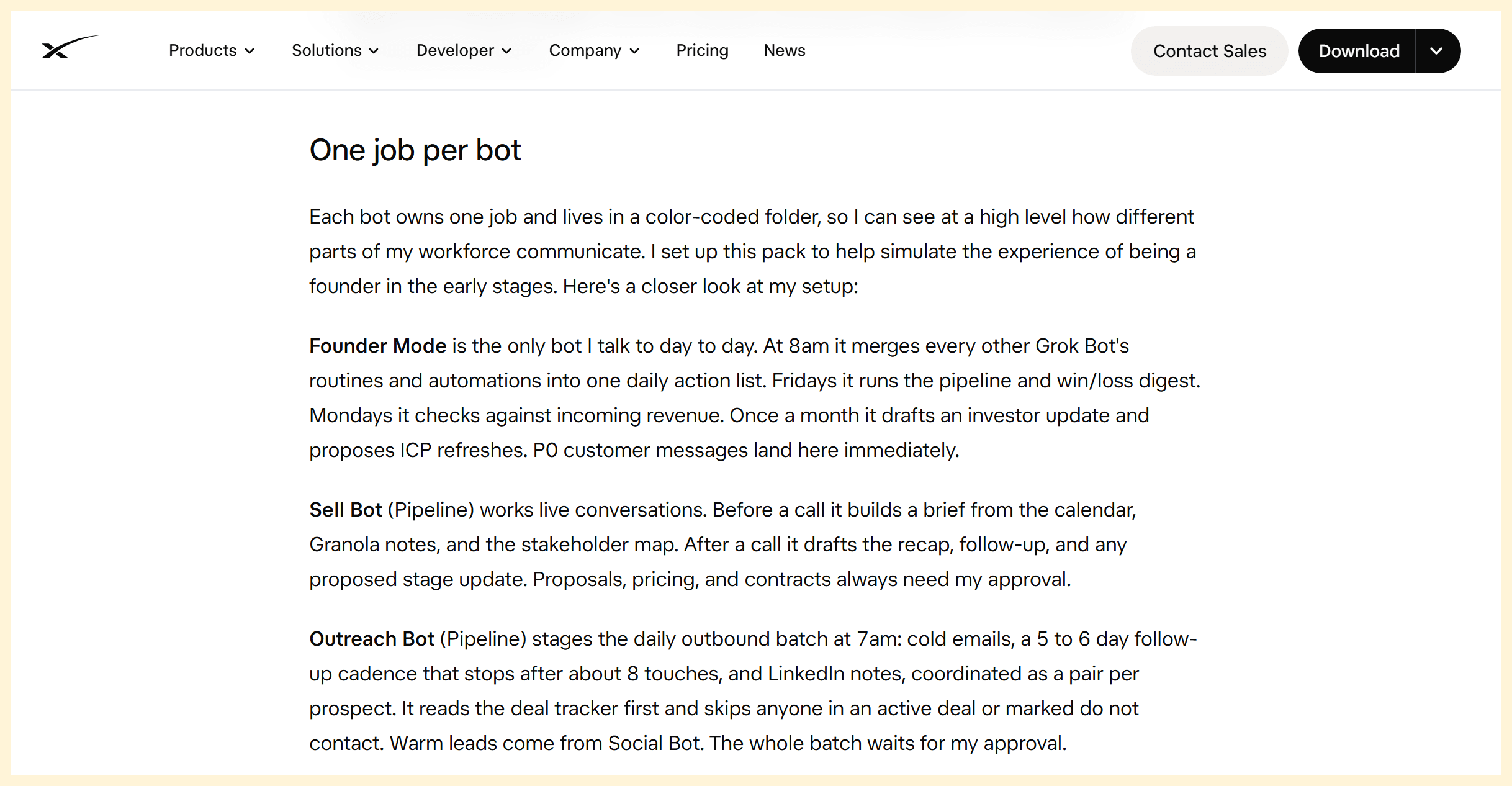
The xAI founder-led sales guide assigns call briefs and follow-ups to Sell Bot and staged outbound to Outreach Bot; the excerpt also states the approval checks.
6. Surface warm leads from customer and social signals
A monitoring bot can collect public posts or approved customer feedback that mentions a problem the product addresses. It should return the original source, date, exact relevant wording, and why it may matter. A person decides whether the author is a plausible prospect and whether contact is appropriate.
Keep observation separate from inference. A like, complaint, or general question does not by itself show purchase intent. Track how many surfaced signals a rep considers actionable and how often the bot confuses casual engagement with a buying signal.
7. Turn call notes into reusable customer proof
A bot can organize approved call notes into recurring objections, product questions, and candidate customer language. It can suggest a proof point only when the notes contain supporting material, with the original passage attached for review.
Preserve customer quotations exactly and obtain permission before publishing names, quotes, or identifiable details. Never let a model invent metrics, attribute a result to a customer without evidence, or turn a private conversation into implied endorsement. Track how many proposed proof points pass fact and permission checks.
The sales handoff at a glance
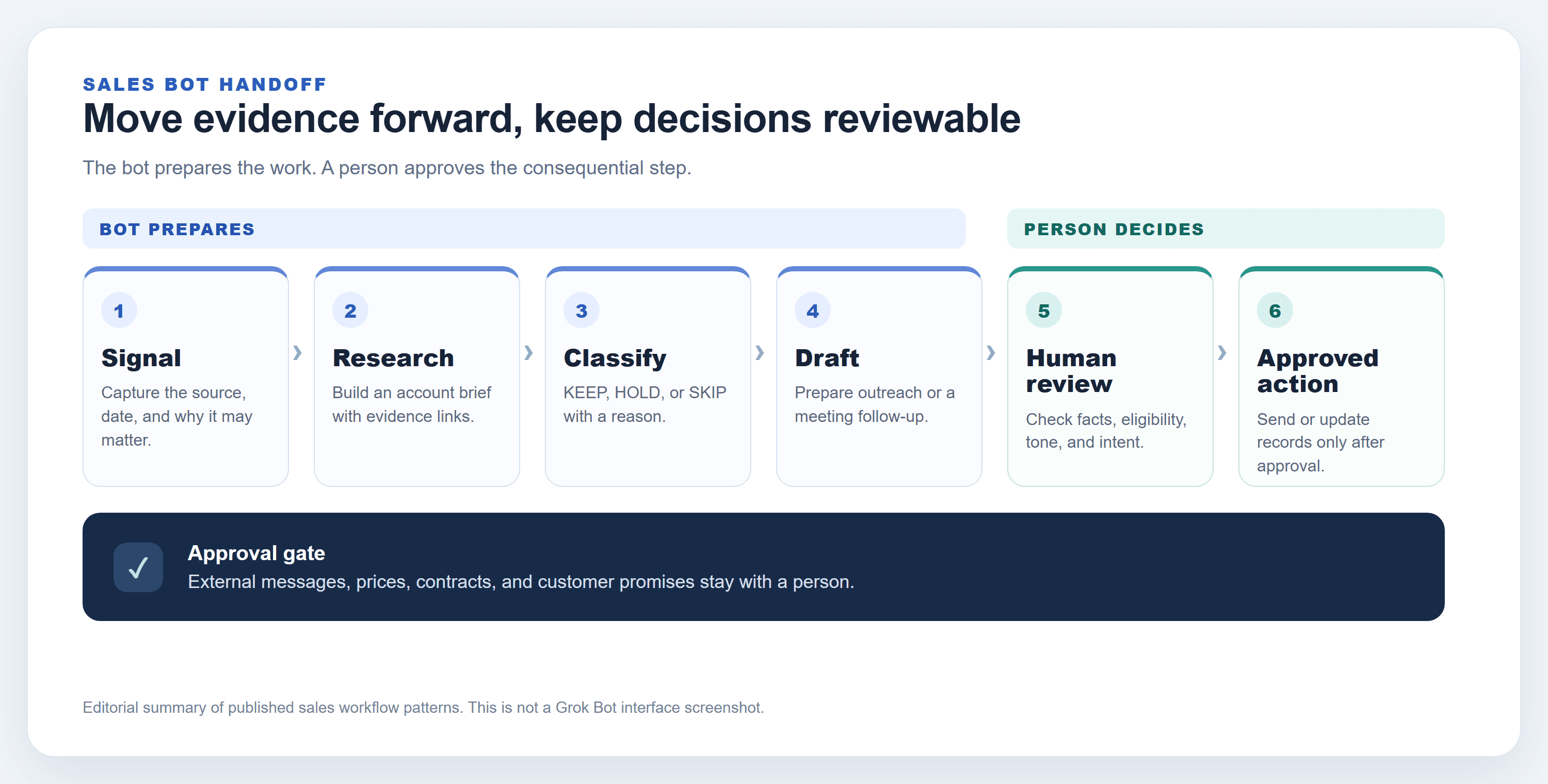
This article's summary of the cited sales workflows. The diagram is explanatory, not a Grok Bot interface capture.
A practical Grok Bot sales workflow for one small pilot
Choose one recurring task with a clear finish line, such as preparing research briefs for a small daily lead queue. Confirm the current Grok Bot plan, usage limits, connectors, and admin controls in the official product before committing. Availability and limits can change, so do not build a business case around a remembered quota.
- Define the task. Name the owner, trigger, and output. For example: “Prepare evidence-linked research briefs for new target accounts.”
- Set the boundary. List permitted read sources, exclusion conditions, fields that must be returned, and actions the bot must never take.
- Run read-only. Have the bot produce drafts with source links and mark missing evidence. Do not authorize sending or CRM changes during the first review.
- Sort the results. Review KEEP, HOLD, and SKIP decisions. Check each exclusion against the real suppression list and current pipeline.
- Record corrections. For a small sample, note factual errors, missing context, duplicate records, and time spent editing. Fix the instructions when the same correction repeats.
- Expand only after review. If the team agrees the output meets its own quality bar, consider a narrow permission for low-risk CRM notes. Keep external messages and commercial commitments under human approval.
A compact task brief can make the pilot reproducible:
- Goal: What work product should the bot prepare?
- Readable data: Which connected sources and records may it use?
- Forbidden actions: What may it never send, change, delete, or promise?
- Output: Which fields, evidence links, and uncertainty labels are required?
- Escalation: Which conditions mean HOLD or SKIP?
- Approver: Who reviews the output before it affects a prospect or customer?
Where should a human stay in the loop?
Treat approval as part of the workflow design. The higher the cost of a wrong action, the narrower the bot's permissions should be. Review the connected accounts and team policy before enabling any action; a workflow description is not a substitute for checking what permissions are actually active.
| Operation | Sensible default | Review focus |
|---|---|---|
| Account research and summaries | Prepare automatically from permitted sources | Recency, source quality, data access |
| Lead classification | Suggest, with a person reviewing uncertain cases | Bias, false matches, suppression status |
| Email or social copy | Draft only | Facts, tone, privacy, contact requirements |
| Sending, pricing, contracts | Require explicit human approval | External promises, legal and brand risk |
| Non-sensitive CRM notes | Consider limited access after a pilot | Audit trail, duplicates, accidental overwrites |
| Customer stories and testimonials | Verify and obtain permission | Exact wording, consent, confidentiality |
The founder-led sales guide describes approval for the outbound batch and for proposals, pricing, and contracts. Teams should verify the current controls in their own account and avoid assuming that a sample workflow enforces the same policy by default.
How can a team tell whether the automation helps?
Compare the pilot with the team's own recent baseline. Useful measures include research preparation time per eligible lead, the share of briefs returned for factual errors, duplicate or excluded records caught before review, the share of drafts usable after editing, and minutes spent reviewing each batch.
Also record severe misses separately: a do-not-contact record included, an active opportunity treated as new, or a customer commitment misstated. Before the pilot, agree what “good enough” means for the task: which fields must be sourced, which records must always be excluded, and how much review effort the team will accept. Keep the same definitions throughout the trial so that changes in scoring do not make week-to-week results look better. A small pilot can show whether preparation is more consistent or less laborious. It cannot, by itself, prove that the bot caused more revenue, a higher reply rate, or better retention. Avoid interpreting a few successful conversations as a causal result.
Optional sales visuals, separate from sales automation
Some teams also need product images or campaign variations after a rep approves the message. That is a separate content task, not a requirement for Grok Bot prospecting. If a visual would make a specific product claim easier to understand, teams can explore image models such as Grok Imagine Image 2.0 on Atlas Cloud. Check the current model page for pricing and availability before use; no price is quoted here.
Frequently Asked Questions
Can Grok Bot send cold emails by itself?
The official sales examples emphasize drafts and approval before outreach. Check the current product permissions and your organization's policies, and require a human to approve external messages in a pilot.
Which sales task should a small team automate first?
Start with a read-only, repeatable task such as account research briefs. It produces a reviewable artifact and lets the team measure accuracy and preparation time without giving the bot authority to contact prospects.
Can Grok Bot update a CRM after a call?
The founder guide describes a proposed stage update after a call. Confirm connector access and current behavior in your account. Review any changes before they alter active pipeline data.
Are reported Grok Bot sales results independently verified?
A user post or product example is not independent verification. Treat reported bookings or revenue as anecdotes unless a source provides auditable methods and supporting data. These Grok Bot sales automation examples describe tasks and guardrails, not guaranteed outcomes.


