

Searching for kling 4 auto subtitles can send you to pages that use the same words for three different outputs: generated speech, text inside the frame, and timed captions. Only the last one lets a viewer follow dialogue with the sound off, edit a brand name, or upload a selectable subtitle file.
The practical answer is simple. Treat a Kling video with native speech as a caption source, then run a separate transcription and review pass before publishing. That approach stays useful even when model names and third-party feature pages change.
Key takeaways
- Native audio gives you a spoken source track, not an editable caption file.
- In-frame lettering can support a short CTA, but it cannot replace timed captions.
- Keep the lower third clean while generating the video, then review names, numbers, timing, and safe areas.
- Use burned-in captions for feed-first posts and SRT/VTT for players that support selectable tracks.
Kling 4 Auto Subtitles: The Short Answer
Start with a clean speech video. Then transcribe it, correct the transcript, and choose the delivery format for the platform. That avoids a common production mistake: expecting visible words in a generated scene to behave like captions.
| You need this result | Is it Kling native audio? | Should it be editable? | Correct deliverable |
|---|---|---|---|
| A character speaks with matched lip movement | Yes | Not applicable | MP4 with audio |
| A sign, package label, or short title appears in-frame | Sometimes | Usually unreliable | Visual scene element |
| Dialogue remains understandable on mute | No | Yes | Burned-in caption video |
| A viewer can switch captions on or off | No | Yes | SRT, VTT, or CC track |
Verify the Version Before You Generate
As checked on October 13, 2026, Kuaishou's February 5 announcement identifies the 3.0 family, including Video 3.0 and Video 3.0 Omni, and describes native multilingual audio plus output up to 15 seconds. It does not document an automatic subtitle export feature. The current official Kuaishou announcement is the safer source for a release claim than a page whose domain happens to contain a version number (Kuaishou, February 2026).
Kling's official quickstart currently navigates users through Video 3.0, Video 3.0 Omni, Image 3.0, Image 3.0 Omni, and O1 guides. That navigation is useful for checking a named feature before promising it to a client (Kling AI, accessed October 2026).
Use a simple credibility filter:
- Cite a dated Kuaishou release, Kling documentation, or an actual model directory.
- Treat an SEO landing page, reseller feature grid, or undated comparison as a lead to verify, not a product specification.
- Check the current model catalog before opening a workflow, especially if a listing says a model is coming soon.
Kling 4 Auto Subtitles vs Native Audio vs On-Screen Text
Kling 4 Auto Subtitles Need Timing and Review
Real auto subtitles begin with speech recognition and produce text aligned to the video timeline. An editor needs to correct spelling, adjust line breaks, move cues away from a face or CTA, and choose whether to burn the text into pixels or export a subtitle file.
Captions also carry more than dialogue. The W3C accessibility guidance says captions provide a text version of speech and non-speech audio that viewers need to understand the content. If a door slam, audience reaction, or product alert changes the meaning, include it where appropriate (W3C WAI, updated September 2024).
Kling Native Audio Is the Source, Not the Caption Track
Kling 3.0's native audio can produce dialogue, ambience, and lip-synced performance. It gives a caption workflow something worth transcribing. It does not establish that the output includes an editable transcript, a caption track, or an SRT download.
Prompt for a quiet lower third. If a presenter, product, or CTA needs that space, captions will compete with it later. For an available source-video test, the Kling V3.0 Turbo Text-to-Video page is a direct place to create the audio-led MP4 before captioning it.
Kling 4 On-Screen Text Is Still a Visual Element
Generated lettering can help with a short sign, packaging detail, or scene label. It should not carry every spoken word in a publishable clip. The words are part of the picture, without a dependable timeline, editing surface, language track, or accessibility behavior.
Avoid the instruction "add subtitles" as a shortcut. It asks a video model to draw words, not a caption workflow to produce timed text.
Kling 4 Auto Subtitles: A Caption-Ready Video Test
Use the following 8-second, 9:16 source-video test to check whether the spoken line is intelligible, the mouth follows it, and the lower third remains clear for a separate caption pass. It does not claim that Atlas Cloud provides automatic transcription or SRT export.
- Open the Kling V3.0 Turbo Text-to-Video page.
- Select 9:16, 8 seconds, 720p, and native audio on.
- Keep the whole lower third free of text, logos, product icons, and watermarks.
- Paste this prompt exactly:
plaintext1Create an 8-second vertical 9:16 product-demo video for a fictional reusable water bottle. A friendly presenter stands in a bright natural kitchen, holds the bottle at chest height, then looks into the camera and says exactly: “Cold coffee by noon? Not anymore. This bottle keeps it chilled all day.” Use clear natural American English, accurate lip sync, and subtle kitchen ambience. Leave the entire lower third visually clean for captions. No on-screen text, no subtitles, no logos, no graphics, no cuts that interrupt the spoken line.
Check four things before you download it as the caption source:
- Every word of the line is audible.
- Lip movement follows the speech closely enough for the intended use.
- The lower third remains visually clear throughout the spoken line.
- The transcript still receives a human review, especially for product names, numbers, and the phrases “Cold coffee,” “Not anymore,” and “keeps it chilled all day.”
Three Source-Clip Checks
These replacement GIFs put generated captions against actual outputs. GIFs are silent; the audio checks below refer to their source MP4 files. All three arrived as 16:9 landscape files, even though the vertical test above calls for 9:16. Check the exported dimensions, audio stream, and visible words before preparing a feed version.
1. Florist: visible captions can fail before transcription even begins. The flower-studio clip displays a dark caption band, but its letters are garbled rather than the requested English sentences. The file also has no audio track, so there is no spoken source to verify or transcribe. This is a failure case for both audio delivery and generated lettering.

Florist GIF with garbled generated captions
Failure case: unreadable burned-in text and no audio stream. A caption band alone does not make a captioned dialogue video.
2. Station: speaker labels can be legible. In the rain-soaked platform clip, the on-screen captions clearly separate “WOMAN: Will we catch the last train?” and “MAN: We will if you stay with me.” The source MP4 contains audio, and both people remain visible during their turns. This GIF shows the intended visual layout, but a reviewer still needs to compare the displayed words and cue timing with the actual voices in the source recording before publishing.
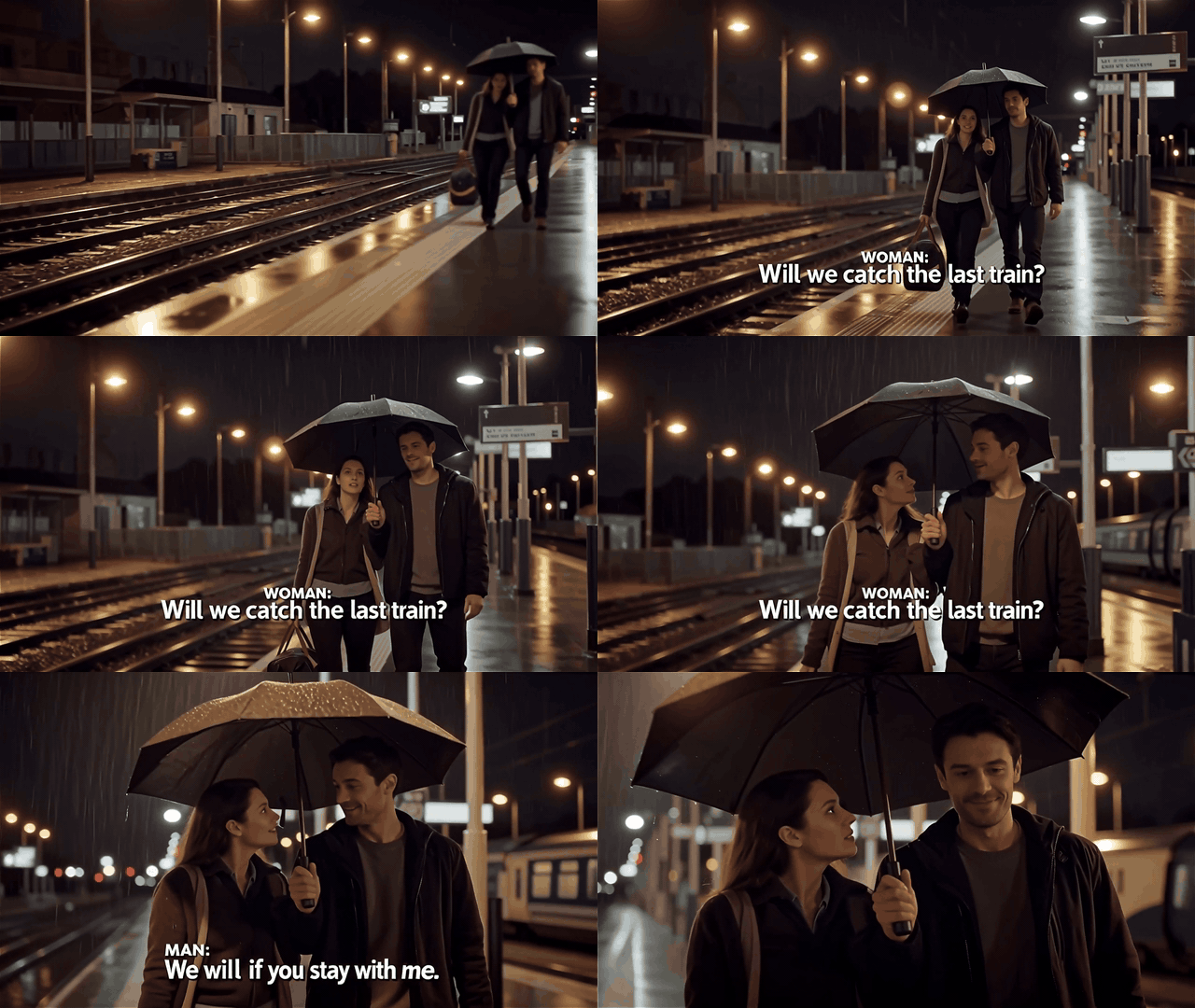
Station dialogue GIF with readable woman and man captions
Visual check: both speaker labels and English lines are readable. Audio-to-caption accuracy still needs a listening pass on the source MP4.
3. Gallery: a translation can change mid-clip. The gallery clip begins with a readable “[Door chimes]” cue, then shows a mixed-language line, “Come in, the exposición acaba de empezar.” Later it switches to “Come in, the exhibition has just begun.” The first line is not a complete English translation, even though the later one is readable. Review the spoken Spanish in the source MP4 and replace any incorrect burned-in wording before release.
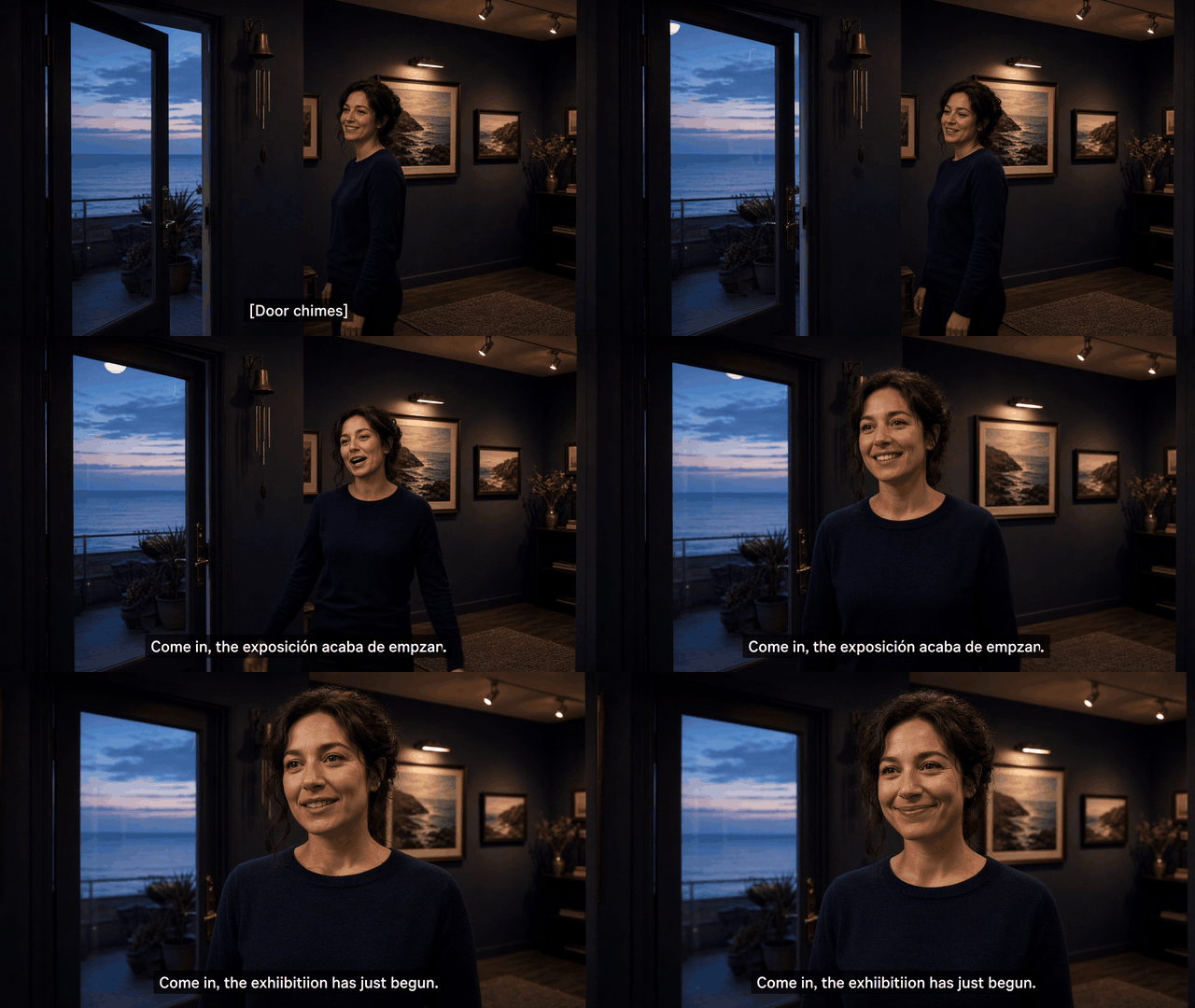
Gallery GIF showing mixed-language and corrected English captions
Failure case: the first translation mixes English and Spanish; the later English caption does not fix the earlier frames.
Choose Burned-In Captions or SRT
The video source and reviewed captions become two separate deliverables. Decide the format from the publishing surface, not from what the generator happened to return.
| Publishing location | Preferred delivery | Why | Pre-publish check |
|---|---|---|---|
| Reels, TikTok, or paid social | Burned-in caption MP4 | Style and position stay visible in muted feed browsing | Avoid platform controls, CTAs, faces, and the product |
| YouTube, a course, or a site player | SRT/VTT plus an optional burned-in version | Viewers can switch, search, translate, or disable captions | Check timecodes, language tags, and non-speech cues |
| Multilingual paid media | One caption track or one finished video per language | Separate versions prevent a crowded bilingual frame | Recheck names, currency, terms, and local phrasing |
| Internal review | Timecoded transcript | Reviewers can assign and resolve exact edits | Verify every proper noun and number |
Use this release check every time:
- Match each caption's start and end to the spoken audio.
- Review product names, people, numbers, URLs, and abbreviations by hand.
- Keep each line away from faces, demonstrations, platform UI, and CTAs.
- Remove residual captions during silent moments.
- Deliver a subtitle file as well when accessibility or selectable captions matter. A burned-in MP4 alone does not provide a caption track.
For teams that need one place to confirm the real model selection before they prepare the source clip, Atlas Cloud can be a practical starting point. Use its V4 status listing for availability checks, not as an assumption that captions are built into the model.
Frequently Asked Questions
Does Kling 4 Auto-Generate Subtitles?
Do not rely on that claim without a current official feature page that shows the exact caption workflow. The documented Kling 3.0 materials support native audio and visual text capabilities, yet they do not establish an editable transcript, timed subtitle track, or SRT export. Generate a clean source video first, then use a dedicated transcription and review step.
Is Kling Native Audio the Same as Captions?
No. Native audio is the sound source: dialogue, ambience, and effects rendered into the video. Captions are timed text that people can read, edit, and often switch on or off. A useful production flow preserves both: the MP4 gives the speech and the reviewed caption file or burn-in gives the audience readable access.
Can Kling Create Readable On-Screen Text for a Video?
It can be useful for short visual elements such as a package label, sign, or brief CTA. Treat it as part of the scene. Do not make it responsible for full dialogue, precise timing, translations, or accessibility. A separate caption layer remains safer when the spoken line carries the message.
Should I Burn Captions Into a Kling Video or Upload an SRT File?
Use a burned-in MP4 for feed-first posts where muted viewers need to see the words immediately. Use SRT or VTT for video players that support selectable tracks, search, and language options. Many teams deliver both: the burned-in version for short-form social and the reviewed subtitle file for owned video surfaces.
Can I Use Kling 4 Auto Subtitles Without Reviewing Them?
No automatic transcript should publish untouched. Reviewers should confirm proper names, product names, prices or quantities, URLs, abbreviations, punctuation, line breaks, and cue timing. A technically correct transcript can still fail in a feed if a line covers a face, a product detail, a CTA, or a platform control.
Is Kling 4 Officially Available Yet?
Availability can change by region, product surface, and provider. Check dated official Kling materials and the specific model directory where you plan to work. If a page marks V4 as coming soon, do not use it as a completed workflow or promise unsupported caption controls. The core kling 4 auto subtitles workflow remains the same: source video, transcription, human review, and the right delivery format.





