The fast answer: kling 4 reference image subject lock is the result creators want, not a confirmed name for a single Kling control. The practical job is to keep a person, product, or fictional character recognisable while the camera, scene, and action change. Current Kling workflows describe this through multi-image references, elements, subject binding, and Reference-to-Video.
Expect stronger continuity, not pixel-for-pixel copying. A useful lock keeps the face or silhouette, outfit markers, product geometry, and key parts stable through a planned shot. It fails when the input leaves too much for the model to infer.
Key takeaways
- Build a subject specification before writing a long prompt.
- Give each reference image one job.
- Test one 8-second continuous shot before a multi-shot story.
- Change one variable after a failed run.
| Reference role | Locks | Should not also define |
|---|---|---|
| Identity reference | Face, silhouette, product body, signature wardrobe | A complex action or camera move |
| Detail reference | Badge, zipper, portafilter, knobs, texture | Full composition |
| Scene reference | Light, background, palette | Who or what the subject is |
| Start frame | First-frame placement and framing | Multi-angle identity |
What Kling 4 Reference Image Subject Lock Means Today
Search results use “Kling 4” as a convenient label for a current consistency problem. Treat it carefully. There is no reason to promise a verified “Kling 4 subject lock” button when a reader may actually be using a different Kling version or interface.
In this article, subject lock means a measurable production target: the same person keeps their identifiable facial structure and wardrobe markers; the same product retains its profile, color, and visible components; the same invented character retains its silhouette and signature props. The surrounding scene and camera may change within a controlled brief.
That goal has a real lineage. Kuaishou announced multi-image reference for Kling 1.6 in January 2025, describing one or more images of the same subject as inputs for more consistent video generation (Kuaishou Multi-Image Reference, January 2025). Kling’s current Subject Binding guide also distinguishes a bound element from an ordinary prompt and recommends multi-angle source material (Kling Subject Binding, June 2026).
Use the terms precisely. A reference image defines visual facts. A start frame defines where a shot begins. An element or subject reference is a reusable identity anchor where the interface supports it. Reference-to-Video gives the model image and, optionally, motion context while your text directs the shot. These controls overlap, but they are not interchangeable.
Why a Single Kling Reference Image Drifts
One clean image can work for a small movement. It becomes fragile when the shot asks for information outside that image. A straight-on portrait does not reveal a left profile, the back of a jacket, the full body, or how a product handle joins its body. The generator must complete those unknowns, and a plausible completion may be a different-looking subject.
Four conflicts cause most drift:
- A single front view has to explain a side view, rear view, and full outfit.
- Photos in the pack have mismatched filters, exposure, crop, or product versions.
- One prompt asks for fast action, a new location, new clothes, a dramatic orbit, and exact consistency at once.
- An identity image also carries a distinctive scene and style, so the model cannot tell which facts are fixed.
Think of the pack as a compact specification. It tells the model which features are known. The prompt then tells the model what happens to those known features. Repeating “same person” five times adds less information than one clear three-quarter view.
| Early symptom | Likely ambiguity | First repair |
|---|---|---|
| Face changes after a turn | No side or three-quarter view | Add a clean side reference and reduce the turn |
| Product grows parts | The body is hidden or a detail is missing | Add a full outline and one key-part close-up |
| Outfit changes | The style image conflicts with the identity image | Move wardrobe facts to the identity reference |
| Result resembles a category, not the subject | Mixed shoots or face-only crops | Replace with a matched 3 to 4 image set |
Build a Kling 4 Subject Lock Reference Pack
Use 3 to 4 images for a single subject. A person pack can include front three-quarter, side, half or full body, and a close shot of a stable accessory. A product pack can include its front three-quarter view, opposite side, rear or full silhouette, and its key control or material detail. A fictional courier can use front three-quarter, profile, full silhouette, and a prop detail such as the bag clasp.
Keep the same subject, visible details, low occlusion, adequate light, and similar color treatment across the pack. Avoid different-year selfies, heavy beauty filters, extreme wide-angle distortion, blurry small images, and two product revisions in one set. A dramatic scene reference belongs in a separate slot, if the interface supports it, because it should establish light and location rather than identity.
For a tutorial-only product pack, generate or photograph a clean sheet first. For commercial work, use authorised product photos that reflect the real specification.
Step 1 settings: use GPT Image 2 Text-to-Image, high quality, PNG, and a 16:9 size. Crop the four panels into separate source images only after confirming that the knobs, body profile, handle, and color agree in every view.
plaintext1Create a premium four-panel product reference sheet for one exact same unbranded semi-automatic espresso machine. The machine has a compact midnight-blue enamel body, a brushed brass group head, a dark walnut portafilter handle, three small ivory control knobs in one horizontal row, and a narrow brass drip tray. Show the exact same machine in four clearly separated panels: front three-quarter view, left side view, rear three-quarter view, and a close detail of the brass group head, walnut handle, and three ivory knobs. Keep the machine’s body proportions, midnight-blue finish, brass parts, walnut handle shape, knob count, knob placement, and drip-tray shape identical in every panel. High-end editorial product photography, warm early-morning sunlight, pale limestone counter, soft shadows, muted sage background accents, shallow depth of field, no people, no cup, no logos, no labels, no text, no watermark.
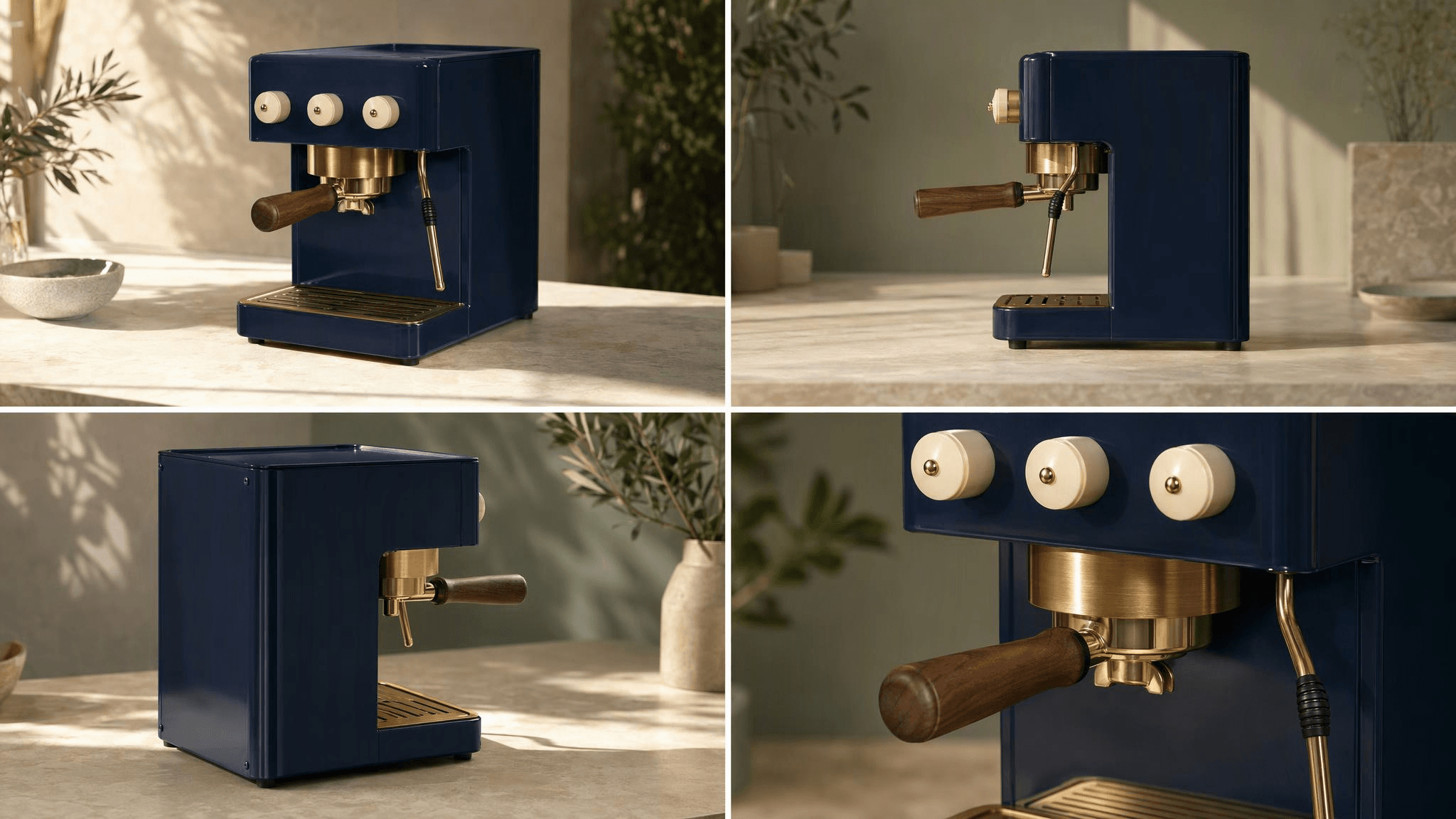 Four-view reference pack for the same midnight-blue, brass, and walnut espresso machine
The four views define the product’s fixed facts: midnight-blue body, brass group head, walnut handle, three ivory knobs, and narrow brass drip tray.
Kling 4 Reference Image Subject Lock: 10-Minute Workflow
Run the smallest useful test first. The midnight-blue espresso machine below is a tutorial asset, not a customer example or a real brand. Start with a single 8-second, 16:9, continuous shot. Leave multi-shot off. The first pass tests whether the model can retain the object while a hand enters frame and the camera travels sideways.
- Inspect the pack. Reject it if the number of knobs, portafilter position, or machine width disagrees across panels.
- Upload the 4 cropped product references to Kling Video O3 Std Reference-to-Video. Select 16:9, 8 seconds, sound off, and one continuous shot. The model page is the source of truth for current limits and quote. Atlas Cloud is useful here because the same model directory and playground make it easy to run a small controlled test before a larger production pass.
- Paste the prompt exactly once. The first paragraph names the immutable product facts. The next paragraphs handle scene, action, and camera. The final line excludes visible errors that would invalidate the test.
- Inspect the actual motion, then freeze 0, 2, 4, and 6 seconds for the audit. Do not approve from the cover frame alone.
plaintext1Create one continuous 8-second premium product film featuring the exact same midnight-blue and brass espresso machine from the four reference images. Preserve its compact midnight-blue enamel body, brushed brass group head, dark walnut portafilter handle, three ivory control knobs in one horizontal row, and narrow brass drip tray. The machine remains rigid and unchanged throughout the shot. 2 3Scene: a refined sunlit kitchen with a pale limestone counter, soft morning window light, subtle sage-green background accents, and gentle steam in the far background. From 0 to 2 seconds, the camera performs a smooth lateral reveal from front three-quarter view. From 2 to 5 seconds, one right hand enters once and places a small cream-colored espresso cup directly beneath the group head. From 5 to 8 seconds, the hand exits naturally while the camera continues a controlled lateral move toward a slightly closer left three-quarter view. Keep the machine centered and fully visible. 4 5Realistic brass reflections, rich enamel texture, cinematic daylight, one continuous shot, no cuts, no zoom-in, no logo, no text, no watermark, no extra machine, no extra knobs, no extra handle, no duplicate cup, no deformed product geometry, no dialogue, no music.
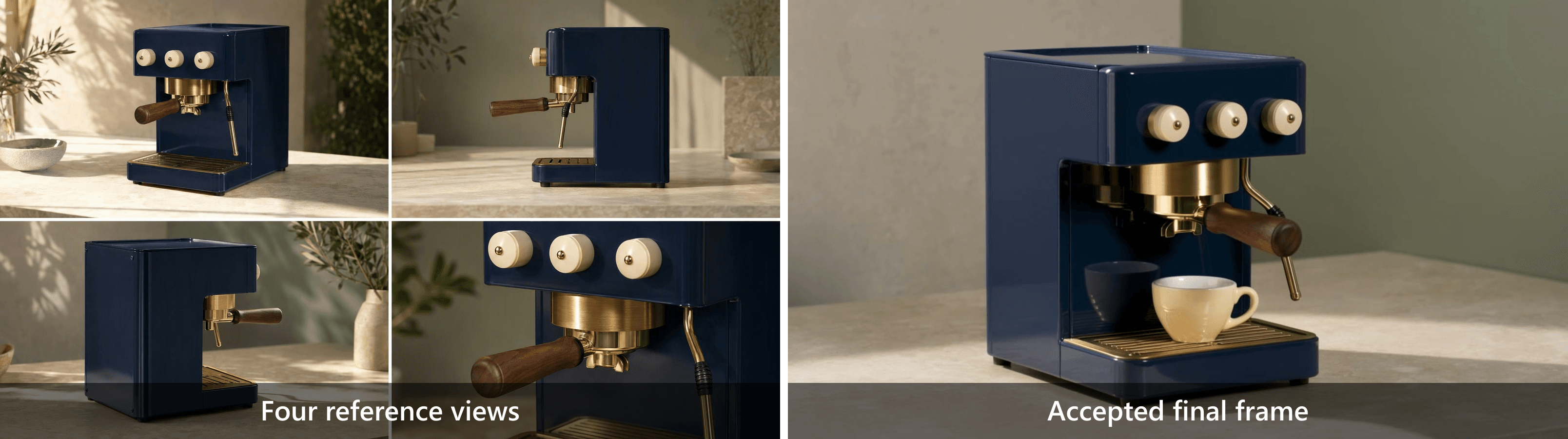 Four real product references beside an accepted final frame from the midnight-blue espresso-machine video
Input to output comparison: the accepted frame retains the same midnight-blue body, brass group head, walnut handle, and three ivory knobs defined by the reference pack.
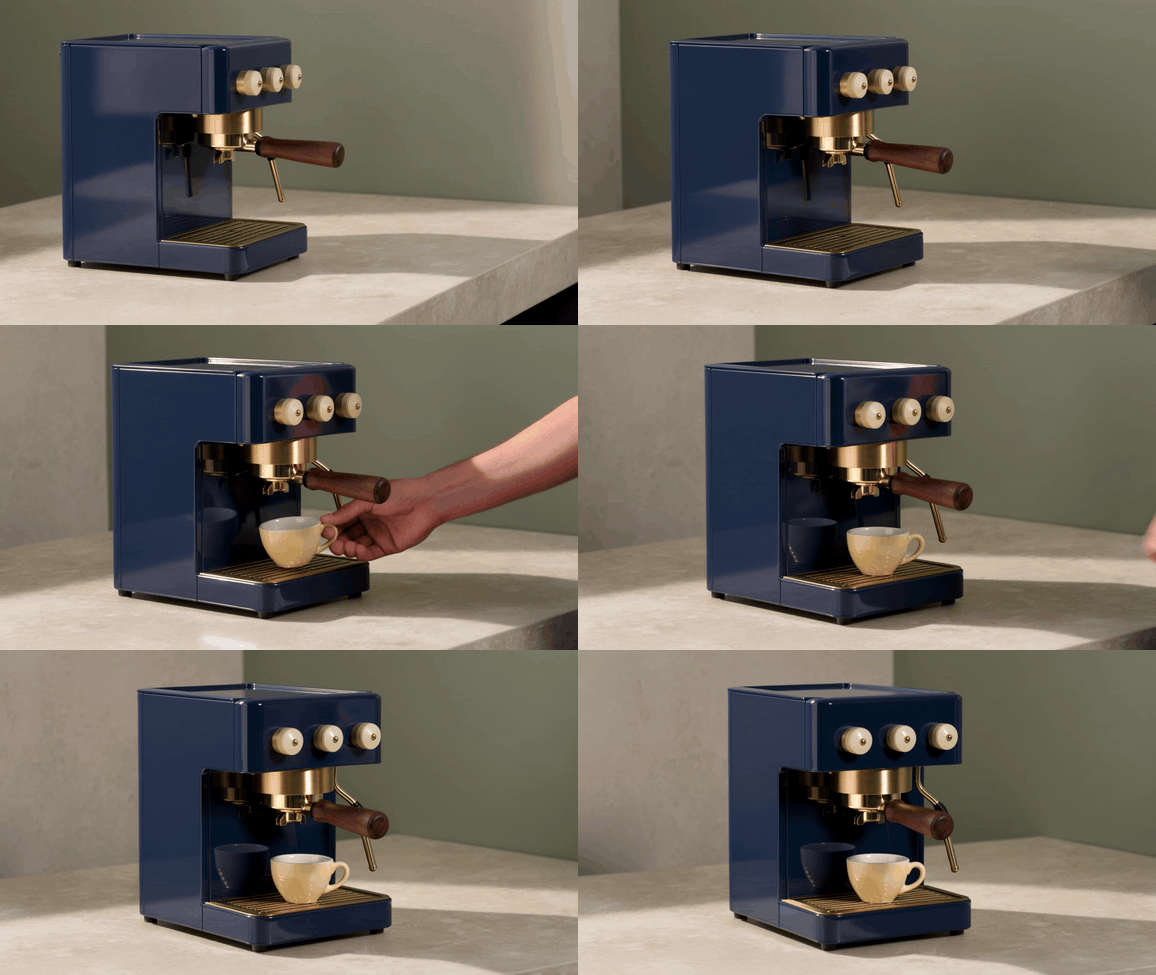
Eight-second product subject-lock test: the midnight-blue espresso machine remains recognisable while a cup enters and the camera moves laterally
Silent 8-second motion proof. Watch the portafilter, three-knob count, walnut handle, and midnight-blue body as the cup enters and the camera moves laterally.
Kling Subject Lock Prompts for People, Products, and Characters
A lock prompt divides responsibility. State identity once with concrete observable traits, give one action and one camera path, then name the constraints that would make the result unusable. Do not repeat a face description sentence after sentence. Repetition can create contradictions, especially if the prompt later asks for a different outfit or accessory.
Kling character consistency prompt for a person
Use this only when you have the adult subject’s likeness permission and any commercial rights needed for the intended use.
plaintext1Create one continuous 8-second cinematic shot of the exact same adult person shown in the reference images. Preserve facial structure, hairstyle, skin tone, navy overshirt, white T-shirt, and silver watch. The subject walks slowly from frame left to frame right inside a bright design studio, then turns their head approximately 25 degrees toward the window. The camera tracks smoothly from a front three-quarter medium shot to a side three-quarter medium shot. 2 3Keep identity, clothing, body proportions, and accessory placement consistent. One person only. No face replacement, no wardrobe change, no added jewelry, no extra limbs, no cuts, no text, no logo, no watermark.
Fixed: facial structure, hair, clothing, watch, body proportions. Variable: walk, 25-degree turn, studio light, camera track.
Kling product subject lock prompt
For products, lock geometry and visible components before describing atmosphere. Avoid asking the model to create readable small packaging text. Use authorised source photos where labels and specifications must be exact.
plaintext1Create one continuous 8-second product shot of the exact same [product] shown in the reference images. Preserve [body geometry], [primary color], [material], [key component], and the number and placement of all visible parts. The product stays rigid and unchanged. In [scene], [one simple action]. The camera [one camera move]. Do not add logos, text, extra components, duplicate products, or changes to geometry.
Fixed: outline, color, material, controls, component count. Variable: background, one hand action, one camera path.
Kling 4 reference images prompt for a fictional character
plaintext1Create one continuous 8-second shot of the exact same fictional courier character shown in the reference images. Preserve the mustard-yellow raincoat, navy messenger bag, short dark hair, round glasses, and slim silhouette. The character crosses a rain-wet pedestrian bridge, pauses once beneath a street lamp, then looks toward camera. The camera performs a smooth low lateral track from three-quarter front to three-quarter side. 2 3Keep the character's face, clothing, bag shape, glasses, and color palette consistent. Do not redesign the character, add another person, change the weather abruptly, add captions, logos, or watermarks.
Fixed: coat, bag, glasses, silhouette, palette. Variable: walking, pause, head movement, lateral camera track.
Debugging Kling 4 Reference Image Subject Lock
Treat each result as a diagnosis, not a lottery ticket. Keep a copy of the input pack, settings, prompt, and output. Make a single controlled change, otherwise you cannot learn whether the added side image, shorter turn, or revised lighting helped.
| Symptom | Most likely cause | Change only this next time |
|---|---|---|
| Face changes after turning | No side or three-quarter reference; turn is too large | Add a clear side image and limit the turn to 15 to 30 degrees |
| Product deforms or gains a part | Product is obscured; prompt gives it an implausible action | Add a complete outline and keep the product rigid |
| Outfit or color changes | Identity and scene references conflict | Put clothing in the identity pack; let scene input define only light |
| Character drifts after a camera cut | First attempt uses multi-shot narrative | Test one continuous shot, then test the next shot separately |
| Output is “similar” but not the same | Pack mixes shoots or only contains a face crop | Replace it with a matched 3 to 4 image pack |
| Approval is subjective | No defined checks | Audit the 5 items below frame by frame |
Use this 5-item acceptance check at 0, 2, 4, and 6 seconds:
- Face or silhouette stays identifiable.
- Clothing or signature component stays in the same design.
- Product geometry and component count remain stable.
- Motion is continuous rather than hiding a redesign in a cut.
- The scene does not introduce an unexplained duplicate subject or object.
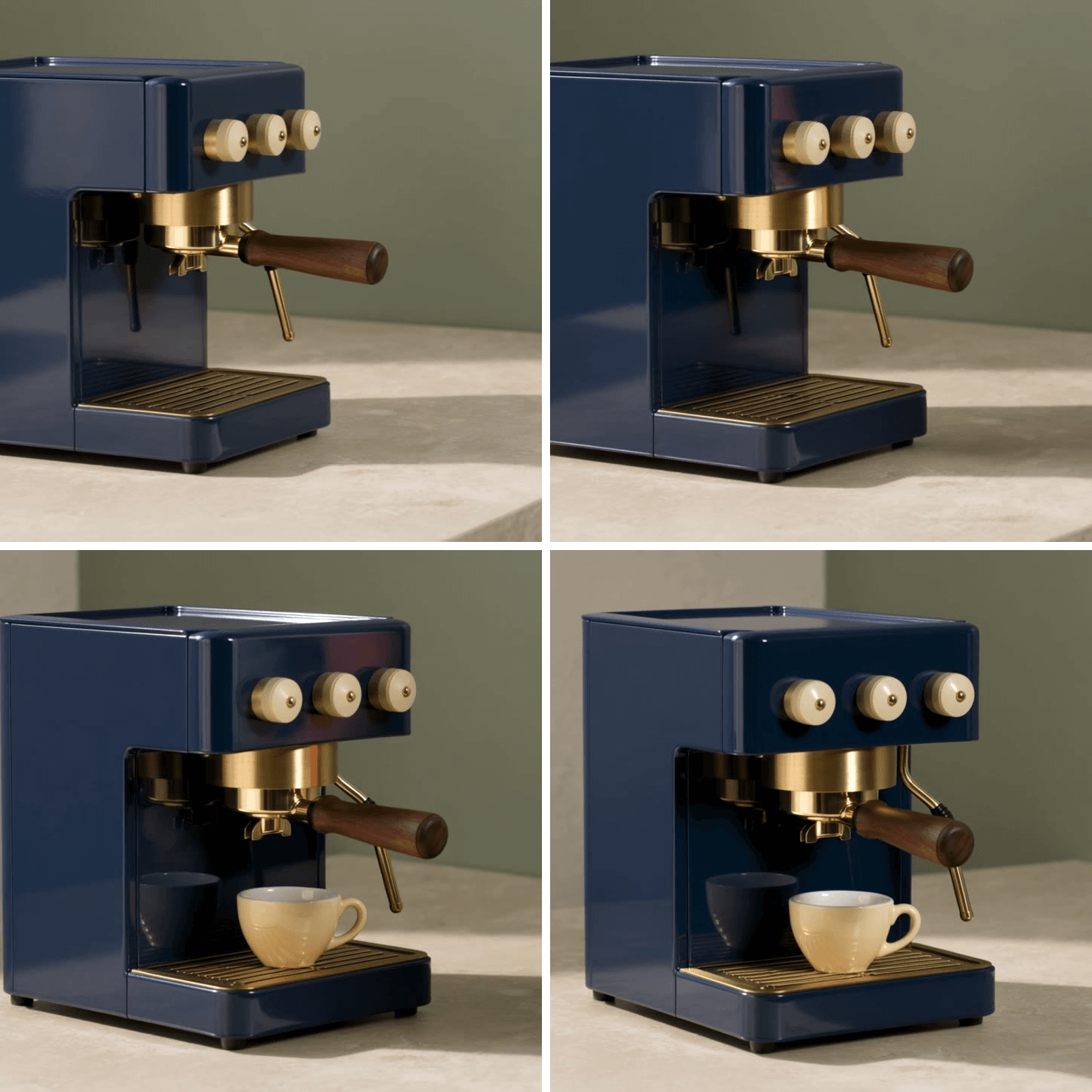 Four-frame subject-lock audit from the midnight-blue espresso-machine test
Four checkpoints show the blue body, brass group head, walnut handle, three ivory knobs, and cup placement throughout the shot, rather than judging only the opening frame.
When Kling Subject Lock Needs Reference-to-Video
Choose the input method from the control you need. If the final shot should barely depart from one approved composition, Image-to-Video keeps the first frame central. If a product or character must remain recognisable while entering a new location or camera angle, Reference-to-Video gives identity its own inputs and lets the text focus on direction.
| Need | Choose | Why |
|---|---|---|
| Animate one approved still with small motion | Image-to-Video | First-frame composition is the priority |
| Keep a subject recognisable in a new scene | Reference-to-Video | Multiple views define identity while the prompt directs action |
| Preserve existing movement rhythm or sound | Reference-to-Video with a reference video | Video can carry motion or timing while images define identity |
| Test a camera idea | Ordinary short test | Avoid complex reference control until the camera language is proven |
For an 8-second test, treat cost as an experiment budget, not a promise based on an old blog post. Check the live quote in the selected Reference-to-Video route before running because model availability, duration, and options can change.
Frequently Asked Questions
What is Kling 4 reference image subject lock?
It is a useful search phrase for keeping a referenced person, character, or product recognisable across a generated video. It should be treated as a workflow target, not a guaranteed, official feature name. Build a clear reference pack and validate the output frame by frame.
Can one reference image keep a character consistent in Kling?
It can help with a short, low-change shot. It cannot show unseen profiles, back details, or a full outfit. Add matched three-quarter, side, and full-body views when the camera reveals those facts.
How many Kling reference images should I use for character consistency?
Start with 3 to 4 images: front or three-quarter, side, full silhouette, and a key detail. Add images only when they resolve a missing fact. Extra inconsistent images create another source of drift.
Is a start frame the same as a subject reference image?
No. A start frame determines the composition at the opening moment. A subject reference defines the appearance facts that should survive changes in framing, action, or scene.
Why does a Kling character change when they turn sideways?
The reference pack may not show the side of the face, hair, body, or clothing, or the requested turn is too large for the available evidence. Add a clear profile and make the first test a 15 to 30-degree turn.
Can I use Kling subject lock for products, not just faces?
Yes. Product work benefits from a full outline view plus close views of its visible controls, caps, seams, or materials. Make the product rigid and keep the first action physically simple.
Is Reference-to-Video worth using for a short 8-second test?
It is worth using when the test answers a real continuity question, such as whether the same coffee machine retains its handle and controls during a lateral move. For a pure camera-language experiment, use a simpler short test first.





