

A 30-second video can look convincing at the start and still quietly change a jacket, move a product, or break the action halfway through. The useful question behind a kling 4.0 30-second video consistency test is whether brand-critical details survive the full sequence, including its transitions.
There is no verified Kling 4.0 test output to report here. Kling’s official materials describe generation from 3 to 30 seconds and up to 10 keyframe images, but the current Atlas Cloud Kling V4 route and runnable settings could not be confirmed during this check. This article gives you a reproducible test protocol, not a hands-on verdict.
Key takeaways
- Kling’s published specifications describe 3–30 second generation and up to 10 keyframes; these are product claims, not consistency scores.
- Judge identity, defining details, scene layout, action logic, and shot continuity across the whole clip.
- Atlas Cloud’s Kling V4 availability and price remain unverified here, so do not budget a V4 run from V3 rates.
What counts as consistency in a 30-second video?
A general impression is a poor test. A character can remain recognizable while a defining product changes shape, or a scene can look stable while an action becomes physically impossible. Score each dimension separately.
| Criterion | Checkpoints | Pass | Flag |
|---|---|---|---|
| Subject identity | 0, 5, 10, 15, 20, 25, 30 seconds | Same person or product stays identifiable | Identity changes materially |
| Defining details | Same checkpoints | Wardrobe, colors, accessories, and held objects match | A required detail changes or disappears |
| Scene layout | Every shot and transition | Landmarks stay in intended positions | Background relocates without direction |
| Action logic | Between checkpoints | Events follow the requested order | A prop teleports or an action is skipped |
| Camera continuity | Every transition | Shot changes are intentional and legible | Unrequested cuts or reversals confuse the sequence |
A deliberate change is not drift. If the courier removes a helmet at a planned moment, that is correct progression. If it vanishes before the courier reaches the kiosk, it is a continuity failure. Decide which attributes must remain fixed before generating.
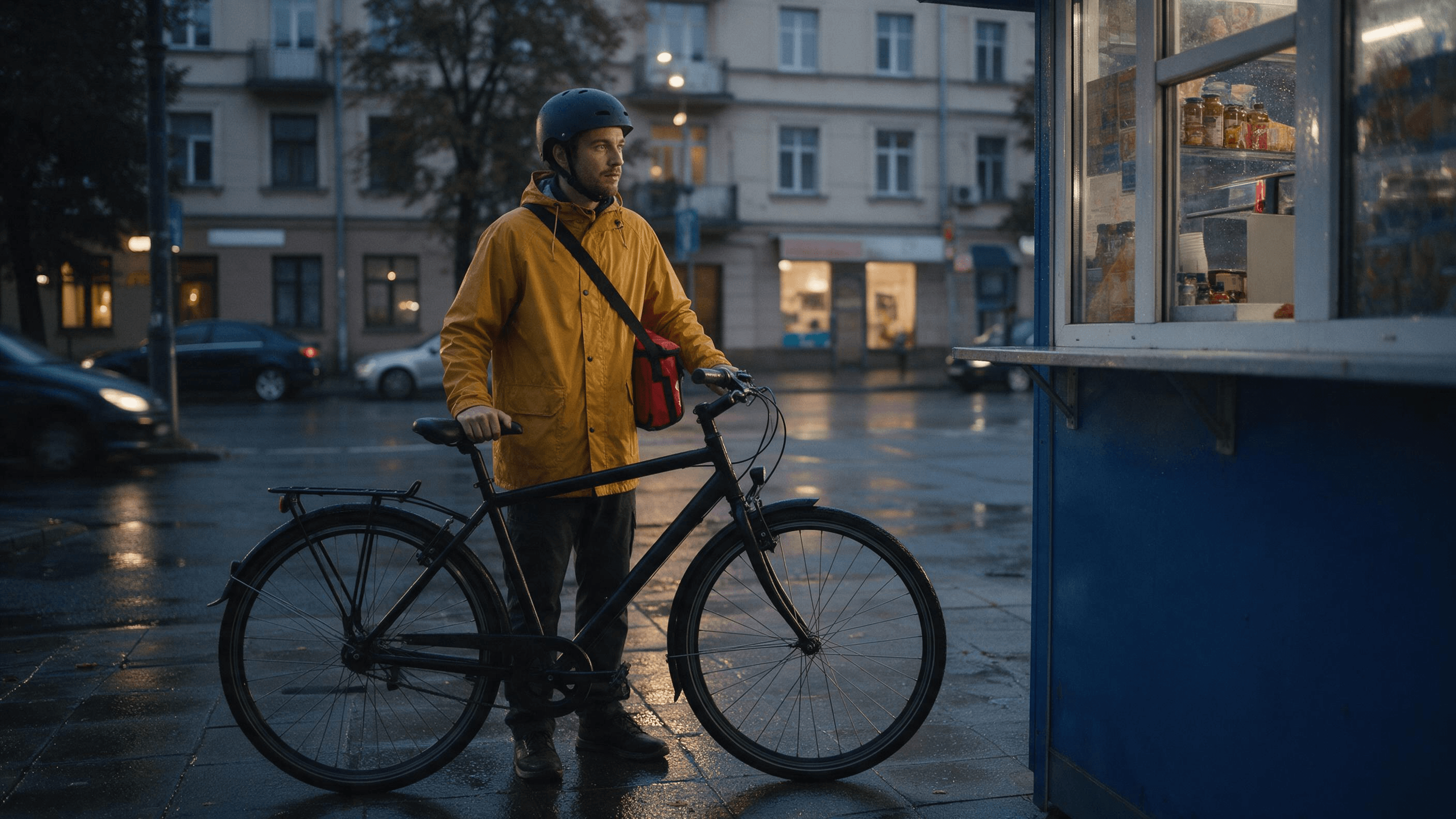 The input reference fixes the person, jacket, strap, helmet, bag, bicycle, kiosk, and dusk street before a motion test. Generated with Seedream v5.0 Pro; it is not Kling 4.0 output.
How to run a fair Kling 4.0 consistency test
Use the same inputs and settings for every run, and retain failures alongside successful outputs.
| Hold constant | Record before running |
|---|---|
| Prompt | Exact text and required persistent details |
| References | File names, order, and each reference’s role |
| Settings | Model variant, duration, aspect ratio, resolution, exposed controls |
| Sample | Run count, date, and retry count |
| Review | Checkpoints, scoring notes, saved frame grabs |
If access and budget allow, generate the same condition twice. Two outputs reveal whether a result is repeatable, but remain a small sample. With one run, call it one example and avoid general claims.
Review the complete clip at 0, 5, 10, 15, 20, 25, and 30 seconds. Inspect handoffs and camera changes between those points too. A defect can occur and resolve between sampled frames, so keep the original video rather than relying only on a contact sheet.
 These three frames from a separate Kling V3 Pro pilot make the camera changes easy to compare. They are 10-second process evidence, not a 30-second Kling 4.0 result; the actor is different from the reference image above.
A V3 run can test your review process, but it cannot establish how V4 behaves. Do not treat a shorter V3 generation as a direct 30-second control. Disclose any differences in duration, references, or settings.
I ran two 10-second process pilots in the Atlas Cloud test environment. The text-to-video Kling V3 Pro pilot produced distinct rear, side, and kiosk views, but its courier differs from the still reference. The reference-led Kling Video O3 Pro pilot kept the male courier, yellow jacket, red bag, bicycle, and kiosk, but stayed largely on one side of the scene instead of giving three clearly different camera positions. Neither pilot measures Kling 4.0 over 30 seconds.
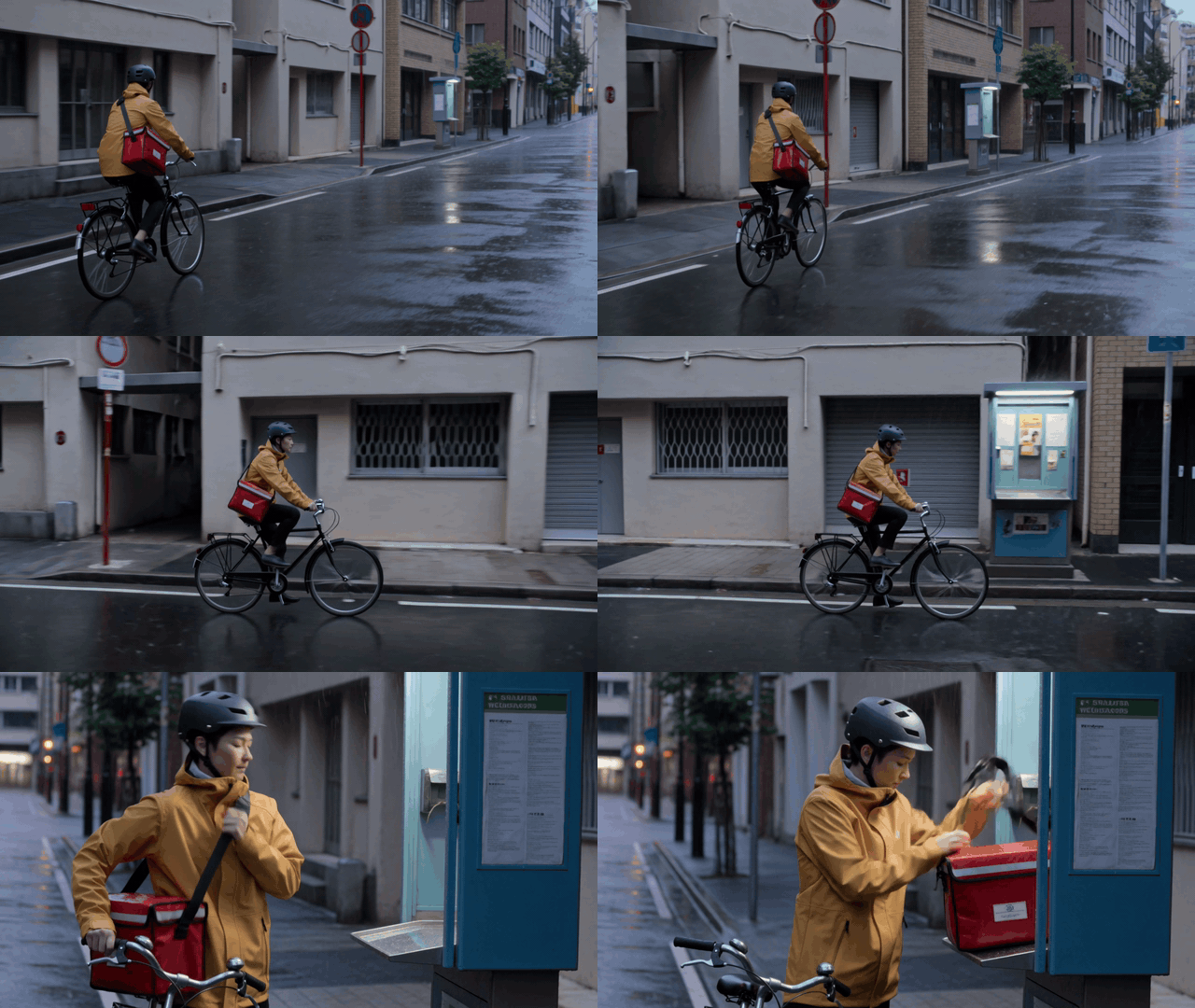
Kling V3 Pro, 10 seconds: distinct viewpoints and action beats. This was generated separately from the male reference image, so it cannot be used as an identity-matching result. Kling Video O3 Pro, 10 seconds: the reference-led pilot retains the courier and props through the bag handoff, but these frames show limited camera variety. It failed the requested three-position camera check.
Where a 30-second scene can break
Longer sequences ask the model to preserve details while coordinating actions, camera movement, objects, lighting, and transitions. The following is a troubleshooting guide, not a diagnosis of an uninspected Kling output.
| Symptom | Inspect | Adjustment |
|---|---|---|
| Jacket, face, or product changes | Do references and keyframes agree? | Keep one clear identity reference and remove conflicting images |
| Prop changes hands or vanishes | Is the handoff located in the sequence? | State who holds it before and after |
| Shots feel unrelated | Are camera and location changes combined? | Separate shot direction from identity requirements |
| Event happens too early | Is the intended timing explicit? | Give the beat a time window and check conflicting inputs |
| Stills look stable, motion does not | Do positions and actions hold between frames? | Review at normal speed and frame by frame |
Keep the first test narrow: one character, one distinctive outfit, one carried object, one location, and a few planned camera changes. That makes failures easier to interpret than a crowded sequence.
A copyable test prompt and review workflow
Use this baseline only when your chosen interface supports a 30-second text-to-video run:
Create one continuous 30-second cinematic scene featuring the same adult bicycle courier throughout. The courier wears a mustard-yellow rain jacket with one black diagonal chest strap, a matte navy helmet, and a small red insulated delivery bag worn over the left shoulder. The courier rides a black city bicycle through one rainy city block at dusk, stops beside a blue street kiosk, removes the red delivery bag with the left hand, places it on the kiosk counter, and looks toward the kiosk window. Preserve the courier’s face, age, jacket color and strap, helmet, bag color and shoulder, bicycle, kiosk position, and direction of travel throughout. Keep the same rainy street and dusk lighting. Use a wide establishing view, a steady side-tracking view during the ride, and a medium view at the kiosk, with smooth transitions and physically plausible movement. Do not add another courier, change clothing or props, reverse the bicycle, relocate the kiosk, add readable text, or introduce a cut that changes the scene.
Before submitting, verify that duration, aspect ratio, resolution, references, and model variant are actually selected. Record what the interface accepted. If it exposes reference or keyframe inputs, begin with one clear character reference. Test a keyframe condition separately so you can distinguish the setups.
After generation:
- Save the full output and record its model label, date, duration, resolution, aspect ratio, references, and retries.
- Score the seven timestamps, then inspect handoffs and transitions between them.
- Mark each criterion pass, minor drift, or material failure. Define “minor” before comparing runs.
- Compare all runs, including weaker results. Report the sample size and a representative failure when one occurs.
- Approve only against campaign-critical details. A pass on this courier scene says nothing about dialogue, multiple characters, or other reference modes.
Kling 4.0 access and cost on Atlas Cloud
Kling’s official materials describe 3–30 second generation and up to 10 keyframes. Its keyframe guide says references help define what should remain consistent, while keyframes mark visual states. Those are documented capabilities, not proof that a clip will preserve every detail. (See the Kling 4.0 Multiple Keyframes guide and Kling 4.0 user guide.)
Atlas Cloud’s Kling V4 listing could not be confirmed as a live, runnable route during this research. Treat access as unverified. No V4 rate is verified here.
For context only, Atlas Cloud’s Kling V3 model page lists Standard text-to-video at $0.084 per second list and $0.071 per second with a displayed 15% discount. Pro is listed at $0.112 per second and $0.095 discounted. These are V3 rates, not V4 pricing. Verify the exact tier and current listing before estimating spend.
If V4 becomes available, Atlas Cloud’s model catalog is one place to check the current options. Compare controlled outputs rather than relying on a feature label alone.
What this test plan can and cannot tell you
This protocol helps decide whether a generation is ready for editing, a social draft, or stricter brand review. It does not provide a Kling 4.0 performance result because no verifiable V4 output was available to inspect. It cannot settle performance across other scenes, resolutions, reference modes, or variants.
Keep a clip only if the full sequence preserves the campaign’s required identity and product details. If one failure would make it unusable, put that detail in the scorecard and inspect the transition where it is most likely to change. A contact sheet speeds up comparison; normal-speed playback catches motion and timing failures.
The next step is to confirm Kling 4.0 is selectable in your intended platform, record the settings that commit, then run this protocol before assigning it a branded 30-second deliverable. That is the honest answer a kling 4.0 30-second video consistency test needs until real outputs can be inspected.
Frequently Asked Questions
Can Kling 4.0 generate a full 30 seconds in one run?
Kling’s official materials describe native generation from 3 to 30 seconds in one generation. That does not establish that every platform exposes the full duration or guarantee continuity.
How many keyframes does Kling 4.0 support?
The official guide describes up to 10 keyframe images in one generation. Confirm the current interface limits before preparing assets.
Is Kling 4.0 available on Atlas Cloud?
This research could not verify a live Kling V4 route on Atlas Cloud. Check the current listing and generation interface before committing a project or quoting availability.
Should I use a reference image or keyframes?
Use a character or product reference to define what should remain recognizable, and keyframes to specify important visual states or story beats. If you test both, treat them as separate conditions and record each input set.





