You used a short-video credit, the bottle turns halfway, the camera cuts away, music arrives anyway, and the final frame misses the edit point. Kling 4.0 Flash Short Video Generation Problems and Fixes starts with a 90-second decision: tighten a testable shot, or stop prompting for a control Flash does not expose.
For one visible action in one shot, reduce variables and rerun with a clean record. For a locked ending, multiple keyframes, or a delivery specification that Flash has not published in its UI, change the workflow instead of adding adjectives to the prompt.
Key takeaways
- Test one subject, one action, and one camera rule first.
- Treat “no cuts” and “no music” as constraints to test, not switches that guarantee an outcome.
- Check the model badge, settings, and task history before resubmitting.
- Use a start-to-end-frame bridge when the last frame is a hard editorial requirement.
What Kling 4.0 Flash Can and Cannot Control
Kling says Flash is the fast, frequent-creation layer of the 4.0 release. Its September release material places the broader 4.0 launch in early access and says Flash was offered to Ultra Yearly subscribers from September 28. The same announcement assigns native 30-second generation, up to 10 keyframes, 10-bit HDR, and future extension features to Kling 4.0 generally. Do not silently transfer those full-model claims to Flash. (Kling’s 4.0 release announcement, September 2026)
| Need | Sensible Flash starting point | What to verify in the live UI | Do not promise from a prompt |
|---|---|---|---|
| A short social shot | One subject, one visible action, one camera rule | Available duration, aspect ratio, and input type | A specific duration you cannot select |
| Product or character consistency | One clean start image and an invariant list | Whether a start-frame input is offered | Perfect identity preservation |
| Audio-free delivery | Inspect audio controls, then inspect the file | A real sound toggle or audio setting | That “no music” is a hard mute switch |
| Exact handoff to the next shot | Write the intended final frame down | Whether the current UI exposes an end-frame field | A deterministic end frame or multi-keyframe path |
The practical rule is simple: official release notes, the selected model badge, the controls visible in your account, and the downloaded file outweigh community reports. The developer release page is the quickest place to recheck the access state before you start a client test. (Kling developer release page, October 2026)
Diagnose Kling 4.0 Flash Problems Before You Regenerate
Confirm Your Kling 4.0 Flash Selection
Save the model badge, date, duration, ratio, input type, task status, and download filename with every run. If the run history does not identify Flash, do not label the output Flash in a review deck.
After a network interruption, inspect the task history before clicking Run again. A completed job may already be waiting, while a failed job may have a useful error message or an unsupported-input hint.
Classify the Kling 4.0 Flash Short Video Failure
| Symptom | Isolation test | What it suggests | Next action |
|---|---|---|---|
| Sudden cut | Keep the same start frame; retain one action and a locked camera | If it still cuts, this is a model-behavior signal | Shorten the shot goal, accept an edit point, or use a bridge |
| Subject drift | Remove competing references and descriptive extras | The prompt or inputs are fighting each other | Keep one primary reference and list invariants |
| Music you did not ask for | Look for a real audio option; run a no-dialogue test | Prompt text may not control the audio track | Mute in post unless the UI exposes a verified control |
| Wrong ending | Write the exact desired last frame | The shot needs end-frame control | Use an end-frame bridge instead of gambling on reruns |
| Failed or stuck job | Check status, history, file type, and moderation message | The issue may be service-side or input-side | Retain the task ID and change only the indicated cause |
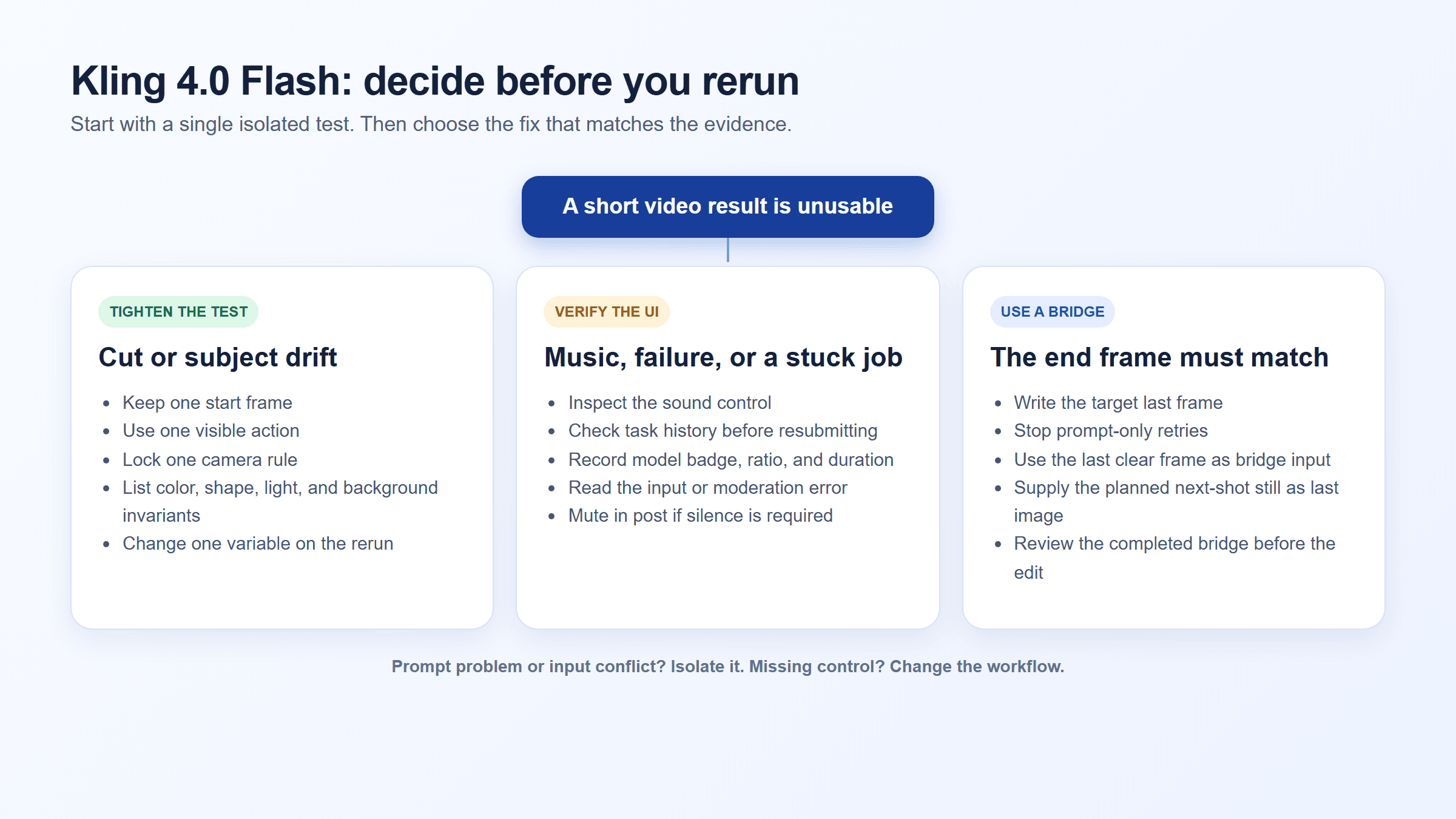 Decision tree for Kling 4.0 Flash short video problems: isolate a prompt issue, an input conflict, or an unavailable control
A saveable diagnostic SOP. It separates a tighter prompt test from a control that needs a different workflow.
One early tester reported unwanted music, spontaneous cuts despite a single-shot instruction, and no start-and-end-frame feature in their Flash access. Treat that as a useful early-access signal, not a population-level performance claim. (Early-access tester report, October 2026)
5 Kling 4.0 Flash Fixes for Short Video Generation Problems
Fix Random Cuts in Kling 4.0 Flash
Delete the bundle of push-in, transition, setting change, and character action. Give Flash one protagonist, one action, one camera rule, and one end state.
Use “one continuous shot” and “locked tripod camera” to reduce the chance of a cut. Do not promise a client that those words disable cutting. If the isolated version still cuts, plan the cut in your edit or move the handoff to a controlled bridge.
Fix Subject Drift with a First-Frame Contract
Write the details that must remain stable as a short contract: color, cap shape, height, position, background, light direction, and contact shadow. Supply one clean start image instead of a collage of references that disagree.
Avoid using tiny package text as the success criterion. Generated lettering can fail even when the bottle, camera, and motion are usable.
Fix Unwanted Music as a Separate Check
First find an audio or sound control in the current interface. If it exists, set it deliberately and record the setting. If it does not, render a no-dialogue test, inspect the downloaded file, and mute it in post before delivery.
For a visual-only proof in a written article or internal SOP, use a silent GIF. Do not describe a “no music” phrase in a prompt as a guarantee of an audio-free source file.
Fix Overstuffed Kling 4.0 Flash Prompts
Use this order and remove every line that does not control something a viewer can see or hear:
plaintext1opening frame → subject invariant → one action → camera → lighting → prohibited changes
Change one variable per rerun. Keep a small log with run number / changed variable / visible defect / keep or reject. That record prevents the common failure mode where a creator changes the prompt, image, ratio, and duration together, then cannot identify the cause of an improvement.
Fix an Unusable Ending by Stopping the Wrong Retry
When the precise final frame matters, prompt iteration cannot substitute for end-frame control. Put the desired ending in a still image, then create a short bridge that begins at the last usable frame of shot A and lands on the planned first frame of shot B.
A Reproducible Kling 4.0 Flash Short Video Test
Use a non-branded object that is easy to inspect: a matte cobalt-blue insulated bottle on a pale stone counter. It exposes color drift, cap drift, hand contact, camera changes, cuts, and unwanted audio without relying on rendered label text.
In the Flash interface, choose only settings that the live form actually offers. For this baseline, use one vertical 9:16 start frame, a 7-second target if the selector offers it, and the highest available quality. Capture the selected options before the run.
plaintext1Use the supplied image as the exact opening frame. 2 3Create one continuous 7-second vertical product shot. A matte cobalt-blue insulated water bottle remains centered on a pale stone counter. One hand enters from the left, turns the bottle 90 degrees clockwise until its blank front panel faces the camera, then releases it. 4 5Use a locked eye-level tripod camera. Preserve the bottle height, cap shape, cobalt-blue color, counter, background, soft window light from the left, and contact shadow. Show one smooth action only. 6 7No cuts. No new objects. No text. No logos. No subtitles. No voice. No music.
Review three moments: the opening frame, the middle of the turn, and the final 0.5 seconds. At each point, check the cap, cobalt color, counter edge, hand contact, and camera continuity. A result that loses the camera rule is a rejected run even if the bottle itself looks acceptable.
A Cinematic Kling 4.0 Flash Example: Kyoto After Rain
For a human-centered scene, use one clear movement in a setting with details that are easy to inspect. This brief tests subject continuity, a single camera path, reflections, and whether the export adds unwanted music. The no-music instruction is a prompt constraint, not a guarantee; check the downloaded file’s audio as described above.
Suggested model: Kling 4.0 Flash, Text-to-Video, if it appears in your account. Choose vertical 9:16 and 8 seconds only if those controls are available; otherwise use the nearest offered settings and record them.
plaintext1Create an 8-second vertical 9:16 cinematic scene at blue hour in a quiet Kyoto garden just after rain. A young woman in a flowing ivory coat walks slowly from left to right across a rain-darkened wooden bridge, carrying one small warm paper lantern. She stops at the center and turns gently toward the pond. A single white heron rises from the water and glides across the reflection of red maple trees. 2 3Use one continuous shot with no edits. A smooth waist-height side-tracking camera follows her, then makes a small, gentle arc into a three-quarter view. Keep the same woman, face, coat, lantern, bridge, pond, and dusk lighting throughout. Light mist and a few maple leaves move naturally; lantern light shimmers softly in the water. Quiet, graceful pacing, realistic motion, cinematic natural color, detailed wet wood and reflections. 4 5No cuts, no sudden zoom, no extra people, no duplicate lantern, no changing clothes or face, no morphing, no captions, no logo, no voice, no background music.
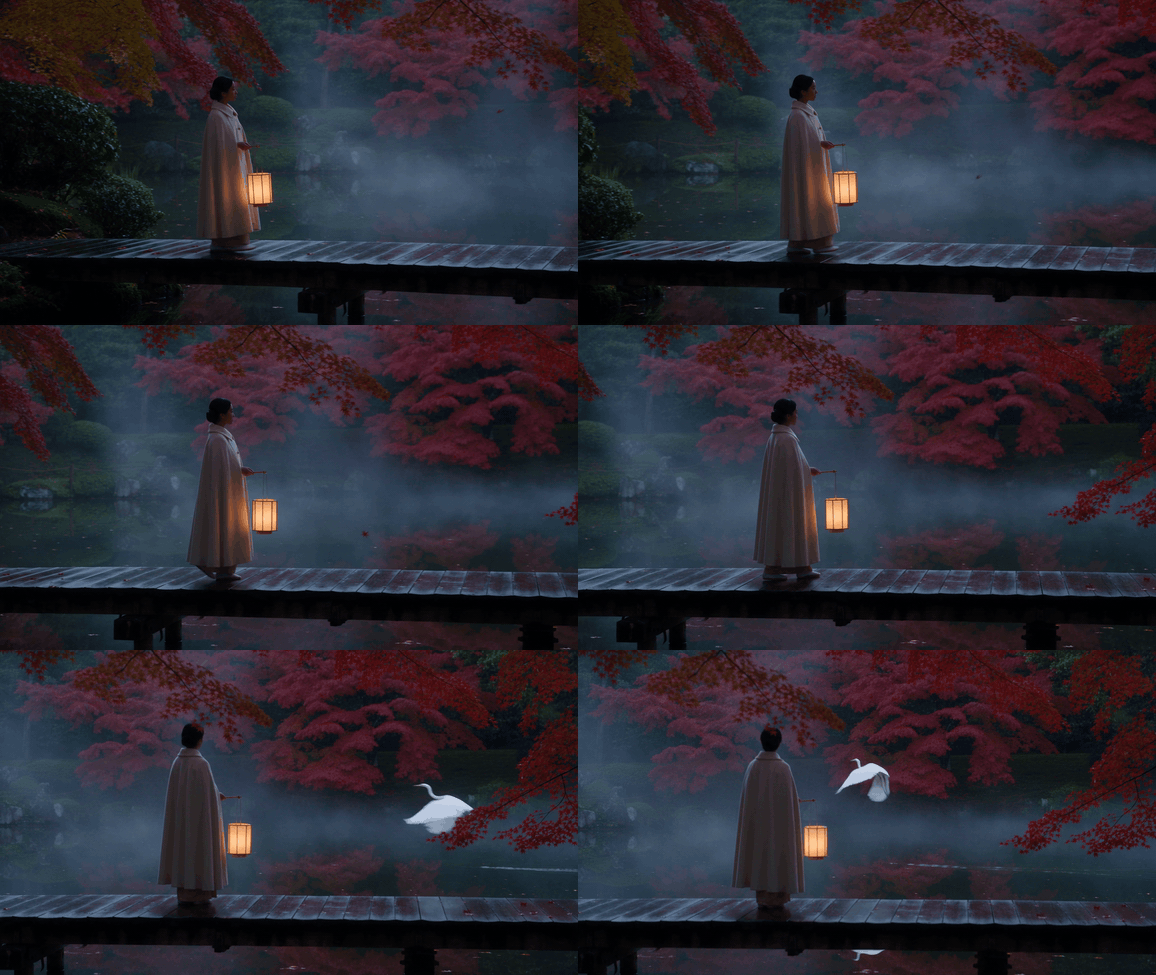
User-supplied 8.1-second example shown as a silent GIF. The lantern-bearing woman stays in the garden scene as the heron lifts off. The original MP4, including its audio track, is retained in the assets folder for audio review.
Review the woman’s appearance, lantern, and bridge throughout the clip. The source file is landscape despite the vertical prompt, so verify the ratio shown in the model form before labeling it a vertical result. Check the exported audio separately; the prompt’s no-music line does not guarantee a silent file.
A Different Kling 4.0 Flash Case: Golden-Hour Rooftop Dance
This second case changes the subject, setting, pace, and movement. It tests whether a full-body turn and landing stay readable while the clothing moves naturally in a bright urban scene.
Suggested model: Kling 4.0 Flash, Text-to-Video. Keep the same settings as the Kyoto case if they are available, so the scene is the main variable.
plaintext1Create an 8-second vertical 9:16 cinematic shot at golden hour on a broad rooftop terrace above Lisbon. A young male contemporary dancer in a charcoal shirt and deep cobalt trousers performs one smooth 360-degree turn, takes two light steps, and finishes in a balanced still pose. A long ochre scarf trails from his shoulder and settles naturally. 2 3Use one continuous shot. A steady low lateral camera move follows the dancer, then rises slightly to reveal warm terracotta rooftops and the Atlantic horizon. Keep his full body in frame through the turn and landing. Preserve his face, clothing, scarf, rooftop geometry, and warm sunlight throughout. A mild breeze moves the scarf and shirt; use credible body mechanics, clean foot contact, and graceful pacing. 4 5No cuts, no repeated turns, no extra dancers, no changing face or wardrobe, no morphing, no sudden zoom, no captions, no logo, no voice, no background music.
Check that the dancer completes one turn, lands with both feet stable, and keeps the same scarf and outfit. Confirm the camera reveals the city without cutting away from the action, then inspect the exported audio separately.
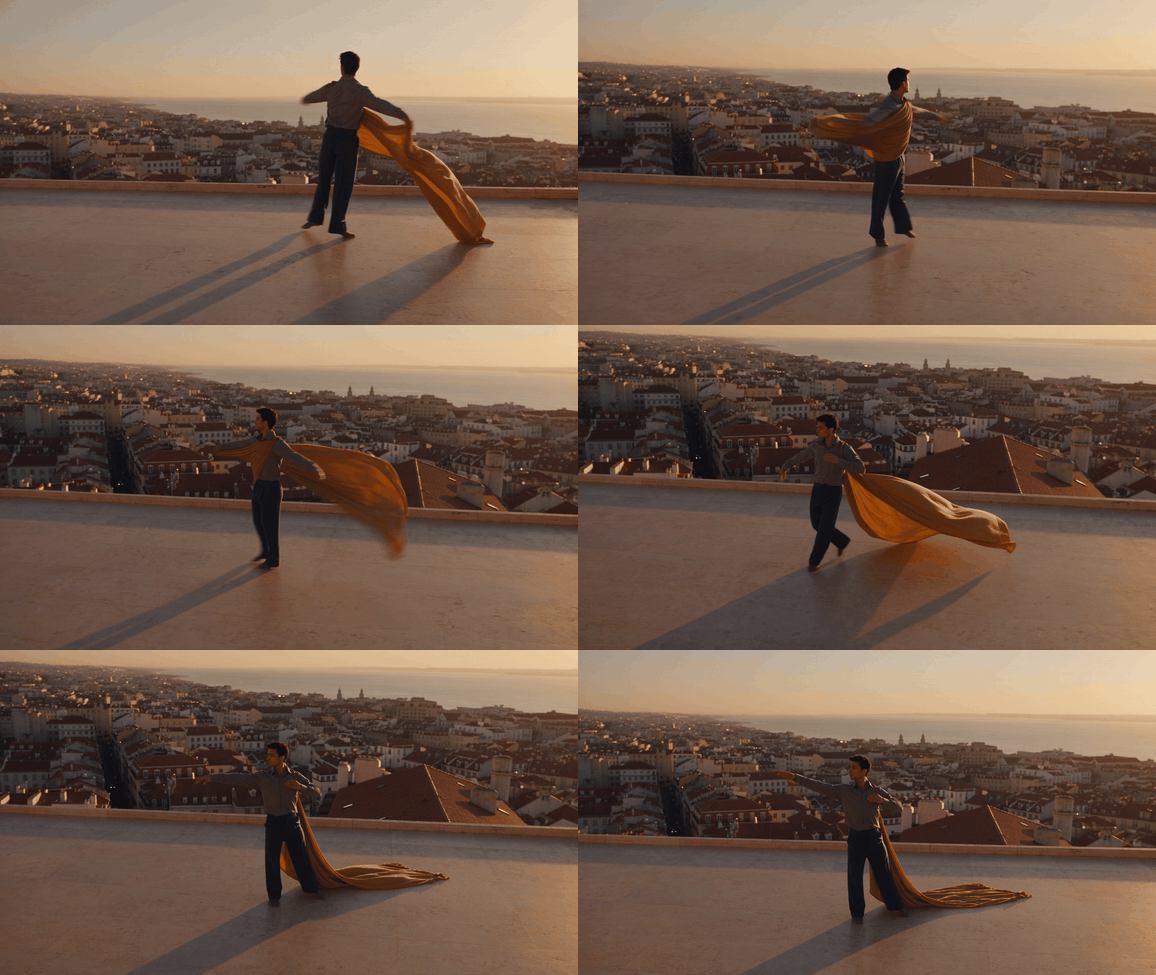
User-supplied 8.1-second example shown as a silent GIF. The rooftop remains one scene, while the ochre scarf becomes a long trailing sheet across the terrace. The original MP4, including its audio track, is retained in the assets folder for audio review.
Kling 4.0 Flash End-Frame Bridge for a Controlled Handoff
This is a production alternative, not proof that Flash has gained end-frame control. Take the last clear frame from a Flash clip as the first image, create the next shot’s planned still as the last image, and generate only the short connection between them.
For the documented workflow below, use two storyboard inputs while Atlas Cloud does not expose a runnable Kling 4.0 Flash endpoint. In a live Flash project, replace the first storyboard still with Flash’s last clear frame. The bridge model is Seedance 2.5 Image-to-Video, not Flash.
Use the first image as image, the planned ending still as last_image, set ratio: adaptive, generate_audio: false, watermark: false, and choose the highest suitable resolution offered by the Playground. Recheck the quoted cost in the live form before you press Run because the catalog’s “from” rate is not a quote for every configuration.
plaintext1Create one continuous 5-second vertical bridge shot. 2 3Begin exactly from the supplied first frame and end exactly on the supplied last frame. The same matte cobalt-blue insulated water bottle stays centered on the pale stone counter. It completes a gentle clockwise turn and settles with the blank front panel facing the camera. 4 5Preserve the bottle cap, height, cobalt-blue color, stone counter, background, soft left-side window light, and contact shadow. Keep one stable eye-level camera. No cuts, no new objects, no text, no logos, no subtitles, no audio.
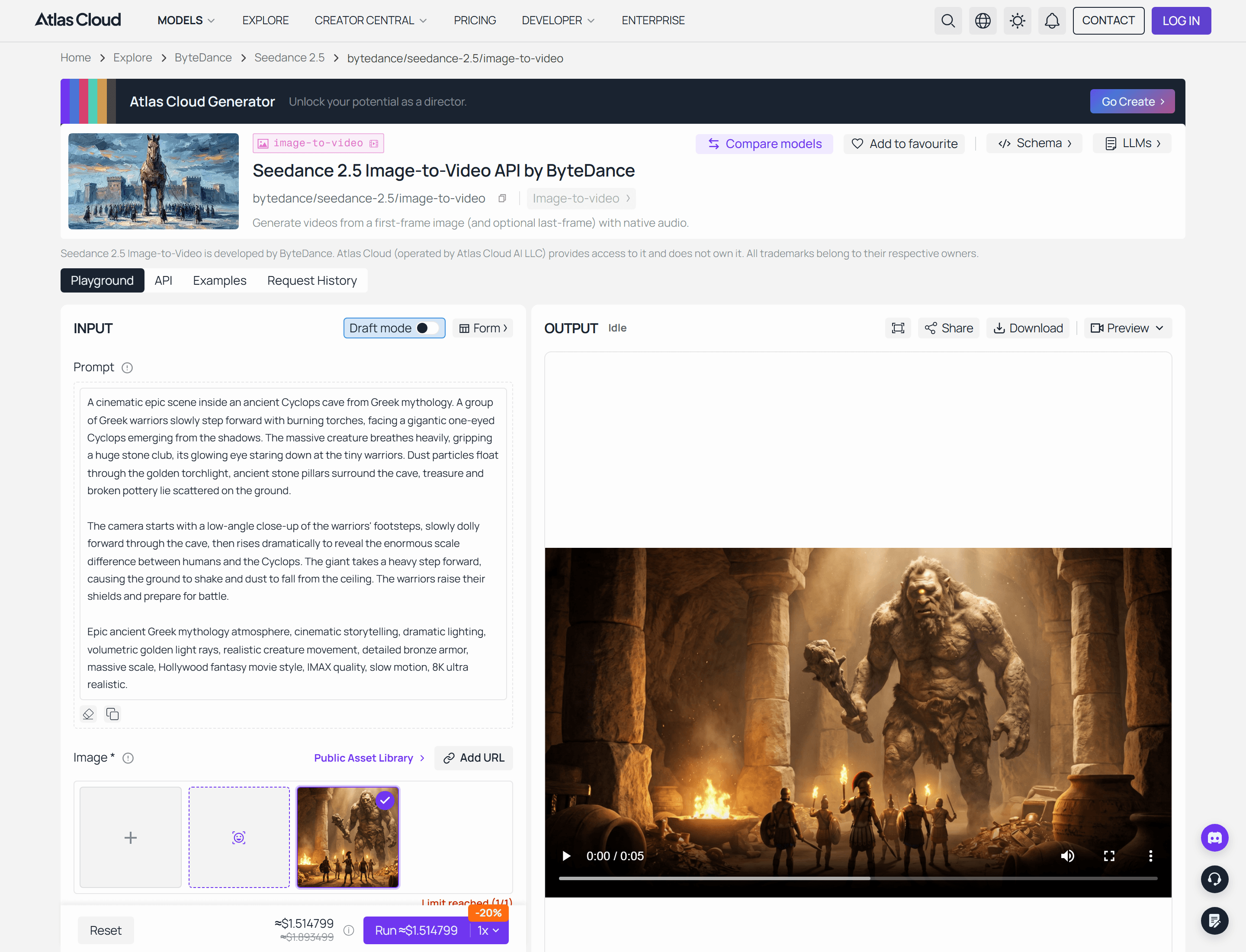 Seedance 2.5 Image-to-Video model page for the controlled end-frame bridge workflow
Model-page capture: verify the live Playground’s available inputs, resolution, and quoted cost before running the bridge. A recorded completed run and its GIF belong here once the test session is authenticated.
A Small Availability Note for Kling 4.0 Flash Teams
Teams can keep a consistent review record by saving prompts, input frames, outputs, and bridge clips alongside the model badge. Atlas Cloud can be useful for running controlled tests on already-live models through its model workspace, while the Kling V4 availability page should remain a monitoring link until it shows a live model ID and schema.
That distinction keeps a team from presenting a bridge-model result as a Kling 4.0 Flash test. It also makes the next Flash evaluation easy to compare: rerun the same bottle brief, keep the same review points, and replace only the verified model and controls.
Frequently Asked Questions
Is Kling 4.0 Flash available to everyone?
No public claim supports universal access. Kling’s release material described Flash early access for Ultra Yearly subscribers from September 28, with the broader 4.0 rollout following in October. Check the current account UI and official release status before scheduling a production test.
How long can a Kling 4.0 Flash short video be?
Use the duration selector in the Flash interface as the source of truth. The 30-second claim in the official 4.0 announcement belongs to Kling 4.0 broadly, so do not assume it applies to the Flash option visible in an account.
Does Kling 4.0 Flash support both a start frame and an end frame?
Do not assume it does. Early-access community reports described a start-frame option without a start-and-end-frame feature. Confirm the actual form in your account. If the last frame is non-negotiable, build a controlled bridge with a model whose Playground exposes a last-image input.
Why does Kling 4.0 Flash add music when I asked for no music?
The prompt is a constraint, not proof of a hard audio toggle. Look for an actual audio setting, inspect the exported file, and mute the file in post when the delivery needs silence.
How do I stop random cuts in a Kling 4.0 Flash video?
Use a single action, fixed camera, stable setting, and one subject. Rerun the isolated version once. If it still cuts, plan an editorial cut or move the handoff to a controlled bridge rather than endlessly lengthening the prompt.
When should I use an end-frame bridge instead of regenerating in Kling 4.0 Flash?
Use one when the final composition must match the next shot, product position, or edit marker. That is the point at which Kling 4.0 Flash Short Video Generation Problems and Fixes becomes a workflow decision: a bridge gives you a defined target, while another Flash rerun only gives you another attempt.





