A scene can look cinematic and still fail the brief. A chef's hand moves away from the noodles, a record crate gains extra sleeves, or a hiker suddenly faces the wrong direction. That is the moment MAI Image 2.6 image editing becomes a controlled-production question rather than a pretty-picture question.
The safest workflow is simple: make one isolated change, name every detail that must survive, and compare the edited result against its source at the same size. The goal is not to prove that a generated person is real. It is to create a coherent fictional scene while preserving the action, object relationships, and lighting logic that the brief requires.
Microsoft positions the model family for controlled generation and editing from text, images, web context, and visual references. Its September 2026 launch note says both the flagship and Flash support multi-reference editing and dynamic aspect ratios. Treat those capabilities as creative control, not a promise of pixel-perfect preservation (Microsoft launch announcement).
Key takeaways
- Separate
CHANGE ONLYfromPRESERVE EXACTLY.- Use Flash to make a source scene; use Edit for the controlled result.
- Review pose, object count, contact points, direction, and light before approval.
The Six Images This Guide Needs
The article uses six images as three source-and-result pairs. Each pair carries a different piece of evidence, so none is decorative or a duplicate crop.
| Pair | Source image proves | Edited image proves | Match requirement |
|---|---|---|---|
| 1. Noodle stall | A chef, noodles, bowls, and counter form one credible action | The same action survives a daylight-to-lantern-market change | Same adult, hand positions, noodle bundle, bowls, camera angle |
| 2. Record stall | A shopper, record crates, and one selected sleeve have clear relationships | The same interaction survives a weather-and-light change | Same adult, sleeve, crate order, hand contact, camera angle |
| 3. Mountain trail | A hiker, backpack, and trail direction are readable | The same walking action survives a season-and-weather change | Same adult, direction of travel, backpack, poles, trail perspective |
Why MAI Image 2.6 Image Editing Is Useful, and Why First Attempts Fail
The useful shift is toward scene edits with a reviewable source: move a fictional action from day to lantern-lit evening, change weather without changing an interaction, or adapt an outdoor scene while holding a person's direction of travel. MAI Image 2.6 is built for controllable generation and editing, while Flash is the faster route for exploratory scene creation (Microsoft model overview).
Most first attempts fail for ordinary reasons. A prompt asks to replace the background, change lighting, alter the pose, add props, and correct anatomy in one run. Or it says “keep everything the same” instead of naming the things a reviewer can actually see.
Use a preservation ledger before every edit:
| Scene | Preserve exactly | Inspect at review | Rerun when |
|---|---|---|---|
| Noodle stall | Chef, both hands, noodle bundle, bowls, counter height | Hand-to-noodle contact and bowl count | A hand, noodle strand, or bowl changes unexpectedly |
| Record stall | Shopper, selected sleeve, crate order, hand placement | Sleeve orientation and fingers on the same crate | A crate, sleeve, or hand is duplicated or moved |
| Mountain trail | Hiker, backpack, poles, stride direction, trail perspective | Direction of travel and contact with the ground | The hiker turns around or gear changes shape |
MAI Image 2.6 Image Editing Workflow: Flash Source, Controlled Edit
Use MAI Image 2.6 Flash Text-to-Image to create the fictional source scene. Then upload that exact source to MAI Image 2.6 Edit and request one controlled environmental change. Keep the ratio unchanged inside each pair. Do not guess an internal model ID or a price. Confirm the live model label, supported ratio, and run cost in the Atlas Cloud model explorer before generating.
| Job | Model shown in the live page | Inputs | QA focus |
|---|---|---|---|
| Source scene | MAI Image 2.6 Flash Text-to-Image | Text prompt only | Clear action, full subject, coherent objects and scene |
| Controlled result | MAI Image 2.6 Edit | One selected source plus preservation prompt | Only the requested environmental change occurs |
| Retry | The same source and model | Shorter prompt with one narrower change | Fix the specific failure, never stack repairs |
Case 1: Keep a Noodle-Making Action Intact While Changing the Market Light
Generate the daylight source first, then use it as the only reference image for the lantern-market edit. The result should feel like the same moment in a changed delivery context, not a new chef or a different recipe.
Prompt 1: Noodle-Stall Source
plaintext1Create a documentary food-and-street photograph of one adult chef stretching one continuous bundle of hand-pulled noodles over a worn stainless-steel counter at a small daylight market stall. Both hands are visible and actively holding the same noodle bundle. Place exactly three plain ceramic noodle bowls on the counter: two empty bowls at the left and one bowl at the right. Steam rises naturally from a large pot behind the counter. Morning daylight enters from the left through a striped awning, with warm cream, muted red, and charcoal color balance, realistic flour dust, worn wood, and metal texture. Use a 35mm lens, eye-level viewpoint, horizontal 16:9 composition. No logos, readable text, watermarks, extra people, extra hands, duplicate bowls, or broken noodles.
Prompt 2: Lantern-Market Edit
Upload Prompt 1's selected result. Use MAI Image 2.6 Edit, 16:9.
plaintext1Use the uploaded image as the source of truth. CHANGE ONLY: transform the surrounding daylight market into an early-evening lantern market, with warm paper-lantern light from above and a faint cool-blue ambient sky beyond the stall. PRESERVE EXACTLY: the same adult chef, both hand positions, the single continuous noodle bundle, exactly three ceramic bowls in the same positions, the counter height, pot position, camera angle, and framing. Keep realistic hand-to-noodle contact and physically coherent shadows. Do not add text, logos, watermarks, extra people, extra hands, extra bowls, different food, broken noodles, or a new camera viewpoint.
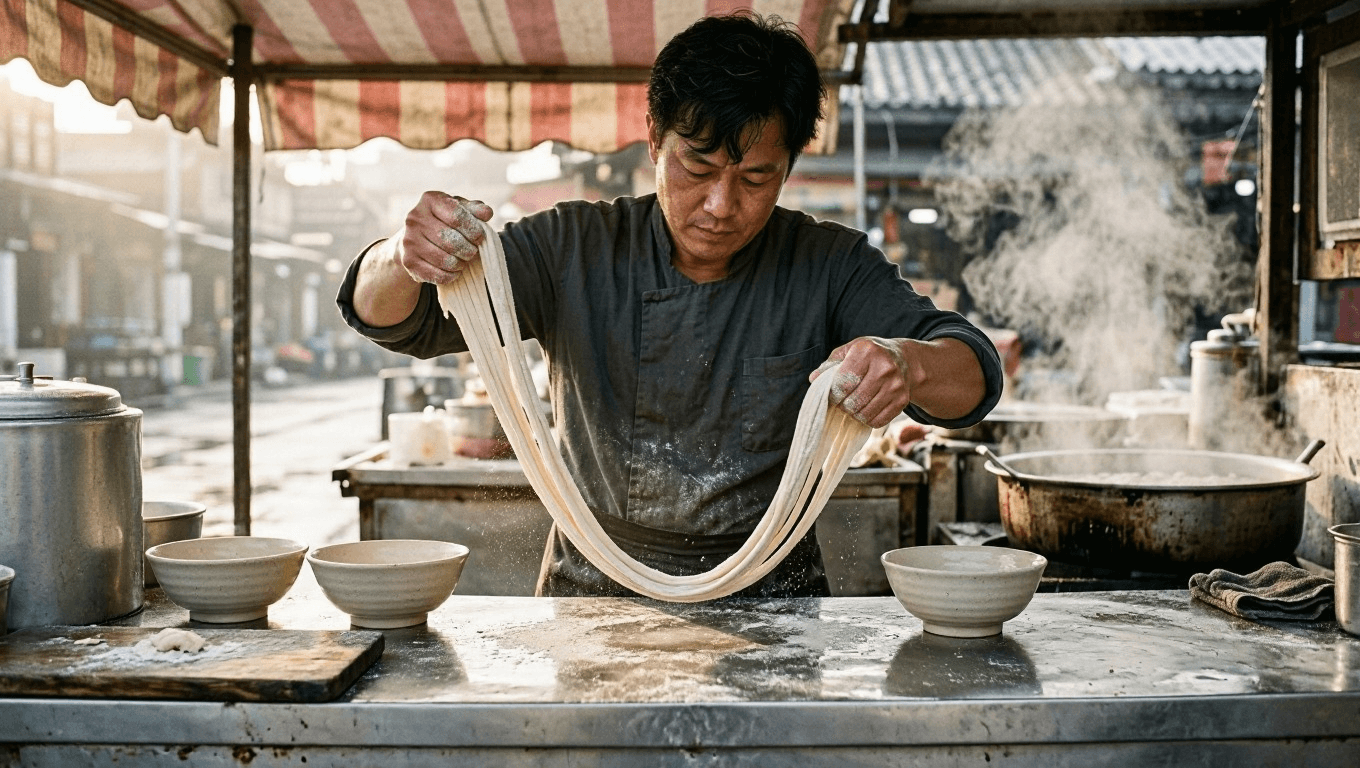
Source scene for MAI Image 2.6 image editing: an adult chef stretching noodles at a daylight market stall
Source evidence: one adult chef, both hands on a single noodle bundle, three bowls, and a clear counter relationship.
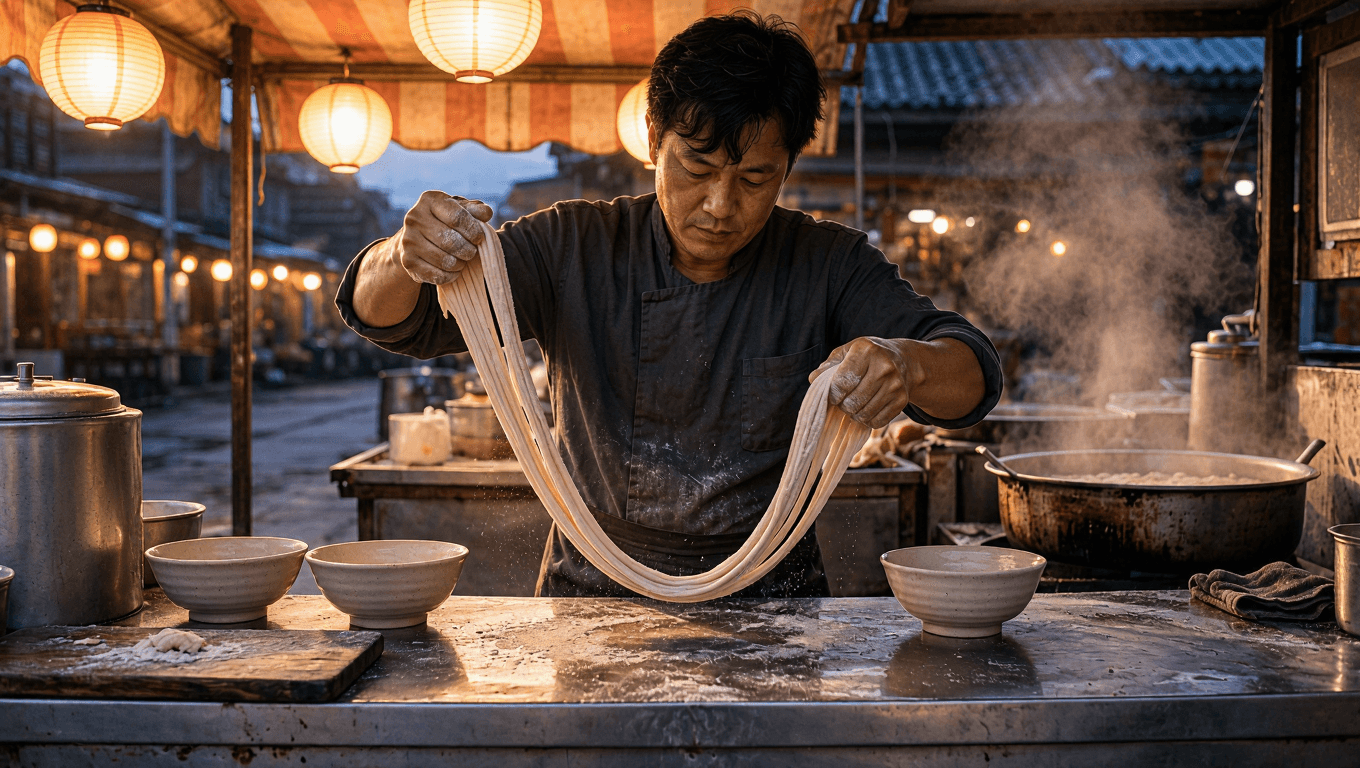
Controlled MAI Image 2.6 Edit result: the same noodle-making action in a lantern-lit evening market
Edit evidence: the market light changes, while the chef, action, bowls, and camera relationship stay reviewable.
Case 2: Keep a Record-Stall Interaction Intact While Changing Weather
The second pair tests a close human-object relationship. The selected record sleeve, the hand that holds it, and the crate arrangement are the preservation checklist. The change is only the weather and light.
Prompt 3: Record-Stall Source
plaintext1Create a documentary flea-market photograph of one adult woman browsing vinyl records at an outdoor stall on an overcast morning. She holds one selected cobalt-blue record sleeve in her right hand and uses her left hand to flip through records in the nearest of exactly three wooden record crates. Arrange the three crates in a shallow row across the lower half of the frame. Include a striped canvas canopy, a few weathered paper price tags with no readable text, and distant market tables softly out of focus. Soft diffused daylight, restrained navy, mustard, and weathered wood palette, tactile cardboard sleeves and fabric texture, 50mm lens, horizontal 16:9 composition. No logos, readable text, watermarks, extra people, duplicate hands, duplicate record sleeves, or additional crates.
Prompt 4: Record-Stall Weather Edit
Upload Prompt 3's selected result. Use MAI Image 2.6 Edit, 16:9.
plaintext1Use the uploaded image as the source of truth. CHANGE ONLY: replace the overcast morning light with warm late-afternoon sunlight, adding soft directional shadows and a subtle dry golden glow to the market canopy. PRESERVE EXACTLY: the same adult woman, the cobalt-blue record sleeve in her right hand, her left-hand contact with the nearest crate, exactly three wooden record crates in the same order, the sleeve orientation, camera angle, and framing. Do not add text, logos, watermarks, extra people, duplicate hands, duplicate sleeves, extra crates, altered clothing, or a new pose.
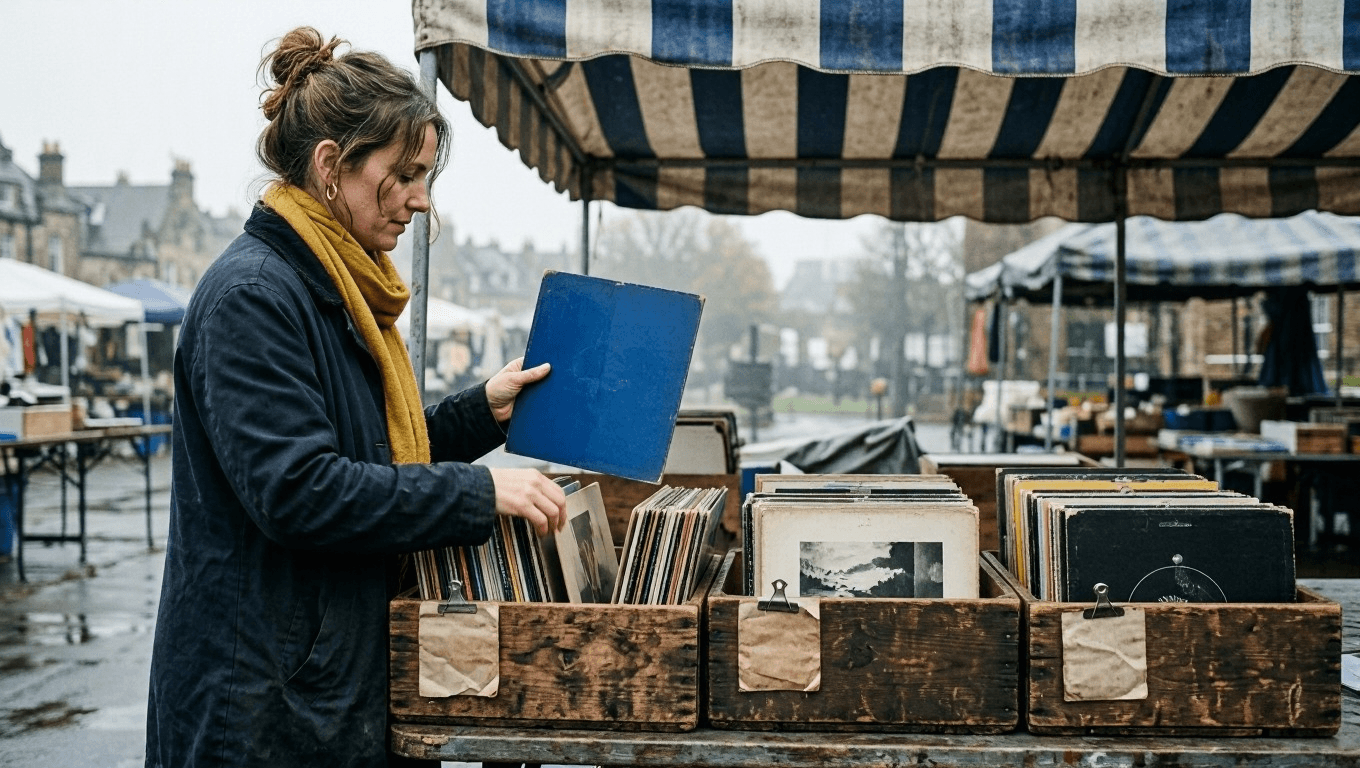
Source scene for MAI Image 2.6 image editing: an adult browsing vinyl records at an overcast flea market
Source evidence: one adult, one selected blue record sleeve, three wooden crates, and stable hand contact.
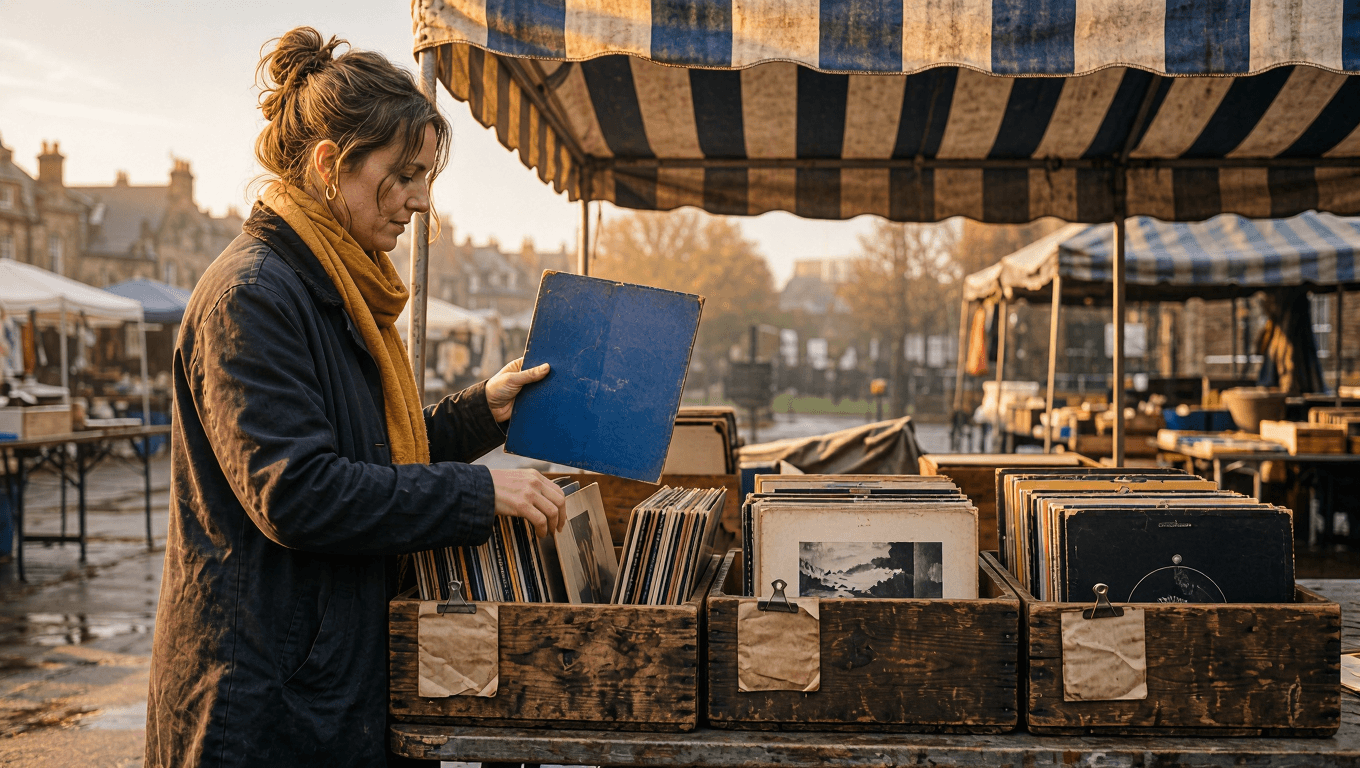
Controlled MAI Image 2.6 Edit result: the same vinyl-record interaction under warm late-afternoon light
Edit evidence: only weather and light change. The buyer, selected sleeve, crates, and hand contact remain the same.
Case 3: Keep a Hiker's Direction of Travel Intact While Changing Season
The final pair tests a wider scene. A hiker's backpack, poles, walking direction, and trail perspective make a clean checklist. The edit can turn the late-summer source into an early-autumn scene, but it cannot turn the walk into a new composition.
Prompt 5: Mountain-Hiker Source
plaintext1Create a cinematic outdoor photograph of one adult hiker walking away from the camera along a late-summer mountain trail toward a distant ridge. The hiker wears a forest-green backpack and holds exactly two trekking poles, one in each hand, with a natural forward walking stride. A narrow trail leads from the lower foreground toward the ridge through tall green grass and sparse alpine pines. Late-afternoon sun enters from the left, creating clear but natural shadows and warm highlights on the grass. Use leading lines from the trail, a small out-of-focus rock in the foreground, restrained green, slate blue, and warm earth tones, 35mm lens, horizontal 16:9 composition. No logos, readable text, watermarks, extra people, duplicate poles, altered backpack shape, or a hiker facing the camera.
Prompt 6: Mountain-Hiker Season Edit
Upload Prompt 5's selected result. Use MAI Image 2.6 Edit, 16:9.
plaintext1Use the uploaded image as the source of truth. CHANGE ONLY: transform the late-summer mountain trail into early autumn, with muted gold grass, scattered amber leaves, a lightly clouded sky, and cooler clean air. PRESERVE EXACTLY: the same adult hiker walking away from the camera, the forest-green backpack, exactly two trekking poles with the same hand contact, the stride direction, trail perspective, ridge position, camera angle, and framing. Keep grounded foot contact and coherent natural shadows. Do not add text, logos, watermarks, extra people, duplicate poles, different gear, a new route, heavy fog, snow, or a hiker facing the camera.
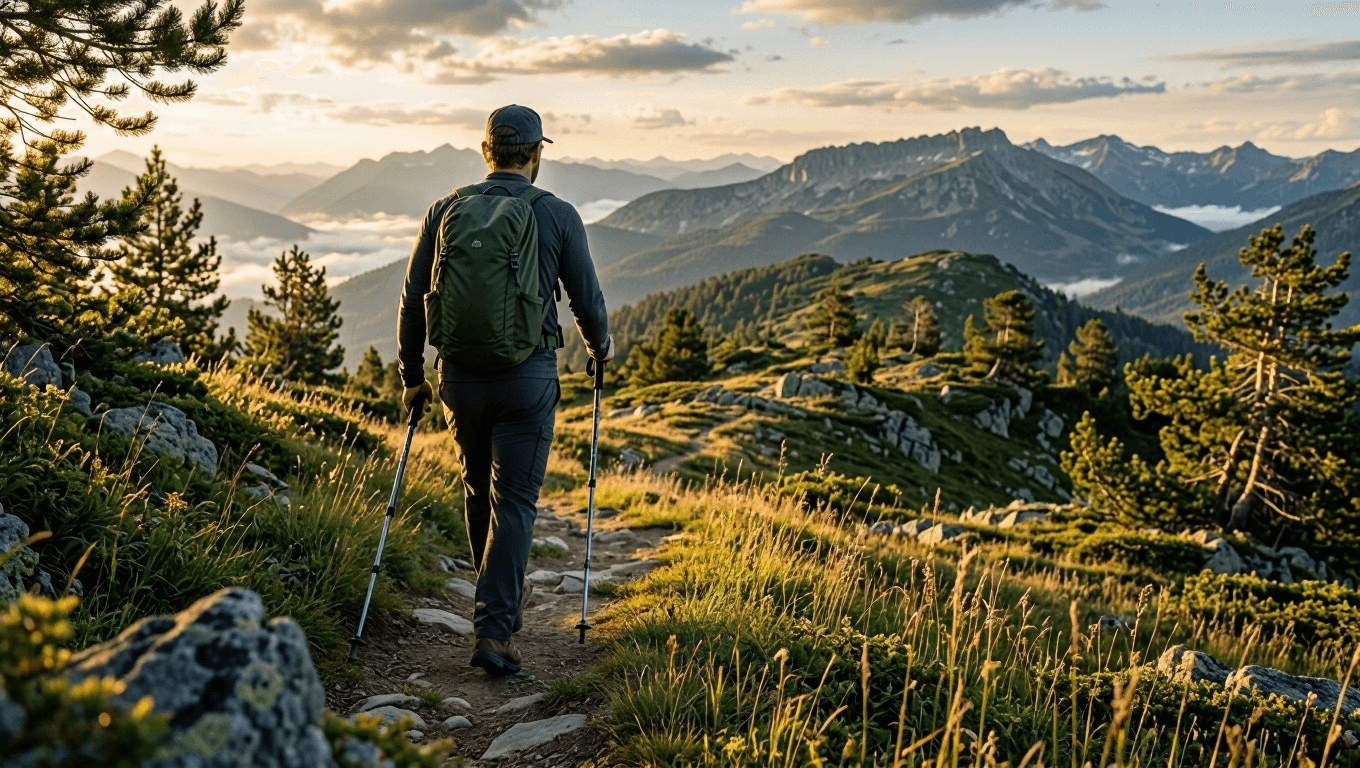
Source scene for MAI Image 2.6 image editing: an adult hiker walking along a late-summer mountain trail
Source evidence: one adult walking away from camera, a forest-green backpack, two trekking poles, and a trail leading toward the ridge.
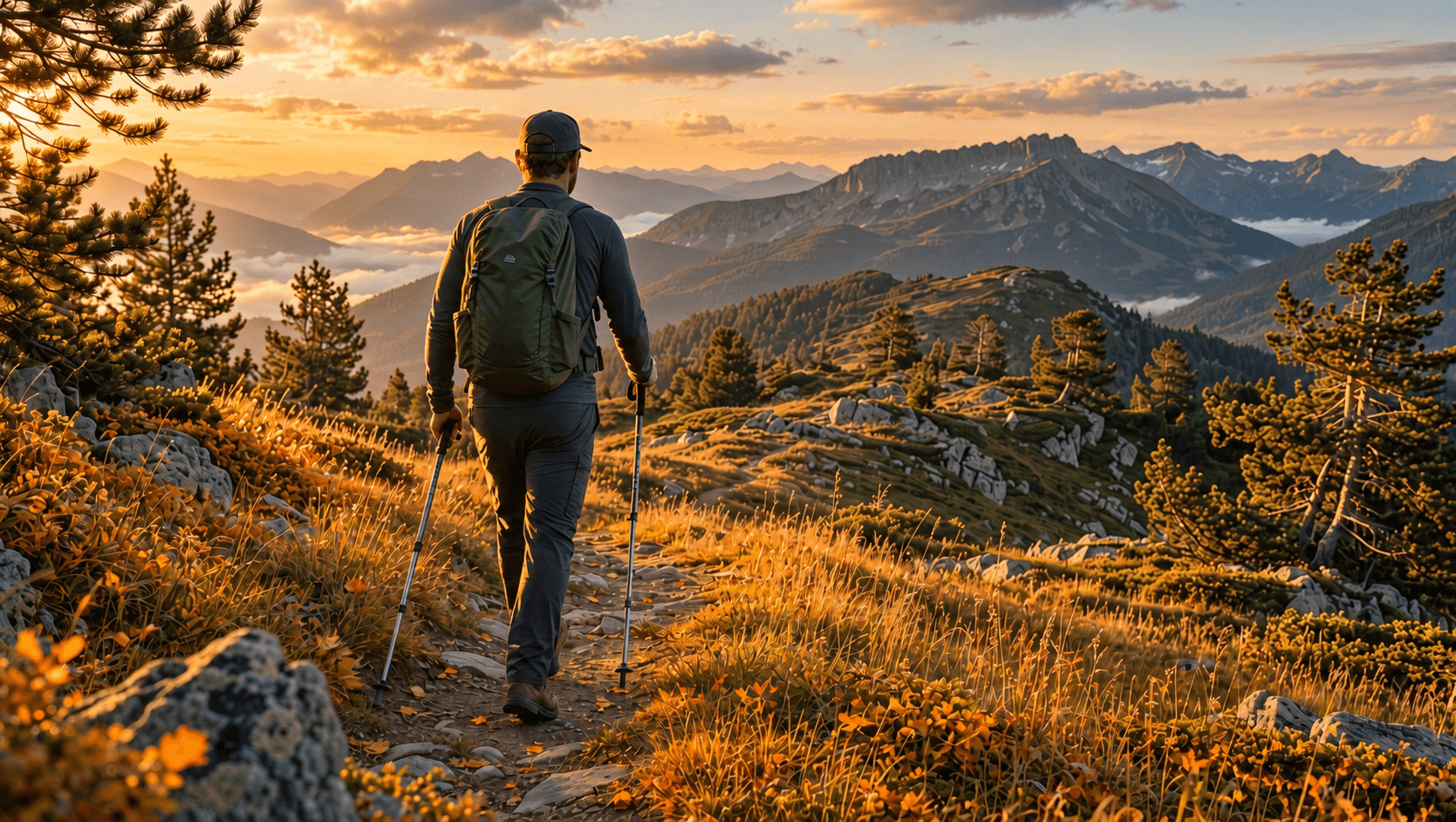
Controlled MAI Image 2.6 Edit result: the same hiker and route transformed into an early-autumn mountain trail
Edit evidence: the season changes without changing the hiker, gear, direction of travel, or trail perspective.
Controlled MAI Image 2.6 Image Editing Variations
Once a preservation ledger works, make one change per variation:
- Change only the light and weather around an approved action scene.
- Change only the setting material while holding a person, object relationship, and camera viewpoint.
- For two to five references, label each image by its role, such as
person,action,scene, orstyle reference. Do not rely on upload order alone.
plaintext1CHANGE ONLY: [one isolated environmental change]. 2 3PRESERVE EXACTLY: [adult subject], [action], [contact points], [object count], [direction], [camera relationship]. 4 5DO NOT: [three to five scene-specific failure modes].
MAI Image 2.6 Image Editing QA and Legal Boundaries
Use the same source and result side by side before approval. A scene passes only when the requested edit is visible and the preservation ledger still holds.
| Pass condition | Failure | Next action |
|---|---|---|
| Action survives | Hand no longer contacts the intended object | Rerun from the source with hand contact in PRESERVE EXACTLY |
| Object count survives | Extra bowl, record sleeve, pole, or person appears | Narrow the prompt and list the exact count |
| Direction survives | Person faces or travels in the wrong direction | Restate direction and camera relation, then rerun |
| Light is coherent | Shadows conflict with the stated light source | Change only the lighting instruction |
| Scene stays fictional | Output implies a real person, event, or current place claim | Remove the claim and label the image as a concept |
Only upload material you own or have permission to edit. Do not present a generated scene as evidence of a real person's identity, a current event, a real location, a safety claim, or an endorsement. Keep human approval for references, portrait permissions, trademarks, and publication claims.
Frequently Asked Questions
Is MAI Image 2.6 good for image editing or only text-to-image generation?
It supports both. The practical test is whether the source action and the specific details named in the preservation ledger survive a controlled run and manual review.
How do I keep an action consistent in MAI Image 2.6 Edit?
Upload the selected source, name the adult subject, the action, every contact point, the objects that must stay, and the camera relationship. Request one change only. In this guide, a hand on noodles, fingers on a record sleeve, and poles on a mountain trail are separate checks.
How many reference images can MAI Image 2.6 use for editing?
Microsoft says the model family supports multi-image reference editing. Label each reference’s role and test the active page before committing a multi-reference workflow.
Should I use MAI Image 2.6 Edit or MAI Image 2.6 Flash Edit?
Start with Flash when you need a fictional source scene quickly. Use Edit when the selected source needs one reviewable environmental change. Confirm the live model page because availability, controls, and pricing can change.
Can I publish an AI-edited scene without checking it manually?
No. MAI Image 2.6 image editing can accelerate a controlled scene workflow, but a human must compare the source and result, especially for anatomy, object counts, direction of travel, light, and any publication claim.





