AI से सारांश माँगें
A file can measure 4096 × 4096 pixels and still fail a product brief. A camera's bellows may deform, its shadow may float, or a background edit may recolor the product. MiniMax H3 Image 4K Image Generation gives designers and developers a static-image model that produces roughly 16-megapixel pictures directly and accepts up to 16 reference images. The useful question is whether a particular result survives delivery checks, not whether its filename says “4K.”
This guide supplies four connected prompts for that check, followed by a reader-supplied four-image run. We inspected the downloaded PNG files, but did not independently operate the generator or verify its settings. MiniMax's speed and showcase claims are vendor evidence; your actual latency and pass rate will depend on your task and setup.
Key takeaways
- MiniMax H3 Image creates and edits still images; MiniMax H3 video model endpoints serve a different task.
- The published 4K square size is 4096 × 4096, while a wide 16:9 choice is 5472 × 3072.
- Test generation, two-reference composition, and a constrained edit with the same recognizable product.
- MiniMax's quoted image prices are examples, and its open-weight license has major territorial and commercial conditions.
What Is MiniMax H3 Image, and Is It the Same as MiniMax H3?
MiniMax H3 Image is a still-image model for text-to-image generation and reference-based editing. MiniMax says both operations use one checkpoint. Its model card describes native output around 16 megapixels without a separate upscaler and support for up to 16 reference pictures. These are capability specifications, not a measured success rate for your own prompts (MiniMax H3 Image model card, November 2026).
The name can mislead a buyer scanning model lists. MiniMax H3 is a video model family. An image to video endpoint for the MiniMax H3 video model takes an image as the starting point for motion; it does not supply a static 4K image-generation result. MiniMax H3 Image Standard and MiniMax H3 Image Highspeed are the still-image variants. MiniMax H3 Image Highspeed is a paid speed option, so select it only after you know how much waiting matters to your team.
The distinction changes what to inspect. A video preview may hide a soft or malformed still frame at normal playback speed. A product image might be cropped, enlarged, printed, or edited again, so a static deliverable needs pixel-level inspection. For the test below, save the original output file after every step. Do not judge only from a web thumbnail or a model-gallery example.
The same restraint applies to vendor images in this article. They demonstrate what MiniMax chose to publish. They do not establish that the four camera prompts below pass, that every edit preserves the background, or that another service hosts MiniMax H3 Image. Those claims require a completed run with the exact model and settings.
What Does “4K” Mean for MiniMax H3 Image Generation?
For this model, “4K” refers to an approximately 16-million-pixel output area across supported aspect ratios. A square 4096 × 4096 image contains 16,777,216 pixels. MiniMax also lists 5472 × 3072 for 16:9, which contains 16,809,984 pixels. Standard UHD video at 3840 × 2160 contains 8,294,400 pixels, about half as many. The numbers describe canvas size, not whether a label, object count, texture, or reflection is correct.
| Layout | Dimensions | Pixel count | Useful delivery |
|---|---|---|---|
| Square, 1:1 | 4096 × 4096 | 16.78 MP | Product tile, square crop |
| Wide, 16:9 | 5472 × 3072 | 16.81 MP | Editorial banner, presentation |
| Standard UHD reference | 3840 × 2160 | 8.29 MP | Video frame or display target |
A published 1K, 2K, and 4K example. A public MiniMax H3 Image test record contains three completed images made with the same prompt for a cobalt-glass pavilion, the same model, and prompt expansion off. The downloaded files measure 1024 × 1024 at 1K, 2048 × 2048 at 2K, and 7104 × 2368 at 4K. The 4K request used a 3:1 wide frame while the other two were square. These are real separate generations, so changes in building shape and composition cannot be attributed to resolution alone; use the dimensions to understand output area and inspect each original at 100% for detail.
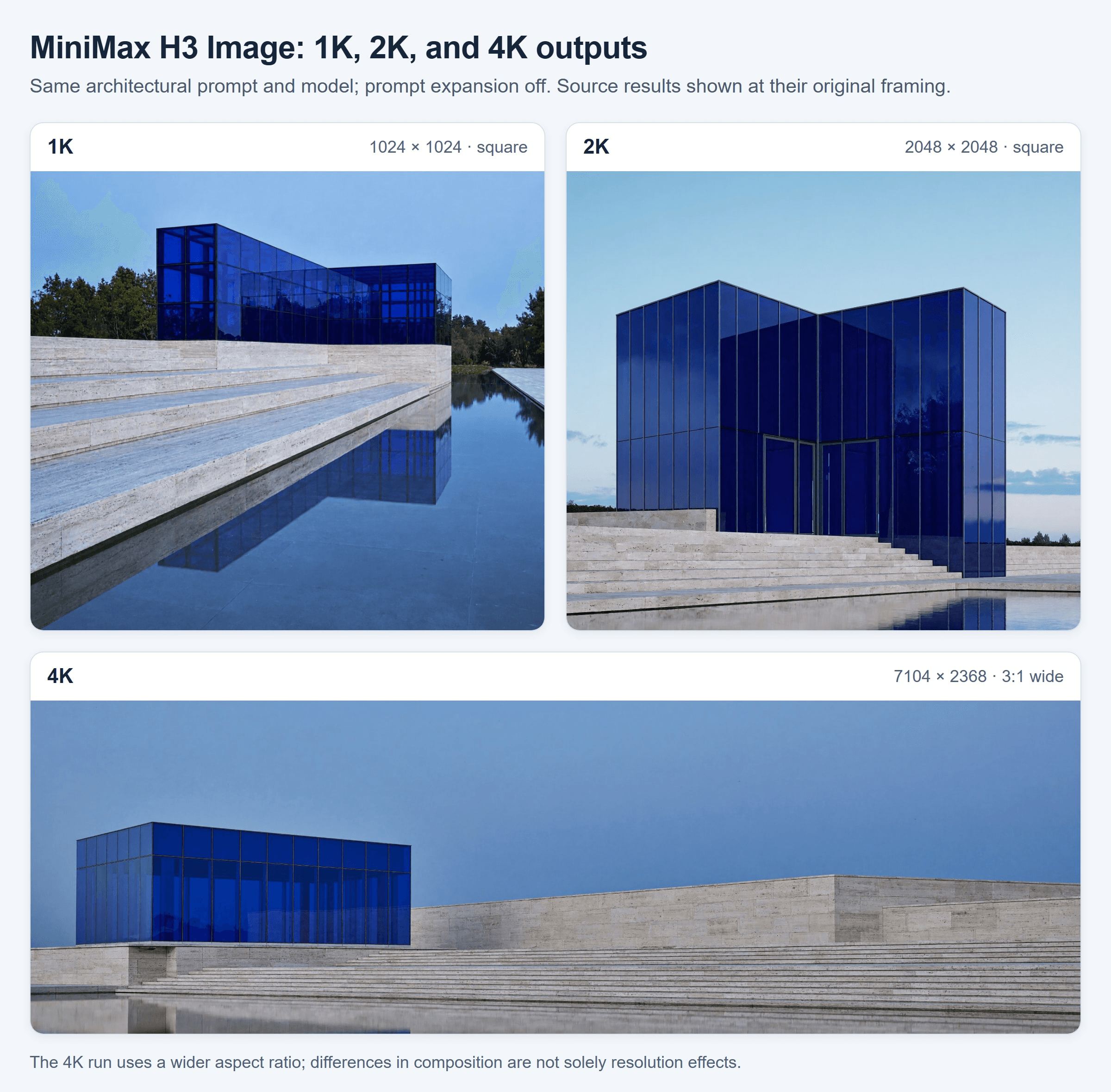
Three published MiniMax H3 Image results from the same prompt. The 1K and 2K outputs are square; the 4K output is 3:1 wide. This composed comparison uses the real source images and is not a controlled sharpness test.
Both MiniMax H3 Image dimensions in the table exceed MiniMax's current 16,600,000-pixel discount threshold. That is a mathematical check of the listed dimensions, not a promise that any interface will commit the requested width and height. Read the downloaded file's dimensions after generation. A platform may expose an area preset, a size field, or a fixed selection, and the returned size is the one that matters.
Native generation also needs careful interpretation. MiniMax says the model directly produces these large canvases rather than routing a smaller image through a separate upscaler. A 16 MP file can still look soft at a 100% crop because of model behavior, subject detail, compression, or a blurred scene in the prompt. Keep the full-resolution source when evaluating it; a scaled web preview can conceal both strengths and defects.
How to Generate a 4K Image With MiniMax H3 Image
Use one fictional product across four tasks: an unbranded scarlet folding film camera with black bellows and a brass-rimmed lens. Its silhouette, materials, and color give the reference and editing steps specific details to preserve. An empty architectural set supplies a separate scene reference. The settings below describe an intended 4K test. The four supplied outputs shown after step 4 each measure 2048 × 1152, so they illustrate the sequence but do not validate 4K delivery. Start with MiniMax H3 Image Standard, one PNG per step, and save the prompt, model variant, requested dimensions, actual dimensions, and elapsed time.
In MiniMax's interface or a compatible MiniMax H3 Image implementation, request the exact output dimensions where that control exists. Its generation and editing paths have different inputs. The reference order matters: upload the camera first and the empty set second, then address them as Picture 1 and Picture 2. If your interface offers either a 4K area preset or an exact size field, follow its documented form rather than trying to impose both on one request.
1. Generate the product subject
Set MiniMax H3 Image Standard to 4096 × 4096, PNG, one output. Keep the complete camera and its shadow inside the frame. Save this result as the first reference.
plaintext1Create a square editorial product photograph of exactly one fictional folding film camera, fully opened and resting on a warm-gray studio surface. Its compact rectangular body is wrapped in scarlet leather; black accordion bellows connect it to one circular lens with a narrow brushed-brass rim. Show the front and right side from a slightly raised three-quarter viewpoint, with the bellows clearly separated from the body. A large soft light from the upper left reveals the leather grain and brass without washing out the black folds; a gentle grounded shadow falls to the lower right. Keep the entire camera in sharp focus with breathing room on all sides. No strap, second camera, hands, brand mark, lettering, or watermark.
Check that there is exactly one camera, one lens, a plausible connection between lens and bellows, and a grounded shadow. If the output fails, record the failure before rerunning. A different seed is a new attempt, and the number of attempts belongs in the eventual acceptance rate.
2. Generate the wide scene
Request 5472 × 3072, PNG, one output. The plinth on the right must remain empty, with clear space on the left. Save this as the second reference; it gives the composition step a known set and layout.
plaintext1Create a wide editorial photograph of an empty modernist gallery set at late afternoon. A low rectangular limestone plinth occupies the right third of the frame, photographed from a slightly raised three-quarter viewpoint so its top and front edge are both visible. Pale plaster walls meet in a clean corner behind it; a tall off-frame window casts one long diagonal band of warm sunlight across the wall and plinth. Leave the left half calm and open for a future headline. The plinth top is completely bare and large enough for a compact camera. Keep the limestone grain and the sunlit edge legible. No product, display card, people, furniture, lettering, or watermark.
Reject a set that already contains a product or a plinth too narrow to support one. Otherwise the next step cannot cleanly test whether the camera was brought in from the first reference. This step isolates the scene from the object.
3. Compose the 2 references
Upload step 1 as Picture 1 and step 2 as Picture 2. Request 5472 × 3072, PNG, one output. The instruction names each source's role so you can see whether the resulting image retains the correct properties.
plaintext1Create a wide campaign photograph using <Picture 1> only for the identity of the folding film camera and <Picture 2> only for the gallery set. Place exactly one camera on the limestone plinth in the right third of <Picture 2>, fully visible and at a believable scale. Retain the scarlet leather body, black accordion bellows, single brass-rimmed lens, and three-quarter orientation from <Picture 1>. Retain the plinth, wall corner, diagonal sunlight, and open left half from <Picture 2>; do not carry over the gray studio background. Match the camera's perspective, warm highlights, and contact shadow to the gallery light. No extra product, strap, headline, logo, or watermark.
Compare against both source files side by side. The product should retain its body shape, bellows, and lens from Picture 1, while the plinth, wall, and diagonal light remain recognizable from Picture 2. A plausible composite also needs a believable contact shadow, relative scale, and viewpoint.
4. Test a constrained edit
Upload only the step 3 composite as Picture 1. Keep 5472 × 3072, PNG, one output. Change the large wall area to a bold new color while keeping the product and plinth intact. The before-and-after difference should be visible even at thumbnail size.
plaintext1Edit <Picture 1> into a striking second version of the same campaign photograph. 2Repaint only the two pale plaster wall planes behind the limestone plinth in 3saturated ultramarine blue, from edge to edge. Retain their matte plaster 4texture and the same visible corner. Keep the diagonal band of afternoon 5sunlight in the same position and shape, appearing naturally lighter where it 6strikes the blue wall. Do not change the scarlet leather camera, black bellows, 7brass lens rim, limestone plinth, their scale or placement, or the contact 8shadow. Preserve the open left half of the composition. Add no tiles, props, 9lettering, logos, or other new elements.
Compare the before and after files at both thumbnail size and 100% zoom. The wall should read as blue immediately; check whether the camera's scarlet leather, brass rim, stone grain, wall corner, and sunbeam stayed recognizable. Treat any recoloring or movement outside the wall as an unwanted edit.
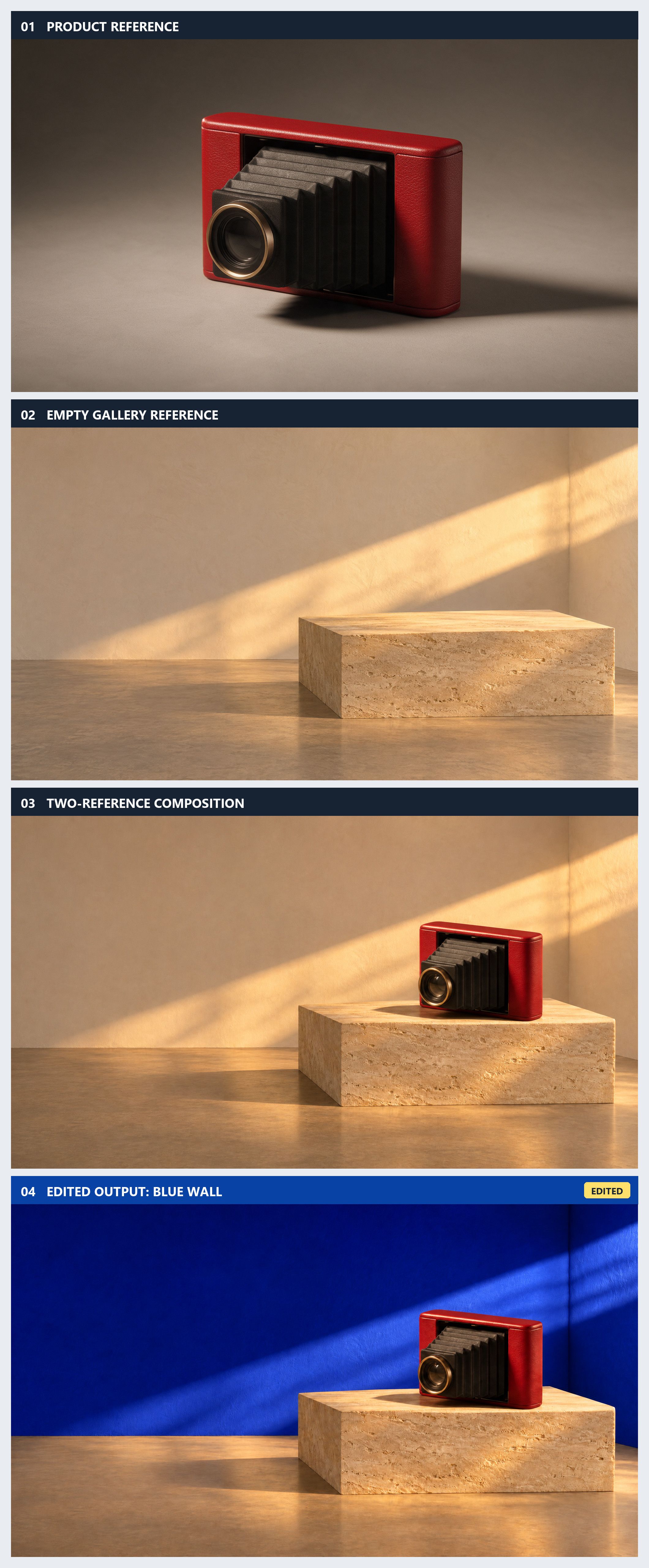
Four supplied outputs in order, with image 04 explicitly labeled as the edited result. All four PNG sources are 2048 × 1152. In the updated image 04, the wall turns blue while the camera's silhouette, red body, brass lens, plinth placement, and diagonal sunlight remain visually consistent with image 03. This visual comparison does not establish pixel-identical preservation or verify a 4K result.
How to Judge the Results Before Shipping Them
Use a pass rule before looking at the results. The camera series has four distinct checks: correct subject, empty set, faithful composition, and localized edit. Each check should pass only when the image could be used for its intended layout without concealing a defect. A high-resolution file that fails the brief remains a failed attempt.
MiniMax publishes a single-reference edit example that turns a gray lunar-base render into a scene image. It demonstrates that its editing workflow accepts and transforms an existing image. It cannot establish the pass rate of the wall edit, because the requested change and preservation standard differ.
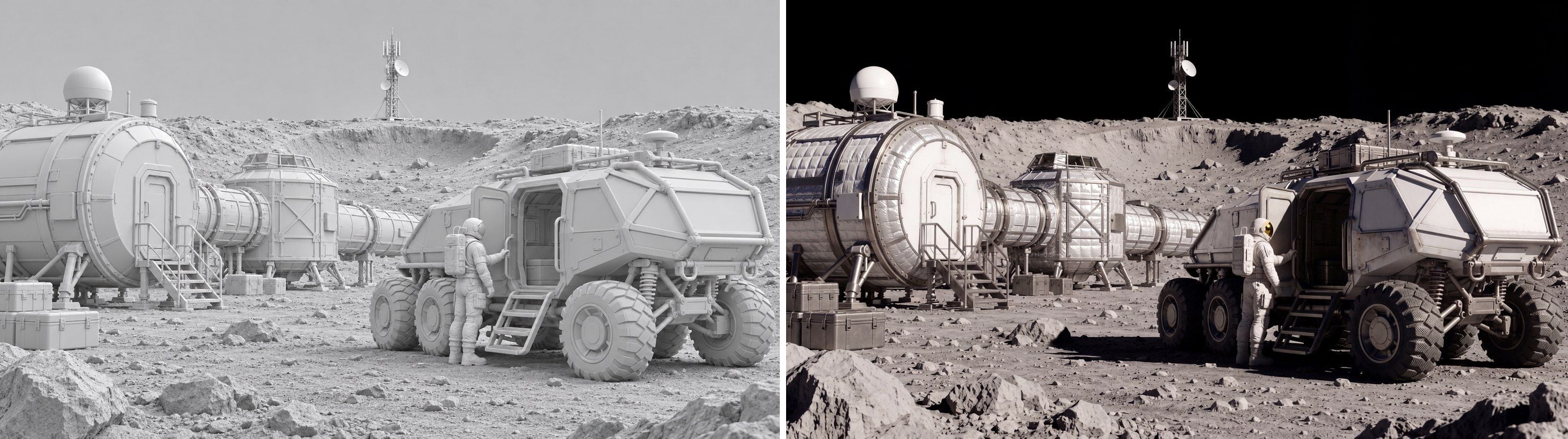
MiniMax official example, not an independent test: a single reference is transformed from a gray lunar-base render into a scene image.
Published text-to-image case: a 4K food spread. The official MiniMax H3 Image workflow starts with a short brief for an overhead farm-to-table scene with bread, vegetables, and cheese on weathered wood. Its prompt-expansion step selected 4736 × 3552 pixels. The model card places a local SGLang result beside a MiniMax API result. Both contain the requested food and viewpoint, but their arrangement differs. For a production brief, check the ingredient list, spacing, and actual download size; these published examples do not measure how often the same prompt succeeds.

MiniMax official workflow: two results from the same food-spread task. The source lists 4736 × 3552 output; this side-by-side display is downscaled.
Published image-editing case: a podcast scene. The second official MiniMax H3 Image workflow uses one reference of two hosts at a desk. Its instruction removes the man's headphones and brings both hosts into a fist bump above the desk sign. The source presents the reference, a local result, and a MiniMax API result, and lists 4096 × 4096 for the outputs. The two edits meet the central action in different poses. Compare the microphones, sign, faces, and background against the reference when judging how much of the original survives an edit. Neither result proves that the wall edit above will preserve every unchanged pixel.

MiniMax official workflow: input on the left, local edit in the center, and MiniMax API edit on the right. The source lists 4096 × 4096 output; this comparison display is downscaled.
For each test, record requested and actual dimensions, start-to-finish wait, pass or fail, and the specific failure. A compact log might use columns for step, attempt, size, seconds, camera count, reference retention, unwanted edit, and decision. Keep failed outputs: they reveal how often the workflow needs another try.
Calculate usable yield as accepted images divided by all generated images. Then divide total generation time by accepted images. For example, if a four-step run needs a rerun at the composition step, a final accepted sequence used five generated files, not four. That arithmetic matters more than the manufacturer's speed headline when planning a production batch. The protocol here supplies no invented pass rate or latency.
MiniMax H3 Image Pricing, Variants, and the 4K Offer
MiniMax H3 Image usage is billed through text, input-image, and output-image token rates. Reference count and prompt length therefore affect the final amount. Its published per-image table is explicitly illustrative. As of November 11, 2026, MiniMax publishes a 4096 × 4096 text-to-image example for MiniMax H3 Image Standard at $0.06879 normally and $0.03439 under a temporary 50% offer. The offer expires November 17, 2026 at 16:00 UTC, exclusive, and requires the final delivered image to contain at least 16,600,000 pixels (MiniMax H3 Image pricing overview, November 2026).
| Choice | Published example or pricing logic | When to try it |
|---|---|---|
| MiniMax H3 Image Standard 1K | $0.02179 text-to-image example | Draft composition cheaply |
| MiniMax H3 Image Standard 2K | $0.02333 text-to-image example | Inspect a layout before 4K |
| MiniMax H3 Image Standard 4K | $0.06879 regular; $0.03439 eligible offer | Evaluate a final-size static image |
| MiniMax H3 Image Highspeed 4K | $0.13001 regular; $0.06501 eligible offer | Test if faster turnaround justifies its premium |
| Reference editing | Input images also incur token charges | Count and retain every uploaded reference |
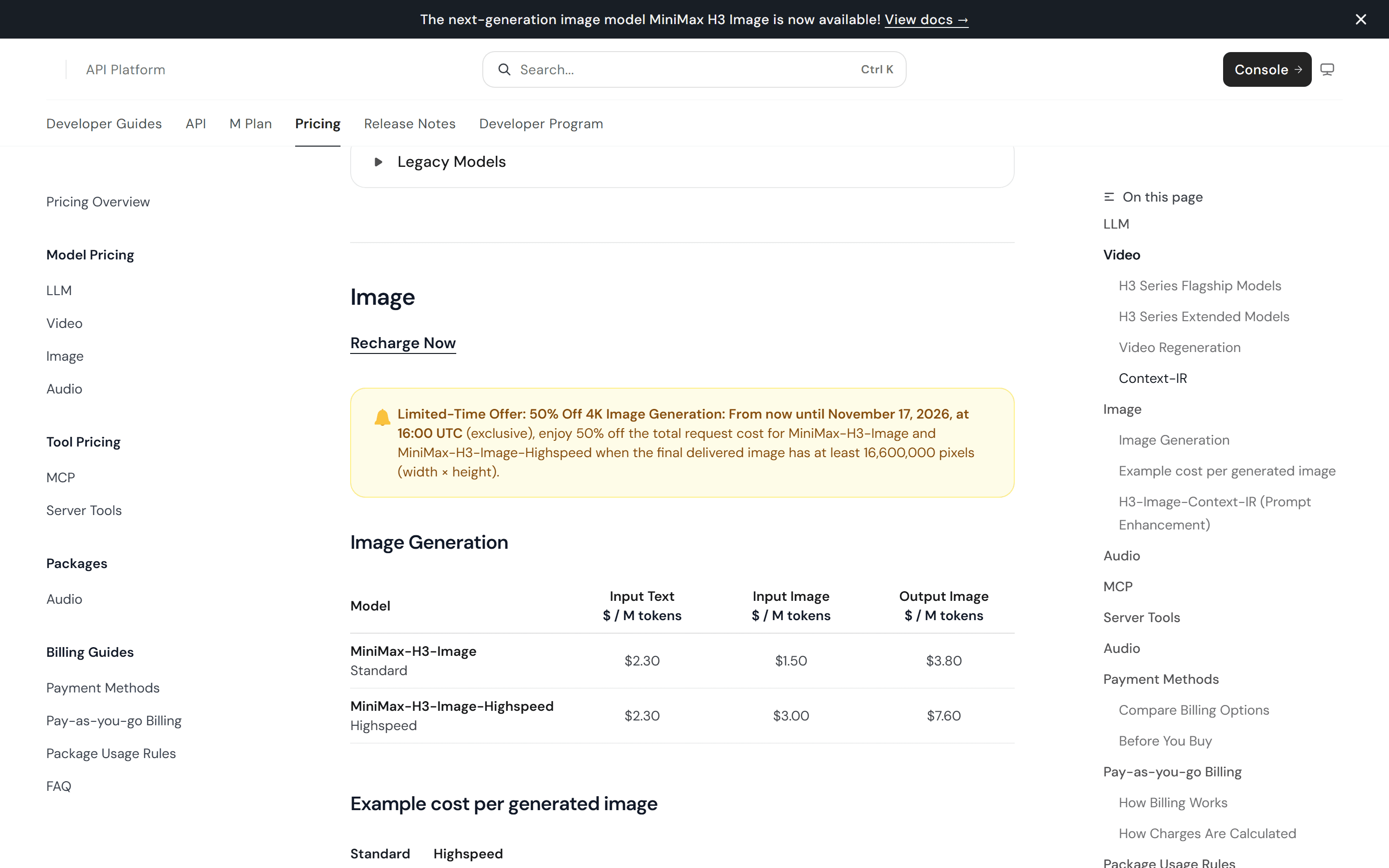
The MiniMax pricing page states the offer deadline and the 16,600,000-pixel threshold. Recheck the live page before publishing or budgeting.
The dimensions in this article both clear the offer's pixel threshold. A smaller “4K” choice on another interface might not, so inspect the actual returned dimensions and current invoice. The example price should never be quoted as a fixed cost for the four-step test: the reference steps have additional input-image charges, and reruns increase spend.
Start with MiniMax H3 Image Standard when testing instruction following. Switch to MiniMax H3 Image Highspeed only after an identical brief shows that waiting time, rather than image acceptance, is the binding cost. Track dollars per accepted image, not just dollars per generated image. A cheap output that needs repeated corrections can cost more work than its listed generation fee.
These are MiniMax's own prices. No Atlas Cloud page or price for MiniMax H3 Image was verified for this article, so the table should not be read as an Atlas Cloud quote. Publication-day checks should confirm both the MiniMax offer status and any newly listed Atlas Cloud endpoint for MiniMax H3 Image.
Where Can You Use MiniMax H3 Image, and What Does Open Weight Allow?
MiniMax links to its online app and developer API from the model card. The downloadable weights also permit local deployment under the model's own license. This is a substantial engineering choice: the model card lists roughly 68.65 GB for the image model and a separate 66.7 GB text encoder. Hardware, memory, setup, and maintenance belong in the decision alongside per-image API fees.
Open weight does not mean unrestricted use. The community license's applicable territory excludes the European Union, United Kingdom, Republic of Korea, and United States. It also requires prior written authorization if the licensee and affiliates have annualized revenue over $1 million or provide a hosted service to third parties. Commercial products using the model have a display requirement. Review the full conditions before deploying weights, distributing them, or building a product around them (MiniMax H3 Image Community License Agreement, November 2026).
The license says MiniMax claims no rights over generated outputs, while placing responsibility for those outputs and their use on the user. That sentence does not resolve ownership of uploaded references, third-party rights, or the terms of every online service. A team intending to publish commercial product imagery should check its input rights and the specific service terms as well as the weight license.
For a managed model catalogue, start at Atlas Cloud and inspect the current model directory. As checked for this article, its public index listed MiniMax H3 video model endpoints but no verified MiniMax H3 Image still-image generation entry. A similarly named image to video endpoint cannot stand in for the 4K test above. If a static alternative is needed now, Atlas lists other image models; verify their exact settings and prices separately.
Is MiniMax H3 Image Worth Trying for Your Workflow?
MiniMax H3 Image 4K Image Generation is worth a controlled trial when your team needs a large still-image canvas, reference-based composition, or a sequence of edits. The four camera prompts turn an editorial product concept into specific checks. A model that handles them cleanly gives you stronger evidence for a product-photo workflow than a gallery of unrelated showcase images.
Match the test to your deliverable. A product tile puts the camera silhouette, bellows, and lens first. A wide article header makes the open left side and crop safety important. A two-reference campaign image depends on product identity, set retention, lighting, and shadow. A frequent local-edit workflow lives or dies by how little else changes. Human review remains necessary at each step.
Run the sequence once with MiniMax H3 Image Standard, retain every result, and calculate accepted images per attempt and time per accepted image. Then rerun only the step that failed, with the failure written down. If you need a different resolution, variant, or hosting route, repeat the same acceptance test. That gives your team a direct comparison without mistaking MiniMax's published examples for your own measurements.
If your team manages image generation from one model directory, check Atlas Cloud's current 4K offerings and whether a genuine MiniMax H3 Image endpoint has appeared. Use the verified model page and test environment before claiming a MiniMax H3 Image workflow on Atlas Cloud or quoting its price.
Frequently Asked Questions
Can MiniMax H3 Image produce transparent PNGs?
The published examples and API response format establish PNG output, but PNG does not by itself establish a transparent alpha channel. Do not promise transparency without checking a current official parameter or a downloaded file's alpha channel. For a cutout deliverable, run a specific transparent-background test and inspect the exported file.
Can I use its images commercially?
The weight license says MiniMax claims no rights over outputs, but it also contains territorial, commercial, and use restrictions. Your source-image rights and the terms of the service used to generate the output matter. Check the current license and service terms for the exact commercial use.
Why does a 4K result still look soft?
Pixel dimensions measure the canvas, not local clarity. Inspect the original download at 100%, compare the subject to the prompt, and check whether the preview or export was resized or compressed. A naturally shallow-depth-of-field prompt can also make parts of the scene soft. If the important object itself lacks usable detail, record that as a failed result even when the dimensions are correct.
Is 4096 × 4096 the only 4K size for MiniMax H3 Image?
No. The model card also lists a 5472 × 3072 wide output. Both are about 16.8 megapixels. Check the dimensions of the downloaded file, since a size requested in an interface is not proof of the size returned.
How many reference images can MiniMax H3 Image use?
The model card lists support for up to 16 references. The two-reference camera test in this guide uses one image for the product and one for the empty set. Keep their order and roles clear, and account for input-image charges when comparing costs.


