A tiny piece of digital jewelry appears on a face, the person pauses, and a casual selfie becomes a chance to test a different look. That is the appeal of the nose piercing filter trend. The effect itself is simple, but the reveal makes it easy to compare styles and see how someone responds to a change they can undo instantly. Three online examples show different ways people explore the look before we examine an original, longer version.
Key takeaways
- The phrase covers virtual nose-ring try-ons and an older piercing roulette challenge; they use similar effects in different ways.
- A useful short clip shows the unfiltered face, the switch, and a readable reaction. Without those beats, the piercing is only an accessory.
- The three GIFs below are silent excerpts of online work, included to study reveal, reaction, and style changes.
- The original 30-second try-on video is shown with a before-and-after image and a real Atlas Cloud playground screenshot.
Three online nose piercing filter examples
These are online examples made by others. The GIFs are silent and do not claim to reproduce the sound of the original posts. They also are not Atlas Cloud outputs.
1. A septum reveal, then a second look
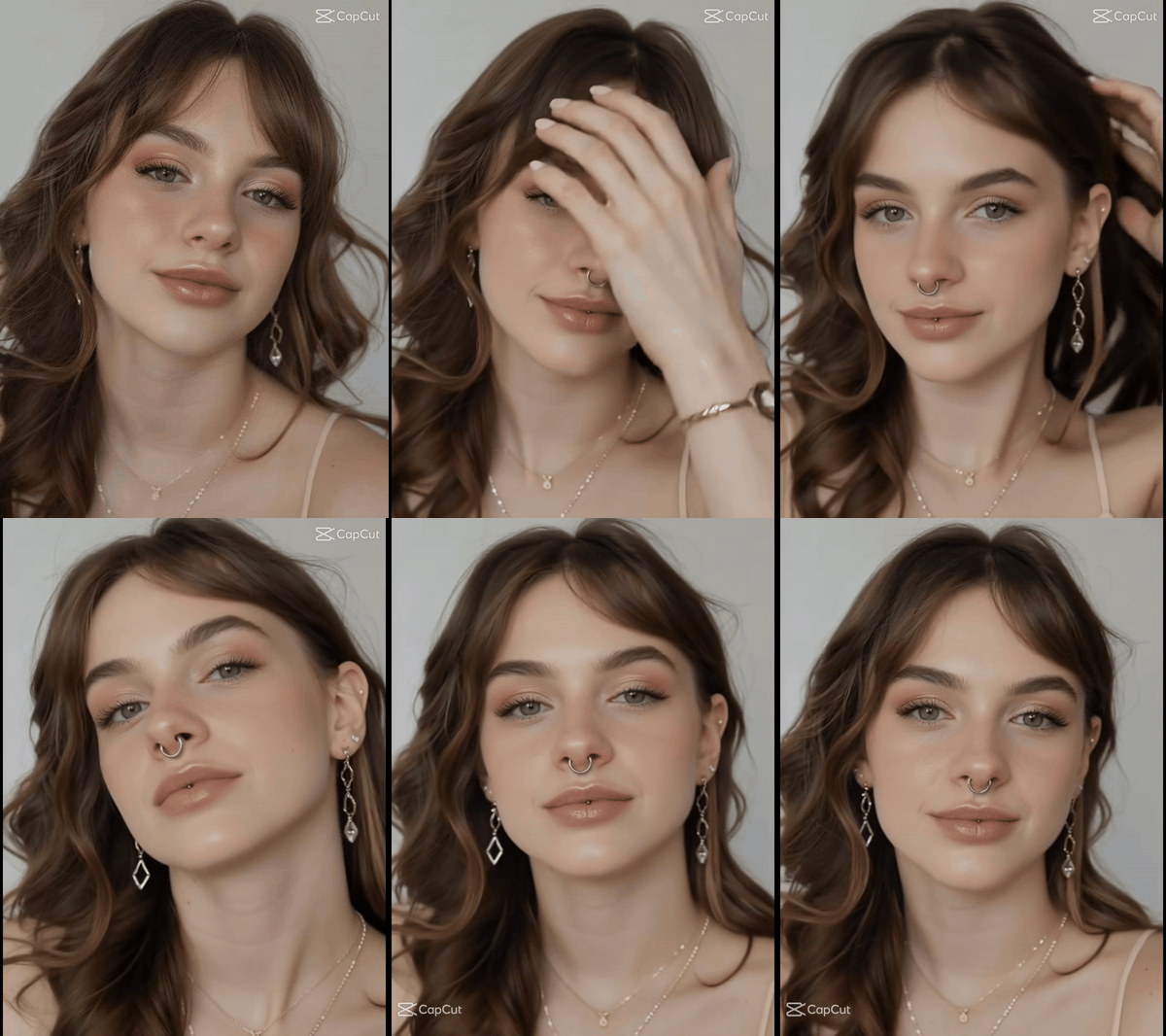
In this short online example, a silver septum ring appears on the same face. The subject brushes back her hair and shows the result from slightly different angles.
The first visual task in this format is orientation. The viewer needs to know what the face looked like before the effect and where to look after it appears. A front-facing frame does that with almost no explanation. The nose stays in roughly the same place on screen, so the ring reads as a change rather than a new scene. The later head movements let the viewer inspect whether the effect still looks attached.
2. The same idea works as a reaction shot
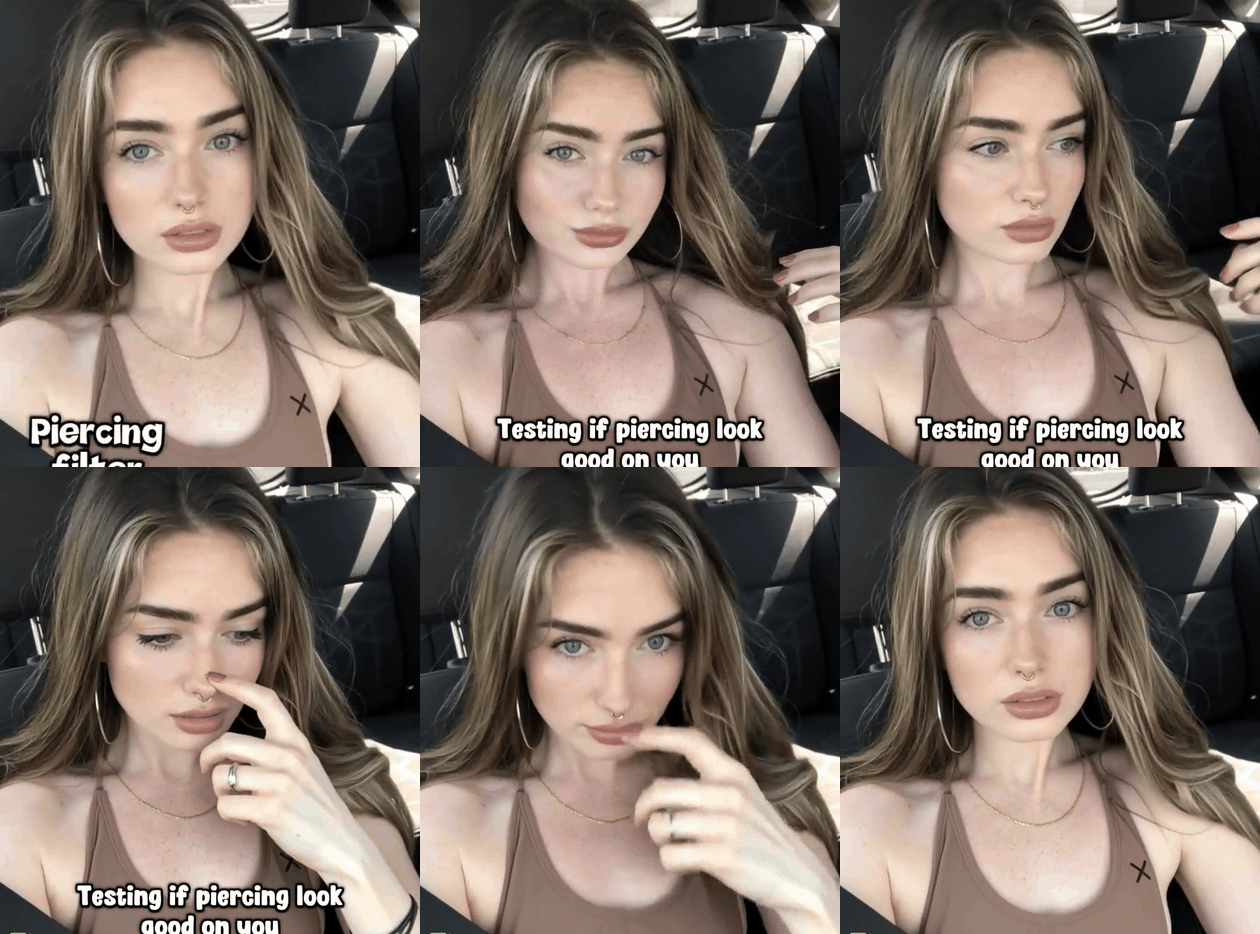
In the second example, the subject turns her head, touches her nose, looks down, then faces the camera again. The on-screen text frames the clip as a test of how a piercing would look.
The interesting event is what happens after the preview. Here the hand reaches for the nose and the subject checks the effect from another angle. The clip does not give a dramatic verdict, but that hesitation is a recognizable part of the format: a tiny virtual change suddenly deserves serious consideration. A longer version could show how a person's opinion shifts as the options change.
3. Several styles, one unchanged face
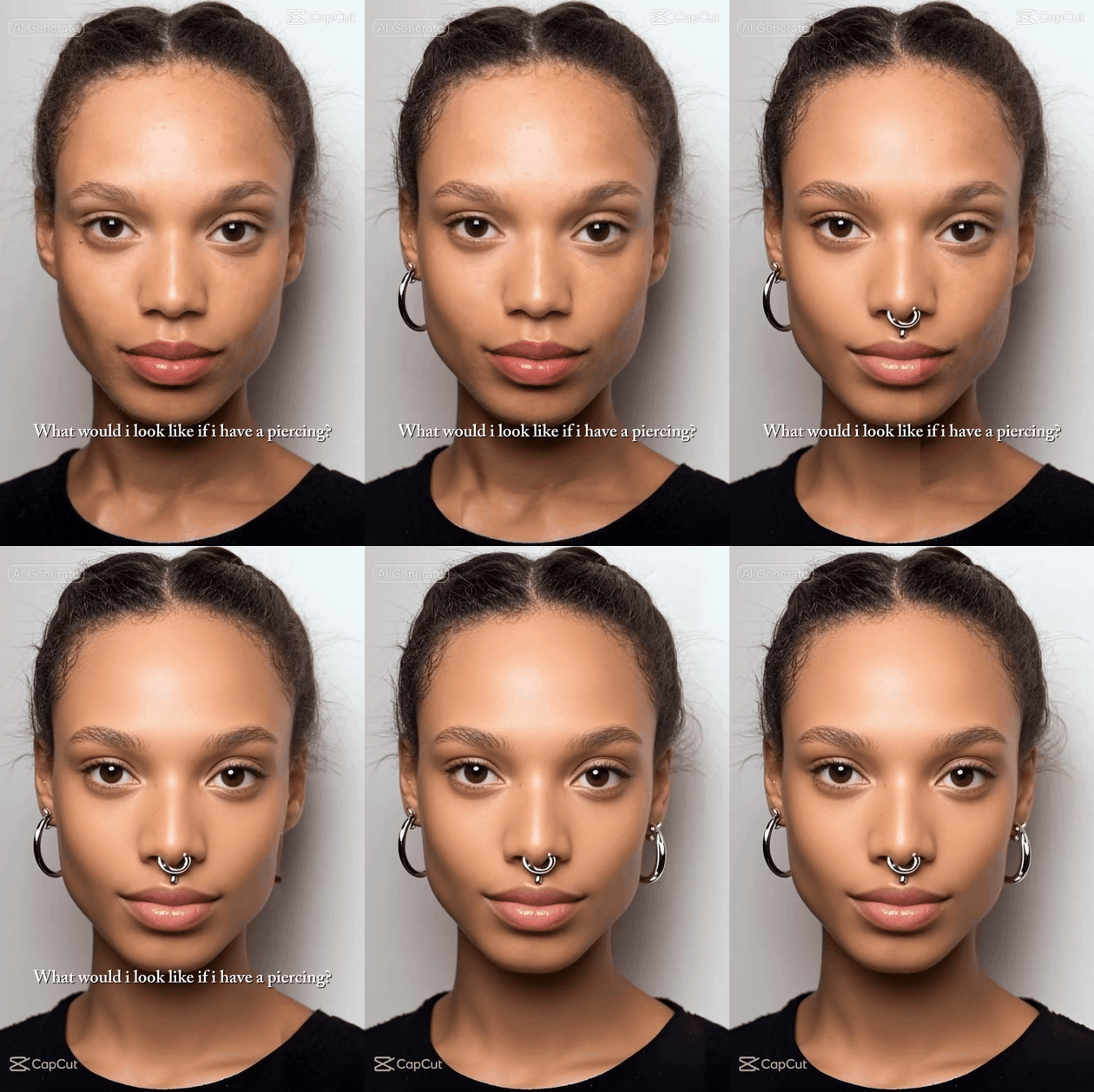
This online montage holds a near-fixed portrait while different earrings and a septum ring appear in sequence. The original preview is about comparing looks, not a filmed piercing.
This example makes comparison easy because the face and background barely move. The jewelry changes one item at a time, so the eye can identify the difference without a split screen. The sequence focuses on the options themselves. The original video below adds a personal reaction to show how the virtual preview feels in the moment.
What is the nose piercing filter trend?
There is no single video or single effect behind the phrase. A virtual nose piercing may be a subtle stud, a nostril hoop, a septum ring, or part of a larger facial-piercing effect. Some posts use the filter as a straightforward try-on. Others focus on the surprise of seeing a new style on a familiar face, or on the person's reaction to a temporary change. The same visual tool supports all of these approaches.
An older version of the format carried a sharper sense of consequence. In the 2019 piercing challenge, users let a cycling filter land on a facial piercing and then filmed a reveal that suggested they followed its choice. An account of the 2019 challenge documents that roulette format. By 2024, coverage of a viral piercing effect described people cycling through styles to see how each looked, without committing to a real piercing. Snapchat's Piercing Lens is one public example of an effect that adds facial jewelry. The current nose piercing filter posts need not involve anyone getting pierced.
That distinction matters when writing or recreating the trend. A virtual result is a screen effect, not evidence that the wearer has new jewelry or has undergone a procedure. The camera can sell the illusion for a second, but an honest caption should keep the difference clear. The appeal is in watching someone test a look, hesitate, and decide how they feel about a reversible change.
A clear edit has three visible beats. First, the face is close enough for the nose to matter. Second, the jewelry appears in a stable spot despite a slight head movement. Third, the person responds in a way that gives the preview context. The timing can be fast, but each beat must be readable. If the ring drifts across the cheek as the face turns, viewers stop following the look and start noticing the error.
Why a tiny digital ring holds attention
A piercing changes only a small region of the image, which makes the viewer compare before and after almost automatically. Hair, clothes, expression, and lighting remain familiar. This is why a fixed close-up often works better than an elaborate transition: the eye can isolate the edit immediately. A nose stud gives a low-key reveal; a septum ring alters the face more visibly and can produce a bigger first reaction. The person's response gives each choice a different feel.
The format also leaves room for a second viewing. On the first pass, the audience watches the new look. On the replay, it notices the brief moment before the reveal and the exact expression that follows. A good loop cuts after the reaction, before the scene has fully settled. The last frame should make the first frame feel like the setup again.
For a 30-second version, the edit needs more than repeated jewelry changes. Give the person a reason to try the effect and let their preferences develop as the options change. The original below begins as a restrained try-on. A friend joins the subject for a photo, and the virtual choices become more dramatic. The final reveal is an exaggerated virtual option, not a recommendation to get a real piercing.
An original 30-second nose piercing filter video
The finished video shows two fictional adults beside a sunlit window. One raises a phone for a selfie; the other leans into frame. A small silver nostril hoop appears in the first close-up. A septum hoop follows, then a much larger layered ring fills the center of the face. The subject's startled expression cuts to her friend's laughter. She lowers the phone, the virtual jewelry disappears, and the two laugh together.
The video keeps the same recognizable face, clothing, and window light through its cuts. It does not depict a needle or a real piercing. The final wide shot makes the virtual effect clear: the rings are gone when the phone comes down. The exaggerated final ring works because the earlier close-ups establish where the smaller jewelry sits.
| Time | Story beat | What the video shows |
|---|---|---|
| 0–5 s | Two friends prepare a selfie | The unfiltered face establishes the starting look. |
| 5–10 s | A small nostril hoop appears | A close-up shows the first virtual change. |
| 10–17 s | The friend reacts; a septum hoop appears | The video moves between their faces as the look changes. |
| 17–25 s | The filter jumps to an oversized layered ring | A close-up catches the surprise, followed by the friend's reaction. |
| 25–30 s | The phone lowers and the jewelry disappears | The wide shot confirms that the rings were virtual. |
The exported file runs 30.08 seconds. It differs from the written prompt in two visible details: the first nose ornament is a hoop rather than a stud, and the septum hoop briefly appears alongside the nostril hoop. The table describes the finished footage rather than treating the prompt as a record of what happened.
The reference image and its edited result
The side-by-side image compares the original portrait with the edited result. The face, shirt, window light, and camera angle remain close enough to make the jewelry change easy to inspect. The generated picture contains no invented app interface; the labels were added only when the two real files were placed beside each other.
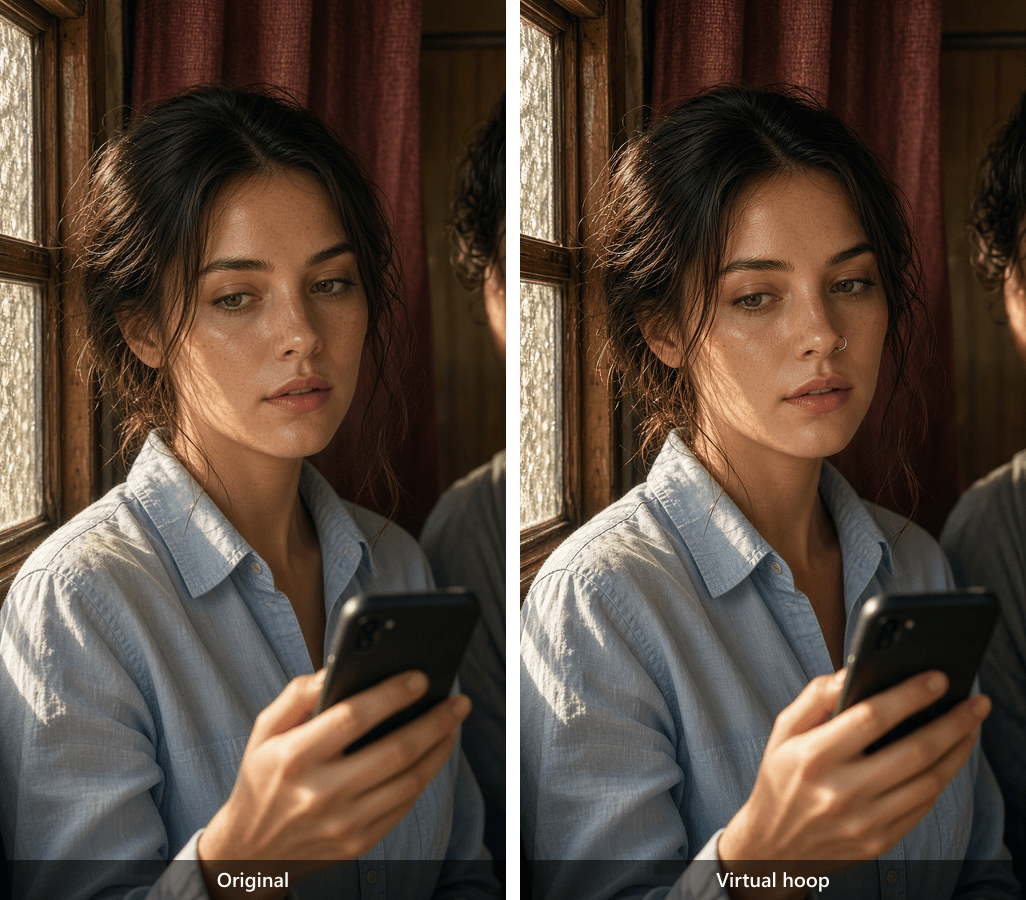
Original portrait at left; edited result at right. The prompt requested a small stud, but the output shows a silver nostril hoop.
The image-edit prompt used for this comparison is below. Atlas Cloud's image model explorer offers an edit playground for this workflow:
plaintext1EDIT THE PROVIDED REFERENCE PHOTO. Keep the same adult woman's facial identity, natural skin texture, hair, pale-blue shirt, seated posture, vintage photo-booth background, warm window light from camera left, camera height, 50 mm portrait framing, and color grade. Add only a tiny polished silver nostril stud to the subject's left nostril, with a restrained highlight and a contact shadow that matches the existing light. Keep the lips, eyes, nose shape, makeup, and every other detail unchanged. Photorealistic result, no added text, no interface, no extra jewelry, no needle, no injury.
The input portrait shows a fictional adult at a slight three-quarter angle with no facial piercing. This is the base-image prompt for the workflow:
plaintext1Photorealistic portrait of a fictional adult woman in her late twenties sitting in a vintage photo booth beside a fictional adult friend who is only partly visible at the edge of frame. The woman wears a pale-blue cotton shirt and raises a phone for a casual selfie. She has no facial piercings. Warm textured window light enters from camera left and reveals natural skin and fabric texture. A 50 mm portrait lens at eye height, slight three-quarter face angle, medium-close framing with enough room to see the nose clearly, restrained warm-cool color balance, subtle film grain, candid anticipatory expression. Keep the phone below the face so it does not hide the nose. No text, no interface, no logos, no jewelry on the face. Vertical 9:16 composition.
Both downloaded images are vertical 9:16. Their matching proportions allow a direct comparison, even though the model chose a hoop instead of the requested stud.
The completed Atlas Cloud run
The real Atlas Cloud playground screenshot shows the written video prompt, two uploaded reference images, and a completed output with a 0:30 player. It records the run beside the finished clip. Atlas Cloud's Seedance 2.5 model page describes the 30-second reference-to-video workflow used for the plan.
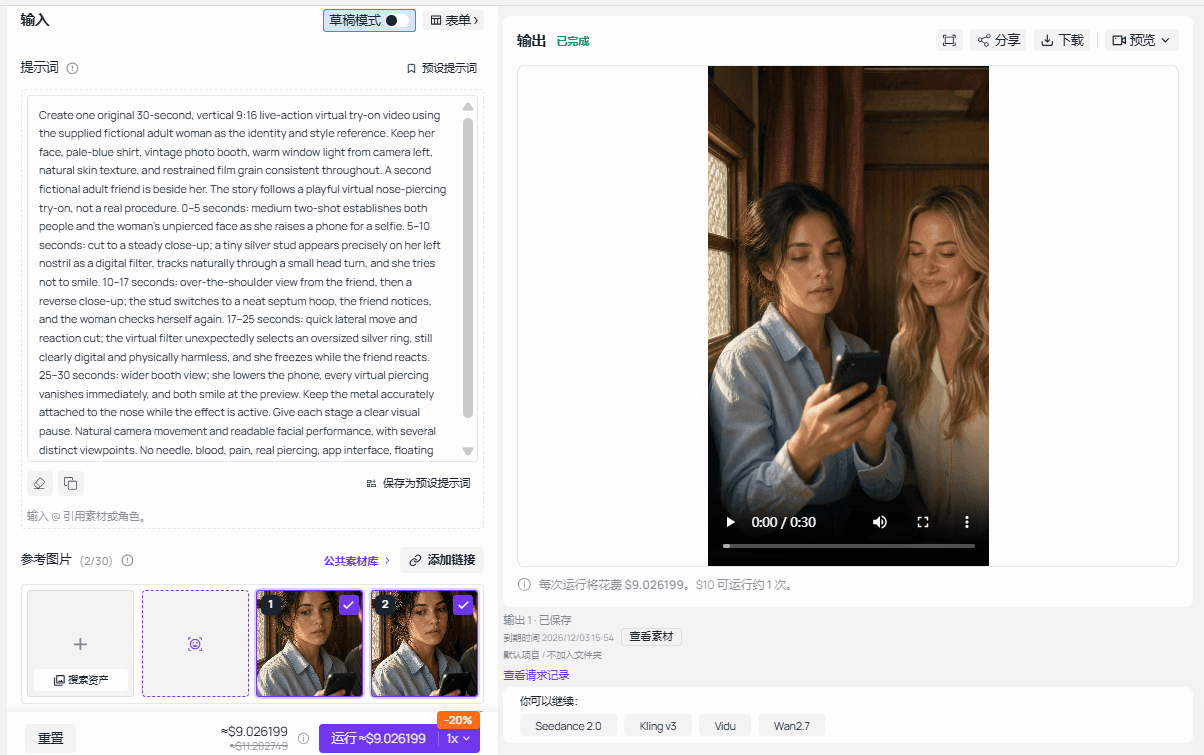
The completed Atlas Cloud playground output appears beside the prompt and reference images. This is a real screen capture, not a generated interface.
The 30-second video prompt
The supplied clip is a vertical 9:16 video with an actual measured duration of 30.08 seconds, above the required 25 seconds. The prompt submitted for the run is reproduced below; the finished footage is described by the table above where it differs from the request:
plaintext1Create one original 30-second, vertical 9:16 live-action virtual try-on video using the supplied fictional adult woman as the identity and style reference. Keep her face, pale-blue shirt, vintage photo booth, warm window light from camera left, natural skin texture, and restrained film grain consistent throughout. A second fictional adult friend is beside her. The story follows a playful virtual nose-piercing try-on, not a real procedure. 0–5 seconds: medium two-shot establishes both people and the woman's unpierced face as she raises a phone for a selfie. 5–10 seconds: cut to a steady close-up; a tiny silver stud appears precisely on her left nostril as a digital filter, tracks naturally through a small head turn, and she tries not to smile. 10–17 seconds: over-the-shoulder view from the friend, then a reverse close-up; the stud switches to a neat septum hoop, the friend notices, and the woman checks herself again. 17–25 seconds: quick lateral move and reaction cut; the virtual filter unexpectedly selects an oversized silver ring, still clearly digital and physically harmless, and she freezes while the friend reacts. 25–30 seconds: wider booth view; she lowers the phone, every virtual piercing vanishes immediately, and both smile at the preview. Keep the metal accurately attached to the nose while the effect is active. Give each stage a clear visual pause. Natural camera movement and readable facial performance, with several distinct viewpoints. No needle, blood, pain, real piercing, app interface, floating captions, logos, watermark, or imitation of any existing creator's face or video.
The 30.08-second original video moves from a subtle virtual hoop to an oversized layered ring, then returns to the unfiltered look when the phone lowers. It remains a playable video because it is longer than 10 seconds.
The still, the screenshot, and the moving result answer different questions. The still makes the jewelry edit visible beside its input. The screenshot records the completed playground run. The video shows how the virtual jewelry and the two characters carry through movement and multiple shots. Together they also expose a useful limit: the generated ornament does not always match the prompt's exact jewelry type.
What to check before posting your own version
The virtual jewelry should remain attached as the face turns, with its reflection and shadow following the scene's light. The unfiltered opening should be long enough to establish the comparison. The final disappearance should clearly signal that the filter, not a real piercing, caused the change. Review the actual duration, audio, and identity consistency, then describe only what the exported file shows.
The nose piercing filter draws attention because a very small edit can change how someone sees a familiar face. Let the viewer see the original look, the virtual choice, and the reaction. The resulting video should make that progression clear without a long explanation.
Frequently Asked Questions
Can a nose piercing filter show exactly how a real piercing would look?
It can preview the position, size, and color of virtual jewelry on a photo or video, but it cannot promise an exact match to a real piercing. Camera angle, lighting, face tracking, and the particular piece of jewelry can all change the result. Treat the filter as a way to compare looks, not as a final prediction.
Can I make a nose piercing filter preview from one photo?
Yes. Start with a clear portrait that shows the nose, then use an image-edit model to add one virtual stud or ring while keeping the face, lighting, and background consistent. Place the original and edited images side by side to make the change easy to judge. The image prompt above gives a concrete starting point.
Should I compare a stud, a nostril hoop, and a septum ring in one image?
Compare them one at a time on the same reference photo. Changing only the jewelry makes it easier to see how each option affects the face. Keep the crop and lighting fixed, and check whether the virtual piece remains correctly placed before deciding which version to use in a video.
Why does a virtual nose ring slip when the person turns?
The effect may lose track of the nose or generate inconsistent placement between frames. A clear reference face, modest head movement, and several stable close-ups give the result a better chance of looking continuous. Review the exported video frame by frame around each turn; if the ring drifts, revise the shot or regenerate the clip.


