


A hundred generated videos can mean a hundred paid attempts or a hundred usable deliverables. Those budgets look very different. This Seedance 2.5 Flash Pricing & Cost Comparison starts with the current rates, then shows how resolution, references, membership commitments and rejected takes change what you actually spend.
The direct API answer is clear: BytePlus lists Seedance 2.5 Flash at $7 per million video tokens for requests without video input, versus $10.70 for Seedance 2.5 at 480p and 720p. That makes Seedance 2.5 Flash about 34.6% cheaper for the same token usage. Comparing platforms needs more care: Jimeng advertises membership-based effective costs, while third-party API quotes depend on the selected request.
Prices checked November 17, 2026. Dollar figures are USD; ¥ figures are CNY. Calculations below are estimates before any separately applicable taxes, currency-conversion charges or payment fees. We checked public prices and playground estimates; we did not purchase plans or generate billable test videos.
Key takeaways
- BytePlus estimates a 5-second, 16:9 Seedance 2.5 Flash video without video input at about $0.34 for 480p or $0.76 for 720p.
- Seedance 2.5 Flash supports native 480p and 720p. A native 1080p deliverable needs a different model configuration.
- Jimeng's advertised yuan-per-second figures depend on the plan and promotion; they are not universal API rates.
- A lower video-input token rate still counts reference footage and may involve a minimum charge.
- Budget for accepted clips. Successful renders that you reject creatively can still consume your budget.
Seedance 2.5 Flash pricing across BytePlus, Jimeng and third-party APIs
The useful comparison begins with the billing unit. A token price, a subscription-derived second and a configured API estimate describe different purchases. Keep each quote attached to its conditions before deciding where to put a production workload.
| Route | Price visible at the check date | What the number buys or assumes |
|---|---|---|
| BytePlus ModelArk, Seedance 2.5 Flash without video input | $7 per million video tokens | Online inference at 480p or 720p; usage determines the bill |
| BytePlus ModelArk, Seedance 2.5 Flash with video input | $4.30 per million video tokens | Input and output footage enter the token estimate; minimum consumption can apply |
| BytePlus ModelArk, standard Seedance 2.5 without video input | $10.70 per million video tokens | Same 480p/720p tier, useful for the model-to-model comparison |
| Jimeng, selected Advanced 6.2K annual offer | ¥2,599 first year; displayed Seedance 2.5 Flash effective cost ¥0.32/s | Promotional 720p generation with reference video, membership discounts and bonus-credit assumptions |
| Atlas Cloud, Seedance 2.5 Flash text-to-video | Live 5-second quote: about $0.353 at 480p or $0.793 at 720p | 16:9, audio enabled, no video input; quoted with the current 35% promotion |
BytePlus's pricing page separates requests with and without video input. Its published estimates and token rules provide the direct-provider baseline used here. The comparison is between public offers, without negotiated enterprise discounts. (BytePlus pricing, checked November 17, 2026.)
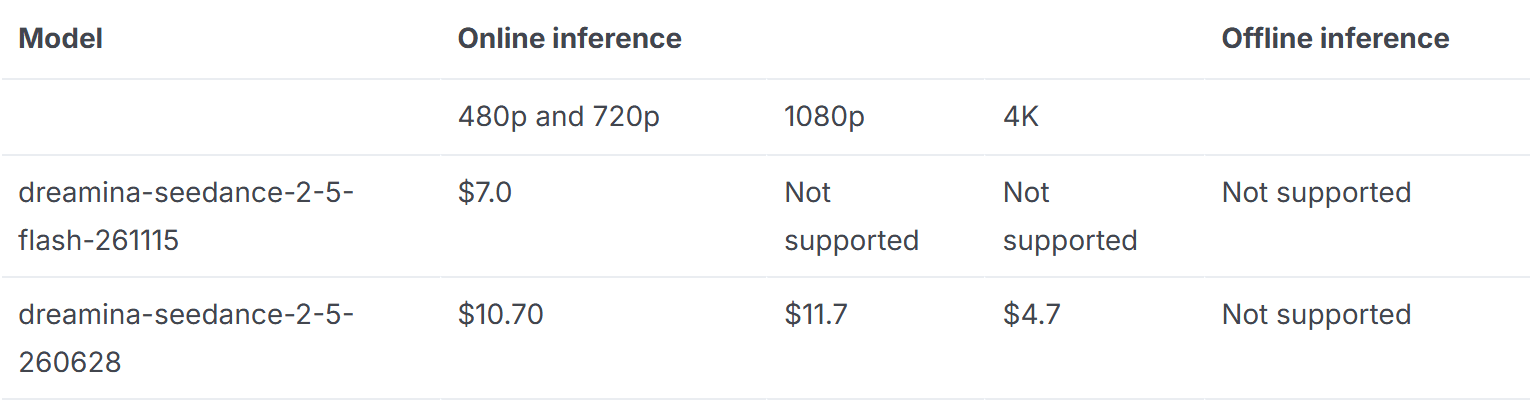
Public-page capture of the no-video-input pricing tab. The rates share a token unit, making the Seedance 2.5 Flash versus Seedance 2.5 comparison meaningful.
For third-party API access, Atlas Cloud is the worked example in this guide. We opened its model catalog, followed the Seedance 2.5 Flash text-to-video listing, and checked the selected settings after the price estimate loaded.
The catalog's displayed starting price was $0.109/second, with a 35% promotion advertised through November 30. The configured playground returned different effective per-second amounts, shown above. Use the configured quote when planning an actual job. A starting-price card cannot establish the cost of every resolution and duration.
For the checked jobs, Atlas's estimate sits slightly above the direct BytePlus baseline. Compare the integration effort, payment arrangement and workflow you need alongside the current quote. A team already using one service for several models may value that arrangement, but it should still cost the same representative jobs on each route.
What do 5, 10 and 30 seconds cost at 480p and 720p?
Use the following table for an initial generation budget. BytePlus's 5-second figures are its published, rounded estimates. Longer BytePlus figures scale those rounded amounts. Atlas's 5-second values come from the configured quote; longer values are arithmetic projections at the same effective rate, rounded to cents.
| Resolution and duration | BytePlus Seedance 2.5 Flash estimate, no video input | Atlas Seedance 2.5 Flash estimate, no video input |
|---|---|---|
| 480p, 5 seconds | $0.34 | $0.35 |
| 480p, 10 seconds | $0.68 | $0.71 |
| 480p, 30 seconds | $2.04 | $2.12 |
| 720p, 5 seconds | $0.76 | $0.79 |
| 720p, 10 seconds | $1.52 | $1.59 |
| 720p, 30 seconds | $4.56 | $4.76 |
| Native 1080p | Not supported by Seedance 2.5 Flash | Not supported by Seedance 2.5 Flash |
These are planning figures, not completed-job invoices. Exact dimensions, actual video-token consumption and rounding can change the final amount. Keep the aspect ratio fixed when comparing quotes, and recalculate after changing reference inputs or duration.
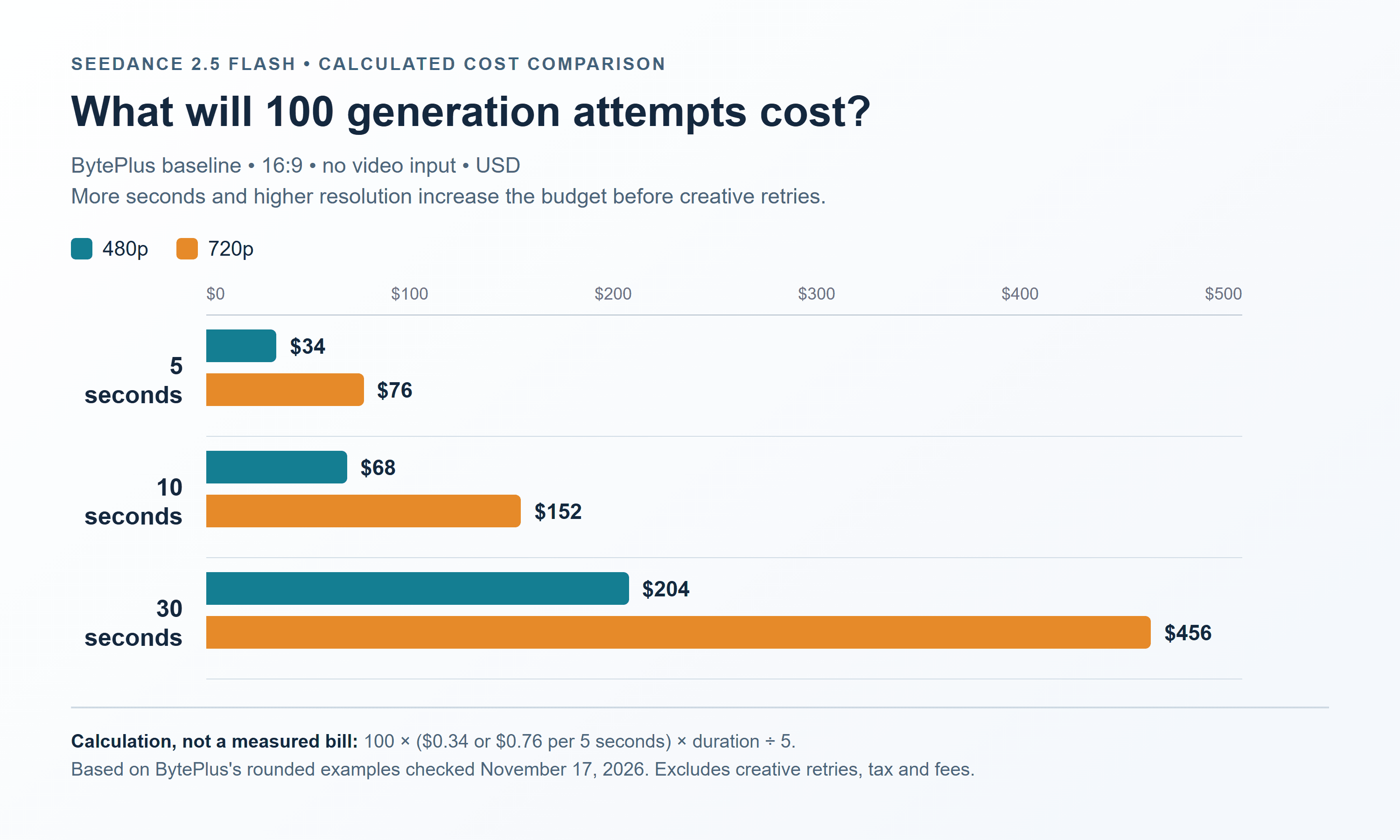
Calculated from BytePlus's rounded 5-second estimates. The chart shows 100 successful generation attempts, with no video references or creative retries added.
At those rounded BytePlus rates, 100 ten-second attempts cost about $68 at 480p or $152 at 720p. The resolution decision changes this example budget by $84 before anyone reviews the results. That difference is large enough to justify checking framing and action at a lower resolution first.
For the same 100 ten-second attempts, the observed Atlas quote projects to about $70.52 at 480p or $158.56 at 720p. We multiply the unrounded 5-second quotes, rather than the rounded table cells. When auditing a production estimate, retain precision until the final total.
How much cheaper is Seedance 2.5 Flash than standard Seedance 2.5?
For BytePlus's no-video-input 480p/720p token tier, the calculation is:
Savings = 1 − 7 ÷ 10.70 = approximately 34.6%.
This percentage compares models at equal usage. It does not compare a Jimeng promotion with an API bill, and it does not describe Atlas's separate 35% offer. Applying both percentages to one provider's price without an explicit offer would double-count a discount.
For a native 1080p requirement, start a separate estimate. BytePlus's Seedance 2.5 series tutorial lists Seedance 2.5 Flash at 480p/720p and standard Seedance 2.5 with higher-resolution options. It also distinguishes standard Seedance 2.5's Draft mode from Seedance 2.5 Flash, which does not support it. A cheap Seedance 2.5 Flash test can inform a later render, but it is a separate generation. (BytePlus Seedance 2.5 series tutorial, checked November 17, 2026.)
Match the resolution to the decision you are making. A rough motion review may work at 480p. Small product details or a final 720p delivery need review at the relevant output size. Moving up in resolution can change the result; do not promise a pixel-for-pixel upgrade of the approved take.
Jimeng pricing: the subscription price matters as much as the seconds
Jimeng's consumer membership can fit a creator who works in its interface and uses the included allowance regularly. Its displayed effective prices require a different calculation from pay-as-you-go video generation.
The checked Advanced 6.2K annual offer showed ¥2,599 for the first year, renewal at ¥5,199, and 6,160 base credits per month. It advertised Seedance 2.5 Flash at ¥0.32/second for 720p with reference video during November 16–23.
The offer also showed 7,410 credits per month for the first three months; its terms make the advertised calculation dependent on the promotion and credited allowance. (Jimeng membership pricing and offer terms, checked November 17, 2026.)
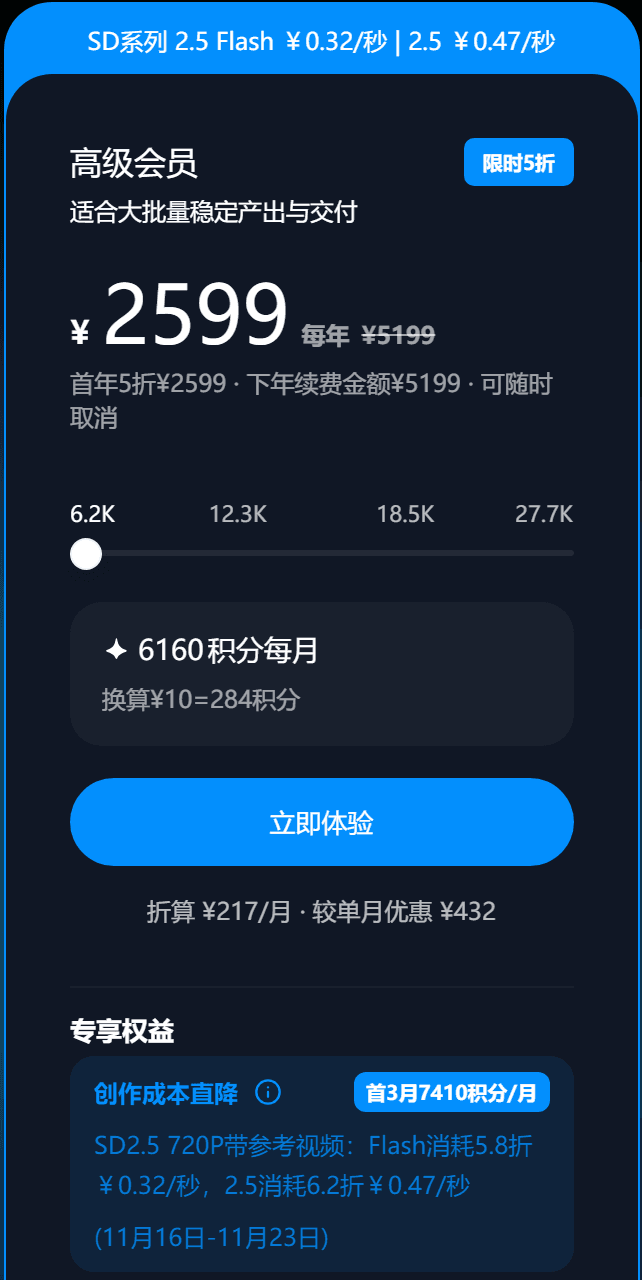
Public membership-page capture for Seedance 2.5 Flash and Seedance 2.5. Read the annual payment, renewal price, reference-video condition and activity dates together.
Treat the displayed ¥0.32 figure as the offer's effective usage illustration. Multiplying it by a ten-second clip gives ¥3.20 under those assumptions, but that is not a promise that you can purchase one standalone clip for ¥3.20. The membership requires its stated upfront payment.
This distinction matters for occasional work. Someone making a few clips this month might spend less overall through a usage-based service, even if a fully utilized annual plan advertises a lower effective rate. Someone producing throughout the year should model both the introductory period and the later months before committing.
A practical membership calculation has two parts:
- Allowance-based estimate: plan payment allocated to the period ÷ credits available in that period × credits deducted for the selected job.
- Realized production cost: money actually paid for the period ÷ usable deliverables produced in that period.
The first helps compare a plan's advertised economics. The second tells you whether your own usage justified buying it. If you allocate a hypothetical ¥300 monthly spend to 100 accepted clips, the realized cost is ¥3 each. Producing only 30 accepted clips raises it to ¥10 each, even though the advertised generation rate never changed.
Check the deduction displayed for your exact settings before subscribing. Separate base credits, bonus credits and extra clip allowances in your worksheet. Count each benefit only in the months and models where you can use it. Keep CNY and USD budgets separate until you choose an explicit exchange rate and include any conversion fee.
Reference videos can raise the bill despite a lower token rate
Reference footage creates a common budgeting mistake. A buyer sees the lower video-input token rate and assumes that attaching a video makes the same output cheaper. The input footage also contributes to the calculation, so the rate alone cannot answer that question.
BytePlus's estimate uses the combined input-video and output-video durations, output dimensions and output frame rate. Minimum token consumption can apply to requests containing video. The API's returned usage determines actual consumption. Use the minimum-consumption table for the relevant settings before treating a short reference as a saving.
For an illustrative calculation, assume a 1280 × 720 output at 24 fps:
Estimated tokens = (input seconds + output seconds) × 1280 × 720 × 24 ÷ 1024.
With ten output seconds and no video input, this produces 216,000 estimated tokens. At $7 per million tokens, the estimate is $1.512. That explains why a planning budget rounded from the published examples is around $1.52, rather than a fixed bill guaranteed to the cent.
Now attach ten seconds of reference footage to a ten-second output. The illustrative consumption becomes 432,000 tokens. At $4.30 per million, that is $1.8576 before considering a minimum. The lower rate has produced a higher total than the no-video-input example.
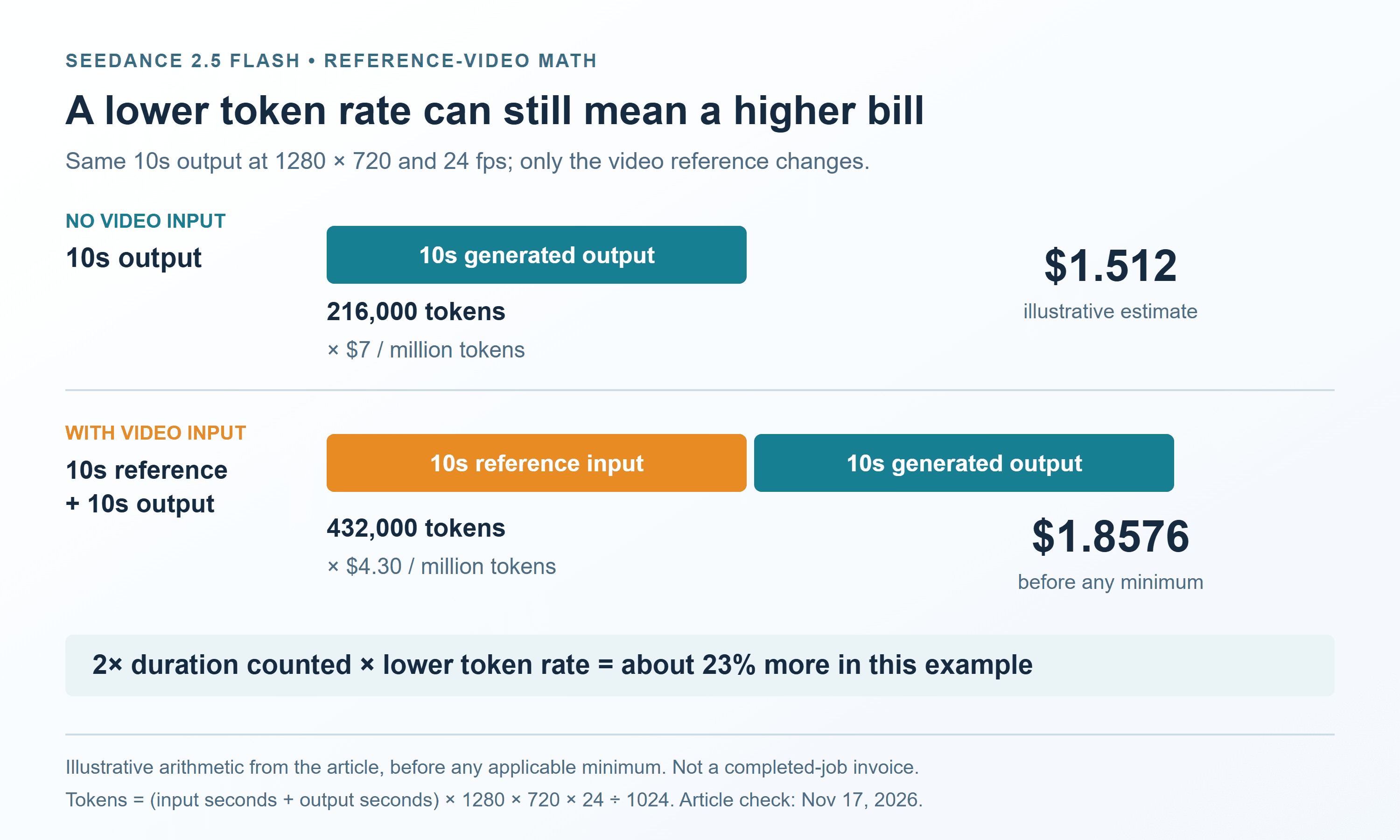
For a quick check before the minimum, the reference-video estimate would be lower only when input duration < output duration × (7 ÷ 4.30 − 1). For a ten-second output, that threshold is approximately 6.28 input seconds. The applicable minimum can remove that apparent advantage, so this is a diagnostic calculation, not a discount recommendation.
Use reference footage because the shot needs its motion, timing or edit context. Trim irrelevant footage where the task permits it, then obtain a fresh estimate. An image reference and a video reference are different inputs; do not apply the video-input rate simply because the job contains some form of reference material.
How to lower the cost of a batch without buying more retries
The headline unit price is only one part of a batch budget. A service can complete every request successfully while half the outputs still fail your brief. Track the reasons for rejection so you can tell whether the problem is the prompt, reference material, requested action or model choice.
For a simple production model, define the acceptance rate as the fraction of paid, successfully generated clips that your reviewer approves:
Expected generation spend = required accepted clips ÷ acceptance rate × cost per paid attempt.
This treats the acceptance rate as stable and does not include human editing or review time. It is a useful planning approximation. Replace the assumed rate with your own pilot results as soon as you have them.
At an estimated $1.52 per ten-second 720p attempt, a target of 100 accepted clips looks like this:
| Assumed acceptance rate | Expected paid attempts | Estimated generation spend |
|---|---|---|
| 100% | 100 | $152.00 |
| 80% | 125 | $190.00 |
| 50% | 200 | $304.00 |
| 25% | 400 | $608.00 |
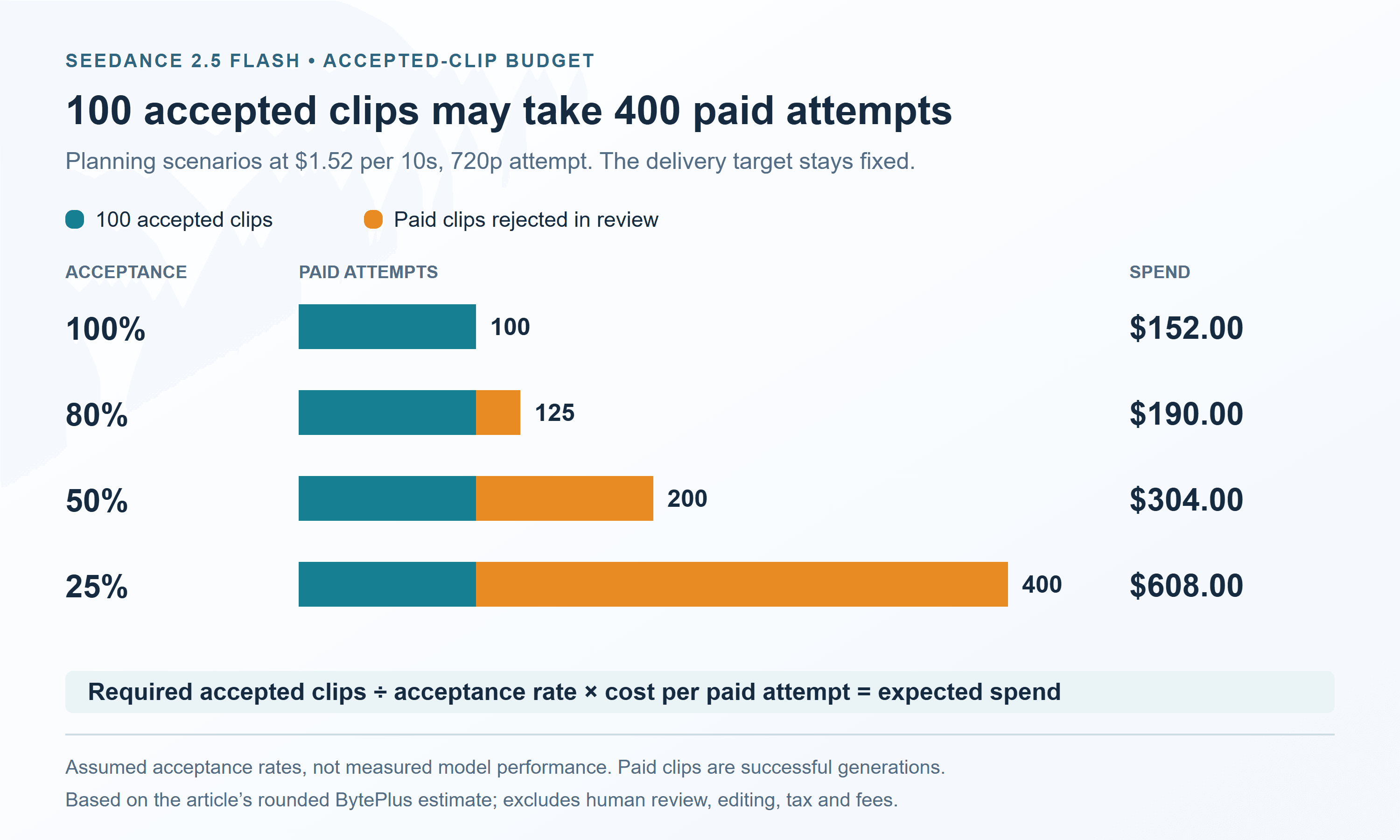
These percentages are scenarios, not measured Seedance 2.5 Flash performance. Their value is making the retry assumption visible. A quote for 100 requests cannot serve as a quote for 100 accepted deliverables unless your acceptance assumption is also stated.
Approve the brief before expanding the batch
Write a short acceptance checklist before generating. For an ad, this might cover the product's visibility, the required action, shot length and whether the sound supports the edit. Resolve conflicting requirements early; a batch faithfully following an ambiguous brief can still waste the entire allowance.
Test a small representative set rather than only the easiest shot. Include the demanding camera move or action that appears throughout the planned batch. If that shot repeatedly fails, revise its staging before multiplying the request count. Record paid attempts and accepted outputs separately.
Use shorter or lower-resolution tests where they answer the question
A rough framing test need not always run for the final duration. Shorter tests can reveal whether the subject, motion and camera direction are workable before you fund a longer narrative. Check timing at full length when timing itself is the risk.
Using the rounded BytePlus estimates, ten ten-second 480p tests followed by two ten-second 720p generations cost about $9.84. Twelve ten-second 720p generations cost about $18.24. This example saves $8.40 in generation spend, provided the lower-resolution tests actually resolve the uncertainty.
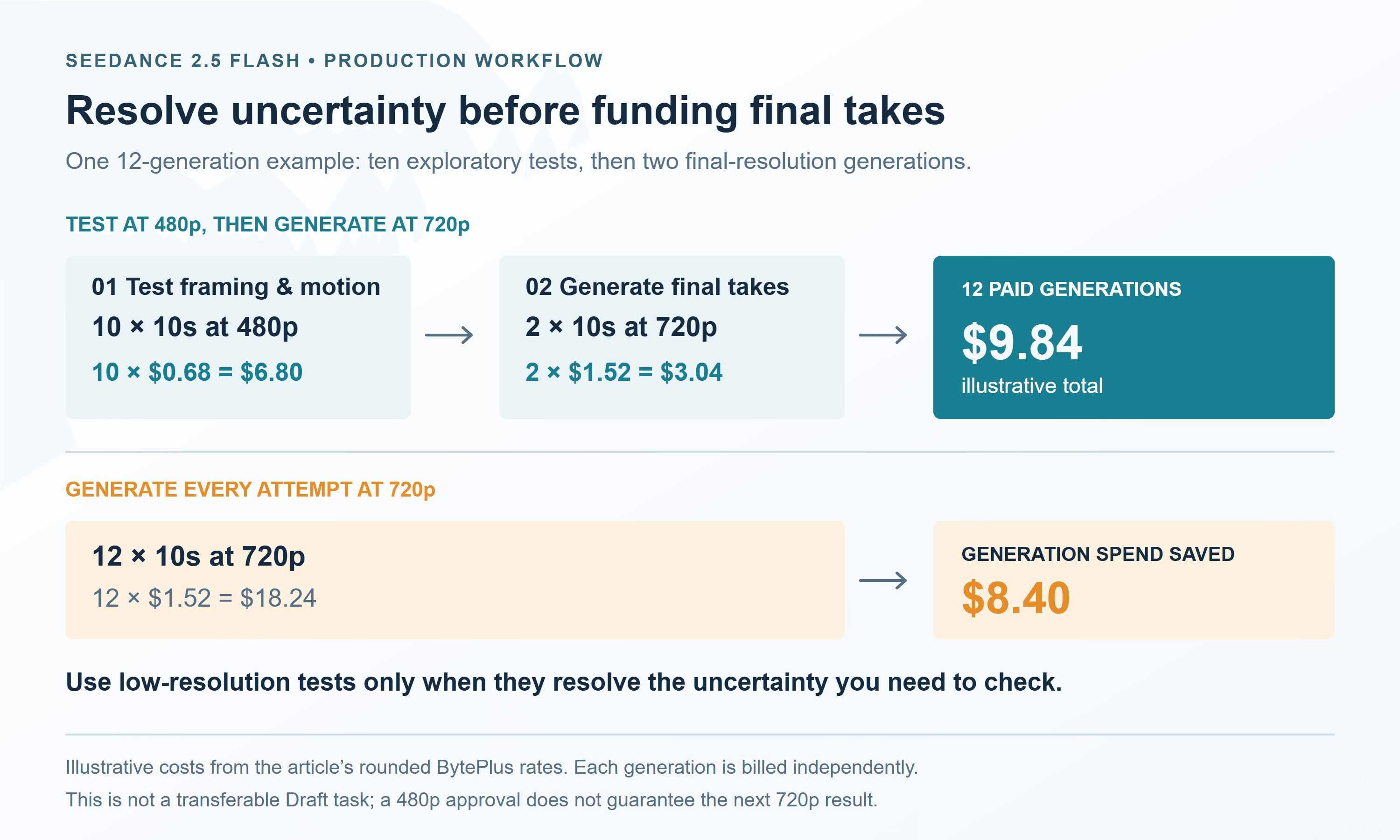
That approach does not create a transferable Seedance 2.5 Flash Draft task. Budget each generation independently, and leave time to review the final render. A lower-resolution approval is evidence about the idea, not a guarantee that the next output will match.
Control submissions and stop spending on solved shots
Save the job identifier when a platform accepts a request. If your client loses the connection, check the existing job before submitting it again. A second submission may create another paid generation rather than recover the first result.
For automated batches, set a spending ceiling, a maximum attempt count per shot and a stop condition when the brief passes review. Increasing concurrency can change turnaround time; it does not itself reduce the price of each completed request.
Do not assume that an LLM batch discount also applies to video. The checked BytePlus pricing table lists offline inference as unsupported for these Seedance 2.5 Flash and standard Seedance 2.5 rows. Ask about an applicable video resource pack or contracted rate if your volume warrants it, then compare the commitment against realistic usage.
For Atlas estimates, use the Seedance 2.5 Flash text-to-video playground to set duration, resolution and aspect ratio, allow the quote to finish updating, and record the result. Changing settings without recording the updated estimate makes later invoice comparisons difficult.
Choose the route using your next month's workload
Direct BytePlus access offers a clear token-based baseline for a team comfortable with that integration. Jimeng's membership deserves consideration when your creators use its interface regularly and can consume the relevant allowance. Third-party API access belongs in the comparison when it fits an existing multi-model workflow and its configured quote meets the budget.
Before funding a large workload, write one row per representative shot: model, route, resolution, aspect ratio, duration, input-video seconds, audio setting, quote, paid attempts and accepted outputs. Add membership commitments or expiring credits outside the per-shot column so they remain visible.
The useful result of a Seedance 2.5 Flash Pricing & Cost Comparison is a budget you can repeat. Start with a small pilot, calculate your accepted-clip cost, then fund the next batch using that evidence. Recheck the current model catalog and the relevant provider's offer before a promotion expires.
Frequently asked questions
How much does a ten-second Seedance 2.5 Flash video cost?
BytePlus's rounded no-video-input examples project to about $0.68 at 480p or $1.52 at 720p for 16:9. The checked Atlas five-second quotes project to about $0.71 and $1.59 respectively. These are generation estimates; reference footage and additional paid takes change the budget.
Is Seedance 2.5 Flash always 35% cheaper than Seedance 2.5?
No universal percentage applies across platforms and plans. The checked BytePlus no-video-input token rates imply approximately 34.6% savings at equal usage. Atlas's 35% badge describes its own current promotion, with a November 30 end date. Membership offers require their own comparison.
Can I get native 1080p from Seedance 2.5 Flash?
Seedance 2.5 Flash's checked native output options are 480p and 720p. If a workflow offers upscaling, evaluate its separate cost and output against the delivery requirement. An upscaled file and a native higher-resolution model generation are different production choices.
Are failed generations and rejected takes billed the same way?
They are different events. BytePlus says unsuccessful generations, including failures due to content moderation, are not charged. A successfully generated clip that your editor rejects can still be paid usage. Confirm other services' failure and refund rules separately.
Does buying credits guarantee a lower cost per usable video?
No. Credits help only when their effective price, eligible settings, validity and actual utilization fit the workload. Compare total money paid with accepted deliverables, and use the renewal price when estimating future periods.




