


A dancer turns, but the camera loses her feet. A product ad changes the bottle halfway through. An emotional scene adds a speech when you wanted a quiet reaction. Each brief leaves a different decision unresolved.
This Seedance 2.5 Flash Prompt Guide & Examples starts with a practical formula: identify the subject, describe an observable action, establish the setting, direct the camera, and specify the sound. When you upload references, assign each file a clear job. The 12 copyable prompts below apply that approach to dance, ads, action, emotion, animation, and environmental sound.
Key takeaways
- Write an action viewers can recognize, then define its beginning and ending.
- Separate camera movement from subject movement and put duration in the actual generation settings.
- Give image, video, and audio references distinct responsibilities.
- Seedance 2.5 Flash supports native 480p and 720p output; standard Seedance 2.5 specifications do not automatically apply.
- Review the complete clip against a few acceptance checks, then change one instruction at a time.
Start with the Right Seedance 2.5 Flash Mode
Choose your input mode before polishing the prompt. Text-to-video is useful when the scene can be described freely. Image-to-video starts from a particular image. Reference-to-video is useful when you want to carry selected identity, motion, scene, or sound information into a new composition.
On Atlas Cloud, the three modes have separate Seedance 2.5 Flash model entries. Check the complete name, including “Seedance 2.5 Flash” and the input mode. Uploading a product image to a first-frame workflow and using it as a loose product reference are different creative decisions.
| Your starting material | Appropriate mode | Main writing task |
|---|---|---|
| An idea without uploaded media | Text-to-video | Establish the subject, action, setting, framing, and sound |
| An image that should start the shot | Image-to-video | Explain what begins moving and how the scene develops |
| Separate appearance, motion, or audio references | Reference-to-video | Assign each input a role and describe the new scene |
| An existing clip you intend to modify | Video editing through the reference workflow | State the change and preserve the relevant source content |
The current Atlas Cloud Seedance 2.5 Flash Text-to-Video entry supports 4–30-second generation, 480p or 720p output, selectable aspect ratios, and generated audio. For the examples here, use 720p and MP4, then set the duration and ratio listed beside the prompt. These are starting settings, not a guarantee that the requested choreography or timing will succeed. Specifications were checked on November 17, 2026.
Keep the length of the clip tied to its purpose. An 8-second shot can establish a subject, develop one action, and land on an ending. A longer sequence needs enough new action to justify the additional time. Filling 30 seconds with one vague instruction leaves many decisions open.
When you need a recognizable product from the opening frame, use the Seedance 2.5 Flash Image-to-Video entry. This mode uses adaptive aspect ratio, preserving the source image's proportions. Prepare the image in the composition you actually want to animate. A tight packshot cannot reveal missing legs or a whole room without the model inventing that information.
The Prompt Formula: From an Idea to a Filmable Brief
The official series tutorial recommends organizing subject, action, environment, visual style, camera direction, and sound. Its notation distinguishes music with parentheses, effects with angle brackets, dialogue with braces, and subtitles with special brackets. Those are documented writing conventions; they are not settings controls. (BytePlus series tutorial, November 2026.)
Use this compact working formula:
Subject + observable action + setting + visual treatment + camera start/path/end + sound + essential continuity.
The final continuity line is an editorial addition in this guide. It tells you which details matter when deciding whether to keep a take. The other fields help turn an idea into something you can picture and inspect.
plaintext1[Subject with 2–3 defining details] performs [one observable action] 2in [specific setting], with [lighting and visual treatment]. 3 4Opening: [shot size, angle, subject placement]. 5Development: [action progression and camera movement]. 6Ending: [final action and composition]. 7 8Sound: [dialogue or foreground event], with [background layer or music]. 9Continuity: [the identity, object features, or spatial relationship to preserve].
Start with the change the audience should notice. “A woman feels relieved” names an emotion. “She releases her grip on the envelope, exhales, and lets her shoulders fall” supplies visible behavior. The second description gives you an acceptance check even if the facial expression is subtle.
Use a small number of identifying details. A red jacket, short dark hair, and a silver shoulder bag can be easier to track than a paragraph cataloging every seam. Choose details that remain visible at the intended framing. An engraved ring does little work in a full-body running shot.
Give the setting a physical function. A doorway lets a character enter and stop. A nearby table edge provides a depth cue for a moving camera. A wooden board provides a visible contact surface for a knife sound. These details make the scene easier to direct and review.
Consider this deliberately vague brief:
plaintext1A cinematic premium bottle ad with dynamic camera movement and beautiful lighting.
It leaves the bottle design, movement, viewpoint, and ending unspecified. A more useful revision says that an amber bottle stands on a stone counter, the camera moves from front-left to side profile, and a rectangular window reflection travels across the glass. You can then inspect the bottle silhouette, the reflection, and the final side view separately.
Keep the first pass readable. If an instruction does not change what should happen on screen or in the soundtrack, consider removing it. A pile of prestige adjectives can hide the action that the model needs to interpret.
The official prompt guide describes an overview followed by detailed shots or a timeline and additional consistency notes. It also documents remaining limitations, including unwanted subtitles. Treat its examples as guidance for the series, then check Seedance 2.5 Flash-specific limits in the model you use. (BytePlus prompt guide, November 2026.)
Write Camera Directions That Have a Visible Payoff
A useful camera instruction answers four questions: where does the shot start, what path does the camera take, what does the subject do independently, and what should the viewer see at the end? You can express that without specialist vocabulary.
For a dance clip, start with the practical requirement: the feet must stay visible. Then choose a wide or full-body composition and describe a modest camera arc. Asking for close-ups, rapid cuts, and uninterrupted footwork in the same short passage creates competing priorities.
For a product shot, decide which new surface should appear. “Move around the bottle until its right side becomes visible” supplies a destination. “Epic orbit” names a feeling without defining how much new information the camera should reveal.
| Camera request | Add this physical detail | Inspect this in the output |
|---|---|---|
| Tracking shot | Camera travels beside the subject at a similar pace | Subject remains framed while the surroundings pass |
| Orbit | Subject stays fixed as the camera moves from one side toward another | Visible sides and background overlap change together |
| Crane rise | Camera rises from a low view to a view over the subject | Previously hidden top surfaces become visible |
| Pan | Camera turns from a stated position toward a named target | The target enters the composition coherently |
| Close-up | Name the detail and when to cut to it | The detail remains readable and connected to the wider scene |
Separate action from camera motion in your sentences. “The cyclist rides past the shop; the camera tracks beside her” is easier to interpret than “a sweeping, spinning cyclist shot.” If the camera should move while the product remains stationary, say so explicitly.
For an 8-second scene, two or three beats are a useful drafting constraint. They are an editorial choice for these examples, not an official shot limit. Allow time for the action to begin, develop, and settle. A catch, sprint, jump, landing, conversation, and reaction usually need more room than one short clip offers.
Timestamps describe intended timing. Set the actual duration in the generation form as well. If you request a 10-second timeline but leave the duration at 5 seconds, the written timing does not repair that mismatch. Review the downloaded clip's real length before judging its pacing.
Use Multimodal References Without Mixing Their Jobs
Treat reference selection like briefing a small production team. One input supplies the subject's appearance, another supplies a movement pattern, and a third supplies music or a voice. Explain those assignments before describing the new scene.
The Seedance 2.5 Flash Reference-to-Video entry currently lists up to 10 images, 5 videos, and 5 audio clips. Its schema limits combined reference-video duration to 30 seconds and combined reference-audio duration to 30 seconds. It uses indexed tokens such as @Image1, @Video1, and @Audio1. Confirm the labels shown by your interface before submitting.
Those are Seedance 2.5 Flash limits, not Seedance 2.5's larger reference allowance. More importantly, a maximum is not a target. Start with the smallest reference set that resolves your actual uncertainty. Three conflicting wardrobe images can make the subject brief harder to interpret than one clean image.
| Input | Give it one clear job | Specify what may change |
|---|---|---|
| Product or character image | Appearance, silhouette, clothing, or materials | Background, pose, or framing |
| Motion-reference video | A particular action, rhythm, or camera route | Performer, wardrobe, location, and source soundtrack |
| Audio reference | Beat, voice qualities, or a sound pattern | Unrelated source visuals and any unwanted vocals |
| First-frame image | The shot's opening composition | Subsequent action and viewpoint |
For the dance example below, upload a clean character image, a short movement reference, and a music clip. The prompt tells the model to use the video's movement while taking the outfit from the image. Without that separation, “follow the video” could also invite its costume, background, or camera behavior.
Use material you own or have permission to use, including any person's likeness or voice. Real-person input requirements can differ between providers and access routes, so follow the current upload and review process in your chosen interface. The presence of a reference does not guarantee exact identity or performance reproduction.
Keep referencing distinct from editing. “Use the movement in this clip for a new dancer” requests a new scene. “Replace the performer in this clip” asks to modify the supplied video and may activate different requirements. The current Atlas editing schema requires automatic duration and preservation of the source aspect ratio. Recheck those controls when switching tasks.
If a reference contradicts the prompt, resolve the conflict before retrying. An image of a seated subject in a tight crop is a weak starting point for an immediate full-body leap. Use a more suitable image or simplify the action, rather than adding several lines demanding that both constraints hold.
12 Copyable Seedance 2.5 Flash Prompt Examples
Text-to-video examples pair a prompt with its result. Image-to-video and image-reference examples also include the actual input image. Cases 5, 6, and 12 use longer scenes with a complete opening, development, and ending.
The prompts preserve the published scene briefs without adding new shots. These are published outputs, not fresh tests of the exact wording shown below. Cases 6 and 12 use playable videos with sound. All other previews remain silent GIFs; sound instructions stay in the prompts for use when generating your own video.
1. Dance: Full-Body Footwork with an Orbiting Camera
Mode: Text-to-video. Settings: 5 seconds requested, 720p, 16:9.
Prompt
plaintext1Frame a thirty-something man full length, dancing in emerald velvet on a sunset rooftop. 2 3CAMERA AND MOTION 4Circle him slowly; show precise, flowing steps and his jacket swinging. Glowing skyline, warm film color, 24 mm. 5 6SOUND 7Hear concrete scuffs, urban ambience and breeze; omit music.
Generated result
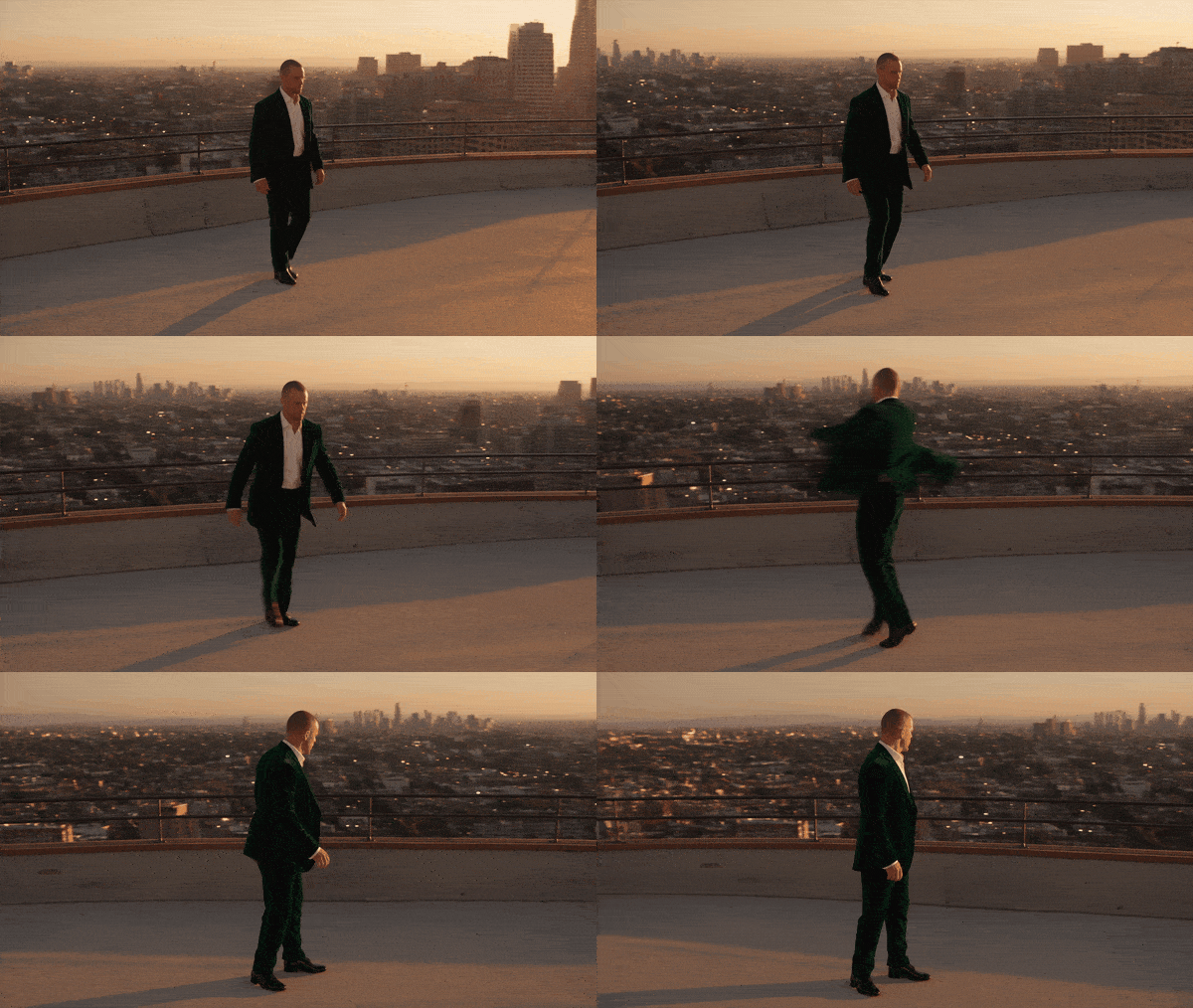
Output duration: 5.06 seconds.
The full-body view keeps the footwork readable while the moving skyline reveals the camera's arc. The jacket swings after each change of direction, giving the movement a second visual rhythm. For a dance brief, this combination of foot contact, fabric response, and camera travel is more useful than a long list of mood words.
2. Beauty Ad: Glass, Metal, and a Liquid Reveal
Mode: Text-to-video. Settings: 5 seconds requested, 720p, 16:9.
Prompt
plaintext1An unbranded frosted serum bottle with a rose-gold cap emerges from milky liquid. 2 3MATERIAL AND CAMERA 4Show streaming droplets and expanding ripples in slow motion through a 100 mm macro lens. Pink backlighting and a controlled light sweep reveal glossy glass. 5 6SOUND 7Hear liquid swelling and dripping, without music.
Generated result
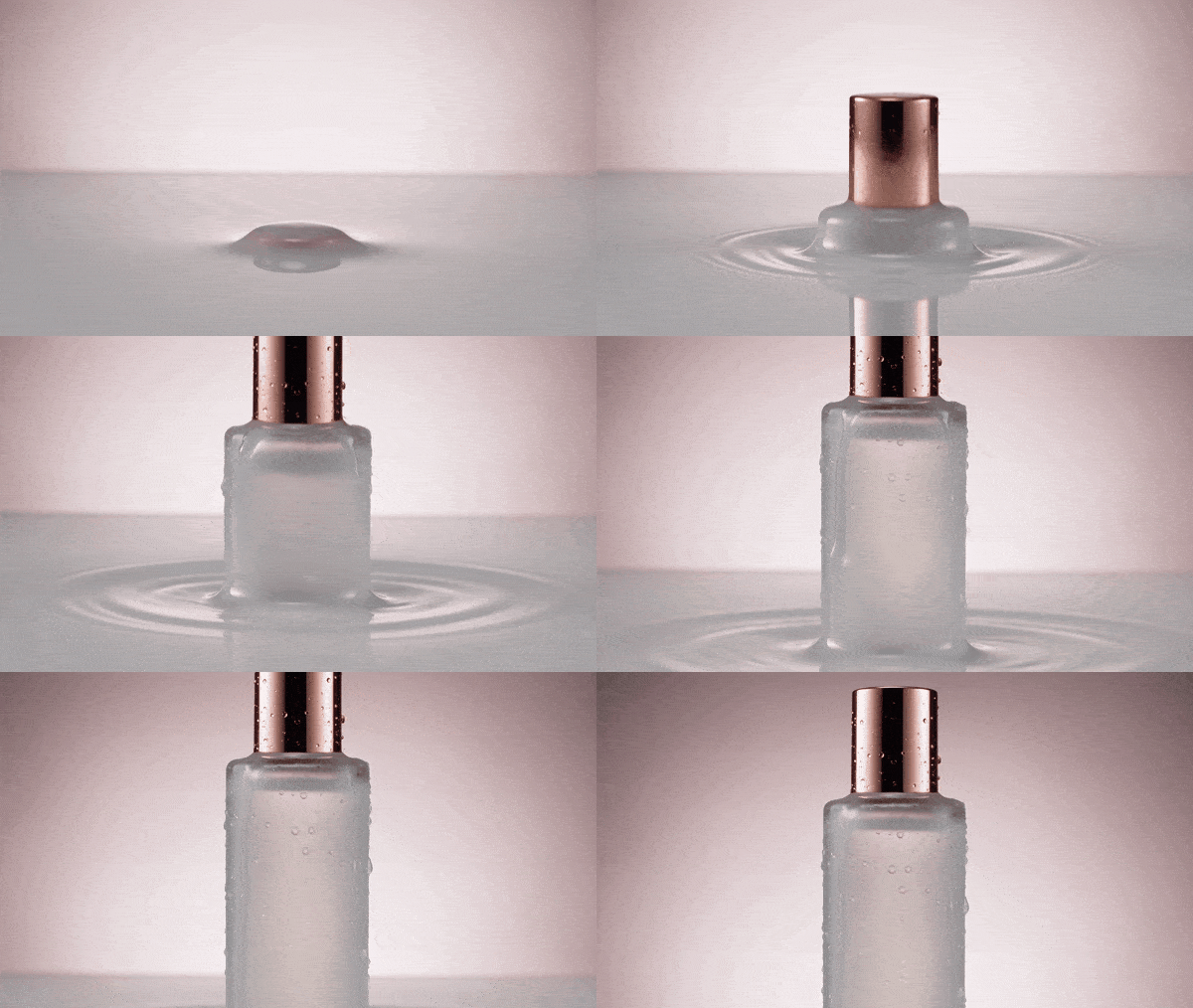
Output duration: 5.06 seconds.
The bottle emerges through a bright liquid surface while droplets and expanding rings make the reveal visible. The cap catches a different reflection from the frosted glass, so the material contrast survives the pale palette. The useful prompt details are the liquid's movement and the controlled light sweep, which give a simple product composition something specific to do.
3. Action: Chalk Dust at the Moment of Contact
Mode: Text-to-video. Settings: 5 seconds requested, 720p, 16:9.
Prompt
plaintext1From below, film a braided young woman in black sportswear driving a right cross into a punching bag. 2 3LIGHT AND CAMERA 4Slow motion reveals glove chalk and airborne sweat. One hard beam through gym haze, contrasty 35 mm. 5 6SOUND 7Hear impact, breath and chain rattle, without music.
Generated result
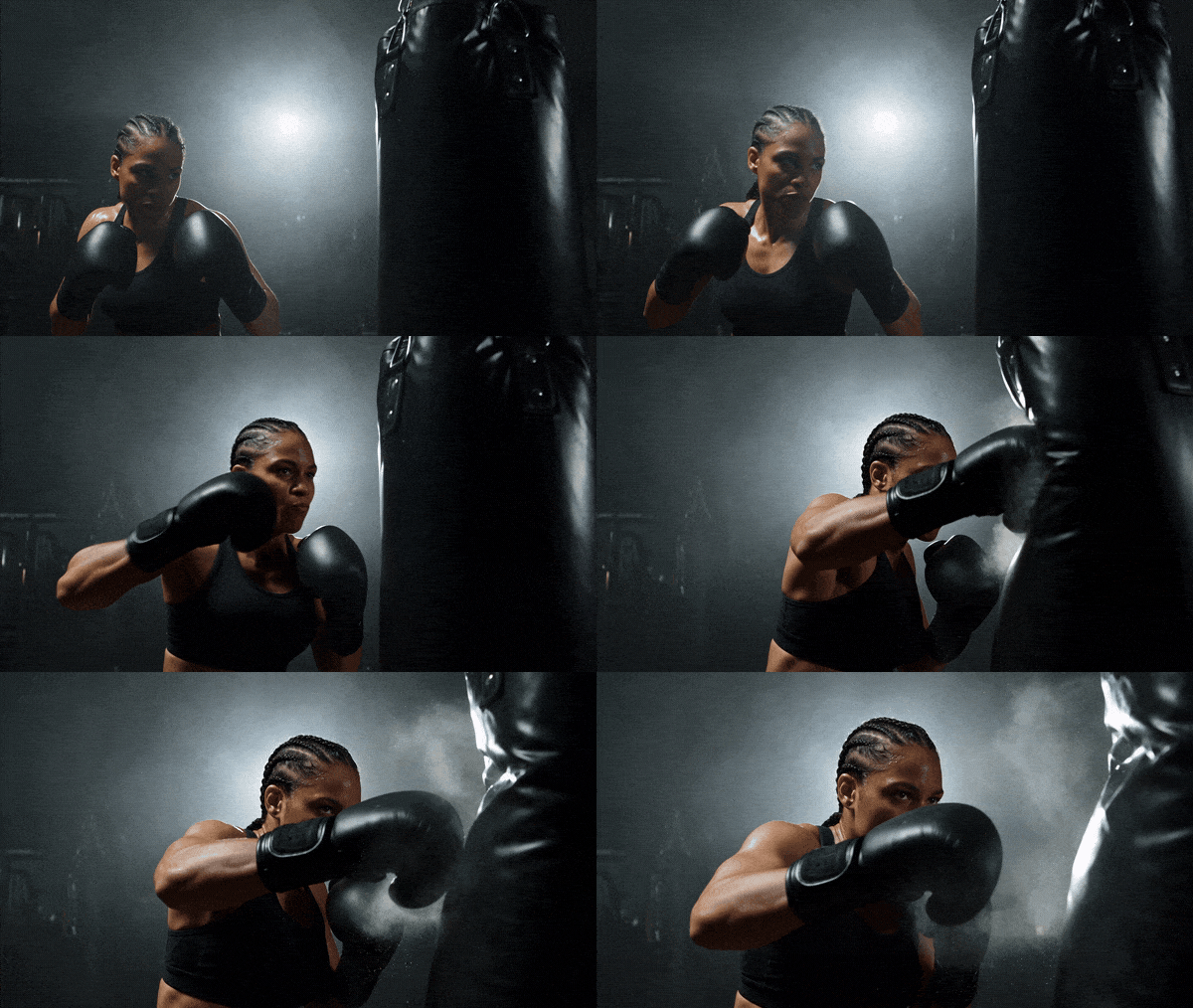
Output duration: 5.06 seconds.
The glove closes the gap to the bag before the chalk cloud spreads across the light. That order gives the impact a visible cause and consequence. The dark gym and single beam make small particles readable without a busy background. A clear contact moment and a readable recoil give an action prompt more direction than the phrase cinematic impact alone.
4. Emotion: Animate a Portrait without Inventing a New Scene
Mode: Image-to-video, first-frame input. Settings: Use the published first frame; the source does not list a complete settings record.
Original input image
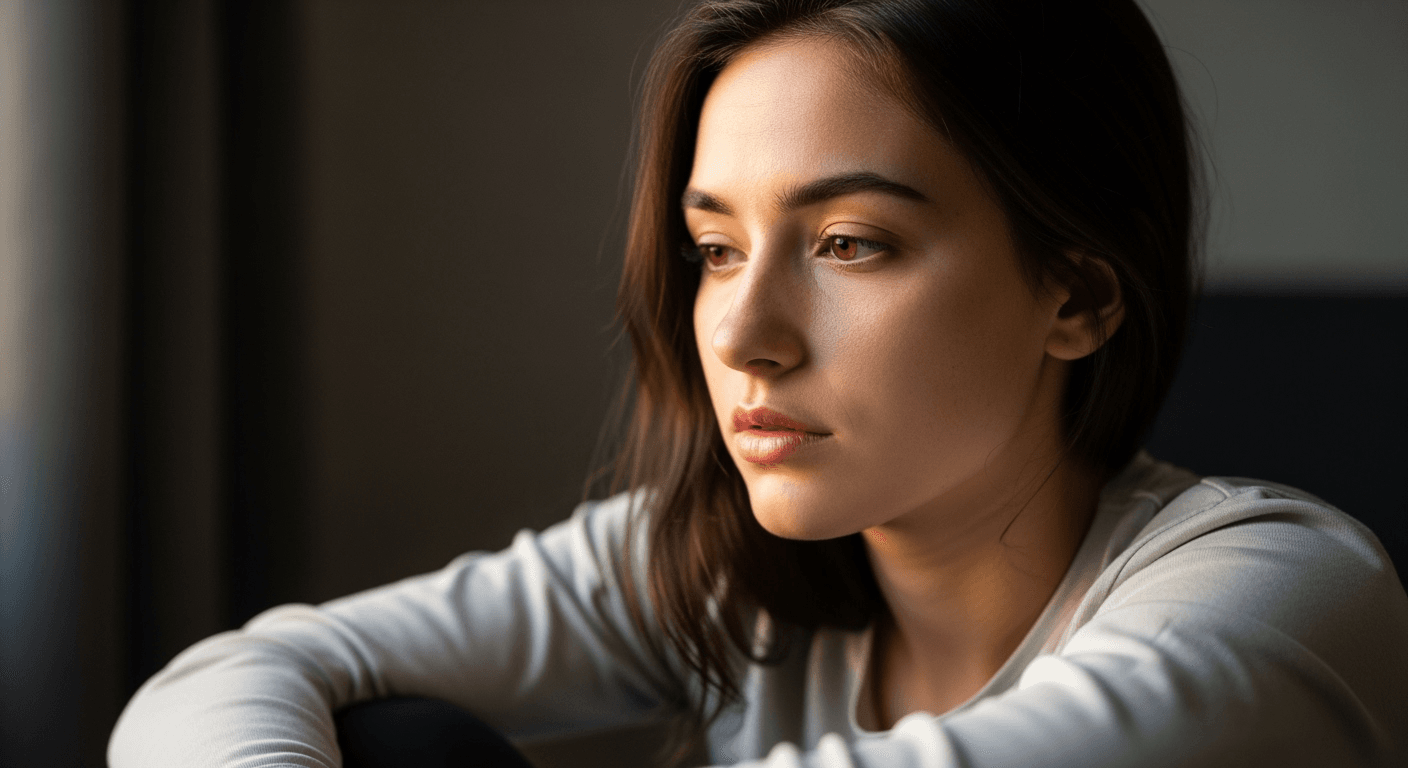
Prompt
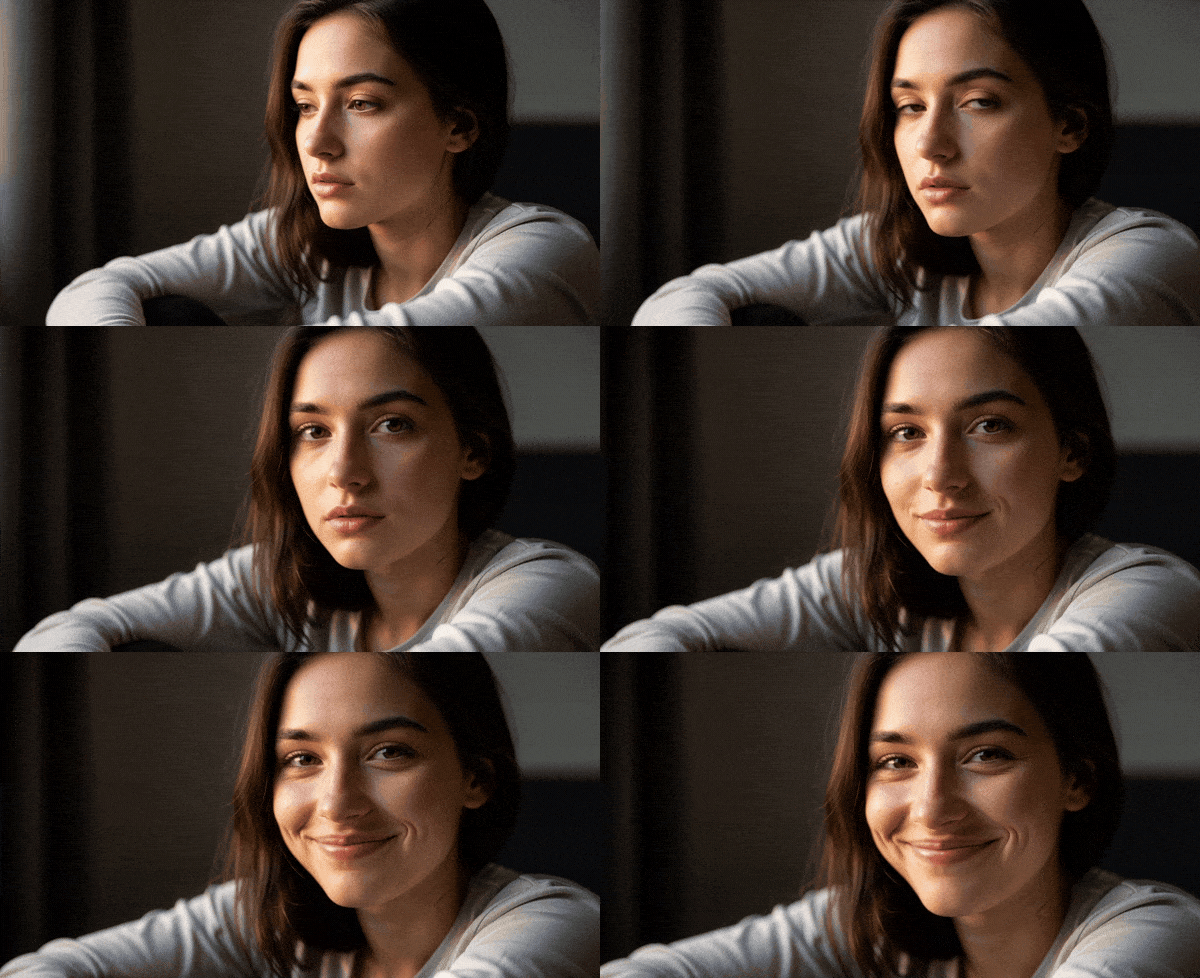
plaintext1Animate the woman in the supplied first frame: let her turn gradually toward the lens and form a gentle smile while warm daylight crosses her face. Move the camera subtly closer. Include a faint breath and indoor ambience.
Generated result
Output duration: 5.06 seconds.
The original portrait supplies the face, clothing, and window-side composition. In the animation, the woman turns toward the viewer and her neutral expression opens into a smile. The small change in gaze carries the scene. This is a useful image-to-video pattern when the photograph already has a strong composition and the goal is a restrained emotional movement.
5. Street Food: A 15-Second Journey under Paper Lanterns
Mode: Text-to-video. Settings: 15 seconds requested, 480p, 9:16.
Prompt
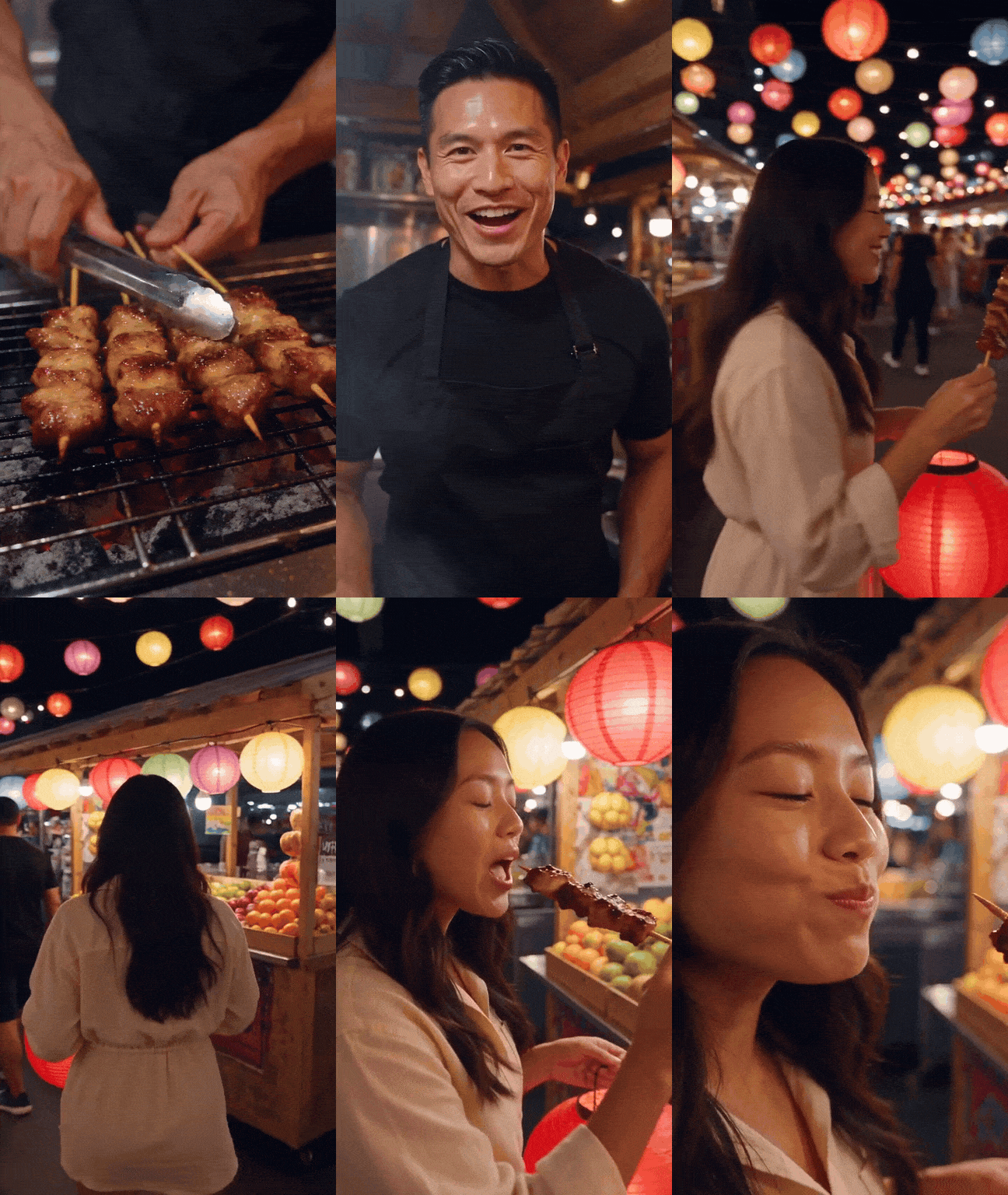
plaintext1Film a vertical, handheld night-market scene in one unbroken take. Begin with skewers turning over a smoky grill. The vendor looks into the lens and says, "Fresh off the fire. Who's hungry?" 2 3He passes a skewer to a woman. Follow her through the market beneath colored paper lanterns, past a juice stall, and stay with her until she stops and tastes the food. 4 5Keep the progression continuous from cooking to handover to walking to the first bite. Include the grill's sizzle, voices in the crowd, and music heard farther away.
Generated result
Output duration: 15.07 seconds.
The skewer carries attention from the grill to the customer, then the camera follows her beneath rows of glowing lanterns. Warm highlights on the food and soft colored lights keep the busy market readable. The closing bite completes the action begun at the stall. This is a useful long-take structure because every movement leads naturally to the next event.
6. Long Take: A 30-Second Ride from Alley to Market Square
Mode: Text-to-video. Settings: 30 seconds requested, 720p, 16:9.
Prompt
plaintext1Make a single, uninterrupted 30-second tracking shot in an old hillside town at golden hour. Follow closely behind a female bicycle courier wearing green, with a yellow parcel secured to the rear rack. 2 3Travel down the cobbled lane, past overhead washing and a windowsill cat. Turn left through a stone arch into a fruit-market square. The courier slows, dismounts, rests the bicycle beside a fountain, and gives the parcel to an elderly shopkeeper at a doorway; he acknowledges her with a smile and nod. 4 5Finish by lifting the camera above the square. Use natural sunlight, extended shadows, and believable movement. Hear bicycle tires, a bell, shoppers, and the fountain. Exclude music, captions, and visible titles.
Generated result
Output duration: 30.08 seconds.
The yellow parcel remains a strong visual anchor as the courier travels from the narrow lane through the arch and into the open square. Foreground stonework slides past the lens before the final rise reveals the wider setting. The prompt gives a long shot a route and a destination; the changing scale supplies variety without a montage of unrelated scenes.
7. Aerial: Build Motion through a Landscape Reveal
Mode: Text-to-video. Settings: 5 seconds requested, 720p, 16:9.
Prompt
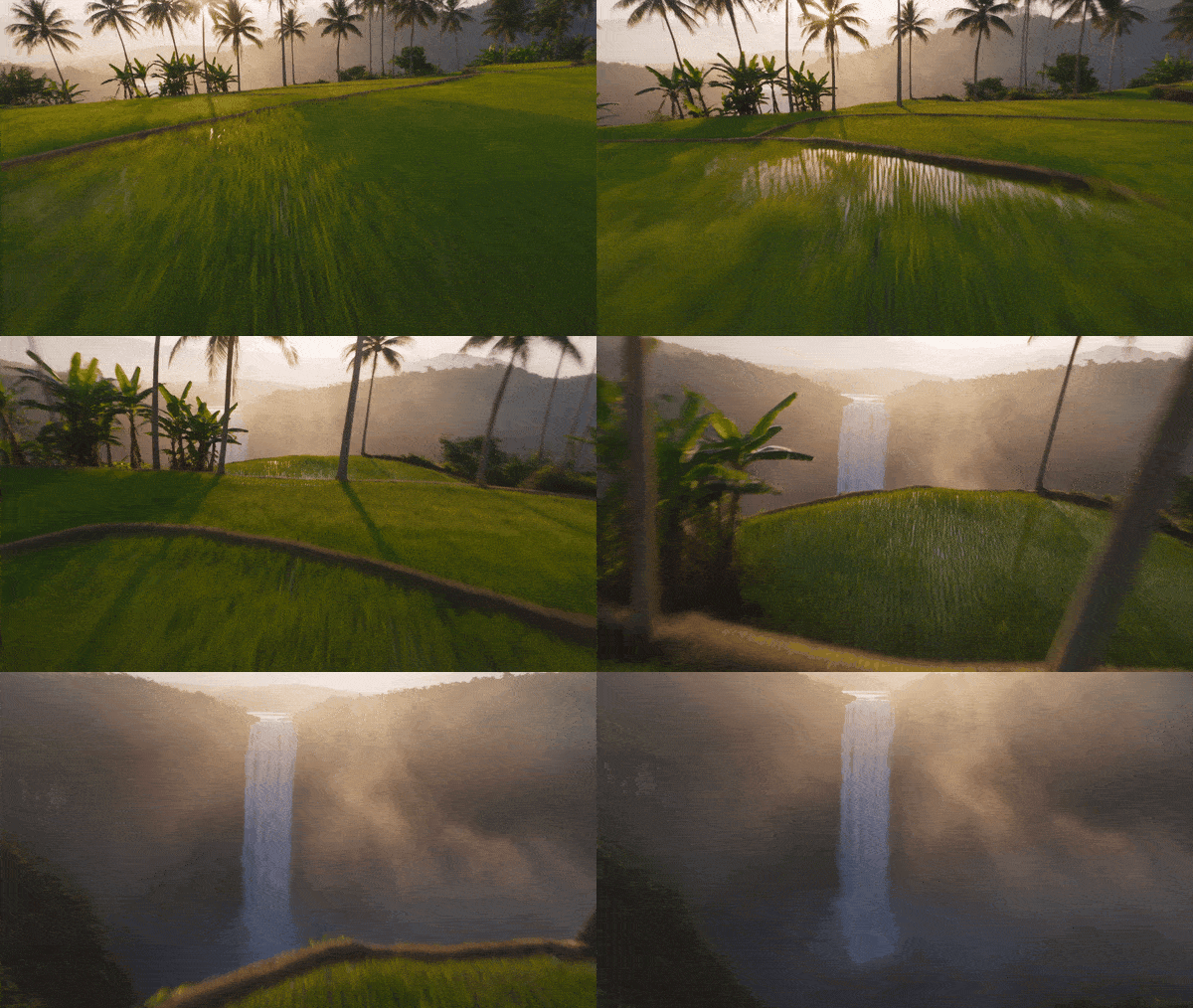
plaintext1Sweep quickly just above emerald rice terraces at dawn, skim palms, then rise to reveal a tall waterfall in a mist-filled valley. Golden rays pierce the haze. Use a crisp, vivid 16 mm view. Hear rushing air and the waterfall growing louder; omit music.
Generated result
Output duration: 5.06 seconds.
The camera first travels close to the terraces, with palms and field edges supplying nearby depth cues, then rises toward the waterfall. The reveal changes both height and the amount of landscape visible. Naming that route makes the shot easier to direct than simply asking for an epic aerial view; the waterfall becomes the destination of the movement.
8. Landscape: Use an Actual Image as a Visual Reference
Mode: Image-guided reference-to-video; not a first-frame task. Settings: 16:9 in the published input record; no input video is attached.
Original input image
Prompt
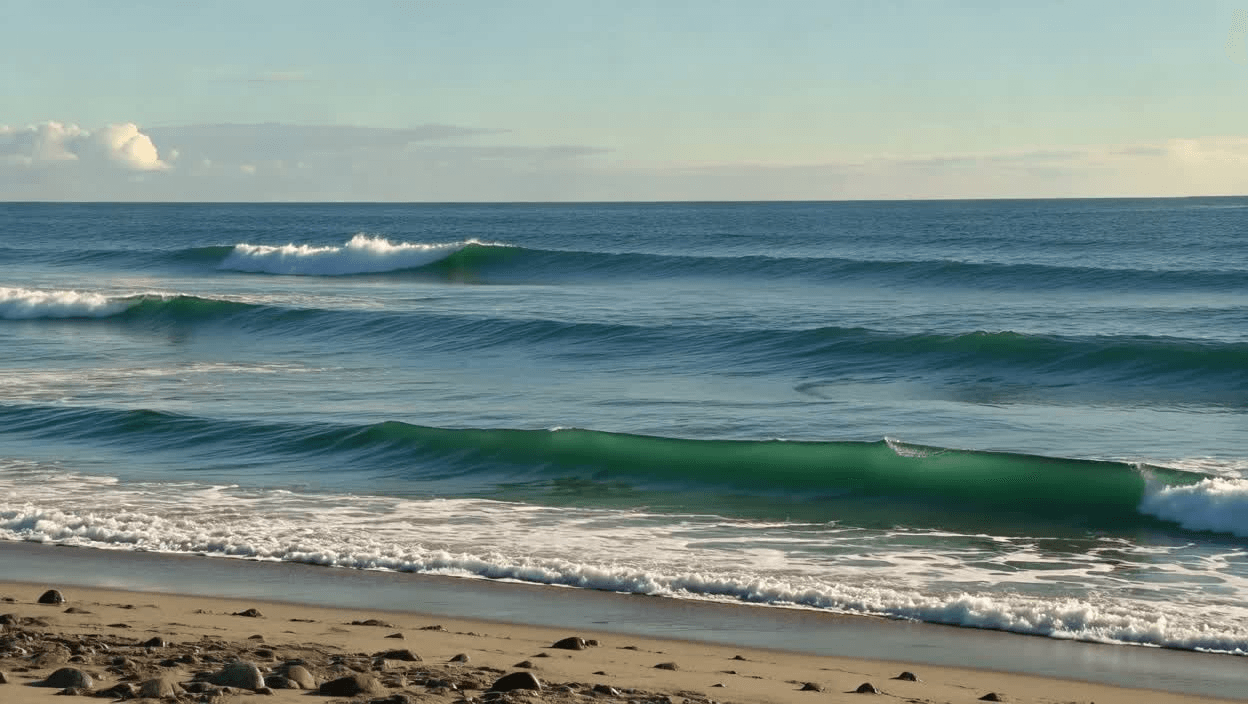
plaintext1Let @Image1 establish the coastline's appearance. At dawn, glide slowly above and along the shore with a drone-like camera. Show mist hanging over the sea and small waves washing onto the beach.
Generated result
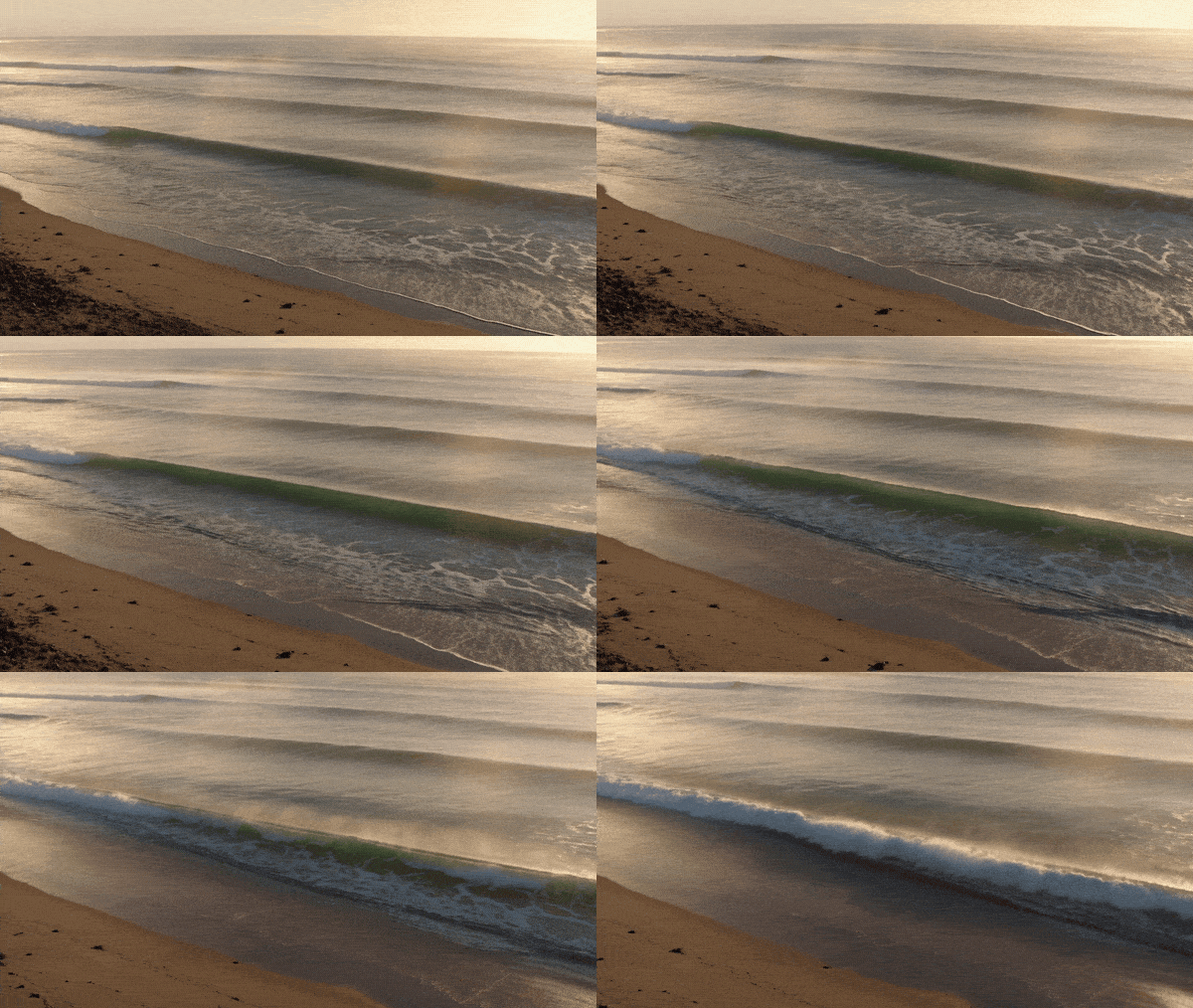
Output duration: 5.06 seconds.
The reference image establishes the sea, shoreline, and blue-green palette, while the result introduces warm light and successive lines of surf. Watch the foam advance and recede along the beach. This is appearance guidance rather than an exact first-frame match: the reference suggests the location's visual character, and the prompt supplies the moving water and aerial viewpoint.
9. Animal Motion: Keep the Camera at the Subject's Height
Mode: Text-to-video. Settings: The saved example does not expose a complete settings record; use the measured output below.
Prompt
plaintext1Track at grass height as a small dog runs toward the lens across a sunny field, its ears bouncing. Use warm late-day illumination. Add cheerful barks and the breeze moving through the grass.
Generated result
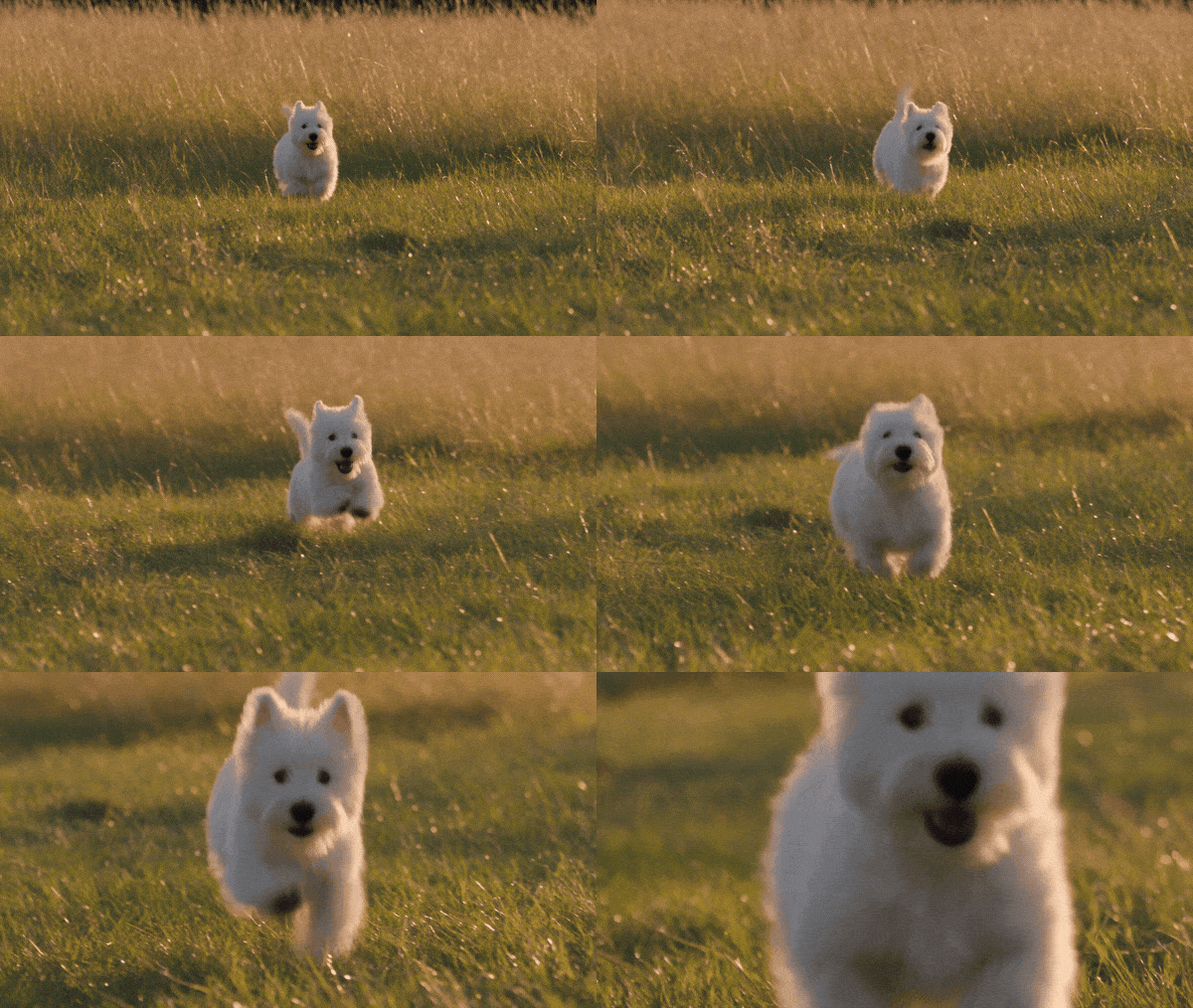
Output duration: 5.06 seconds.
The dog's approach changes the frame from a small figure in the grass to a close view of its face. Bouncing ears and repeated strides keep the movement legible throughout. A low camera puts the viewer at the animal's height and gives a simple run a clear endpoint, without needing a cut or a second character.
10. Image-to-Video: A Seaplane Leaves Its Original Dock
Mode: Image-to-video, first-frame input. Settings: 8 seconds, 720p, adaptive ratio, audio on; published seed 42.
Original input image
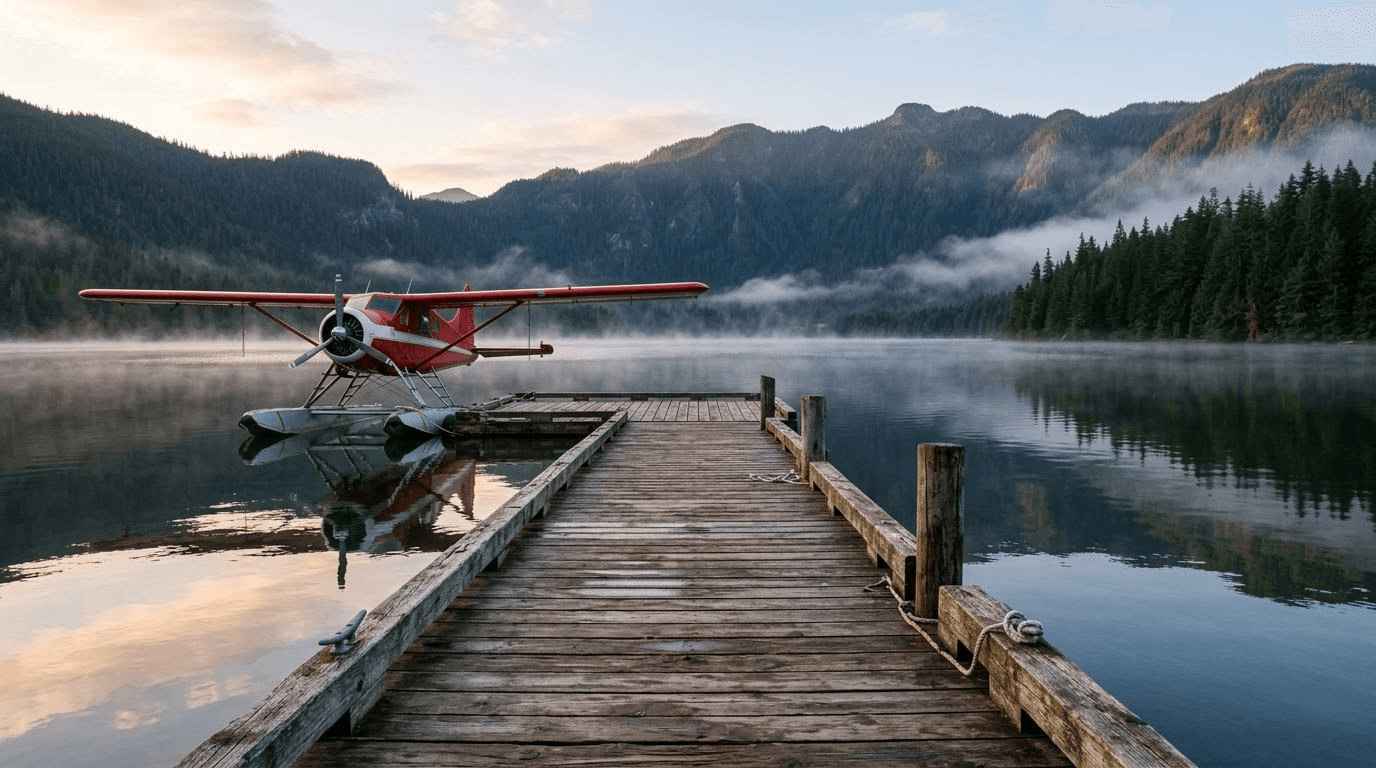
Prompt
plaintext1Animate the supplied seaplane: its propeller starts, it taxis away with a white wake, then takes off toward the mountains. Pan from the dock to follow; mist moves over the lake. Hear ignition, engine roar, water against dock posts, then the receding engine. No music.
Generated result
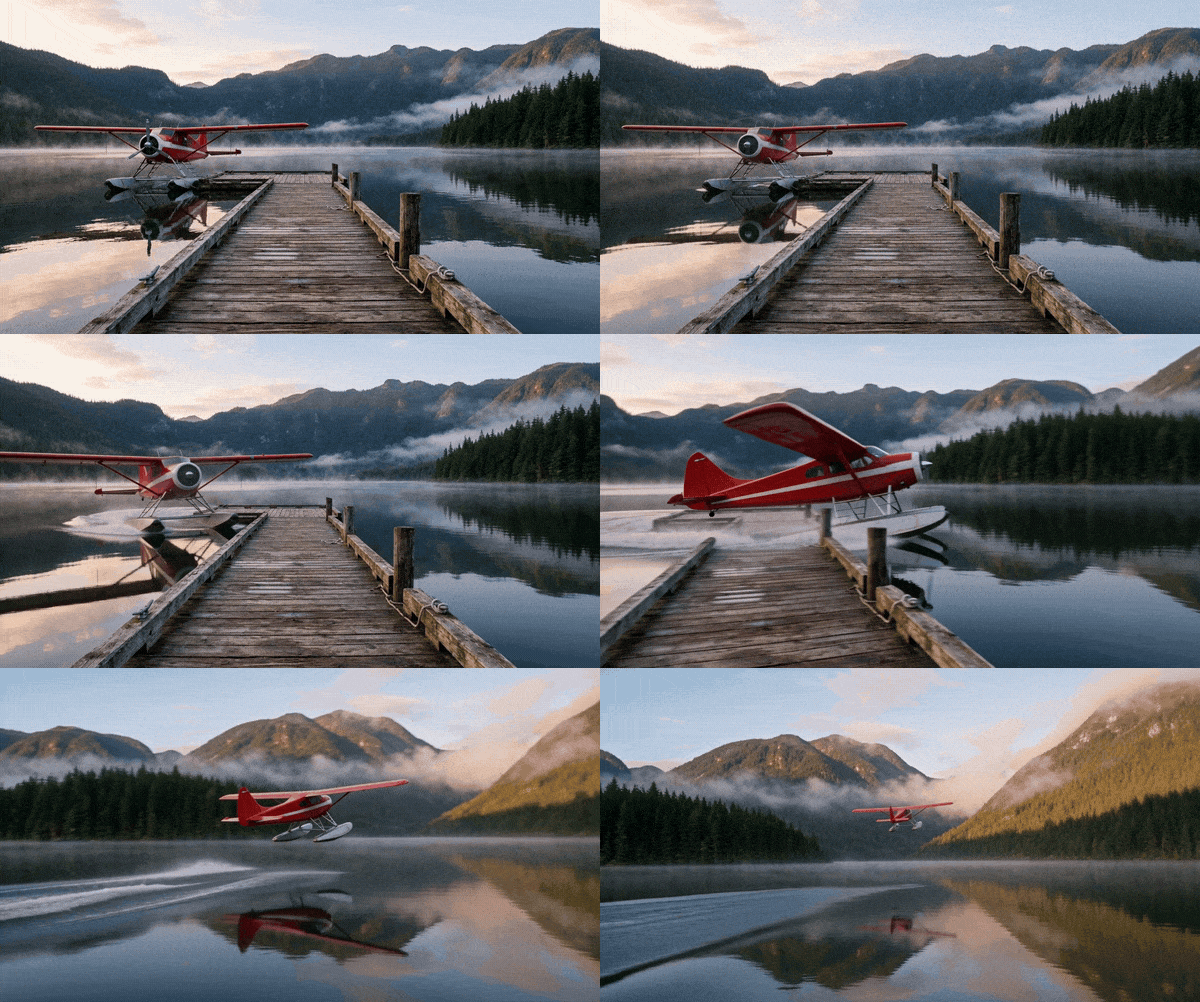
Output duration: 8.06 seconds.
The source image fixes the red seaplane, wooden dock, mountain skyline, and lake reflections. The result develops from departure into acceleration across the water, with a widening wake, before the aircraft leaves the surface. The key is an ordered action chain: starting, taxiing, and lifting off are separate visible stages rather than one vague instruction to make the plane fly.
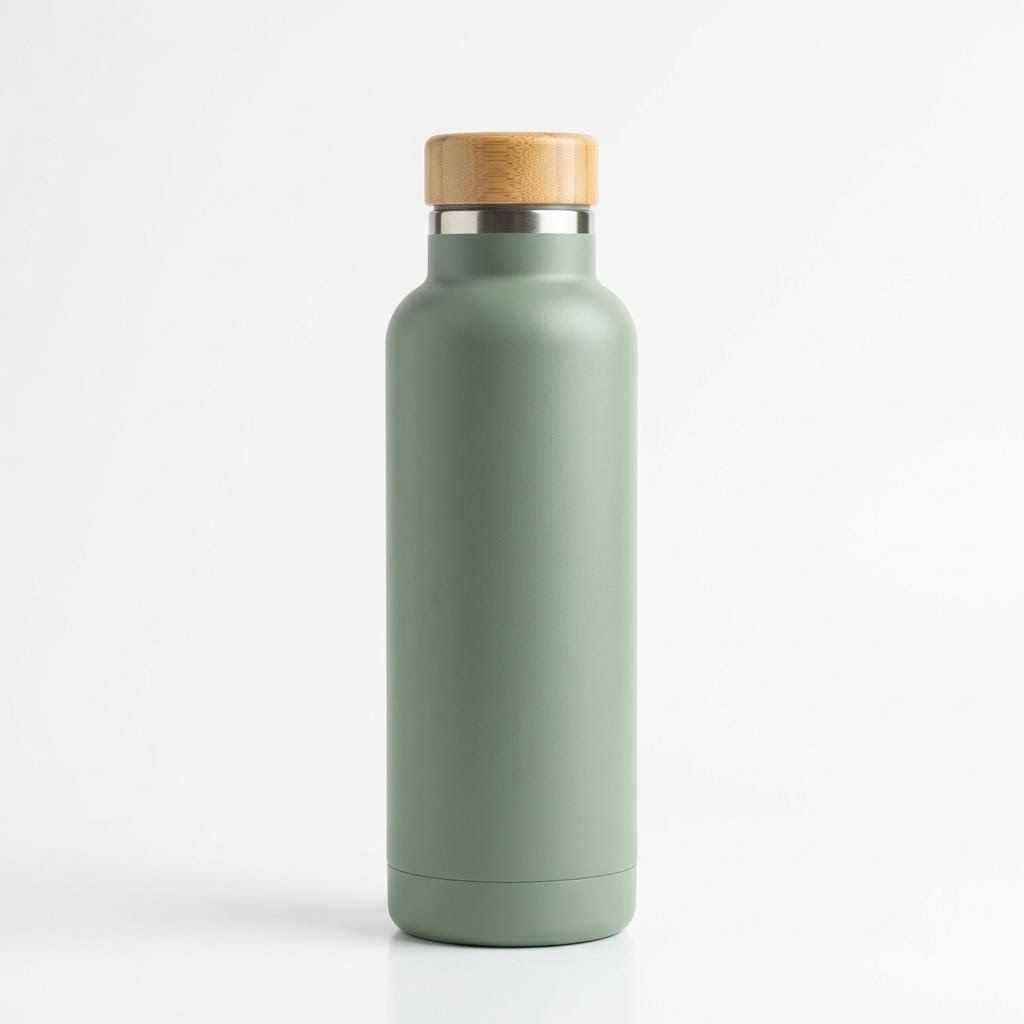
11. Image Reference: Carry One Bottle into a Mountain Scene
Mode: Image-guided reference-to-video; product reference, not a first frame. Settings: 8 seconds, 720p, 16:9, audio on; published seed 42.
Original input image
Prompt
plaintext1@Image1 identifies the bottle: sage matte finish, bamboo cap, steel ring, no branding. At sunset on a rocky ridge, a red-jacketed female hiker removes it from her backpack, opens it, drinks and surveys the valley. Pull from hands-and-bottle detail to a landscape wide. Hear wind, gravel and unscrewing; exclude music.
Generated result
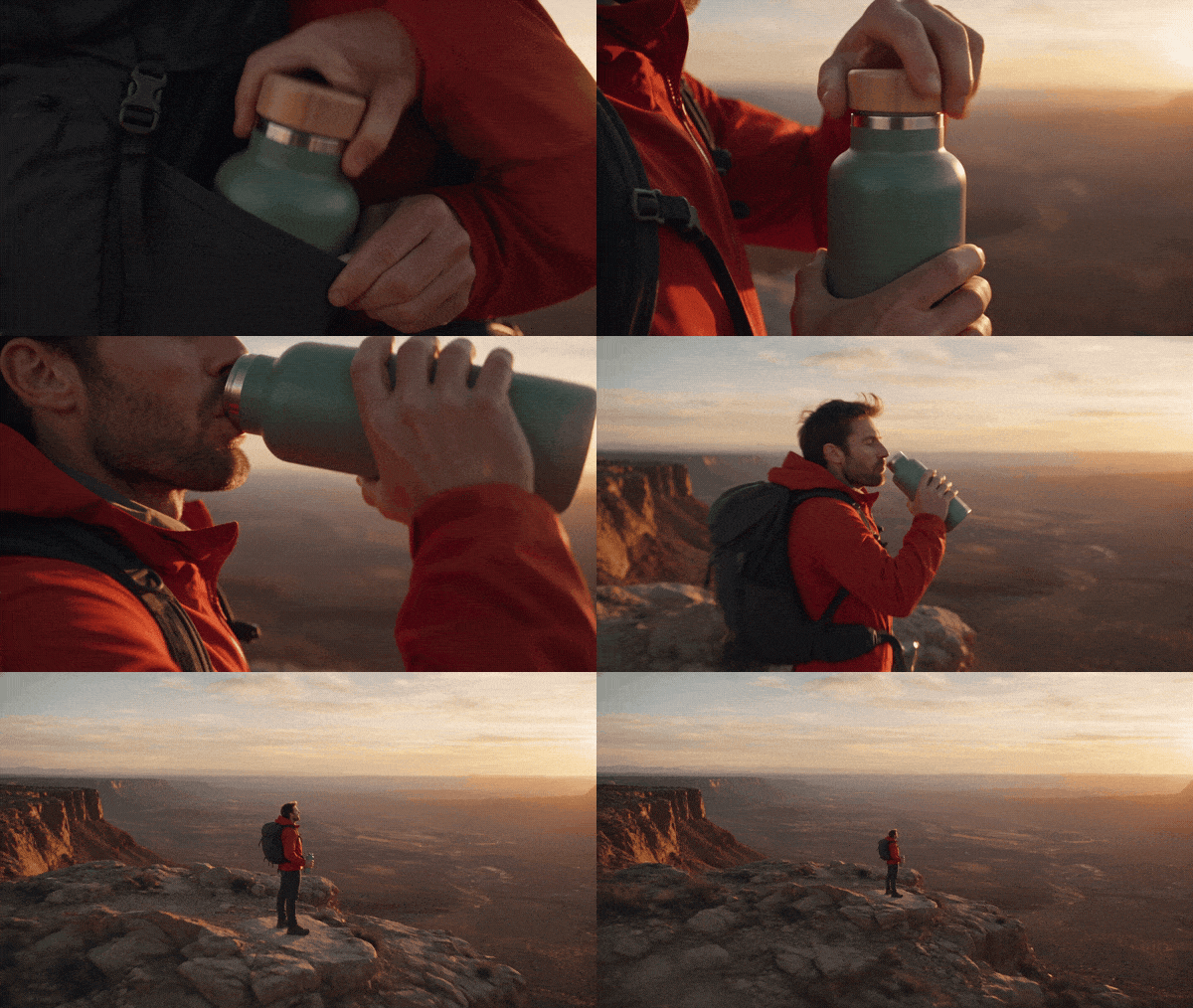
Output duration: 8.06 seconds.
The result carries the bottle's overall silhouette and matte surface into a much wider outdoor scene, then pulls back from drinking to the canyon view. It also shows the limits of the reference: the bottle shifts toward teal, and the requested female hiker becomes a man. Check product color and the human subject separately when an image is assigned only to the product.
12. Emotion: A 20-Second Kite Story in Three Connected Shots
Mode: Text-to-video. Settings: 20 seconds requested, 720p, 16:9; published seed 42.
Prompt
plaintext1Create a three-shot, 20-second beach scene in the wind and late-afternoon light. 2 30–6 seconds: An older man in a gray wool sweater kneels beside an eight-year-old girl and helps her hold a yellow diamond-shaped kite. He says, "Wait for the wind. Now let go." 4 56–13 seconds: A gust lifts the kite. Its line slips through the girl's hands as she laughs and runs backward over wet sand. 6 713–20 seconds: Show both figures from behind in a wide composition, the kite high above the waves under a pale-blue sky. The girl says, "Grandpa, it's flying!" 8 9Use wind, breaking surf, gulls, and the kite's fabric snapping. Do not add a score or subtitles.
Generated result
Output duration: 20.06 seconds.
The yellow kite links the close interaction on the sand to the open sky in the closing wide shot. The scene changes scale as the shared task becomes a moment of release, so the emotion develops through action rather than a request to look happy. Three shot blocks give the preparation, launch, and payoff room to read across the full twenty seconds.
Run One Brief, Then Fix the Actual Failure
Open the Seedance 2.5 Flash Text-to-Video playground for a text-only example. For a referenced example, use the corresponding entry linked earlier. Select resolution, ratio, duration, and audio explicitly, and check that the selected values remain visible before submitting.
Download the complete result and keep the original alongside your prompt and settings. Watch at normal speed before inspecting individual frames. A still can expose a distorted hand, but it cannot establish whether the camera path, landing, or sound transition works.
Write three acceptance checks before you run. For the dance example, they could be feet visible, one complete turn, and recognizable outfit continuity. For the bottle ad, use stable silhouette, an actual change of viewpoint, and a clear ending. These checks turn “make it better” into a specific revision.
| Observed problem | First useful revision |
|---|---|
| Subject barely moves | Replace mood words with an action that has a visible endpoint |
| Camera zooms instead of changing viewpoint | Name the start and end sides and include a background depth cue |
| Outfit or product changes after a cut | Reduce cuts, simplify occlusion, and use a suitable appearance reference |
| Too many actions remain unfinished | Remove a beat or extend the actual duration setting |
| Reference background overwhelms the new scene | Restrict that input to appearance or motion and specify the new setting |
| Music appears during an ambience scene | Remove musical language and request environmental sound only |
| Speech changes or extra words appear | Shorten the line and identify one speaker and language |
| Text is wrong or unstable | Add exact copy and approved graphics in post-production |
Change one category at a time: action, camera, references, or sound. Keep the other requested settings stable. Outputs can still vary between runs, so one successful take does not establish that a wording change improves the success rate. Record repeated outcomes before making that claim.
Keep a short revision log: the failure you saw, the sentence you changed, and whether the new take resolved it. You can then reuse a working shot brief without accumulating every instruction from every failed attempt. A bloated prompt often contains old constraints that no longer serve the current scene.
Use this Seedance 2.5 Flash Prompt Guide & Examples as a prompt library you can adapt: choose one scene, preserve its action and camera logic, and replace only the subject-specific details. Start with a short, inspectable result before building a longer sequence around it.
Frequently Asked Questions
Is there an official Seedance 2.5 Flash prompt formula?
BytePlus publishes a Seedance 2.5 series tutorial and prompt guide that cover structured writing and distinguish model variants. The formula in this article adapts those principles into a working brief and adds an explicit continuity check. It is not a mandatory parser format or a promise of exact camera execution.
Should I write Seedance 2.5 Flash prompts in English or Chinese?
The current Atlas Cloud Seedance 2.5 Flash Text-to-Video schema supports both. Use the language in which you can describe the action precisely. For dialogue, identify the spoken language and speaker directly. This guide does not claim that English produces better results than Chinese.
Do I need a separate negative prompt?
The checked Atlas Cloud Seedance 2.5 Flash Text-to-Video schema does not list a separate negative-prompt field. Put useful exclusions in the main prompt, especially for music, speech, subtitles, or added text. Describe the desired behavior positively as well, such as maintaining head-to-toe framing.
Can Seedance 2.5 Flash generate native 1080p video?
The current Atlas Cloud Seedance 2.5 Flash entries list native 480p and 720p output. Do not infer native 1080p support from a standard Seedance 2.5 page or from an upscaled export. If the delivery requires higher native resolution, choose a model and configuration that explicitly support it.
Are the 12 examples tested prompts with guaranteed results?
The examples pair published Seedance 2.5 Flash outputs with prompts adapted from their scene briefs. They are not fresh tests of the exact wording shown here and do not establish a success rate. Inspect the complete previews and compare any supplied images with the result; case 11 shows why a reference does not guarantee every requested detail.
How long should a Seedance 2.5 Flash prompt be?
Use enough detail to establish the action, camera, sound, and important continuity without introducing conflicts. Begin with one compact scene. Add a second beat or reference assignment when it answers a specific need. A longer prompt is useful when it directs more of the scene clearly, rather than repeating the same request.




