


A basketball drops below the frame and returns to a player's hand. The preview feels convincing, but you never see the bounce. That missing moment matters when you are choosing a sports clip for a client.
Seedance 2.5 Flash sports motion realism depends on whether the complete action remains believable and visible: contact, travel, body support, and recovery. A sharp frame or energetic camera move cannot establish that alone. Review the whole shot at normal speed, then inspect the uncertain transition in the original file.
These five sports examples cover a longer basketball comparison, a team possession, soccer, tennis, and skateboarding. The four short examples include copyable prompts. The longer public reference shows how to review motion across an edit, with its source and model labels stated beside the video.
Key takeaways
- Keep the feet, equipment, and decisive contact region inside the frame.
- Use Pass, Fail, and Inconclusive to separate visible errors from missing evidence.
- Repeat each unchanged prompt 3 times before drawing conclusions about reliability.
- Compare total retry spend with accepted clips; a lower starting price does not establish lower delivery cost.
Media status, November 23, 2026: Case 1 contains a complete 30.12-second public basketball comparison labeled Seedance 2.0 and Seedance 2.5. Cases 2 through 5 contain the four supplied clips as complete silent GIFs, with original MP4 files retained. Those four source files are 1280 x 720 at 24 fps and approximately 8 seconds long. This selection is not a completed repeat-run benchmark and does not establish a sports success rate.
What Seedance 2.5 Flash Can Generate for Sports Clips
Seedance 2.5 Flash is positioned as the speed- and cost-focused version of Seedance 2.5. For sports creators, the useful question is whether that tradeoff leaves the required action intact. Faster iteration has value only if you can identify a clip that satisfies your brief.
The test design uses text-to-video on Atlas Cloud. Starting without a reference image keeps the requested movement and camera instructions visible in the prompt. It also avoids confusing a strong starting photograph with evidence that the generated motion works.
The current Seedance 2.5 Flash schema lists native 480p and 720p output and durations from 4 to 30 seconds. The four short examples use 720p, 16:9, and about 8 seconds. That leaves room for an approach and recovery while limiting competing events. Case 1 is a separate, longer public reference with its own source-file properties and model labels.
Those are supported parameters, separate from evidence about delivered files. A completed run still needs its downloaded duration, dimensions, and readable frame rate checked. Selecting 8 seconds in a form does not prove the file is 8 seconds long.
A landscape 720p shot may suit a concept presentation or some social placements. Confirm the destination's requirements before generating a batch, especially if the client expects native 1080p or plans a substantial crop.
What Makes AI Sports Motion Look Believable?
Watch the complete clip once before scrubbing. You need to know whether a viewer can follow the action at normal speed. Then return to the decisive phase and inspect the original frames, using court markings, track lines, or the ground as spatial references.
Five checks cover different failure modes. Contact connects the athlete to the surface or equipment. Trajectory follows the moving object. Weight transfer explains how the body supports the movement. Object continuity checks that limbs and equipment remain present. Recovery shows what happens after the apparent achievement.
| Check | Pass condition | Visible failure | Inconclusive evidence |
|---|---|---|---|
| Contact | Approach and departure support a plausible interaction | Foot skates across the ground; ball passes through a surface | Contact region leaves the frame or is hidden |
| Trajectory | Movement follows a readable path | Ball jumps between separated positions without an explained transition | Small ball cannot be distinguished from blur |
| Weight transfer | Support and body movement remain compatible | Athlete visibly drifts without supporting steps | Feet or supporting surface are obscured |
| Object continuity | One ball, board, or racket persists coherently | Equipment vanishes, duplicates, or changes form | Occlusion prevents tracking identity |
| Recovery | Follow-through or landing continues into a stable state | Rider floats after landing; body snaps to a new pose | Shot ends before recovery can be assessed |
Pass means the requested action chain is visible and has no obvious continuity error. Fail requires a clear contradiction, such as sliding, penetration, teleportation, or an omitted action. Inconclusive means framing, blur, or occlusion prevents a fair judgment; it earns no pass credit.
Use these categories for the requested action, rather than averaging unrelated strengths. A convincing shirt texture cannot compensate for a missing ball. A stable landing cannot prove that the board completed the requested takeoff.
This is a visual plausibility review, not motion capture or a physics simulation. At 24 fps, frames are roughly 42 milliseconds apart. A brief contact may occur between recorded frames; its absence from one still is insufficient to declare failure. Inspect the neighboring motion for a coherent transition.
ByteDance acknowledges remaining limitations in complex motion and interactions between multiple subjects. That statement concerns the broader Seedance 2.5 release, rather than a Seedance 2.5 Flash sports benchmark. (ByteDance Seed, Seedance 2.5 launch notes)
Five Sports Examples That Test Different Motion Problems
Use the same contact and continuity checks across all five examples. Case 1 examines a longer public edit; the four short prompts focus on a team possession, a soccer strike, a tennis rally, and an ollie. Judge the action that remains visible through the complete sequence.
Long-Form Basketball: Follow the Athlete Across a 30-Second Edit
This public basketball comparison was posted by Dhaval Makwana. The complete downloaded file runs 30.12 seconds at 1280 x 720 and 30 fps. Its two panels are labeled Seedance 2.0 and Seedance 2.5. These are the creator's model attributions; this clip is a reference for reviewing sports motion, rather than a Seedance 2.5 Flash test.
Source brief, summarized: An arena sequence follows a player from the entrance into ball handling, a move past a defender, an approach to the basket, and a dunk. The brief asks the player's appearance and uniform to stay consistent as the framing changes. This summary describes the published request, not a promise that every requested action is completed correctly.
Public sports reference: the complete 30.12-second comparison by Dhaval Makwana, retaining its original panel labels, edit, and audio. This is not a Seedance 2.5 Flash output or a controlled head-to-head benchmark.
Watch each panel separately. During a dribble, follow the ball from hand to floor and back. During the drive, check that planted steps explain the player's forward travel. Around the dunk, inspect the gather, takeoff, ball-to-rim interaction, and whatever recovery the shot actually shows. When the framing crops out the shoes or ball, mark that phase unresolved rather than inferring a valid contact.
The public edit uses different shot timings across the panels, so simultaneous frames are not necessarily the same action phase. A cut can preserve the player's identity while hiding a missing movement transition. Use the longer example to identify those review points, then apply them to a fresh Seedance 2.5 Flash output; this selected comparison does not establish a model ranking or success rate.
Basketball: One Ball Through a Team Possession
A two-on-two possession tests whether one ball remains coherent across dribbles, a pass, a catch, and a shot. Different jersey colors and clear spacing identify the ball handler, receiver, and defenders.
plaintext1An 8-second photorealistic indoor basketball game, 16:9, with fluid real-time athletic movement. 2 3A lively community basketball gym with a polished maple floor, accurate court markings, a glass backboard, padded walls, overhead steel rafters, and warm daylight entering through high windows. Around twelve spectators sit on wooden sideline bleachers. Sports bags and water bottles sit beneath the benches. The playing surface is dry and clear. 4 5Exactly four adult players take part in a two-on-two half-court possession. Two teammates wear blue jerseys: a guard in dark shorts on the left wing and a teammate in light gray shorts near the right elbow. Two defenders wear white jerseys, each guarding one blue player. Exactly one orange basketball is present in the entire scene, shared by all four players. 6 7The possession is already underway at the opening frame. The blue guard makes two quick right-hand dribbles while advancing diagonally toward the lane. The nearest white defender shuffles laterally to stay in front. The guard gathers the ball and sends one direct chest pass through a clear passing lane to the blue teammate at the right elbow. The ball visibly leaves the passer's hands, crosses the open space, and is caught securely with both hands. The receiver bends the knees, rises vertically into a balanced jump shot, and releases the same ball toward the hoop. The second defender closes out with a raised arm while maintaining clear separation. The ball follows one continuous arc and drops through the rim and net. The shooter lands with bent knees as the other players turn toward the basket. 8 9Film from a slightly elevated sideline angle in one continuous wide shot with a gentle follow pan. Keep all four players, their feet, the passing lane, and the hoop visible. The single ball remains continuous through dribbles, pass, catch, release, and basket. Natural footwork, believable spacing, stable anatomy, normal-speed motion, uninterrupted take, silent video.
Follow the same orange ball through each handoff between phases. The passer should release before the receiver catches; only the receiver should control the ball after the pass. Check footwork, defender spacing, and the shot trajectory separately.
Observation status: user-supplied clip embedded below. The original MP4 is retained. This selected example is not a completed three-run baseline, and no benchmark pass rate is assigned.
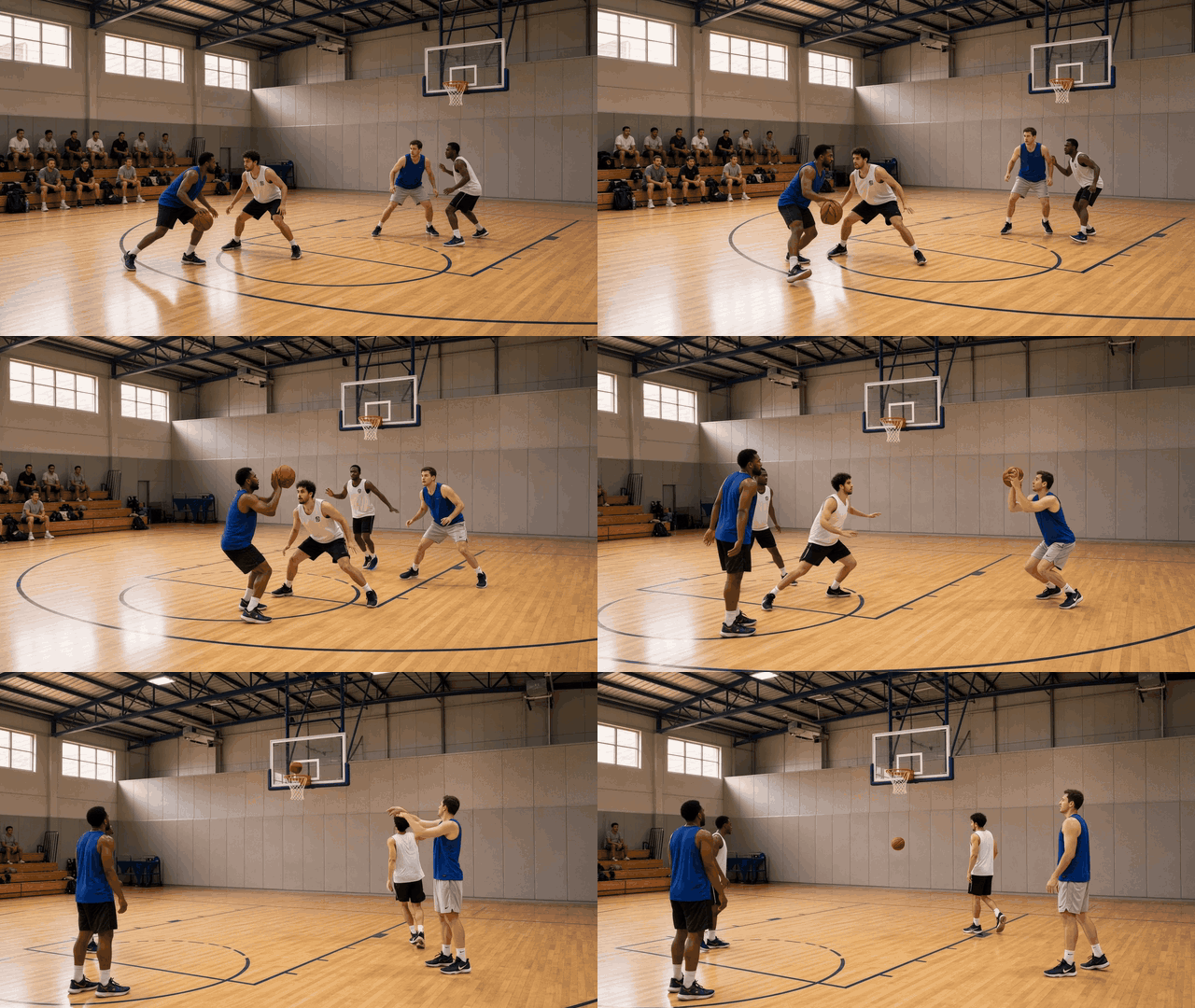
User-supplied basketball clip: a two-on-two possession in an indoor gym. The complete source is preserved as a silent GIF; inspect the original MP4 for precise ball contacts.
Soccer: Plant, Strike, and Follow Through
The soccer test checks action order. The supporting foot should establish the stance, the kicking leg should approach, and the ball should depart in a direction compatible with the strike. Keeping defenders out of the shot makes that relationship easier to inspect.
plaintext1An 8-second photorealistic soccer commercial, 16:9. One adult player in a navy training kit and white boots on a neatly maintained grass pitch. An empty full-size goal stands ahead, with a tree-lined hillside and a modern low stadium roof in the background. Clear late-afternoon light creates warm highlights and readable shadows. 2 30–3 seconds: Already running, the player advances with three quick, controlled touches, keeping one white soccer ball within a stride. 43–5 seconds: The player uses the outside of the right boot to cut the ball diagonally right, follows with two quick adjustment steps, and opens a clear shooting angle. 55–6 seconds: The left foot plants beside the ball and the right instep strikes a firm, low shot toward the far bottom corner of the goal, approximately ten meters away. 66–8 seconds: The ball travels rapidly across the grass into the lower net while the player follows through and takes two balanced recovery steps. 7 8One continuous medium-wide sideline tracking shot with a gentle pan toward the goal. Keep both feet, the ball, and the goal visible through the strike. The ball moves only after each actual boot contact. Realistic traction, momentum, and follow-through. Normal speed, no slow motion, no defenders, no cuts, no text, no audio.
Review the last approach step and the first frames of ball movement together. A ball that clearly starts rolling well before the boot arrives contradicts the requested strike, even if the eventual goal looks convincing. A grass occlusion may instead leave the exact interaction unresolved.
Observation status: user-supplied clip embedded below. The original MP4 is retained. This selected example is not a completed three-run baseline, and no benchmark pass rate is assigned.
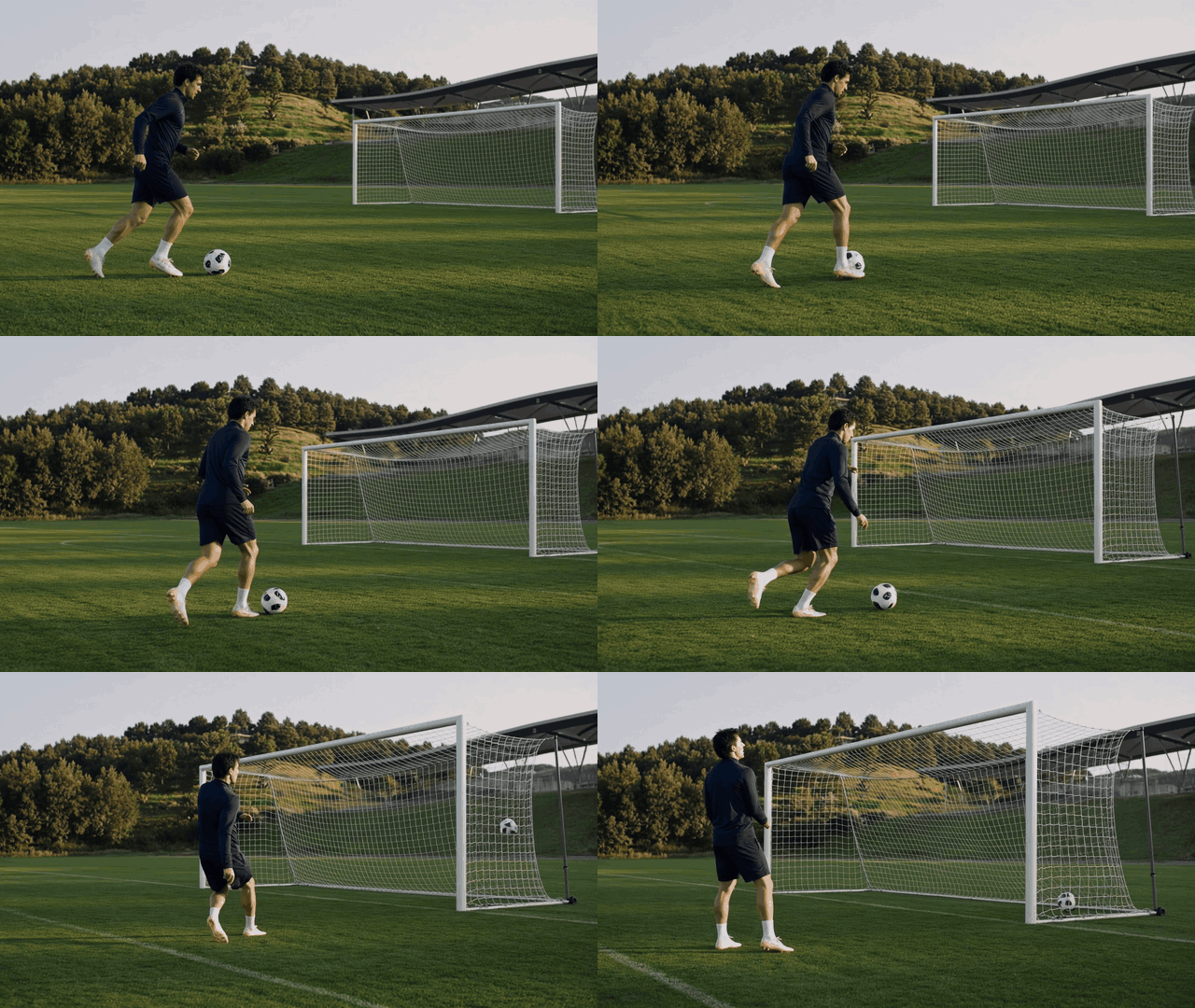
User-supplied soccer clip: approach touches, a shot toward goal, and follow-through. The GIF preserves the complete clip at normal playback speed.
Tennis: Keep One Ball Through a Two-Player Rally
Tennis adds a small, fast object. A smooth forehand animation can look plausible while giving the viewer little evidence about the incoming and outgoing ball. Review the ball's path separately from the player's performance, then check how the two align.
plaintext1An 8-second photorealistic tennis match filmed like a live club tournament, 16:9, at natural real-time speed. 2 3A blue outdoor hard court with a green surround, accurate singles markings, and a taut regulation net. Behind the fences are landscaped trees, flowering shrubs, a cream-colored clubhouse, shaded benches, and a small seated audience. Warm late-afternoon sunlight illuminates the court evenly. A physical courtside flip scoreboard beside the umpire chair displays 15–15 and remains unchanged because the rally is still in progress. Towels and water bottles rest beside the players' benches. 4 5Exactly two adult singles players occupy opposite ends of the court. The near-court player wears navy sportswear; the far-court player wears a white shirt and dark shorts. Each holds one consistently shaped tennis racket. Exactly one bright yellow tennis ball is in play. 6 7The clip opens mid-rally as the ball bounces in the near court. The navy player makes two quick adjustment steps and strikes a controlled forehand crosscourt. The ball clears the net and bounces once inside the far court. The white-shirted player shuffles into position and returns it with a compact two-handed backhand. The same ball clears the net again and bounces once in the near court. The navy player moves laterally, plants, and strikes another forehand toward the far side. The far player performs a split-step and begins moving to receive as the clip ends. Each player recovers toward the center after striking. 8 9Use a stable, moderately elevated three-quarter sideline view that includes both full players, the net, and both bounce areas. A subtle follow pan keeps the rally centered while preserving court geometry. The same single ball follows a continuous path, changing direction only at racket contact or court bounce. Natural ball flight, grounded footwork, coordinated torso rotation, and smooth recovery steps. Crisp sports coverage with restrained motion blur, one uninterrupted take, normal playback speed, silent video.
Begin several frames before the swing. Locate the incoming ball, follow its approach, and inspect where it goes after the racket passes. Do not infer a successful return from the follow-through alone. Racket blur and a small ball can leave the evidence incomplete.
Observation status: user-supplied clip embedded below. The original MP4 is retained. This selected example is not a completed three-run baseline, and no benchmark pass rate is assigned.
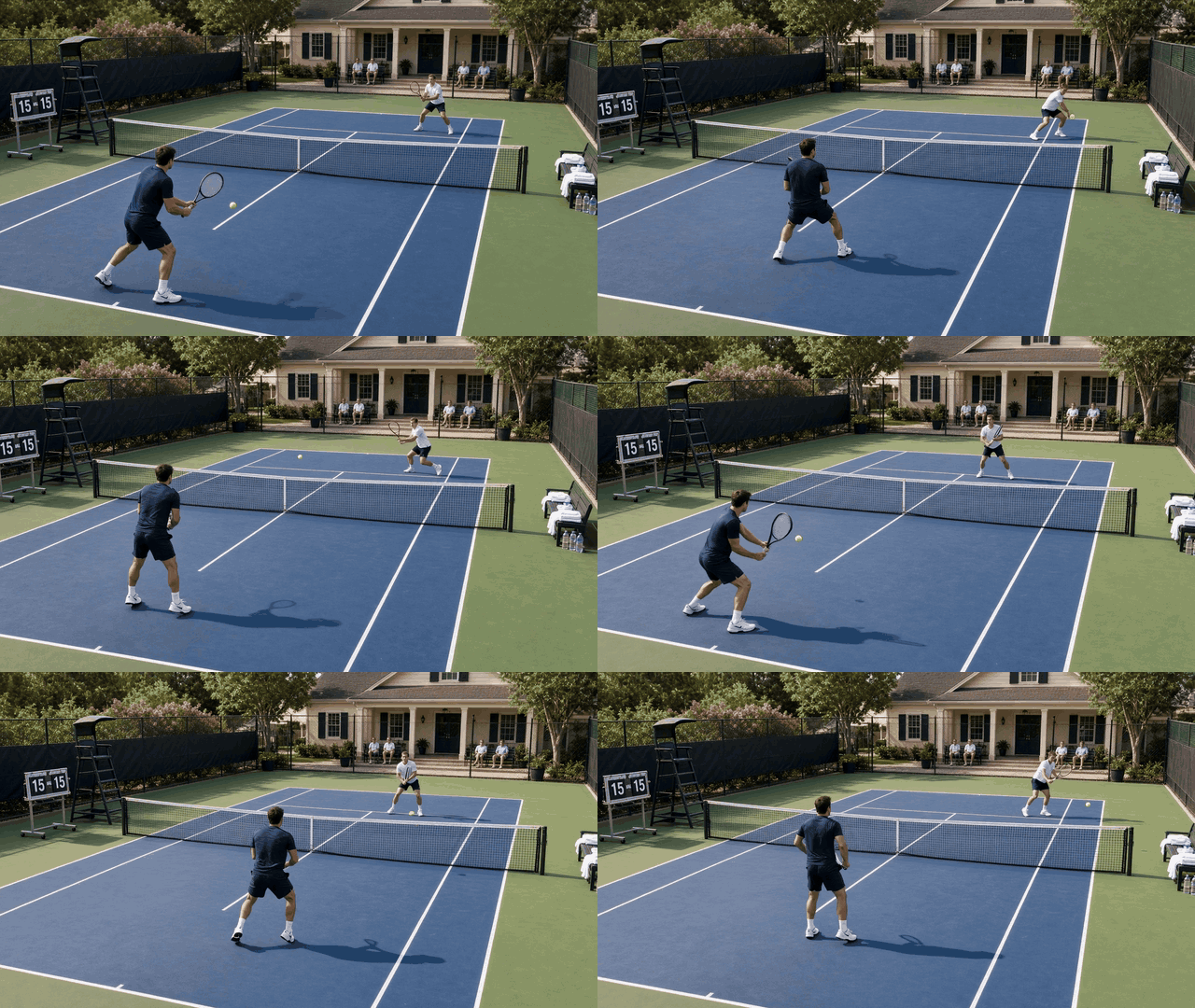
User-supplied tennis clip: two players exchange shots with a courtside scoreboard in view. Review ball continuity in the original MP4 rather than inferring contact from a follow-through.
Skateboarding: Takeoff, Board Control, and Landing
A small flat-ground ollie tests the athlete and equipment as a moving pair. Inspect the setup, takeoff, board leveling, descent, wheel contact, and knee compression. A high jump or dramatic camera move adds little if it hides those relationships.
plaintext1An 8-second photorealistic skateboarding commercial, 16:9. One skilled adult skateboarder wearing a helmet, navy T-shirt, gray trousers, and white skate shoes at a spacious seaside concrete skate plaza. Low sculptural concrete features, coastal grasses, and a distant ocean horizon form an attractive background in warm sunset light. The riding path is smooth, dry, and clear. 2 30–2 seconds: Already rolling in a regular stance, the rider keeps the left foot on the deck and makes two quick pushes with the right foot, then places it over the tail. 42–3 seconds: With both feet on the board, the rider bends the knees and lowers the center of gravity while maintaining forward speed. 53–5 seconds: The rider snaps the tail against the ground, slides the front foot upward, and performs one compact ollie over a painted ground stripe. The board rises and levels beneath the feet without flipping. 65–6 seconds: All four wheels return to the concrete, and the rider bends the knees to absorb the landing. 76–8 seconds: The rider rolls away smoothly into a shallow heel-side carve. 8 9A low, smooth side-tracking camera gradually shifts toward a rear three-quarter view after landing. Keep the full rider, both shoes, entire board, wheels, and ground visible. Realistic gravity, board control, and continuous forward momentum. Normal speed, no slow motion, no cuts, no text, no audio.
Watch whether the feet remain plausibly related to the deck as the board rises and levels. After touchdown, inspect the next movement: the rider should absorb the landing and continue rolling coherently. A single attractive airborne frame cannot establish completion.
Observation status: user-supplied clip embedded below. The original MP4 is retained. This selected example is not a completed three-run baseline, and no benchmark pass rate is assigned.
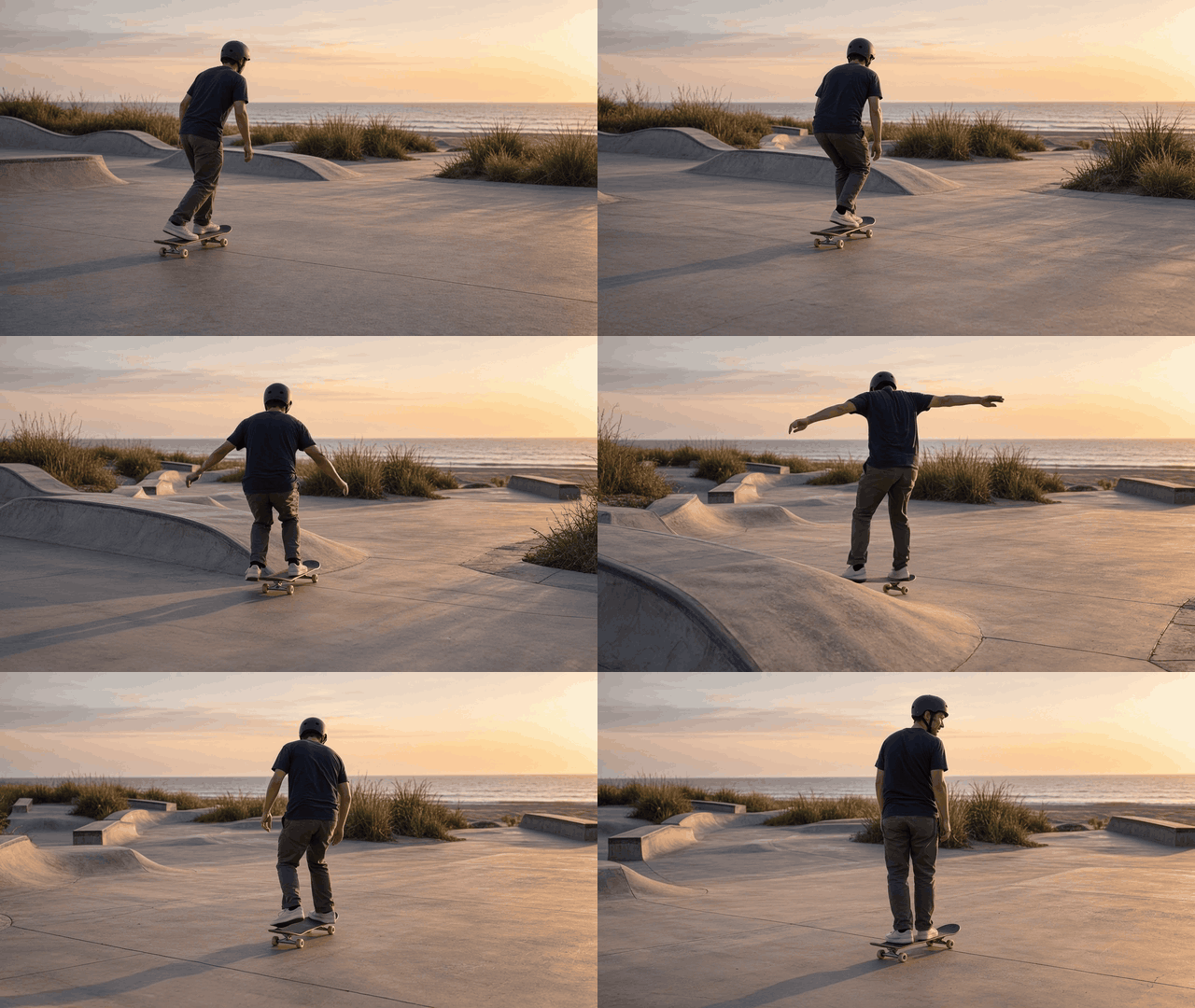
User-supplied skateboarding clip: a seaside approach, ollie, landing, and roll-away. The full clip is retained without cutting out the landing.
Reproduce the Sports Tests on Atlas Cloud
Start with the Seedance 2.5 Flash Text-to-Video playground. Confirm the exact model identity before entering the prompt. Other modes introduce different inputs and would change the experiment.
The settings below apply to new 8-second Seedance 2.5 Flash trials using the four short prompts. The externally sourced comparison in Case 1 has different model labels and is not governed by these settings.
| Setting | Fixed test value |
|---|---|
| Model | Seedance 2.5 Flash |
| Mode | Text-to-video; no reference material |
| Resolution and ratio | 720p; 16:9 |
| Requested duration | 8 seconds |
| Audio | Off |
| Output | Original MP4 |
| Prompt assistance | Disable automatic rewriting if available; otherwise record submitted text |
| Repetitions | 3 completed outputs per unchanged prompt |
| Seed | No fixed seed control verified |
- Choose one of the four 8-second prompts, paste it exactly, and commit the settings above. Turn audio off with the actual control; the words “no audio” in a prompt alone do not verify that parameter.
- Read the displayed quote before running. Record submission time, then wait for a completed output. Download the original file and check its actual dimensions and duration.
- Once that trial works, complete the remaining baseline runs one at a time. Preserve every result, including the first output from each sport.
- Watch each original at normal speed, then inspect neighboring frames around uncertain contacts. Record Pass, Fail, or Inconclusive with one observable reason.
- Save model, submitted prompt, committed settings, completion time, source-file properties, quote, and settled charge together. Use the same naming pattern for all runs.
Measure elapsed time from submission to completion, including queue time. With only 3 samples per sport, report individual durations or a range. Such a small batch cannot establish a general speed advantage over another model.
For each trial, save the entered prompt, committed settings, finished output, and original download together. A public sample is not evidence that a trial was run.
Keep original MP4 files for close inspection. The article's GIFs are convenient silent previews, but conversion can remove temporal detail. Base a disputed contact judgment on the source file and retain the frame timestamps supporting the decision.
Fix Sliding Feet, Missing Balls, and Floaty Landings
Choose the first change from the actual defect. If the decisive region leaves the frame, widen the composition. If the ball visibly teleports while fully in frame, a wider view addresses a different problem. Record what failed before editing anything.
An overloaded action sequence deserves simplification. Keep the central action and enough recovery to assess it. BytePlus warns that packing excessive events into a time interval can lead to cuts or omitted story elements. This supports simplifying the request, without proving that any specific wording repairs sports physics. (BytePlus prompt guide, accessed November 23, 2026)
For an unreadable tennis ball, reduce visual competition and preserve space along its path. For drifting equipment, remove unnecessary moving subjects or occlusions. For a floaty landing, specify wheel contact, knee compression, and continued rolling. Each is a hypothesis to test in a new generation.
If basketball's lowest point is out of frame, replace only the short team-possession prompt's camera paragraph with:
plaintext1Use a wider full-body composition with generous visible court space below the ball throughout the bounce. Use the same stable sideline viewpoint as the team-possession brief. The lowest point of the ball must remain clearly inside the frame.
Seedance 2.5 Flash vs Seedance 2.5: Resolution, Retries, and Cost
Compare specifications before comparing creative results. The Seedance 2.5 lists native 480p, 720p, and 1080p. Its enhanced output options are separate products. Seedance 2.5 Flash's current native ceiling is 720p.
More pixels can make shoes, court markings, and a small ball easier to inspect. They do not guarantee a coherent collision or landing. Submitting a Seedance 2.5 Flash prompt to Seedance 2.5 starts a new generation; expect to review its motion again.
The following facts were checked against the Atlas Cloud model directory and the two detail pages on November 23, 2026. Starting rates do not establish the quote for this guide's exact settings.
| Decision factor | Seedance 2.5 Flash | Seedance 2.5 |
|---|---|---|
| Native output listed | 480p, 720p | 480p, 720p, 1080p |
| Duration listed | 4–30 seconds | 4–30 seconds |
| Displayed starting rate | $0.109/second; directory shows $0.167 struck through and 35% off | $0.134/second |
| Promotion context | Banner says ends November 30; recheck at publication | No equivalent discount verified here |
| 720p, 8-second, audio-off execution quote | Unavailable: access blocked before the form | Not tested |
| Measured sports advantage | Not established | Not tested |
| Practical decision | Evaluate when the brief accepts 720p | Consider when native 1080p is required; review a fresh output |
The 35% label compares Seedance 2.5 Flash's promotional rate with its displayed original rate. It does not mean Seedance 2.5 Flash costs 35% less than Seedance 2.5's current price.
Calculate usable-shot cost as total actual batch spend divided by accepted clips. For example, a hypothetical $12 batch yielding 3 accepted clips costs $4 per accepted clip. Label that calculation as an illustration, separate from measured results.
If a completed batch produces no accepted clips, report “no usable clip obtained in this batch.” Keep blocked or unexecuted batches distinct. Include paid failures in the spending ledger and check refunds before calculating; do not substitute the starting rate for actual charges.
The original automated access check submitted no tasks and incurred no generation charges. Generation charges and elapsed generation times for the subsequently supplied clips were not recorded here, so their usable-shot cost is not measured.
Decide Whether a Sports Clip Is Ready to Publish
Approve against a named use. A concept presentation may need a readable action and mood. A sports brand's social post may also expose shoes, equipment, and contact details to repeated viewing. Agree on those expectations before choosing which outputs count as usable.
For technical instruction, ask someone with relevant sports knowledge to review the movement. Visual plausibility alone cannot establish correct technique. For a real-event context, label generated content clearly so viewers understand that it is a constructed scene.
Review the opening, decisive contact, recovery, and final frame. If the clip will loop, watch the loop boundary too: a sudden reset can undermine an otherwise coherent short. Test the final crop, captions, and delivery encode, since edits may hide the evidence you approved.
Keep the acceptance decision attached to the delivered version. A pass on the landscape original does not automatically transfer to a vertical crop or an export that obscures the ball. Have a reviewer check the final file at its intended viewing size.
Use these Seedance 2.5 Flash sports motion realism checks on one action from your own brief in the Seedance 2.5 Flash playground, then decide whether to keep, revise, or abandon the shot based on visible evidence.
Frequently Asked Questions
Can I turn a landscape sports prompt into a vertical clip?
Change the ratio to 9:16 and generate again, then review the entire action. A narrower composition may lose the feet or ball path. Cropping an existing shot also needs a fresh visibility check; neither route guarantees the same usable motion.
Does using the same prompt reproduce the same motion?
Identical text can produce different outputs. This workflow has not verified a fixed seed control, so retain the original prompt and file for every run. Three repetitions reveal some variability within that batch; they cannot establish a model-wide success rate.
How can I reduce duplicate balls in multiplayer sports clips?
Specify one ball for the whole scene and identify the handler, receiver, and defenders by position or contrasting clothing. Describe one clear possession chain: dribble, release, travel, catch, and shot. Keep the transfer visible. Review the result for overlapping possession or a ball appearing in two places; wording alone cannot guarantee continuity.
Does a Seedance 2.5 sports example prove that Seedance 2.5 Flash will produce the same result?
No. A public clip attributed to Seedance 2.5 illustrates an action to inspect, but it does not measure Seedance 2.5 Flash's behavior. Keep the model, prompt, references, settings, and source file attached to each result. A Seedance 2.5 Flash claim requires a reviewed Seedance 2.5 Flash output rather than a similarly named model's selected showcase.
Why is the longer example a video while the short examples are GIFs?
The 30.12-second reference stays as one playable video with its original audio and a poster. The four short clips are complete silent GIF previews. Keep the source MP4 files for frame-level inspection, and review any disputed contact in the original file because a GIF conversion can remove temporal detail.







