


Move to Seedance 2.5 Flash when your projects need 16-30-second generations, more video or audio references, or a lower estimated unit cost at native 480p or 720p. Keep Seedance 2.0 for established shots and workflows that require its native 1080p or 4K output.
That is the practical answer to Seedance 2.5 Flash vs Seedance 2.0. Seedance 2.5 Flash expands the time and reference budget, but its 720p ceiling makes this a production decision rather than an automatic upgrade. A newer version number does not settle every delivery requirement.
We checked official documentation and the live public model catalog on Atlas Cloud on November 17, 2026. This comparison combines documented specifications and pricing with four user-supplied clips covering rooftop action and reference-guided underwater exploration, plus a migration plan. The clips illustrate two shared briefs; they are not a controlled benchmark of average performance. Here, Seedance 2.0 means the full model, not Seedance 2.0 Fast or Seedance 2.0 Mini.
Key takeaways
- Seedance 2.5 Flash supports 4-30 seconds per generation; Seedance 2.0 supports 4-15 seconds.
- Reference limits rise from 9 images, 3 videos, and 3 audio clips to 10, 5, and 5. Video and audio duration budgets also increase.
- Seedance 2.5 Flash generates natively at 480p or 720p. The full Seedance 2.0 also offers native 1080p and 4K.
- Matched native 720p estimates currently favor Seedance 2.5 Flash by about 18.8% per second. Catalog starting labels alone suggest a different result.
- The advertised roughly 2x speed comparison is against Seedance 2.5, not Seedance 2.0. Test your own turnaround before changing deadlines.
Seedance 2.5 Flash vs Seedance 2.0 at a glance
Start with the requirement your existing workflow cannot meet. If you are repeatedly splitting a longer scene, the duration increase matters. If you already deliver short, approved 1080p clips, changing models can introduce additional review without solving an immediate problem.
The following model limits are documented in the official capabilities table. These are endpoint capabilities, not a promise that every prompt will succeed. (Source: BytePlus Seedance series tutorial, November 2026.)
| Decision factor | Seedance 2.5 Flash | Seedance 2.0, full model | Practical consequence |
|---|---|---|---|
| Requested generation length | 4-30 seconds, or automatic | 4-15 seconds, or automatic | Seedance 2.5 Flash can cover a longer scene in one request. |
| Reference images | Up to 10 | Up to 9 | A small increase for image-heavy projects. |
| Reference videos | Up to 5 | Up to 3 | More separate motion or scene references. |
| Reference audio clips | Up to 5 | Up to 3 | More separate sound or voice references. |
| Combined reference capacity | 20, split 10 + 5 + 5 | 15, split 9 + 3 + 3 | Category limits cannot be exchanged. |
| Total reference-video duration | Up to 30 seconds | Up to 15 seconds | Count seconds as well as files. |
| Total reference-audio duration | Up to 30 seconds | Up to 15 seconds | A longer audio reference can fit. |
| Audio as the only reference modality | Supported | Requires an image or video alongside audio | Seedance 2.5 Flash opens an audio-led input route. |
| Native output resolutions | 480p, 720p | 480p, 720p, 1080p, 4K | Seedance 2.5 Flash does not replace a native high-resolution delivery path. |
| Video editing and extension | Supported | Supported | These are existing capabilities, not entirely new features. |
| Generated synchronized audio | Supported | Supported | Moving to Seedance 2.5 Flash is not necessary merely to add sound. |
| Draft-to-final mode | Not supported | Not supported | Standard Seedance 2.5 has a separate Draft workflow. |
Duration and reference inputs: where the upgrade earns its place
A 30-second limit changes how you plan a scene. A 24-second product sequence can contain an opening action, demonstration, and reaction within one request. Seedance 2.0's 15-second maximum requires a different production approach, such as separate shots or extension. Seedance 2.5 Flash removes that particular limit; it does not guarantee perfect continuity throughout a longer take.
Give the additional time a purpose. For a 24-second brief, allocate time to distinct actions and a clear ending, then check that the result reaches each beat. Asking for 30 seconds because the field permits it increases the amount of footage you must review and potentially regenerate. A 7-second insert may still be the right asset for an edit.
The reference expansion is uneven. Images increase by just one slot. Video and audio each gain two slots, while their respective total duration allowances double. A team relying on several motion references may therefore gain more than a team submitting a single product photograph.
For example, four 5-second motion references exceed Seedance 2.0's three-video count and 15-second total budget. They fit Seedance 2.5 Flash's five-video count and 30-second budget, subject to the remaining file requirements. Conversely, six 3-second videos still exceed Seedance 2.5 Flash's file-count limit even though their combined duration is below 30 seconds.
Treat each reference as an instruction with a specific job: identity, product geometry, camera movement, or audio timing. Extra capacity is useful when those roles are distinct. Several inconsistent references can make the brief harder to interpret. Preserve the reference order and explain which input controls which element before adding more files.
Audio-only reference support also deserves a separate pilot if your creative process begins with music or a voice track. This refers to generating a video from an audio-led input, not producing audio without video. Seedance 2.0 already generates synchronized sound; the difference concerns what must accompany the reference audio.
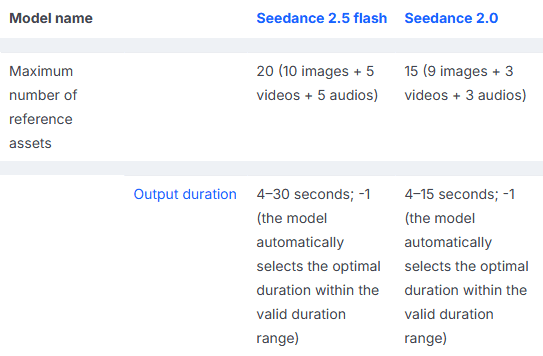
Real BytePlus table excerpts, cropped to the two models: reference capacity above, generated duration below. The separated rows come from the same capabilities table.
Quality: the 720p ceiling matters more than the version number
Separate output resolution from whether the model follows the brief. Resolution determines the available pixel dimensions. Instruction following, identity stability, physical interactions, and scene continuity require viewing the actual generated footage. One figure cannot stand in for all of those checks.
Seedance 2.5 Flash's native output stops at 720p. In a 16:9 landscape clip that is 1280 × 720; native 1080p is 1920 × 1080. If you intend to crop a small product detail out of a wide shot, starting with fewer pixels leaves less room before enlargement. Check the intended crop at delivery size before approving the model choice.
The current full Seedance 2.0 endpoint offers native 1080p and 4K as well as lower resolutions. Do not transfer that claim to Seedance 2.0 Fast or Seedance 2.0 Mini. Likewise, do not confuse an SR enhancement option with a native generation setting. Enlarging a Seedance 2.5 Flash export changes its dimensions but does not make it a native 1080p generation.
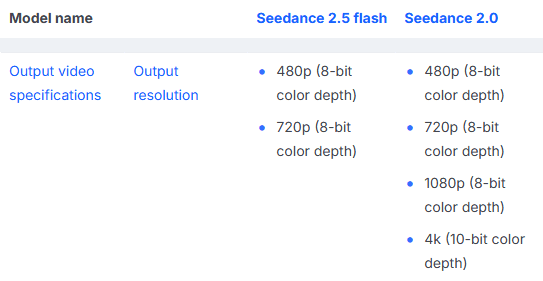
The official resolution row shows Seedance 2.5 Flash's 480p/720p limits beside the full Seedance 2.0 model's additional 1080p/4K options. This documents output specifications, not a visual-quality benchmark.
For quality evaluation, compare a small set of existing production briefs at the same native resolution. Review the whole clip, including hand-object contact, subject entrances, cuts, and the ending. A convincing opening frame can hide a failed action later. Record whether a clip is usable for its intended placement, rather than assigning an unsupported overall quality ranking.
Case A: the same rooftop delivery brief on both models
This brief asks a courier to cross rooftops, pass under a bedsheet, vault a railing, and deliver flowers within ten seconds. It tests whether several connected actions remain readable across changes in viewpoint, including an occlusion and a hand-to-hand exchange.
The two supplied exports were identified by the contributor as Seedance 2.5 Flash and Seedance 2.0. Their file metadata differs: Seedance 2.5 Flash is 1280 × 720 and 10.04 seconds; Seedance 2.0 is 1344 × 768 and 10.13 seconds. Both source video streams are 24 fps. The complete clips are shown below as silent, looping GIFs at a shared display width and 16 fps. These web previews should be used to inspect action and shot interpretation, rather than to rank native detail or infer generation speed and cost.
Shared text prompt
plaintext1A cinematic 10-second rooftop flower delivery in a sunlit Mediterranean coastal town. One athletic female courier wears a cream linen shirt, a burgundy scarf, dark trousers, and a leather crossbody satchel. She carries a small bouquet of yellow flowers. 2 30–3 seconds: A lateral tracking shot follows her sprinting across terracotta rooftops. She plants one foot on a low parapet and jumps across a narrow alley, keeping the bouquet above her shoulder. The camera travels alongside her so the takeoff, airborne arc, and landing remain clearly visible. 4 53–7 seconds: Cut on the landing to a low three-quarter tracking angle. She absorbs the impact, slides under a hanging bedsheet, then vaults a waist-high railing. Her scarf and the sheet respond naturally to her movement; several loose petals trail behind her. 6 77–10 seconds: Cut to a smooth curved tracking shot as she lands on a balcony, takes two quick steps, and hands the bouquet to an elderly woman opening the shutters. Both smile as the camera arcs outward to reveal the sparkling harbor. 8 9Warm morning sunlight, detailed stone and fabric textures, realistic anatomy, consistent clothing and bouquet, physically plausible momentum, crisp readable action at normal speed. No slow motion, titles, logos, or split screen.
Seedance 2.5 Flash

Seedance 2.5 Flash rooftop delivery, supplied as a1. The complete clip is shown as a silent GIF.
Seedance 2.0
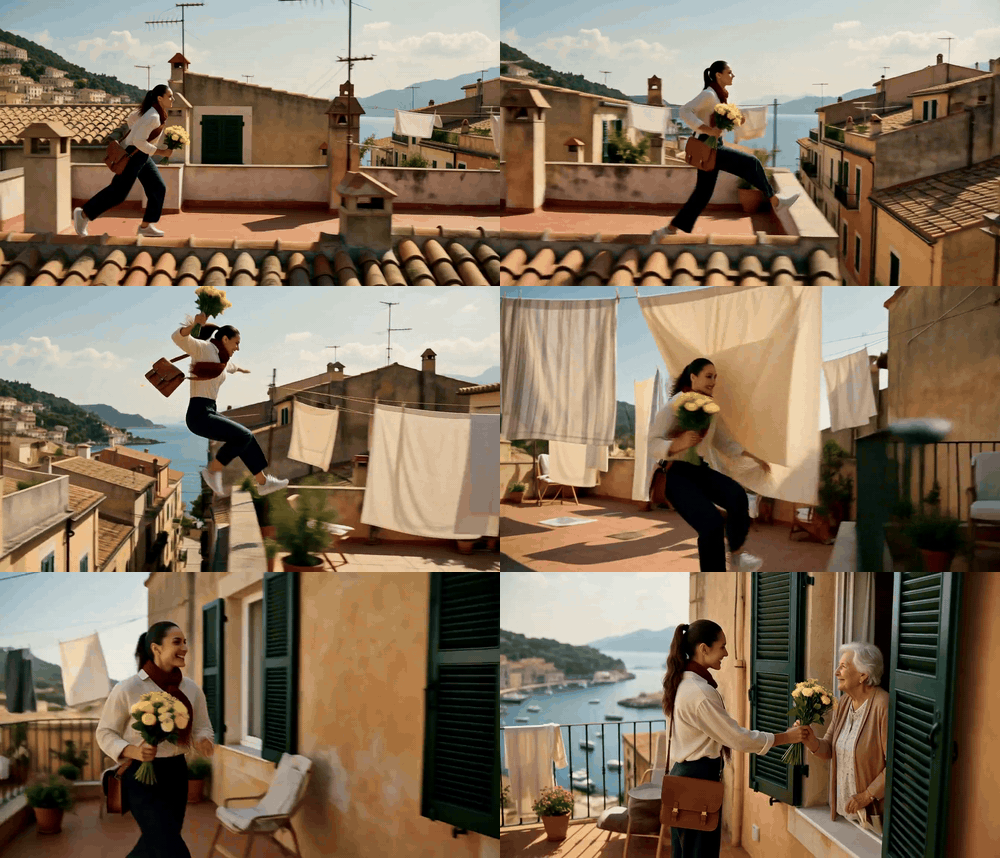
Seedance 2.0 rooftop delivery, supplied as a2. The complete clip is shown as a silent GIF.
Both clips reach the flower handoff and retain the cream shirt, burgundy scarf, satchel, and yellow bouquet across the sequence. They organize the route differently: Seedance 2.5 Flash moves from the rooftop view into a terrace passage and a visible railing vault; Seedance 2.0 holds a lateral rooftop view longer before the terrace and final exchange. The comparison is useful for reviewing which action beats appear and how the cuts connect them. It does not establish an overall winner from one supplied clip per model.
Case B: the same underwater references on both models
The underwater brief adds three visual anchors: a teal-suited diver with yellow equipment, a manta ray with recognizable underside markings, and a submerged stone arcade. It asks the models to keep those subjects recognizable while moving through arches, passing foreground coral, and changing camera angle. The reference set prepared for this brief is shown below.
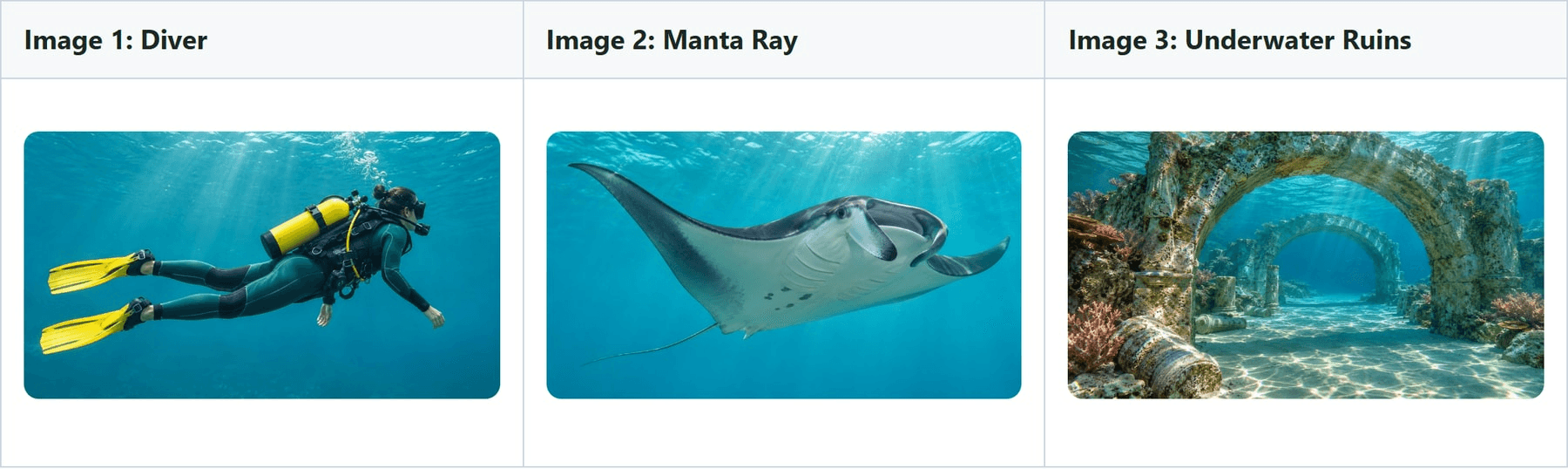 Display thumbnails of the three reference PNGs, in upload order. These are generated production references; the ruins depict a fictional setting.
Shared reference-to-video prompt
plaintext1Create a cinematic 15-second underwater exploration sequence using the supplied references. Preserve the diver's suit, yellow fins, tank, and equipment from @Image 1; the manta ray's proportions and distinctive underside markings from @Image 2; and the submerged stone arches, coral formations, and lighting from @Image 3. 2 30–5 seconds: Begin with a wide descending tracking shot behind and slightly above the diver. The diver swims toward a broad stone arch as a manta ray glides into view from the right. A school of silver fish parts around them. Sunlight forms moving caustics across the ancient stone and the diver's equipment. 4 55–10 seconds: Cut on the diver's forward movement to a lateral tracking shot through two successive arches. The manta banks gently through the first opening; the diver follows below and behind, adjusting body position and making controlled fin strokes to clear the stone. Foreground coral briefly occludes them before revealing both subjects again, still moving in the same direction. 6 710–15 seconds: Cut to a low upward-looking tracking angle as they emerge into open blue water. The manta banks above the diver, clearly revealing its referenced underside markings. The diver rotates slightly to watch it, releases a stream of bubbles, and continues swimming as the camera curves outward into a wide final composition. 8 9Photorealistic underwater cinematography, detailed weathered stone, clear tropical water, soft turquoise gradients, realistic buoyancy and water resistance. Maintain subject identity, spatial continuity, believable scale, and fluid motion across every cut. Normal-speed action, no captions, logos, or split screen.
The contributor confirmed b1 as Seedance 2.5 Flash and b2 as Seedance 2.0. Both supplied video streams are 1280 × 720 at 24 fps, with about 15 seconds of footage. The complete clips are embedded below with their audio retained. The delivery files have been compressed for browser playback; generation times and billed costs were not supplied.
Seedance 2.5 Flash
Seedance 2.5 Flash underwater exploration, supplied as b1. Full video with audio.
Seedance 2.0
Seedance 2.0 underwater exploration, supplied as b2. Full video with audio.
Both clips retain the yellow tank and fins, the stone arches, and a manta ray moving ahead of or above the diver. They differ in staging: Seedance 2.5 Flash ends with a more frontal view of the diver beneath the ray, with the arches still prominent behind them; Seedance 2.0 ends with a closer upward-looking view of the ray and diver against the brighter water surface. The middle passage is useful for checking whether subjects remain distinct when coral crosses the foreground, while the final turn exposes the ray's underside for comparison with Image 2. These observations describe the two supplied takes rather than an average success rate.
Migration can also change an established visual treatment. BytePlus's prompt guide warns that Seedance 2.5 and Seedance 2.0 have different style preferences and discusses using existing footage as an extension reference. Treat that as guidance for a Seedance 2.5 Flash pilot, not a guarantee that it will reproduce a Seedance 2.0 take. Save an approved Seedance 2.0 clip and its prompt as a visual baseline. (Source: BytePlus prompting guide, November 2026.)
Price: why the starting label can point you the wrong way
The phrase “about the same price” needs a defined setting. In the live Atlas model catalog, Seedance 2.5 Flash's text-to-video card displayed a starting label of $0.109/s, while Seedance 2.0 displayed approximately $0.09/s. Reading only those cards makes Seedance 2.5 Flash look more expensive.
The expanded resolution pricing tables gave a different matched comparison. For native 480p and 720p, Seedance 2.5 Flash's displayed estimates were lower. The catalog label and resolution estimate are different public displays; neither should be silently substituted for a final job charge.
| Native text-to-video setting | Seedance 2.5 Flash estimated USD/second | Seedance 2.0 estimated USD/second | Estimated 10-second attempt, Seedance 2.5 Flash / Seedance 2.0 |
|---|---|---|---|
| 480p | $0.0731 | $0.0900 | $0.731 / $0.900 |
| 720p | $0.1572 | $0.1935 | $1.572 / $1.935 |
| 1080p | Not supported | $0.4355 | Not available / $4.355 |
| 4K | Not supported | $0.9722 | Not available / $9.722 |
Pricing snapshot: November 17, 2026. These are token-derived native text-to-video estimates with displayed discounts of 35% for Seedance 2.5 Flash and 20% for Seedance 2.0. SR options and reference-video inputs are excluded. Final charges use actual completion tokens. The Seedance 2.5 Flash banner advertised its promotion through November 30; recheck current terms before budgeting.
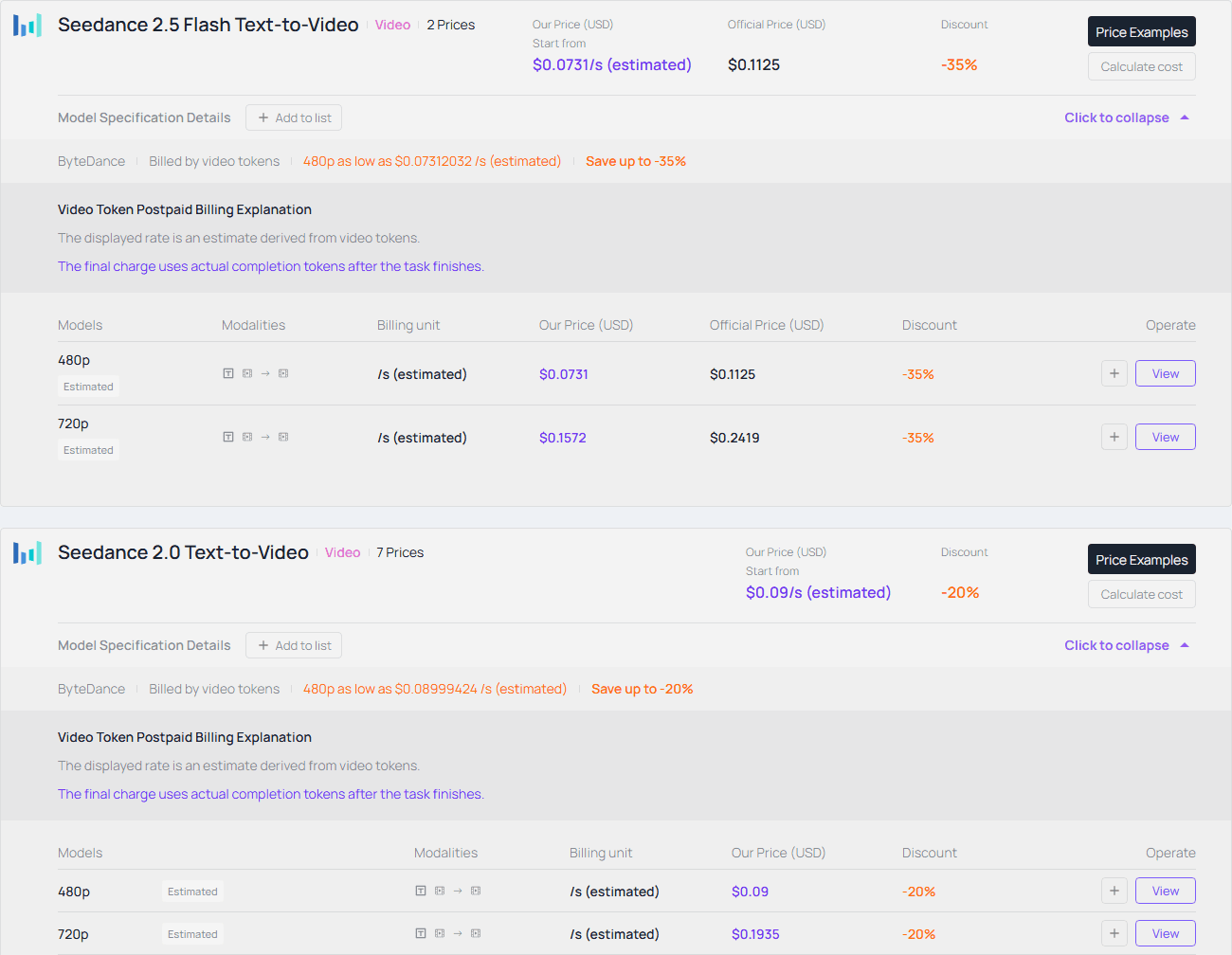
Live pricing excerpts: Seedance 2.5 Flash above, Seedance 2.0 below. The same-resolution rows show why the catalog's starting labels are insufficient; both panels identify the rates as token-derived estimates.
At the displayed native 720p estimates, Seedance 2.5 Flash costs about 18.8% less per second: 1 - 0.1572 / 0.1935. Ten attempts of 10 seconds each would estimate to $15.72 versus $19.35. This is arithmetic from the pricing snapshot, not spending from a generation test.
Longer output still costs more in total. A 30-second Seedance 2.5 Flash attempt at the same displayed rate estimates to $4.716, versus $2.9025 for a 15-second Seedance 2.0 attempt. The first has a lower unit cost and twice the footage. Comparing those totals as if they were equivalent requests would be misleading.
Your useful metric is cost per accepted clip. Suppose an illustrative batch produces 8 accepted clips out of 10 attempts on Seedance 2.0, but only 6 on Seedance 2.5 Flash. The estimates above become about $2.42 versus $2.62 per accepted clip. That reverses the apparent saving. Those acceptance rates are hypothetical; measure yours instead of assuming that a cheaper attempt yields cheaper production.
Reference-video jobs need their own quote because source-video tokens can enter the billing calculation. Keep source length, output length, resolution, and audio settings fixed when comparing. A campaign discount is also temporary, so separate today's rate from the model's long-term workflow value.
You can turn that into a migration threshold. For equally long attempts at these 720p estimates, Seedance 2.5 Flash's acceptance rate must be at least about 81.2% of your Seedance 2.0 acceptance rate to preserve the generation-cost advantage. If Seedance 2.0 delivers an 80% acceptance rate, Seedance 2.5 Flash needs roughly 65% to break even on generation spend. Review time, editing labor, and any enhancement costs sit outside that calculation. Add them before deciding whether the saving matters to the project.
Speed: do not turn “Seedance 2.5 Flash” into an untested deadline
Atlas describes Seedance 2.5 Flash as generating at roughly twice the speed of standard Seedance 2.5. That does not establish a 2x gain over Seedance 2.0. It also does not tell you how long a 30-second reference-heavy request will take in your account's current queue.
Measure the workflow your team actually runs. Separate submission-to-completion time from the time a producer spends reviewing, revising, and assembling the clip. A faster first result may save little if an unfamiliar prompt needs several extra attempts. Conversely, avoiding a second generation and manual stitching can save work even without a large inference-speed difference.
For a pilot, submit several representative matched 720p briefs on both models, with comparable duration and input types. Repeat across more than one batch, record failures, and report median completion time alongside the slowest observed successful run. Keep a separate record for 16-30-second Seedance 2.5 Flash jobs, since Seedance 2.0 cannot provide a matched single-generation baseline at that length.
Keep the existing production deadline until the pilot shows both usable results and reliable turnaround. Seedance 2.5 Flash may be a useful iteration route, but no absolute completion-time promise follows from its name or the supplier's comparison with a different model.
Choose test briefs before looking at the results. Include an ordinary repeatable job and a difficult interaction your team often rejects. Apply the same acceptance checklist to both, and keep unsuccessful attempts in the record. Otherwise, selecting one appealing output from a large batch can make either model appear more dependable than the workflow really is.
How to migrate from Seedance 2.0 without rebuilding everything
Move a category of work first. Short 720p variations and briefs blocked by the 15-second ceiling are sensible pilot candidates. Preserve the existing model route for approved client sequences, native high-resolution masters, and jobs already close to their delivery deadline.
- Save the baseline. Retain the Seedance 2.0 model ID, full prompt, ordered references, duration, resolution, aspect ratio, audio setting, and accepted output. Record actual spend and completion time when available.
- Match the task. Use text-to-video for a text-only brief, image-to-video for a first frame, and Seedance 2.5 Flash reference-to-video for multimodal references, editing, or extension. Recheck the selected endpoint's fields.
- Run a matched pilot. Start with the same 10-second native 720p brief, reference order, and audio choice on both models. Review identity, action completion, continuity, required details, cost per accepted clip, and turnaround.
- Test the new capacity separately. Only after the baseline, try a longer generation or additional references. Changing the prompt, length, resolution, and reference pack together makes the outcome difficult to explain.
- Route by delivery requirement. Keep Seedance 2.5 Flash for categories that pass review at 720p. Retain Seedance 2.0 or evaluate a suitable high-resolution route when native 1080p or 4K is mandatory. Keep a way to return to the old route while prompts are being adjusted.
Editing needs an additional configuration check. BytePlus specifies automatic aspect ratio and duration=-1 for Seedance 2.5 series editing tasks; first-frame tasks also require adaptive aspect ratio. Read the gateway's current schema rather than carrying fixed values from a generic text-to-video request into every task. (Source: BytePlus video task API reference, November 2026.)
For an integrated application, inspect your own form and request validation too. A duration selector capped at 15 seconds or an uploader capped at three videos can hide the new capacity even after you change the model ID. Conversely, a global resolution selector that still offers 1080p can produce an invalid Seedance 2.5 Flash request. Update those controls per model, and check that the submitted values match what the user selected before expanding access to the new route.
Copying a prompt into a different model starts a new generation. It does not preserve the exact camera path, performance, or timing of the accepted Seedance 2.0 take. If a client has approved that specific footage, retain the file and test a reference-based revision before replacing it.
Neither model in this comparison offers standard Seedance 2.5's Draft-to-final workflow. A Seedance 2.5 Flash exploration followed by another model's high-resolution render therefore needs another review; it is not a guaranteed upgrade of the same shot.
For Seedance 2.5 Flash vs Seedance 2.0, the upgrade is worthwhile when the added time or reference flexibility solves a recurring production limit and your deliverable fits 720p. Start with one real brief, keep the accepted Seedance 2.0 output beside it, and make the switch only for the work that benefits.
Frequently Asked Questions
Is Seedance 2.5 Flash cheaper than Seedance 2.0?
The checked native 480p and 720p text-to-video estimates were about 18.8% lower per second after the displayed discounts. That is a dated, matched-setting comparison. Catalog starting labels differ, and reference-video jobs or a change in promotions can change the outcome. Check the quote for your exact request.
Can I move a 1080p Seedance 2.0 workflow directly to Seedance 2.5 Flash?
Only if you accept a different delivery route. Seedance 2.5 Flash generates natively at up to 720p. If your brief requires native 1080p, retain an endpoint that supports it. Upscaling a Seedance 2.5 Flash export does not change its source generation resolution.
Can I reuse my Seedance 2.0 prompts and references?
Use them as the baseline for a new test. Check the endpoint's supported fields, task constraints, and reference order. Similar inputs do not guarantee the same generated take, and you should keep the accepted Seedance 2.0 file until the replacement passes review.
Does Seedance 2.5 Flash give me 20 image references?
No. Its documented reference capacity is 10 images, 5 videos, and 5 audio clips. Unused video or audio slots cannot become extra image slots. File-count limits and total input-duration limits both apply.
Should I move every existing project to Seedance 2.5 Flash?
Begin with new variations or work blocked by Seedance 2.0's duration and reference limits. Keep established approved footage and native high-resolution jobs on their existing route until a relevant pilot justifies changing them. Migration is useful when it removes a production constraint you actually have.




