“What would I look like with gray hair?” sounds like a request for one altered selfie. Online, it can lead to three different moving images: a face aging in seconds, a longer timeline that passes through several ages, or a color change that leaves the face alone. Those are different questions. The first two imagine a future person; the third helps you judge silver hair on the person you are now. Our original video puts two young adults side by side: she grows old while he stays young, and only then does he follow. Keeping them in one frame makes every change easier to judge.
Key takeaways
- The gray-hair question is a broader online topic, covering hair-color previews and imagined future-self videos. No single original video is verified for this exact phrase.
- An aging effect changes skin and facial structure along with the hair. A hair-only edit should preserve the face, haircut, lighting, and background.
- The three online examples below show different visual approaches: a subtle color change, a gradual aging effect, and a dramatic age jump.
- The original 20-second video keeps a young woman and man side by side. She ages first while he stays young; then he ages while her new appearance holds steady.
Three online videos that answer the question differently
Online example 1: a subtle gray-hair reveal
In the first public demo, a woman with dark shoulder-length hair holds a steady pose while scattered gray strands appear, especially near the part and temples. The four-second runtime is enough to show the basic color change without asking the viewer to track a new camera angle or outfit. The visible face changes much less than the hair, so this sample comes closest to a hair-color try-on. Watch whether the eyes, hairline, and original expression remain recognizable through the transition.

Online example, silent GIF. The face stays close to the starting portrait while gray strands emerge.
Online example 2: one continuous old-me transformation
The second public sample starts from a still portrait and lets the subject grow older in one shot. Keeping the camera and pose steady makes the changing hair and skin easy to compare, but it also exposes continuity errors. A strand that changes color abruptly or a jawline that shifts between frames can break the illusion. The lesson for an original video is to hold the person, lighting, and framing steady while changing only the feature you intend to test.

Online example, silent GIF. The fixed framing makes the added age cues visible.
Online example 3: a dramatic age jump
The third sample takes a more theatrical route. A seated woman with red hair rapidly becomes an older, white-haired version in different clothes. It makes the “future self” idea obvious in under three seconds, but it changes so much at once that it cannot answer whether gray hair alone would suit her current face. The outfit change is particularly useful to notice: the effect is a character transformation, not a controlled hair-color comparison.

Online example, silent GIF. The hair, face, and clothing all change; this is an age-jump effect, not a hair-only preview.
The broader gray-hair and aging-video trend has a documented history. An account of the 2023 Aged filter describes split-screen reactions to an older face with gray hair. Reporting on the later Time Travel effect describes a gradual change across years. Those sources describe related effects, but do not identify one original video for this exact gray-hair question. The demos above are contemporary tool-page examples of related visual treatments.
Decide which gray-hair question your video answers
There are two honest ways to frame the result. A future-self story can alter hair, skin, and facial age together. It should be described as a fictional visualization. A hair-only try-on should keep the current face intact while changing the color and perhaps the gray coverage. It can help someone compare looks, though it still cannot predict how their own hair will grow or take dye.
Our original piece chooses the future-self story. A young woman and man sit beside each other in one fixed shot. The woman ages completely first, including her face, hands, and slightly shorter white hair. The man can react and move, but must still look young. Only after she has finished changing does he age. During his transformation, her older appearance stays the same. The unchanged room and clothes let the viewer focus on the two people rather than a changing set.
| Phase | Visible change | What must stay fixed |
|---|---|---|
| Both young | Two adults sit side by side, faces and hands visible | Room, clothes, seating positions, camera |
| Woman ages | Her face and hands age; dark hair becomes slightly shorter and white | The man's age, face, hair, and hands |
| Man ages | His face and hands age; his hair becomes white | The woman's completed older appearance |
| Both older | They share a brief natural glance and settle | Each person's identity, room, clothes, framing |
Make one or two original images and capture one real Atlas result
Start with a clear 16:9 image of two consenting adults, or create two fictional adults. Place the woman on the viewer's left and the man on the right, seated side by side at the same distance from the camera. Show both faces, full hairlines, and both pairs of hands. Keep the background, clothes, light, and framing simple enough to repeat exactly. If you use real people, get their permission before uploading their portraits.
For fictional characters, create the starting frame with this image prompt:
plaintext1Photorealistic horizontal 16:9 medium shot of exactly two fictional young adults, both about 25 years old, seated side by side on one sofa at equal distance from a fixed eye-level camera. Woman on the viewer's left with dark brown shoulder-length hair; man on the viewer's right with short dark hair. Both have youthful faces and hands, no gray hair, and distinct recognizable facial features. The woman's entire face, hairline, and both hands are visible; the man's entire face, hairline, and both hands are visible. Their hands rest naturally on their laps without overlapping. She wears a plain burgundy long-sleeve top; he wears a plain navy long-sleeve top. Simple cream wall and the same sofa behind them, soft even window daylight, realistic skin and individual hair strands, calm natural expressions. Both remain clearly separated inside the frame, with space around their heads and hands for later motion. No third person, no mirror, no text, no logos, no interface, no beauty filter, no wrinkles.
Image 1, before and midpoint comparison. The two downloaded stills are stacked below: both people are young in the upper image, while only the woman is older in the lower image. The exports have slightly different crops, so this is a stage comparison rather than a pixel-aligned edit test. The man remains visibly young in the second stage.
Prompt for the midpoint edit in Seedream 5.0 Pro Edit on Atlas Cloud:
plaintext1Edit the uploaded two-person starting image. Age ONLY the woman on the viewer's left from about 25 to about 75 while preserving her identity. Her dark shoulder-length hair becomes slightly shorter, around chin length, and naturally white. Add believable age to her face and visible hands: fine and deeper lines, natural skin texture, and age-appropriate hand detail. Keep her recognizable. The man on the viewer's right must remain exactly the same young adult: unchanged face, apparent age, hair color, hairline, skin, and hands. Preserve both people's positions, expressions, clothes, fabric colors, sofa, cream wall, daylight, camera angle, framing, and image quality. No change to the man's features, no new person, no extra fingers, no altered clothes, no added objects, no text or logos.
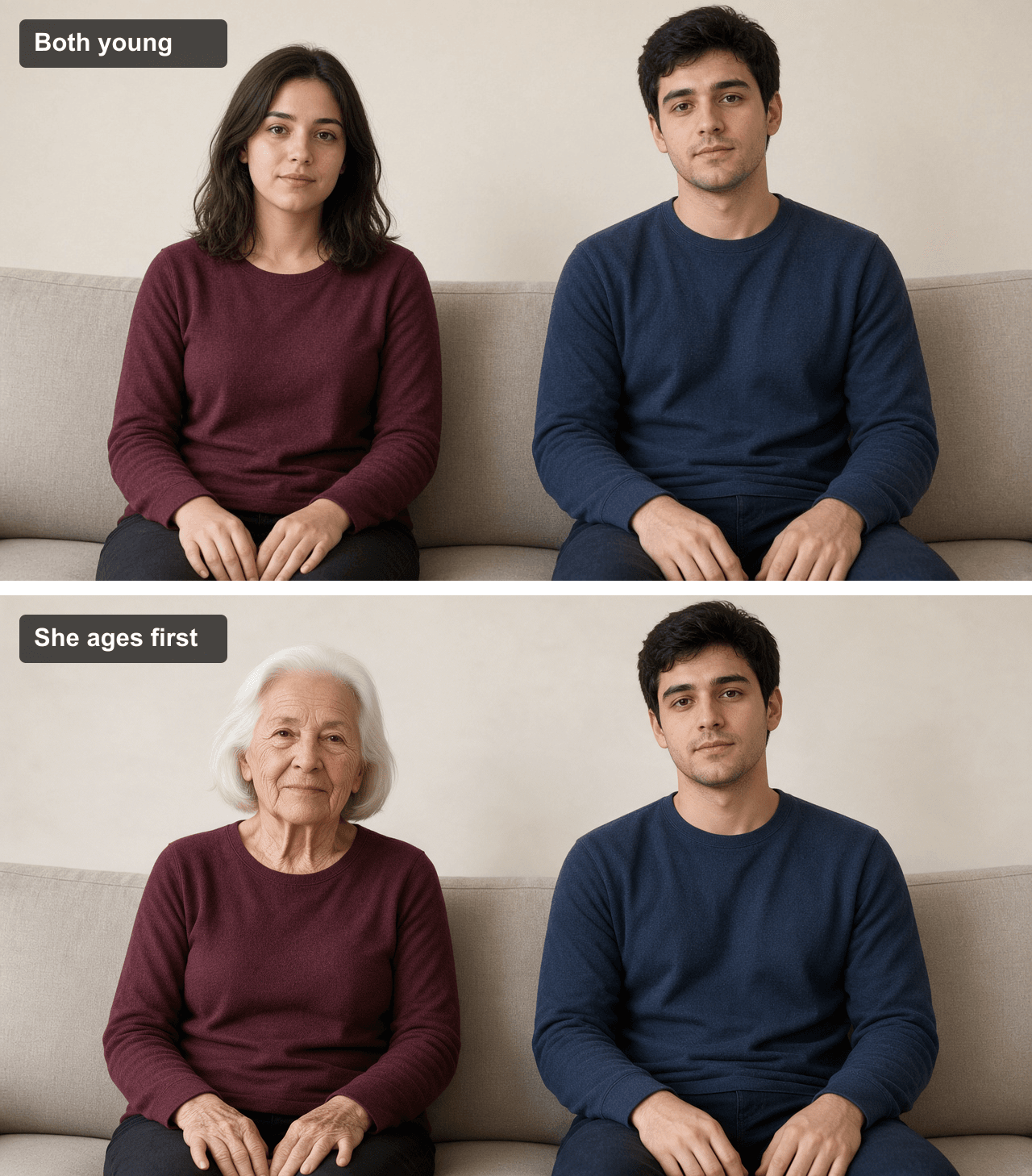
Original two-stage comparison from the supplied young and woman-aged images. The crops differ slightly between the separate renders.
Image 2, both older. The third supplied still shows the endpoint: both people have white hair and aged faces and hands, while their burgundy and navy clothes and the sofa remain. It is a separately generated still, not a frame extracted from the video. If a video tool accepts a last-frame image, a final still like this can guide the endpoint.
Prompt for the optional final still:
plaintext1Edit the same uploaded two-person starting image. Make both adults appear about 75 while preserving each person's identity and their original left-right positions. The woman on the left has a slightly shorter chin-length white hairstyle, a naturally aged face, and naturally aged visible hands. The man on the right has white hair, a naturally aged face, and naturally aged visible hands; keep his original short haircut shape. Both are recognizably the same people as in the source. Keep the exact same burgundy and navy tops, sofa, cream wall, daylight, camera angle, framing, and seating positions. Change only age-related face and hand detail and hair color, plus the woman's slight hair shortening. No new person, no extra limbs or fingers, no outfit or background change, no text or logos.

Original final-state still. Both have aged; the clothing and room stay consistent with the starting image.
Atlas screenshot. The actual playground capture shows the video prompt and three reference thumbnails on the left, with a completed 20-second clip on the right. This is evidence of the video generation screen, not a still-image edit. The screenshot documents the submitted instructions and visible result without recreating the interface.

Real Atlas playground capture. The prompt, selected references, and completed video are visible in one screen.
Original 20-second video: she ages first, then he follows
Use the starting still as the first frame. Atlas Cloud's Seedance 2.5 page describes up to 30 seconds of image-to-video generation; select and verify 20 seconds in the live playground before running. If the tool allows a last frame, use the optional both-older still as that endpoint. The woman-old/man-young image is a midpoint reference, so do not use it as the final frame of the full 20-second clip. If your available duration is shorter, make two complementary sections and join them into one 20-second video, noting that edit in the caption.
| Time | What happens on screen | Review point |
|---|---|---|
| 0-1 s | Both sit young and exchange a quick natural glance | Both match the starting still; no long opening hold |
| 1-10 s | The woman steadily ages as she brushes her hair and turns toward the man | First age signs appear by 2 s; the man can move but stays young |
| 10-11 s | The older woman and young man react to each other | Their age contrast is clear without freezing the action |
| 11-19 s | The man steadily ages as he turns back, moves his hands, and smiles | The woman's older face, hands, and white hair stay unchanged |
| 19-20 s | Both older adults share a natural glance | Identities, clothes, set, light, and framing remain consistent |
Image-to-video prompt for Seedance 2.5 Image-to-Video on Atlas Cloud:
plaintext1Create one 20-second photorealistic horizontal 16:9 video from the supplied starting image. Exactly two people remain seated side by side: the young woman on the viewer's left and the young man on the right. Use one continuous eye-level medium shot from a locked camera. Keep both faces, full hairlines, and all four hands visible. Preserve their identities, positions, burgundy and navy tops, sofa, cream wall, daylight, and framing throughout. No cuts or scene changes. 2 30-1 second: both are about 25, with dark hair and youthful faces and hands. They share one quick glance and begin moving naturally. This youthful opening lasts only about one second. The first visible signs of the woman's aging must appear between 1 and 2 seconds; do not leave both people fully young for 7 or 8 seconds. 4 51-10 seconds: ONLY the woman ages progressively and continuously from about 25 to about 75 across the full nine seconds, with no long pause and no sudden jump. Her dark shoulder-length hair gradually shortens a little to chin length and turns naturally white. Her face gains believable lines, changed facial muscle and skin detail, and her visible hands age too. While the change unfolds, she brushes her hair behind an ear, looks toward the man, shifts her hands on her lap, and gives a small changing expression at normal human speed. She remains recognizable. The man may blink, turn toward her, adjust his hands, and react, but his facial features, apparent age, skin, hands, haircut, and dark hair color remain young and unchanged throughout her transformation. 6 710-11 seconds: show the fully older woman beside the still-young man for only a brief, active moment. They exchange a glance; neither freezes. 8 911-19 seconds: ONLY the man now ages progressively and continuously from about 25 to about 75 across the full eight seconds. His dark hair gradually turns naturally white while retaining its short haircut shape. His face and visible hands gain believable age detail. He turns back toward the woman, lifts and settles one hand, and smiles naturally at ordinary speed. He remains recognizable. The woman's completed older face, white chin-length hair, and aged hands remain visually unchanged, although she blinks, shifts her hands, and reacts naturally. 10 1119-20 seconds: both are older and share a brief natural glance and small smile in the same seats. Their clothes, sofa, wall, lighting, and camera view remain exactly as at the start. 12 13The aging itself should be gradual and readable over each person's entire transformation window, while all body movements and expressions happen at natural real-time speed. Add visible human action every few seconds so the fixed shot never feels static. No slow motion, long young opening, frozen poses, abrupt age jumps, age reversal, flickering hair color, face swap, identity drift, melting skin, duplicate hands or extra fingers, new people, changing clothes, changing background or lighting, zoom, camera movement, captions, text, logos, or watermark. Natural room ambience only.
The finished file runs 20.04 seconds. In the sampled frames, the woman ages first while the man remains young; his face and hair then age in the second half. Her first clear aging appears around the 3–4 second mark, later than the 1–2 second target in the prompt. The movement stays active through glances, head turns, and hand gestures. Both people finish older in the same clothes and room. The poster below comes from an actual late frame of the video.
Original 20-second two-person aging video. She changes first; he follows while the clothes and setting remain the same.
When you publish a realistic generated person, label the video as AI-made. TikTok's creator guidance explains its labeling tools. The three online GIFs are references for the changing image. The original piece should use your own permitted portraits or fictional adults and its own shot design.
FAQ
Is there one original video behind this gray-hair trend?
I could not verify one original post behind that exact phrase. The topic spans gray-hair preview tools and older-face filter videos. Describe each clip by what it shows: a hair-color try-on, an aging effect, or a time-lapse.
Can a gray-hair video tell me how I will age?
No. A future-face effect is a creative visualization. A hair-only preview answers a narrower question about how a color reads on a current face, and even that is an approximation rather than a salon guarantee.
What is the best source photo?
Use a sharp, evenly lit image of two adults seated side by side, with both faces, full hairlines, and all four hands visible. Keep them separated in the frame so each person's age can change without obscuring the other.
Why use a still image, an Atlas screenshot, and a long video?
The first image compares the young start with the woman-old/man-young midpoint; the second shows both older. The real Atlas screenshot shows the prompt, references, and completed output. The video shows the two aging in sequence while their clothes and room remain consistent.vvvvvvv


