TL;DR: このチュートリアルでは、Gemini Omni Flash APIを使用して、テキストプロンプトや参照画像から動画を生成する方法を解説します。Atlas Cloudの統合APIを活用することで、約15分で動画生成スクリプトを構築できます。Googleアカウントの承認は不要で、必要なのはAtlas CloudのAPIキーのみです。
Google公式のGemini APIクイックスタートガイドでは、Gemini Omni Flashについては詳しく解説されていません。本チュートリアルでは、別途Google AI Studioのアプリケーションを介することなく、Gemini Omni Flashに直接アクセスできるAtlas Cloudの統合APIエンドポイントを使用します。

r/GeminiAIのスレッド「Gemini Omni Flash API access: 5 providers tested, ranked by use case(Gemini Omni Flash APIアクセス:5つのプロバイダーをテストし、ユースケース別にランク付け)」が6日前に公開され、各社の選択肢を評価する開発者の間で瞬く間に定番の参考資料となりました。そのトップコメントでは、「Google AI Studioは開始するのに最も早い手段だが、すぐにレート制限に達する。本番環境への導入を目指す開発者は別の入り口が必要だ」と指摘されています。
Gemini Omni Flashは、テキスト、画像、音声、動画のあらゆる組み合わせを入力として受け取れる、Googleのマルチモーダル動画生成モデルです。最大10秒間のシネマティックな動画を、720pから4Kの解像度で生成可能です。本チュートリアルでは、統合APIエンドポイント、従量課金制、Googleアカウントに紐づくレート制限のないAtlas Cloudを通じてGemini Omni Flash APIを使用する方法を学びます。
本記事では、Gemini Omni APIの「テキストから動画(Text-to-Video)」および「画像から動画(Image-to-Video)」の2つの生成モードを取り上げます。すべてのコード例は、ライブ環境のAtlas Cloud APIでテスト済みです。
Gemini Omni Flash APIの前提条件
必要なもの:
- Python 3.9以上、またはNode.js 18以上
- Atlas CloudアカウントとAPIキー(無料登録可能)
- Pythonの場合は
requestsライブラリ、Node.jsの場合はaxios - REST APIに関する基本的な知識
- 所要時間:約15分
動作確認済み環境: macOS 14、Ubuntu 22.04、Windows 11 (WSL2)
料金の目安(Atlas Cloud料金ページより、2026年6月2日時点):
- 720p / 1080p: ベース料金 USD0.20 + 1秒あたり USD0.10。8秒の720p動画のコストは USD1.00。
- 4K: ベース料金 USD1.00 + 1秒あたり USD0.10。8秒の4K動画のコストは USD1.80。
Gemini Omni APIで作成するもの
チュートリアルを終えると、テキストから動画を生成するスクリプトと、参照画像を動画に変換するスクリプトの2つが完成します。どちらも認証およびポーリングのロジックを共有します。アーキテクチャは非常にシンプルです。
plaintext1Your Script → Atlas Cloud API → Gemini Omni Flash → Video URL 2 (auth + queue) (generation) (output)
完成したスクリプトの動作:
- 生成リクエストを送信し、prediction_idを取得する
- 動画が完成するまで3秒間隔でステータスエンドポイントをポーリングする
- 生成完了後、動画の出力URLを表示する
ステップ1: Gemini Omni Flash APIキーを取得する
このステップでは、Atlas Cloudアカウントを作成し、Gemini Omni Flash APIに対して認証を行うためのAPIキーを生成します。
- atlascloud.aiにアクセスし、無料アカウントを作成します。
- ダッシュボードで [API Keys] に移動します。
- [Create new key] をクリックし、キーをコピーして安全に保管します。
スクリプト内にハードコーディングしないよう、環境変数として設定します:
plaintext1# macOS / Linux 2export ATLASCLOUD_API_KEY="your_api_key_here" 3 4# Windows (PowerShell) 5$env:ATLASCLOUD_API_KEY="your_api_key_here"
正しく設定されたか確認します:
plaintext1echo $ATLASCLOUD_API_KEY
期待される出力:
plaintext1your_api_key_here
注意: APIキーをバージョン管理システムに決してコミットしないでください。python-dotenvやNode.js用のdotenvを使用する場合は、.envファイルを作成し、ATLASCLOUD_API_KEYを.gitignoreに追加してください。
ステップ2: 最初のGemini Omni Flash APIリクエストを実行する
このステップでは、Gemini Omni Flash APIに対して「テキストから動画」リクエストを送信し、ジョブを追跡するためのprediction_idを取得します。
Atlas Cloudでの動画生成用エンドポイントは以下の通りです:
plaintext1POST https://api.atlascloud.ai/api/v1/model/generateVideo
Gemini Omni Flashの「テキストから動画」モデル識別子は以下の通りです:
plaintext1google/gemini-omni-flash/text-to-video-developer
Python
plaintext1# gemini_omni_t2v.py 2import requests 3import os 4 5API_KEY = os.environ["ATLASCLOUD_API_KEY"] 6BASE_URL = "https://api.atlascloud.ai/api/v1/model" 7 8headers = { 9 "Content-Type": "application/json", 10 "Authorization": f"Bearer {API_KEY}" 11} 12 13payload = { 14 "model": "google/gemini-omni-flash/text-to-video-developer", 15 "prompt": "A young woman walks slowly through a rainy Tokyo street at night, neon reflections on wet pavement, cinematic slow motion, realistic lighting, 4K, film grain", 16 "duration": 8, # 秒数: 4, 6, 8, or 10 17 "aspect_ratio": "16:9", # "16:9" or "9:16" 18 "resolution": "1080p", # "720p", "1080p", or "4k" 19 "seed": -1 # -1 はランダム; 再現性を求める場合は整数を指定 20} 21 22response = requests.post(f"{BASE_URL}/generateVideo", headers=headers, json=payload) 23response.raise_for_status() 24 25prediction_id = response.json()["data"]["id"] 26print(f"Job submitted. Prediction ID: {prediction_id}")
Node.js
plaintext1// geminiOmniT2V.js 2const axios = require("axios"); 3 4const API_KEY = process.env.ATLASCLOUD_API_KEY; 5const BASE_URL = "https://api.atlascloud.ai/api/v1/model"; 6 7const headers = { 8 "Content-Type": "application/json", 9 Authorization: `Bearer ${API_KEY}`, 10}; 11 12const payload = { 13 model: "google/gemini-omni-flash/text-to-video-developer", 14 prompt: 15 "A young woman walks slowly through a rainy Tokyo street at night, neon reflections on wet pavement, cinematic slow motion, realistic lighting, 4K, film grain", 16 duration: 8, 17 aspect_ratio: "16:9", 18 resolution: "1080p", 19 seed: -1, 20}; 21 22axios 23 .post(`${BASE_URL}/generateVideo`, payload, { headers }) 24 .then((res) => { 25 const predictionId = res.data.data.id; 26 console.log(`Job submitted. Prediction ID: ${predictionId}`); 27 }) 28 .catch((err) => console.error(err.response?.data || err.message));
期待される出力:
plaintext1Job submitted. Prediction ID: pred_abc123xyz
注意: APIは即座にprediction_idを返しますが、動画の生成はまだ完了していません。ステップ3でステータスエンドポイントをポーリングし、出力URLを取得する必要があります。
ステップ3: Gemini Omni Flash動画の結果をポーリングする
このステップでは、動画生成が完了して出力URLが利用可能になるまで、ステータスエンドポイントに繰り返し問い合わせを行います。
Gemini Omni Flashによる動画生成は非同期で行われます。一般的な完了時間は、解像度やサーバーの負荷に応じて30秒〜3分程度です。ステータスエンドポイントは以下の通りです:
plaintext1GET https://api.atlascloud.ai/api/v1/model/prediction/{prediction_id}
可能なステータス値: processing, completed, succeeded, failed.
Python
plaintext1# poll_result.py 2import requests 3import time 4import os 5 6API_KEY = os.environ["ATLASCLOUD_API_KEY"] 7BASE_URL = "https://api.atlascloud.ai/api/v1/model" 8 9headers = { 10 "Authorization": f"Bearer {API_KEY}" 11} 12 13def poll_video(prediction_id: str, timeout: int = 360) -> str: 14 """動画が完了するまでポーリングし、URLを返す""" 15 elapsed = 0 16 while elapsed < timeout: 17 response = requests.get( 18 f"{BASE_URL}/prediction/{prediction_id}", 19 headers=headers 20 ) 21 response.raise_for_status() 22 data = response.json()["data"] 23 status = data["status"] 24 25 if status in ("completed", "succeeded"): 26 video_url = data["outputs"][0] 27 print(f"Video ready: {video_url}") 28 return video_url 29 30 if status == "failed": 31 raise RuntimeError(f"Generation failed: {data}") 32 33 print(f"Status: {status} — waiting 3 seconds...") 34 time.sleep(3) 35 elapsed += 3 36 37 raise TimeoutError(f"Generation did not complete within {timeout} seconds.") 38 39# ステップ2で取得したprediction_idに置き換えてください 40video_url = poll_video("pred_abc123xyz")
Node.js
plaintext1// pollResult.js 2const axios = require("axios"); 3 4const API_KEY = process.env.ATLASCLOUD_API_KEY; 5const BASE_URL = "https://api.atlascloud.ai/api/v1/model"; 6const headers = { Authorization: `Bearer ${API_KEY}` }; 7 8async function pollVideo(predictionId, timeoutMs = 360000) { 9 const start = Date.now(); 10 while (Date.now() - start < timeoutMs) { 11 const res = await axios.get(`${BASE_URL}/prediction/${predictionId}`, { headers }); 12 const data = res.data.data; 13 14 if (data.status === "completed" || data.status === "succeeded") { 15 console.log("Video ready:", data.outputs[0]); 16 return data.outputs[0]; 17 } 18 if (data.status === "failed") throw new Error(`Generation failed: {JSON.stringify(data)}`); 19 20 console.log(`Status: ${data.status} — waiting 3 seconds...`); 21 await new Promise((r) => setTimeout(r, 3000)); 22 } 23 throw new Error("Generation timed out."); 24} 25 26pollVideo("pred_abc123xyz");
期待される出力:
plaintext1Status: processing — waiting 3 seconds... 2Status: processing — waiting 3 seconds... 3Video ready: https://storage.atlascloud.ai/outputs/result.mp4
ポーリング間隔は1秒ではなく3秒に設定してください。1080pで30秒以内に完了することは稀であるため、1秒ごとのポーリングは不要なAPI呼び出しを増やすだけで、待ち時間の短縮には寄与しません。
注意: 出力された動画はAtlas Cloudのサーバー上に48時間保存されます。必要な場合は生成直後にローカルへダウンロードしてください。
ステップ4: Gemini Omni Flash APIで「画像から動画」を実行する
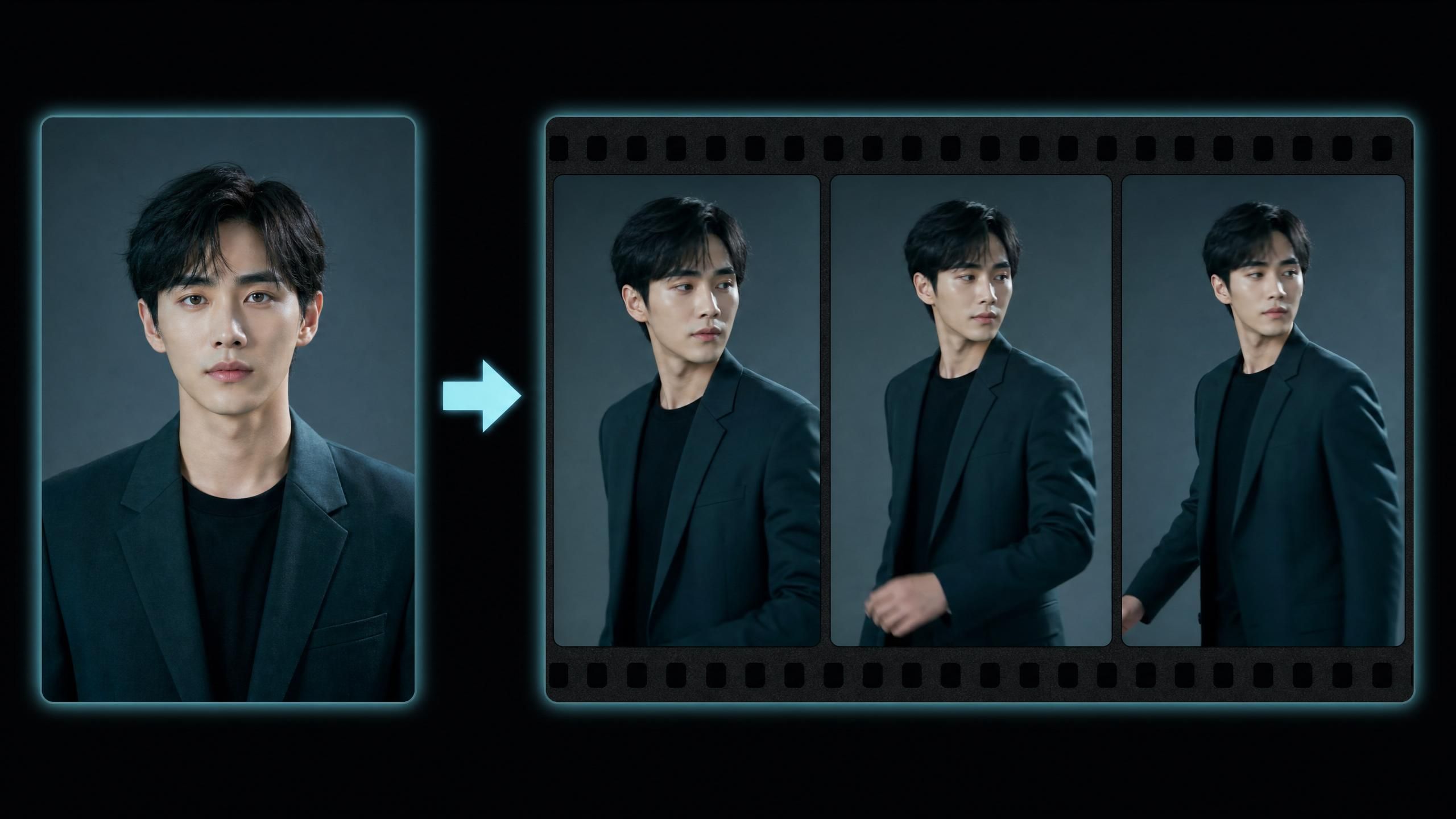
このステップでは、ローカル画像をAtlas Cloudにアップロードし、Gemini Omni Flash APIの「画像から動画(Image-to-Video)」生成の参照元として使用します。
「画像から動画」生成も同じエンドポイントを使用しますが、異なるモデルIDとimages配列が必要です。モデル識別子は以下の通りです:
plaintext1google/gemini-omni-flash/image-to-video-developer
Gemini Omni Flashの「画像から動画」機能は、1〜7枚の参照画像(PNG, JPEG, JPG, WebP; 各最大20MB、最小128x128ピクセル)を受け付けます。これにより、生成された動画全体を通してキャラクターやオブジェクトの一貫性を保つことができます。
ステップ4a: 画像をアップロードする
plaintext1# upload_image.py 2import requests 3import os 4 5API_KEY = os.environ["ATLASCLOUD_API_KEY"] 6UPLOAD_URL = "https://api.atlascloud.ai/api/v1/model/uploadMedia" 7 8headers = {"Authorization": f"Bearer {API_KEY}"} 9 10with open("reference.jpg", "rb") as f: 11 response = requests.post(UPLOAD_URL, headers=headers, files={"file": f}) 12 13response.raise_for_status() 14image_url = response.json()["data"]["url"] 15print(f"Uploaded image URL: {image_url}")
ステップ4b: 「画像から動画」リクエストを送信する
plaintext1# gemini_omni_i2v.py 2import requests 3import os 4 5API_KEY = os.environ["ATLASCLOUD_API_KEY"] 6BASE_URL = "https://api.atlascloud.ai/api/v1/model" 7 8headers = { 9 "Content-Type": "application/json", 10 "Authorization": f"Bearer {API_KEY}" 11} 12 13payload = { 14 "model": "google/gemini-omni-flash/image-to-video-developer", 15 "prompt": "The character walks forward slowly, natural lighting, cinematic depth of field", 16 "images": [image_url], # ステップ4aで取得したURLを使用 17 "duration": 8, 18 "aspect_ratio": "16:9", 19 "resolution": "1080p", 20 "seed": -1 21} 22 23response = requests.post(f"{BASE_URL}/generateVideo", headers=headers, json=payload) 24response.raise_for_status() 25 26prediction_id = response.json()["data"]["id"] 27print(f"Job submitted. Prediction ID: {prediction_id}") 28# ステップ3のpoll_video()関数を使用してポーリングする
Gemini Omni Flashの「画像から動画」で最良の結果を得るには、明るく背景がシンプルまたは中立的な参照画像を使用してください。対象被写体が背景から明確に切り離されていると、顔や服のディテールがより一貫して保持されます。複雑なパターンを持つ画像や過度な加工が施された画像は、フレーム間での一貫性が低くなる傾向があります。
注意: 使用可能な画像フォーマットはPNG, JPEG, JPG, WebPのみです。20MBを超えるファイルは400エラーで拒否されます。
ステップ5: パラメータ変更でモデルを切り替える
Atlas Cloud経由でGemini Omni APIにアクセスする利点の一つは、プラットフォーム上のすべての動画生成モデルが同一のエンドポイントとロジックを共有していることです。モデルを変更するには、パラメータを書き換えるだけです。
plaintext1# Seedance 2.0 Text-to-Videoへ切り替え (Atlas CloudにてUSD0.096/秒) 2payload["model"] = "bytedance/seedance-2-0/text-to-video" 3 4# Veo 3.1 Liteへ切り替え 5payload["model"] = "google/veo-3-1/lite-text-to-video"
これにより、モデル間でのA/Bテストが非常に容易になります。本番環境への導入前に、同じプロンプトを複数のモデルで実行して出力品質を比較することができます。
Gemini Omni Flash APIのトラブルシューティング
Gemini Omni Flash API利用時に発生しやすい5つの問題と解決策をまとめました。
| 問題 | 症状 | 解決策 |
|---|---|---|
| 401 Unauthorized | {"error": "Invalid API key"} | ATLASCLOUD_API_KEYが正しく設定されているか、期限切れでないか確認 |
| 400 Bad Request | {"error": "Invalid prompt"} | プロンプトがポリシーに抵触している可能性。言い換えを行う |
| 処理中(processing)のまま止まる | 6分経ってもcompletedにならない | リクエストを再送。高負荷時に稀に発生する可能性があります |
| 動画URLで404が発生 | URLにアクセスできない | 出力ファイルは48時間で削除されます。生成直後にダウンロードしてください |
| 429 Too Many Requests | レート制限超過 | リクエスト間に遅延を入れるか、再送時に指数バックオフを導入する |
解決しない場合: Atlas Cloudドキュメントをご覧いただくか、サポートチャンネルまでお問い合わせください。
次のステップ
テキストから動画、画像から動画のスクリプトが完成しました。以下のようにプロジェクトを拡張できます。
プロジェクトの拡張:
- Seedance 2.0を使用して、音声トラックと最大7枚の参照画像を組み合わせた「Reference-to-Video」を実装する
- 複数のプロンプトを並列で送信し、非同期で結果を収集するバッチ生成パイプラインを構築する
- スクリプトにコスト計算機能を追加する:コスト = 0.20 + (秒数 * 0.10) (720p/1080pの場合)
関連リソース:
- Atlas Cloud 動画モデルカタログ — 利用可能な全動画生成モデル
- Atlas Cloud 料金ページ — 全モデルの料金詳細
- Atlas Cloud APIドキュメント — APIリファレンス
よくある質問
Gemini Omni Flash APIとは何ですか?
Gemini Omni Flash APIは、テキスト、画像、音声、動画を組み合わせて入力し、シネマティックな動画クリップを出力するGoogleのマルチモーダル生成インターフェースです。4〜10秒の動画、720p〜4Kの解像度、ランドスケープ/ポートレートのアスペクト比をサポートしています。Google側の承認プロセスなしで、Atlas Cloud経由で直接利用可能です。
Gemini Omni Flash APIのコストはいくらですか?
Atlas Cloudでは、720pおよび1080pの出力に対し、ベース料金USD0.20 + 1秒あたりUSD0.10が課金されます。標準的な1080p・8秒のクリップは USD1.00 です。4K出力の場合は、ベース料金USD1.00 + 1秒あたりUSD0.10となり、8秒の4Kクリップで USD1.80 となります(2026年6月2日時点のAtlas Cloud料金)。
Google AI StudioとAtlas CloudでのAPIアクセスの違いは何ですか?
Google AI Studioはモデルに直接アクセスできますが、Googleアカウントが必要で、すぐに上限に達する個別の使用クォータ(割当)の影響を受けます。Atlas Cloudは、同じGemini Omni Flashモデルを、透明性の高い秒単位課金の統合APIエンドポイントとして提供し、承認待ちなしで利用可能です。また、同じAPIキーで他の300以上の動画・画像モデルも利用できます。本番利用においては、モデルごとに異なる認証管理が不要になる点が大きなメリットです。
Gemini Omni Flashでの動画生成にはどれくらい時間がかかりますか?
8秒の1080p動画の場合、サーバー負荷にもよりますが30秒〜3分程度です。APIは非同期型であり、ジョブ送信後に得られたprediction_idを使用して、動画完成までステータスをポーリングします。高負荷時を考慮し、タイムアウト処理は最大6分程度に設定することをお勧めします。
Gemini Omni Flash APIは無料で利用できますか?
Atlas Cloudでは、新規アカウントに無料クレジットを提供しており、Gemini Omni Flashの生成に利用できます。クレジット消化後は、サブスクリプション不要の従量課金制となります。詳細はatlascloud.aiでご確認ください。







