
 A Atlas Cloud agora é revendedora autorizada nos EUA do Dreamina Seedance 2.5 e do Seedream 5.0 Pro.A Atlas Cloud agora é revendedora autorizada nos EUA do Dreamina Seedance 2.5 e do Seedream 5.0 Pro.
Gemini Omni é a família de modelos de vídeo nativamente multimodais da Google DeepMind para criação e edição orientadas por prompts. Gere vídeos a partir de texto, anime imagens estáticas ou revise vídeos existentes com referências visuais opcionais, preservando o conteúdo não alterado. Controles flexíveis de resolução, proporção e duração oferecem suporte a diversos fluxos de produção. A Atlas Cloud unifica o acesso com preços transparentes conforme o uso. Comece a criar hoje.
Gemini Omni Flash foi desenvolvido pela Google. A Atlas Cloud (operada pela Atlas Cloud AI LLC) fornece acesso ao modelo, mas não é sua proprietária. Todas as marcas registradas pertencem aos seus respectivos titulares.
O Atlas Cloud oferece os modelos criativos mais avançados e inovadores do setor.
Compare as rotas de entrada do Gemini Omni, os recursos de saída e os usos em produção dos seven endpoints de vídeo especializados.
| Modalidade | Descrição |
|---|---|
| Gemini Omni Flash R2V API (Reference To Video) | Combine um prompt de texto com one to five imagens de referência para gerar um vídeo cinematográfico com som nativo. A consistência de objetos, cenas e estilos torna este endpoint adequado para sequências de marca, personagens recorrentes e narrativas visuais coordenadas. |
| Gemini Omni Flash I2V API (Image To Video) | Começando com uma imagem estática e um prompt de texto, este endpoint cria um vídeo cinematográfico com som, preservando o objeto e a composição da fonte. É adequado para animação de produtos, movimento em retratos e desenvolvimento de conceitos visuais. |
| Gemini Omni Flash Video Edit API | Envie um vídeo existente, uma instrução de texto e imagens de referência opcionais para aplicar alterações consistentes com a cena e áudio nativo. Como as imagens não alteradas permanecem preservadas, os editores podem fazer revisões pontuais sem reconstruir toda a cena. |
| Gemini Omni Flash T2V API (Text To Video) | Um simples prompt de texto se transforma em um vídeo cinematográfico com áudio nativo sincronizado e movimento baseado na física do mundo real. Sua geração controlável e de alta velocidade oferece suporte à visualização de conceitos, ao desenvolvimento de histórias e à prototipagem rápida de vídeos. |
| Gemini Omni Flash R2V Developer API | Para transformações orientadas, combine um clipe de vídeo existente com imagens de referência e prompts de texto. O endpoint oferece suporte à transferência de estilo de vídeo, à edição de cenas e à inserção de personagens em aplicações criativas que geram variações direcionadas a partir de imagens fornecidas. |
| Gemini Omni Flash I2V Developer API | Até seven imagens de referência podem orientar um vídeo baseado em prompt de texto, preservando a identidade visual em todo o resultado. Escolha esta rota para personagens recorrentes, imagens consistentes de produtos ou assets coesos em uma campanha. |
| Gemini Omni Flash T2V Developer API | Escolha um prompt de texto junto com a resolução, a proporção e a duração necessárias para produzir um vídeo cinematográfico controlável. Configurações de saída flexíveis ajudam desenvolvedores a criar conteúdo específico para cada plataforma, automatizar fluxos de geração e testar várias direções criativas. |
Cada solicitação à API Gemini Omni Flash pode receber qualquer combinação de texto, imagem, vídeo e áudio, gerar som sincronizado, modelar a física do mundo real e aperfeiçoar o resultado por meio de conversa.
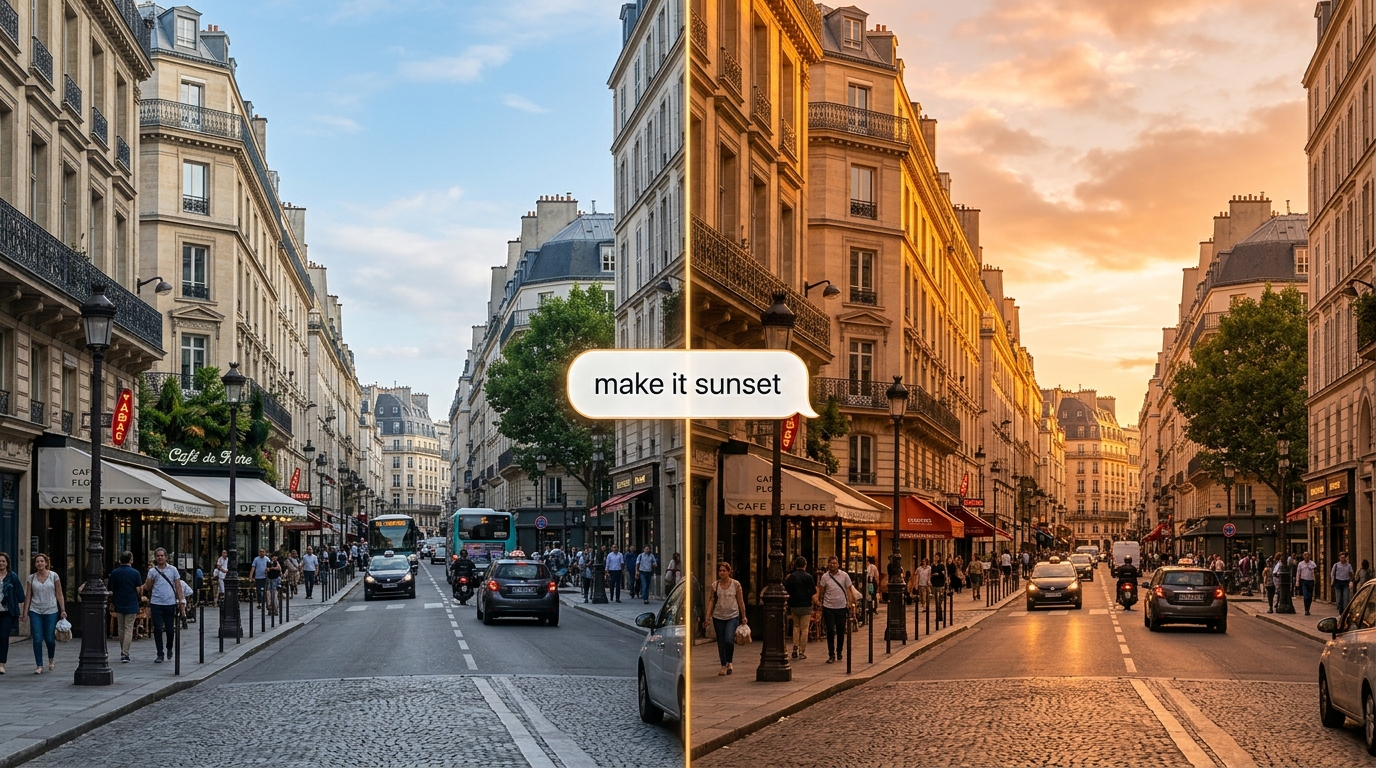
Aperfeiçoe um clipe usando linguagem natural, e a API Gemini Omni Flash aplicará a alteração preservando o restante da cena. A Interactions API mantém o estado e se lembra de cada turno, permitindo que as edições sejam construídas umas sobre as outras.
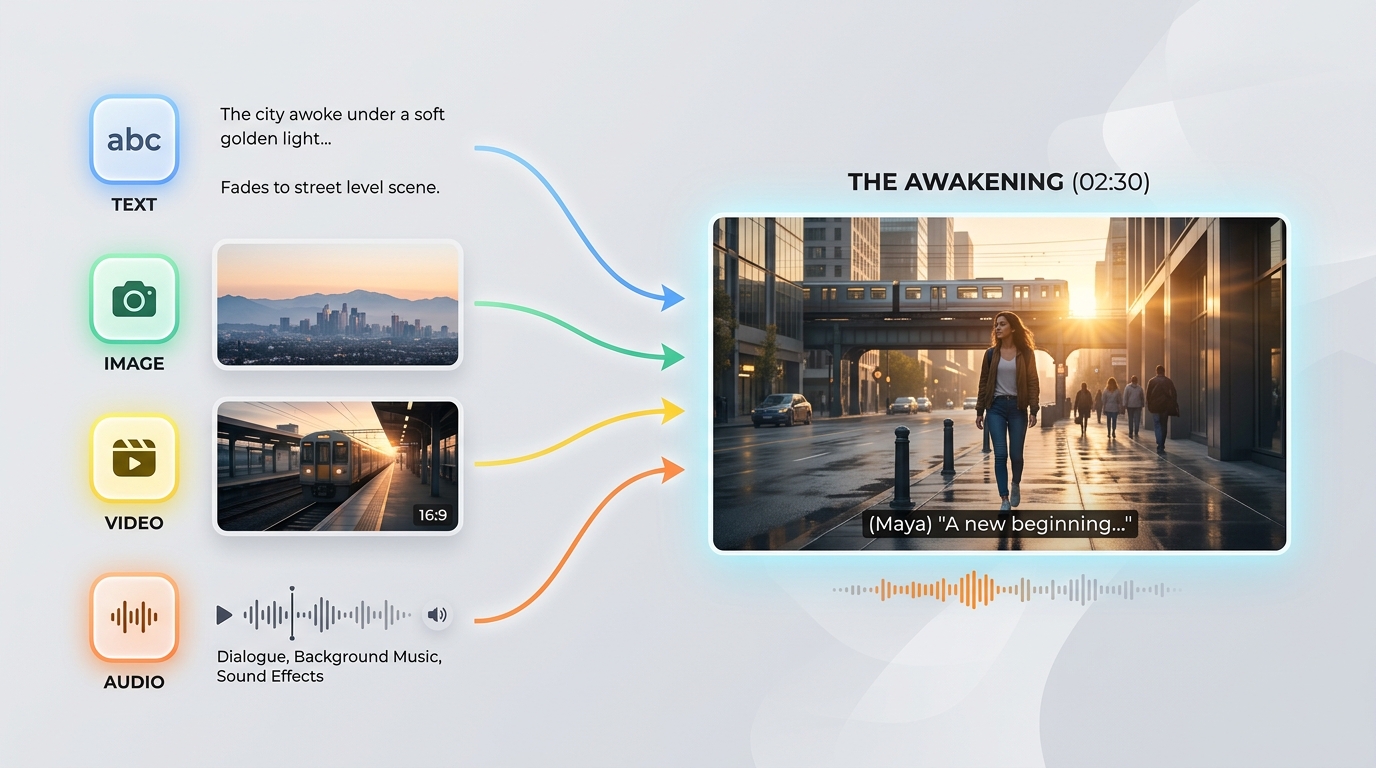
A API Gemini Omni Flash aceita qualquer combinação de texto, imagem, vídeo e áudio em um único prompt. Essa entrada de qualquer origem permite iniciar uma geração a partir de qualquer material de origem que você já tenha.
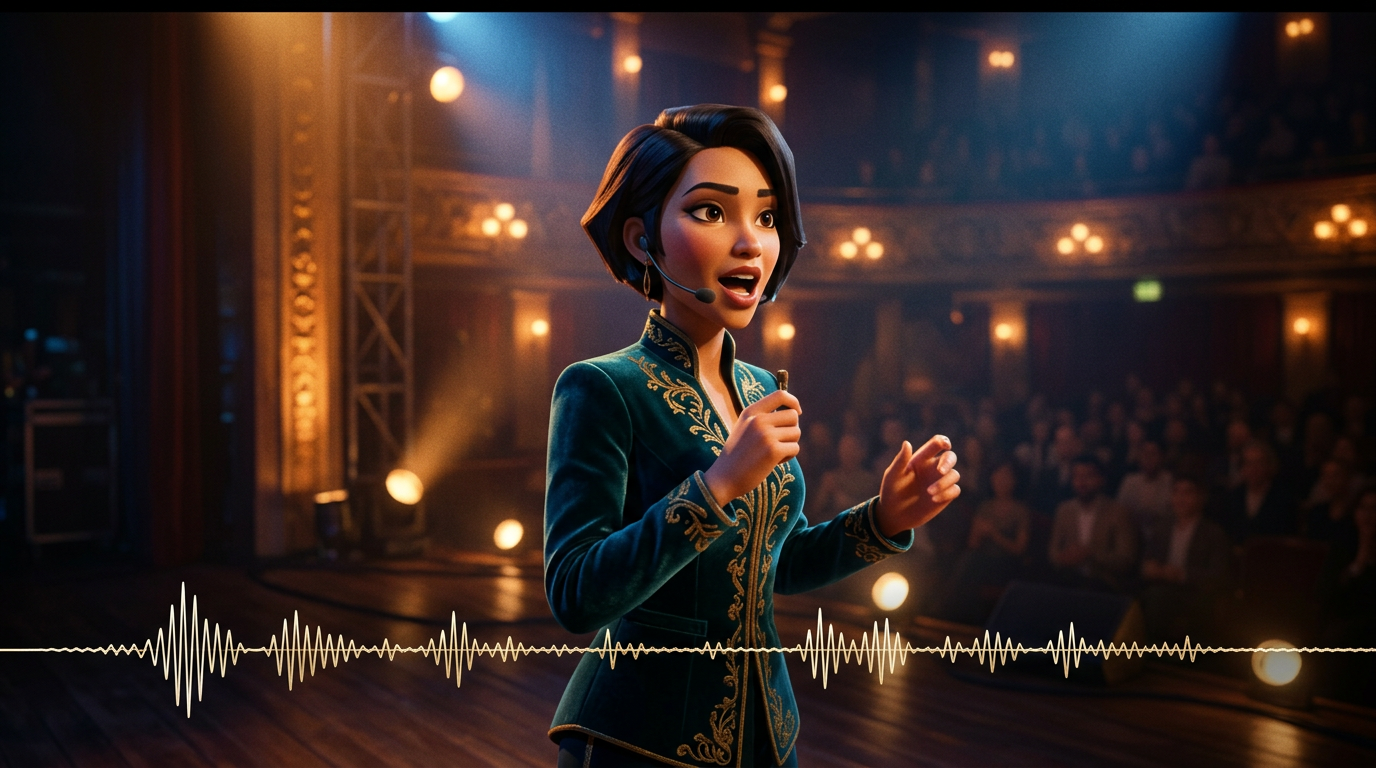
O som é gerado junto com a imagem em uma única passagem de inferência, mantendo diálogos, efeitos e ambiência sincronizados com a ação. A API Gemini Omni Flash não precisa de uma etapa de áudio separada posteriormente.

Baseada em um modelo da física do mundo real, a API Gemini Omni Flash renderiza reflexos, gravidade, iluminação e condições climáticas convincentes. As cenas permanecem visualmente coerentes, sem se transformar em artefatos, mesmo em tomadas dinâmicas.
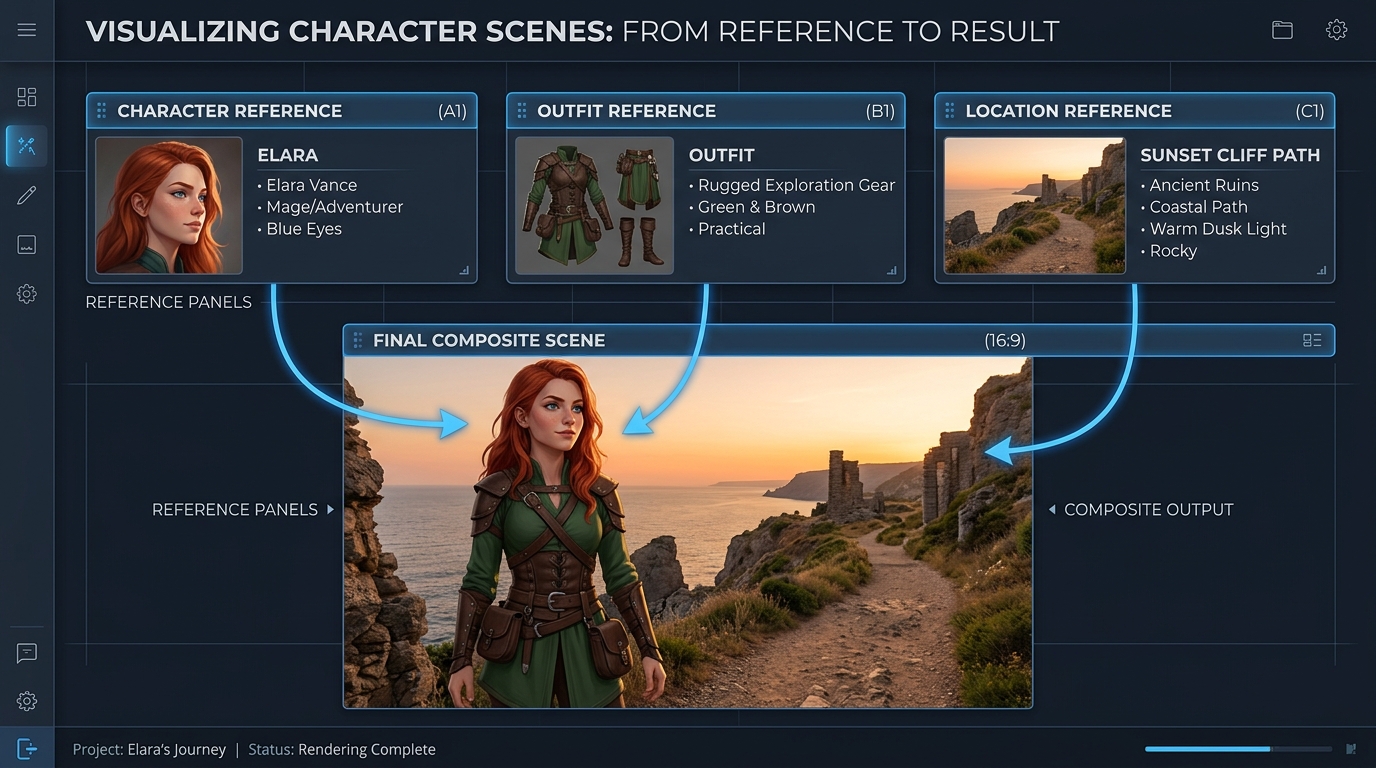
Oriente uma geração com até sete imagens de referência e três clipes de vídeo curtos, e a API Gemini Omni Flash manterá consistentes os sujeitos, o estilo e a cena. Isso preserva a identidade entre edições e tomadas.
O mesmo prompt, gerado pelo Gemini Omni e por outros modelos de vídeo líderes: múltiplas cenas e filme comercial de alto nível
Gere um vídeo contínuo de 3 cenas: Cena 1: A mulher está sob luzes de neon em uma rua chuvosa de Tóquio. Reflexos no chão molhado, profundidade de campo cinematográfica, movimento de câmera na mão. Cena 2: A câmera faz uma transição lenta para um plano mais fechado. Ela fala suavemente em sincronia com a voz fornecida, com os movimentos dos lábios perfeitamente sincronizados. O trânsito ao fundo continua sem interrupções. Cena 3: Ela entra em uma estação de metrô. O ambiente permanece consistente em iluminação, clima e atmosfera. A câmera a acompanha por trás, mantendo a consistência da identidade. Restrições: - Mantenha a identidade facial idêntica em todas as cenas - Preserve a continuidade da iluminação (chuva, reflexos de neon) - Garanta realismo físico (interação com a chuva, superfícies molhadas) - Garanta a sincronização audiovisual com a entrada de voz - Não reinicie a cena durante as transições; mantenha um estado de mundo contínuo Estilo: realismo cinematográfico de alto nível, granulação de filme, lente anamórfica, profundidade de campo reduzida, aparência de filme em 4K
Gemini Omni
Wan 2.7
Kling v3.0
Gere um vídeo contínuo de 4 cenas: Cena 1: Um pequeno robô branco está imóvel sobre uma escrivaninha de madeira, em um apartamento pouco iluminado à meia-noite. A luz da lua entra pela janela. Os olhos do robô se acendem lentamente, e um leve zumbido mecânico começa. Cena 2: O robô desce cuidadosamente da escrivaninha. Seus pequenos pés metálicos produzem suaves sons de cliques no piso de madeira. A câmera o acompanha em um ângulo baixo, mantendo consistentes o tamanho e a forma do robô. Cena 3: O robô entra na cozinha. Os reflexos na porta da geladeira e no piso de azulejos respondem naturalmente aos seus movimentos. A mesma luz da lua e a atmosfera noturna silenciosa continuam da cena anterior. Cena 4: O robô para perto de uma janela e olha para as luzes da cidade do lado de fora. A câmera se aproxima lentamente por trás, preservando a identidade, o material, a escala, a iluminação e a continuidade sonora do robô. Requisitos: - Mantenha exatamente o mesmo design do robô em todas as cenas - Preserve uma única configuração contínua do apartamento, sem reiniciar as cenas - Mantenha a iluminação consistente de um cômodo para outro - Sincronize os passos e o zumbido mecânico com os movimentos do robô - Use reflexos, sombras e interações entre objetos fisicamente realistas - Faça transições suaves entre as cenas, como se um único mundo contínuo estivesse sendo filmado Estilo: realismo cinematográfico, atmosfera sci-fi silenciosa, luz suave da lua, materiais detalhados, movimento de câmera realista, profundidade de campo reduzida, aparência de filme comercial de alto nível
Gemini Omni
Kling V3.0
Pixverse v6
Gemini Omni conduz a produção de campanhas, a revisão conversacional, a pré-visualização, a aprendizagem visual, a continuidade da marca e as ferramentas integradas para criadores em fluxos de edição de texto, imagem, referência e vídeo com áudio nativo sincronizado.

Anime uma imagem estática de produto aprovada, transformando-a em movimento cinematográfico enquanto preserva o objeto e a composição. As equipes de marketing podem produzir teasers de lançamento, anúncios para redes sociais e revelações de produtos refinadas com áudio nativo sincronizado.

Descreva uma alteração específica, e o Gemini Omni editará a filmagem existente mantendo intacto o conteúdo não alterado. Os editores podem criar tratamentos alternativos, variantes localizadas e revisões para clientes sem reconstruir uma cena aprovada.

Oriente a geração com imagens de referência para manter produtos, personagens e estilo visual consistentes ao longo de um clipe. Os estúdios podem desenvolver ativos de campanha coordenados, universos de marca recorrentes e conteúdos episódicos reconhecíveis em diferentes canais.

Comece com um prompt de texto e gere vídeos cinematográficos com áudio sincronizado e movimentos fundamentados na física do mundo real. Diretores e designers podem explorar momentos da história, ideias de câmera e formatos específicos para cada plataforma antes da produção.

Transforme conceitos abstratos em explicações visuais curtas descrevendo a cena, a ação e a sequência de aprendizagem pretendida. As equipes de educação podem criar demonstrações científicas, tutoriais de processos e módulos de treinamento com som nativo.

Combine geração de texto, animação de imagens estáticas, criação orientada por referências e edição de vídeo em uma única integração com o Gemini Omni. As plataformas para criadores podem oferecer ferramentas de produção conectadas sem montar pipelines visuais e de áudio separados.
Compare os modelos de vídeo baseados em referência da API Gemini Omni, incluindo o Gemini Omni 1.1 Flash, com as principais alternativas quanto às entradas compatíveis, à capacidade de referência, à geração de áudio e ao preço padrão.
| Modelo | Entradas aceitas | Capacidade de referência | Geração de áudio | Preço padrão | Standard Base Price |
|---|---|---|---|---|---|
| Gemini Omni 1.1 Flash Reference-to-Video | Text, source video, reference images | Conversational additions, removals, replacements, and restyling | 360p, 720p, upscaled 1080p, upscaled 4K | Native synchronized audio | $0.041 |
| Gemini Omni Flash Reference-to-Video | Text, source video, up to 5 reference images | Scene-consistent edits that preserve untouched footage | 720p | Native audio editing | $0.14 |
| Seedance 2.0 Reference-to-Video | Text, source video, up to 5 reference images | Instruction-guided video changes with visual references | 720p, 1080p | Automatic audio or original audio retention | $0.14 |
| Wan-2.7 Reference-to-video | Text, source video, reference images, optional driving audio | Style transfer, scene changes, and element replacement | 720p, 1080p | Original audio retention, regeneration, or driving audio | $0.10 |
Comece em minutos — siga estes passos simples para integrar e implantar modelos pela plataforma da Atlas Cloud.
Cadastre-se em atlascloud.ai e conclua a verificação. Novos usuários recebem créditos gratuitos para explorar a plataforma e testar modelos.
Combine modelos avançados de Gemini Omni Flash com a plataforma acelerada por GPU do Atlas Cloud, fornecendo desempenho, escalabilidade e experiência de desenvolvimento incomparáveis.
Baixa Latência:
Inferência otimizada por GPU para respostas em tempo real.
API Unificada:
Uma única integração para acessar Gemini Omni Flash, GPT, Gemini e DeepSeek.
Preços Transparentes:
Faturamento por Token, suporta modo Serverless.
Experiência do Desenvolvedor:
SDK, análise de dados, ferramentas de ajuste fino e modelos tudo em um.
Confiabilidade:
99.99% de disponibilidade, controle de permissões RBAC, logs de conformidade.
Segurança e Conformidade:
Certificação SOC 2 Type II, conformidade HIPAA, soberania de dados nos EUA.
A Gemini Omni API oferece aos desenvolvedores acesso, por meio da Atlas Cloud, à família de geração e edição de vídeo nativamente multimodal do Google DeepMind. Dependendo do endpoint selecionado, ela pode gerar vídeos a partir de texto ou imagens, usar mídias de referência, editar vídeos existentes e produzir áudio nativo sincronizado.
A Gemini Omni 1.1 Flash adiciona extensão de vídeo, interpolação do primeiro e do último quadro, resoluções de saída de 360p a 4K e orientação expandida por referências. Sua variante de extensão adiciona de 3 a 10 segundos por solicitação e pode ser encadeada para criar um vídeo coerente de até 40 segundos.
Crie uma conta na Atlas Cloud, mantenha sua chave de API no servidor e selecione o endpoint do modelo que corresponde ao seu fluxo de trabalho. A Atlas Cloud fornece uma única chave compatível com OpenAI, enquanto o esquema publicado de cada endpoint define o prompt, as entradas de mídia e as configurações de geração obrigatórios.
Escolha text to video ao começar com um prompt, image to video ao animar uma imagem estática ou reference to video quando a identidade e a orientação de estilo forem importantes. Use video edit para modificar vídeos existentes e o endpoint Gemini Omni 1.1 Flash video extend para continuar uma cena.
Os limites de referência variam conforme o endpoint e a versão do modelo. O Gemini Omni 1.1 Flash Reference to Video aceita até 10 imagens de referência e 3 clipes de vídeo de referência, enquanto endpoints anteriores têm limites diferentes. Por isso, verifique o esquema do endpoint selecionado antes de enviar as mídias.
A Gemini Omni 1.1 Flash é compatível com saídas de 3 a 10 segundos a 24 FPS, com opções de resolução de 360p, 720p, 1080p ampliada e 4K ampliada. As proporções compatíveis são 16:9 e 9:16, embora os controles disponíveis possam variar conforme o endpoint da Atlas Cloud.
Sim. A variante video edit segue instruções de texto para adicionar, remover, substituir ou alterar o estilo de elementos, preservando as partes do vídeo que não forem mencionadas no prompt. Para alterações iterativas, use instruções objetivas e o contexto de interação compatível com o fluxo de trabalho selecionado.
Para continuar uma cena, forneça um clipe existente ao endpoint Gemini Omni 1.1 Flash video extend e solicite de 3 a 10 segundos adicionais. As extensões podem ser encadeadas até um total de 40 segundos, enquanto a variante image to video pode interpolar entre o primeiro e o último quadro fornecidos.
O preço padrão da Atlas Cloud para a Gemini Omni 1.1 Flash é de $0.041 por segundo para text to video, reference to video, edição de vídeo e extensão de vídeo, enquanto image to video custa $0.043 por segundo. Os endpoints Gemini Omni Flash anteriores começam em $0.112 por segundo, com cobrança baseada no uso e sem necessidade de assinatura.
Todo vídeo gerado inclui uma marca-d'água invisível SynthID, que pode ser detectada programaticamente. Filtros de segurança se aplicam tanto aos prompts quanto às saídas geradas, enquanto o tempo de processamento varia conforme a duração, a resolução e a carga do serviço. Os controles dedicados de negative prompt, system instruction, temperature, top_p e stop sequence não são compatíveis; portanto, inclua as exclusões no prompt principal.
A API do Seedance 2.5 já está disponível no Atlas Cloud! Ela oferece aos desenvolvedores o mais novo modelo de vídeo da ByteDance. Ele gera até 30 segundos de vídeo nativo em uma única passagem a partir de texto, uma única imagem ou até 50 referências multimodais, com áudio sincronizado e texto multilíngue no quadro. No Atlas Cloud, você o acessa por meio de uma única chave, com consistência de sujeito e física aprimorada mantendo a coerência em tomadas longas.

A API Wan 3.0 é a próxima geração da família de vídeos Wan da Alibaba, desenvolvida para elevar a geração de formato longo, o controle de múltiplas referências e a qualidade audiovisual a novos patamares. O Atlas Cloud já hospeda o Wan 2.7, 2.6 e 2.5, e o Wan 3.0 funciona com a mesma chave unificada, sem necessidade de configuração separada. Comece a construir hoje mesmo. Role a tela para baixo até a vitrine para ver o que o Wan 3.0 pode criar.
MiniMax H3 é a família de vídeo multimodal da MiniMax para criação guiada por texto, imagem e referências. Nas rotas compatíveis, preserva os elementos das mídias de referência, oferece proporções flexíveis e combina som gerado com elementos visuais por meio do H3 Developer, com perfis de saída selecionados por endpoint. O Atlas Cloud unifica a família com uma única chave compatível com a OpenAI e preços transparentes de pagamento conforme o uso, a partir da tarifa padrão de $0.038 por segundo. Comece a criar hoje.
A família gpt-image-2.5 da OpenAI oferece aos desenvolvedores a opção entre Flare e Sunburst para fluxos de trabalho de imagens em produção. Renderize em resoluções arbitrárias de até 3840x2160 e escolha entre cinco níveis de qualidade, incluindo xhigh e max, para atender a requisitos específicos de saída. A Atlas Cloud oferece inferência REST pronta para uso, sem cold starts, com preços padrão a partir de US$ 0,004 por geração. Comece a criar hoje.
A API do Seedream 5.0 Pro fornece aos desenvolvedores o modelo de edição de imagens controlável da ByteDance no Atlas Cloud. Ela posiciona as edições com precisão usando âncoras e coordenadas, separa as imagens em camadas editáveis, funde múltiplas referências e combina cores e materiais exatos, com texto multilíngue em 2K e 3K. No Atlas Cloud, você pode acessá-lo por meio de uma única chave!
Seedance 2.0 é o modelo de vídeo para produção da ByteDance, desenvolvido para a criação precisa de planos. Transforme prompts em vídeo, anime uma imagem do primeiro quadro com orientação opcional do último quadro ou defina os resultados com mídia de referência e pesquisa opcional na web. O Atlas Cloud reúne esses fluxos de trabalho em uma única API, com preços transparentes conforme o uso e uma única chave compatível com OpenAI. Comece a desenvolver hoje.
A Kling 3.0 API leva a suíte de vídeo principal da Kuaishou para a Atlas Cloud através de uma chave compatível com OpenAI. Ela abrange dois modelos: Kling 3.0 para narrativa AI Director, sincronização labial multilíngue e texto preciso na tela, e Kling 3.0 Omni (O3) para clonagem de sujeito e voz a partir de um vídeo curto ou imagem. Ambos geram áudio nativo na mesma passagem, com saída de até 4K. Crie narrativas cinematográficas, marketing global, anúncios multilíngues e conteúdo de personagens em série em uma infraestrutura confiável.
Grok Imagine Video dá aos desenvolvedores acesso à família de modelos de vídeo da xAI para criar, animar, estender e editar clipes. Gere vídeos de 1 a 15 segundos a partir de prompts, oriente pessoas, objetos ou estilos com até sete imagens de referência e trabalhe em 480p ou 720p. A Atlas Cloud reúne esses recursos por meio de endpoints compatíveis com a OpenAI, com preços transparentes conforme o uso. Comece a desenvolver hoje.
O Vidu Q4 é o mais recente modelo de vídeo topo de linha da Vidu, desenvolvido para geração de imagem para vídeo e referência para vídeo. Ele pode animar uma única imagem estática e criar transições automáticas de cena, oferecendo aos desenvolvedores dois caminhos de entrada para diferentes fluxos de trabalho de produtos. A Atlas Cloud fornece endpoints de API dedicados com esquemas de parâmetros publicados pelo preço padrão verificado de $0.04 por segundo. Comece a desenvolver hoje.
Gemini Omni 1.1 Flash é a família de vídeos nativamente multimodal do Google DeepMind, criada para fluxos de produção flexíveis. Edite filmagens existentes por meio de instruções de texto, mantenha a consistência visual com até 10 imagens de referência e 3 clipes de vídeo ou estenda uma tomada em segmentos encadeáveis de até 40 segundos. Acesse todos os fluxos de trabalho no Atlas Cloud com uma única chave de API compatível com a OpenAI, preços conforme o uso e disponibilidade desde o Dia 0. Comece a desenvolver hoje.
Nano Banana 2.1 é a família de modelos de imagem do Google baseada no Gemini 3.6 Flash. Oferece geração e edição de nível Pro com a velocidade do Flash, permite edições em linguagem natural e combinações entre 1 e 14 imagens de entrada, além de manter a consistência de até 4 personagens e 10 objetos. Por meio do Atlas Cloud, os desenvolvedores podem acessar a família com uma única chave compatível com OpenAI, disponibilidade confiável e disponibilidade desde o Dia 0. Comece a criar hoje.
Construa com a API Nano Banana 2, desenvolvida com o modelo Gemini 3.1 Flash Image do Google. Ele gera imagens em 4K nativo de até 4096x2304 com renderização de texto precisa e personagens consistentes em até 14 imagens de referência para geração e edição. No Atlas Cloud, você pode acessá-lo por meio de uma API unificada junto com mais de 300 modelos, com preços a partir de US$ 0,04 por imagem, 99,99% de tempo de atividade e créditos gratuitos para começar.
Guias, tutoriais e novidades de produto para você aproveitar ao máximo a Atlas Cloud.



