Your grandmother's photo came back looking incredible. Then the receipt arrived, $9.99, seven days after the last one.
That receipt is where the hunt for a Remini alternative usually starts. The app did the job. The job was one photo, and the plan renews weekly whether you open the app again or not.
Here is a number worth pinning down before you compare anything. Remini's own site describes its Image Enlarger as upscaling "up to 2x," which is the same factor a free browser tool runs on a picture that never leaves your machine. So the honest question is not which tool is more powerful. It is which parts of Remini you actually use.

Key Takeaways
- Remini's own homepage caps its Image Enlarger at 2x, the same factor thefree AI image upscalerruns on a file you never upload.
- Remini bills weekly through the app stores and its Android listing declares ads. The browser tool has no plan, no meter and no watermark on the download.
- Face enhancement and colour repair stay Remini's ground. The free alternative rebuilds resolution, and a separate cloud model handles dust, scratches and noise.
- The free tool takes a long edge of 384 pixels and returns up to 768, which sizes it for avatars, thumbnails and tight crops.
- Bigger files and factors up to 4x move to the hosted upscaler, one image per request, callable from your own code.
Why People Look for a Remini Alternative
Remini is not a small app. Its Google Play listing shows more than 500 million downloads against 5.87 million reviews, and its App Store rating sits at 4.61 from 352,198 ratings, published by Bending Spoons Apps ApS.
What it sells is a bundle, six named repair tools. The site lists an Unblur and Sharpener that removes "any motion blur, camera shake, or focus issues," a Denoiser that cleans "every pixel in your photo, eliminating grain and noise," an Old Photos Restorer for "blurred, faded, and damaged photos," a Face Enhancer, and a Color Fixer.
The sixth is the Image Enlarger, the one that raises pixel count, and the page puts its ceiling at 2x.
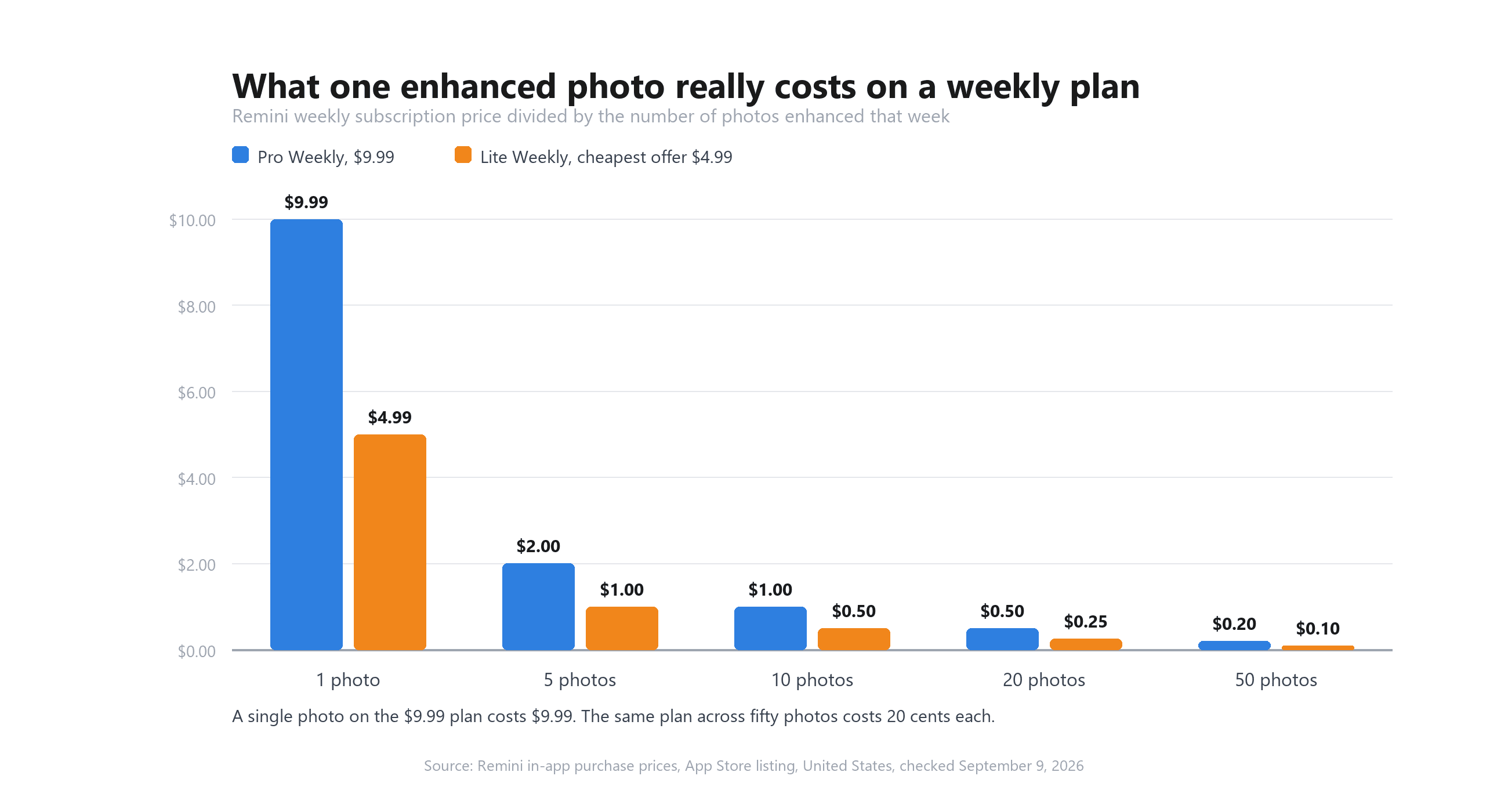
The friction shows up in how you pay for that bundle. Apple's listing for the app enumerates the in-app purchases: Remini Pro Weekly at $9.99, Remini Lite Weekly at $7.99, $5.99 and $4.99 depending on the offer, and a single month at $9.99. Google Play flags both "Contains ads" and "In-app purchases" on the free build.
Weekly billing is fine if you edit weekly. It reads very differently when your whole project was four photos from a shoebox. Divide a $9.99 week across the number of pictures you actually enhance and the per-photo figure moves fast.
Trust in that billing is the other recurring theme. On Trustpilot the remini.ai domain holds a TrustScore of 1.5 out of 5 across roughly 70 reviews, and the titles on the first page run to "Fraudulent $9.99/week charges with no…", "Scamming $10/week" and "Scammers! Do not do the trial."
Reviewers there describe charges continuing after they believed they had cancelled. Those are customer accounts, not audited transactions. They are also what a search for an alternative is usually reacting to.
The Free Remini Alternative for PC and Web
Drop a small photo into a browser tab, wait about a minute, download a PNG at twice the size. No install, no account, no counter ticking down.
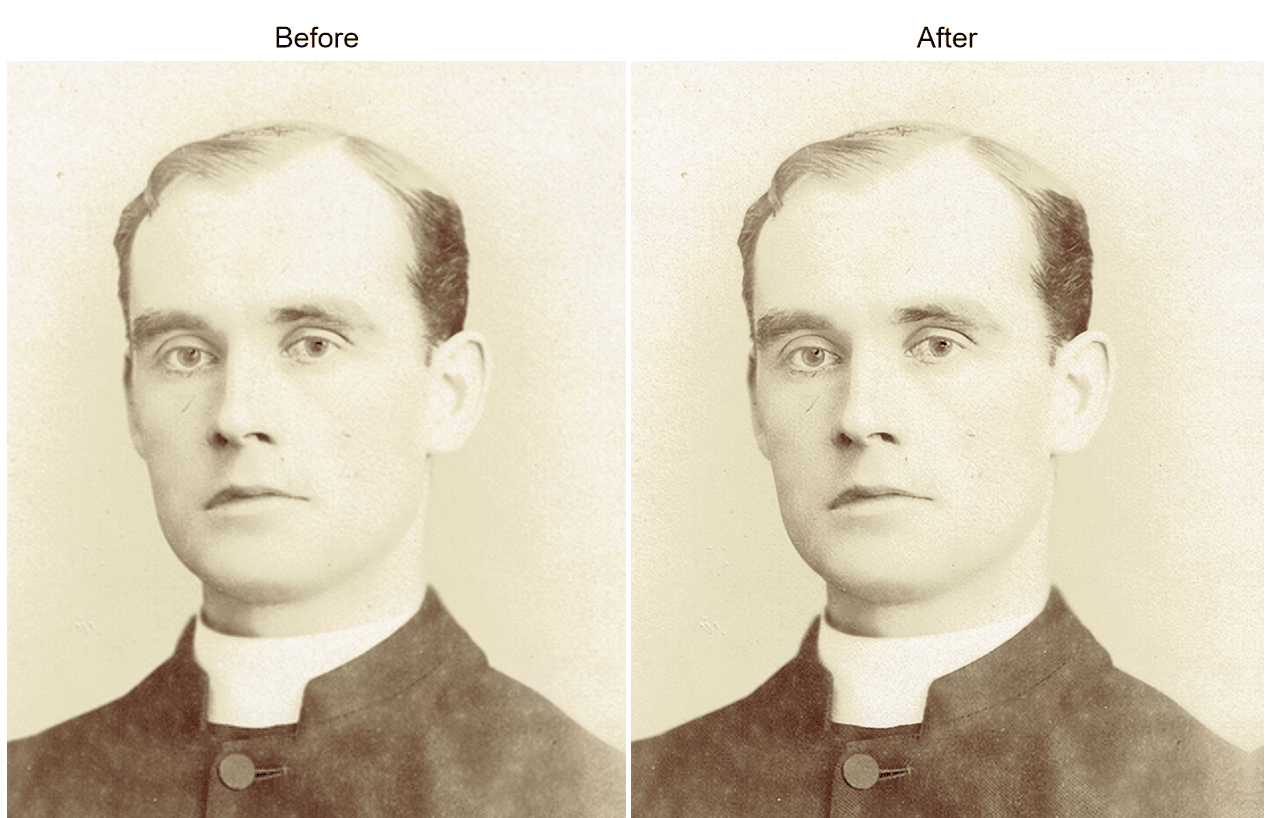
That tool is one of the free AI tools Atlas Cloud runs in the browser, alongside a background remover, an image eraser and a video upscaler.
The upscaler's terms are short enough to read in one breath. Fixed 2x. One image at a time. No daily cap and no account to create. Its page states that the download is "a full resolution PNG and nothing else. No corner logo, no reduced quality export held back for paying users," and the Swin2SR weights behind it permit commercial use.
It also has a hard ceiling, and the page says so up front: "This tool feeds the model a maximum long edge of 384 pixels, which caps the output at 768." Anything larger is scaled down before processing, so a 2000 pixel scan comes back around 768 rather than 4000. The limit exists to keep a browser tab from running out of memory, and it decides whether this tool is right for your file before you upload anything.
Which makes the sweet spot specific. Profile pictures that platforms store at 128 or 256 pixels. Thumbnails saved off a website years ago. A face cropped out of a group shot, where the crop itself lands tiny. Put a whole 4000 pixel scan through it and you will be disappointed for reasons the page warned you about.
One practical note for the first run: your browser downloads about 54MB of model weights once, then caches them, so run one takes roughly a minute and run two takes seconds.
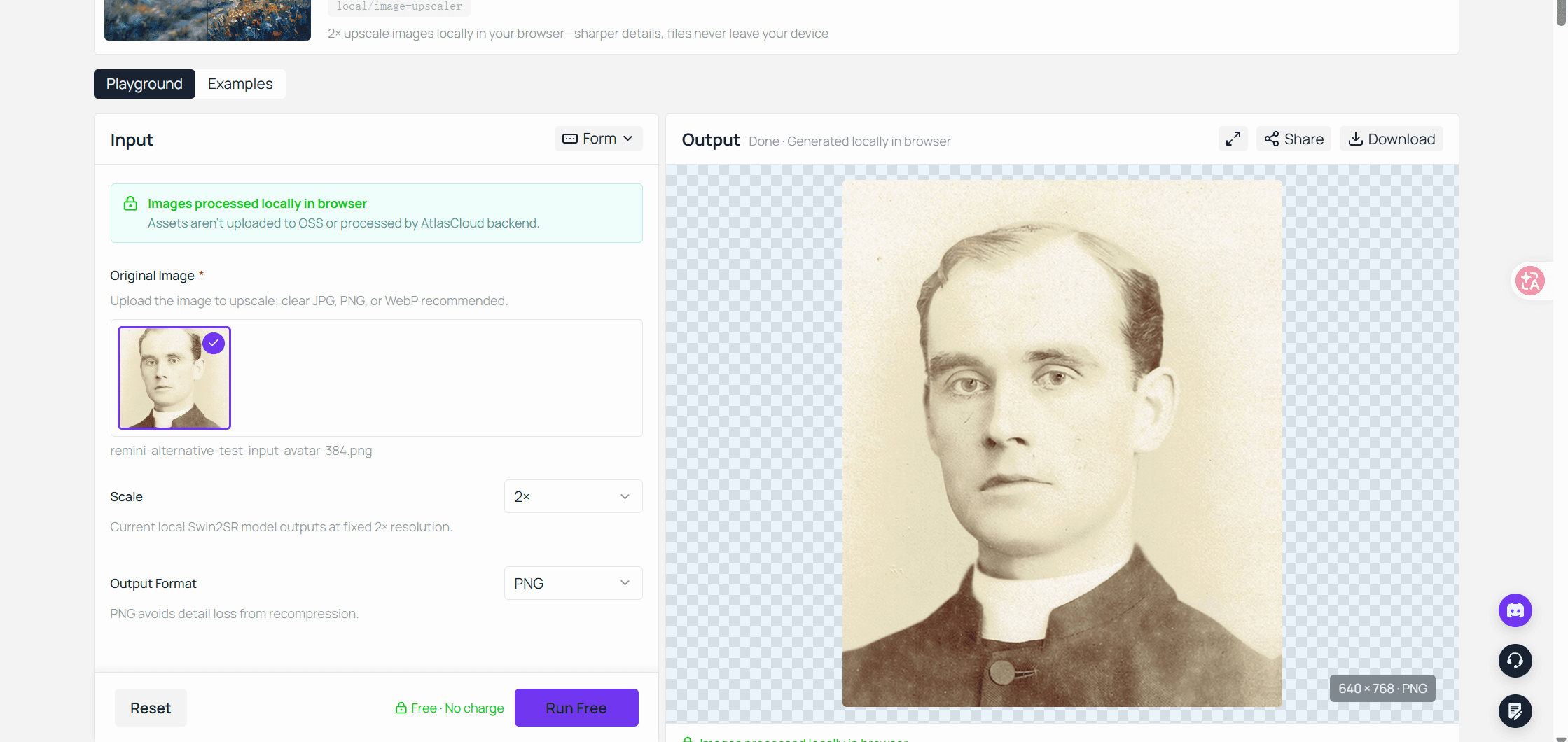
Test it with the file you were about to hand Remini. Open the free browser upscaler, drop the crop in, and you will know inside two minutes whether the free route covers your job.
Beyond 2x: The Hosted Image Upscaler for Bigger Files
That input ceiling is where the browser hands off. Larger sources, or factors past 2x, run on server hardware through the same Atlas Cloud account, and the model behind that is available two ways.
Method 1: Run It in the Playground
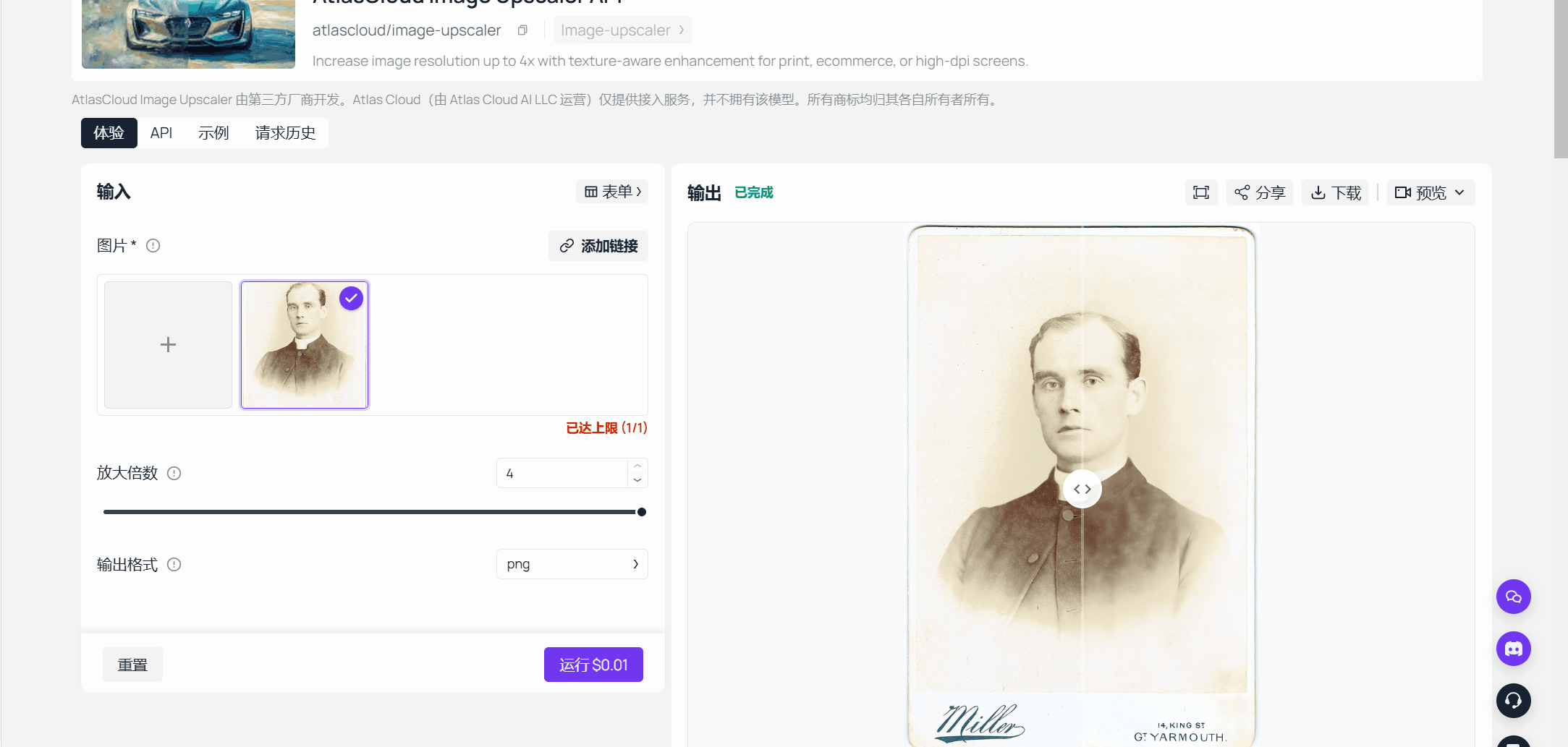
Open the image upscaler model page, give it an image, and set outscale. The slider accepts values from 1.0 to 4.0, where 1.0 enhances without enlarging and 4.0 is the highest exposed factor.
Output comes back as JPEG, PNG, WebP or JPG, rebuilt on a RealESRGAN backend. The playground shows what a run costs before you commit to it.
Method 2: Call the API Directly
A shoebox of two hundred scans is a loop, not an afternoon of clicking.
Step 1: Create an API key. Generate one in the Atlas Cloud console. It is a server-side key, and one key covers every model on the platform.

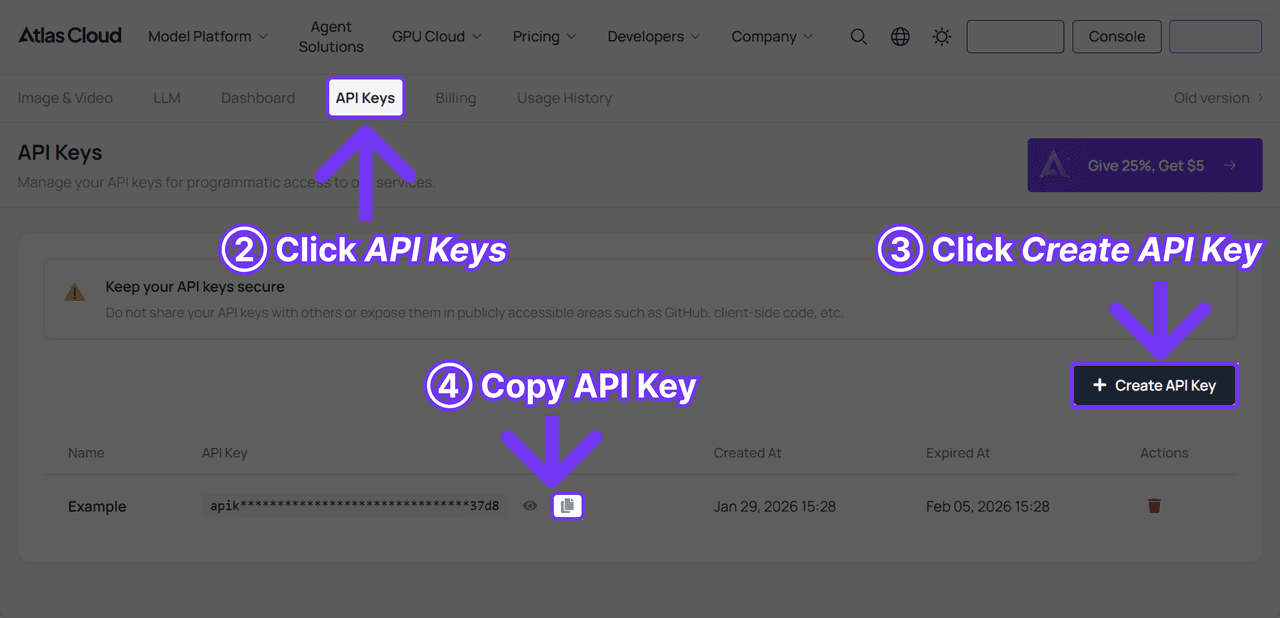
Step 2: Check the request shape. The API documentation lists the fields this model accepts, and the API tab on the model page shows the same request filled in with a working example. The input is one image URL per call, so you batch in your own loop.
Step 3: Send the request and poll. Submit the image, then poll the prediction id that comes back:
plaintext1curl -X POST https://api.atlascloud.ai/api/v1/model/generateImage \ 2 -H "Content-Type: application/json" \ 3 -H "Authorization: Bearer $ATLASCLOUD_API_KEY" \ 4 -d '{ 5 "model": "atlascloud/image-upscaler", 6 "image": "https://your-cdn.com/scan-014.jpg", 7 "outscale": 4.0, 8 "output_format": "png" 9 }'
plaintext1curl -s https://api.atlascloud.ai/api/v1/model/prediction/<PREDICTION_ID> \ 2 -H "Authorization: Bearer $ATLASCLOUD_API_KEY"
When status reads completed, the enlarged file sits in outputs.
Swap the model string for atlascloud/photo-cleanup and the same key, endpoint and polling loop send that scan through scratch and noise reduction instead. Old prints usually want both passes. Our headshot API guide walks the same request pattern across the portrait endpoints.
A Remini Alternative for Old Photos: What Each Tool Fixes
Old photos are where the comparison stops being about pixel counts. A 1970s print has three separate problems. It is small, it is scratched, and the face has gone soft. Remini sells a named tool for each of those. The free upscaler answers exactly one of them.
There is no face enhancement model in the free browser tool, and no colour repair. What Atlas Cloud offers on the repair side is a hosted Photo Cleanup model, which reduces dust, scratches, noise and repeated micro-texture while keeping composition and colour intent unchanged. Its own documentation is explicit that it "does not upscale images."
| The problem in the photo | Remini | Atlas Cloud |
|---|---|---|
| Too few pixels | Image Enlarger, up to 2x | Free browser tool at 2x, hosted model up to 4x |
| Dust, scratches, specks | Old Photos Restorer | Photo Cleanup, hosted |
| Grain and noise | Denoiser | Photo Cleanup, hosted |
| Soft or unclear face | Face Enhancer | Not offered |
| Faded or wrong colour | Color Fixer | Not offered |
| Motion blur, camera shake | Unblur and Sharpener | Not offered |
| New portraits generated of you | AI Photos, from 8 to 12 selfies | Separate portrait tools, compared in our AI selfie tools guide |
Read that table as a routing decision. If your pile of photos mostly needs faces rescued and colour brought back, Remini's bundle is doing real work, and swapping it for a resolution tool will feel like a downgrade. If the photos are basically fine and simply too small, you are paying weekly for five features to use one.
Where Your Photo Goes After You Upload It
Family photos are not neutral files. Both sides of this comparison publish something about where yours ends up, and the two answers are shaped differently.
Remini publishes its retention rules as specific day counts. Enhanced images "are deleted after one (1) day from upload or enhancement." Photos fed to the AI Photos generator are held longer, "up to twenty (20) days" for subscribers and up to seven days for everyone else, and face data follows the same clock.
On training the policy states a clear default: "Your images and videos aren't used to train our AI technologies, unless you explicitly opt in for that."
The free browser tool removes the question instead of answering it. Its page states that "Assets aren't uploaded to OSS or processed by AtlasCloud backend," and that your image "never uploads." Nothing to retain, no deletion clock, nothing to request removal of afterwards.
| Remini | Free browser tool | Hosted Atlas Cloud model | |
|---|---|---|---|
| Where processing happens | Remini servers | Your browser | Atlas Cloud servers |
| File leaves your device | Yes | No | Yes, as a URL you supply |
| Stated retention | 1 day for enhancements, 7 or 20 days for AI Photos | Nothing uploaded | Governed by the platform policy |
| Training on your uploads | Opt-in only | Nothing uploaded | Governed by the platform policy |
Two caveats belong here. The hosted upscaler needs an image URL it can reach, which means the file genuinely leaves your control, so the privacy trade there is real. And Remini's web app publishes a separate policy from its mobile one, so read whichever surface you actually use.
Remini or Atlas Cloud, Side by Side
| Remini | Atlas Cloud | |
|---|---|---|
| Platforms | iOS, Android, web | Web, any modern browser |
| Install required | App for mobile | None |
| Account to start | Not required for the web app, per its privacy policy | Not required for the free browser tool |
| Free tier | Ad-supported, per the Play listing | Unlimited 2x runs |
| Watermark on output | Reported by reviewers | None, per the tool page |
| Maximum upscale factor | 2x, per the site | 2x free, up to 4x hosted |
| Input size ceiling | No figure on its feature page | 384 pixel long edge, free tool |
| Face enhancement | Yes | No |
| Scratch and noise repair | Yes | Hosted Photo Cleanup model |
| Billing shape | Weekly or monthly subscription | Per image, no plan |
| How you run it | Tap in the app or the web app | Browser tool, playground, or API |
Two rows carry most of the decision. The maximum factor row says these tools tie on enlargement. The face enhancement row says they are not peers on repair.
Should You Switch From Remini?
Not everyone should, and pretending otherwise would waste your afternoon.
| If this is you | Where to land |
|---|---|
| A stack of damaged prints needing faces and colour rescued | Stay with Remini, its bundle is the product you need |
| An avatar, a thumbnail or a crop that needs to hold up bigger | The free browser upscaler, no account, no plan |
| Hundreds of scans, or a product catalogue | The hosted model through the API, priced per image |
| Uneasy about family photos sitting on someone's server | The browser tool, where the upload never happens |
The switch that makes the least sense is cancelling a subscription you use across five features to gain one that does a single job well. The switch that makes the most sense is the opposite case, a weekly charge renewing for a tool you open twice a year.
Frequently Asked Questions
Is there a free Remini alternative with no watermark?
Yes. The Atlas Cloud browser upscaler runs 2x passes without a plan or a signup, and its page states the download is a full resolution PNG with no corner logo and no quality held back for paying users. The trade is the input ceiling of a 384 pixel long edge.
Does Remini work on PC, or only on a phone?
Remini ships an iOS app, an Android app and a web app, so a desktop browser works. The free alternative here is web only, which removes the install step on a work machine where installing anything may not be an option.
How much does Remini cost?
Apple's listing for the app showed Remini Pro Weekly at $9.99, Remini Lite Weekly at $7.99, $5.99 and $4.99 across different offers, and one month at $9.99 when checked on September 9, 2026. The Android build is free with ads and in-app purchases. The listing carries several Lite Weekly prices at once, so the figure you are offered may not be the figure someone else sees.
What does the Atlas Cloud upscaler cost per image?
The browser tool is free with no metering. The hosted model bills a flat $0.0100 per image as of September 9, 2026, and Photo Cleanup runs $0.0200 per image, both with no discount applied. The playground quotes the price of a run before you submit it.
Can a free alternative enhance faces the way Remini does?
No, and that gap is the honest reason to keep Remini for some jobs. The browser tool rebuilds resolution, and the hosted Photo Cleanup model reduces dust, scratches and noise without changing content. Neither reconstructs facial detail the way a dedicated face model does.
Why does the free tool stop at 768 pixels?
Because it feeds the model a maximum long edge of 384 pixels and doubles it. The model runs inside your browser tab, and the cap is what keeps that tab from exhausting memory. Larger inputs are scaled down before processing, so the result comes back no bigger than 768 either way.
What happens to the photos I upload to Remini?
Its policy says enhanced images and the originals behind them are deleted one day after upload or enhancement, while photos used for AI Photos are retained up to twenty days for subscribers and up to seven days otherwise. Training on your uploads happens only if you opt in.
Conclusion
That receipt from the opening is the whole problem in miniature. Remini enhanced the photo properly, and it will keep charging weekly for five repair tools whether you need one of them or five. Its own site puts the enlargement ceiling at 2x, and that number is worth carrying into any comparison, because it means the free option gives up nothing on that particular axis.
So run the cheap experiment before the expensive decision. Crop the face you care about, keep the long edge under 384 pixels, and put it through the browser tool to see what a 2x rebuild does with your kind of image. If the faces need real reconstruction, keep the subscription and use it deliberately. If they only needed to be bigger, you have already found your Remini alternative, and the two hundred scans behind it have an API waiting.





