


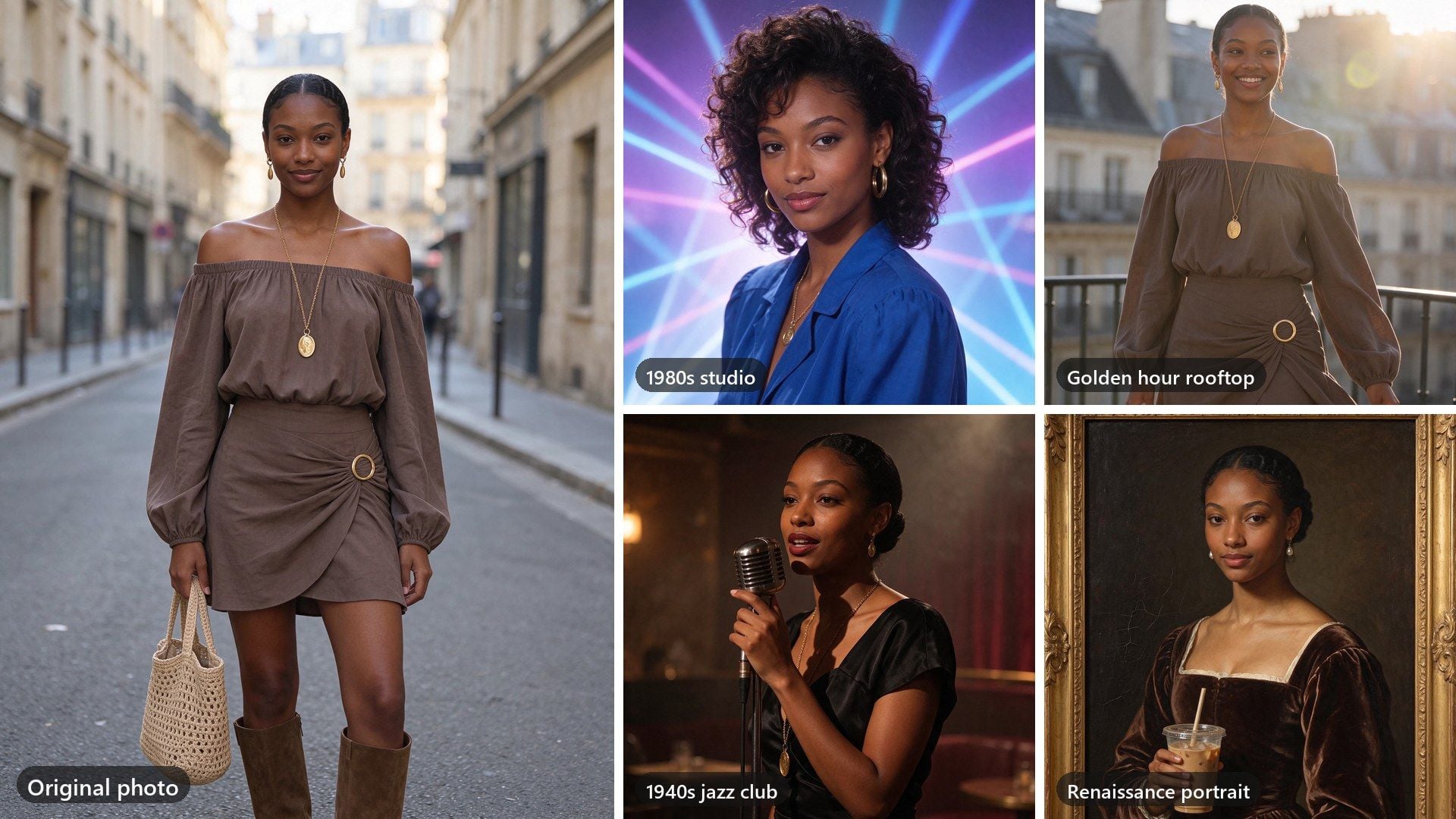
一个可靠的 ChatGPT 照片提示词 会先说明哪些必须保持不变(你的脸、肤色和发型),然后再说明要改变的那一件事。以下是 30 个按这种方式编写的复制粘贴提示词,适用于自拍、1980 年代潮流、情侣、节日贺卡、老照片修复和图像扩展,每个都附有真实效果。
每一条提示词都在真实照片上运行过,几乎所有都用同一组两张人像测试,因此你在粘贴之前就能看到效果。只描述新场景的提示词会让模型随意重绘你的脸,这就是为什么保留清单要放在最前面。
关键要点
- 好的 ChatGPT 照片编辑提示词会先说明哪些必须保持不变,然后再指出要改变的那一件事。
- 先粘贴一条锁定面部的话,并且每条消息只要求一处修改,这样模型能重绘你的空间就更小。
- 1980 年代潮流、情侣照、节日贺卡、老照片修复和图像扩展都配有复制粘贴提示词和真实效果。
- 这里的每条提示词也可在 Seedream 5.5 上运行,位于 Atlas Cloud 的 Image Edit 标签页中,你可以在那里选择精确的输出尺寸。
- 卡在措辞上?一个 Photo Prompt Perfector 元提示词可以让 ChatGPT 把粗略想法变成完整提示词。
如何在 ChatGPT 中编辑照片而不改变你的脸
是的,ChatGPT 可以编辑你自己的照片。OpenAI 的图像帮助页面说,你可以上传图片并描述更改,还有一个选择工具可以让你先标记一个区域。同一页面也承认“高亮并不总是精确。”
ChatGPT 会根据你的文字重绘图片,所以任何你没有说明的内容都可能被改动。脸是最容易看出问题的地方,因为眼睛或下巴的细微变化在提示词中很容易被忽略,但在结果中却很难不被发现。
OpenAI 针对 ChatGPT Images 2.6 的发行说明(发布于 2026 年 11 月 4 日)将跨编辑的更好细节保留列为主要变化。
三种习惯起最大作用:
- 使用一张清晰、正面打光的照片,让整张脸都可见。
- 把保留清单放在前面,然后只写一处修改。同一条消息里的每一个额外修改,都是模型可以重新诠释的又一件事。
- 每个新造型都从你的原始照片开始,而不是从上一次编辑结果开始。
保留清单中的每一项都保护某个具体内容:
| 保留清单项 | 命名它能保护什么 | 可粘贴词句 |
|---|---|---|
| 脸型和五官 | 身份:眼睛、鼻子或下巴的细微变化会让人看起来像另一个人 | same face shape, eyes, nose and lips |
| 肤色和肤质 | 自然的皮肤,而不是更白或塑料般光滑的版本 | same skin tone and skin texture, no retouching |
| 发型 | 你的头发,而不是适合新场景的改换造型 | same hairstyle |
| 配饰 | 耳环、眼镜和穿孔等小物件 | same earrings and glasses |
| 服装 | 当只应改变背景或光线时,保留你的衣服 | keep my outfit |
| 姿势和构图 | 原始裁剪和身体位置 | keep my pose and framing |
把这一行粘贴到任何编辑提示词的开头,并填写括号内容:
plaintext1Keep my face exactly as it is in this photo: same face shape, eyes, nose, lips, skin tone and skin texture, same hairstyle. Do not retouch, slim or beautify my face. Change only: [the one thing you want changed].
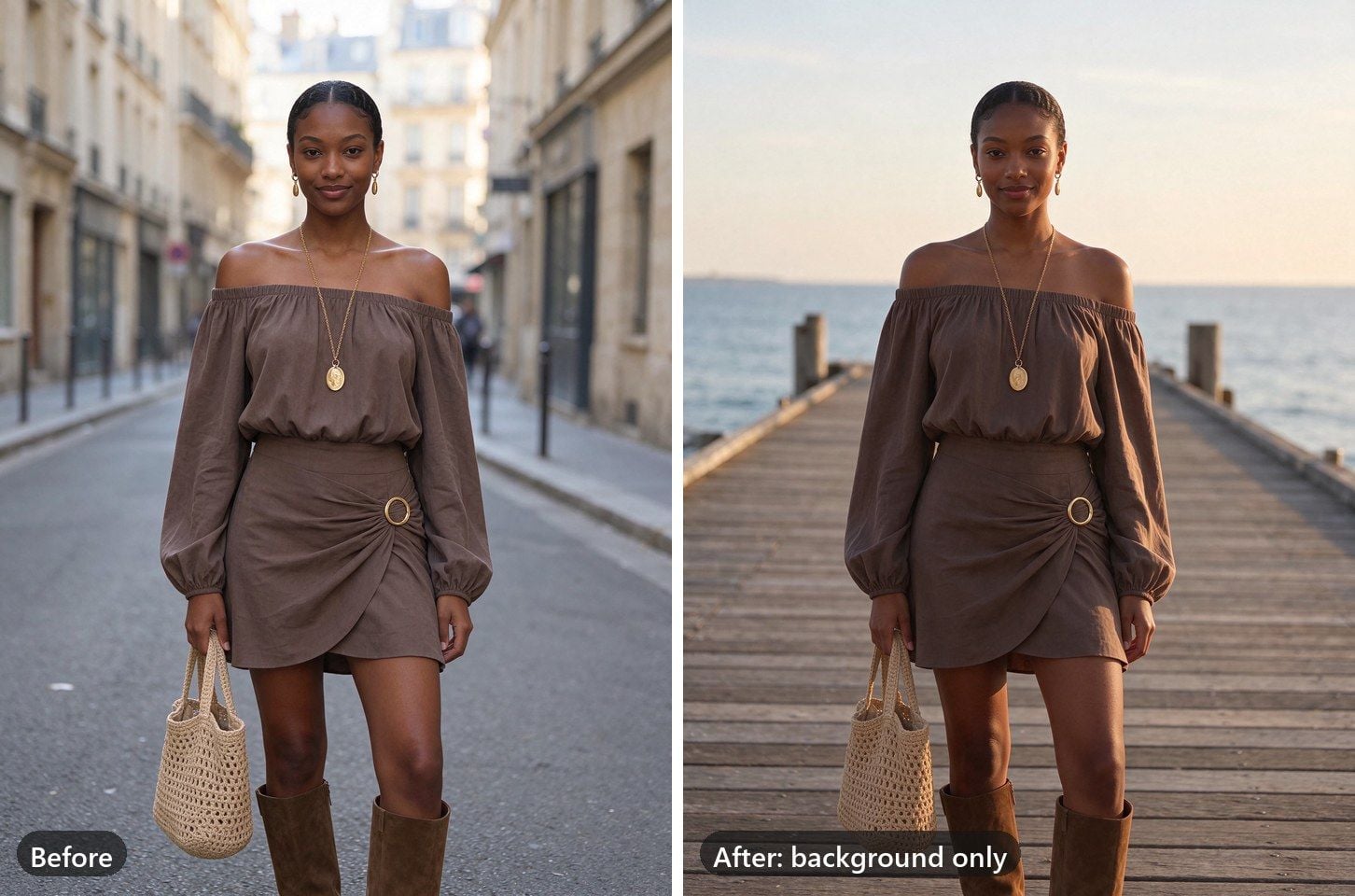
下面是它执行背景替换的效果,这是常见的第一项编辑:
plaintext1Keep my face exactly as it is in this photo: same face shape, eyes, nose, lips, skin tone and skin texture, same hairstyle and earrings. Do not retouch, slim or beautify my face. Change only the background: put me on a wooden pier by the sea at sunset, with warm side light that matches the new scene. Keep my pose, outfit and framing the same.
在 Atlas Cloud 的 Seedream 5.5 上运行这些 ChatGPT 照片提示词
ChatGPT 照片提示词是浅显英文,所以你也可以在 ChatGPT 之外运行它们,本指南中的每个结果都是这样生成的。Atlas Cloud 在其 AI 照片编辑器 中运行字节跳动的 Seedream 5.5 编辑模型,Atlas 称该模型能在 100 多轮编辑中保持未编辑区域稳定。下面是在我们的男性人像上运行的 1985 年快照提示词。
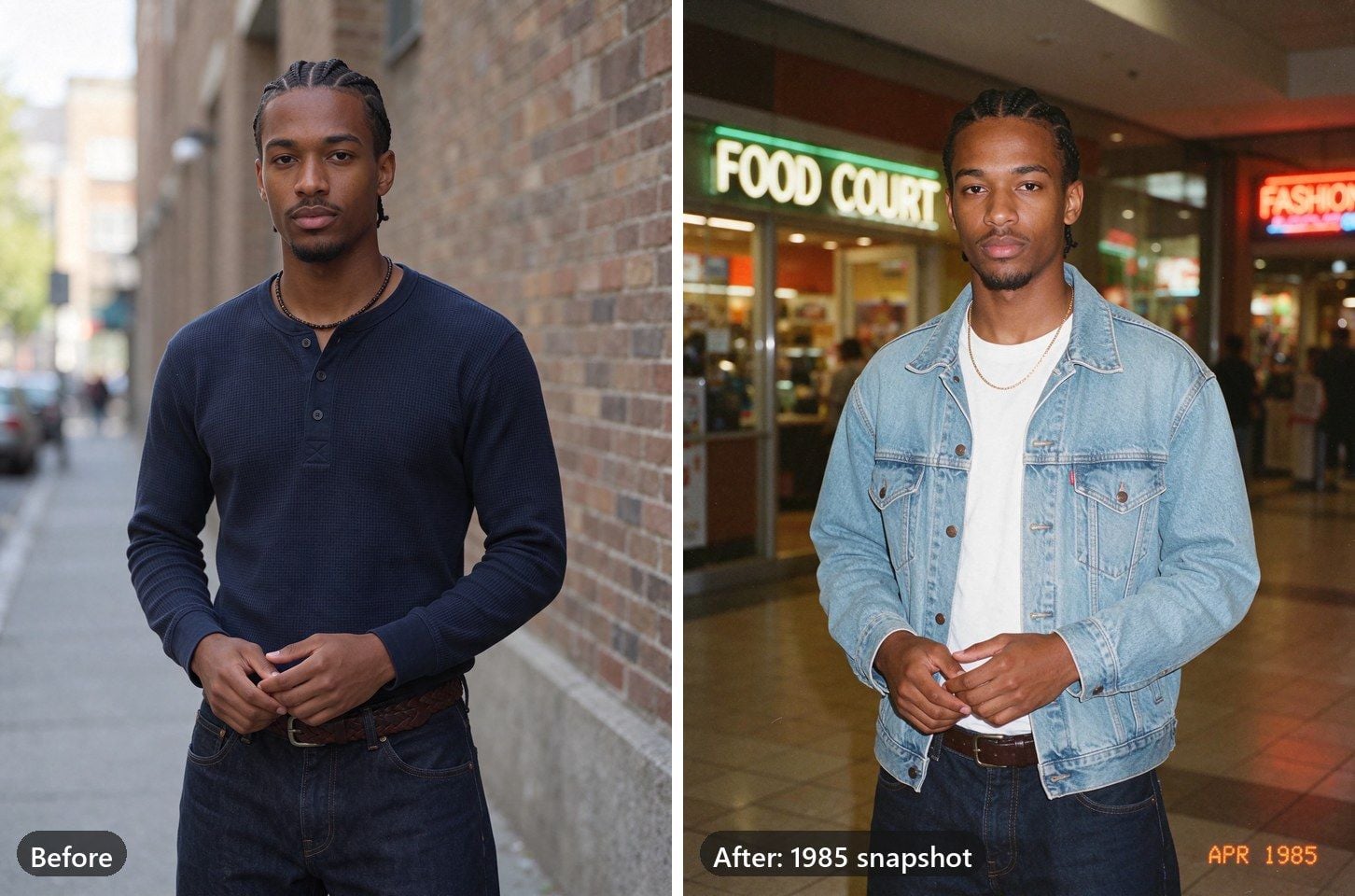
plaintext1Turn this photo into an authentic 1985 snapshot. Keep my face, features, skin tone and braids exactly as they are. Dress me in a period outfit: a light-wash denim jacket over a white tee and a thin gold chain. Shoot it like a 35mm point-and-shoot with a direct on-camera flash, slightly faded warm colors, soft film grain and a small orange date stamp in the bottom right corner. Background: a 1980s shopping mall with neon shop signs, slightly blurred.
六个步骤带你从照片到结果:
- 打开 Image Edit 标签页。
- 在 Models 下选择 Seedream v5.5。
- 在 Reference 下上传你的照片。情侣提示词需要两张照片,按提示词中提到的顺序上传。
- 粘贴提示词。
- 在 Settings 下设置尺寸和输出数量。
- 点击 Run。
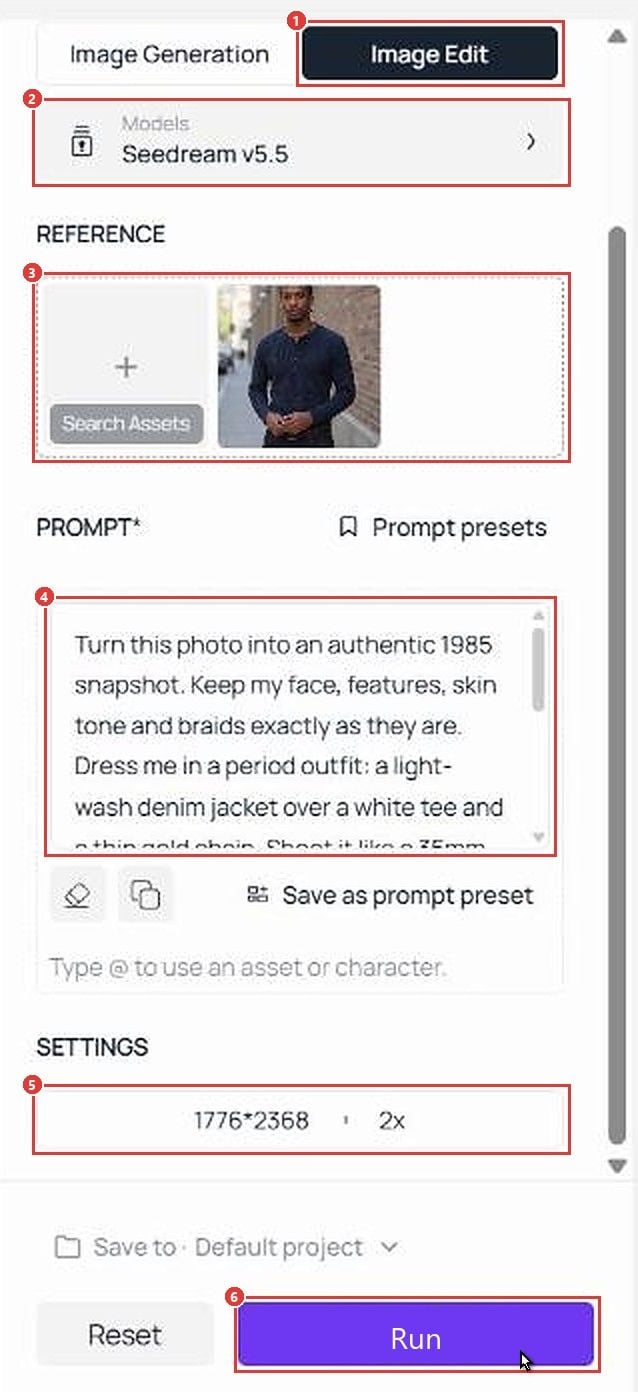
Settings 提供 1K、1.5K 和 2K 预设,比例包括 1:1、3:4、16:9 和 9:16。除非图注另有说明,本页每个结果都是 3:4 的 2K,每次运行大约一两分钟返回两个版本。
用于你自己的照片的 ChatGPT 提示词
用于你自己照片的 ChatGPT 提示词从一张自拍开始,在场景、光线和相机围绕你变化时,仍让你作为主体。这里的每条提示词都以保留清单结尾,所以可以原样粘贴,并把“dress”或“braids”换成你自己的细节。
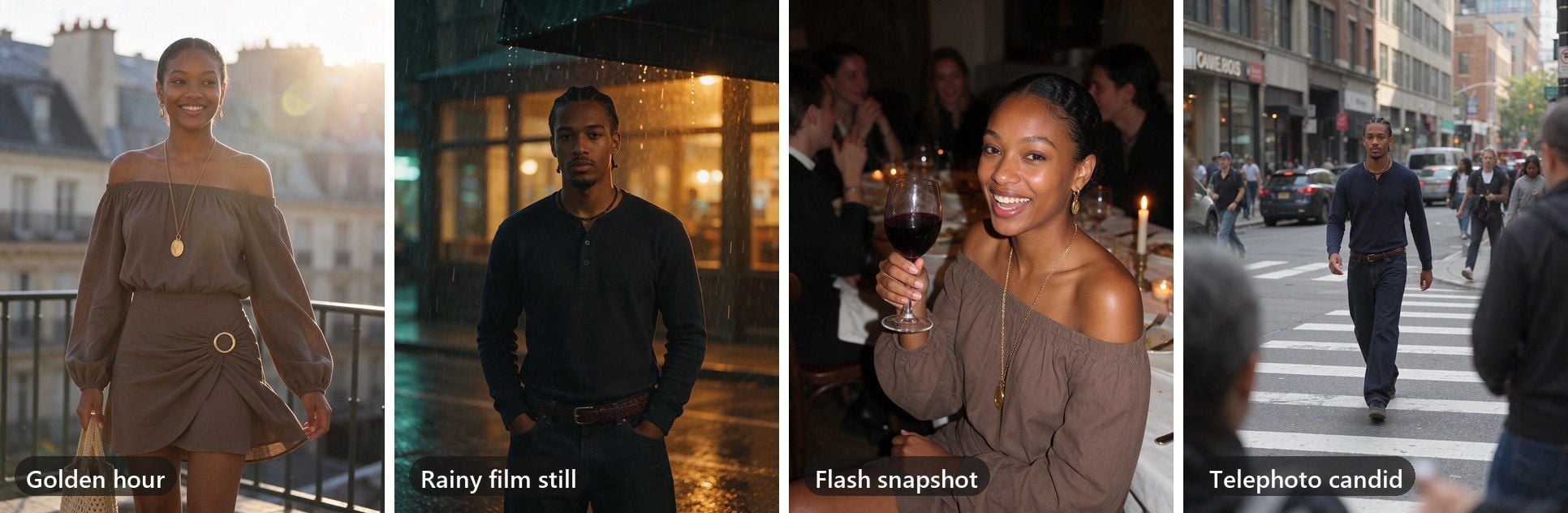
黄金时刻屋顶(展示于一位女性)
plaintext1Use my photo to create a candid shot of me on a city rooftop at golden hour, laughing and glancing just past the camera while the breeze moves my dress. Warm backlight, soft lens flare, shallow depth of field, shot on a 50mm lens. Keep my face, features, skin tone, hairstyle and jewelry exactly as in my photo. Photorealistic, natural skin texture.
雨夜电影剧照(展示于一位男性)
plaintext1Make me the lead in a film still: I'm standing under a cafe awning on a rainy night street, hands in my pockets, rain streaks catching the warm light from the cafe window. Teal and amber color grade, light film grain, shallow depth of field. Keep my face, features, skin tone, braids and outfit exactly as in my photo.
晚宴闪光灯快照(展示于一位女性)
plaintext1Turn my photo into a direct-flash snapshot at a candlelit dinner party: I'm holding a glass of red wine, mid-laugh, with friends blurred at the table behind me. Hard on-camera flash, dark background falloff, slightly hot skin highlights like a point-and-shoot camera. Keep my face, features, skin tone, hairstyle and earrings exactly as in my photo.
街头风长焦抓拍(展示于一位男性)
plaintext1Create a candid street-style photo of me crossing a busy downtown crosswalk, caught mid-stride, shot from across the street with an 85mm telephoto lens, people and traffic blurred in the foreground. Overcast daylight, muted colors. Keep my face, features, skin tone, braids and outfit exactly as in my photo.
热门 ChatGPT 图像提示词,从 1980 年代照片到年轻时的自己
1980 年代照片潮流在 2026 年 9 月兴起。Pixelbin 在 9 月 10 日发布了 15 条相关提示词,ChatGPT 自己的 Images 页面现在在 Y2K 数码相机风格旁边提供了一个 80s 预设。这里的六条热门 ChatGPT 图像提示词涵盖了人们不断询问的造型,另外还有两条纯粹好玩。
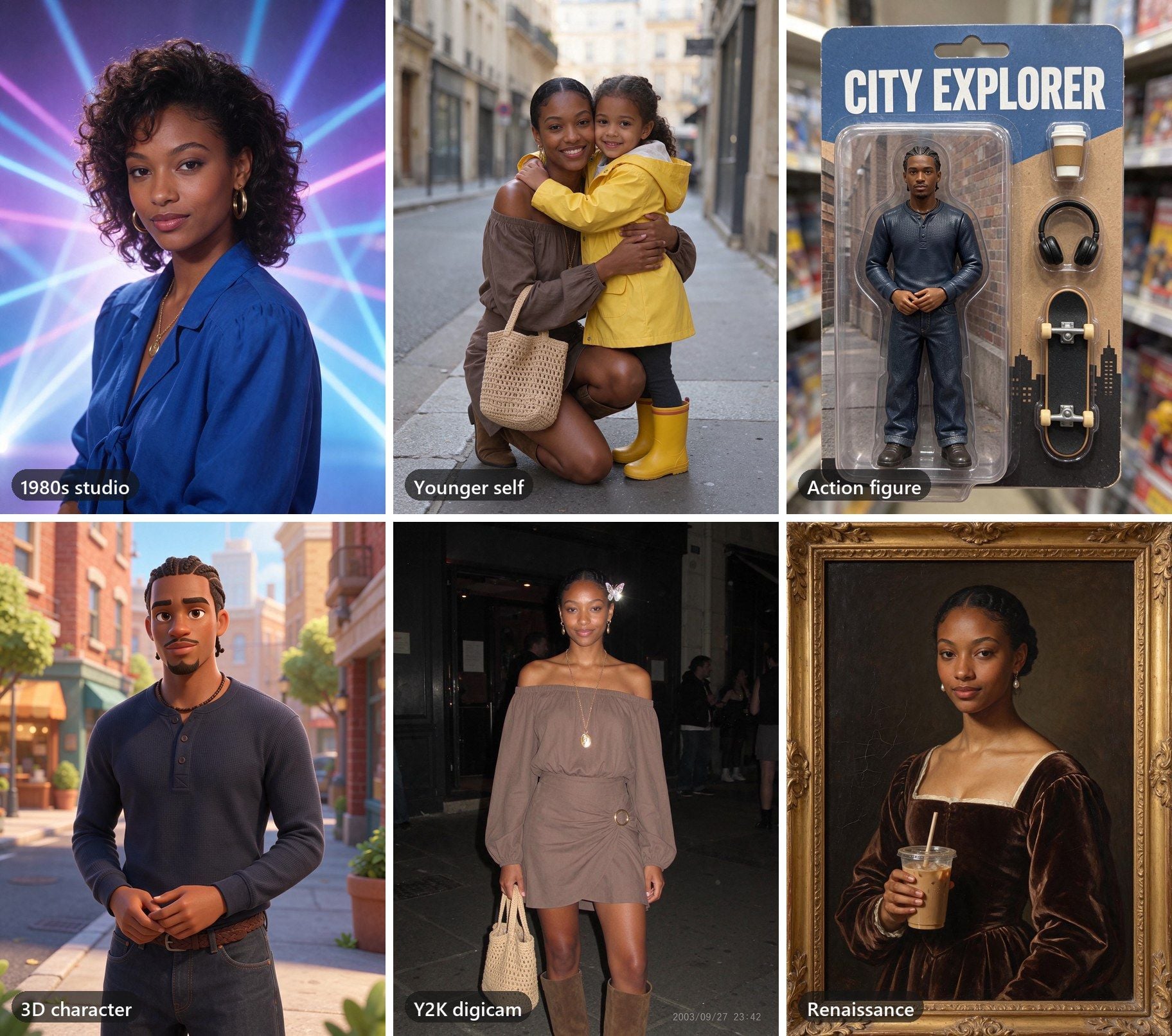
1980 年代商场影棚人像
plaintext1Recreate my photo as a 1980s mall studio portrait. Keep my face, features and skin tone exactly as they are. Give me voluminous 80s curls, a shoulder-padded electric-blue blouse and big gold earrings. Classic laser-beam backdrop in purple and blue, soft-focus filter, glossy studio lighting, slight film grain, posed over-the-shoulder look at the camera.
拥抱年轻时的自己
plaintext1Add a six-year-old girl who is clearly my younger self, with the same face shape, eyes and skin tone, wearing a yellow raincoat. I'm kneeling on the sidewalk hugging her and we're both smiling at the camera. Keep my face, features, skin tone, hairstyle and outfit exactly as in my photo. Natural daylight, candid family-photo feel.
吸塑包装中的可动人偶
plaintext1Turn me into a 12-inch action figure sealed in a clear plastic blister pack on a toy store shelf. Keep my face, braids and outfit recognizable, scaled down in glossy plastic. The cardboard backing says "CITY EXPLORER" in bold letters and holds tiny accessories: a coffee cup, headphones and a skateboard. Bright retail lighting, photorealistic product shot.
3D 动画电影角色
plaintext1Turn me into a stylized 3D animated movie character with slightly larger eyes and soft rounded features, while keeping my face shape, skin tone, braids, beard and outfit clearly recognizable. Place me on a sunny cartoon city street. Soft global illumination, rich colors, high-detail render.
Y2K 数码相机夜景照
plaintext1Turn my photo into a 2003-style digital camera shot taken at night outside a club: harsh built-in flash, low dynamic range, blown-out highlights and a small timestamp in the bottom corner. Add a sparkly butterfly hair clip. Keep my face, features, skin tone and outfit exactly as in my photo.
带冰咖啡的文艺复兴人像
plaintext1Paint me as a Renaissance oil portrait in a gilded frame: dark background, soft window light, a deep brown velvet gown and pearl earrings, and in my hand an iced coffee in a clear plastic cup with a straw. Keep my face, features and skin tone exactly as in my photo. Visible canvas texture and fine craquelure.
保留两张脸的情侣照
对于 ChatGPT 情侣照,在一条消息中上传两张照片,并说明谁在哪张里。“第一张照片中的女性和第二张照片中的男性”会给模型一张清晰的地图,并有助于区分两张脸。根据你们自己的组合修改措辞。
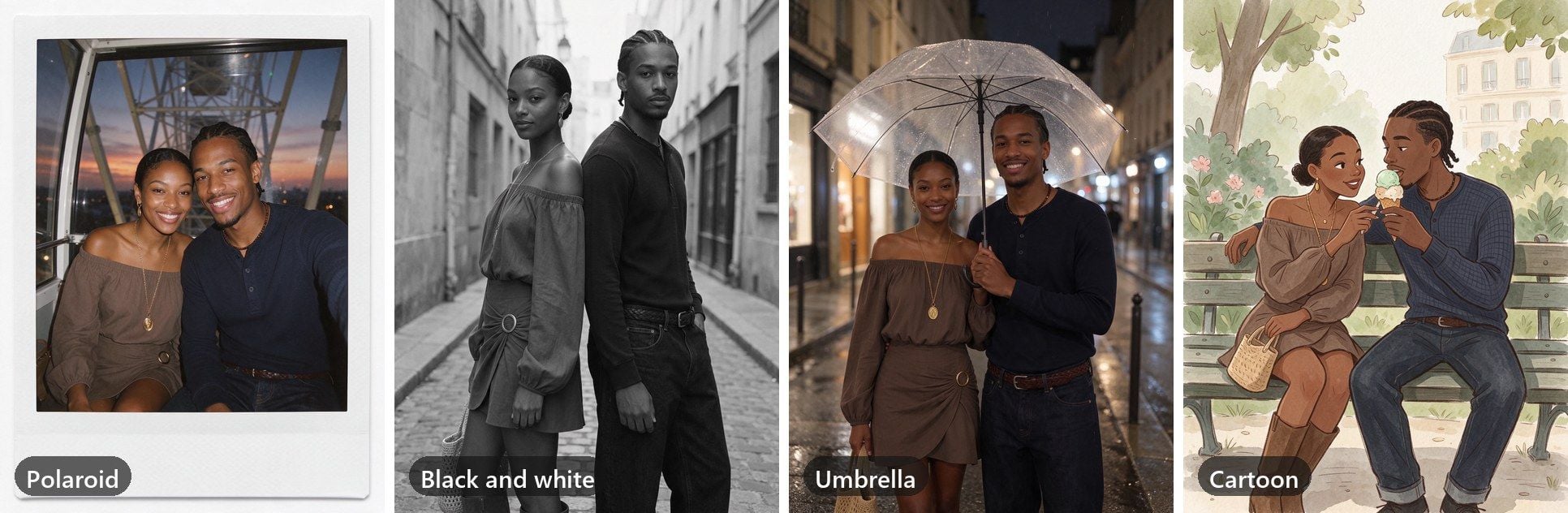
摩天轮宝丽来
plaintext1Using the woman in the first photo and the man in the second photo, create an instant Polaroid of the two of them squeezed together for a selfie on a Ferris wheel at dusk, both laughing. Built-in flash, warm faded colors, white Polaroid border. Keep both faces, skin tones, hairstyles and outfits exactly as in their photos.
黑白杂志风
plaintext1Combine the woman from the first photo and the man from the second into one black-and-white editorial portrait: standing back to back on a cobblestone street, both looking at the camera with calm expressions. High-contrast monochrome, soft natural light, fine grain. Keep both faces and hairstyles exactly as in their photos.
雨夜雨伞
plaintext1Put the woman from the first photo and the man from the second under one clear umbrella on a rainy city street at night, her arm through his, both smiling with their faces turned toward the camera. Wet pavement reflections, warm shop lights, shallow depth of field. Keep both faces, skin tones, hairstyles and outfits exactly as in their photos.
手绘卡通情侣
plaintext1Turn the woman from the first photo and the man from the second into a hand-drawn cartoon couple portrait: sitting together on a park bench sharing an ice cream, clean line art, soft pastel colors, light paper texture. Keep their face shapes, skin tones, hairstyles and outfits recognizable.
无需摄影师的工作室风格人像
专业写真提示词主要取决于背景和光线。把两者都说明,ChatGPT 需要猜测的就少得多。若想更深入了解 LinkedIn 风格头像,我们关于专业头像的 AI 提示词的指南把提示词拆成了多个槽位。
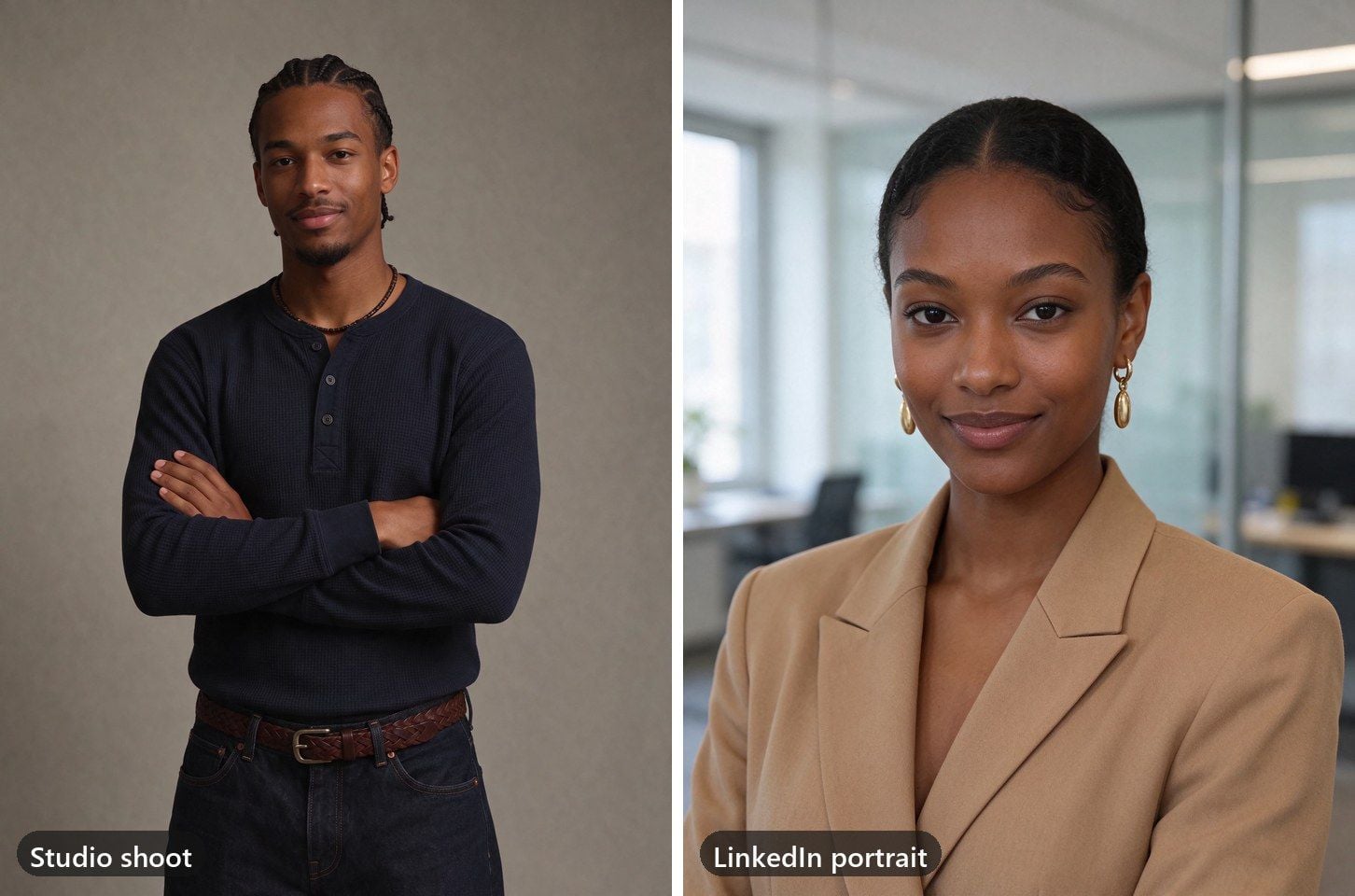
工作室写真(展示于一位男性)
plaintext1Turn my photo into a professional studio portrait: I'm standing against a seamless warm-gray backdrop, three-quarter body, arms crossed, slight confident smile. Large softbox key light from the left, subtle rim light, crisp focus, color-accurate skin. Keep my face, features, skin tone, braids and outfit exactly as in my photo.
用于 LinkedIn 的办公室人像(展示于一位女性)
plaintext1Make a polished head-and-shoulders portrait of me for LinkedIn: I'm wearing a camel tailored blazer, a bright modern office is softly blurred behind me, gentle window light falls on my face, friendly closed-mouth smile, eye-level camera. Keep my face, features, skin tone, hairstyle and earrings exactly as in my photo. No heavy retouching.
用于贺卡和派对的 ChatGPT 节日照片提示词
当道具承载节日氛围、保留清单承载你本人时,ChatGPT 节日照片提示词效果最好。这里的三条涵盖新年前夜、温馨贺卡和冬季市集。关于拐杖糖和圣诞布景,请看如何制作 AI 圣诞照片潮流。
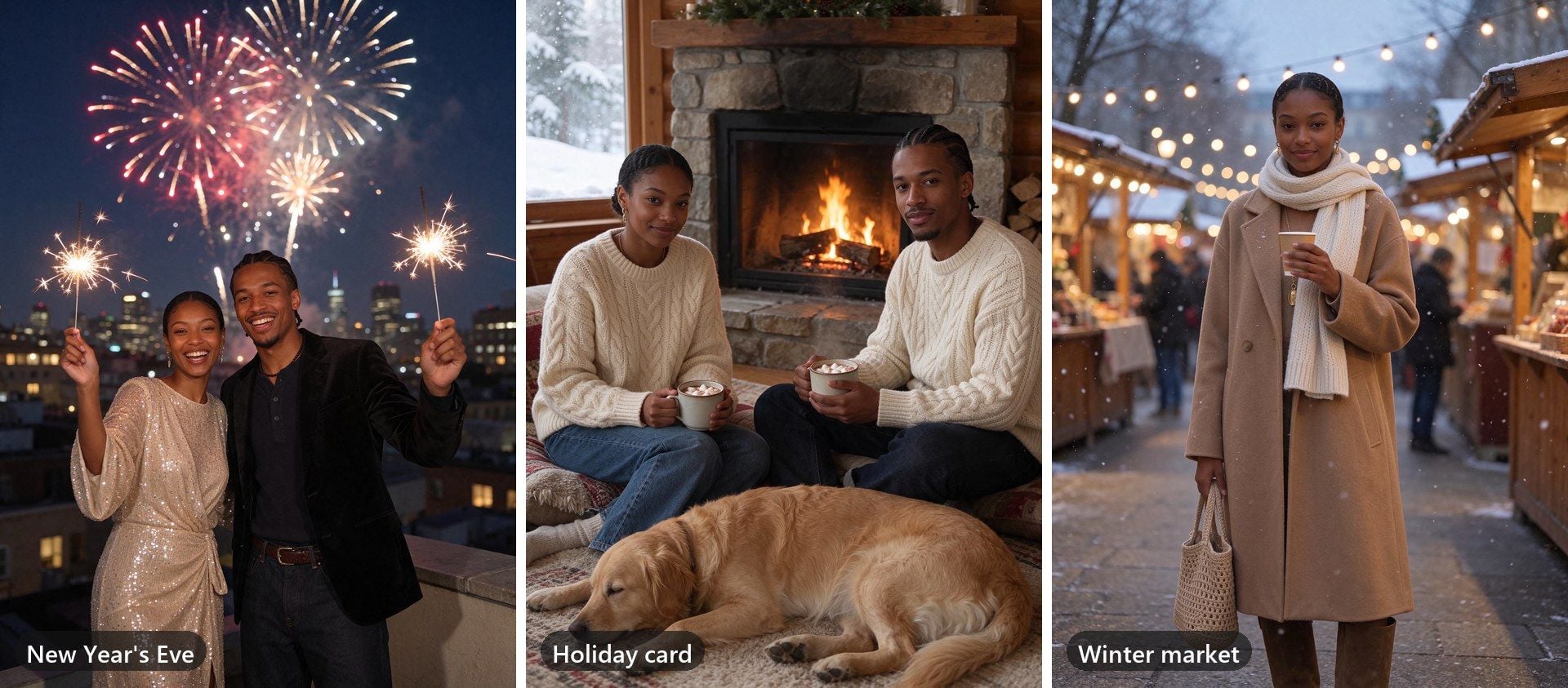
新年前夜屋顶(两张照片)
plaintext1Put the woman from the first photo and the man from the second on a city rooftop at midnight on New Year's Eve, holding sparklers, fireworks bursting over the skyline behind them, both laughing toward the camera. She wears a sequined champagne dress and he wears a black velvet blazer. Keep both faces, skin tones and hairstyles exactly as in their photos.
温馨节日贺卡(两张照片)
plaintext1Make a cozy holiday card photo of the woman from the first photo and the man from the second sitting by a stone fireplace in a snowy cabin, wearing matching cream cable-knit sweaters and holding mugs of hot cocoa, with a sleepy golden retriever at their feet. Warm firelight, soft snowy window light. Keep both faces, skin tones and hairstyles exactly as in their photos.
冬季市集漫步(一张照片)
plaintext1Put me at an outdoor winter market at dusk, wearing a long camel wool coat and a knit scarf, holding a paper cup of mulled cider, with string lights and wooden stalls softly blurred behind me and light snow falling. Keep my face, features, skin tone, hairstyle and earrings exactly as in my photo.
用于修复真实照片的 ChatGPT 照片编辑提示词
用于修复的 ChatGPT 照片编辑提示词与风格提示词的工作方式相反:它们修复真实照片中的一处瑕疵,其余全部保持不动。诀窍是更严格地列出保持不变的内容,细到背景和构图。我们故意把人像副本做旧降质,这样修复效果一目了然。
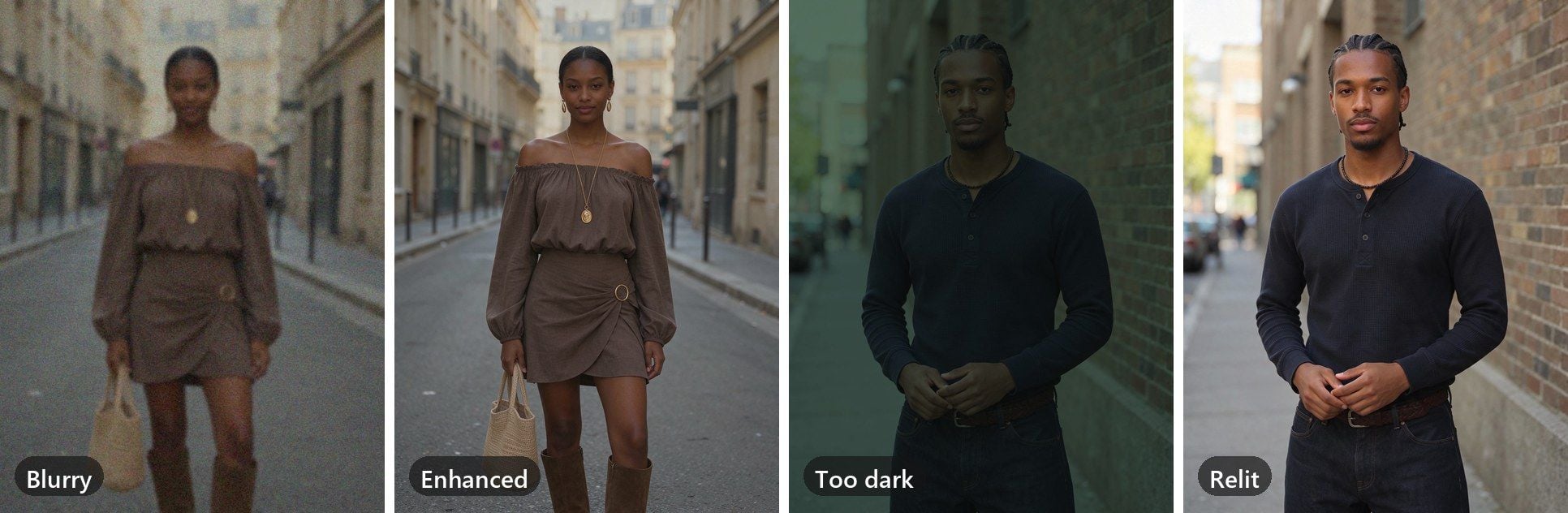
提升照片质量
plaintext1Enhance this photo: remove the blur and noise, recover sharp detail in my face, hair and clothes, and correct the exposure. Keep my face, features, skin tone, expression, pose, outfit and background exactly the same. Do not change the composition or add anything new. Natural skin texture, no plastic smoothing.
修复黑暗光线
plaintext1This photo is underexposed with a green cast. Relight it like soft late-afternoon daylight: brighten my face evenly, restore natural skin tones and recover shadow detail in my clothes. Keep my face, features, pose, outfit, framing and background exactly the same.
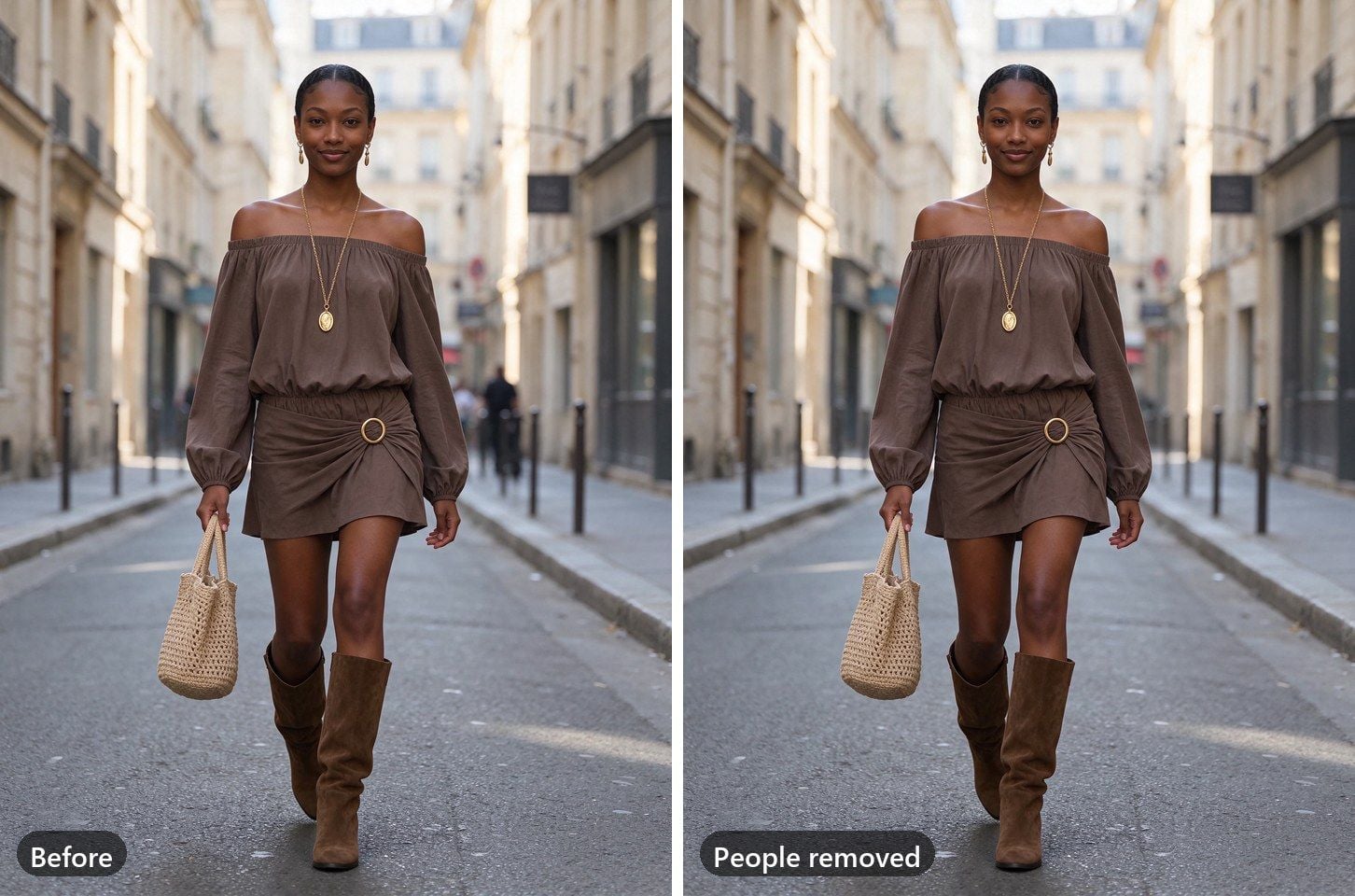
从背景中移除人物
plaintext1Remove every person and car in the background behind me and fill the street naturally with matching pavement and stone buildings. Keep me, my pose, my outfit and the lighting exactly the same.
老照片正是修复提示词发挥价值的地方。我们使用了一张扫描的、超过一个世纪的家庭人像,脸部有剥落的乳剂层,然后在第二轮中给修复后的版本上色。
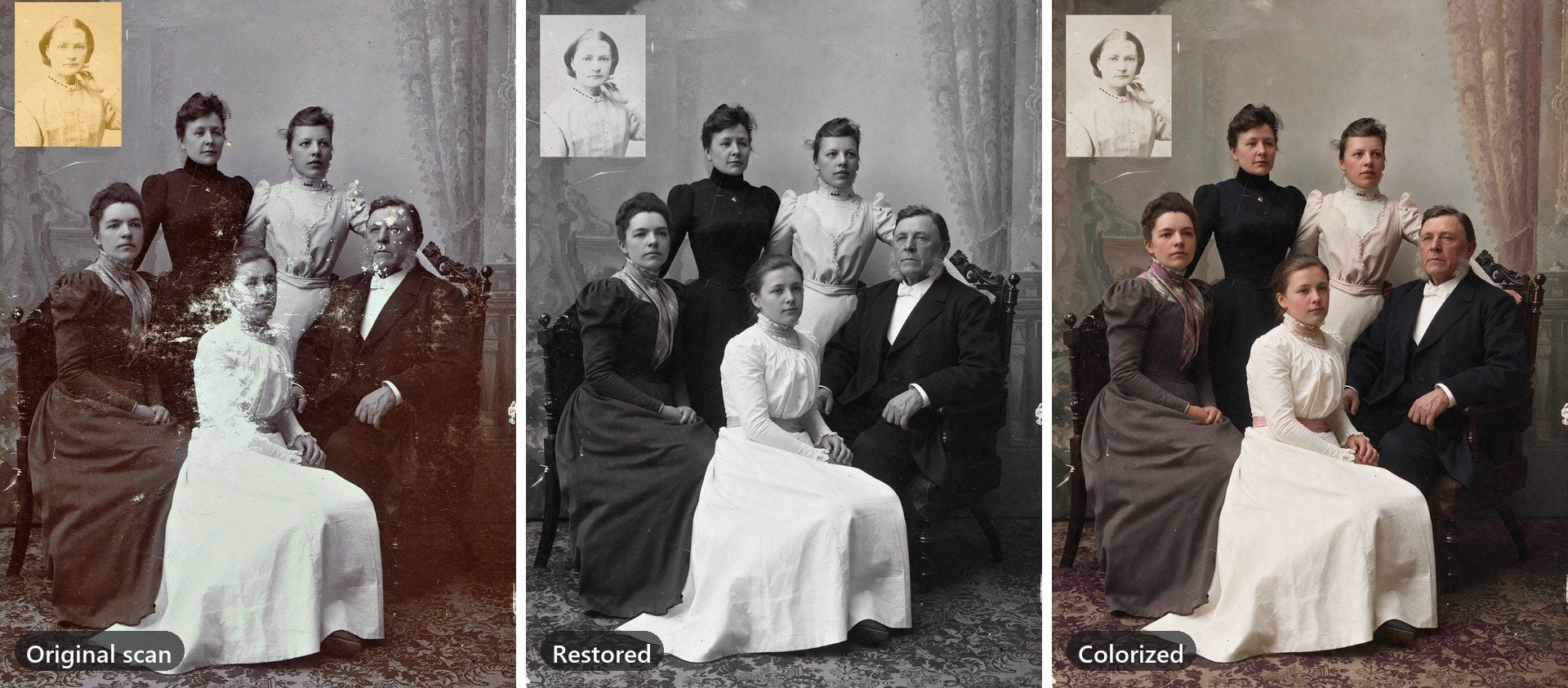
原始照片:Sofia Jansdotter Wallin family,Wikimedia Commons,公有领域。
修复老照片
plaintext1Restore this old photo: repair the scratches, creases, stains and torn edges, rebuild missing detail and sharpen the faces gently. Keep every person's face, expression, hairstyle, clothing and the original composition exactly the same. Keep it black and white with a natural film grain.
给黑白照片上色
plaintext1Colorize this black-and-white photo with realistic, period-accurate colors: natural skin tones, muted fabric colors and soft daylight. Keep every face, expression and detail exactly the same.
用于扩展图像的 ChatGPT 提示词
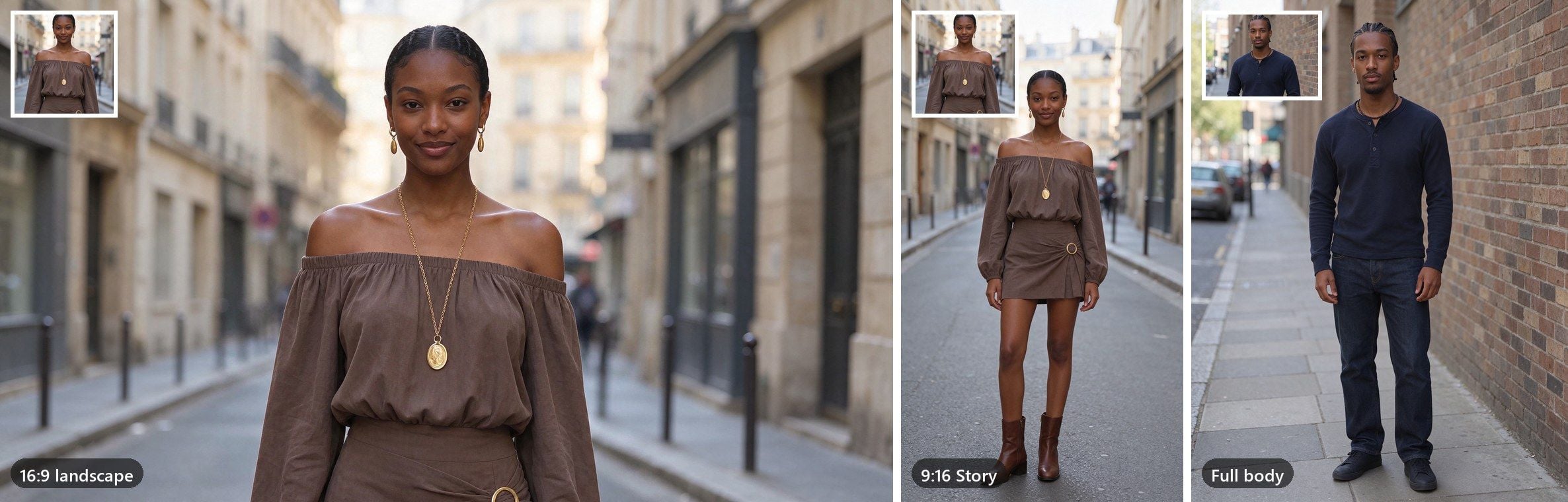
在 ChatGPT 中扩展图像意味着在已有照片周围添加画布:紧凑裁剪变成宽幅镜头,正方形变成 Story。告诉模型目标比例、要扩展哪些边缘,以及新区域应包含什么,并反复说明原始部分保持不变。
加宽至 16:9
plaintext1Expand this image to a 16:9 landscape without cropping or changing me. Continue the stone street, buildings and soft afternoon light naturally on both sides, matching the camera angle, lens and colors. Keep my face, pose, outfit and the original part of the photo exactly the same.
拉伸为 9:16 Story
plaintext1Expand this photo into a 9:16 vertical frame for Instagram Stories. Extend the scene above and below me, showing more sky and street, and continue my outfit naturally down to my boots. Keep my face, pose and outfit exactly the same.
半身到全身
plaintext1Extend this half-body photo into a full-body shot: continue my body, jeans and shoes downward and widen the street around me, matching the light and perspective. Keep my face, pose, outfit and everything in the original area exactly the same.
ChatGPT 照片提示词完善器:让 ChatGPT 来写提示词
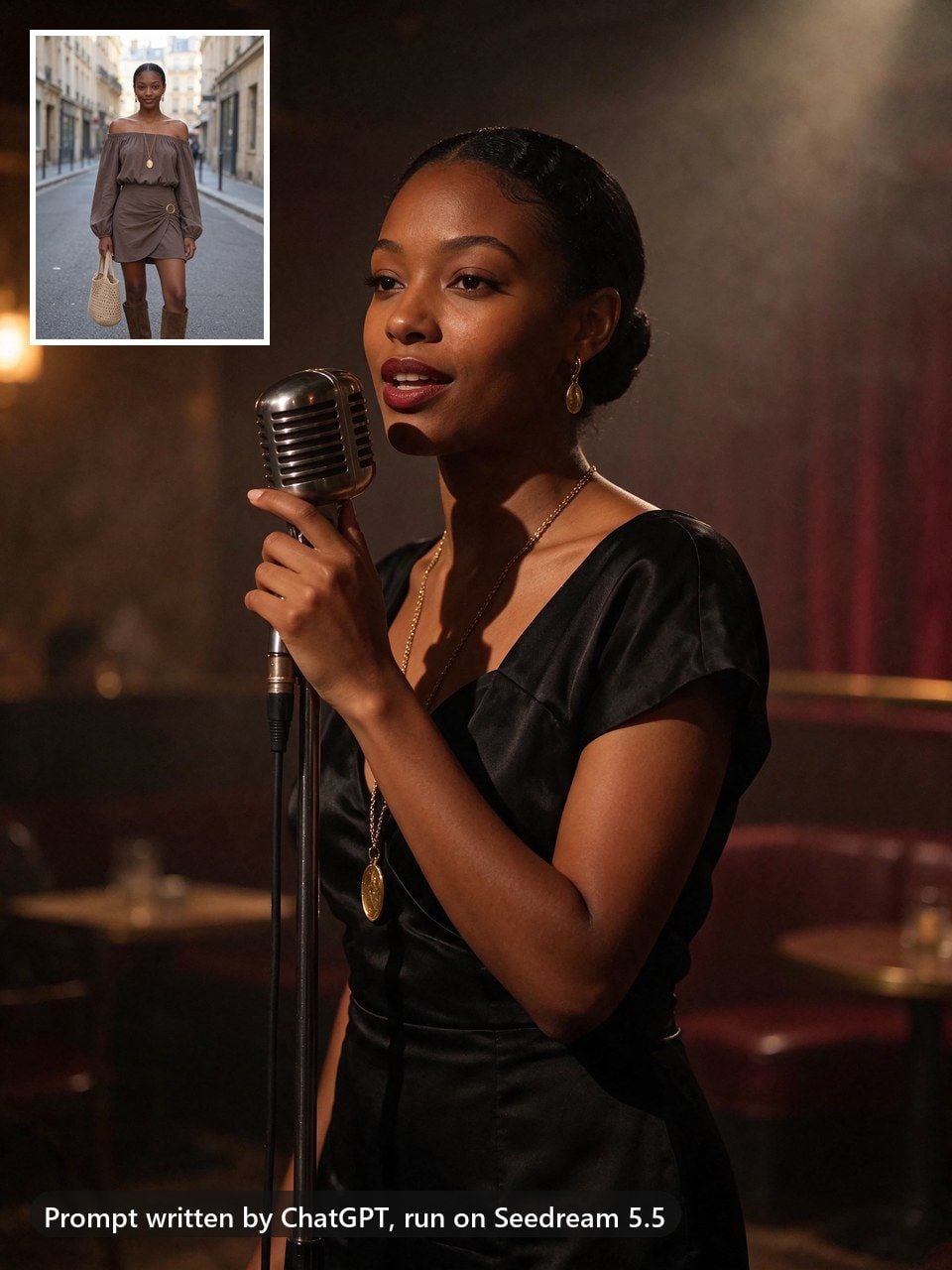
ChatGPT 照片提示词完善器是一条简短指令,可把粗略想法变成完整的照片提示词,并且保留清单已经就位。当你知道自己想要什么效果但不知道如何措辞时,就可以使用它。把这粘贴到新聊天中,然后在最后一行添加你的想法:
plaintext1You are a photo prompt editor for ChatGPT Images. I'll give you a rough idea, and sometimes a photo of me. Rewrite my idea as one image prompt of 60 to 90 words. Start with what must stay the same: my face, features, skin tone, hairstyle and anything else I name. Then describe the new scene: setting, outfit, pose, camera and lens, lighting, color and texture. Use plain, concrete words and skip hype like "stunning" or "8K masterpiece". If my idea is unclear, ask me one question first. Return only the final prompt. 2 3My idea: [describe it in a few words]
我们在一个免费 ChatGPT 账户中试了试,输入是“me as a jazz singer in an old club, I'm a woman”。下面逐字返回的内容是:
plaintext1Keep my face, facial features, skin tone, and hairstyle exactly as shown in my reference photo. Show me as a woman jazz singer performing in a dim, intimate 1940s jazz club, wearing a black satin evening dress and holding a vintage microphone. Pose me mid-song, one hand on the microphone stand, with a relaxed, expressive gaze. Use a medium close-up, 50mm lens, warm amber stage lighting, deep burgundy shadows, a smoky atmosphere, and subtle film grain.
常见问题
ChatGPT 可以编辑人物照片吗?
可以。ChatGPT 允许你上传人像,并要求更换背景、服装、光线或风格,而本指南中的每条编辑提示词都是为此编写的。当你的脸部清晰、光线充足,并且提示词说明哪些必须保持不变时,结果最好。
ChatGPT 编辑一张照片需要多长时间?
OpenAI 的帮助页面说,图像生成可能需要几分钟,具体取决于请求的复杂程度。单个背景替换比包含多个人物、道具和文字的场景更简单,所以更复杂的提示词预计需要更长时间。
这些 ChatGPT 照片提示词在免费方案上能用吗?
根据 OpenAI 的帮助页面,每个 ChatGPT 层级都提供图像生成,包括 Free。问题在于免费账户每天能获得多少张图像,而 OpenAI 并未公布。我们在这项 ChatGPT 图像限制测试中统计了自己的免费方案运行次数。
ChatGPT 可以修复老照片吗?
ChatGPT 可以修复扫描照片上的划痕、污渍和褪色,并在第二轮中添加颜色。用你拥有的最高分辨率扫描,先修复并保持照片为黑白,然后给修复后的版本上色。
在 Atlas Cloud 上,Seedream 5.5 照片编辑费用是多少?
截至 2026 年 11 月 26 日,使用一张参考照片的 Seedream 5.5 编辑,在 2K 下每张图像费用为 $0.0344,这是在 $0.043 标价基础上享受 20% 折扣后的价格。1.5K 档位费用为 $0.0224,两张照片的情侣提示词在 2K 下每张图像费用为 $0.0408。
结论
一个会改变你脸的 ChatGPT 照片编辑,通常来自只描述了新场景的提示词。先说明哪些保持不变,每条消息只做一处修改,并且每个新造型都从原始照片开始,这样 ChatGPT 和 Seedream 5.5 可以偏离的空间都会小得多。
从上面挑一条提示词,换成你自己的细节并运行。如果你想要精确的输出尺寸,或每次运行得到两个版本,请打开 Atlas Cloud 上的 Image Edit 标签页,把同样的文本粘贴到那里。当 ChatGPT 照片编辑提示词读起来像给摄影师的简短说明时效果最好:保留什么、改变什么,以及光线应该如何落下。







