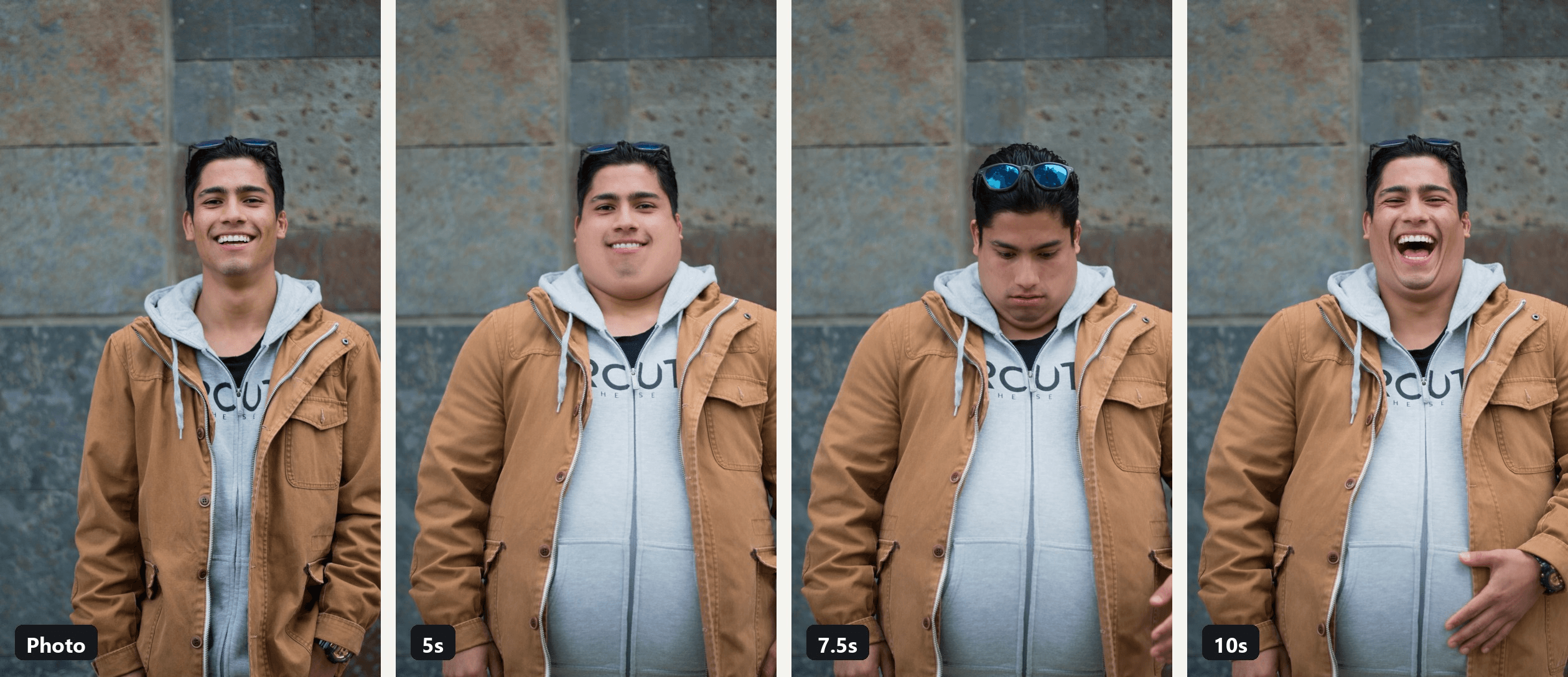
到第三秒时,夹克还合身。到第七秒,它已经敞开着,露出一个照片里本没有的肚子,而屏幕上的男人正拿自己打趣。
这就是 AI 增肥滤镜 在 2026 年的形态。CapCut 在 2025 年 3 月下架的微胖滤镜,以用户模板的形式回归,而我们找到的最大模板已超过 107,000 次使用。下面介绍增肥滤镜趋势目前的状况、背后有哪些模板和应用,以及如何用一张照片和一段可复制的提示词制作视频版。
要点速览
- AI 增肥滤镜最初是 2025 年 3 月 CapCut 上的微胖滤镜,并在走红后十天内被下架。
- 2026 年,它以 CapCut 模板的形式继续存在;我们找到的最大模板——BangPenn 的 chubby filter——使用量已超过 107,000 次。
- 一张照片加上 AI 视频生成器 就能把这个效果变成一段 10 秒的你逐渐变胖的视频。
- 提示词会锁定你的脸、衣服和背景,因此变胖后的版本看起来仍然是你。
- 使用你自己的照片或已同意成年人的照片,并且把玩笑开在自己身上。
TikTok 上的 AI 增肥滤镜趋势是什么?
2025 年 3 月,这种形式是前后对比:一张正常照片,然后同一个人被编辑成胖很多的样子,通常配上 Doechii 的采样音乐。这个效果是 CapCut 内的一个 AI 滤镜。截至我们于 2026 年 11 月 2 日查看时,2025 年 3 月 16 日发布的一条教程帖子已达到 605,000 次播放,而它链接到的模板页面现在打开是空的。
抵制来得同样快。BBC 报道,2025 年 3 月 21 日,TikTok 让这些视频不具备推荐资格,并阻止它们在青少年账户上出现;NBC News 报道,3 月 25 日 CapCut 已移除该滤镜。
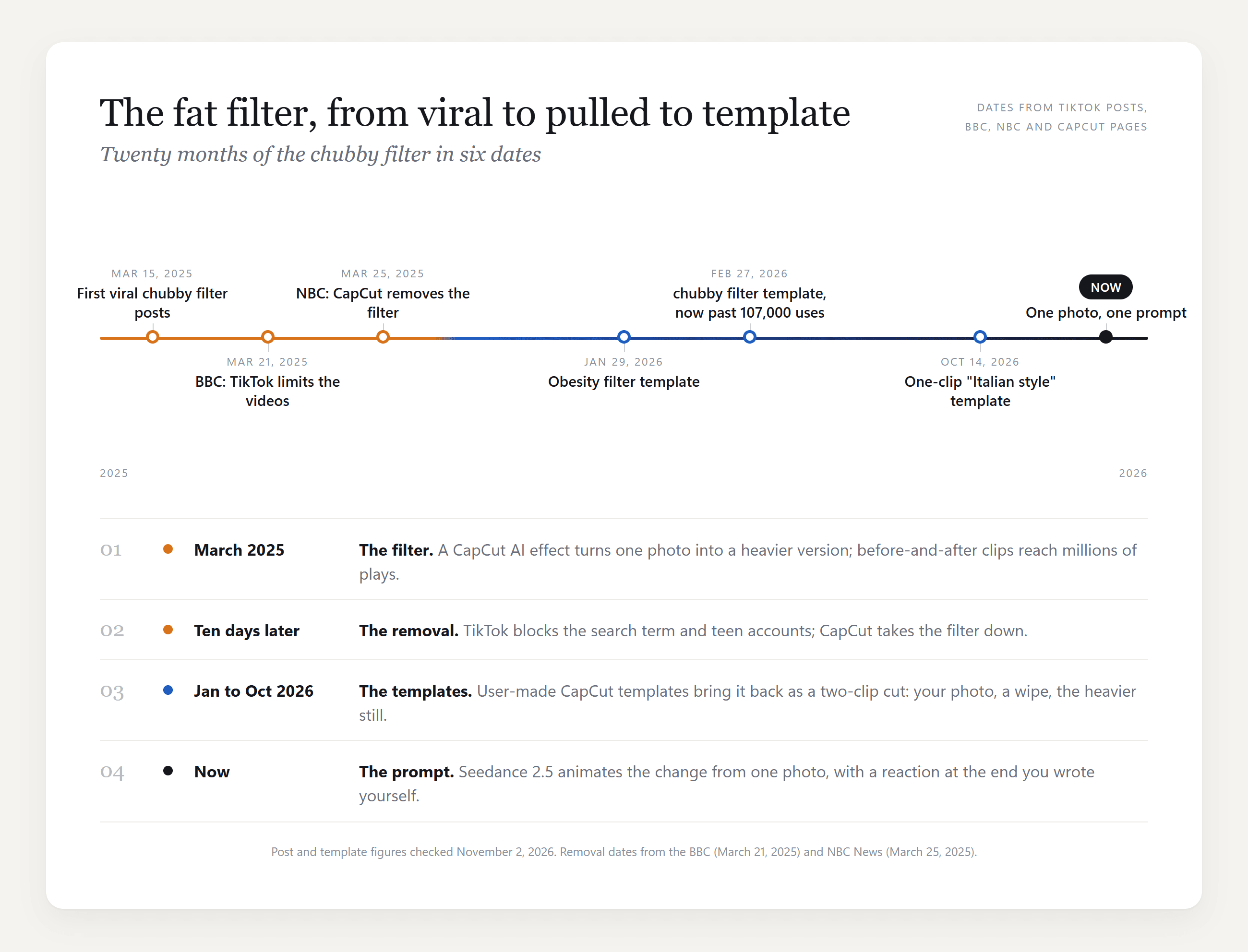
从微胖滤镜到 2026 年的 CapCut 模板
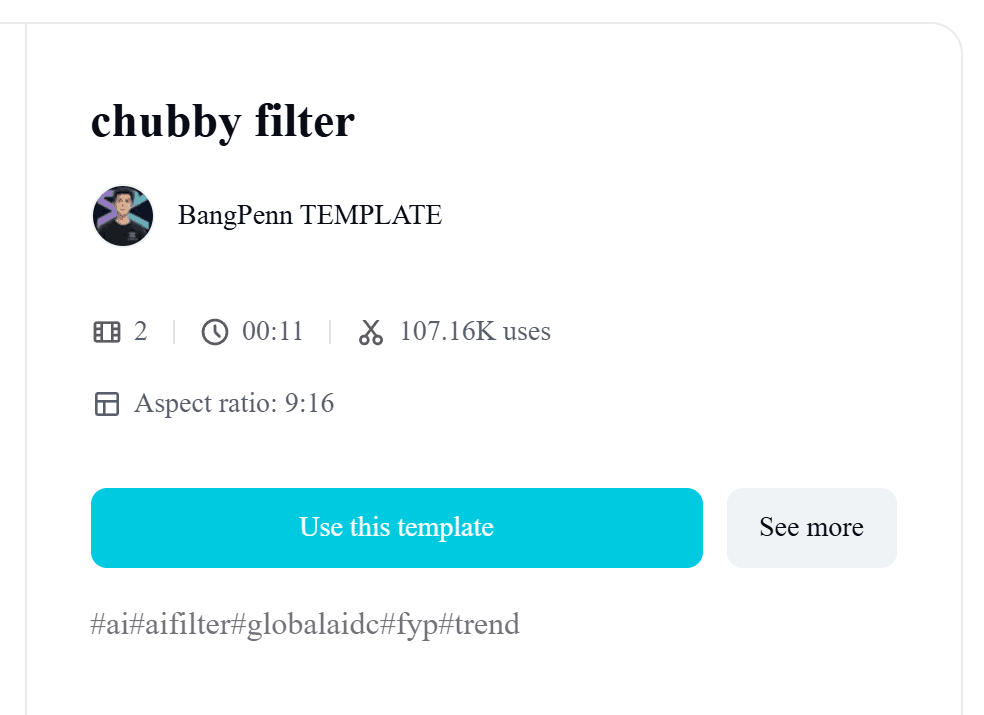
模板制作者填补了空缺。BangPenn TEMPLATE 的 chubby filter 模板发布于 2026 年 2 月 27 日,需要两段片段,时长 11 秒,截至 11 月 2 日已超过 107,000 次使用和 130 万次播放。
1 月的一个 Obesity filter 模板有 16,000 次使用;10 月,一个单片段模板出现在 CapCut 的宣传帖子中,标题为“瘦小伙也能驾驭那种意大利风格!”。
实时摄像头版本也仍在继续。Snapchat 列出一款 Fat Face Filter 镜头,TikTok 有一个名为 FAT 的效果,而 2026 年 4 月一条使用它的脸胖趋势帖子有 68,000 次播放。这些效果在你录制时实时应用,而不是根据照片渲染。
如何用一张照片制作 AI 增肥滤镜视频
模板给你一个之前、一个之后,以及两者之间的转场。要想看到变化发生,并在结尾带反应,你需要提示词。Atlas Cloud 运行 Seedance 2.5,它把一张照片作为第一帧,并根据你的描述生成随后 10 秒的动画。“AI,让我变胖”变成一行文字,而不是一个滑块。
我们把主图里的照片给了它:
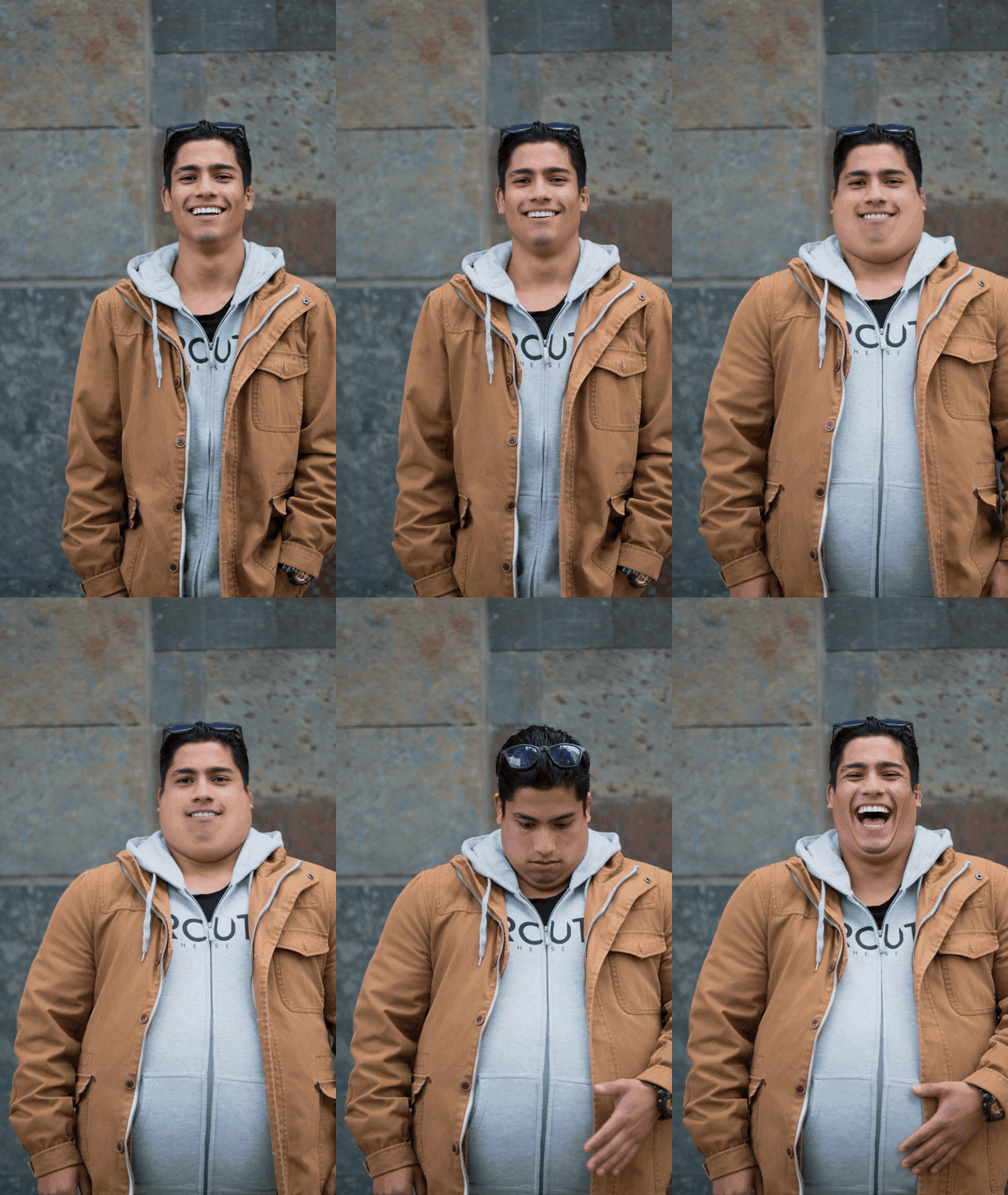
变化发生在第 3 到第 6 秒:先是脸颊,然后是脖子,接着是撑开夹克的肚子。到第 7 秒,他低头看着肚子并拍了拍它,最后一秒是大笑。墙、夹克和他的脸保持不动,这才让它看起来不像贴上去的贴纸。
方法 1:在生成器中把你的照片变成变胖版的你
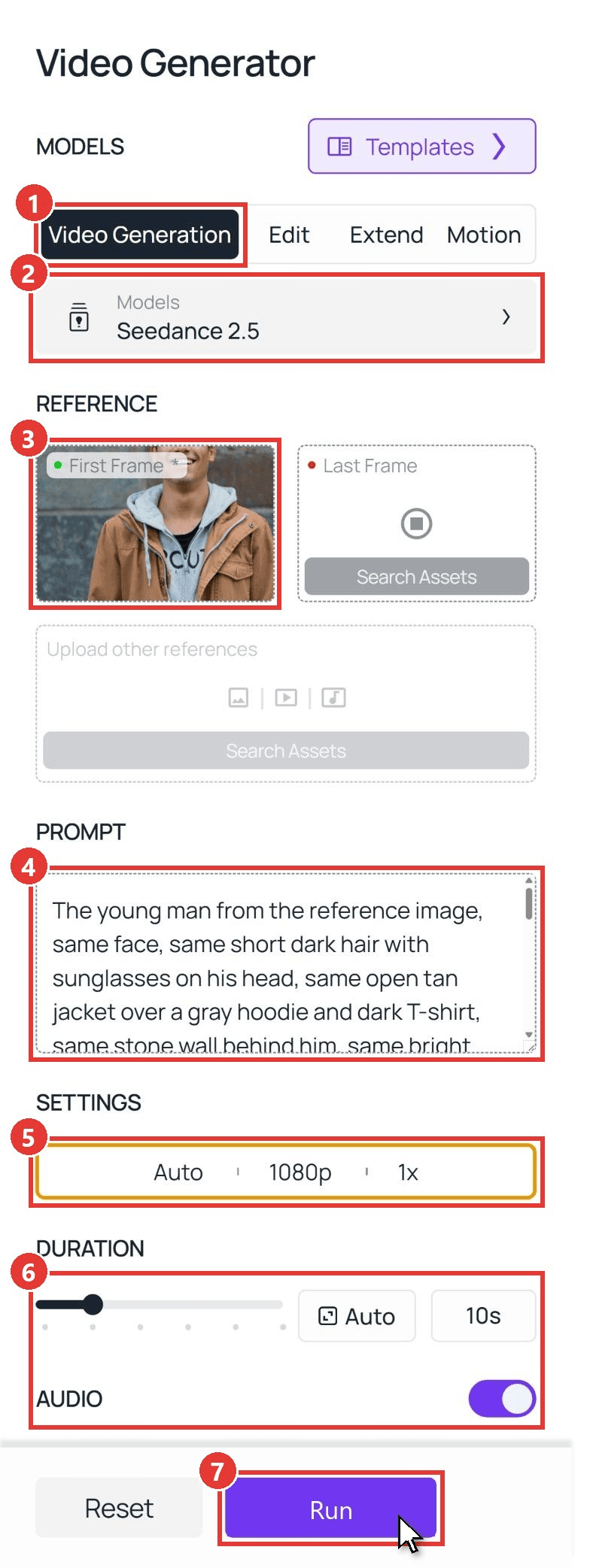
登录,打开视频生成标签页,然后按照截图中的编号操作:
- 保持在 Video Generation 标签页。
- 在 Models 下保留 Seedance 2.5。
- 将你的照片上传到 First Frame。先裁剪成 9:16,这样片段会以竖屏输出。将 Last Frame 留空。
- 将下面的提示词粘贴到 Prompt 框中。
- 在 Settings 下选择 1080p。
- 将 Duration 设为 10,并保持 Audio 开启。
- 点击 Run。
以下是上面片段背后的提示词:
plaintext1The young man from the reference image, same face, same short dark hair with sunglasses on his head, same open tan jacket over a gray hoodie and dark T-shirt, same stone wall behind him, same bright smile, waist-up framing, the camera does not move. 0-2s: he stands relaxed and smiles at the camera. 2-7s: he slowly and steadily gains weight: his cheeks and neck fill out into a soft double chin, his shoulders and arms get thicker, and a large round belly swells under the hoodie and pushes the jacket wide open, the fabric stretching tight. 7-8.5s: he looks down at his new belly in surprise and pats it with one hand. 8.5-10s: he looks back up at the camera and bursts out laughing, and the heavier body stays exactly like that to the final frame. His eyes, nose, mouth, hairstyle, clothes and the wall never change. Realistic skin and fabric, no text on screen. Sound: quiet street ambience, then his laugh.
把夹克、墙和头发换成你照片里的内容,并保留时间码。我们的撰写 Seedance 2.5 提示词指南解释了为什么结尾那句话很重要。
方法 2:通过 API 运行增肥滤镜提示词
想给整个群聊做一段,还是把在线增肥滤镜加到你自己的应用里?API 在单个请求中接收同一张照片和提示词。
第 1 步:创建 API 密钥。 在控制台中,打开 Settings,并在 API Keys 下创建一个密钥。一个密钥覆盖平台上的所有模型。
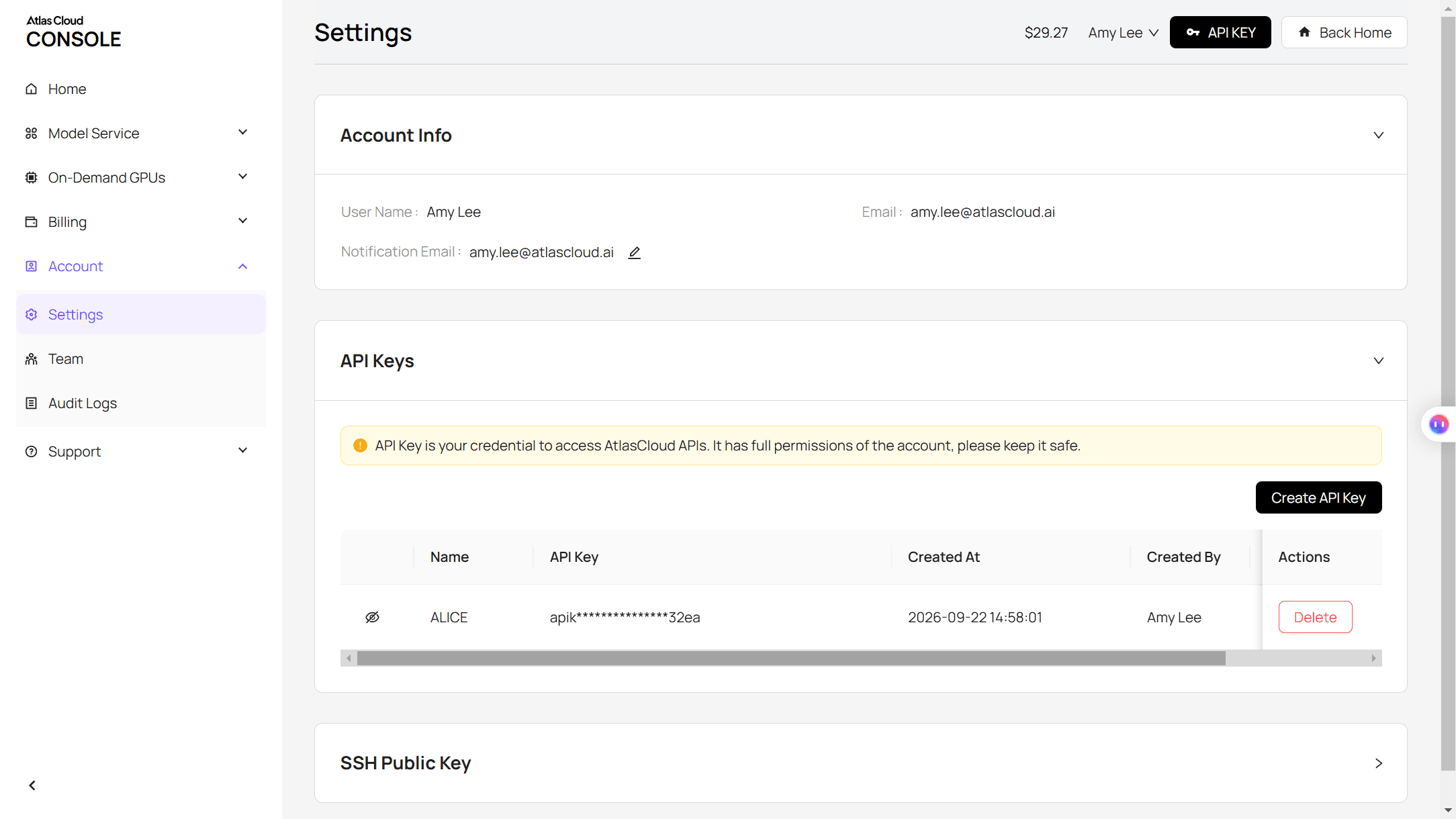
第 2 步:检查请求格式。 Atlas Cloud API 文档涵盖了身份验证和视频端点。
第 3 步:发送请求并轮询。 将你的 9:16 照片的公开 URL 放入 image 字段:
plaintext1curl -X POST https://api.atlascloud.ai/api/v1/model/generateVideo \ 2 -H "Authorization: Bearer $ATLASCLOUD_API_KEY" \ 3 -H "Content-Type: application/json" \ 4 -d '{ 5 "model": "bytedance/seedance-2.5/image-to-video", 6 "prompt": "<paste the Method 1 prompt here>", 7 "image": "https://your-cdn.com/your-photo-9x16.jpg", 8 "duration": 10, 9 "resolution": "1080p", 10 "generate_audio": true 11 }'
响应会返回一个 prediction ID。轮询它,直到状态显示为 completed,然后从 outputs 数组中下载 MP4:
plaintext1curl https://api.atlascloud.ai/api/v1/model/prediction/<prediction_id> \ 2 -H "Authorization: Bearer $ATLASCLOUD_API_KEY"
每个视频模型都使用相同的端点和相同的密钥,所以要在另一个模型上尝试这个片段,只需改一行模型字符串。
哪些增肥滤镜模板和应用符合这一趋势?
搜索增肥滤镜应用,你会得到照片工具;搜索这一趋势,你会得到 CapCut 模板。以下是各工具根据其页面在 2026 年 11 月 2 日所列的输入和输出。
| 模板或工具 | 输入 | 输出 | 标注的模型 | 备注 |
|---|---|---|---|---|
| CapCut,BangPenn TEMPLATE 的 chubby filter | 2 段片段 | 11 秒,9:16 | 未标注 | 发布于 2026 年 2 月 27 日 |
| CapCut,niuniu 的 Obesity filter | 2 段片段 | 3 秒,9:16 | 未标注 | 发布于 2026 年 1 月 29 日 |
| CapCut,Future301 的 Ai | 1 段片段 | 6 秒,9:16 | 未标注 | 发布于 2026 年 10 月 14 日;“意大利风格”宣传帖 |
| Dreamina,Fat Face Filter | 1 张照片 | 仅图片 | Seedream 5.0 | 每日免费积分 |
| Pippit,Free AI Fat Filter Online | 照片加提示词 | 仅图片 | Nano Banana Pro 和 Seedream 4.0 | 免费,无需银行卡 |
| Magic Hour,AI Fat Filter | 1 张照片 | 768 x 1376 图片 | Nano Banana 2 | 每日免费积分 |
| YouCam Makeup,Fat Filter | 自拍或全身照 | 仅图片 | 未标注 | 免费应用 |
| Snapchat Fat Face Filter 镜头,TikTok FAT 效果 | 实时摄像头 | 实时效果 | 无 | 录制时应用 |
| Atlas Cloud,Seedance 2.5 | 1 张照片,可选最后一帧 | 4 到 30 秒,原生 1080p | Seedance 2.5 | 比例跟随你的照片 |
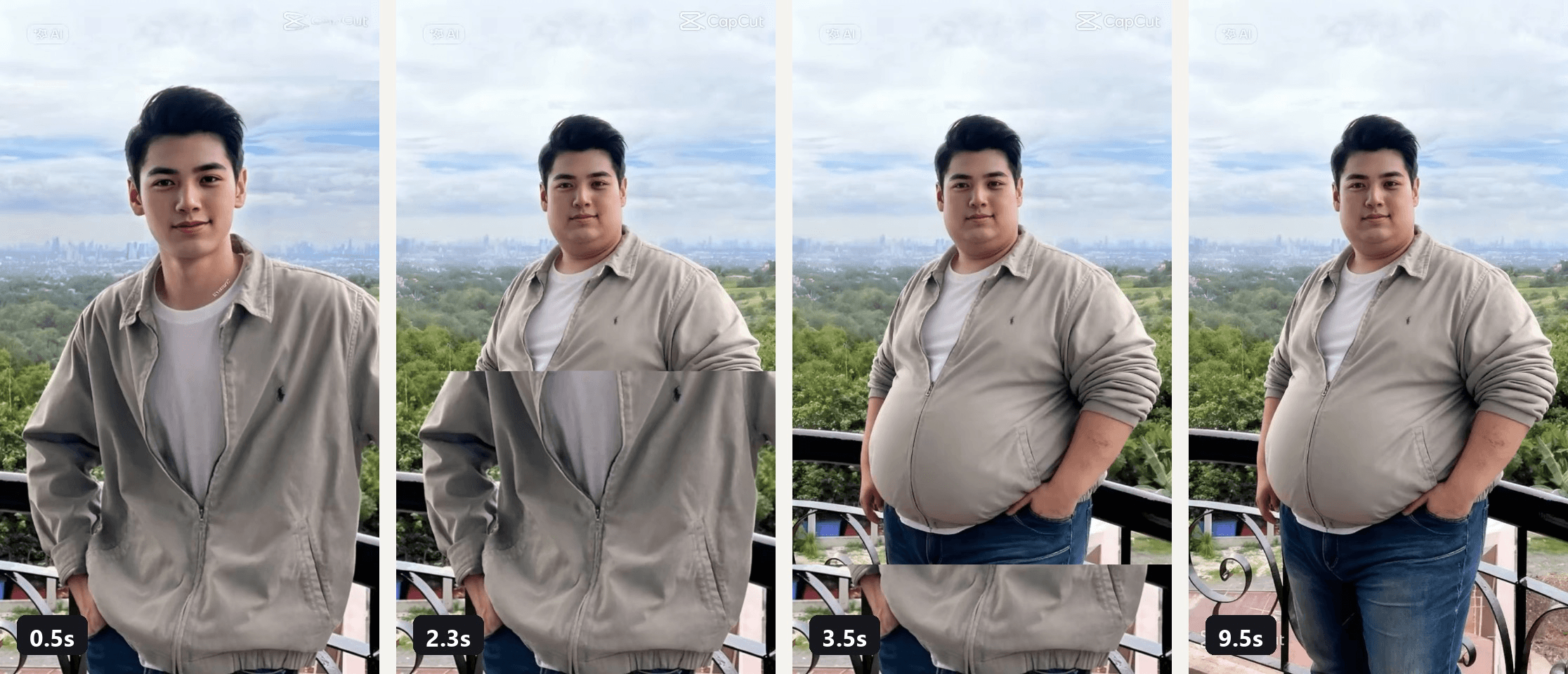
来自 CapCut 模板 chubby filter by BangPenn TEMPLATE 预览视频的帧。
在我们能核对的条目中,变化本身始终不在屏幕上发生:一张静止图,或从之前片段切到之后片段。而提示词路线才能让你看到它发生。
一段能保住你脸的 AI 增肥滤镜提示词
难的不是增重,而是在增重的同时不把你变成另一个人。上面的提示词通过两个清单做到了这一点:哪些不能动,以及哪些按秒发生变化。
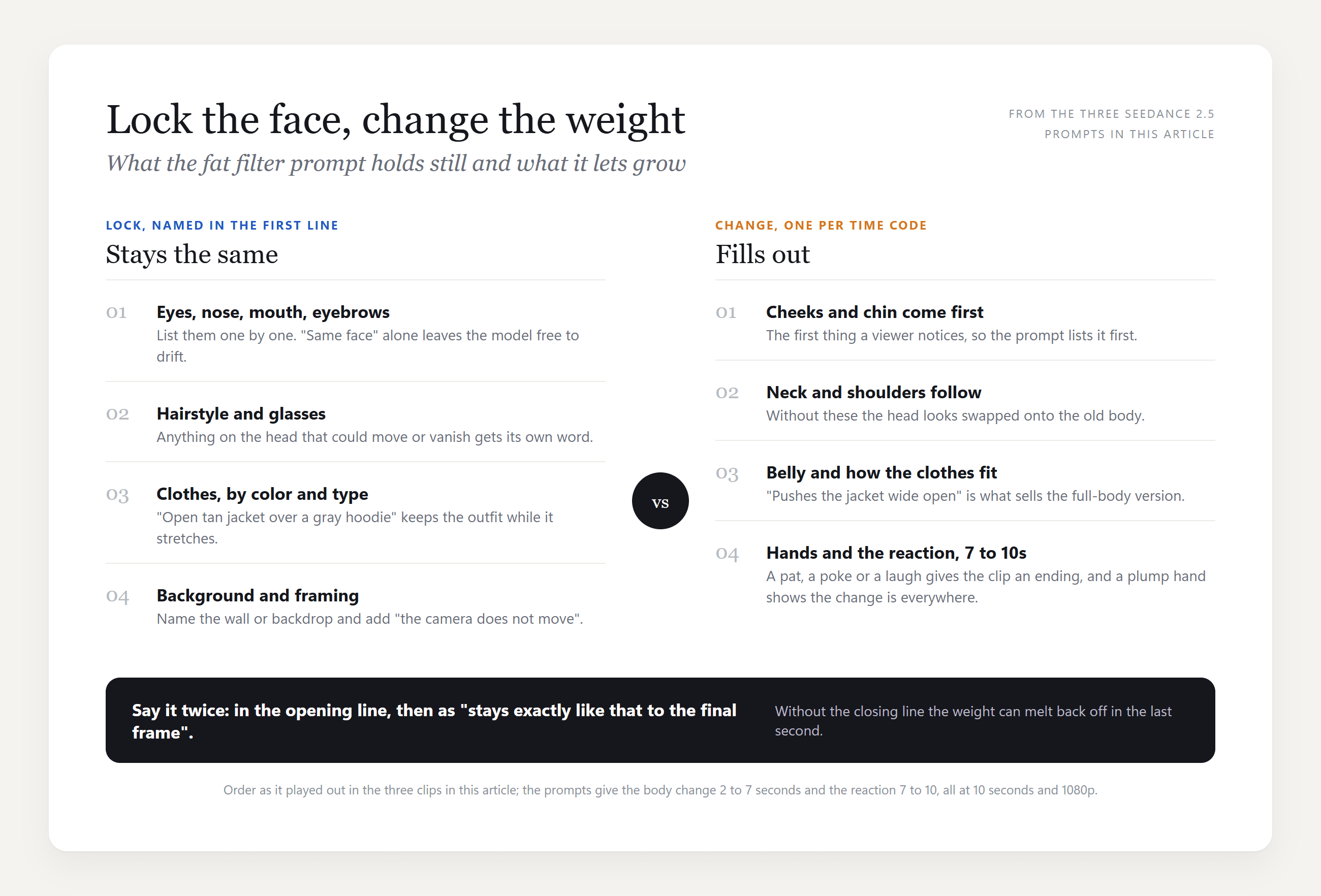
逐一列出脸部各部位,列出衣服和墙,然后把时间码用在会长大的部分上,并以一个动作结尾——拍一下或笑一下——这样片段才有落脚点。
自拍用的胖脸滤镜版本
Snapchat 和 TikTok 的效果作用在脸上,所以自拍版把变化放在那里,同时脖子、肩膀和手也跟着变化,这样看起来才像同一个身体。
她的脸颊在第 3 到第 6 秒之间鼓起来,双下巴挤进毛领里,夹克在肩膀处绷紧。到第 7 秒,那只抬起来戳她脸颊的手也变得更胖。
plaintext1The young woman from the reference image, same face, same long straight brown hair, same thin rectangular glasses, same black leather jacket with a brown fur collar, same plain beige studio background, selfie framing with one arm reaching toward the camera, the framing does not change. She stays alive the whole time: she blinks naturally every two or three seconds, breathes, tilts her head a little and her eyes move behind the glasses. 0-2s: she pouts her lips at the camera and blinks. 2-7s: her whole visible body slowly and steadily gains weight, not just her face: her cheeks grow round and full, a soft double chin pushes down into the fur collar, her neck gets thick and short, her shoulders and arms fill out until the leather jacket stretches tight across them, and the hand reaching toward the camera gets plump with thick fingers. While this happens she blinks twice, glances to the side and back, and her pout turns into a small smirk. Her eyes, nose, lips, eyebrows, glasses and hairstyle stay exactly the same. 7-8.5s: she raises her free hand, its fingers now visibly plump, and pokes her round cheek with one finger. 8.5-10s: she bursts out laughing with her eyes crinkling behind the glasses, and the heavier face, neck, arms and hands stay like that to the final frame. Realistic skin, hair and leather texture, no text on screen. Sound: quiet studio room tone, then her laugh.
“她全程保持鲜活”这句话之所以存在,是因为早前的一次生成在变化时让她的脸僵住了;写进去的眨眼动作让它不会看起来像两张照片之间的变形。
宠物用的胖猫滤镜版本
CapCut 的宠物模板 Chubby Dog 和 fat cat 在 11 月 2 日分别有 9,000 次和 1,700 次使用。提示词版本适用于长毛猫,因为毛发承载了变化。
plaintext1The fluffy ginger cat from the reference image, same long orange fur, same amber eyes, same white chest patch, same garden background with green plants, sitting and facing the camera, the camera does not move. The cat stays alive the whole time: it blinks slowly, its ears swivel, its whiskers twitch, its tail tip flicks and it breathes. 0-2s: the cat sits and looks at the camera, blinks once. 2-7s: it slowly and steadily grows into an enormously chunky, fluffy cat, the way a famously fat long-haired house cat looks: its body becomes a wide, round ball of fur from neck to hips, its chest and neck merge into one big fluffy mass, its cheeks puff out until its face looks small on top of the body, and its paws peek out from under the round belly, but it stays clearly a real cat with soft, natural long fur, never a smooth balloon. While this happens it blinks, glances to the side and back, and its expression turns slightly grumpy. 7-10s: the chunky cat shifts its weight, settles its heavy round body down a little wider, slowly blinks at the camera with a grumpy face and flicks its tail, and it stays this chunky to the final frame. Realistic fur texture and lighting, no text on screen. Sound: quiet garden ambience with birds, one short grumpy meow at the end.
“绝不要变成光滑的气球”这句话很有必要:我们第一次对宠物——一只短毛狗——生成时,把它鼓成了一个闪亮的圆桶。
微胖滤镜为什么被下架,以及如何让你的版本无害
BBC 引用了一位食品与营养科学家的话,称 2025 年的这一趋势在体重污名问题上“是一大倒退”,而批评点在于变胖的身体本身就是笑点。我们的衰老滤镜趋势指南也得出同样的规则:用你自己的成年人照片,或你有权使用的照片。
| 应该做 | 不要做 |
|---|---|
| 用你自己的照片,或用朋友主动要求你用的照片 | 用陌生人的照片或创作者的片段 |
| 把玩笑放在变化本身上,并在结尾加一个笑声 | 把它配文成警告或最坏情况 |
| 发布时加上 AI 标签 | 剪掉反应,只发变胖后的那一帧 |
本文中的每个片段都使用了我们有权使用的照片,并且每个片段都以当事人对结果大笑结尾。
常见问题
Snapchat 或 TikTok 现在有增肥滤镜吗?
有,作为实时摄像头效果。Snapchat 列出一款 Fat Face Filter 镜头,TikTok 有一个名为 FAT 的效果,两者都会在你录制时应用。而身体本身在几秒内改变形状的片段,则是根据照片渲染出来的,通常通过 CapCut 模板,肥胖身体滤镜的帖子就来自那里。
哪个应用有增肥滤镜?
对于照片,CapCut 自家的 Dreamina 和 Pippit 工具、Magic Hour 以及 YouCam Makeup 都列出了增肥滤镜,而且前三个会公布由哪个模型绘制。对于视频,CapCut 应用运行上表中的模板,而当你想让变化出现在屏幕上时,Atlas Cloud 视频生成器接收一张照片和一段提示词。
AI 微胖滤镜和 AI 增肥滤镜是一样的吗?
同一个效果,两个名字。2025 年的潮流称它为微胖滤镜,而上表中的 2026 年照片工具称它为增肥滤镜。BangPenn 模板保留了较旧的名字,所以两种搜索都会指向它。
AI 增肥滤镜能用于全身照吗?
可以,而且比裁切到脸部更可信,因为衣服能做出反应。在我们那个男性片段中,肚子把夹克撑开,比双下巴更能让人相信变化。让身体保持在画面内,并在上传前裁剪成 9:16。
我可以做成前后对比剪辑,而不是缓慢变化吗?
可以。Seedance 2.5 Image-to-Video 也接收 Last Frame,所以如果你先用任意图像模型制作变胖后的静止图,片段就会像模板那样在两张照片之间过渡。胡子滤镜指南也把这招用在刮胡子上。
结论
增肥滤镜趋势比开启它的那个滤镜活得更久。2025 年 3 月的微胖滤镜已从 CapCut 消失,取而代之的是一个使用量超过 100,000 次的用户模板、会公布背后模型的照片工具,以及实时拉伸你脸的 Snapchat 和 TikTok 效果。在我们查看过的那些内容中,变化本身从未真正播放出来,而这恰恰是人们真正想看的部分。
一张照片、一段提示词和 Seedance 2.5 的 10 秒生成,就能给你这些:脸颊、脖子、肚子和大笑,出现在你自己的脸上,而其他一切都保持不动。把它用在自己身上,保留反应镜头,你的 AI 增肥滤镜片段就是这一趋势中没人会要求下架的版本。


