


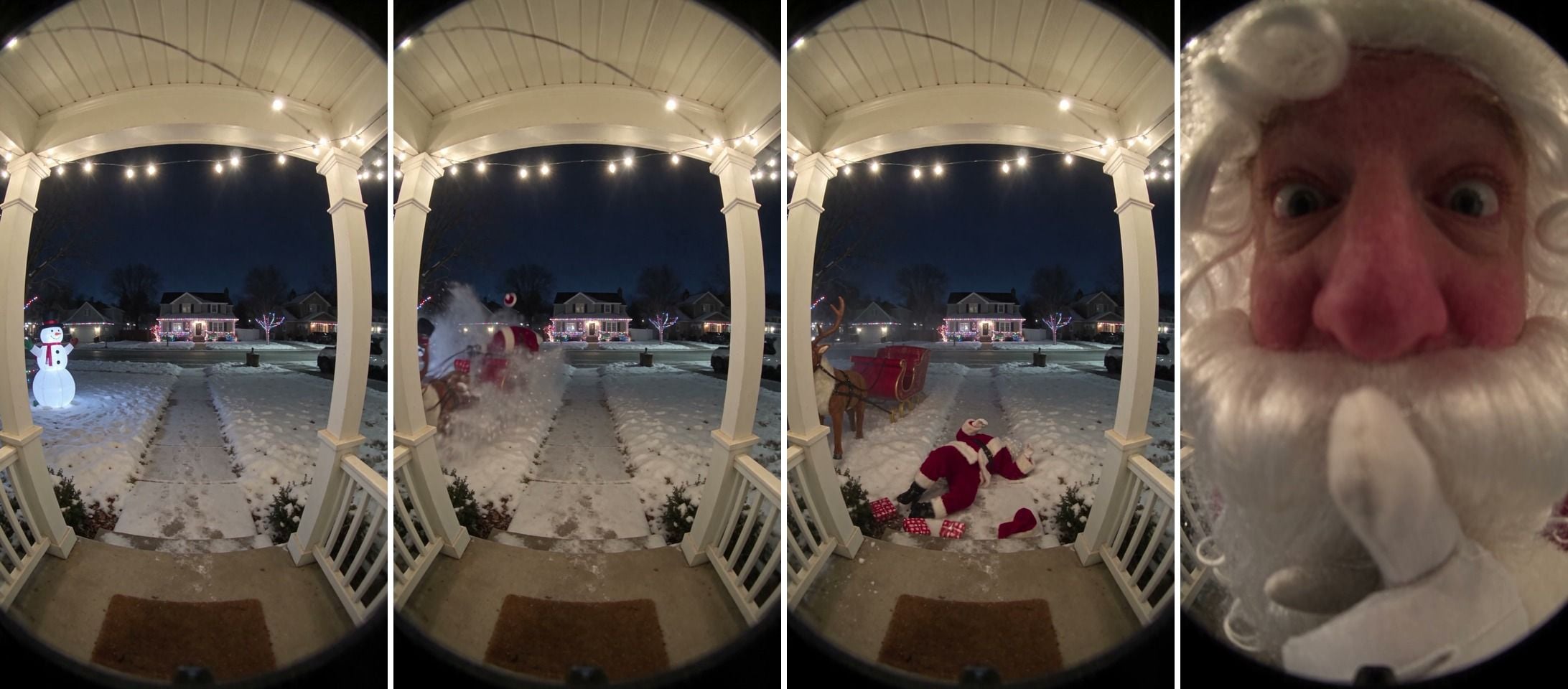
门廊很安静。然后一辆雪橇飞得太低,压扁了充气雪人,把驾驶者头朝下摔到了前院小路上。他在那儿躺了一秒。他找到自己的帽子。然后他注意到门铃,走上前,直到鼻子占满镜头,低声说:“你什么都没看到。”
这就是我们自己的 圣诞老人被摄像头拍到 片段:12 秒、一张门铃风格的照片、一个提示词。每年 12 月填满 Facebook 和 TikTok 的那些片段也是做出来的,要么由卖家把圣诞老人编辑到你的门铃截图上,要么由 AI 模型生成他。本指南会说明它们由谁制作,然后给出我们运行的提示词,并附上另外两个版本供你尝试。
要点
- 那些真正露出圣诞老人本人的“圣诞老人被摄像头拍到”片段,都是有意制作的,要么出自卖家之手,要么由 AI 完成。
- 没有 CapCut 模板推动这一潮流:我们检查的 149 条 TikTok 帖子中,没有一条链接了模板。
- 一张门铃截图和一个定时提示词,在 AI 视频生成器 中就能生成一段带声音的 12 秒片段。
- 我们的提示词明确写出雪橇是撞毁而不是降落,第一次运行就交付了这场撞击。
- 同一张门廊照片还能做出雪橇飞越版,而宠物摄像头能做出第三个版本。
什么是“圣诞老人被摄像头拍到”潮流?
它是一段伪装成门铃或安防录像的短片。画面是夜晚的门廊,通常为黑白夜视。然后圣诞老人沿小路走来挥手,或者他的雪橇和驯鹿从房屋上空掠过。父母在圣诞节早晨放给孩子看。其他人转发它,是因为它好笑。
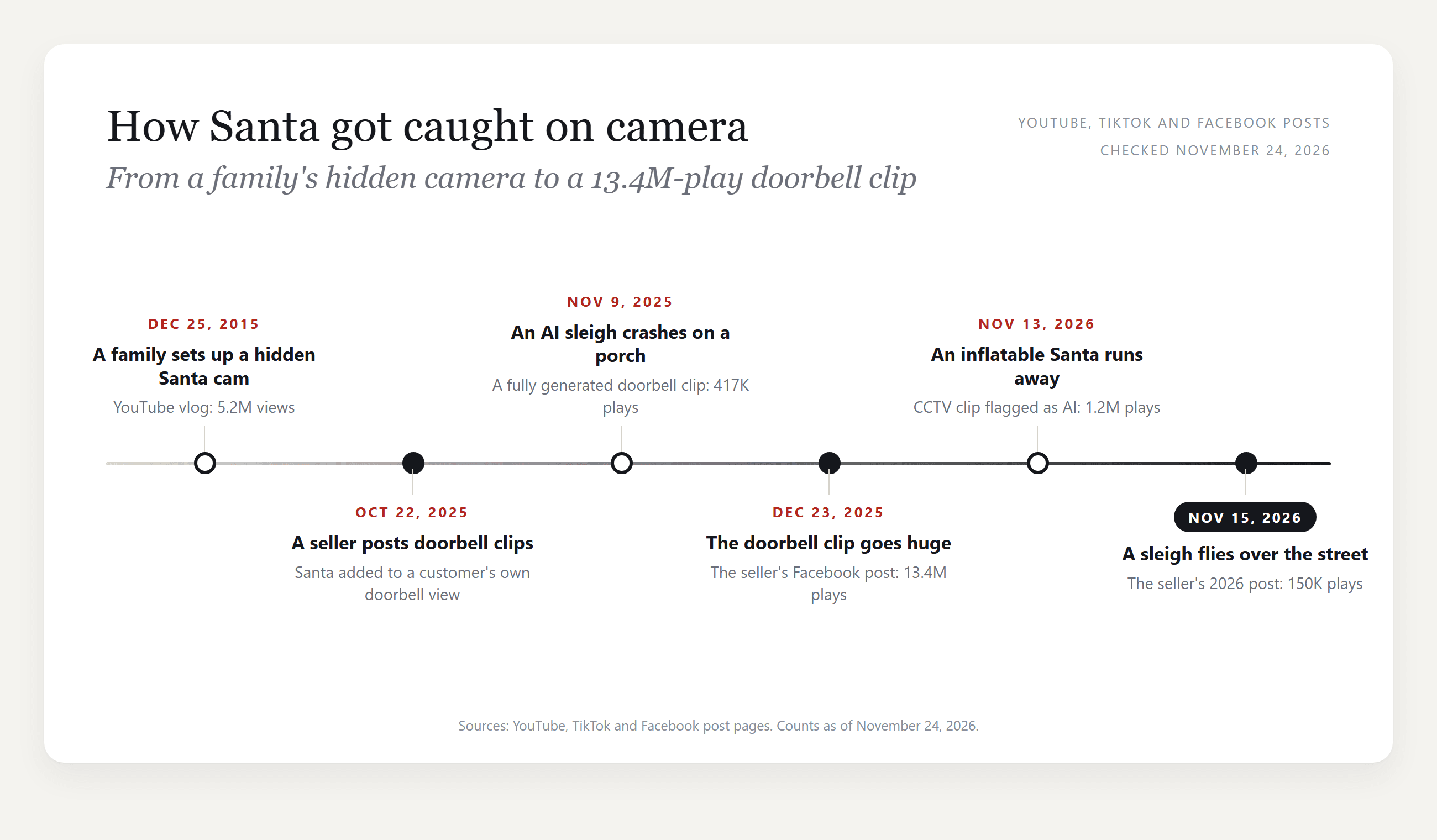
这个点子比 AI 视频更早。2015 年圣诞节,一个名为 Santa Caught on Santa Cam! 的家庭视频博客展示了为孩子们设置的隐藏摄像头,如今它已有 520 万次观看。
门铃版本去年冬天火了起来。我们找到的最大门铃片段是 Front Door Santa 的 Facebook 帖子,发布于 2025 年 12 月 23 日。黑白鱼眼门铃视角中,圣诞老人以全彩出现,爬进停在街上的雪橇,驯鹿拉着他离开,道路空无一人。到 2026 年 11 月 24 日,它已有 1340 万次播放和约 16 万个赞。
那个账号是一家店铺。你上传自家门铃拍摄的夜间截图,其产品页称每个视频都手工编辑,并在 48 小时内交付。其他卖家现在用 AI 做同样的活,其中一家在其网站上表示,每个视频都是用你的照片通过 AI 制作的。
我们梳理了 2025 年 10 月以来的 149 条 TikTok 帖子,取自六个话题标签和 TikTok 的主题页面。没有一条链接 CapCut 模板,我们看到的唯一 TikTok 效果是某条帖子上基础的 Green Screen。这是一个由成品片段构成的潮流,逐个出售或生成。
现实中真的拍到过圣诞老人吗?
很多人在看完后都会问。我们追踪到的片段大致分为三类。
| 你看到的画面 | 制作方式 | 示例,2026 年 11 月 24 日核查 |
|---|---|---|
| 黑白门铃视角,圣诞老人或他的雪橇是彩色的 | 卖家把圣诞老人编辑到客户自己的门铃截图上 | 播放量 1340 万的 Facebook 片段 |
| 圣诞老人走路、摔倒或对着镜头说话的完整场景 | AI 视频模型根据照片或提示词生成 | 带有 Sora 水印的雪橇坠毁(41.7 万次播放);一个跑掉的充气圣诞老人,在 TikTok 上被标记为 AI 生成(120 万次播放) |
| 一颗亮点划过黑暗天空,家人在旁边反应 | 用手机拍摄夜空中的光,再加一段配文 | 一条 TikTok 片段,配文写着“我 5 岁的孩子发誓说他在天上看到了他”(4640 万次播放) |
我们样本中观看最多的片段是最朴素的那个。里面根本没有圣诞老人,只有一道光和一个孩子的笃定。
那么,现实中真的有过圣诞老人被摄像头拍到的影像吗?对家长来说,有用的答案是:那些看起来可信的都是有意制作的。第二行那种,就是你今晚可以自己做的。
如何用 AI 制作“圣诞老人被摄像头拍到”视频
卖家替你选好场景。提示词则让你自己写,连圣诞老人发现摄像头时说什么都能写。下面是我们在 Atlas Cloud 上的运行结果,只用了一张雪地门廊照片。
打开声音。撞击声和耳语声是与画面一起生成的。
这个笑点来自 2025 年 11 月 9 日发布的一段 门铃片段,其中雪橇滑上门廊,圣诞老人从里面滚出来。我们保留了撞击,去掉了后半段的警灯,并在镜头前写了一个新结局。
模型是 Seedance 2.5。它把你的照片作为第一帧,所以视频里的门廊就是你照片里的门廊,并且它会在同一次生成中产生声音。我们第一次运行就命中了这个笑话需要的节拍:撞击、翻滚、帽子掉落又戴回、脸凑到镜头前。当我们把音频跑一遍语音转文字时,那句耳语逐字返了回来。
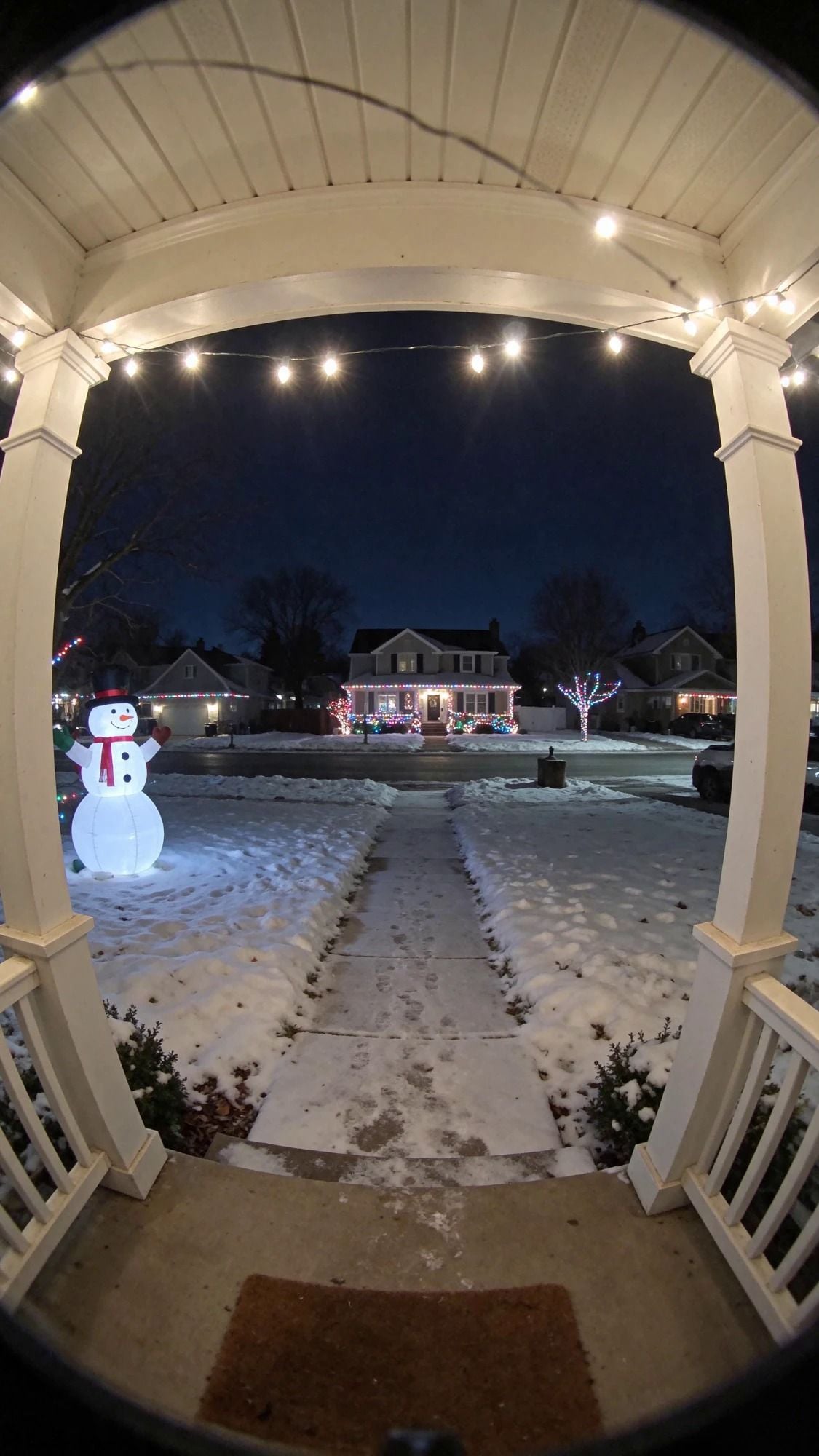
那个门廊不是我们的。我们用图像模型生成了起始照片,提示它看起来像门铃截图。你的照片应该是真实拍摄的:来自门铃 App 的夜间截图。三点能让它成功:
- 画面中没有人。 圣诞老人应该是摄像头唯一拍到的人。
- 门前有开阔地面。 圣诞老人需要有地方落地。
- 屋顶上方有一条天空。 雪橇从那里进来。
下面的一切都在 Atlas Cloud 视频生成器 的 Video Generation 标签页中进行。
方法 1:在 Atlas Cloud 视频生成器中制作门铃片段
按照截图中的编号操作:
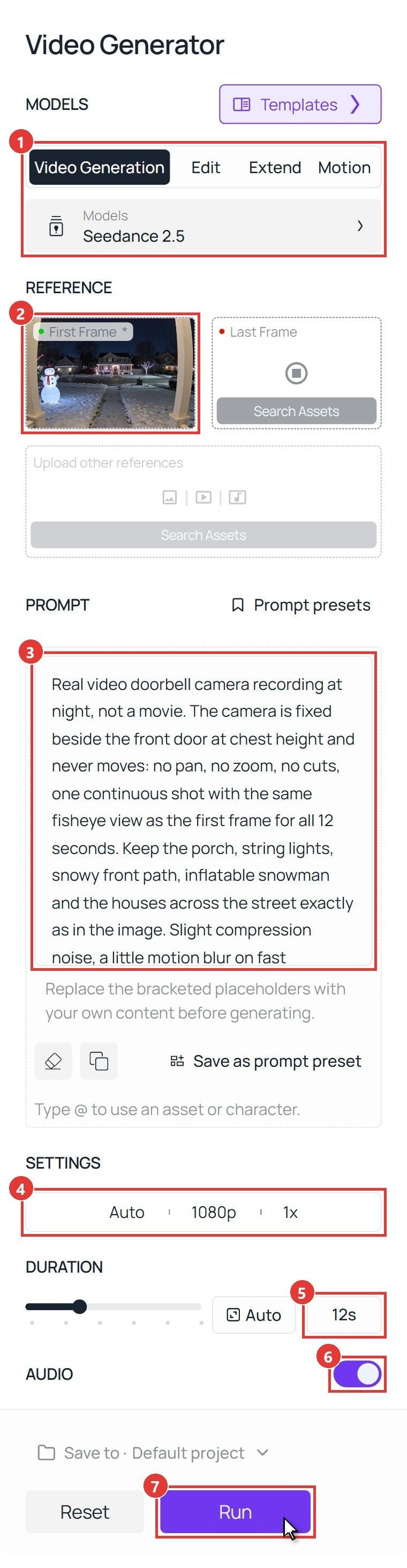
- Model: 打开 Video Generation,保留 Seedance 2.5。
- First Frame: 将你的门铃截图上传到 First Frame 槽位。Last Frame 留空。
- Prompt: 粘贴下面的提示词。
- Settings: 选择 1080p,输出一个。比例保持 Auto,跟随你的照片。
- Duration: 设为 12 秒。
- Audio: 保持开启。
- Run。 片段会出现在右侧面板中。
plaintext1Real video doorbell camera recording at night, not a movie. The camera is fixed beside the front door at chest height and never moves: no pan, no zoom, no cuts, one continuous shot with the same fisheye view as the first frame for all 12 seconds. Keep the porch, string lights, snowy front path, inflatable snowman and the houses across the street exactly as in the image. Slight compression noise, a little motion blur on fast movement. 2 3[0-1.5s] Quiet snowy night, only falling snow moves. 4[1.5-3s] Santa's red wooden sleigh, pulled by reindeer, comes in far too low and too fast from the upper left of the sky. It is a crash, not a landing: it slams into the snowy front yard, throws up a big spray of snow, knocks the inflatable snowman flat, and skids sideways to a stop at the left edge of the frame. The reindeer stumble to a halt behind it, tangled in their reins. Sleigh bells jangle wildly. 5[3-5s] The impact throws Santa out of the sleigh; he does not climb out. A real-looking Santa Claus in a red suit and white beard tumbles head over heels down the snowy path toward the porch, his hat flying off, and lands flat on his back near the doorstep. A few wrapped presents spill from his sack onto the snow. 6[5-8s] He lies still for a beat, then slowly sits up with a groan, finds his hat in the snow, puts it back on crooked, and brushes snow out of his beard. 7[8-10.5s] He looks left and right to check whether anyone saw, then notices the doorbell camera. He freezes, then walks right up to the lens; his face fills the top half of the frame and bulges in the fisheye. 8[10.5-12s] He leans in, raises a gloved finger to his lips and says in a low, embarrassed whisper with natural lip movement: "You didn't see that." Then he winks. 9 10Audio: real doorbell microphone sound: wind, a whoosh, a loud crunching crash, wildly jangling sleigh bells, a reindeer snort, Santa's groan, then his whisper. No music. 11Only Santa and his reindeer appear. No other people, no children, no police, no brand logos, no subtitles, no on-screen text.
有两句话是为了喜剧效果。“It is a crash, not a landing”告诉模型不要把雪橇轻轻放下,“he does not climb out”则要求他翻滚出来,而不是利落地爬出。
第一段负责门铃的观感。它把摄像头固定在门旁胸口高度,并禁止平移、变焦和剪辑,这正是门铃片段与电影场景的区别。至于俯视 CCTV 角度,我们的老虎打架指南里有相应措辞。
要把它变成你的版本,就写出你照片里真实存在的东西。把充气雪人换成你自己的邮箱、树篱或停着的车,并保留六个定时节拍。
方法 2:通过 Seedance 2.5 API 发送同一提示词
想为家庭群聊里每个门廊都做一个?API 接收同一张照片和同一个提示词。
第 1 步:创建 API 密钥。 在控制台中打开 Settings,并在 API Keys 下创建一个密钥。
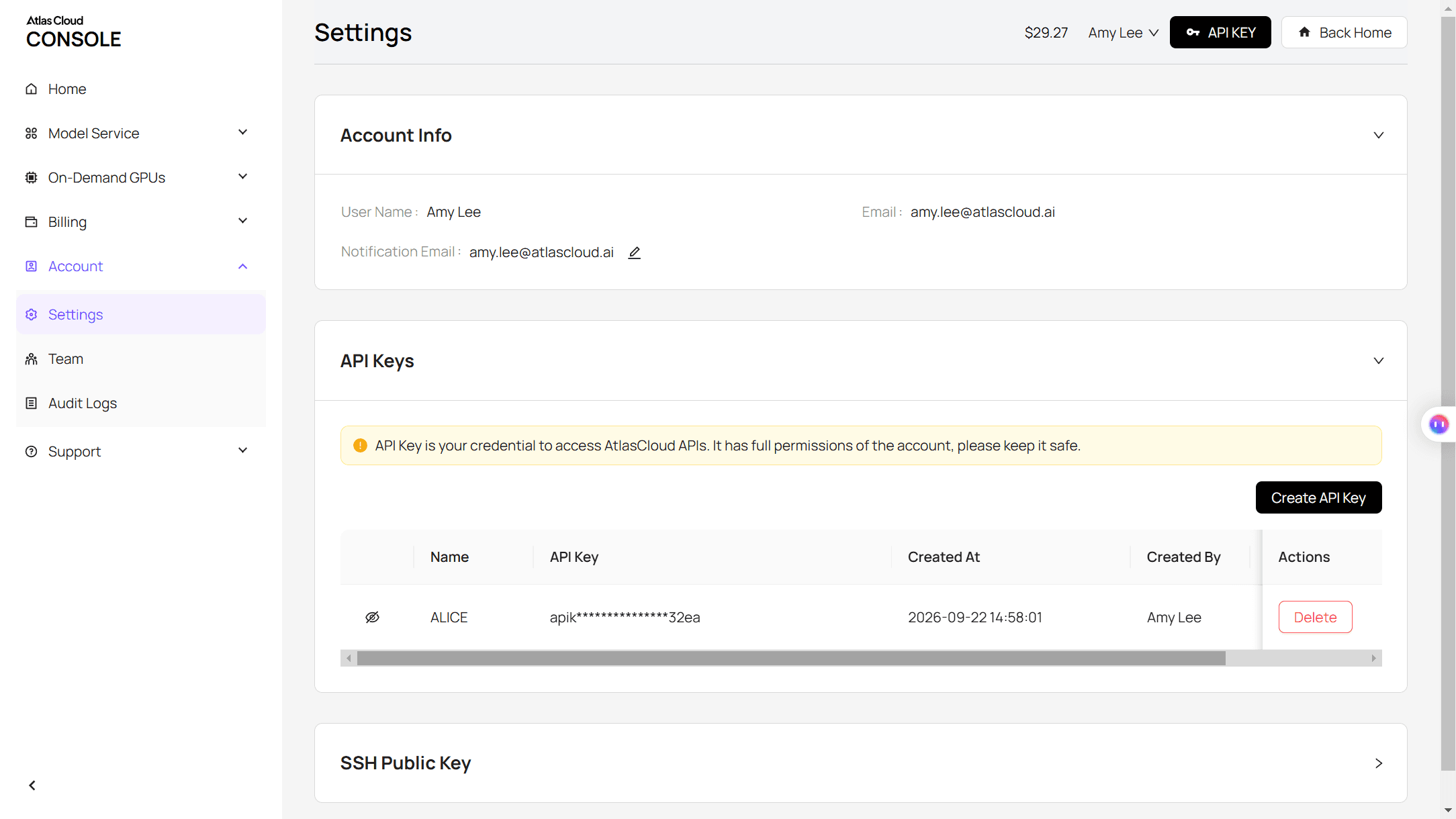
第 2 步:检查请求格式。 Atlas Cloud 文档介绍了身份验证和视频端点,Seedance 2.5 图生视频模型页面的 API 标签页列出了字段。Duration 接受 4 到 30 秒。
第 3 步:发送请求并轮询。 门铃照片以公开 URL 放入 image 字段:
plaintext1curl -X POST https://api.atlascloud.ai/api/v1/model/generateVideo \ 2 -H "Authorization: Bearer $ATLASCLOUD_API_KEY" \ 3 -H "Content-Type: application/json" \ 4 -d '{ 5 "model": "bytedance/seedance-2.5/image-to-video", 6 "prompt": "<paste the doorbell prompt here>", 7 "image": "https://your-cdn.com/your-doorbell-screenshot.jpg", 8 "resolution": "1080p", 9 "duration": 12, 10 "generate_audio": true 11 }'
轮询返回的 prediction ID,直到状态显示 completed,然后从 outputs 数组中下载片段:
plaintext1curl https://api.atlascloud.ai/api/v1/model/prediction/<prediction_id> \ 2 -H "Authorization: Bearer $ATLASCLOUD_API_KEY"
同一个密钥和端点也能运行 Atlas Cloud 上的其他视频模型。切换只需更改 model 字符串。
用一张照片创作更多“圣诞老人被摄像头拍到”的点子
撞毁版是热闹的那一版。下面两个更安静,第一个适合在圣诞节早晨放给五岁孩子看。
圣诞老人的雪橇飞过房子
这是温和版,那个大热 Facebook 片段背后的卖家也发布了 2026 年的自己的版本。没有任何东西降落。雪橇和驯鹿从房屋上空掠过,然后街道再次空无一人。
它从同一张门廊照片开始。保留撞毁提示词的第一段,把 12 秒改成 10 秒,然后用下面这些替换定时节拍和音频行:
plaintext1[0-2s] Quiet snowy night. Only a little falling snow moves. Very faint sleigh bells start, far away. 2[2-7s] High above the rooftops across the street, Santa's sleigh crosses the dark sky from left to right: a small red wooden sleigh pulled by a team of eight reindeer in pairs, Santa in his red suit holding the reins, a soft trail of golden sparkles behind the runners. It stays small and far away, never bigger than one of the houses, and it flies in a smooth gentle arc, never toward the camera. The sleigh bells grow louder as it passes, and a distant, happy "Ho ho ho!" carries across the street. 3[7-10s] The sleigh disappears behind the porch column on the right. The sparkle trail fades. The bells die away, and the porch is quiet again, exactly as in the first frame. 4 5Audio: real doorbell microphone sound: light wind, sleigh bells that approach and fade, one distant "Ho ho ho!". No music. 6Nothing lands. No people on the ground, no children, no brand logos, no subtitles, no on-screen text.
在我们的运行中,驯鹿先从左边出现,雪橇大约落后三秒,圣诞老人握着缰绳。出来的是一架明亮的童话书风格雪橇,很像门铃卖家加到片段里的那种,所以在手机上扫一眼就能看懂。经过时有一声“Ho ho ho!”,到第十秒前门廊又空了。
宠物摄像头拍到圣诞老人
宠物摄像头也会整夜看着客厅,而狗比我们任何人都更适合当目击者。这个版本把门廊换成客厅,让宠物来做出反应。
起始照片是宠物摄像头拍下的夜间静帧,画面里有你的宠物在睡觉,并且能看到一扇窗户。我们的和门廊一样是生成的。提示词:
plaintext1Real indoor pet camera recording at night, not a movie. The camera is fixed high in the corner of the room and never moves: no pan, no zoom, no cuts, one continuous shot with the same view as the first frame for all 10 seconds. Keep the room, the Christmas tree, the window, the rug and the dog exactly as in the image. The dog is a real dog on four legs and stays the same dog in every frame. Slight night-camera noise. 2 3[0-2s] The dog sleeps on the rug, its side rising and falling. Faint sleigh bells start outside, far away. 4[2-4s] One ear lifts. The dog raises its head and looks at the window. 5[4-8s] Outside the window, in the strip of dark sky above the snowy rooftops, Santa's sleigh crosses from left to right: a tiny red sleigh pulled by reindeer, Santa holding the reins, a soft trail of golden sparkles. It stays tiny and far away, always above the rooftops and never in front of the houses. The dog jumps up, trots to the window and puts its front paws on the sill, tail wagging fast, and follows the sleigh with its head as the bells grow louder. It gives one short, excited bark. 6[8-10s] The sleigh is gone and the bells fade. The dog drops back to the floor, turns around and looks straight up at the camera with its head tilted. 7 8Audio: real pet camera microphone sound: a quiet room, sleigh bells that approach and fade outside the window, paws on the floor, one bark. No music, no human voice. 9Exactly one dog. No people, no children, nothing enters the room, no brand logos, no subtitles, no on-screen text.
我们的狗到第五秒就起来到了窗边。雪橇从外面那条天空带穿过时,它用后腿站立,前爪搭在窗台上,然后落回地面,转身面向摄像头。
想让宠物来唱歌?我们的唱歌宠物指南里有一只戴着圣诞帽的狗在唱颂歌。
Ring 门铃上的圣诞老人:订购片段、使用 App,还是自己制作?
搜索 Ring 门铃上的圣诞老人,通常最后会落在四个地方。它们都从你自己家的照片开始,区别在于接下来发生什么由谁决定。
| 途径 | 你提供 | 你得到 | 谁决定圣诞老人做什么 |
|---|---|---|---|
| 向手工剪辑的卖家订购 | 一张来自你门铃的夜间截图 | 把圣诞老人或他的雪橇加进你的视角,48 小时内邮件发送 | 卖家的固定场景 |
| 向 AI 卖家订购 | 一张你门口或房间的照片 | 少数几个固定场景之一,比如圣诞老人在门铃摄像头前挥手 | 卖家的固定场景 |
| 使用圣诞老人照片 App | 一张你房间的照片或视频 | 把你的照片或视频叠上一张现成的圣诞老人图片 | 你放置一张现成的圣诞老人图片 |
| 写提示词(本指南) | 一张门铃截图和一个提示词 | 一段 1080p、带声音的 12 秒片段 | 你写出每个节拍,包括他说的话 |
最后一行对任何门铃都适用,从门口用手机拍的照片也一样。本指南与任何摄像头品牌都没有关联,提示词也要求画面上不出现标志。
有两个习惯值得保持。使用一个画面中没有人的帧,并在发布片段时打开 AI 标签。我们的 AI 圣诞照片指南介绍了标注规则,以及上传家庭照片前需要权衡什么。
常见问题
有“圣诞老人被摄像头拍到”的 App 吗?
有,而且不止一个。比如 Catch Santa in My House 会让你拍一张照片,选择一个圣诞老人图像,然后把两者合并;它的网站还列出了视频编辑器,可以把其角色叠加到你的视频上。要获得带声音的完整动态场景,选择就是找卖家,或者用上面的提示词路线。
什么是 Santa cam?
这个说法涵盖三种不同事物。它可能指来自圣诞老人村或驯鹿农场的实时网络摄像头直播,可能指一个告诉孩子圣诞老人在看着他们的玩具摄像头摆件,也可能指本指南中这样的片段。如果你在购物,付款前先确认商品页面卖的是哪一种。
需要真的视频门铃才能拍到圣诞老人吗?
不需要。夜晚站在敞开的门口,把手机举在胸口高度,在门廊灯打开时拍一张小路照片。门铃通常就在这个位置,所以片段能保持同样的视角。真实的门铃截图可以省掉这一步。
“圣诞老人被摄像头拍到”片段自带声音吗?
会,只要 Audio 开关保持开启。我们的提示词要求一条门铃麦克风音轨,包含风声、撞击声、雪橇铃声和一句耳语,并说明不要音乐。不加音乐能让片段听起来像录音,而不是预告片。
在 Atlas Cloud 上制作一段“圣诞老人被摄像头拍到”视频要多少钱?
一段带音频的 1080p、12 秒片段约为 $9.01,比 $11.26 标价低 20%,截至 2026 年 11 月 24 日。相同片段在 720p 下约为 $3.64。如果还要生成起始照片,来自 Seedream 5.0 Pro 的 2K 图像大约再加 $0.07。折扣可能变化,Run 按钮会在生成前显示预估费用。
结语
一个安静的门廊,一辆糟糕抵达的雪橇,一个穿红西装、希望没人看见的男人。那些真正露出圣诞老人本人的片段都是有意制作的,要么出自卖家之手,要么由模型完成,而其中最好的会讲一个小故事。
要制作你自己的“圣诞老人被摄像头拍到”视频,先从一张空门廊的夜间截图开始,在提示词第一行固定摄像头,然后逐拍写出动作。接着决定你的圣诞老人是降落、挥手,还是仰面摔倒。







