


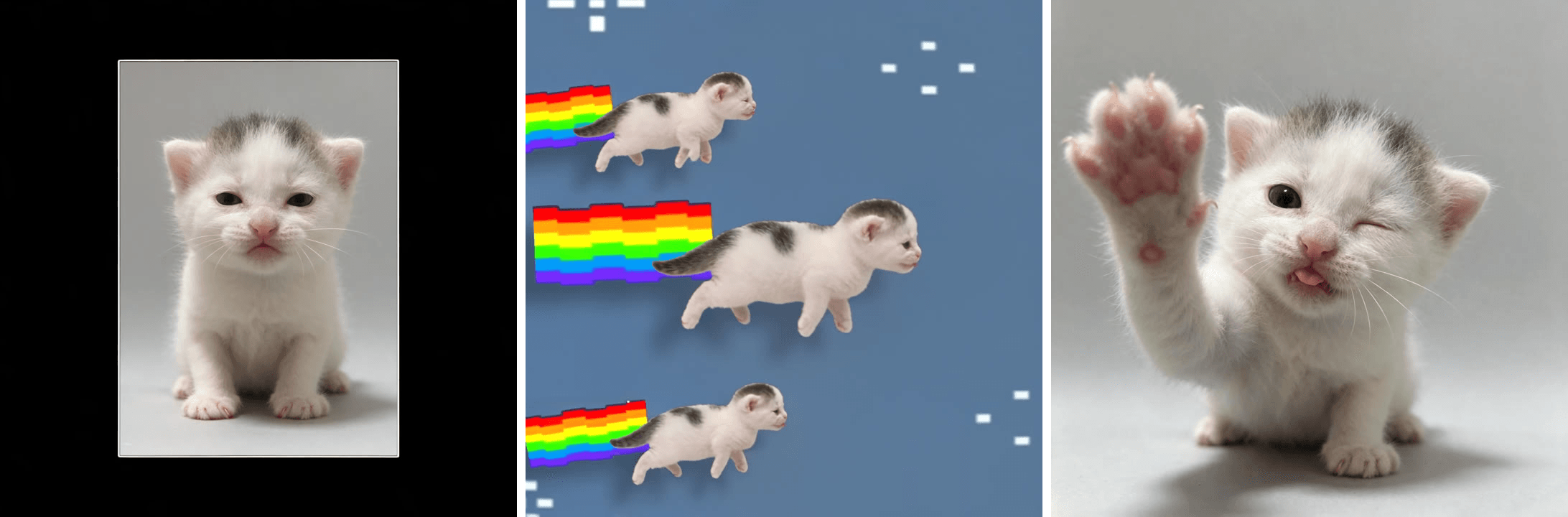
一个零食罐拉长到自身两倍的高度,弹回,旋转,然后在一排复制品中飞出去,全部踩在一个底鼓的节拍上。
这就是tweenslop:tweening(补间)加上 slop(粗制滥造),一种夸张到极致的动画风格——一张图片在巴西放克音乐的每一个节拍上被推来搡去。它最初是动画师口中的贬义词,如今却在这个秋天变成了一种热门的TikTok剪辑格式。
我们追溯了奠定这种视觉风格的帖子,查看了是否有CapCut模板,还用AI把一张小猫照片变成了15秒的tweenslop短片。
核心要点
- Tweenslop结合了补间(tweening)与粗制滥造(slop):一张图片在巴西放克音乐的每个节拍上被弹跳、拉伸和旋转。
- 这种视觉风格可追溯到2026年8月的一条CheezeDibbless零食罐剪辑,观看量突破2000万。
- 有三种视觉风格共用这个名字:CheezeDibbles风格的产品剪辑、成排飞行的剪影照片,以及在不同姿势间抽搐的绘制角色。
- 没有高使用量的CapCut模板带有tweenslop的名字,因此我们查看的热门帖子都是手动打关键帧的,很多使用Alight Motion制作。
- 一张照片加一条参考剪辑,在Atlas Cloud视频生成器_ 中就能生成一段15秒的tweenslop短片。
什么是Tweenslop?TikTok的Tween Slop趋势背后的含义
补间(Tweening)是一种动画捷径:软件在两个关键姿势之间自动填充中间帧。Slop是网络俚语,指廉价、批量制造的内容。两者合在一起就成了个笑话:完全依赖软件、没有任何手绘中间帧的动画。
动画师最初用这个词来嘲讽偷懒的动作。后来他们开始故意这么做,把中间帧推到极致,使结果变得好笑。最能说明这一点的格式是"我的补间风格 vs tweenslop":创作者先展示一段温柔的动画,然后同一张图片在放克音乐响起时彻底失控。
| 正常补间 | Tweenslop | |
|---|---|---|
| 动作 | 轻微摆动、眨眼、重心转移 | 整张画面倾斜、拉伸到两倍高度再弹回 |
| 时机 | 平滑、在姿势之间缓动 | 每个底鼓上都有硬切和变焦 |
| 附加效果 | 通常没有 | 色彩闪烁、成排飞行的复制品、彩虹拖尾 |
| 声音 | 任意 | 巴西放克,通常是字幕中标注的定制曲目 |
| 制作工具 | 任何动画应用 | 通常是Alight Motion或CapCut的关键帧 |
我们查看的每条帖子都配有自己的原创放克曲目,这就是为什么没有两条剪辑听起来完全一样。
如何用AI从一张照片制作Tweenslop动画
手动打关键帧制作一条tweenslop剪辑可能要花一整晚。我们的版本只用了一张照片、一条参考剪辑和一次运行。
Atlas Cloud 运行 Seedance 2.5,这是字节跳动的视频模型,可以在同一请求中接受参考照片和参考片段,并允许你在提示词中为每一个打标签。把你的照片作为 @Image1、把一条tweenslop剪辑作为 @Video1 交给它,它就会逐镜头重建这条剪辑,让你的主体出现在每一帧和每一个飞行的复制品中。上图中小猫还会在节拍之间眨眼、打哈欠和打喷嚏,这是静态照片永远做不到的。
方法一:在Atlas Cloud视频生成器中制作Tweenslop视频
先从照片开始。干净的背景能让剪影在旋转时保持清晰,而有特点的姿势能给剪辑增加一个笑点。我们清理了小猫的背景,然后用图像生成器图像编辑选项卡中的Seedream 5.5,让它抬起爪子并做出吐舌头的表情。
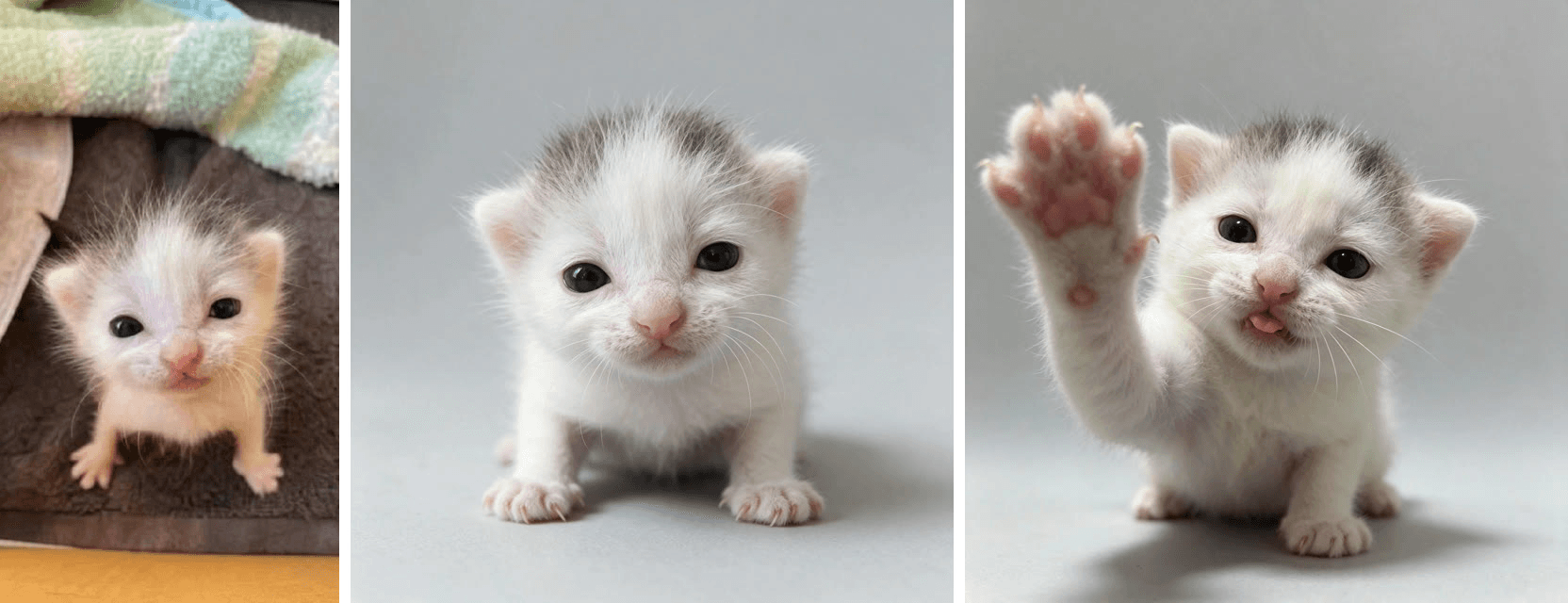
然后登录,打开视频生成器,按编号操作。
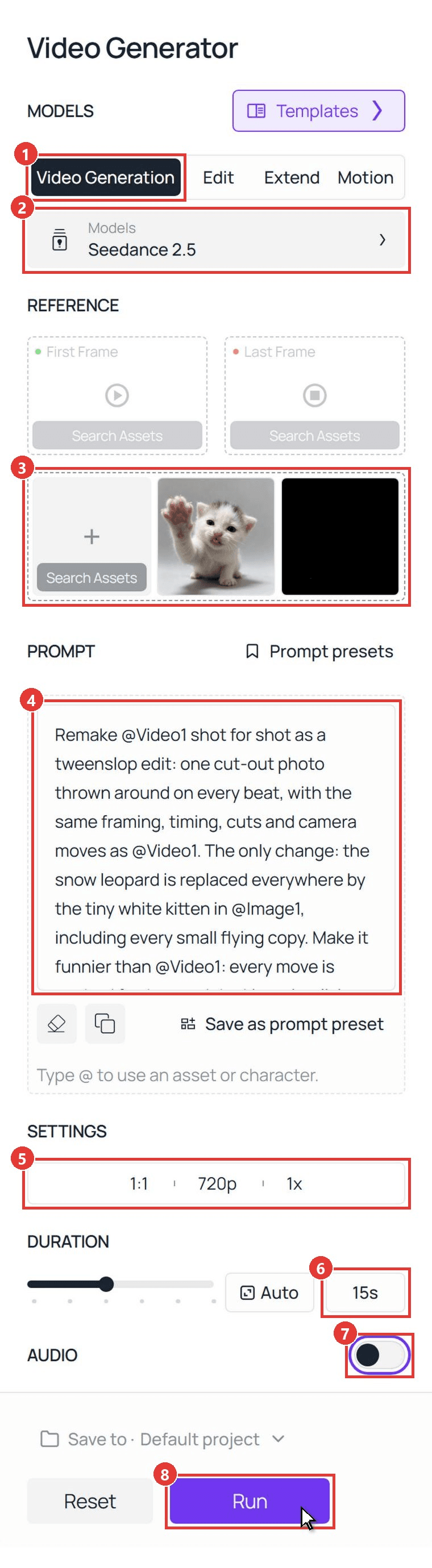
- 点击 视频生成 选项卡。
- 将模型保持在 Seedance 2.5。
- 在 上传其他参考 下,先添加你的照片,使其成为 @Image1,然后添加一条约15秒长的tweenslop剪辑作为 @Video1。我们使用的是11月1日发布的雪豹剪辑。上传前将片段静音,并选择画面干净的一条:Seedance 2.5会紧密跟随参考,所以干净的片段会带来干净的结果。
- 粘贴提示词。我们为宠物写的提示词如下:
plaintext1Remake @Video1 shot for shot as a tweenslop edit: one cut-out photo thrown around on every beat, with the same framing, timing, cuts and camera moves as @Video1. The only change: the snow leopard is replaced everywhere by the tiny white kitten in @Image1, including every small flying copy. Make it funnier than @Video1: every move is pushed further, and the kitten is a living photo sticker, so its face, eyes, ears, tongue and paws keep moving with a new little action on almost every beat instead of holding one expression. 2 3The cut-out: a sticker-like photo cut-out of the kitten in @Image1 with a thin clean white edge, keeping its exact face, dark eyes, small pink tongue, grey patch on top of its head, pink nose, pale pink ears and fluffy white fur in every frame. It stays a tiny kitten, never a grown cat. In the side-on rainbow shots it is the same kitten seen from the side, flying horizontally like a sticker. It never turns back into the leopard: no spotted grey coat, no thick tail, no large round ears. 4 5Follow @Video1 second by second: 60-1.5s: a small framed photo of the kitten sits in the middle of a black screen and jumps bigger on each beat. Inside the frame the kitten comes alive: it slowly blinks both eyes, licks its nose with its tiny pink tongue, then tilts its whole head far over to one side like a confused puppy and holds the tilt with the tip of its tongue sticking out, staring at the camera. 71.5-3.5s: a white flash, then the big cut-out on a plain grey background stretches up to twice its height, snaps back, squashes flat like a pancake and springs up again. On each beat it does one new thing: its ears flick, its head tilts to one side, it gives one quick wink, then it opens its mouth in a big wide yawn. 83.5-5s: a white flash; the cut-out in front of a green hill and a blue sky lifts its left front paw high and waves twice, then spins flat like a flipped coin and flies off as a flat picture. 95-8.5s: a white flash, then a dark blue background with tiny white pixel stars: a sideways cut-out of the kitten slides across with a pixel rainbow trail behind it, its little legs paddling as if it is swimming through the sky. More and more copies of the kitten pop in above and below until the screen is crowded, each with its own rainbow trail, and the copies do different things: one yawns, one licks its paw, one blinks. 108.5-12s: extreme close-ups of the kitten's face filling the frame while the colors flash on each beat: grey-green, lilac, white, peach and pink. Each flash shows a new face, and in between them the kitten keeps tilting its head far to one side and grinning with squinted happy eyes and the tip of its tongue out: eyes wide in shock, then a head-tilted squinty grin, a scrunched-up sneeze, then tilted the other way with the same grin, a slow sleepy blink, the tongue licking its nose. Then it tilts and flies off over a purple sky and a green hill. 1112-15s: a white flash, then rows of the kitten with rainbow trails slide across while the background color changes on every beat: teal, green, olive, brown, purple, every copy waving a paw. On the very last beat one single kitten bonks into the camera with its paw up, stops dead and gives one slow blink. 12 13Keep the cheap 2D tween-animation look of @Video1: hard zooms, bounces, squash and stretch, white flashes, flat color backgrounds, pixel stars and rainbow trails, all on the beat. The kitten's small face and paw actions are quick and cute, like a real kitten, while the cut-out is thrown around. One head per cut-out, four paws only, kitten paws only, no human hands, no person anywhere, no text, no captions, no logos, no watermark letters in the corner. No music, no singing, no lyrics.
- 打开设置栏,选择 1:1 和 720p,与参考相同的方形画幅。
- 在时长框中输入 15。
- 将 音频 关闭。发布时再把放克音乐加回去。
- 点击 运行。
逐秒分块能让结果保持在节拍上。把主体相关的行替换成你自己的照片。我们的Seedance 2.5提示词指南介绍了更多时机模式。
方法二:通过Seedance 2.5 API生成Tweenslop片段
想在应用里加一个"把你的宠物变成tweenslop"的按钮?同样的请求也可以通过API实现。
第1步:创建并复制API密钥。 打开Atlas Cloud控制台中的设置,点击创建API密钥并立即复制;之后列表中会将其隐藏。
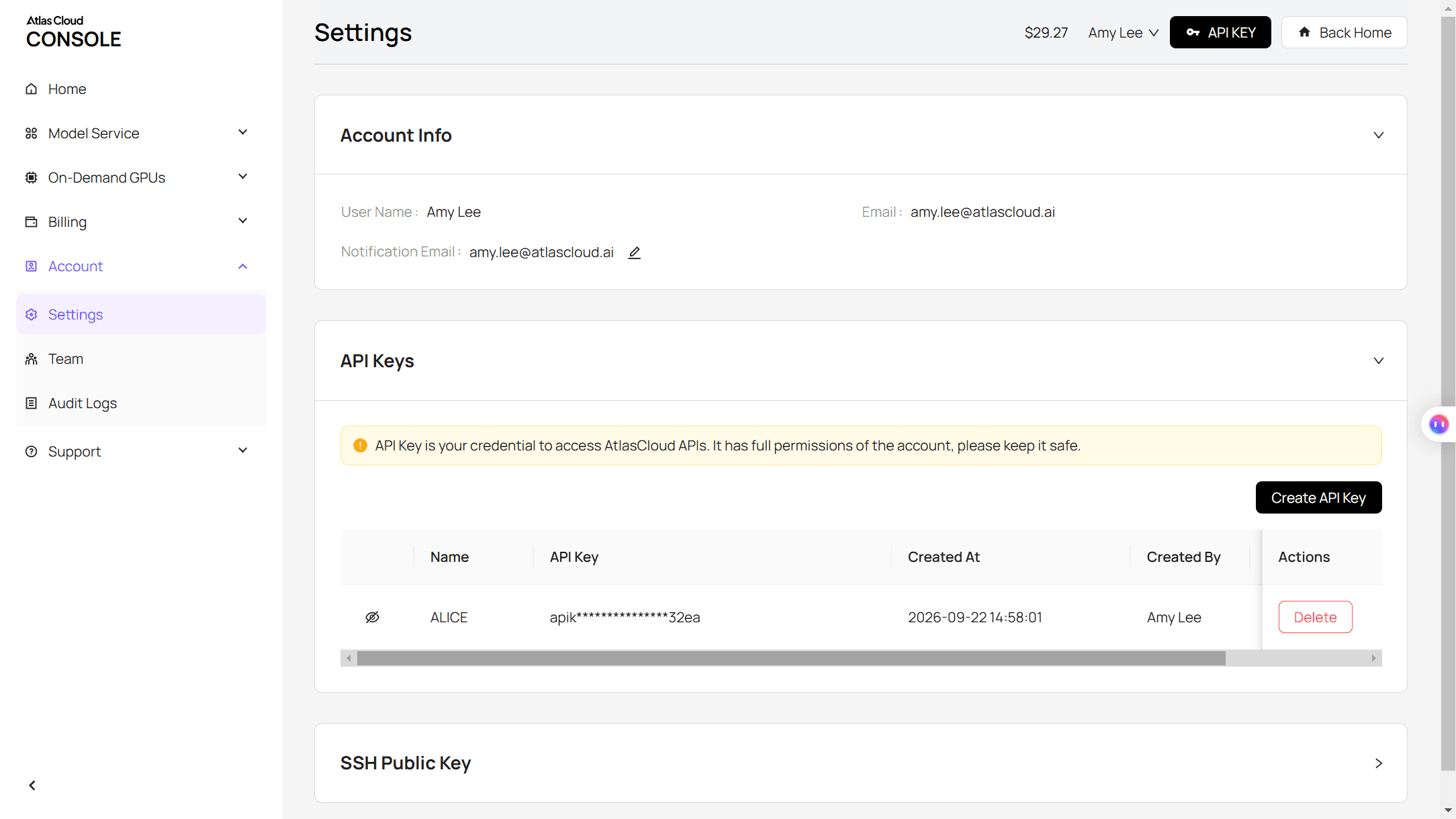
第2步:查看请求格式。 Atlas Cloud API文档列出了Seedance 2.5参考生视频模型的每个字段,也就是你在添加参考时视频生成选项卡所调用的模型。
第3步:提交任务并轮询结果。 把照片放入 reference_images,把剪辑放入 reference_videos,使标签与提示词匹配:
plaintext1curl -X POST https://api.atlascloud.ai/api/v1/model/generateVideo \ 2 -H "Authorization: Bearer $ATLASCLOUD_API_KEY" \ 3 -H "Content-Type: application/json" \ 4 -d '{ 5 "model": "bytedance/seedance-2.5/reference-to-video", 6 "reference_images": ["https://your-cdn.com/kitten.jpg"], 7 "reference_videos": ["https://your-cdn.com/tweenslop-reference-muted.mp4"], 8 "prompt": "Remake @Video1 shot for shot as a tweenslop edit... (paste the full Method 1 prompt)", 9 "duration": 15, 10 "resolution": "720p", 11 "ratio": "1:1", 12 "generate_audio": false 13 }'
响应会携带一个预测ID。轮询它,直到状态显示为 completed,且片段URL出现在 outputs 数组中:
plaintext1curl https://api.atlascloud.ai/api/v1/model/prediction/<prediction_id> \ 2 -H "Authorization: Bearer $ATLASCLOUD_API_KEY"
Atlas Cloud上的视频模型共用这个端点、密钥和轮询循环。更换模型字符串及其字段,同一段代码就能运行另一个模型。
Tweenslop风格:CheezeDibbles、剪影照片剪辑和OC舞蹈
翻一翻这个标签,你会看到同一个名字下的三种视觉风格,都共用放克音乐和推得过头的动作。
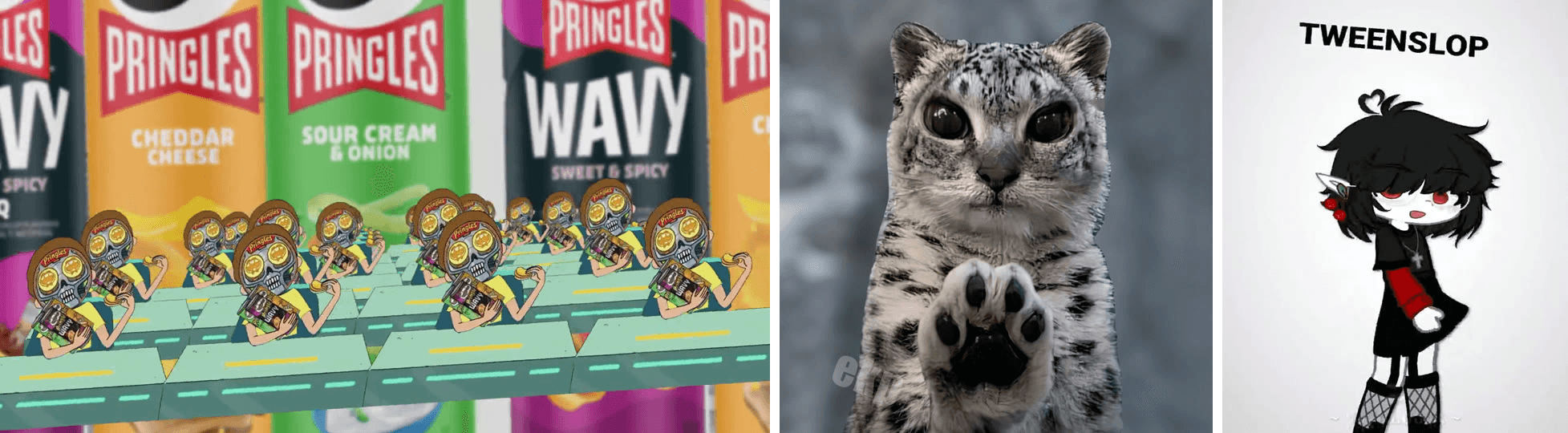
从左到右:8月11日的 CheezeDibbles剪辑、11月1日的雪豹剪影剪辑,以及10月24日的一条"我的补间风格 vs tweenslop"帖子。
- CheezeDibbles风格。 产品镜头加一个卡通角色被剪出后成排地甩来甩去。翻拍者会标注创作者的名字,其他动画师现在把它当作一种具名风格来模仿。
- 剪影照片剪辑。 一张真实照片,通常是宠物,被变成贴纸,带着彩虹拖尾变焦、压扁并成排飞行。这是能从单张图片制作的版本,也是我们的小猫所模仿的。
- OC舞蹈。 一个绘制角色,从火柴人到Gacha OC和Roblox头像,在几个关键姿势之间抽搐着歪头摆臀。"我的风格 vs tweenslop"对比帖大多属于这一类。
Tweenslop趋势从何而来
这个词比趋势本身更早。TikTok为 #tweenslop 标签分配的ID将其定到2025年7月,当时它还只是指偷懒的动画。今年秋天火起来的这种视觉风格来得更晚。以下观看量为截至2026年11月16日的数据。
| 日期 | 发生了什么 | 传播量 |
|---|---|---|
| 2025年7月 | #tweenslop 标签在TikTok出现,当时这个词还指偷懒的补间 | 未统计 |
| 2026年8月11日 | CheezeDibbles发布一条Pringles剪影剪辑 | 2080万次观看 |
| 2026年9月下旬 | 创作者在Alight Motion中用自己照片翻拍这种风格 | 最高230万次观看 |
| 2026年10月24日 | "我的补间风格 vs tweenslop"对比格式扩散 | 480万次观看 |
| 2026年11月1日 | 带有彩虹拖尾复制品的雪豹剪影剪辑 | 140万次观看 |
| 2026年11月8日至14日 | 至少有五条新帖每条都突破1万次收藏 | 每条1.4万至5.1万次收藏 |
到11月中旬,该标签下已有近3万条帖子,而我们查看的热门帖子全是手动制作的。
有Tweenslop的CapCut模板吗?
没有专门为它做的模板。11月16日我们查看时,CapCut上针对tweenslop的模板页面没有任何结果。一个标注 #tweenslop 的模板账号链接到的是一个点头模板,有57,237次使用,属于另一个梗;它其他的tweenslop帖子则指向一个已被删除的模板。
| 方式 | 你需要什么 | 你能得到什么 |
|---|---|---|
| Alight Motion或CapCut关键帧 | 一张剪影照片、一条放克曲目和打关键帧的时间 | 完全掌控每一次弹跳和闪烁 |
| 一个CapCut补间模板 | 一张放入固定槽位的照片 | 别人的动作,通常来自一个相关的梗 |
| AI视频模型 | 一张照片和一条参考剪辑 | 把你的主体重建进剪辑,并在节拍之间有小小的生动动作 |
如果你更喜欢固定节拍模式的单图剪辑,我们的一分钟wassup指南展示了一种相关的剪影格式。
常见问题
Tweenslop用的是什么歌?
没有单一的tweenslop歌曲。声音是巴西放克,一种接近phonk的低音风格,我们查看的每条帖子都使用原创曲目,并在字幕中标注制作人。我们的AI片段是静音生成的;之后我们加上了参考剪辑的放克音乐,从0:00开始,让白色闪烁落在节拍上。
我可以给自己的宠物或OC做tweenslop吗?
可以。宠物最贴合剪影照片风格,纯色背景上的正面照片效果最好。对于OC,把角色插画作为 @Image1 上传,在提示词中描述其颜色和服装,并用一条OC舞蹈剪辑作为参考。更多宠物剪辑,请见我们的AI猫咪视频指南。
在Atlas Cloud上做一条tweenslop AI视频要多少钱?
我们这次运行——一张照片加一条15秒的参考剪辑,720p和1:1——截至2026年11月17日,运行按钮上显示为 $5.45,是标价的八折。参考片段按其长度计费,所以更短的剪辑花费更少;运行按钮会在你开始前显示确切的总额。
结语
Tweenslop就是把中间帧变成了笑点。剥去放克音乐和闪烁,剩下的就是一条简单规则:一张图片,在每个节拍上被推得超出它该有的程度。
选一张轮廓清晰的照片,挑一条你喜欢的剪辑作为参考,然后粘贴提示词。发布时把放克音乐加回去,属于你自己的tweenslop就只差一次运行了。




