一件羽绒服、一条金链、一叠扇形展开的现金,还有一个卡通人物在白屏上左右摇摆。接着白光一闪,下一个人物接替出场。如果你的 For You 页面从十月下旬起就循环播放这些,那你已经见过 wassup in a minute 趋势。
下文将介绍:这种摇摆、这首歌和这些画作的来源,哪些 CapCut 模板在复刻它,以及我们如何把一张自拍变成自己的摇摆角色。
重点提要
- wassup in a minute 趋势让 Atlanta Lock 动漫角色在白色背景上伴着 jersey club 节拍摇摆。
- 音源是 zbee 于 2026 年 1 月对 Drake《From Time》的 jersey club 混音,循环 Jhené Aiko 的副歌。
- 我们找到的最热门 CapCut 模板 in a minute wassup,一周内使用量突破一百万。
- 一张自拍,运行两次 Atlas Cloud 视频生成器 ,就能把你变成摇摆的 Atlanta Lock 角色。
- 在提示词中按秒为每个动作命名,这样眨眼和撒钱才不会打断摇摆。
什么是 Wassup in a Minute 趋势?伴着 Drake 摇摆的 Atlanta Lock 角色
这是一段 14 秒的剪辑,主角是手绘街头服饰角色,每个人物都在白色背景上原地摇摆约三秒半,然后切到下一位。
给它命名的帖子发布于 2026 年 10 月 23 日,配文“Wassup in a minute”,画作署名 Zayy。我们在 11 月 2 日查看时,它已有 260 万次播放。它的四个角色排列如下:
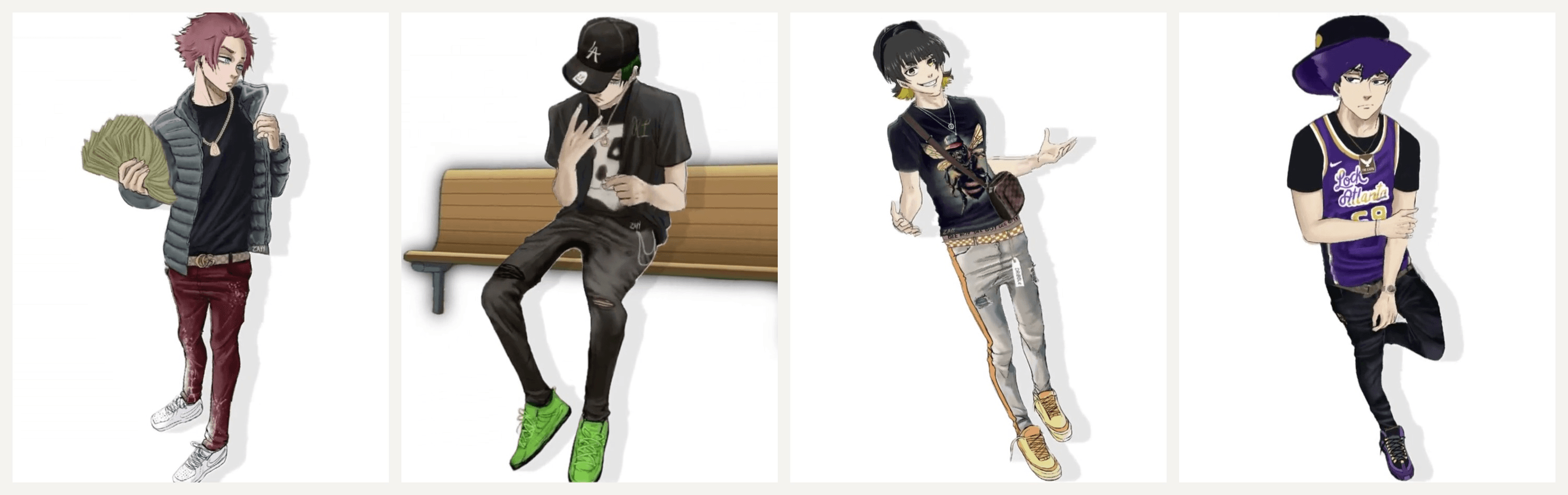
其他一切都不动。每个角色都以脚为轴摇摆,跟着节拍点头,手上只做一个动作。正是这种静止感,让一张干净图片就足以加入。
Wassup in a Minute 歌曲是 Drake《From Time》的混音
节拍是《From Time》的 jersey club 改编版,这首 2013 年 Drake 与 Jhené Aiko 合作的歌曲收录于《Nothing Was the Same》。制作人 zbee 发布了这支混音于 2026 年 1 月 14 日。它把 Aiko 的副歌切成短循环,很多人听成“wassup, been a minute”,趋势的名字和种种拼写也由此而来。
TikTok 上有两个音源支撑着这一趋势,统计于 11 月 2 日:
| 音源 | 发布者 | 使用视频数 | 音源页热门帖子 |
|---|---|---|---|
| from time jerseyclub prodzbee | zbee,1 月 14 日 | 22,100 | 真人摇摆和 cosplay,也有一些动漫剪辑 |
| original sound | 10 月 23 日剪辑背后的动画师 | 8,799 | 大多是动漫角色剪辑 |
它如何从真人摇摆变成动漫剪辑
这支混音在 TikTok 上搁了九个月,卡通角色才出现。到十月中旬,人们已经开始对着它上镜摇摆。其中一条 10 月 12 日发布的片段有 290 万次播放。
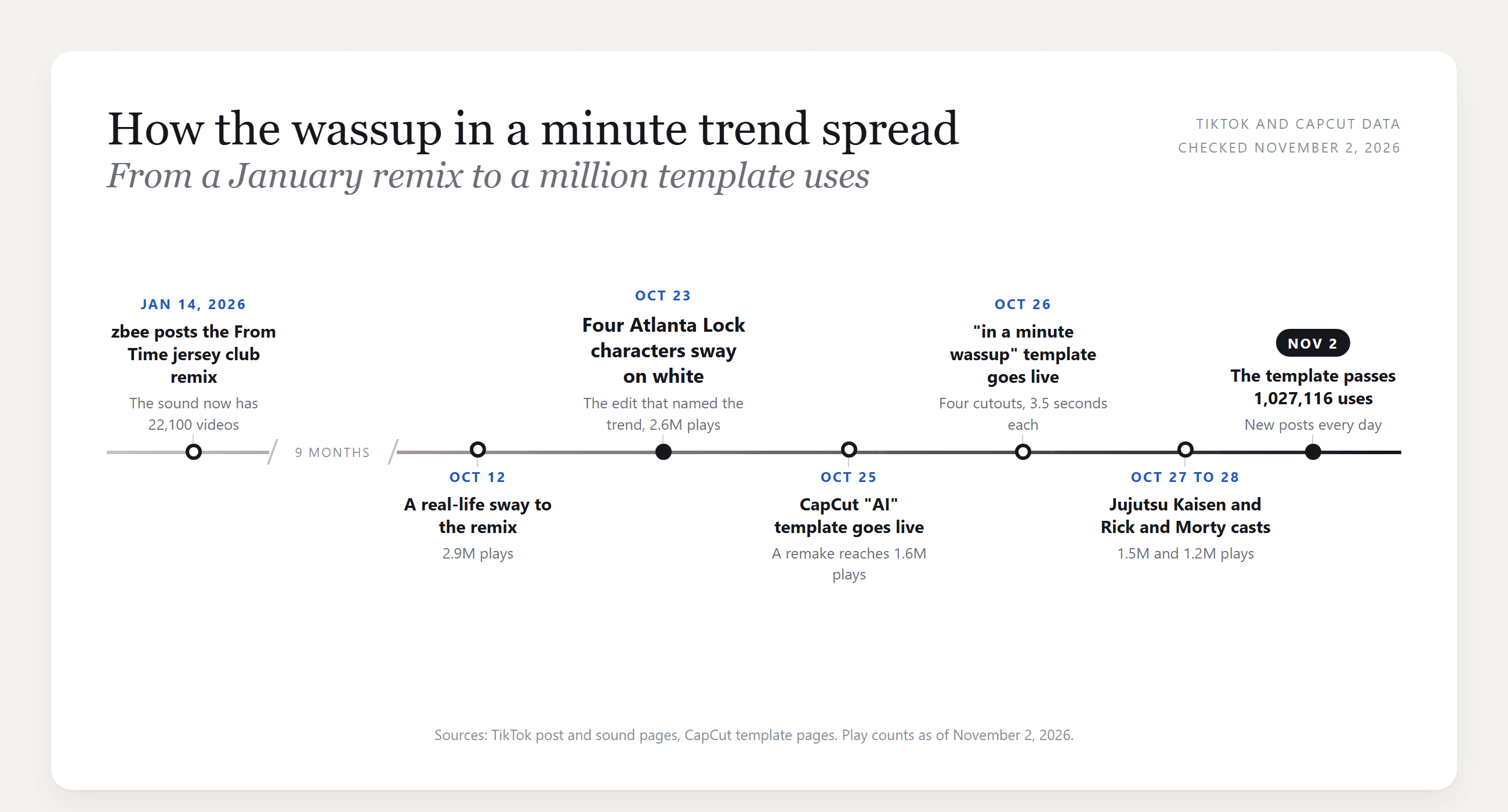
10 月 23 日之后,这一格式在几天内传遍各粉丝圈。10 月 25 日发布的一个重制版有 160 万次播放。27 日出现了 Jujutsu Kaisen 阵容,28 日又是 Rick and Morty。10 月 29 日,一个逐件复刻手绘角色服装的真人版播放量超过 180 万。
如何用 AI 制作 Wassup in a Minute 趋势
要让自己进入剪辑,你需要一张自己的画,以及让这张画摇摆起来。
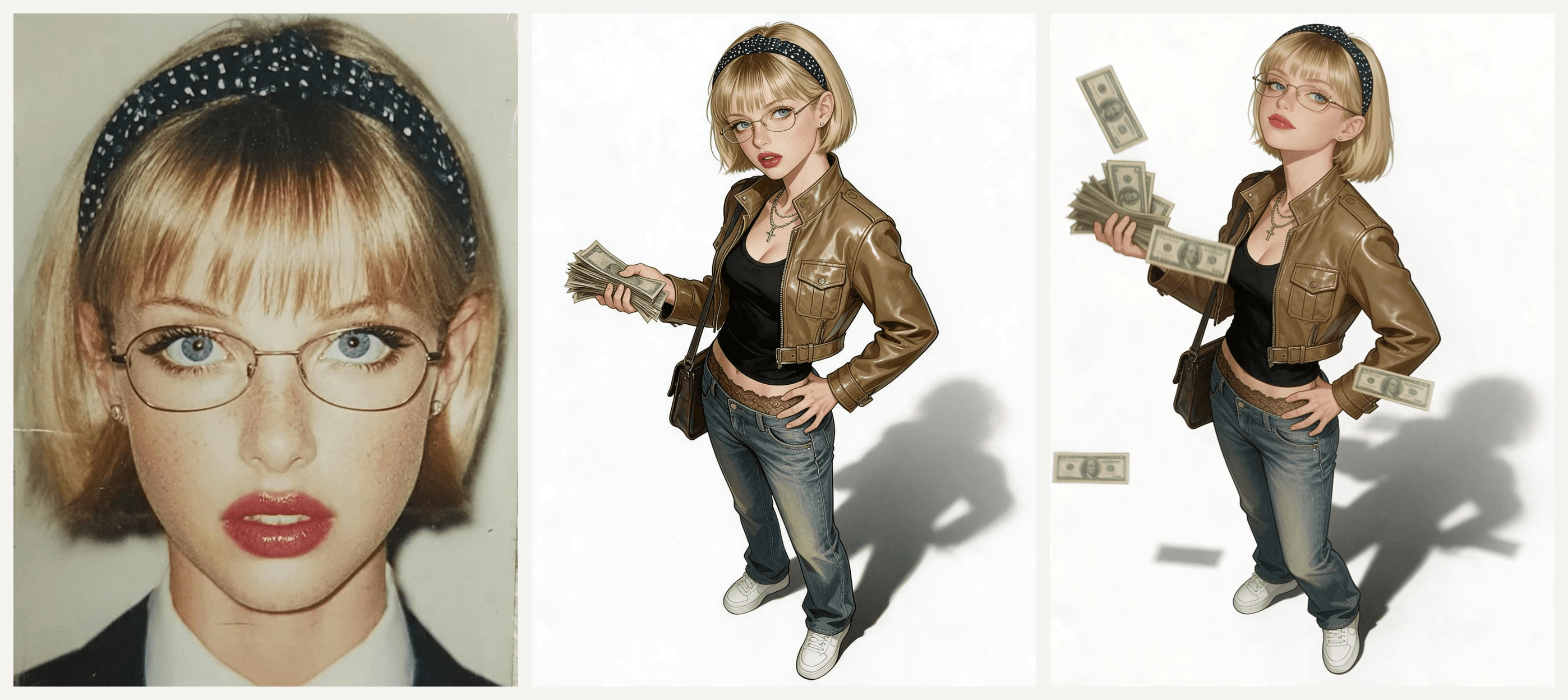
Atlas Cloud 在同一个工作区完成这两步。Seedream 5.0 Pro 把自拍重绘成全身角色。然后 Seedance 2.5 以那张画作为首帧,生成摇摆动画。下面是我们的版本,由主图中的棚拍肖像制作:
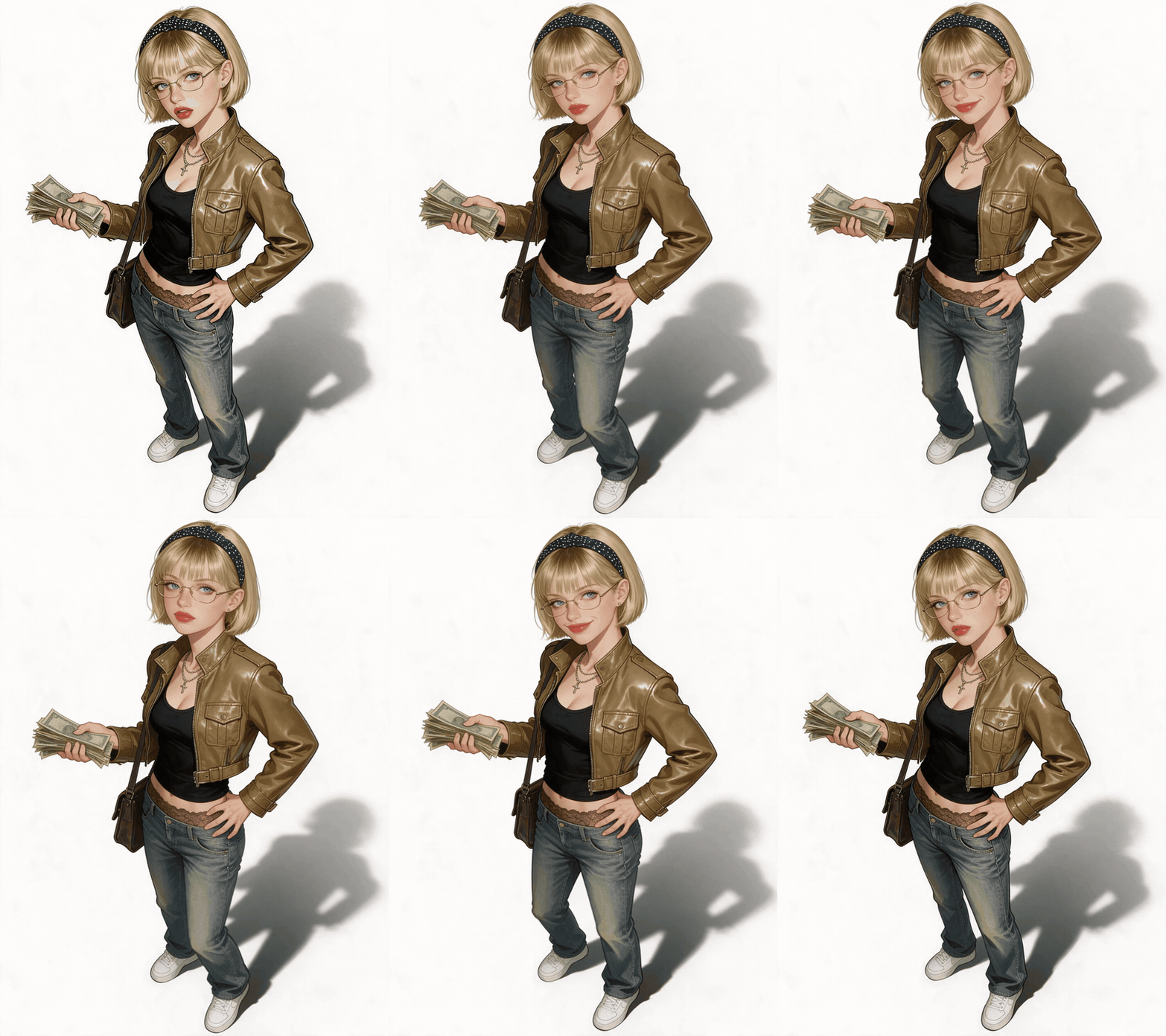
她整整十秒都在摇摆,在眨眼和坏笑之间甩动现金,眼镜始终没有滑落。歌曲不属于生成的一部分:我们事后把 zbee 的混音叠在片段上,就像你在 TikTok 里添加声音一样。
方法 1:在 Atlas Cloud 生成器中画出自己,再让它摇摆
登录 AI 视频生成器。图像工具就在同一个左侧菜单里。
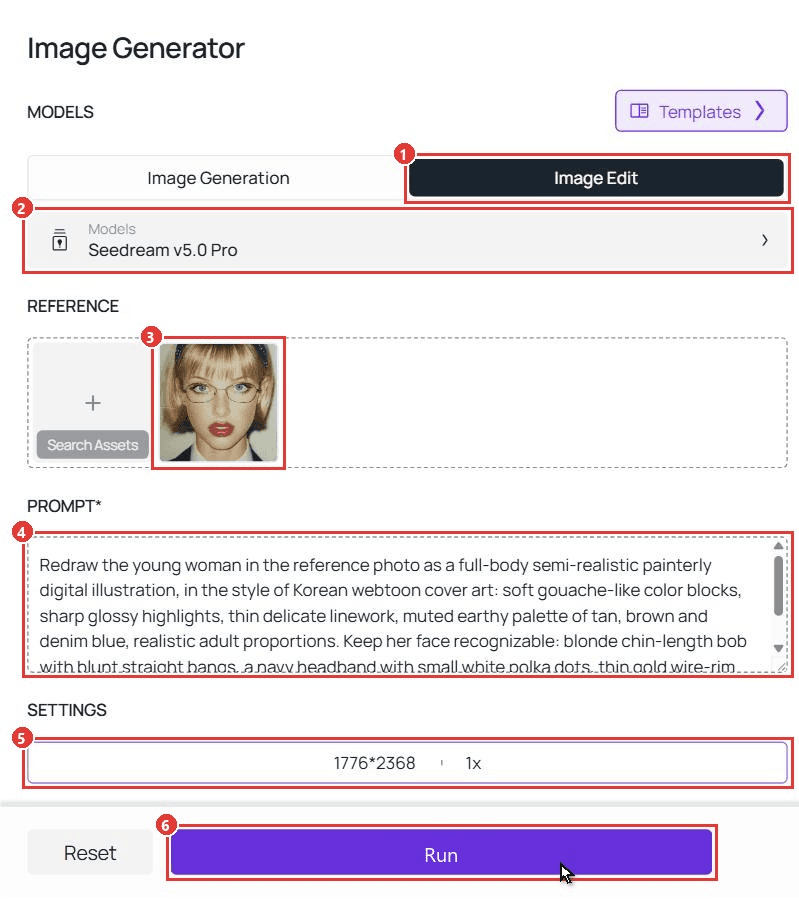
第 1 部分:把自拍变成角色。 打开 Image Generator,然后按步骤操作:
- 打开 Image Edit 标签页。
- 选择 Seedream v5.0 Pro。
- 上传一张清晰的正脸照片。
- 粘贴下方的角色提示词。
- 在 Settings 下,选择 3:4,显示为 1776*2368。
- 点击 Run。
plaintext1Redraw the young woman in the reference photo as a full-body semi-realistic painterly digital illustration, in the style of Korean webtoon cover art: soft gouache-like color blocks, sharp glossy highlights, thin delicate linework, muted earthy palette of tan, brown and denim blue, realistic adult proportions. Keep her face recognizable: blonde chin-length bob with blunt straight bangs, a navy headband with small white polka dots, thin gold wire-rim oval glasses, light blue eyes, faint freckles, bold red lips, small stud earrings. Expression cool and distant, eyes glancing sideways out of frame, lips slightly parted. Outfit: cropped tan-brown leather moto jacket with a stand collar, chest flap pockets, zip details and a buckled waist tab, worn open over a fitted black tank top; layered silver chains with a small cross pendant; low-rise faded blue straight-leg jeans with a strip of brown lace trim showing at the waistband; chunky white low-top sneakers with no logos; a dark leather messenger bag on a long strap over one shoulder. Pose: three-quarter turn, weight on one hip, one hand fans a thick stack of worn green banknotes at chest height, the other hand rests on her hip. Full body from hair to shoes, feet fully visible, a soft grey cast shadow falling to the back right, pure white background, no text, no logos, no watermark.
把面部那一行换成你自己的特征。保留“full body from hair to shoes”和“pure white background”,因为摇摆效果需要双脚都在画面内。
第 2 部分:让角色摇摆起来。 切换到 Video Generator:
- 打开 Video Generation 标签页。
- 在 Models 下保留 Seedance 2.5。
- 将角色图像上传到 First Frame。
- 粘贴下方的摇摆提示词。
- 选择 1080p。
- 在 Duration 框中输入 10。
- 关闭 Audio,因为歌曲会在发布时添加。
- 点击 Run。
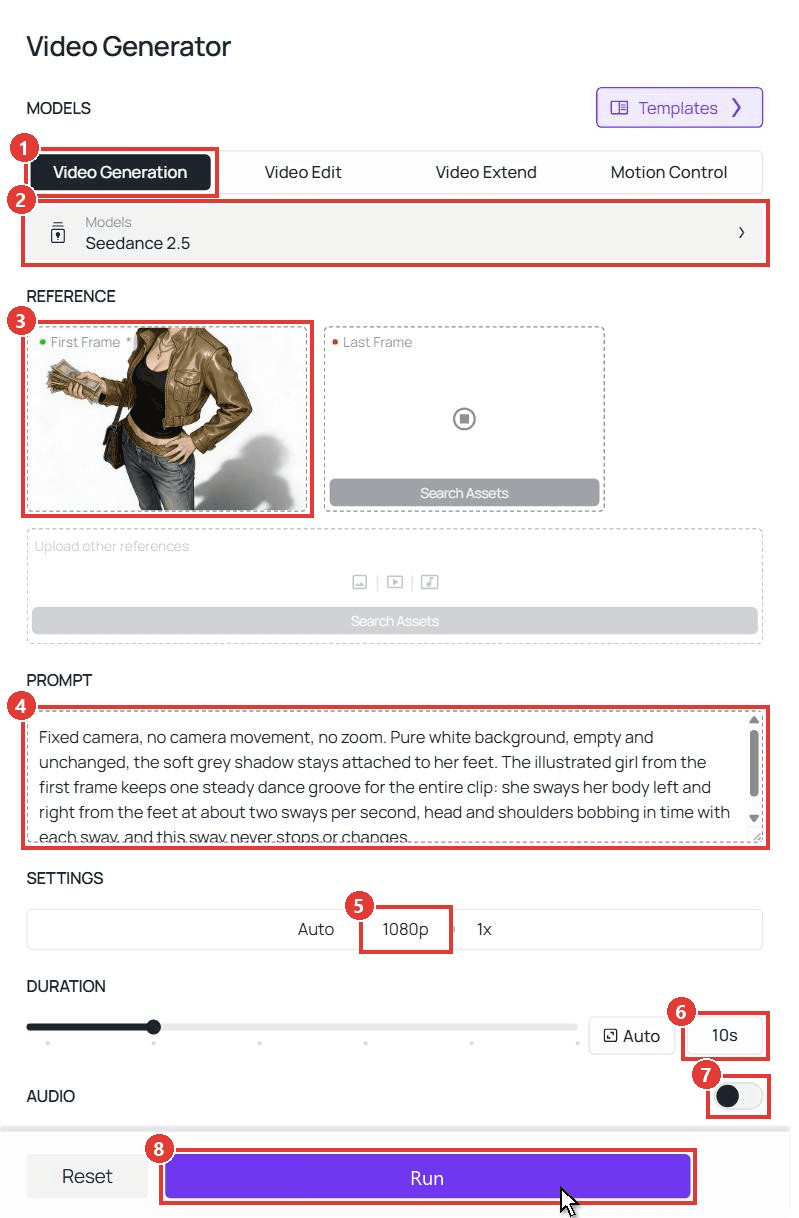
plaintext1Fixed camera, no camera movement, no zoom. Pure white background, empty and unchanged, the soft grey shadow stays attached to her feet. The illustrated girl from the first frame keeps one steady dance groove for the entire clip: she sways her body left and right from the feet at about two sways per second, head and shoulders bobbing in time with each sway, and this sway never stops or changes. On the downbeat at 1, 3, 5, 7 and 9 seconds she flicks the stack of banknotes sharply upward, and each flick sends a few loose bills fluttering up above her head and drifting slowly down around her; the thick stack always stays in her hand and never runs out. Between the flicks she adds small playful accents: at 2 seconds a slow cocky wink at the camera; at 4 seconds a quick eyebrow raise and a one-sided smirk; at 6 seconds a sharp chin flick with a little head tilt; at 8 seconds another wink. Otherwise her expression stays cool and unimpressed. Her mouth never talks or lip-syncs, only smirks. The other hand stays on her hip. Her hair, the chains and the messenger bag swing slightly with the sway, and the falling bills land and disappear out of frame below. Keep the semi-realistic painterly illustration look of the first frame. Her glasses, headband and messenger bag stay on the whole time. Outfit, face and background never change, she never leaves the frame, and the last frame returns to the same pose as the first frame so the clip loops.
关键是:每个点缀动作都占自己的一秒,而“this sway never stops or changes”这一句则稳住底层的律动。在我们的运行中,眨眼和甩钱大致按我们写下的顺序出现。
想要更平静的版本?少甩几次现金,多眨几次眼:
想了解更多这类时间线写法,请参阅我们的编写 Seedance 2.5 提示词指南。错过火车舞蹈教程用同样的逐秒方法讲述一个 15 秒故事,Wyw My Sweetie 舞蹈指南则涵盖双人舞步。
方法 2:通过 API 运行这两个步骤
要为整个群聊制作角色,或把它构建进应用?API 会串联同样两个模型。
第 1 步:创建 API 密钥。 在控制台中,打开 Settings,在 API Keys 下创建密钥。一把密钥适用于所有模型。
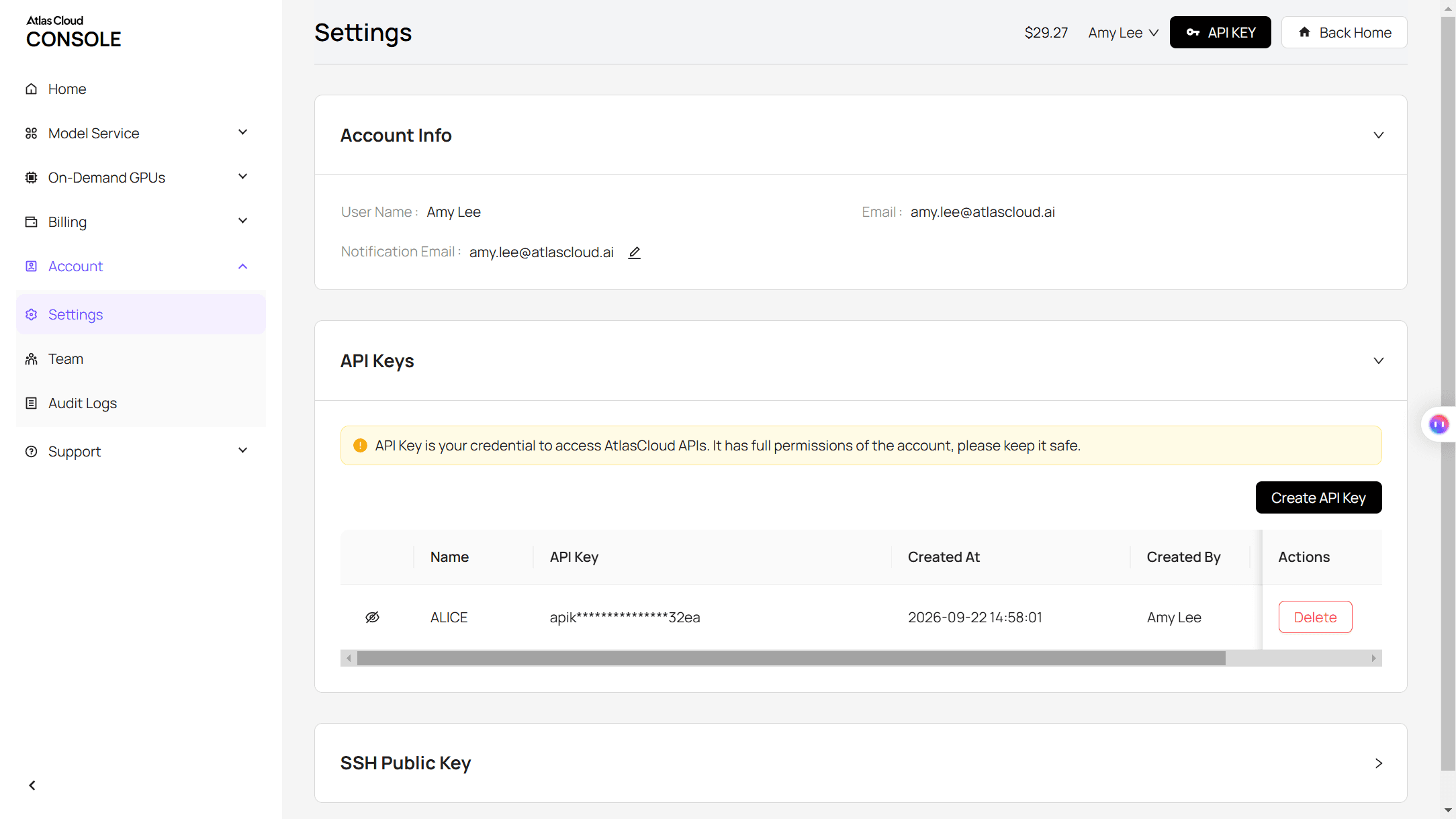
第 2 步:检查请求格式。 Atlas Cloud 文档介绍了身份验证。Seedance 2.5 图生视频模型页面的 API 标签页列出了所有视频参数。
第 3 步:发送请求并轮询。 首先是角色:
plaintext1curl -X POST https://api.atlascloud.ai/api/v1/model/generateImage \ 2 -H "Authorization: Bearer $ATLASCLOUD_API_KEY" \ 3 -H "Content-Type: application/json" \ 4 -d '{ 5 "model": "bytedance/seedream-v5.0-pro/edit", 6 "prompt": "<paste the character prompt here>", 7 "images": ["https://your-cdn.com/your-selfie.jpg"], 8 "size": "1776*2368" 9 }'
轮询预测 ID,直到状态显示 completed,然后从 outputs 中取出图像 URL:
plaintext1curl https://api.atlascloud.ai/api/v1/model/prediction/<prediction_id> \ 2 -H "Authorization: Bearer $ATLASCLOUD_API_KEY"
然后把这个图像 URL 作为首帧发送:
plaintext1curl -X POST https://api.atlascloud.ai/api/v1/model/generateVideo \ 2 -H "Authorization: Bearer $ATLASCLOUD_API_KEY" \ 3 -H "Content-Type: application/json" \ 4 -d '{ 5 "model": "bytedance/seedance-2.5/image-to-video", 6 "prompt": "<paste the sway prompt here>", 7 "image": "<character image URL from the first request>", 8 "duration": 10, 9 "resolution": "1080p", 10 "generate_audio": false 11 }'
用同样方式轮询。视频会保持角色图像的 3:4 形状。两个调用共用一把密钥和一个基础端点,所以在 Atlas Cloud 上切换模型只需改一个字符串。
Atlanta Lock:造型背后的 Blue Lock 同人画
Atlanta Lock 是粉丝给 Blue Lock 足球运动员重绘成亚特兰大说唱歌手的昵称:羽绒服、金链、修身牛仔裤和现金。它早于摇摆形式出现。我们在 TikTok 上找到的最早 Atlanta Lock 帖子发布于 2025 年 3 月。
原版剪辑中的画作由 Zayy 创作,许多重制版会在配文中署名。早期重制版常打上 #bluelock 标签,所以 Blue Lock 粉丝最先看到它。
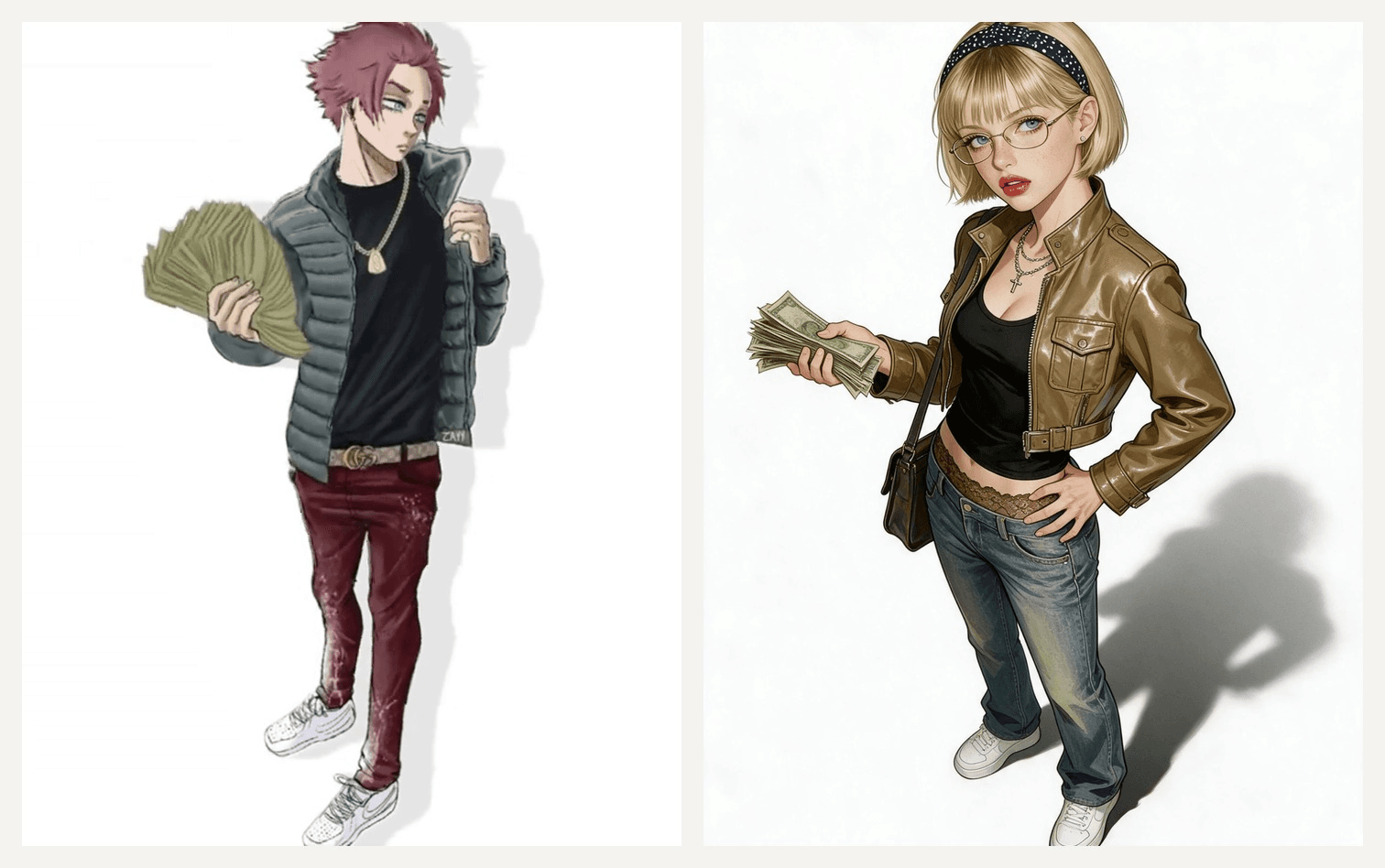
左:来自 原版剪辑 的截图,画作:Zayy。右:我们的 Seedream 5.0 Pro 角色。
你不必照搬墨线漫画风。我们的版本偏绘画感,但姿势、留白和现金仍然能读出这一趋势。
Blue Lock Drip:羽绒服、金链和扇形现金
原版中的每个角色都穿着一套清晰服装。借用这些元素放进你的角色提示词:
| 原版中的角色 | 可放入提示词的描述 |
|---|---|
| 扇现金的人 | “open grey quilted puffer, black tee, gold rope chain, dark red jeans, fans a stack of cash” |
| 坐长椅的人 | “sits on a wooden bench, black cap, black tee, neon green sneakers” |
| 张开双臂摇摆的人 | “black tee, baggy grey pants, orange sneakers, both arms spread wide” |
| 渔夫帽角色 | “purple bucket hat, oversized purple basketball jersey, black pants” |
Wassup in a Minute CapCut 模板,以及人们混淆的那个 AI 模板
我们查看的趋势帖子里,CapCut 链接指向三个模板。我们在 2026 年 11 月 2 日逐一打开了预览:
| 模板 | 创建时间 | 使用次数 | 功能 |
|---|---|---|---|
| in a minute wassup | 2026 年 10 月 26 日 | 1,027,116 | 四张抠图图像轮流摇摆,每张约 3.5 秒,与混音同步 |
| AI | 2026 年 10 月 25 日 | 31,576 | 为你上传的一张图像添加摇摆效果,时长 7 秒 |
| Wasup Dance TREND | 2026 年 10 月 29 日 | 85,152 | 与 in a minute wassup 相同的四张抠图结构 |
in a minute wassup 模板复刻了原版的节奏。它的预览使用四张抠图照片,所以背景干净的图像效果最好。
名为“AI”的模板容易被误读。教程承诺它能把自拍变成 Blue Lock 画作,但它的预览只是让一张已经是画作的图像动起来。它添加的是动作,不是风格。这就是方法 1 第 1 部分填补的空白。
所以,当你已经有画作时,CapCut 模板就能派上用场。当你想让自己成为那张画时,提示词就能派上用场。
常见问题
在 Atlas Cloud 上制作一段 wassup in a minute AI 视频要多少钱?
截至 2026 年 11 月 2 日,一段 10 秒的 Seedance 2.5 图生视频片段在 1080p 下约 $5.98,在 720p 下约 $3.04。用 Seedream v5.0 Pro Edit 把自拍变成角色,在 2K 下花费 $0.072。三者的标价分别为 $7.47、$3.80 和 $0.09,目前均为八折。生成器会在每次运行前显示确切的视频价格。
是“wassup in a minute”还是“wassup, been a minute”?
音频循环了 Jhené Aiko 在 From Time 中的部分副歌,很多人听成“wassup, been a minute”。“Wassup in a minute”是被听错后成为话题标签的版本,而“wassup wait a minute”和“wasala”则是同一个循环被听成不同结果。
我可以在自己的剪辑中发布 Atlanta Lock 同人画吗?
许多趋势帖子会在配文中署名,例如“art by Zayy”。你也应这样做;如果打算靠视频赚钱,请先征得同意。把自己画成自己的角色就能绕过这个问题。
我可以用一张自拍做出四角色版本吗?
可以。用同一张照片和 Blue Lock drip 表中的四套不同服装,运行第 1 部分四次。把四张图像放进 in a minute wassup 模板,或者对每张运行第 2 部分,然后把片段按每段约 3.5 秒剪在一起。
结语
这个趋势故意做得很简单。一段九个月前的混音循环,每隔几秒换一个角色,以及一个什么都藏不住的白色背景。这就是为什么它能在不到一周内从 Blue Lock 粉丝传到其他粉丝圈。
你的版本需要一张好自拍、一段角色提示词,以及一段把每次眨眼和撒钱都钉在某一秒上的摇摆提示词。发布时加上声音,你就有了自己对 wassup in a minute 趋势的诠释。


