

You spend three hours crafting a single thirty-second clip, only to realize your engagement strategy requires twenty videos a week. Manual editing pipelines break under this volume. The Hailuo AI API solves this bottleneck by acting as the bridge between slow, manual efforts and high-output, automated video workflows.
Integrating the API stops the cycle of fragile, one-off renders. Instead, you build a consistent pipeline. You aren't just generating videos anymore, you're feeding a system that spits out high-fidelity content on demand.
Why API-Driven Production Wins
Shifting to API-driven video production offers measurable gains in consistency and speed:
| Feature | Manual Creation | Automated API Workflow |
| Time per Video | 60+ minutes | Seconds |
| Output Consistency | Variable | Standardized |
| Scaling Capacity | Limited by staff | Limited by compute |
You stop fighting against the limitations of manual creative suites and start building pipelines that generate media based on data triggers. This is not just a tool for efficiency; it is the infrastructure required to maintain a dominant presence in competitive feed environments.
Build Your Competitive Edge
Your team likely spends more time exporting files and resizing assets than actually iterating on creative strategy. This manual friction kills momentum. Moving toward an AI video workflow is no longer a luxury; it is a necessity for teams needing to maintain high-output production.
Engineering beats manual effort every time. Transition your workflow from a collection of manual tasks to a scalable infrastructure, and you’ll spend less time grinding on exports and more time iterating on strategy. Use this roadmap to transition your production:
| Milestone | Strategy |
| Phase 1 | Run a single-prompt pilot project |
| Phase 2 | Integrate webhook monitoring |
| Phase 3 | Scale to multi-asset batching |
The future of video production belongs to those who build these automated bridges today. Start with a single pilot project this week and replace your manual bottlenecks with a scalable, programmable pipeline.
Why Choose the Hailuo AI API for Your Automation Stack?
Faced with a backlog of thirty video requests, your team spends days manually triggering generations and managing file exports. This bottleneck disappears when you shift to an automated video pipeline powered by the Hailuo AI API features. Unlike generic generators that often struggle with spatial logic, this model excels in high-fidelity physics simulation, including gravity, fluid dynamics, and precise camera controls like orbits and pans.
| Advantage | Technical Impact |
| Physics Accuracy | Reduces artifacts in complex biological motion |
| Camera Control | Enables modular, prompt-based cinematic direction |
| Throughput | Supports asynchronous, high-volume batch processing |
This AI video model is meant for developers who want solid infrastructure, not just creative gadgets. Instead of waiting for a slow browser render, you may queue up many tasks at once by using asynchronous API calls. Plus, its tiered pricing makes it a budget-friendly video option, letting you run nonstop production tests without the baggage of monthly per-user plans. You get a programmable engine that turns structured data into steady, high-quality video clips on its own. If you have not seen how this model performs in hands on testing, our full Hailuo AI video generator review covers motion quality in depth.
Architecting the Automated Video Pipeline
Engineering teams often hit a plateau when manual rendering workflows clash with high-output requirements. Staring at a blank folder after a hour-long render is the primary friction point that kills production velocity. To build an AI video workflow that actually scales, you need to move away from clicking dashboards and start using a pipeline where data goes in and files come out.
Viewing video creation as a technical process—instead of just a creative one—is how you unlock consistent results.
The Technical Workflow
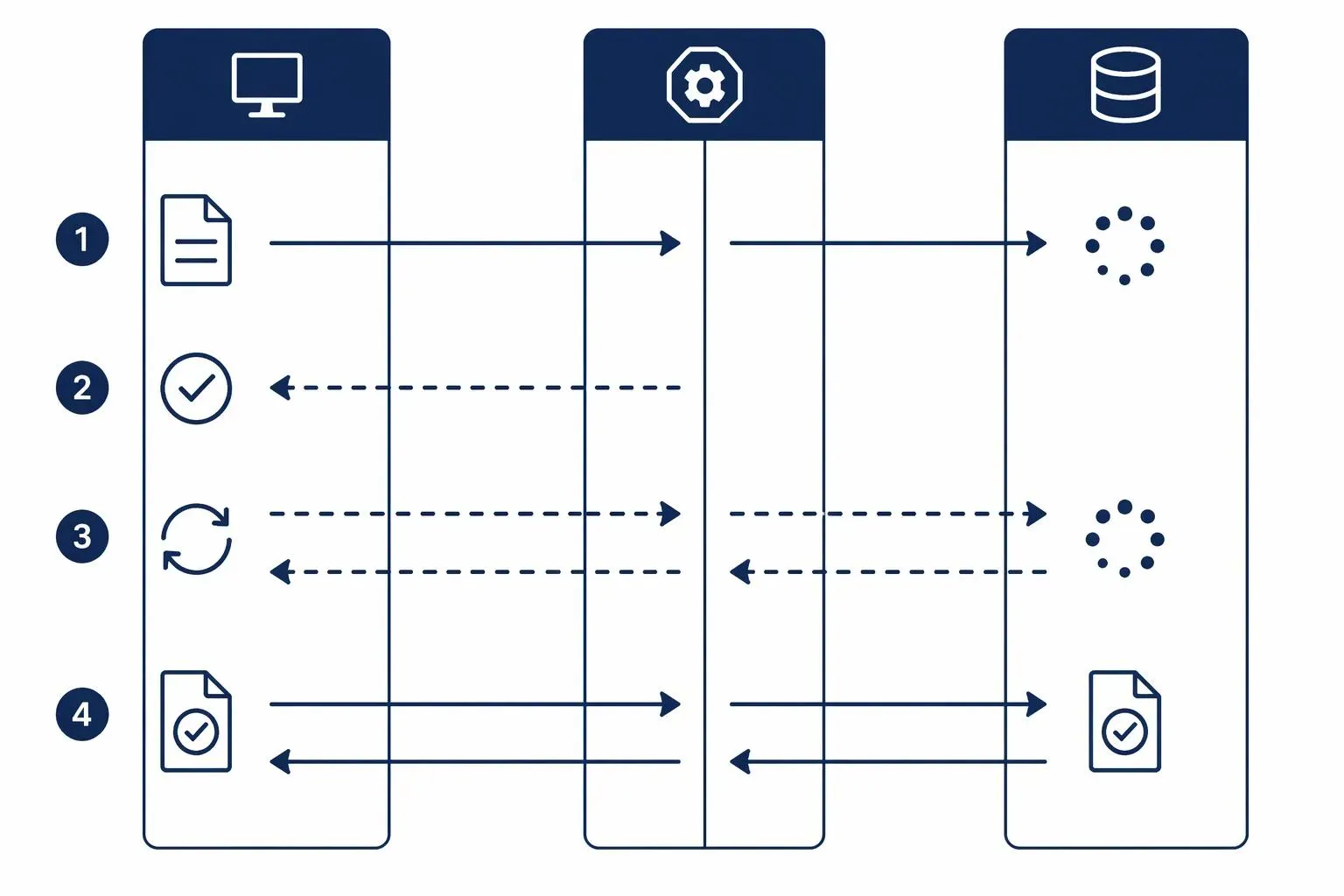
Successful integration with the MiniMax Hailuo API follows a clean, asynchronous lifecycle. The server handles tasks in the background to prevent your application from hanging since high-fidelity rendering requires a lot of processing power.
-
Submission (Input): Fire off a POST request with your script and motion parameters. The API will quickly validate your payload and hand back a task_id.
-
Polling (Processing): Use that task_id to poll the status endpoint periodically.
Pro Tip: A 10-second check interval is the sweet spot. By maintaining a steady request rate, you may avoid hitting limits and maintain clean backend code, negating the need for endpoint spam.
-
Retrieval: Once the status hits "Success," the API returns a file_id. Heads up: the API doesn't return the video directly; it gives you a file_id. You'll just need to feed that ID into the /v1/files/retrieve endpoint to snag your download link. It's a quick two-step dance that ensure you're pulling the final render and keeping things safe.
Developer Note: If you’d rather not poll, the API supports webhook callbacks. Just make sure your server is ready to echo the challenge field within 3 seconds to complete the handshake. It’s a one-time setup that saves you from managing endless polling loops.
Code example:
Here is how you chain those three steps into a single, clean workflow using the Atlas Cloud hailuo 2.3 i2v-pro API:
plaintext1import requests 2import time 3 4# Step 1: Start video generation 5generate_url = "https://api.atlascloud.ai/api/v1/model/generateVideo" 6headers = { 7 "Content-Type": "application/json", 8 "Authorization": "Bearer $ATLASCLOUD_API_KEY" 9} 10data = { 11 "model": "minimax/hailuo-2.3/i2v-pro", # Required. model name 12 "enable_prompt_expansion": True, # The model automatically optimizes incoming prompts to enhance output quality 13 "image": "https://static.atlascloud.ai/media/images/521d1a00f8528a65d28cbd186b8c9602.jpg", # Required. The model generates video with the picture passed in as the first frame 14 "prompt": "your prompt", # The positive prompt for the generation 15} 16 17generate_response = requests.post(generate_url, headers=headers, json=data) 18generate_result = generate_response.json() 19prediction_id = generate_result["data"]["id"] 20 21# Step 2: Poll for result 22poll_url = f"https://api.atlascloud.ai/api/v1/model/prediction/{prediction_id}" 23 24def check_status(): 25 while True: 26 response = requests.get(poll_url, headers={"Authorization": "Bearer $ATLASCLOUD_API_KEY"}) 27 result = response.json() 28 29 if result["data"]["status"] in ["completed", "succeeded"]: 30 print("Generated video:", result["data"]["outputs"][0]) 31 return result["data"]["outputs"][0] 32 elif result["data"]["status"] == "failed": 33 raise Exception(result["data"]["error"] or "Generation failed") 34 else: 35 # Still processing, wait 2 seconds 36 time.sleep(2) 37 38video_url = check_status()
By routing these through Atlas Cloud, you skip the headache of managing raw API plumbing. It’s essentially "set it and forget it" for your video production pipeline.
Implementation Checklist for Stability
Standardizing your integration prevents "production drift" and ensures your pipeline remains resilient under load:
| Step | Action | Benefit |
| Authentication | Use Environment Variables | Prevents credential exposure in codebases. |
| Rate Limiting | Implement Exponential Backoff | Gracefully handles 429 errors during traffic spikes. |
| Storage | Auto-Sync to S3/Cloud Storage | Ensures assets persist beyond temporary API links. |
| Error Handling | Log task_id with Status | Simplifies debugging failed generations in batch runs. |
You may remove manual bottlenecks and turn your production stack into a reliable, high-fidelity motion engine by designing your workflow around these primitives.
Advanced Prompt Engineering & Parameter Control for Consistent Results
You have probably spent hours tweaking prompts, only to get clips where the subject’s face drifts or the lighting changes randomly between shots. This inconsistency happens because you view AI as a partner that "remembers" your goals, rather than a data engine that needs exact instructions. To maintain AI video consistency, you must transition to a standardized modular framework.
Standardizing Your Workflow
Whether using Text-to-Video (T2V) or an image-to-video API, stability relies on fixing your core variables. Apply these parameter optimization strategies to lock in your production quality:
| Feature | Best Practice | Technical Impact |
| Prompt Structure | Use the 80/20 Rule: 80% of consistency is the first 20% of your prompt. | Anchors character geometry early. |
| Resolution | Default to 768p for speed; use 1080p for final assets. | Prevents unneeded downscaling artifacts. |
| Motion Control | Use single, simple camera adjectives (e.g., "slow pan"). | Minimizes background warping. |
| Reference Images | Use high-res, neutral-expression headshots. | Provides a stable "identity" seed. |
Mastering Prompt Mechanics
Forget flowery, poetic descriptions. To get consistent results from the Hailuo API, think of your prompt as a technical blueprint.
- Camera Control: Use the [command] syntax (e.g., [Push in], [Pan left]) to steer the camera. A pro tip: don't overcook it. Stick to 2–3 movements at most. Stacking too many—like combining a zoom with a tilt—usually breaks the model and leaves you with a warped, glitchy mess.
- Aspect Ratio Discipline: Match your source image to your target output from the jump. Trying to crop a 16:9 shot into 9:16 after the fact is a recipe for disaster—you’ll end up with massive pixel loss and "hallucinated" edges where the model tries to fill the gaps. Just generate at the correct ratio from the start and save yourself the headache.
- Temporal Continuity: For long-form projects, front-load your core subject descriptors. Keep your clips to the 4-6 second sweet spot—this is where the model is most stable and predictable for automated stitching.
Video consistency is just engineering. Standardize the inputs, cut the debugging time, and start shipping.
Scaling Production: Integrating Hailuo API with Your Existing Tech Stack
Teams often hit a wall when their social strategy demands fifty high-quality clips, but their human resources can only output five. This volume gap is the primary reason why manual video production fails to meet the needs of modern social platforms. By choosing to integrate AI video API solutions directly into your backend, you transform sporadic creative bursts into a consistent stream of scalable video content.
Building the Connection
You can bridge the gap between your existing data and your video output by connecting the API to your primary business tools. For example:
- E-commerce: Hook into your product database (like Shopify). Use product images as triggers to auto-generate cinematic showcases via the i2v-pro endpoint.
- CMS Integration: Automate B-roll production by pulling key-frames or keywords from new blog posts to generate social hooks.
- Asset Pipelines: Pipe generated video files straight to S3 or your scheduler (Buffer/Later). Stop manually dragging and dropping files; let the backend handle the transit.
Optimizing for Social Feeds
Hailuo is built for 6–10 second clips, making it a no-brainer for TikTok, Reels, and Shorts. It’s not trying to win an Oscar for long-form storytelling, it’s designed for high-impact hooks and B-roll. Instead of spending hours on a single manual edit, you can use the API to churn out a dozen creative variations for a single campaign and see what actually hits.
Pro-grade optimization tactics:
- A/B Test Your Hooks: Don't bet on one creative. Use the API to generate 10+ variations of your intro hook per campaign. By programmatically swapping reference images or prompt adjectives, you can let your social data—not your intuition—decide which version performs best.
- Dynamic Visual Pacing: Use [command] syntax to force movement into your clips. Whether it’s a [Push in] or a [Fast pan], motion is your best defense against the swipe. On mobile feeds, static shots don't play since the viewer won't stay if the frame isn't moving.
- Aspect Ratio & Safe Zones: Generate in 9:16 natively at all times. If you’re pushing for mobile feeds, avoid the temptation to center-crop 16:9 assets. Native 9:16 generation ensures your subject stays within the "safe zone" away from the app’s UI overlays (like the like/comment buttons).
- The "Loop" Logic: Since these are short clips, design your prompt to conclude with a "match cut" or a visually similar frame to your starting point. View counts and engagement metrics increase as a result of this smooth, endless loop.
You may change your focus from "creating a video" to "managing a content experiment" by using the API as a programmable engine. Teams adding synced voice to these clips can pair this pipeline with the steps in our Hailuo AI lip sync feature guide.
Managing Costs and Optimization for Long-Term Success
Running an automated system can lead to surprise costs if you treat the generator as if it has no limits. Scaling your production requires a clear strategy for optimizing AI video runs to ensure your budget supports long-term output rather than a few days of experimentation.
Understanding the Hailuo API Cost Structure
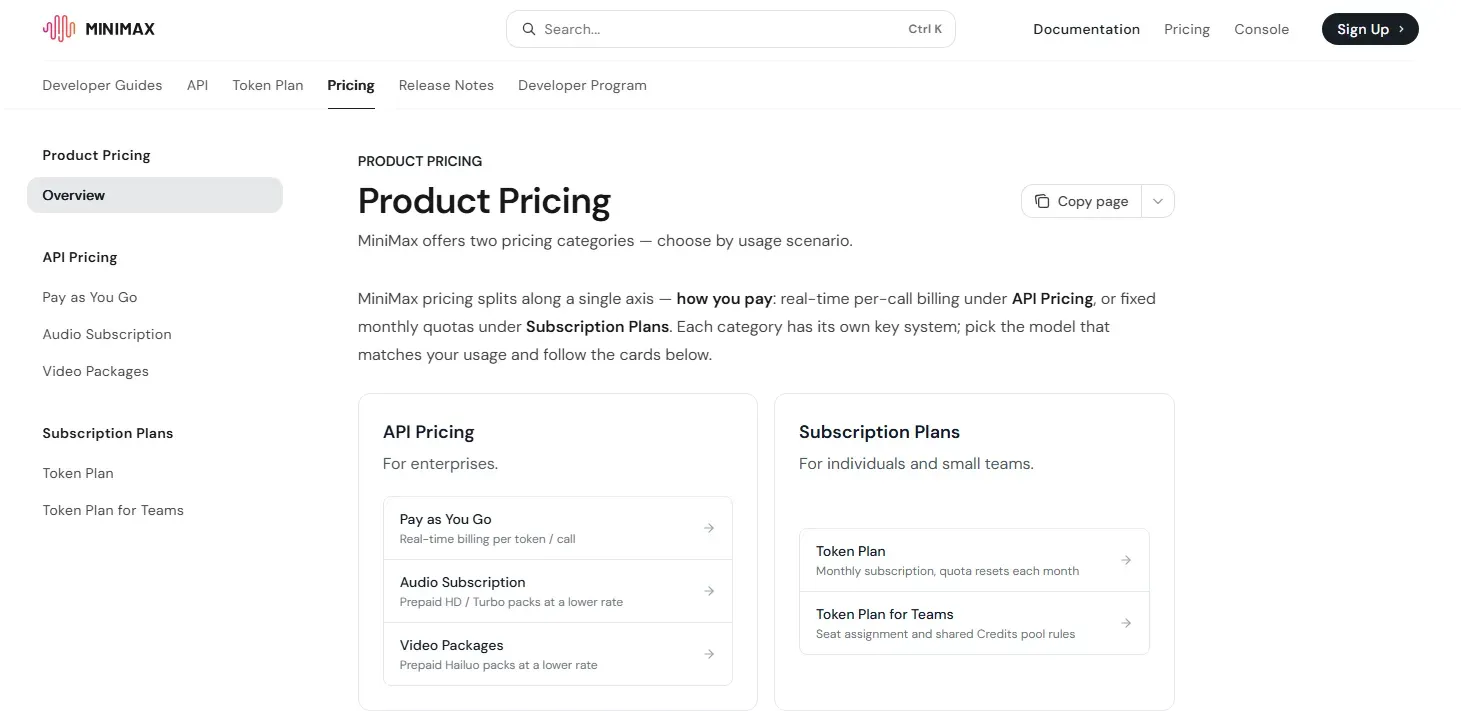
It is important to distinguish between web-based subscriptions and developer access. There is no set "monthly subscription" for the Hailuo AI API. While their website features monthly plans from $9.99 to $199.99 for both casual and power users, these subscriptions do not include access to the API.
Instead, the Hailuo AI API pricing model operates on a pay-as-you-go basis. You pay per generation, which allows for precise AI video generation costs tracking. Costs fluctuate based on resolution, duration, and the specific model version used.
Smart Cost Optimization
To maintain a sustainable API credit management strategy, categorize your generations based on their purpose:
| Use Case | Strategy | Optimization |
| Drafting | Use -Fast models at 768p | Cuts cost per call by ~30–50% |
| Hero Assets | 1080p, standard Hailuo 2.3 | Reserve for prompt-locked, final cuts |
| Prototyping | Short duration (6s) | Minimize unnecessary compute overhead |
Pro Tip: If you're building a tool for long-term production, track your credit usage per task_id. By reserving your premium credits for finalized exports and using the Fast model for rapid iteration, you’ll significantly extend your runway. Treat every generation like it costs money—because it does.
Concluding Synthesis: The Programmable Future
Automated video production is not about replacing your creative team; it’s about removing the technical tax that limits their output. By moving from manual editing to a programmable pipeline using the Hailuo AI API, you trade "hours spent exporting" for "cycles spent iterating."





