Spending hours generating a cinematic character in Hailuo AI only to realize the final output features a silent, unmoving mouth is a frustrating bottleneck for video editors. Despite its advanced MiniMax video architecture, Hailuo AI lacks a native lip-sync feature. Creators cannot simply input voice tracks directly inside the generator.
Solving this technical gap requires a multi-step workflow. First, export the silent video clip from Hailuo AI. Next, pair that visual asset with an external text-to-speech voiceover and route both files through dedicated third-party platforms like Sync.so. This external pipeline maps phonetic mouth movements onto the character, producing a realistic talking avatar without wasting generation credits on failed native attempts.
Key Takeaways: How to Add Lip Sync to Hailuo AI Videos
Hailuo AI focuses only on cinematic video generation and does not have built-in lip sync, so you have to use a split workflow: save your silent clip from Hailuo, make a voice track, and join them using extra tools like Sync.so or CapCut.
- Step 1 (Visuals): Generate a clean, front-facing base video using optimized prompts (closed mouth, minimal head movement) to prevent jaw distortion.
- Step 2 (Audio): Export uncompressed WAV voiceovers with calibrated stability settings to ensure accurate phoneme mapping.
- Step 3 (Sync): Process the assets through cloud-based sync tools or open-source alternatives (like MuseTalk) to map precise mouth movements.
Understanding Hailuo AI's Capabilities and Why Native Lip Sync Is Missing
Typing a detailed prompt into a text-to-video generator only to receive a stunning, photorealistic character whose mouth remains completely shut during dialogue ruins an editing schedule. Hailuo AI delivers exceptional motion physics, sharp camera angle control, and high-fidelity text-to-video rendering built on the MiniMax architecture. Yet, searching for a native hailuo ai lip sync feature yields dead ends because the platform focuses strictly on visual synthesis rather than audio-driven animation.
Understanding these text to video limitations prevents wasted credits and failed generations. The platform processes visual prompts into fluid motion, but it lacks an internal audio track parser.
- Core Visual Strengths: High dynamic range, complex character movement, and multi-angle cinematic rendering.
- Functional Gap: Zero built-in audio import, voice-matching, or phoneme-to-mouth mapping tools.
- Production Impact: Creators must separate video generation from audio synchronization.
Why Top Creators Rely on a Decoupled Pipeline
Professional editors bypass these constraints by adopting a decoupled production workflow. Instead of expecting a single application to handle generation and audio integration, top producers use specialized tools for each stage.
| Production Stage | Primary Tool | Function |
| Visual Generation | Hailuo AI | Creates cinematic character motion and scenes |
| Voice Generation | ElevenLabs or similar TTS | Converts script text into realistic speech audio |
| Mouth Alignment | Sync.so or SadTalker | Maps audio phonemes to video frames |
Adopting this decoupled pipeline bridges the gap between text-to-video creation and audio sync. Rather than hunting for non-existent platform settings, treating Hailuo AI as a dedicated visual asset generator unlocks professional results for modern social media campaigns.
Step One: Generating the Ideal Base Video Asset in Hailuo AI
You finish a Hailuo AI clip, upload it to a lip-sync tool, and watch the mouth movements distort because the character was looking sideways or the background had too much random motion. This mismatch wastes hours and forces multiple re-generations.
Strong base assets make the entire hailuo ai video generation to lip-sync pipeline work smoothly. Focus on settings that support clean external processing later.
Start with the image-to-video workflow when possible. Upload a clear, front-facing portrait as the reference image. In your prompt, specify technical orientation constraints to give the downstream lip-sync tool a stable reference frame.
For steady output, use a tested template instead of casual phrasing. Pro creators trust a four-part design formula to stop weird facial flaws:
High-Success Talking Avatar Prompt Template:
"A young woman in business casual, facing camera straight on; minimal head tilt, mouth starts closed, speaks with clear lip movements later; static medium close-up shot, eye level, stable framing; simple office background with soft lighting, low motion elements."
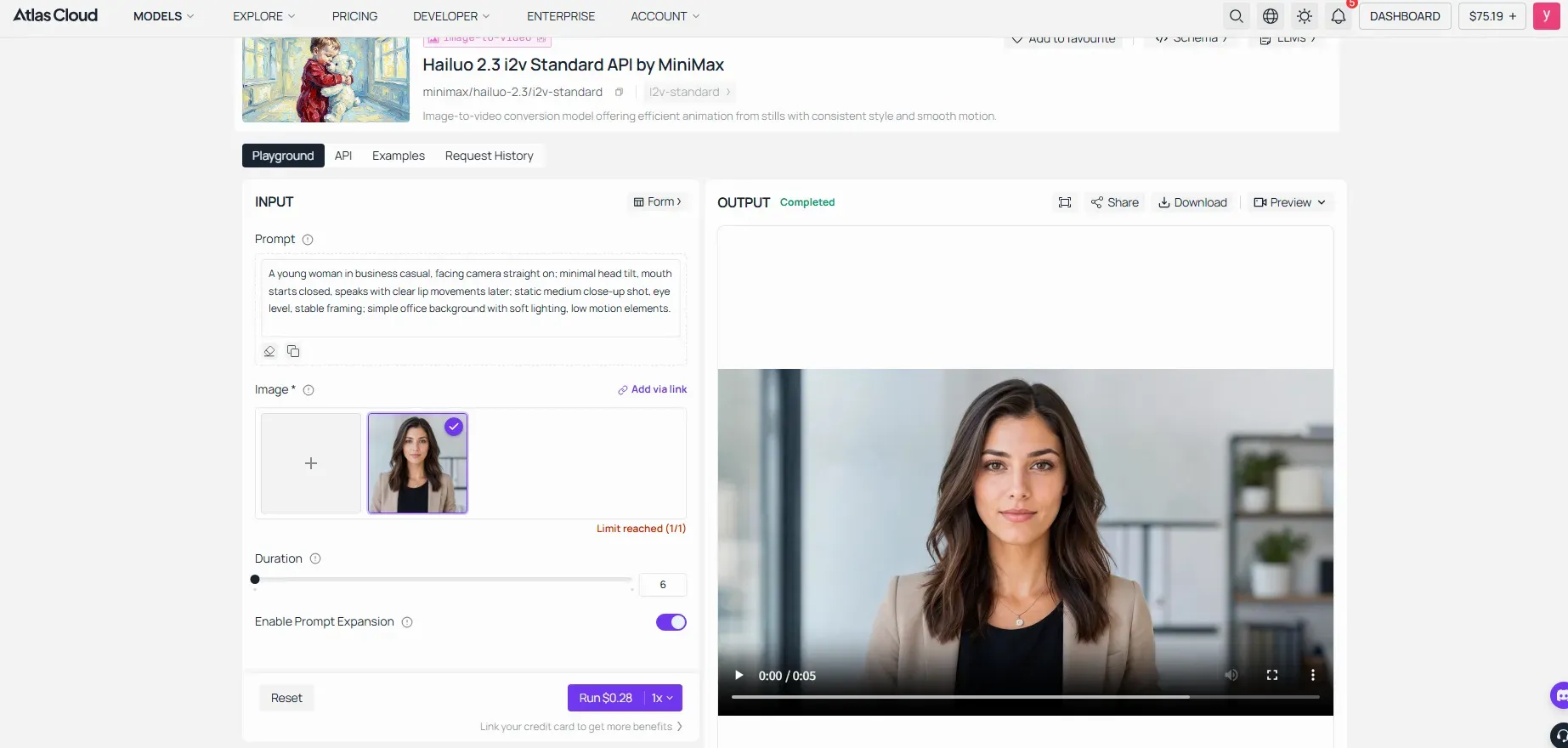
Proven Prompt Architecture Breakdown:
- Subject description first: "A young woman in business casual, facing camera straight on"
- Motion constraints: "minimal head tilt, mouth starts closed, speaks with clear lip movements later"
- Camera direction: "static medium close-up shot, eye level, stable framing"
- Background control: "simple office background with soft lighting, low motion elements"
Success-Rate Tips for Downstream Stability:
- Keep the face bright and clear in the first 2-3 seconds to give the tracking tech a solid start.
- Skip tricky face items like glasses, masks, heavy makeup, or sharp side angles in your base setup.
- Limit background activity: explicitly command a "static background with minimal movement" rather than letting the AI render dynamic, shifting environments.
- Keep generation clips short: set duration to 5-8 seconds initially to isolate tracking errors and save generation credits during testing.
- Leverage seed variation testing: Test three distinct variations of the same prompt using different seed values, then select the output featuring the steadiest facial orientation and minimal jaw jitter.
Many creators document these prompt templates in public Notion pages or GitHub repos. Sharing your own tested Hailuo prompt library for talking avatars fills a noticeable gap in current tutorials and helps build authority in the community.
Once the base video exports cleanly with good face visibility, the next tools can handle audio alignment much more accurately. The prompt structure that keeps a face stable across frames is explained in full in our Hailuo AI video generation prompt guide.
Step Two: Crafting Professional Voiceovers and Audio Tracks
Importing an unedited script into a lip-sync processor often creates an unnatural mismatch where the character's facial cadence fails to match the mood of the visual scene. Preparing the audio track beforehand ensures the narrative tone, pacing, and emotional weight align cleanly with the base video asset generated in Hailuo AI.
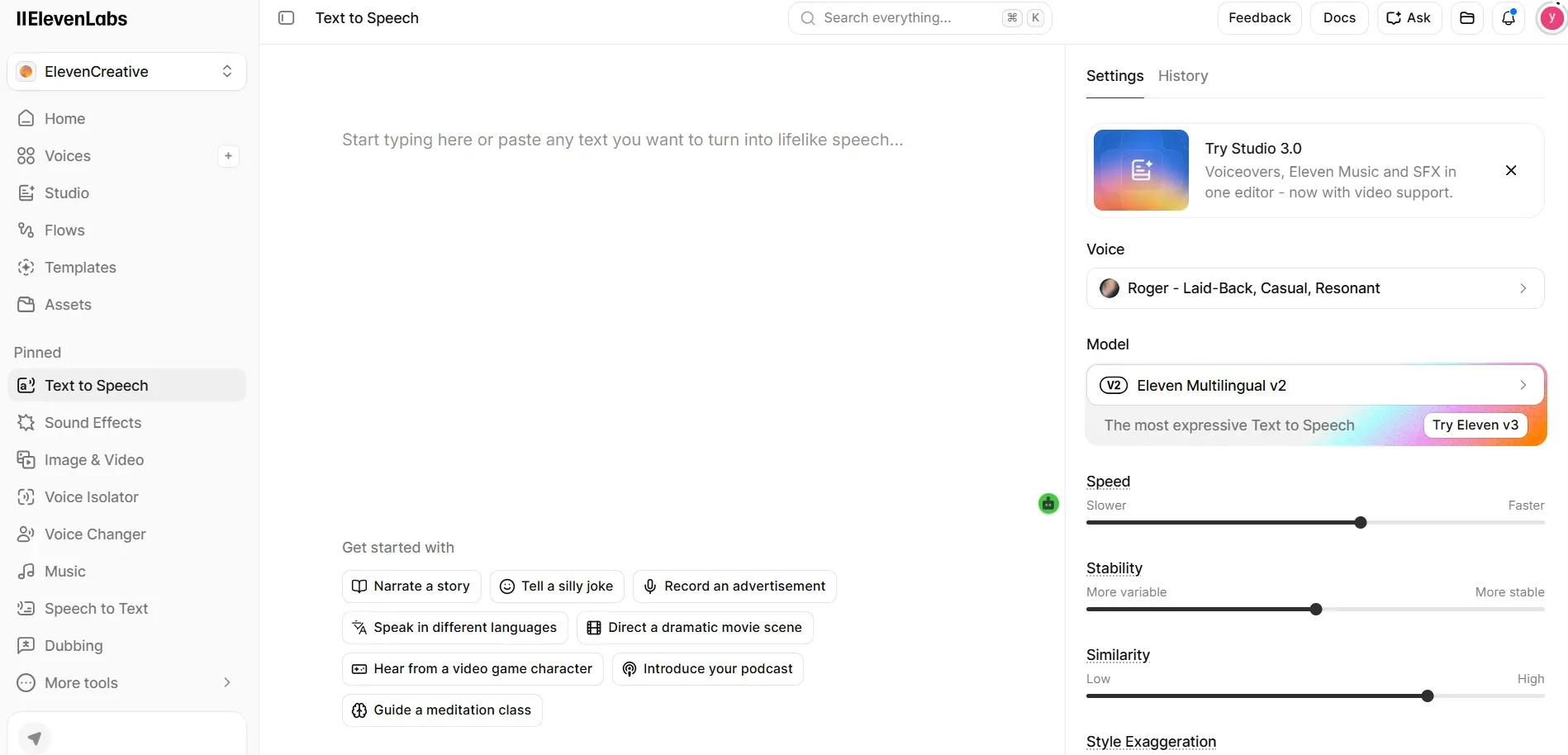
Creators can choose between recording clean human voiceovers or utilizing advanced ai text to speech engines to generate voiceover for ai video projects. Modern tools offer specialized parameters to match character delivery to specific cinematic contexts:
-
Engine Selection & Advanced Configuration: Utilizing engines like ElevenLabs provides studio-grade clarity, multi-language support, and precise emotional variance. To maximize downstream tracking accuracy, configure your ElevenLabs generation settings using proven baseline parameters:
- Stability (50% - 75%): Keeps the voice delivery emotionally consistent while avoiding robotic monotony. Lower values add expressive variance, but too low can cause audio spikes that disrupt phoneme mapping.
- Clarity / Similarity Boost (75% - 85%): Enhances voice definition and preserves character identity across multiple clip generations.
- Style Exaggeration (0% - 15%): Keep this low for corporate or standard talking heads; raise slightly only for high-drama narratives to prevent the audio renderer from introducing artificial vocal artifacts.
-
Pacing and Timing: Change speech speed to fit the character's head movement pace, stopping fast talk from ruining the real look.
-
Acoustic Purity: Save files in raw formats like 44.1kHz or 48kHz WAV to clear out background noise and fuzz that mess up sound matching.
Matching the vocal delivery style to the character's visual expression establishes immediate narrative immersion before routing the final audio and video files into a dedicated lipsync processor.
Pro tips: Many creators overlook the value of creating a personal voice library. Record a set of neutral phrases from your main talent or clone a consistent AI voice, then reuse it across multiple videos. Publishing your tested voice settings and prompt templates for different video lengths helps other creators and strengthens your own topical authority in AI video production communities.
Step Three: Integrating External Tools to Sync Audio and Video
Staring at a completed voice track and a silent video file while wondering how to merge them without causing awkward mouth stutter requires a precise external handoff. Executing this step successfully means bridging the visual assets generated through text-to-video tools with specialized external lip sync tools.
With rapid advancements in AI video tools, choosing the right lip-sync solution depends on your priorities: speed, quality, cost, or ease of use. Here’s a practical comparison of the top options for Hailuo AI workflows:
| Tool | Best For | Pricing (2026) | Strengths | Limitations | Hailuo Integration |
| Sync.so | Precision lip-sync | Free tier (limited); Paid ~$0.02–0.08/sec | High accuracy, good occlusion handling | Cloud-only, usage-based costs | Excellent |
| HeyGen | Full talking avatars | Generous free minutes; Subscriptions from $29/mo | Voice cloning, multi-language, templates | Less flexible for custom base videos | Very Good |
| CapCut | Quick social edits | Free (Premium unlocks more) | Built-in stabilization, fast, mobile-friendly | Lower precision on complex motions | Good |
| MuseTalk | Open-source / Local control | Free (self-hosted) | No recurring fees, customizable | Steeper learning curve, hardware needs | Good (via export) |
| Hailuo Native | Simple image-to-video | Included in Hailuo credits | Seamless workflow, fast | Limited control in complex scenes | Native |
1. Primary Recommendation: Sync.so
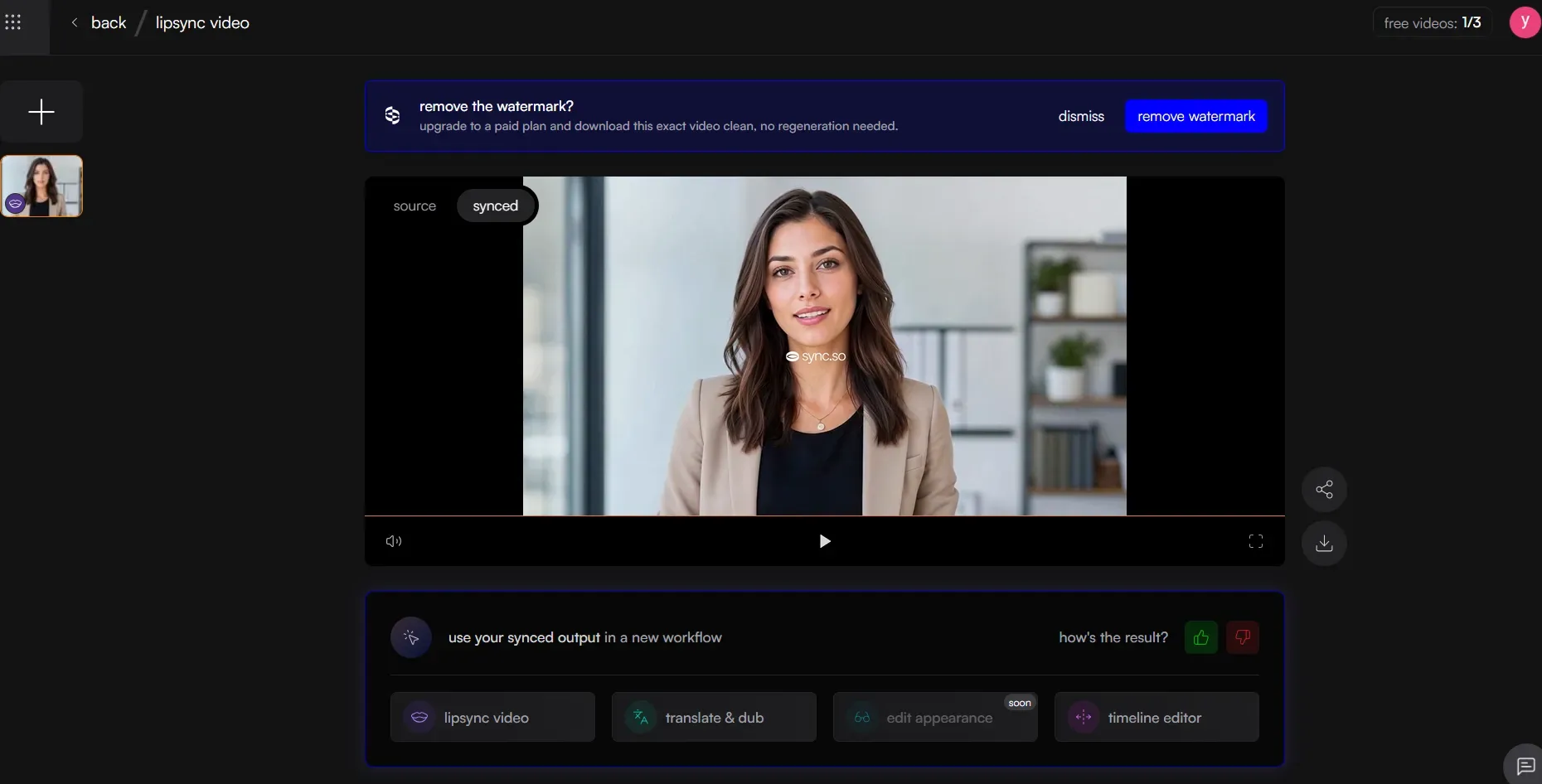
Sync.so remains one of the most reliable dedicated platforms for this workflow. Navigate to the dashboard, import your downloaded Hailuo AI clip, and upload the corresponding clean voice track.
- File Upload and Selection: Drag and drop the uncompressed video asset alongside your audio file. Choose the appropriate model (e.g., lipsync-2 for speed or higher-fidelity options for close-up portraits).
- Execution and Processing: Click generate to map audio phonemes to video frames. Depending on the server and clip length, processing usually takes 1 to 3 minutes.
- Resolving Rendering Quirks: Low contrast lighting background motion are common causes of minor jawline blurring or mouth jitter. Enable occlusion settings and test with slight head turns or accessories.
2. Open-Source & Enterprise Alternatives
While Sync.so excels at precision, several other tools offer different strengths and pricing models:
- HeyGen: Excellent for full talking-avatar pipelines with built-in voice cloning and multi-language support. Strong free tier, limited minutes/month, then subscription-based plans. Ideal if you want an all-in-one solution beyond just lip sync.
- CapCut: Free with optional premium features and beginner-friendly. Use its built-in AI lip-sync tools or “Auto Reframe + Lip Sync” features—great for quick social media edits and basic stabilization before syncing.
- MuseTalk Open-Source: 100% free and runs right on your PC if you have a good GPU or use tools like Pinokio or ComfyUI. Great for makers who want total control with zero monthly fees, but it takes more tech setup and has lower ease of use than cloud web apps.
- Other Notables: Runway Gen-3 or Kling AI if your Hailuo base clip allows re-generation with audio for native-style integration.
When evaluating platforms, always check their tier structures to avoid surprises. Most operate on a hybrid model—free tiers with watermarks or short duration limits, paid plans with monthly subscriptions plus per-second usage fees. Testing short 3-second segments first is one of the best practices for adding audio to Hailuo videos.
Pro Tips:
- If the character shows extreme expressions, reduce the lip-sync intensity slider to avoid unnatural stretching.
- When background movement fights with face tracking, use a soft face mask or lock the clip steady in CapCut.
- Save sound in raw WAV format and match frame speeds closely to cut down delay.
This flexible, tool-agnostic approach ensures your final talking avatar looks professional and publication-ready across social media channels.
Troubleshooting Common Glitches and Refining Output Quality
Watching a newly rendered talking head video feature a delayed audio track or a warped jawline instantly destroys viewer trust during a marketing campaign. Marrying AI video models with external sync software frequently introduces friction points like fix ai lip sync errors, post processing ai videos, and handling any persistent frame rate mismatch workaround. Resolving these technical hurdles requires targeted adjustments before final publication.
| Common Glitch | Primary Cause | Corrective Action |
| Audio-Delay Drift | Timeline frame rate conflict between video and audio tracks | Re-sample audio sample rate to match the exact project timeline fps |
| Unnatural Mouth Stretching | Low-resolution source frame or aggressive phoneme mapping | Apply noise reduction and upscale source assets prior to syncing |
| Jittery Jawline Edges | Background movement confusing the face tracker | Isolate subject layers or re-render with minimal motion prompts |
Applying these corrections ensures a professional finish. Utilizing AI frame interpolation tools (such as Topaz Labs or native timeline optical flow settings) bridges temporal gaps when converting standard 25fps video outputs into smooth 60fps assets. Conforming your clips before export eliminates stutter and secures crisp rendering across all social media distributions. Developers building this step into a larger pipeline should also read our Hailuo AI API automated workflows guide.
Best Practices Checklist for Hailuo AI Lip Sync
To increase success reduce wasted generations, follow to this checklist:
- Use front-facing, well-lit portraits with neutral starting mouth position in Hailuo.
- Generate voiceover first (ElevenLabs recommended) and match pacing to intended head movements.
- Test with 3–5 second clips before full runs.
- Always export Hailuo video in highest available resolution and uncompressed audio.
- Match frame rates and sample rates exactly between video and audio files.
- Preview on target platforms TikTok, YouTube, Instagram early.
- Maintain a personal prompt library and voice clones for consistency across projects.
Conclusion
Adding realistic lip sync to Hailuo AI videos no longer needs to be a frustrating bottleneck. By using Hailuo's strong visual skills with the right extra tools, you can make sharp talking avatars fast and easy.
Ready to get started? Try the front-facing prompt template from Step One and test it with a short clip in Sync.so or CapCut today. Share your results in the comments, I’d love to see your talking avatar creations and answer any questions! For a wider evaluation of Hailuo's video quality outside of talking avatars, check our complete Hailuo AI video generator review.





