You've seen him. A man in a suit, swaying left, right, left, perfectly on beat, apologizing to absolutely no one. Then it's a cat doing it. Then it's your friend. Then it's your friend's grandmother, mid-sway, morphing into a golden retriever.
That's pardon dance, and PixVerse is the app most people use to join it. One photo in, one hypnotic swaying clip out. This guide covers where the meme came from, the exact steps to make your own, prompts that actually sync to the beat, what it costs, and the API route once one clip turns into a hundred.
Key Takeaways
- The pardon dance comes from Turkish creator Güven Demir swaying to Lvbel C5's track "Aşkım Çok Pardon"; AI tools turned it into a template anyone can join with one photo.
- PixVerse bills V6 generation per second: 9 credits per second at 720p without audio, so a standard 5-second dance clip runs 45 credits, according to the official PixVerse V6 docs (2026).
- For volume or product work, the hosted PixVerse V6 API on Atlas Cloud runs pay-as-you-go from $0.025 per second, watermark-free.
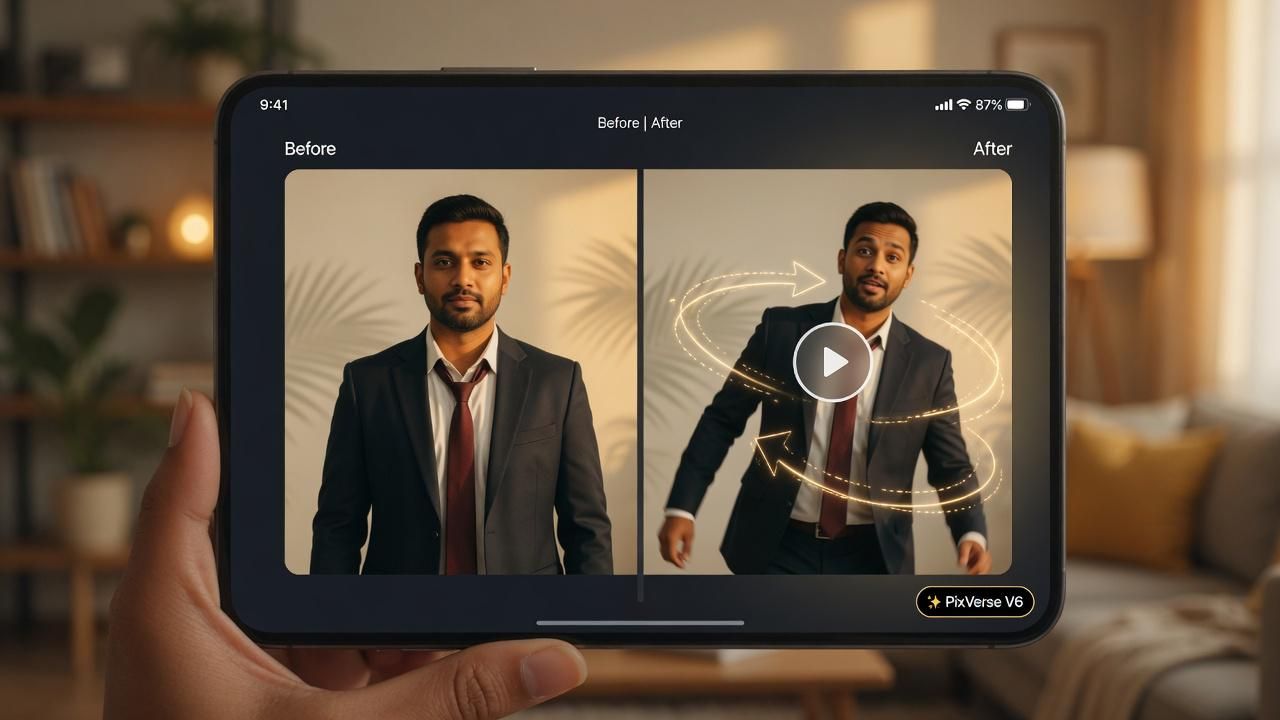
What Is the PixVerse AI Pardon Dance, and Where Did It Come From?
The pixverse ai pardon dance is an AI video effect that animates a still photo into the viral "Aşkım Çok Pardon" sway. The trend took off on TikTok in late 2025, and by 2026 one effect vendor, PXZ, claimed more than 2 million videos created with its pardon dance effect alone. That number is a vendor claim, but the flood of clips on TikTok and Instagram backs the scale.
The source material is simple. Turkish creator Güven Demir posted clips of himself doing a slow, choreography-free sway, shoulders rocking left and right on every beat. The audio is Lvbel C5's Turkish rap track "Aşkım Çok Pardon," usually in a slowed remix. The phrase translates to "sorry, my love," which is why every edit plays like a smug little apology.
Why did AI supercharge it? Because the dance is trivially easy for a model to reproduce. No footwork, no hand choreography, just a rhythmic sway. That made it the perfect payload for photo-to-video effects: upload any face, get a convincing dancer. The meme's signature twist, a mid-dance morph into a cat or dog, is pure AI and impossible to film.
How to Make a Pardon Dance PixVerse Video, Step by Step
Making one is fast, one photo and one tap, as long as the trending template is still live in the app.
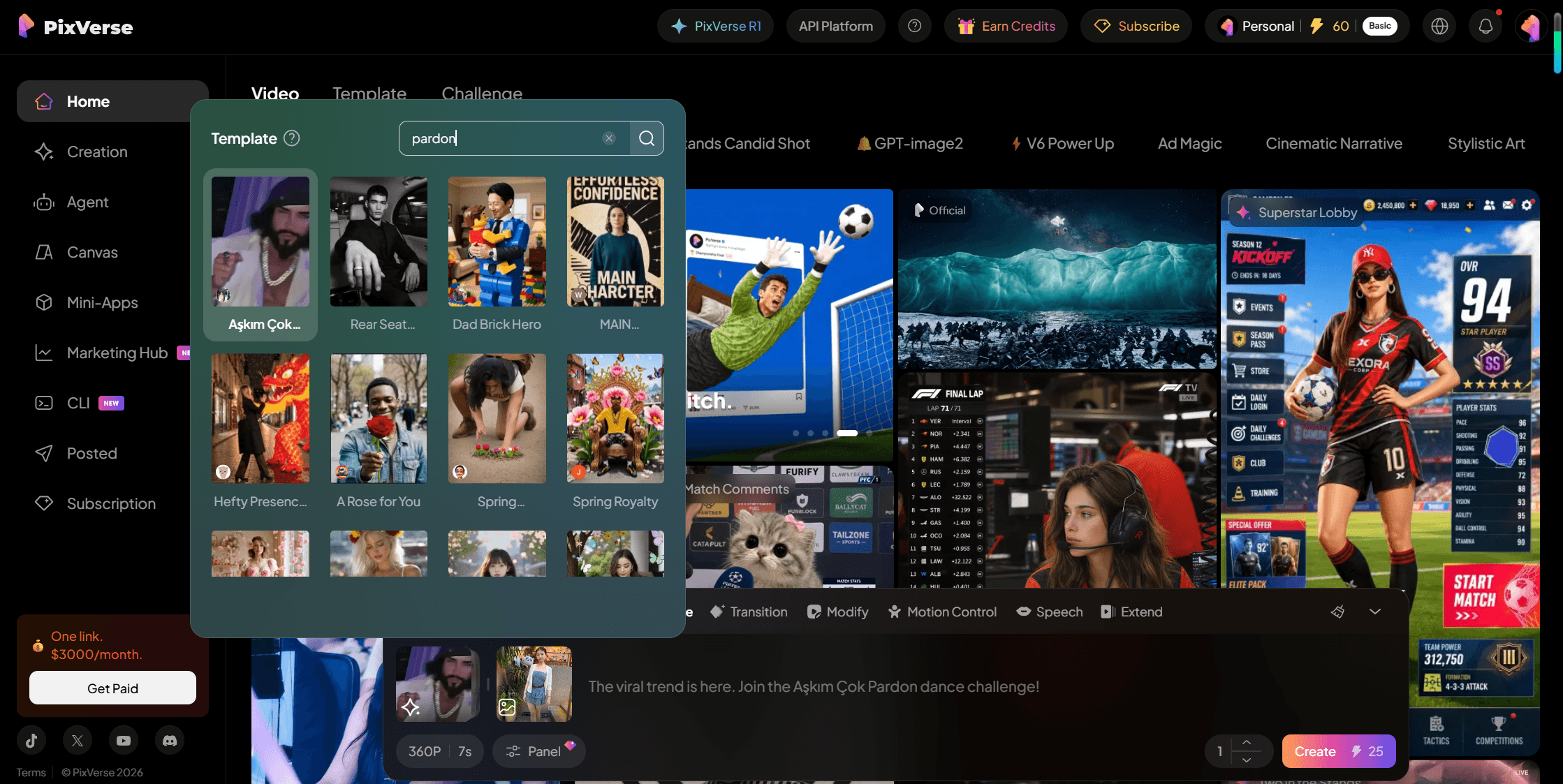
In PixVerse's effect library the template is listed under the song's actual name, "Aşkım Çok Pardon," not "pardon dance," which is why so many people scroll right past it. You can jump to it directly via the Aşkım Çok Pardon template on PixVerse, or find it in the app under trending effects; the official Effects guide describes these as one-click templates applied to a single image. Upload one clear, front-facing photo. Tap generate. The app handles motion and music sync.
The catch is that template availability rotates with trends, and one-click effects give you zero control over camera angle, wardrobe, or animal-morph timing. When you want the exact same sway applied on your own terms, or the template has already rotated out of the trending tab, the fix is to write the motion yourself as a prompt instead of waiting on a preset. That's what the next two sections cover.
Generate PixVerse Dance Clips at Scale on Atlas Cloud
Making one meme in the app is easy. Making pixverse dance content as a workflow, for a brand account, a meme page, or an app feature, is where the consumer app stops fitting. That's the gap Atlas Cloud covers: it hosts the PixVerse model family, both V6 and C1, on one pay-as-you-go API with no monthly minimum.
There are two ways to run it.
Method 1: use it directly in the browser. Open the PixVerse V6 image-to-video playground and generate right on the page, no code required. Upload the photo, write the dance prompt, pick resolution and duration, and hit generate. V6 accepts JPG or PNG up to 10MB, outputs 1 to 15 seconds at up to 1080p, and can generate native audio in the same way.
Method 2: call the API. Three steps get you from zero to the first clip:
-
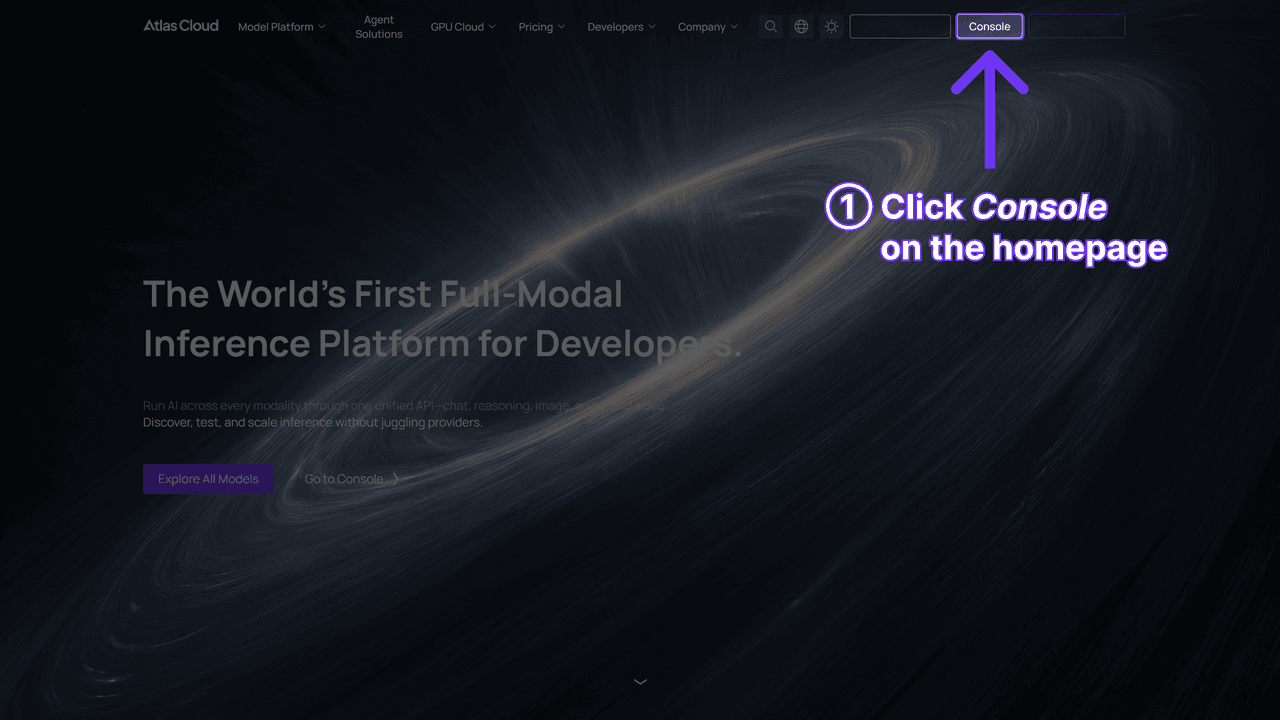
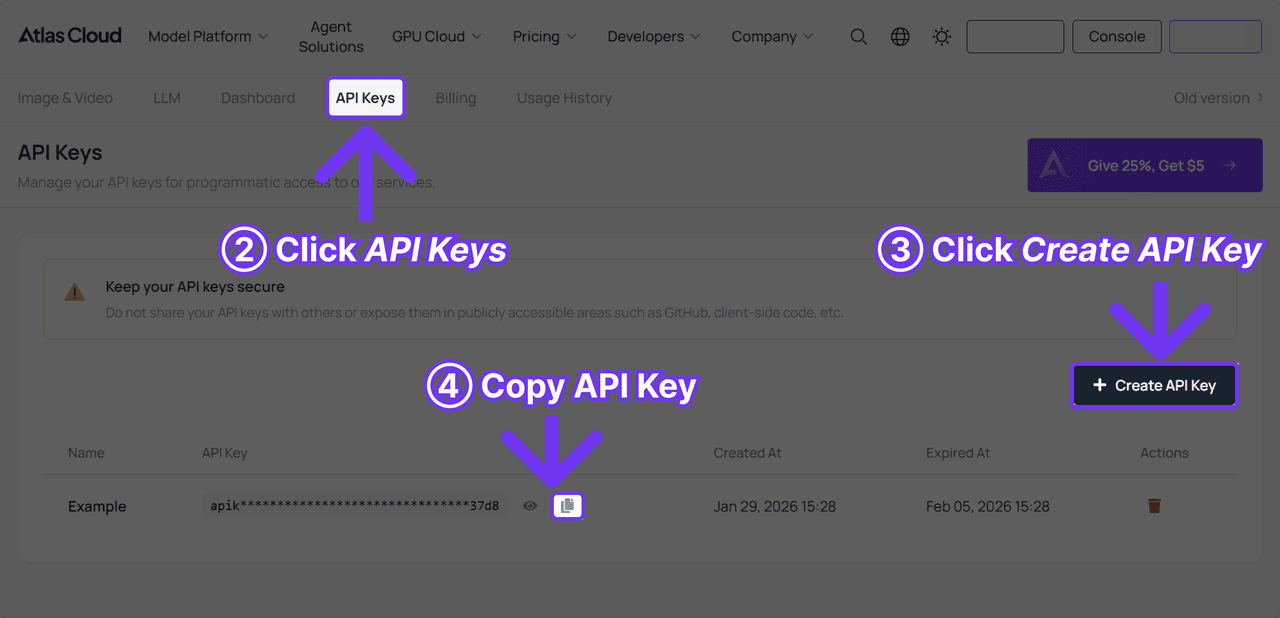
Get your API key. Create one in the console dashboard and copy it.
-
Check the API docs. The Atlas Cloud API documentation lists the endpoint, request parameters, and authentication in one place.
-
Make your first request. Call the video endpoint with pixverse/v6/image-to-video as the model, your image, and a motion prompt. Through Atlas Cloud's One API, a single calling convention drives every model on the platform. When a new model lands, you switch by changing the model name in the request, no re-integration required.
Two reasons builders route the dance trend through it once volume climbs. First, billing is per second and metered only when you generate: V6 runs $0.025 per second and C1 runs $0.03, so a 5-second dance clip costs about $0.13. Second, output is watermark-free at every tier, with no paid unlock for clean exports.
What a PixVerse AI Dance Costs in 2026
A standard pixverse ai dance clip is cheap; the costs only diverge at volume. Everything on PixVerse's platform is metered per second. The official V6 docs list 5 credits per second at 360p, 7 at 540p, 9 at 720p, and 18 at 1080p without audio; adding audio raises those to 7, 9, 12, and 23. So a typical 5-second 720p dance clip without audio runs 45 credits.
Put that in dollar terms and the gap between resolutions gets real. PixVerse's own docs peg the baseline conversion at "$1 = 5 videos" for 720p, 5-second, no-audio clips, which work out to roughly 225 credits per dollar. At that rate, $10 buys about 90 clips at 360p, 50 at 720p, or 25 at full 1080p. That's the actual budget decision hiding behind "which quality should I pick": 1080p costs 3.6 times as many credits per second as 360p.
The free tier exists but runs out in about a day of play, and free exports carry a watermark; our breakdown of PixVerse's free credits covers exactly how far the daily allowance stretches. For the full plan-by-plan math, including where the $100/month API floor kicks in, see the PixVerse pricing teardown. The short version: casual memes fit the app's credits, and anything programmatic is cheaper per clip on metered per-second billing.
Prompt Recipes for the PixVerse AI Dance Effect
If you skip the template and prompt the dance directly, wording decides whether you get a sway or a seizure. The Pixverse AI dance effect responds best to the three-sentence structure from our PixVerse prompts guide: subject and action first, then one camera instruction, then constraints and audio.
Three recipes that hold up:
The classic sway. "A confident man in a dark suit sways side to side in a smooth rhythmic dance, shifting weight left and right on each beat. Static camera, medium shot, soft indoor lighting. Keep the face consistent, loop-friendly motion, upbeat Turkish pop audio."
The animal morph. "A young woman sways left and right to the beat, then mid-dance she smoothly transforms into a fluffy orange cat that keeps the exact same sway. Static camera, centered framing. Smooth transition, no cuts, playful energy."
The pet version. "A golden retriever stands upright and sways side to side in a rhythmic dance, head bobbing on the beat. Static camera, living room background. Natural fur motion, comedic timing, keeps the dog's real face."
Two details matter more than the adjectives. Keep the camera static, because the meme's deadpan framing is a joke, and a drifting camera kills it. And state "on each beat" or "rhythmic" explicitly; without a rhythm cue, models drift into generic slow motion that never syncs with the audio you'll add.
Why Your PixVerse Pardon Dance Looks Off (and How to Fix It)
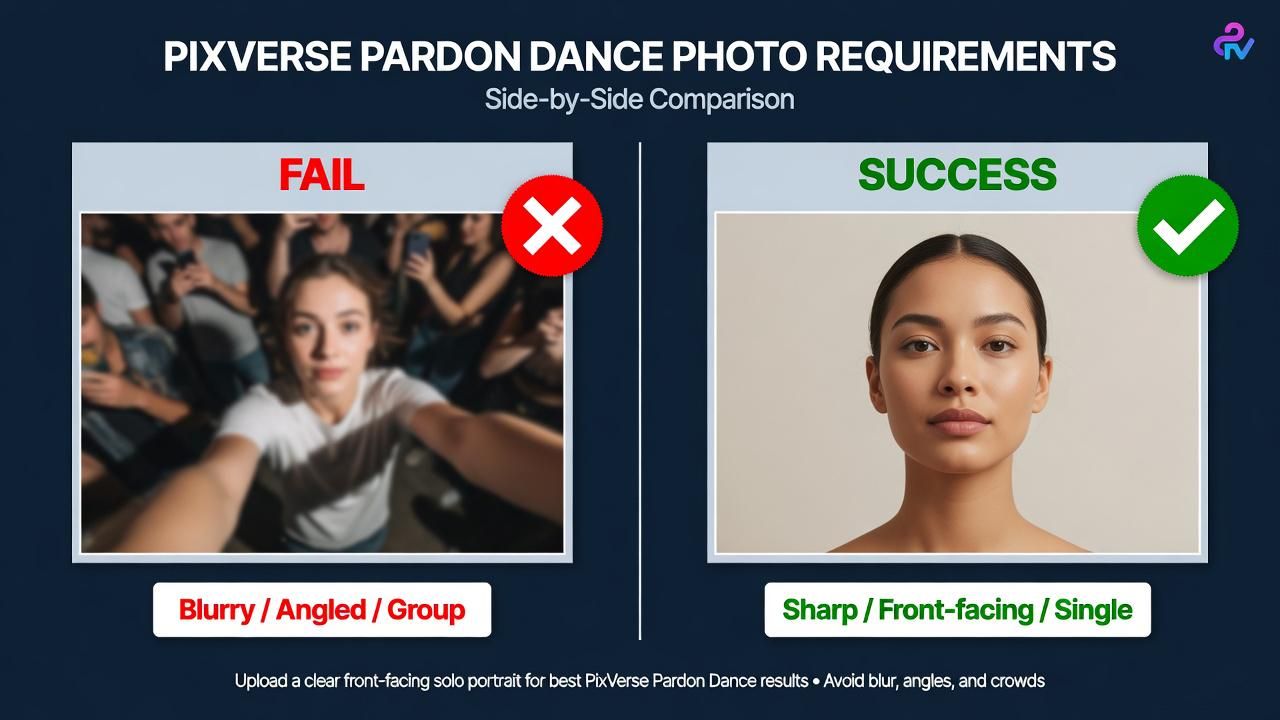
Most failed pixverse pardon dance clips trace back to the input photo, not the model.
The fixes are boring and effective:
- Face melts or warps mid-sway. Your photo is too small or the face is angled. Use a sharp, front-facing portrait, and prefer higher resolution.
- The beat never lines up. Generate short. A 5-to-8 second clip stays on rhythm; long generations drift. You can always loop it in your editor.
- Two people, one dancer. Group photos confuse subject detection. Crop to one person per generation and composite later.
- The morph looks like a jump cut. Put the transformation in the middle of the prompt sentence, not the end, and ask for "no cuts, smooth transition."
- The subject gets cropped weirdly. V6 image-to-video only supports aspect ratios between 1:2.5 and 2.5:1. A tall phone-camera portrait shot outside that range gets forced to fit, which is what causes heads or feet to clip. Crop closer to a standard portrait or square ratio before you upload.
One counterintuitive tip: the meme tolerates imperfection everywhere except the face. Viewers forgive floaty hands and weird shadows, but an off-model face reads like a different person and the joke dies. Spend your retries on face consistency, nothing else.
Frequently Asked Questions
Is the pardon dance PixVerse AI effect free to try?
Partly. New PixVerse accounts get a small credit allowance that refreshes daily, enough for roughly one standard clip a day, with a watermark on free exports. A paid plan or a pay-as-you-go API removes the watermark and the daily ceiling.
What song plays behind pixverse ai pardon dance videos?
The audio is "Aşkım Çok Pardon" by Turkish rapper Lvbel C5, almost always in a slowed remix. The title translates to "sorry, my love." Most creators add the trending sound in TikTok or CapCut after generating the silent video, which also helps the clip surface in the trend's audio feed.
Can my pet or an anime character do the pardon dance?
Yes. Photo-to-video generation works from any clear image with one identifiable subject, and that includes pets and illustrated characters, not just human faces. Animal and illustrated subjects tend to hide small motion artifacts better than real faces, which is part of why the cat versions dominate the trend.
Can I post pardon dance clips commercially?
The video itself is yours to use under your plan's terms, but the trend's audio is a commercial music track. Brands should generate the video, then license or swap the music. Watermark-free generation through an API route keeps brand output clean without a consumer subscription.
Conclusion
The pardon dance is disposable internet joy, and that's exactly why it's worth understanding. The template route gets you one laugh in a minute, no control, gone when the trend rotates. Prompting the sway yourself, in the app or through an API, is what lasts once the preset disappears from the trending tab. And once the next sway-adjacent meme lands, the model access matters more than the template, because trends rotate faster than apps ship effects.





