


Your friend posts one. Silver hair, folded skin at the eyes, still unmistakably them. You install the app three different roundups told you to install, open the filter tray, scroll it twice, and nothing in there ages anything.
That gap is what this list fixes. Choosing the best age progression app in 2026 turns out to depend less on which model looks convincing and more on which apps still ship the feature at all.
Key Takeaways
- Of the five phone apps here, only two still name an aging feature in their current App Store listing. FaceApp, Reface and Remini describe other things.
- AgingBooth is iPhone only now. Its Google Play page returns a 404 and its last iOS update landed in July 2023.
- The browser tools all still lead with it. Atlas Cloud's aging photo tool turns one upload into a full resolution older portrait with nothing stamped across it.
- Free tiers are where these pages differ most. One grants three images a month, one grants a single run per account, and one grants nothing until you earn credits.
- Two of the ten mention API access, which decides things quickly if the aging has to happen inside your own product.
How We Tested Every Age Progression App on This List
Roundups tend to carry the same names forward year to year. We opened every store listing and every tool page on September 2, 2026 instead, and recorded three things: what the vendor promises in its own words, whether the aging feature is still described at all, and what the free path actually returns.
The table below sorts on where each one runs, since that decides more about your result than model quality does.
| # | Tool | Platform | Age control |
|---|---|---|---|
| 1 | Atlas Cloud AI Aging Photo | Browser | None, one jump decades ahead |
| 2 | Pixelbin | Browser | Four presets plus custom prompt |
| 3 | GoStudio | Browser | Slider, any age from 5 to 90 |
| 4 | Fotor | Browser | Five life-stage presets |
| 5 | Media.io | Browser | Not stated on the page |
| 6 | YouCam Makeup | iOS, Android | Six AI Age filters |
| 7 | FaceApp | iOS, Android | Not documented |
| 8 | AgingBooth | iOS only | One fixed effect |
| 9 | Reface | iOS, Android | Not documented |
| 10 | Remini | iOS, Android | Not documented |
One route is missing from that table deliberately. Instagram is where most people first met an aging effect, and that door shut in 2025. The old age filter guide walks through what happened on each social platform.
Atlas Cloud: The Best AI App for Age Progression Right Now
Rank one goes to the tool that offers the fewest options. No slider, no presets, no de-aging mode. You hand it a portrait and it returns the same person decades older, in the same pose and the same shirt against the same wall.

That consistency is the whole trick. Keeping the background, clothing and lighting fixed is what lets you post the pair side by side, because the only variable left in frame is the face. A real-time lens can never give you that, since it never produces two matched stills of one moment.
Atlas Cloud runs it as one of its free AI tools, so an upscaler or background remover sits one click away if the aged portrait needs a second pass.
Disclosure worth stating plainly: Atlas Cloud publishes this article and operates the tool ranked first. Nothing else on this list paid for placement, and every claim about every tool below comes from that vendor's own page or store listing.
What the Free Age Progression Run Actually Gives You
The AI Aging Photo tool takes any common image format up to 10MB and states that the model builds your older portrait in about 30 seconds. The page reports one portrait test coming back at 1328 by 1776 pixels, with no watermark anywhere on the image.
Two limits are worth knowing before you upload. Generation is tied to an Atlas Cloud account, so signing in comes first, and several browser rivals below skip that step entirely. Every account gets one free generation on this tool, after which runs draw on credits.
It also moves in one direction. There is no de-age mode and no way to ask for a specific age, so a single request jumps decades rather than adding a careful five years.
For the step-by-step version, plus the request and polling code for the endpoint behind it, the age progression walkthrough covers both routes in full.
Best Free Age Progression App Options You Run in a Browser
Free means four genuinely different things across the four pages below, and the difference shows up before you generate anything rather than after.
2. Pixelbin, the clearest free allowance. Its old age filter page promises "up to three aged images per month" at no cost, states "No sign-up required," and describes downloads as "Free HD downloads" with "no watermarks or extra costs." A second page covers age progression with four presets plus a custom prompt, and it runs in reverse for a younger face. Upgrading buys more credits or API access.
3. GoStudio, the finest age control on the list. You pick any age between 5 and 90 on a slider, or tap a life-stage chip. It accepts PNG, JPG, JPEG, WEBP and HEIC up to 10MB, and advertises full-resolution downloads with no watermark.
One caution on that page. It says "No sign-up" in its opening description and "Sign up for 10 free credits" further down, so budget for an account even though the headline suggests otherwise.
4. Fotor, where the free tier is not free by default. Five presets run from Child through Elderly, images between 256px and 4096px are accepted, and the page advertises no watermarks. Its own FAQ then explains the catch: "New users do not receive free credits by default, but you can earn credits through the Rewards Center."
5. Media.io, the page that tells you the least. It ages or de-ages a face, accepts JPG, JPEG, PNG, BMP and WebP, and runs in the browser. Nothing on the page states a watermark policy, a free limit or a sign-up requirement, so treat all three as unknown until you hit them.
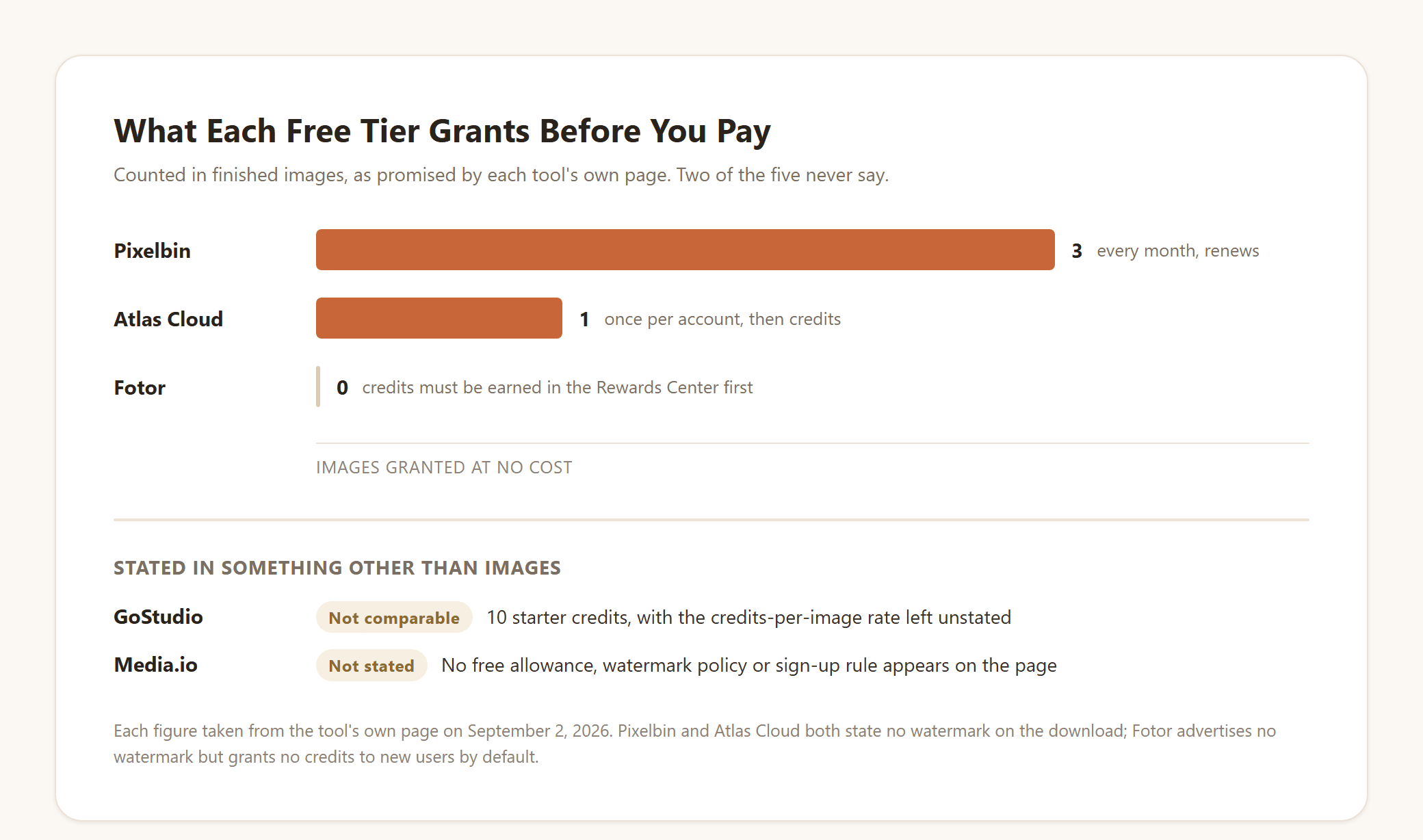
Two of the five never put a number on it, which is its own answer. A page that will not say how many images you get before payment is a page you should test with something other than the photo you actually care about.
Best Old Age Filter App Picks on iOS and Android
Here is where inherited recommendations fall apart. Four of these five shipped an update within the past week, so neglect is not the explanation, and three of them no longer describe an aging feature anywhere in their store listing.
We read each live listing on September 2, 2026 and looked for the feature by name.
| App | Latest iOS update | Google Play | What the listing leads with |
|---|---|---|---|
| YouCam Makeup | Aug 26, 2026 | Updated Aug 31, 2026 | Makeup try-on, beauty editing, AI Age |
| FaceApp | Aug 26, 2026 | Updated Aug 28, 2026 | 60+ photorealistic filters, one-tap edits |
| AgingBooth | Jul 5, 2023 | Page returns 404 | Aging a face, and nothing else |
| Reface | Aug 29, 2026 | Updated Sep 1, 2026 | Face swap videos and AI avatars |
| Remini | Aug 28, 2026 | Updated Aug 28, 2026 | Unblurring and restoring old photos |
6. YouCam Makeup, the only mainstream app still advertising it. The listing reads "AI Age: Step into our AI time machine to see your past and future with 6 different AI filters." Six filters covering both past and future puts it ahead of every other phone app here on stated capability. The same listing also sells AI Facelift for reducing the appearance of aging, so the aging tools sit beside the tools for undoing it.
7. FaceApp, whose listing now sells everything except aging. It walks through more than 60 filters: Impression looks, beards, hair color, makeup, light effects, and "Smooth wrinkles." An aging filter is not among the named features. That is a positioning choice rather than proof the feature has been pulled, but if you install FaceApp today expecting the viral aging effect front and center, the store page is not promising it.
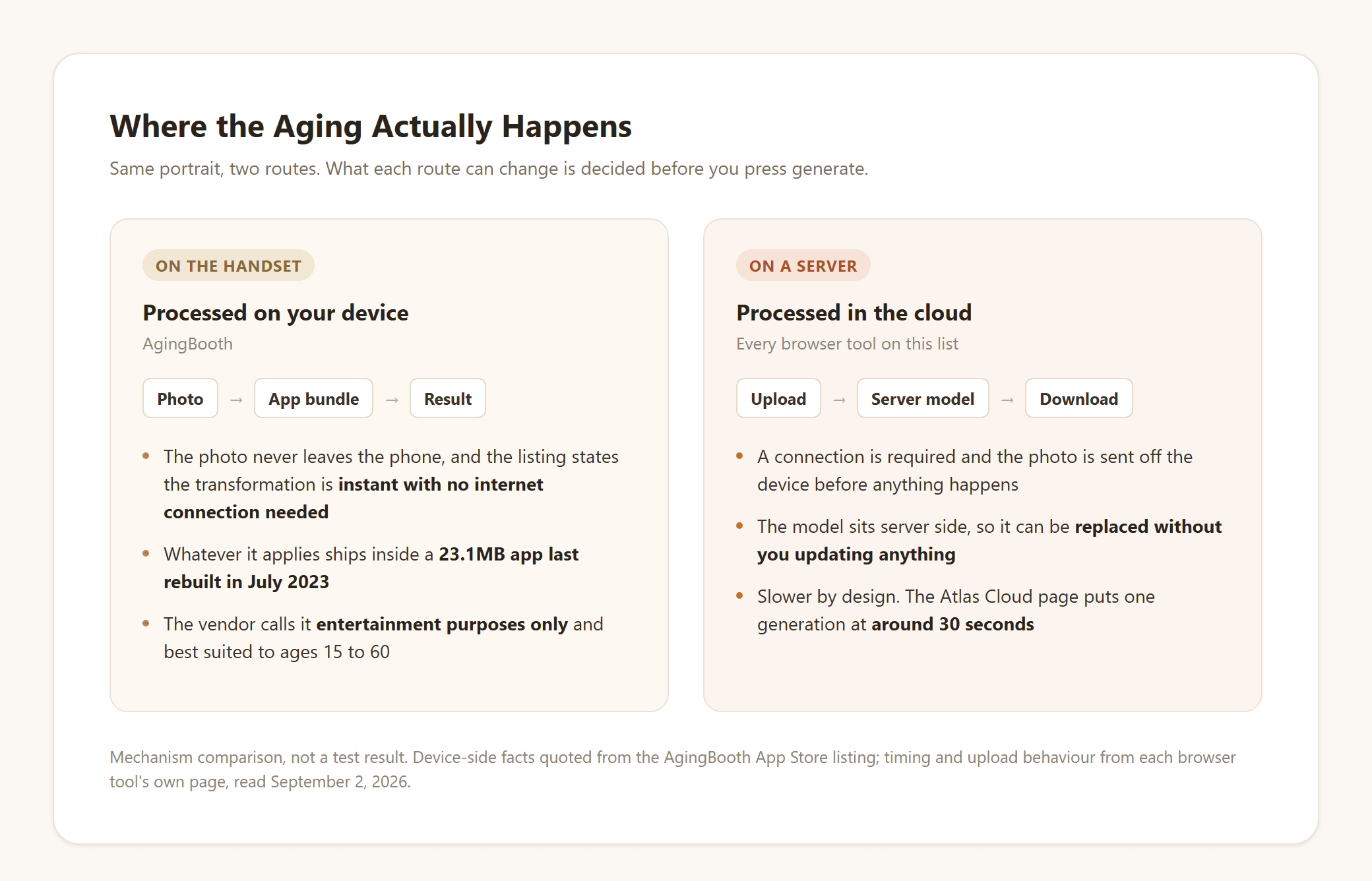
8. AgingBooth, still the fastest, still built on 2010 technology. It has been on the App Store since February 2010 and carries 4.5 stars from more than 17,000 ratings. The listing states the "transformation process is instant with no internet connection needed." None of the other four phone listings mentions offline processing, and the browser tools rule it out by design.
It is also candid in a way the rest are not. AgingBooth is "made for entertainment purposes only and does not guarantee resemblance to the real aging process," and it "works best with people between the ages of 15 and 60."
Its last iOS update landed on July 5, 2023, and its App Store listing is now the only place to get it. The Google Play page for its package returns a 404, and a Play search for the name surfaces competitors instead.
9. Reface, where aging never appears. The listing covers face swap videos, AI avatars, future baby images, haircut try-on and a hair color changer that includes grey tones. Grey hair is not age progression, and nothing else in the listing fills the gap. It also carries a 17+ rating, which matters if you were planning to hand your phone to a nephew.
10. Remini, an enhancer worth running before the aging step. Both its site and its listing describe restoring blurry, damaged, low-resolution photos, with no aging feature named. That still earns it a place, in a specific order: restore the faded photo first, then send the cleaned-up face to one of the browser tools above. An aging model has more to work with when the input is sharp, and this costs nothing to try.
Why Two Age Progression Apps Give You Different Faces
Two tools on this list can hand you noticeably different faces from the same portrait, and the offline claim is where that starts.
AgingBooth finishes with no network connection, so whatever it applies has to fit inside a 23.1MB app bundle last rebuilt in July 2023 and cannot change until the developer ships a new build. The browser tools send the photo to a server instead, which is why they need a connection, why they take around 30 seconds, and why the model behind them can be swapped for a newer one without you reinstalling anything.
Neither approach is predicting your face. A 2025 SIGGRAPH paper on personalized age transformation puts the limit precisely: facial aging is "highly dependent on multiple factors like gender, ethnicity, lifestyle, etc., making it extremely challenging to learn a global aging prior to predict aging for any individual accurately."
The paper's own fix is personalization from as few as 50 images of the same person. No consumer app on this list asks you for a second photo, let alone fifty.
So one photo in, one plausible older face out. Every tool here is answering a question about likeness, not running a forecast.
Where Your Photo Goes When You Use an Age Progression App
The device split from the last section decides something the feature lists never mention: whether the picture travels.
| Route | What happens to the photo | Who else could hold a copy |
|---|---|---|
| The one app that runs on the handset | Processed where it already lives, nothing sent | Nobody, unless you share the result |
| The five browser tools | Uploaded before any aging happens | Whoever operates the server, under whatever their policy says |
That is a real trade rather than a warning. Uploading is what buys you a full-resolution file instead of an in-app export, and for your own selfie it is an easy call.
It gets less easy with a photo of someone else, which is where these tools are most often pointed. Atlas Cloud's own guidance says to upload only photos you are authorized to use and to get consent before generating someone else's likeness. Whichever tool you land on, a child's or a parent's face deserves that question asked first.
Frequently Asked Questions
What is the best app for age progression in 2026?
For a keepable image, a browser tool beats a phone app right now, because most phone apps no longer advertise the feature. Among installed apps, YouCam Makeup is the one still naming an aging feature in its store listing, with six filters running in both directions.
Is there a best free age progression app with no watermark?
Several pages promise exactly that. Pixelbin states three free aged images a month with no watermark and no sign-up, and Atlas Cloud gives one free generation per account with no watermark on the output. Fotor advertises no watermarks but grants new users no credits by default, so read the free claim and the credit claim as two separate things.
What happened to the best old age filter Instagram users remember?
Meta shut the platform those effects were built on. Its Spark announcement confirms third-party AR effects stopped being available across Instagram, Facebook and Messenger on January 14, 2025, while effects owned by Meta continued. Aging effects on Instagram were overwhelmingly creator-made, so they went with the shutdown.
Does an age progression app work on Android as well as iPhone?
Mostly. FaceApp, Reface, Remini and YouCam Makeup all shipped Google Play updates in the past week, so the Android builds are current. AgingBooth is the exception, and it is the one that dropped off Android rather than the one that neglected it.
How much does an age progression app cost after the free run?
On Atlas Cloud, the free generation is one per account and further runs draw on credits at $0.045 per image, with no discount active as of September 2, 2026. Phone apps price differently, through subscriptions rather than per image, and the weekly plans several of them push add up faster than the monthly figure suggests.
Do age progression apps predict what I will really look like?
No. The oldest app here says as much in its own store listing, and the research points the same way: without dozens of photos of you specifically, a model can only produce a plausible older face. Treat the output as one version of you rather than a forecast of you.
Conclusion
The reason this search keeps disappointing people is that the recommendations aged worse than the faces did. Old lists keep circulating, and the apps on them now sell makeup, face swaps and photo restoration on their store pages, with aging nowhere in the pitch. Reading the listing before the download saves the whole trip.
So pick the best age progression app on evidence you can gather in about a minute. Open the store page or the tool page, check that aging is still described there, then check whether a number is attached to the free tier. Only a handful survive both questions, and the one that hands back a full-resolution portrait of your own face decades on is worth more than the one with the longest feature grid.





