

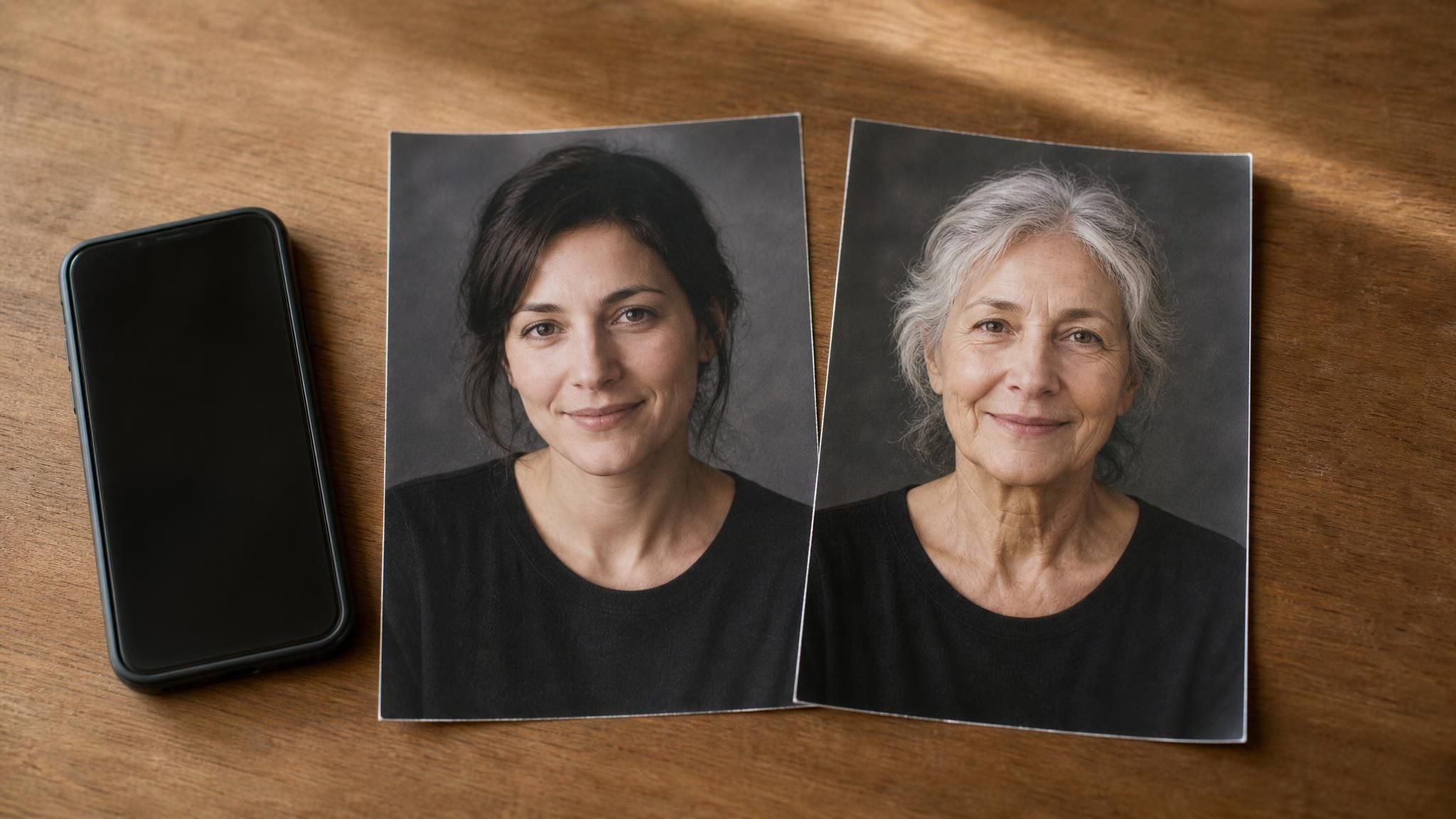
Someone in the group chat sends theirs first. Silver hair, deep laugh lines, unmistakably them. You open the effects tray to try it, scroll the whole carousel, and the old age filter they used is not there.
You did not miss a menu. Aging effects now sit in four different places, built by four different parties, and one of those platforms deleted its entire third-party collection outright. Which means the answer to where is it depends on which app you have open.
Here is where each one actually lives right now, what a browser tool hands back that a camera lens cannot, and why the aged version of your face looks harsher than the real one is likely to be.
Key Takeaways
- Instagram's old age filter is not buried in a submenu. Meta removed all third-party AR effects on January 14, 2025.
- Snapchat still runs an aging lens it built itself, TikTok's viral version came from an independent creator, and CapCut offers templates rather than a built-in effect.
- Real-time filters deepen the skin you already have. The hollows and shadows of real aging never show up, which is why results skew harsh.
- Face age AI estimators guess how old you look. They do not draw an older you.
- A browser tool returns a downloadable portrait instead of a screen recording. Atlas Cloud's aging photo tool runs on one selfie.
Where Is the Old Age Filter? Platform by Platform
The four answers below are not variations on one theme. Who built an effect turns out to decide whether it still exists, and what you are allowed to take away from it.
Snapchat is the straightforward one. Its Time Machine lens credits Snapchat itself as the creator, and the lens page carries search tags including old age filter, aging filter and old face filter.
Drag the slider right and the years pile on, gray hair and deepening lines. Drag left and it runs backwards. Engadget covered the launch on November 21, 2019, noting the rear camera works too, so you can age a friend across the table.
The other three each break a different assumption.
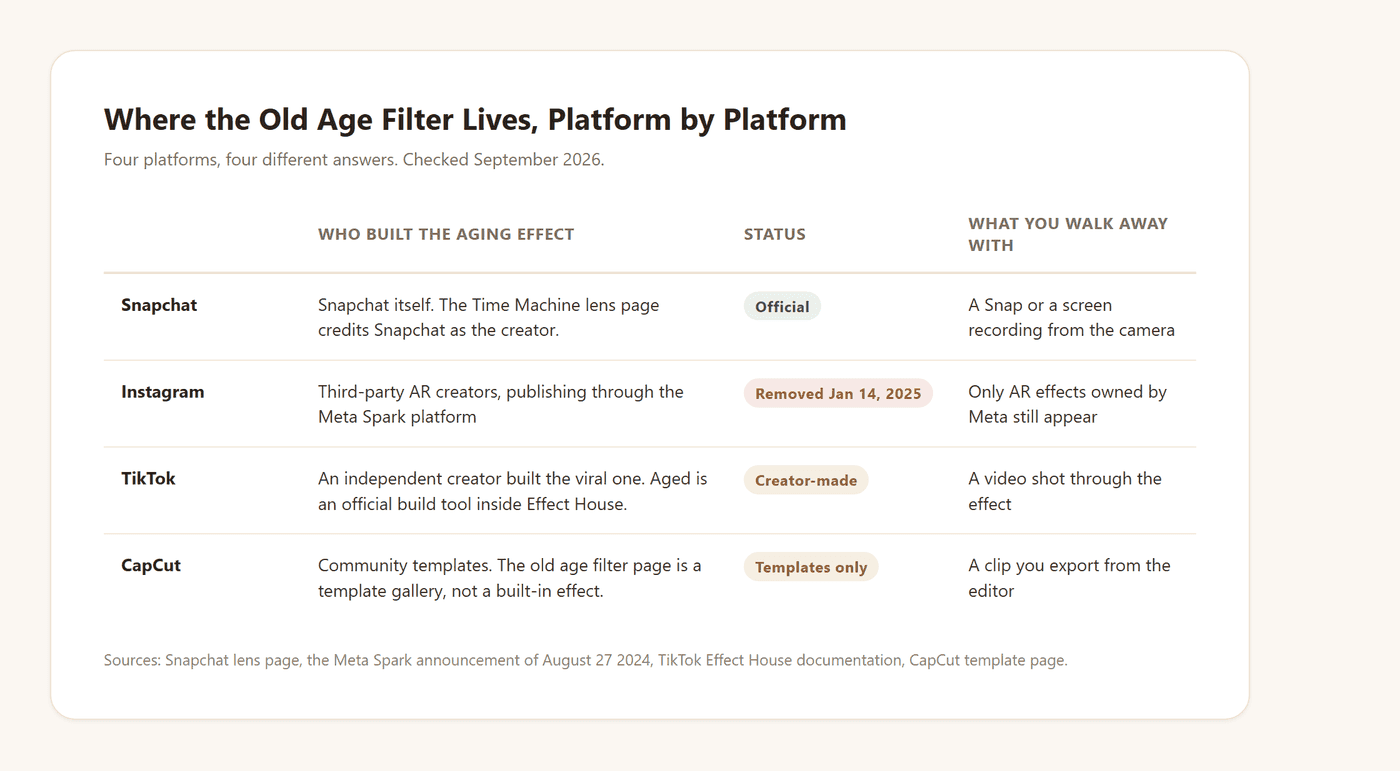
CapCut is worth one line before we go deeper. Its aging page is headed "Free Old Age Filter Effect Templates By CapCut" and lists community templates with usage counts. It presents templates rather than an aging effect of its own, which is why CapCut walkthroughs tend to start by generating the aged image somewhere else and importing it.
The Old Age Filter on Instagram Was Removed in 2025
Ask what the Instagram old age filter is called and you hit a name problem, because the thing people remember mostly does not exist any more. Meta documented the reason itself.
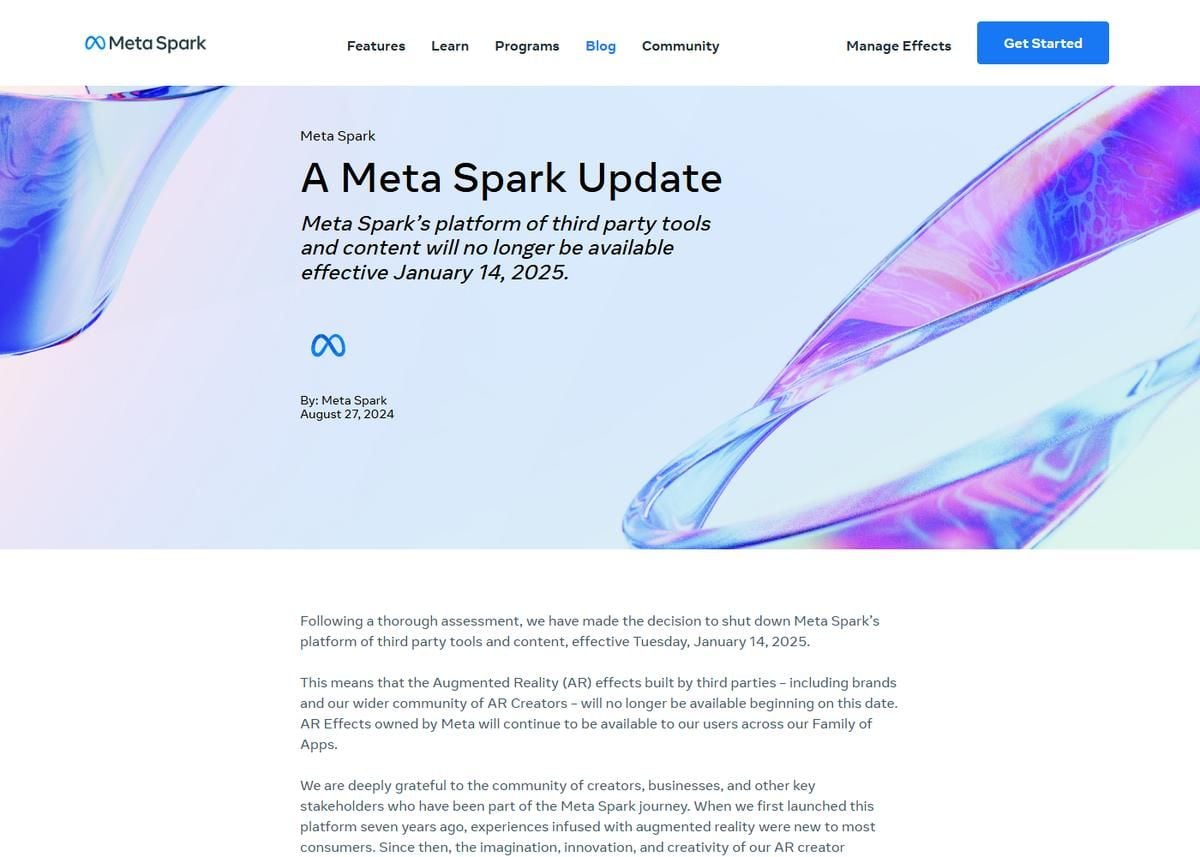
The wording is blunt. Third-party AR effects, "including brands and our wider community of AR Creators," stopped being available on that date. Effects owned by Meta carried on across what the post calls its Family of Apps, Instagram among them.
So when someone asks what is the old age filter on Instagram, the answer arrives in two halves. It was usually a creator's effect, and creator effects are gone.
On TikTok, the Old Age Filter Is Creator-Made
TikTok's answer is split in a different way, and it comes closer to owning the technology than Instagram does.
The July 2023 wave ran on an effect called Aged. On July 16 that year, NBC News reported what it did to a face: it "deepens wrinkles and adds facial sagging." Reactions ran to millions of likes per video.
Then came a second one. In December 2023 the Washington Post reported that the effect people were calling the aging filter was named time travel, that an independent creator released it that October, and that it had been shared 1.4 million times.
Where TikTok does own something is the toolkit. Its Effect House documentation lists Aged as an official generative effect that creators can drop into their own builds.
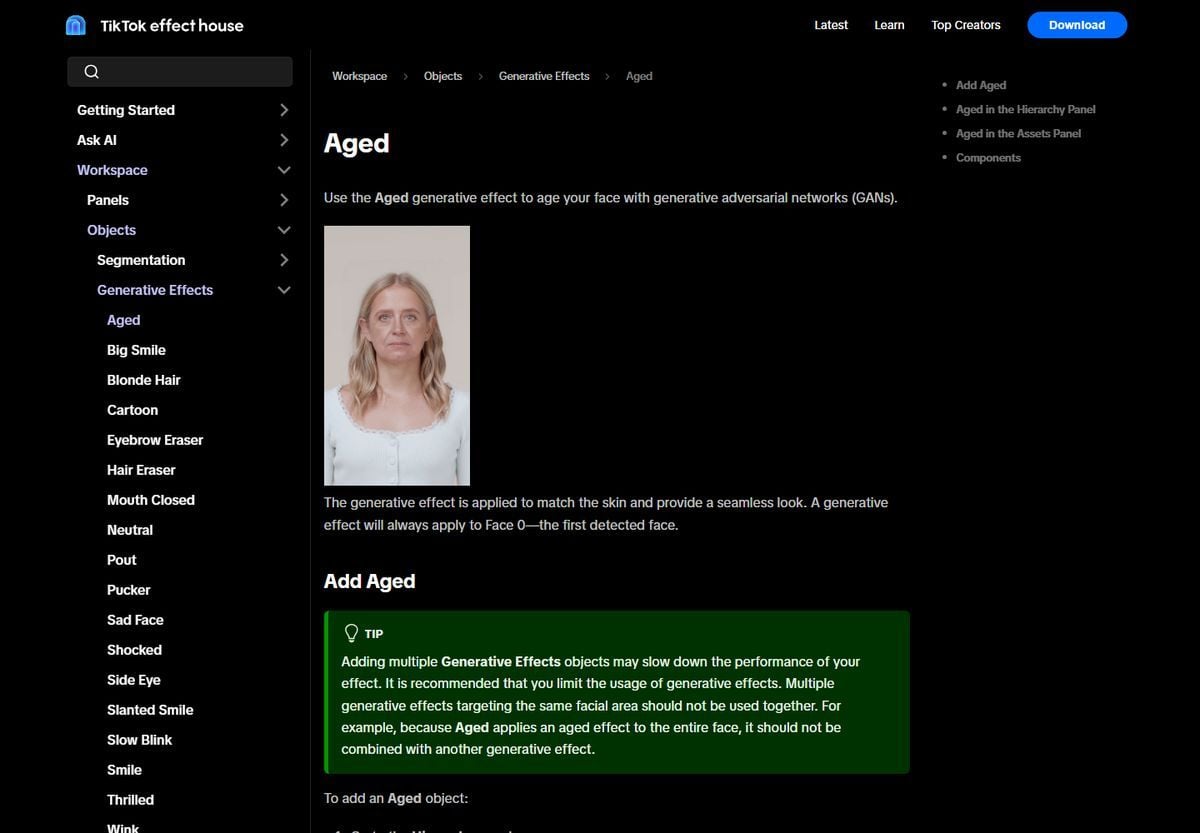
Screenshot of the Effect House documentation for the Aged generative effect.
"Use the Aged generative effect to age your face with generative adversarial networks (GANs)," the page reads. It always applies to the first detected face, and the docs warn against stacking it with a second generative effect on the same region. Official technology, creator-made effects, which is why no single filter name stays put for long.
That same asymmetry across platforms shows up for other face edits too. The bald filter guide walks through an almost identical split.
Free AI Age Filter Online, No App Install
Chasing a filter across four apps has one flaw waiting at the end of it. Even when you find one, what you get is a moving effect on a camera feed, and the thing you wanted to keep was the picture.
An upload tool inverts that. You hand it one portrait and it hands back a finished image. Atlas Cloud runs its aging photo tool this way, and its published example shows the output.
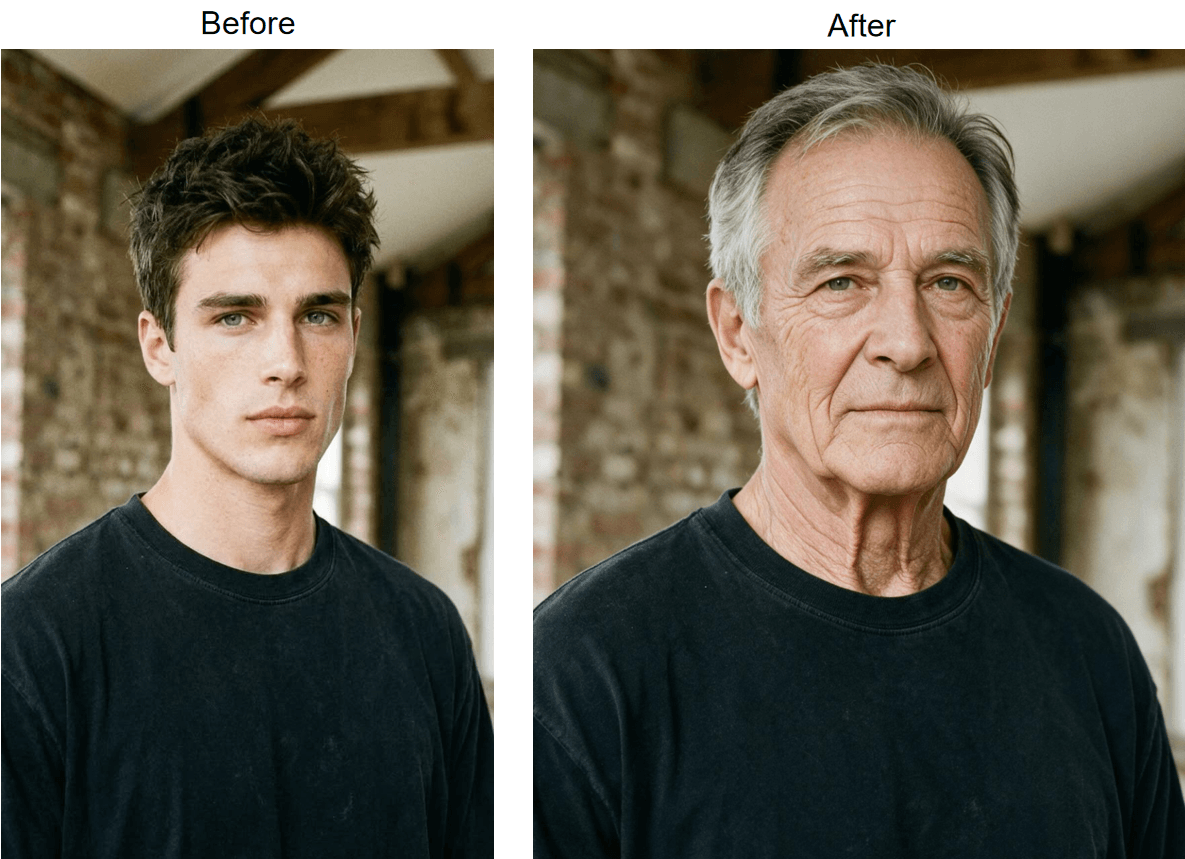
Official before and after pair published on the Atlas Cloud aging photo page.
Look at what stayed. Same marble wall, same V-neck, same pose, same tilt of the head. Gray arrives at the temples and along the part, the beard grays with the hair, the neck ages with the face. That is what makes a pair like this postable side by side, and it is what a camera lens cannot give you, since a lens never produces two matched stills of the same moment.
It sits alongside the other free AI tools on the platform, so an upscaler or background remover is one click away if the aged portrait needs a second pass.
Run the Old Face Filter in Three Steps
Three steps, no download, and the page states results arrive in roughly 30 seconds.
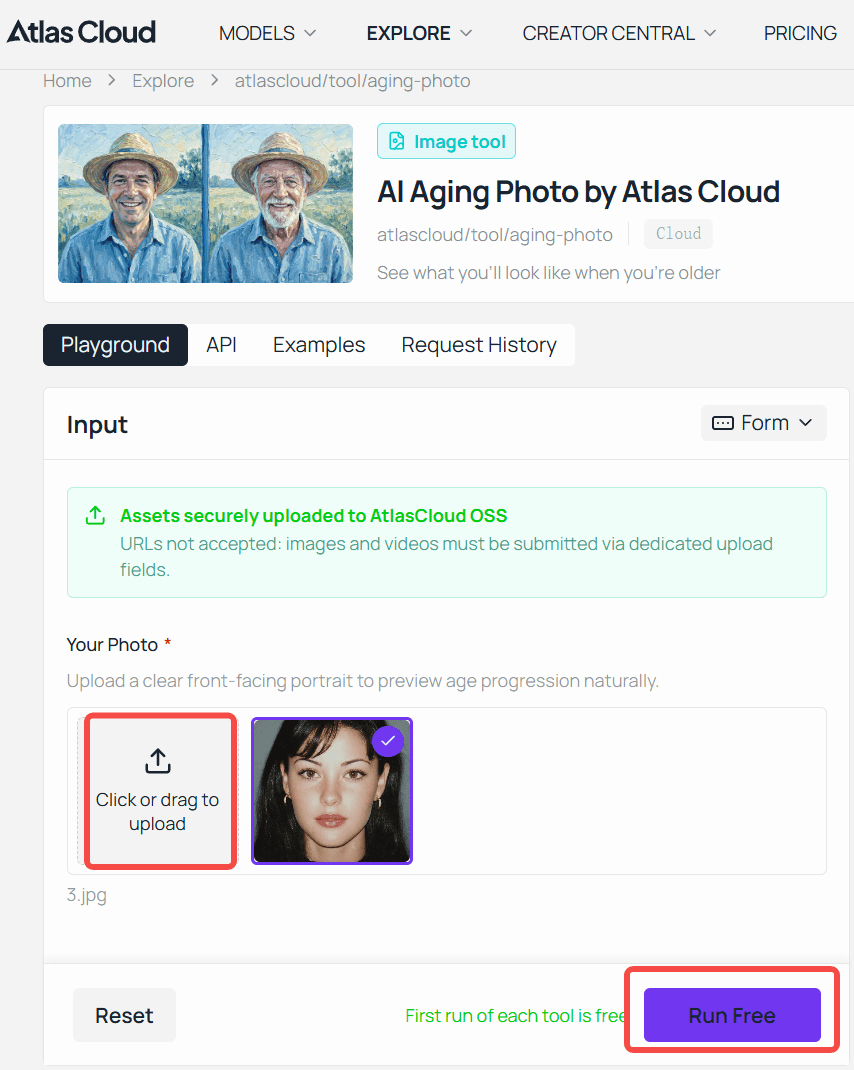
Step 1. Open the aging photo tool and sign in to your Atlas Cloud account. Generation is tied to the account, which is also what keeps your request history and downloads in one place.
Step 2. Drag in a clear front-facing portrait, any common image format up to 10MB. If you would rather see the mechanism before committing your own face, the page loads an official example for you.
Step 3. Generate, then download. The tool page reports no watermark on the output, and says one portrait test came back at 1328 by 1776 pixels.
Two habits move the result more than anything else. Frame from the chest up with your hair in view, since graying hair and an aging neck do most of the convincing. And upload the unretouched original, because smoothed skin leaves the model less real texture to work from.
Build an Aging Effect Into Your Own App via API
A one-off preview answers personal curiosity. A birthday app, a photo booth kiosk or a genealogy product needs the same aging model available to every user without routing them all through one browser page.
Step 1: Create an API key. Generate one in the Atlas Cloud console and keep it server side, never in client-facing code.

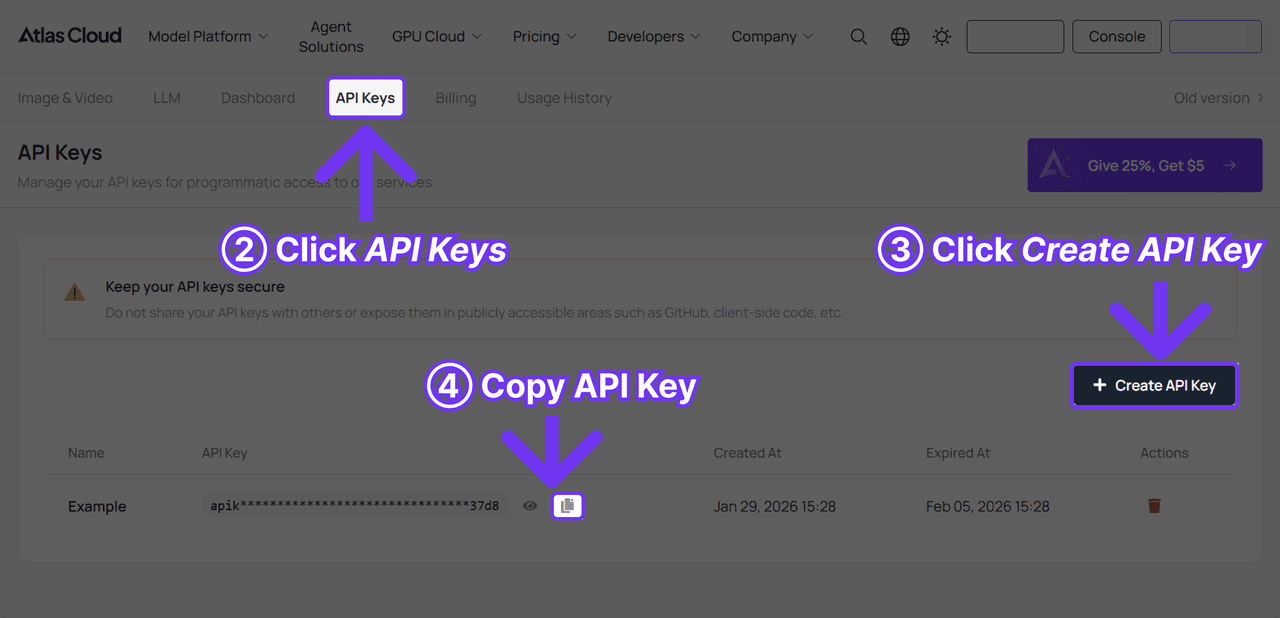
Step 2: Check the request format. The Atlas Cloud docs cover authentication and the shared image endpoint. This particular model is unusually small on the surface, taking two fields and no prompt.
| Field | Required | Notes |
|---|---|---|
| model | Yes | atlascloud/tool/aging-photo |
| image | Yes | One clear front-facing portrait, passed as a URL |
Step 3: Send the request, then poll for the result.
Bash1curl -X POST https://api.atlascloud.ai/api/v1/model/generateImage \ 2 -H "Authorization: Bearer $ATLAS_API_KEY" \ 3 -H "Content-Type: application/json" \ 4 -d '{ 5 "model": "atlascloud/tool/aging-photo", 6 "image": "https://your-cdn.example.com/portrait.jpg" 7 }'
Bash1curl https://api.atlascloud.ai/api/v1/model/prediction/{request_id} \ 2 -H "Authorization: Bearer $ATLAS_API_KEY"
The first call returns a request ID right away. Poll the second endpoint until status reads completed, then read the image URL out of outputs. Status moves through created, processing and then either completed or failed, so a simple loop with a short delay covers it.
There is no aging strength parameter, which cuts both ways. Nothing to misconfigure, and no dial for a lighter result. If you need that control, the same endpoint and the same key reach every other image model on the platform. Change the model string and the rest of your integration stays as it is.
Face Age AI Guesses Your Age. It Doesn't Age Your Photo.
Search face age AI and half the results do something completely different from an aging filter. That is how people end up on a page that hands them a number when they wanted a picture.
An estimator reads your portrait and returns an age. That is the whole product. A skincare quiz, a longevity site or a party game asks how old do I look, and the model answers with a figure. No image comes back.
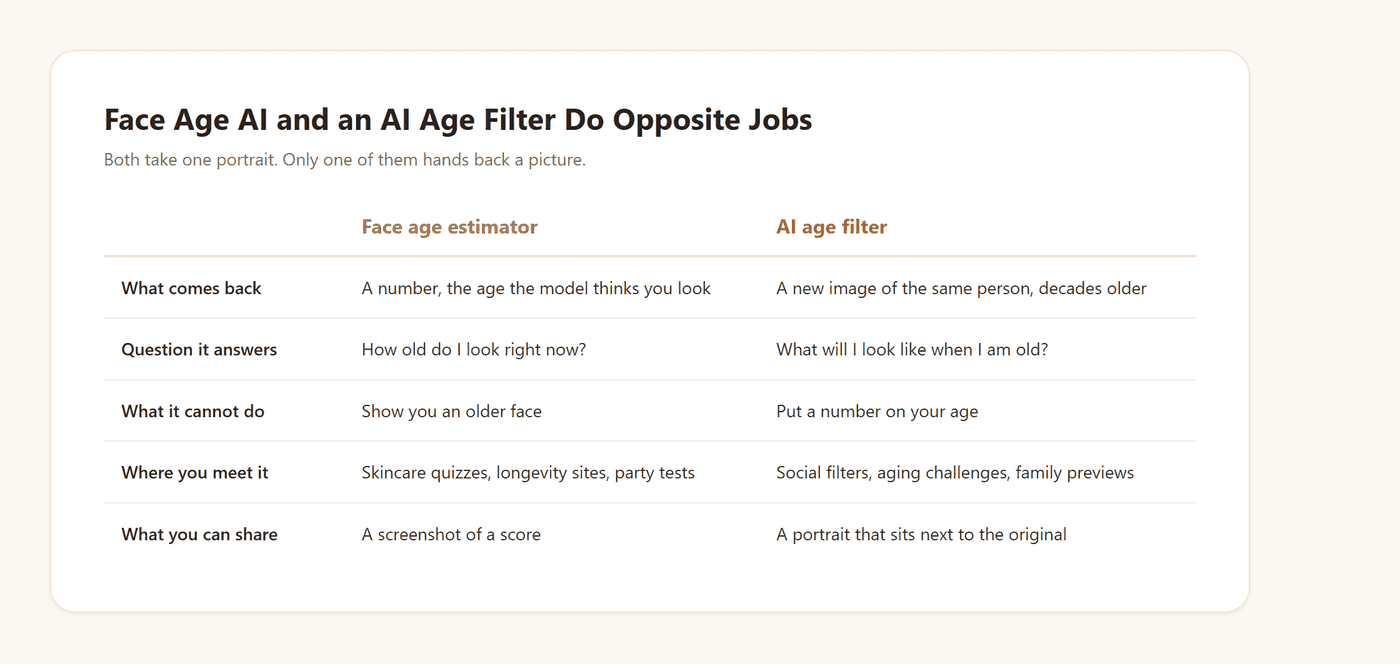
An AI face aging tool goes the other way. It generates a new portrait of the same person, decades on, and never tells you a number. Ask it your age and it has nothing to say, because estimating age was never part of the job.
One caution covers both. An estimator is guessing about a photograph, where lighting and angle move the answer, and a filter is rendering one. Neither measures your body.
Why That Result Looks Harsher Than Real Aging
Which brings us to the reaction that carried the whole trend. People kept saying the result looked too harsh, older than their own grandparents at the same age. There is a mechanical reason for that.
A real-time filter works with the surface it can see. Skin, hair, the folds already on your face. Dermatologist Rebecca Marcus, quoted in a Highsnobiety breakdown on July 19, 2023, put the mechanism in one line: "existing lines, wrinkles, and folds are deepened." If you smile in the photo, your smile lines are what get carved deeper.
The limit sits one layer deeper. Dermatologist Noreen Galaria, in the same piece, granted that the filter does show skin sagging as a result of volume loss, then named what it misses. The effect "isn't able to demonstrate hollows and shadows on our face."
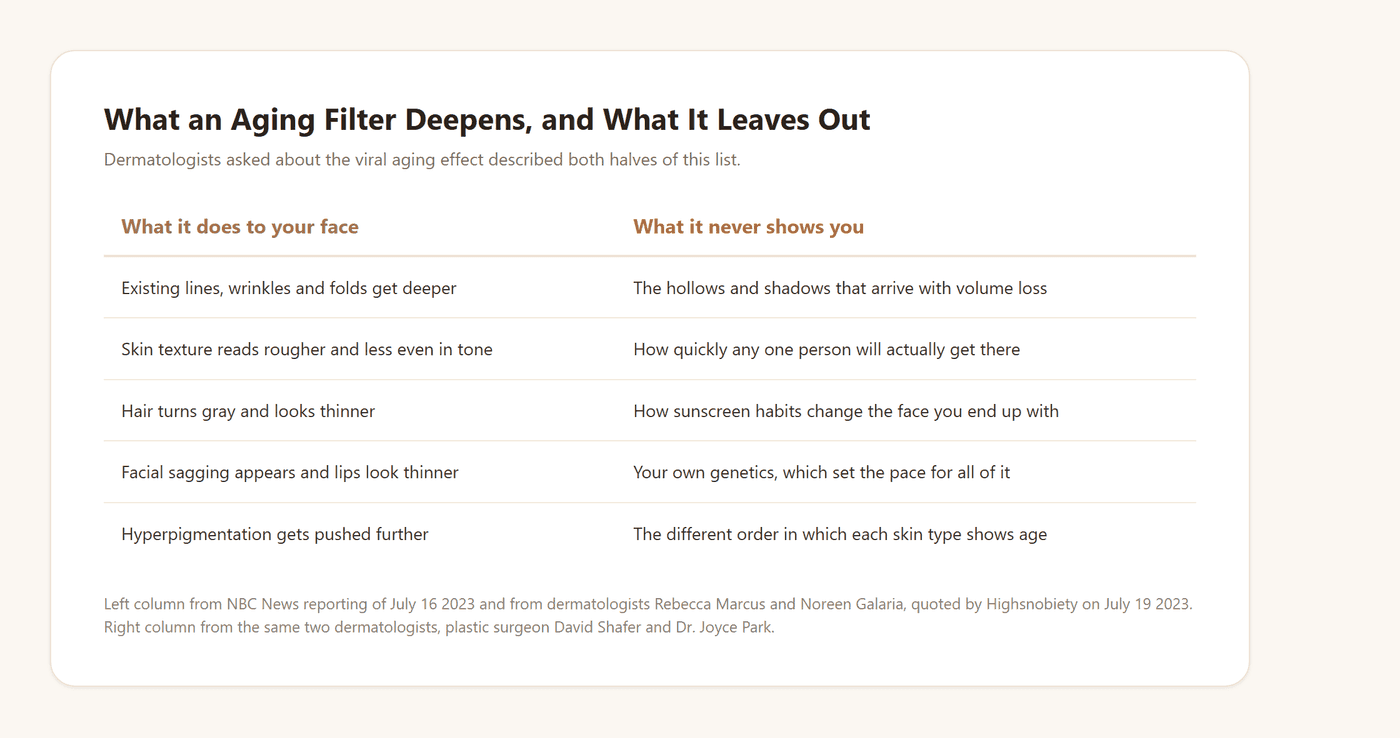
So the aged face you saw was mostly your current skin pushed harder. The shadowing that real volume loss carves out never arrives, and pushing harder lands harsh.
If the hair was the part you actually wanted to preview, a gray hair preview targets that instead.
What Even an Accurate Old Age Filter Can't Model
Push further and a second problem appears. One preset cannot be right for every face, because faces do not age in the same order.
Dermatologist Dr. Joyce Park described the gap plainly in her own newsletter, writing in 2023. People with more melanin in their skin "have more sun protection and are more resistant to photoaging, like wrinkling, sagging," while being susceptible to hyperpigmentation instead.
East Asian faces, she added, tend toward sagging cheeks and noticeable eye bags because of skeletal structure. Same age, different signs, in a different order.
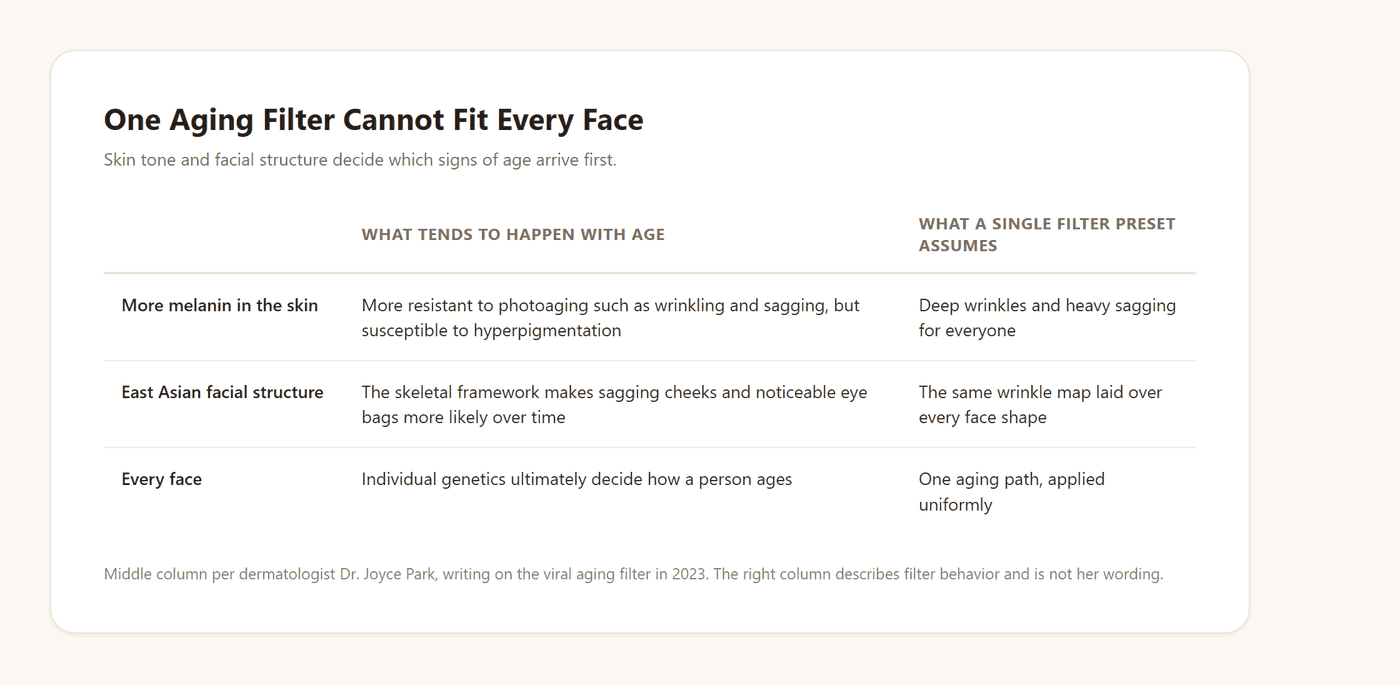
A filter tuned for deep wrinkles and heavy sagging is therefore wrong in a particular direction, and wrong by different amounts depending on the face. Park's own conclusion is the one to keep: individual genetics ultimately decide how a person ages.
Old Age Filter App or Online Tool: How to Choose
None of that settles what you should open tonight. Three routes exist, and they differ mostly in what you are left holding afterward.
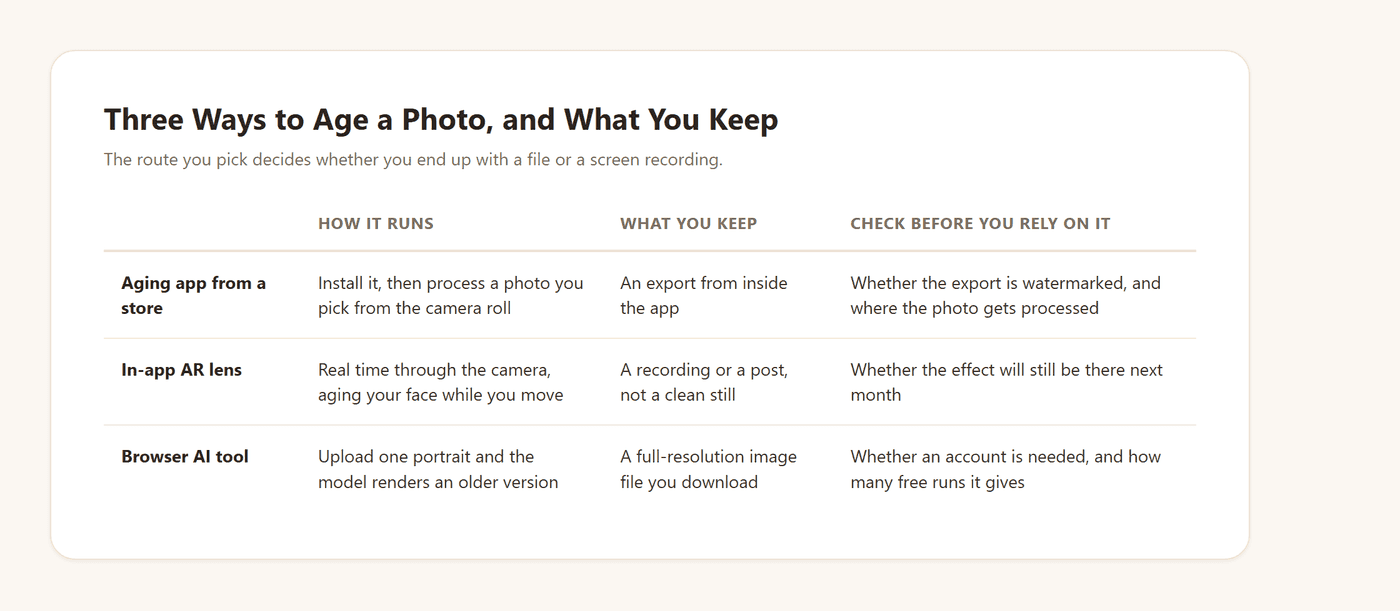
An installed app makes sense if you plan to age dozens of photos and keep them on your phone. An AR lens wins when the aging itself is the content, reacting on camera while you talk.
A browser tool suits the case where the still image is the point: a reunion table card, an anniversary post, a character mockup, an aged profile picture for a birthday week. You want a full-resolution file with nothing stamped across it, which a screen recording will never be.
The trade-off on that third route is the sign-in. An account is what the free run and your saved results hang off, and plenty of competing pages skip that step entirely.
If the real curiosity underneath all this is how you will look decades from now, the older self preview takes that question on directly.
Frequently Asked Questions
What is the old age filter on Instagram called?
There is no single official name, and that is the useful half of the answer. The aging effects that circulated on Instagram came from third-party AR creators, and Meta removed all third-party AR effects from its family of apps on January 14, 2025.
How do I do the old age filter on TikTok?
Search the effect name rather than a category. The July 2023 wave used an effect called Aged, and a later one released that October was named time travel. Both are effects rather than a permanent app feature, so availability shifts.
Is there a CapCut old age filter?
Its old age filter page presents community templates rather than an aging effect of its own, so the usual workflow is to generate the aged image elsewhere and bring it into the editor for the transition.
Why do I look so old with the aged filter?
Because a real-time filter deepens what it can already see. Existing lines and folds get pushed further, texture roughens, hair grays and thins. The hollows and shadows that real aging carves out never arrive, so the effect overshoots on the one thing it can change, your skin.
Is face age AI accurate?
An estimator returns a guess about a photograph, and lighting, angle and expression all move that guess. Aging tools carry a different limit: dermatologists point out that one preset misreads how melanin-rich skin and different facial structures age. Read either output as an estimate.
Can I use an old age filter online free without signing up?
Not on this one. Generation is tied to an Atlas Cloud account. Several competing pages do run without one, and that is a fair reason to pick them if signing in is a dealbreaker for you.
Once you are in, every account gets one free generation on the aging photo tool. Runs after that draw on Atlas Cloud credits, priced at $0.045 per image with no discount active as of September 2, 2026.
Can the tool make me look younger instead?
No. It ages in one direction only, with no de-age mode and no age slider. A single request jumps decades ahead rather than adding a subtle few years.
Can I run an old age filter on someone else's photo?
Only with their permission. The tool's own guidance says to upload only photos you are authorized to use and to get consent before generating someone else's likeness.
Conclusion
The reason this search feels broken is that the answer moved. An aging effect used to be a thing you found in a carousel, and now it is four different things owned by four different parties, one of which was deleted outright. Knowing who built what saves you from scrolling for something that is not coming back.
What has not changed is the underlying want. You saw a picture of someone with their own eyes and forty extra years, and you wanted one. A camera lens gives you a few seconds of that. An upload-based old age filter gives you the photograph, at full size, ready to sit next to the original and start an argument in the group chat about which of you is aging better.





