

A salted caramel bar in a forest-green sleeve. Three lines of dialogue. Fifteen seconds of vertical video. That was the whole brief, and we handed the identical version to five tools that sell AI UGC ads.
Three of them came back with a finished ad. Two stopped at a credit wall before a single frame rendered. Below are all ten tools worth knowing, ranked on what a paid social test actually needs: the product has to look like the one you ship, the presenter has to say your words, and you should know what one finished ad costs before you subscribe.
Key Takeaways
- Five tools got the same chocolate bar photo and three-line script; three of them returned a finished ad.
- Atlas Cloud's UGC ads workflow bills by the second with no plan, and its presenter read every line verbatim.
- Creatify and Nextify finished free test ads, but both carried a watermark and Nextify's clip ran nine seconds.
- Tagshop and HeyOz stopped at the credit gate: one 15-second video needed more credits than either free account held.
- Ads shown in New York with an AI-generated presenter have needed a conspicuous disclosure since June 9, 2026.
AI UGC Ad Generator Comparison Table
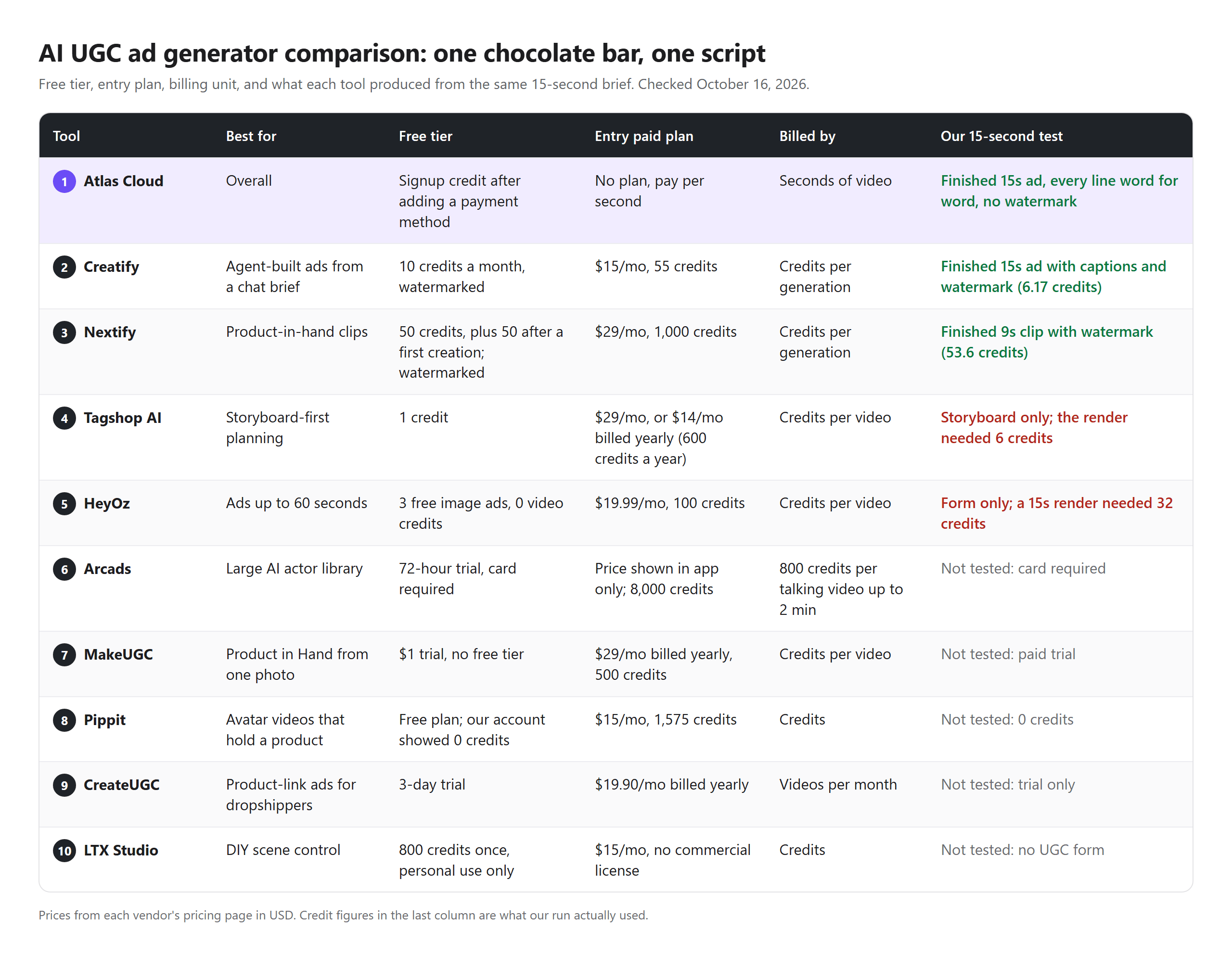
We opened free accounts on five competitors. Two produced a watermarked test video, and one of those needed a bonus top-up first. Two more let us write a full brief, then asked for credits we didn't have, and the fifth showed a balance of zero. Arcads and MakeUGC never made it into the test at all.
The entry plans we could price run from $12 a month (Creatify, billed yearly) to $29 a month (Nextify on monthly billing). Credit costs per video vary so much across UGC ads AI tools that the cheapest plan is not always the cheapest ad. The last column shows what happened when each tool got our brief.
How We Tested Every AI UGC Ad Generator on This List
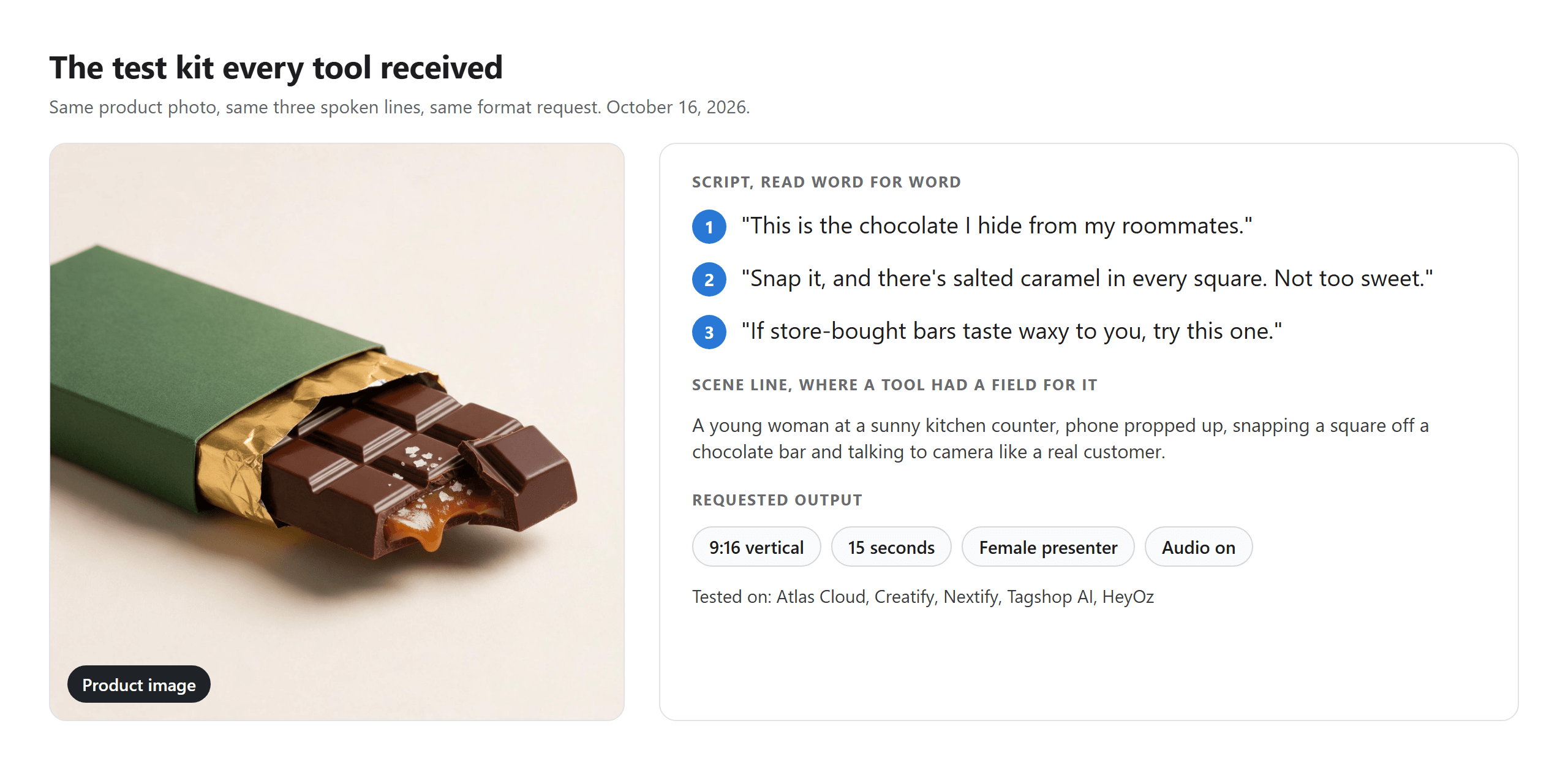
All runs happened on October 16, 2026. Every tool got the same studio photo of an unbranded chocolate bar, generated on Atlas Cloud with no text on the wrapper, plus the same three spoken lines:
"This is the chocolate I hide from my roommates. Snap it, and there's salted caramel in every square. Not too sweet. If store-bought bars taste waxy to you, try this one."
Where a tool had a scene field, it also got one sentence: a young woman at a sunny kitchen counter, phone propped up, talking to camera. We asked for 9:16 and 15 seconds wherever the form allowed it, and picked or requested a female presenter on each tool. Atlas Cloud was the only run with our own presenter photos, used with permission.
Four criteria decided the ranking:
- Finished ad from our inputs. Did the tool return a playable video from this exact photo and script, on the plan we could access?
- Script fidelity. We transcribed every clip with Whisper and checked the lines word for word.
- Product fidelity. Did the green sleeve, the gold foil, and the caramel center survive the render?
- Cost of one usable ad. What is the billing unit, and what do you pay for a version without a watermark?
The first criterion carried the most weight. A tool can promise lifelike presenters, but if its free tier can't render one ad from your product, you are buying a subscription before you've seen your own product on screen.
Disclosure: Atlas Cloud publishes this article and operates the tool ranked first. No vendor paid for placement. Competitor runs used free accounts we registered ourselves, and everything else is described from each vendor's own pages.
1. Atlas Cloud: Best AI UGC Ads Tool Overall
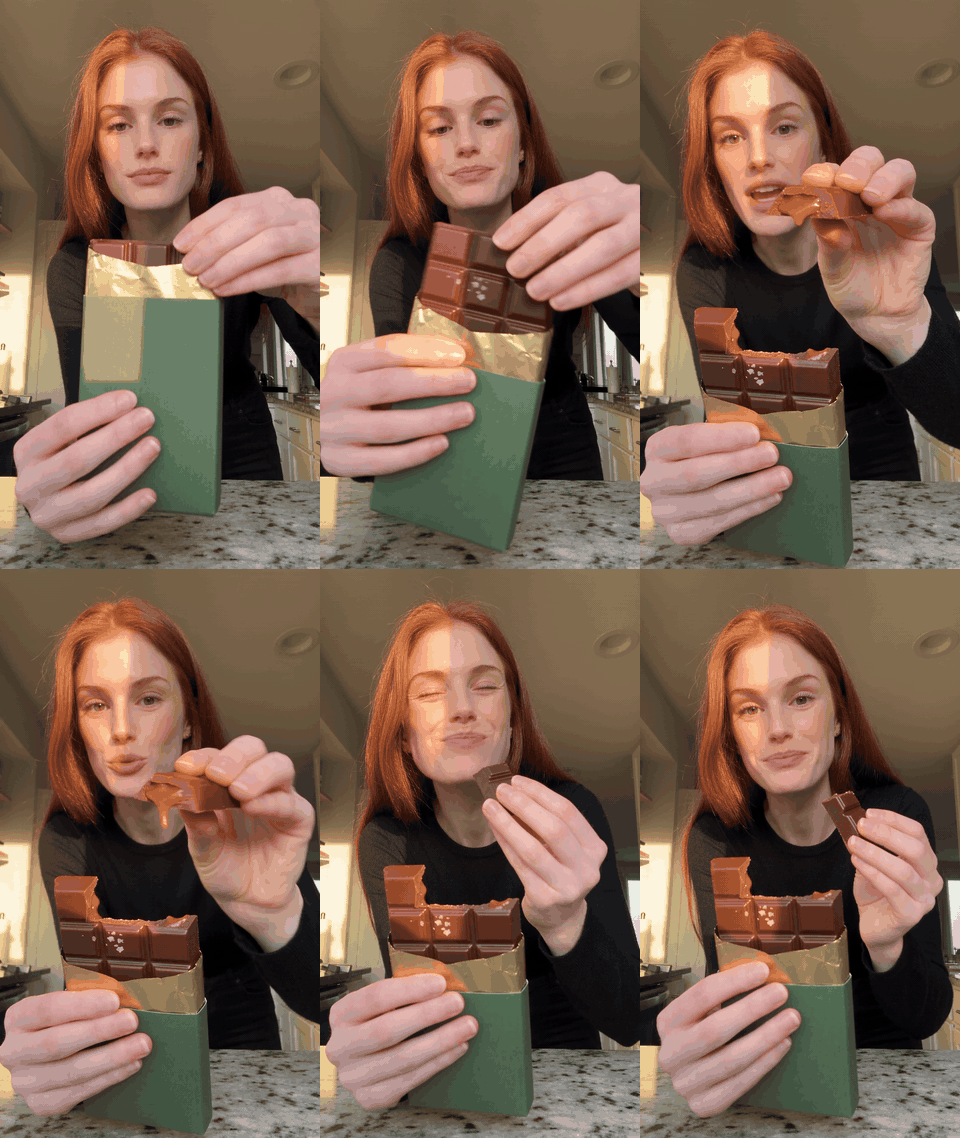
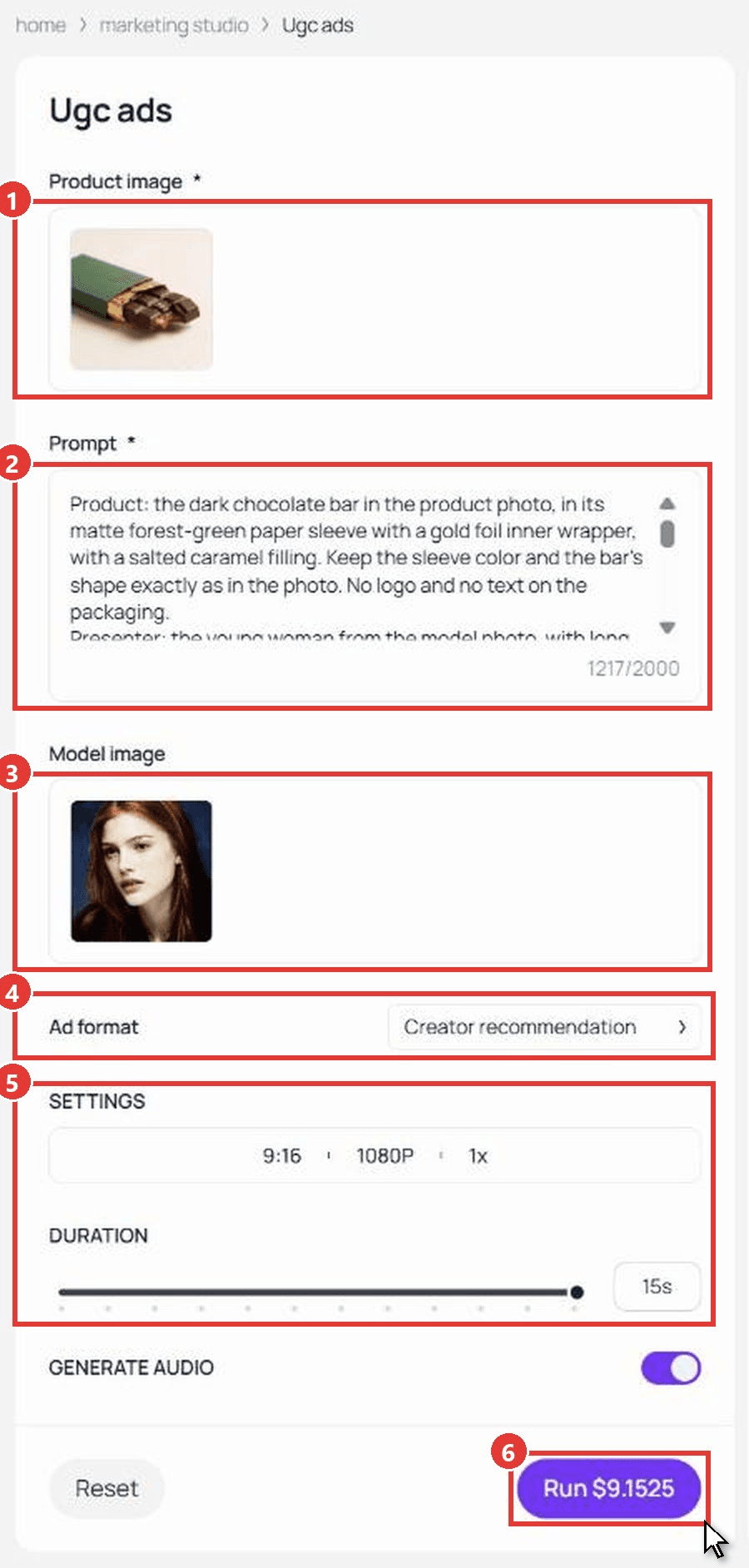
The Ugc ads workflow in Atlas Cloud's Marketing Studio takes a product photo, an optional presenter photo, and a brief of up to 2,000 characters. Our run came back as a 15-second, 1080 x 1920 ad. The presenter lifts the bar, snaps off a square so the caramel shows, takes a bite, and delivers the three lines at 0:00, 0:05, and 0:12, the beats we wrote into the brief.
Try it with your own product in the pay-per-second UGC ad maker.
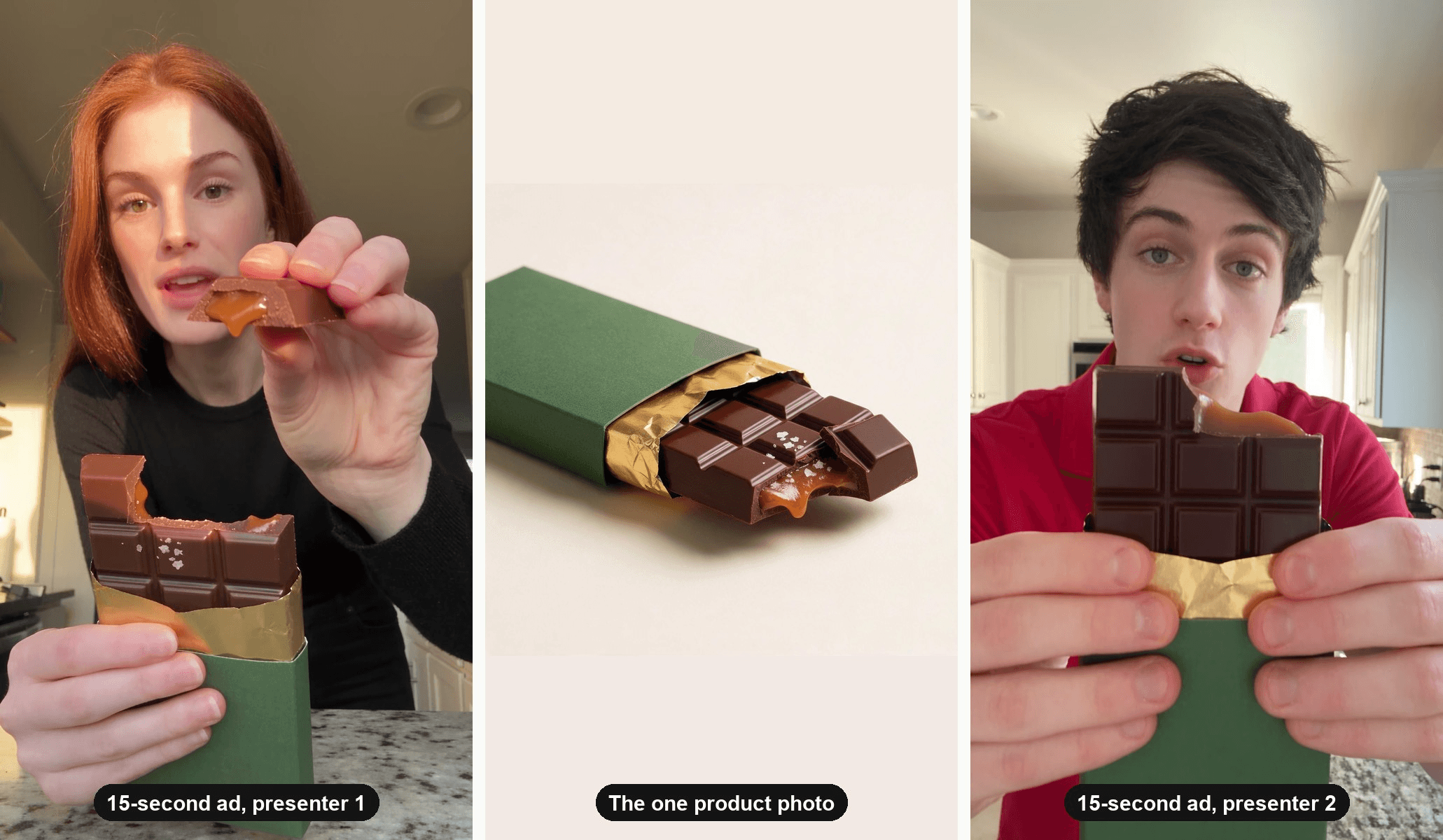
Why it stands out: quoted lines are read as written, and each one lands where the brief places it, so the hook stays in the first three seconds instead of drifting. The Model image slot keeps your own presenter across a campaign, which is how the two different creators in the hero above came from the same product photo.
The form also covers more than one ad shape. Ad format switches between Creator recommendation, Before & After, and Unboxing. Settings offer five aspect ratios, native 480p to 1080p output plus upscaled tiers up to 4K, 4 to 15 seconds, and up to two variations per run.
Best for: brands testing a few new hooks a week that want to pay per finished clip and keep the same face across a series.
Pricing: there is no subscription. Each run is priced by length and resolution, and the Run button shows the exact cost before you generate. New accounts unlock a signup credit after adding a payment method.
How to Make Our Test Ad in the Workflow
The steps match the numbers on the screenshot below.
- Upload one clean product photo in Product image.
- Paste a brief into Prompt: product, presenter, setting, then timed beats with each spoken line in quotes. Our 20-minute AI UGC workflow covers how to write one.
- Add a presenter in Model image, or leave it empty and the workflow casts one.
- Pick an Ad format. We used Creator recommendation.
- Set ratio, resolution, and Duration. We used 9:16, 1080P, and 15 seconds.
- Check the price on the Run button, then run it.
2. Creatify: Best AI UGC Creator Ads From a Chat Brief
Creatify now sends avatar requests to its Ad Agent, a chat assistant that plans and renders the ad for you. We attached the photo and pasted the brief. The agent built a keyframe of a presenter holding the bar, then rendered a 15-second take in about six minutes.
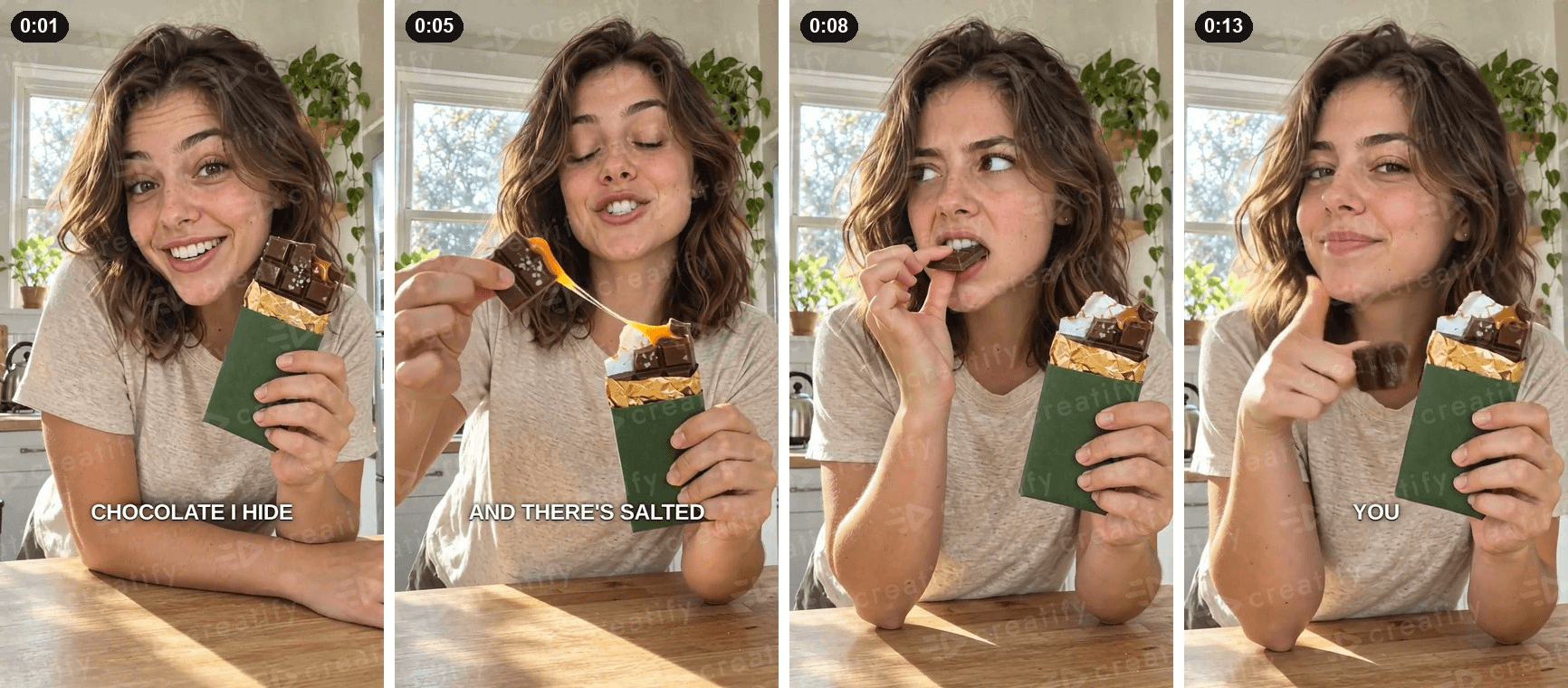
Frames from our own Creatify test on a free account, October 2026.
Where the free tier stops you: the free plan gives 10 credits a month, and its FAQ says exports include a watermark. Our single take used 6.17 credits, so a free account covers one test ad a month at this length.
What one usable ad actually costs: Standard is $15 a month, or $12 a month billed yearly, for 55 credits plus watermark removal. At the rate our take burned, that's about eight full takes a month, or roughly $1.70 per take if you use every credit.
What users report: Creatify holds a 3.8 TrustScore on Trustpilot across 838 reviews as of October 2026.
Where it falls short for AI UGC ads: the classic Avatar Video tool has no slot for your product, so product-in-hand ads run through the agent. Uploading your own presenter photo is a premium feature. The agent also burned in captions we never asked for, and it flagged a white patch on the bar's broken edge from about 0:06 in its own report.
Fits: teams that like briefing in plain English and want a finished take without touching a timeline. Not for you if: you need a specific face, or clean footage without captions.
3. Nextify: Best AI UGC Ad Generator for Product-in-Hand Clips
Nextify's UGC Product Video form is a close match for the job: a promotional image slot, a script box, and an actor picked from its library. The script is turned into a voice track first, and the clip length follows that voice, not a duration setting.
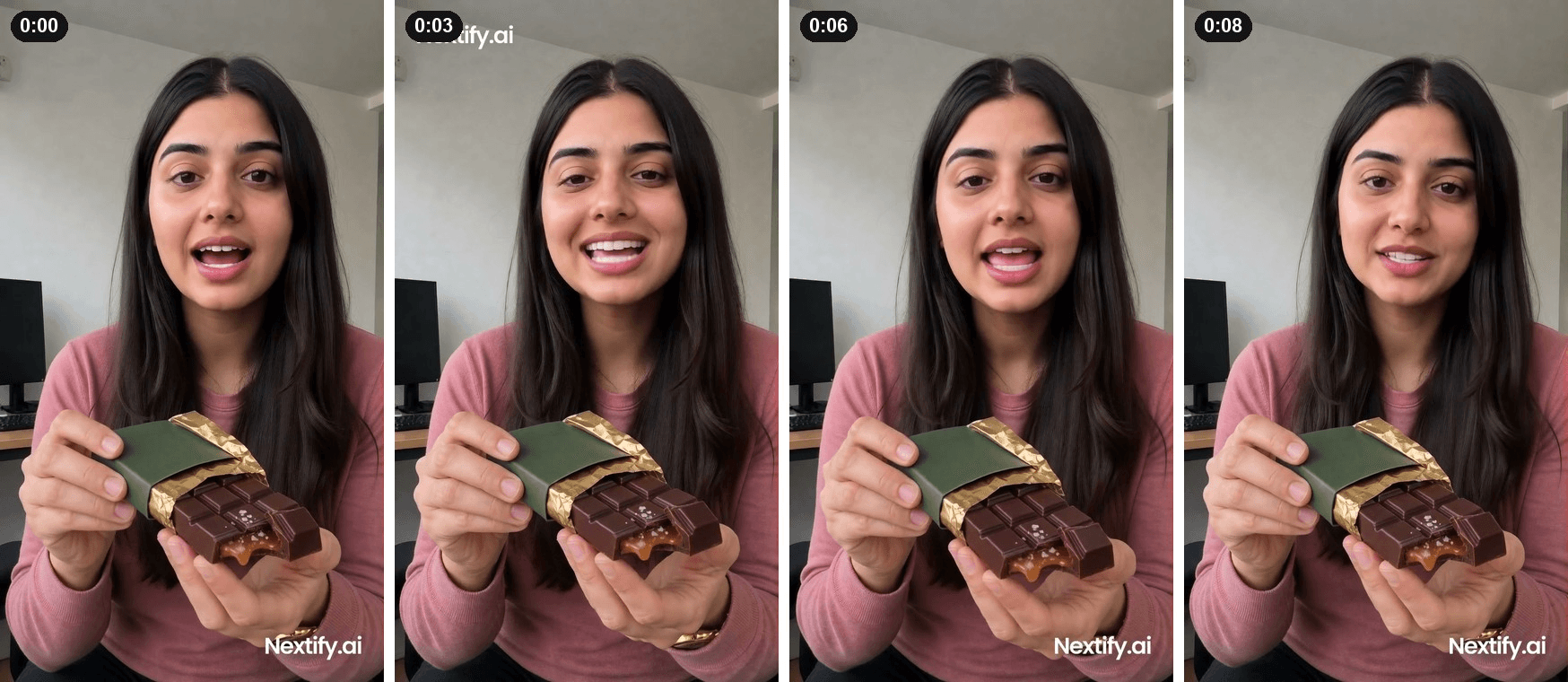
Frames from our own Nextify test on a free account, October 2026.
Where the free tier stops you: new accounts get 50 credits for 30 days, but our clip cost 53.6. A welcome offer adds 50 more after your first creation, so we spent 10 credits on a single image to unlock it, then rendered the video. The export carries a moving "Nextify.ai" watermark.
What one usable ad actually costs: Starter is $29 a month, or $21 a month billed yearly, for 1,000 credits. That puts our clip near $1.55 on monthly billing. A one-time pack of 1,250 credits costs $50 and never expires, about $2.14 per clip.
What users report: Nextify's Trustpilot page shows a single review as of October 2026, too few to read anything into.
Where it falls short for AI UGC ads: the presenter held the bar still for the whole clip and never snapped it. The voice ran the script in one breath, so the ad lasted 8.96 seconds instead of 15, and 720p is the lowest output setting.
Fits: quick talking-head variants where the product just needs to be in frame. Not for you if: the ad depends on a physical demo.
4. Tagshop AI: Best AI UGC Ad Generator for Storyboard-First Planning
Tagshop's Video Agent asks before it renders. After we saved the chocolate bar as a product, it asked for the video type, then the presenter's gender, age, accent, and outfit. It then wrote a timestamped storyboard for approval.
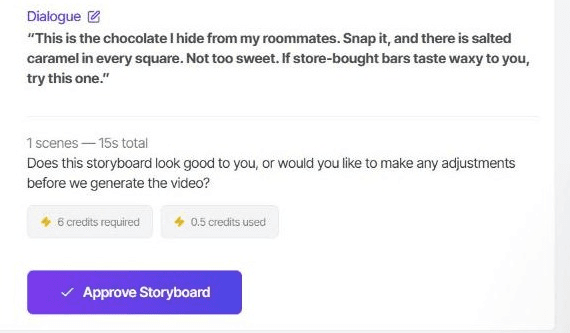
Screenshot from our own Tagshop test on a free account, October 2026.
Where the free tier stops you: the free account held 1 credit. The storyboard used 0.5, and rendering the 15-second video needed 6, so the test ended at the approval button.
What one usable ad actually costs: Starter is $29 a month, or $14 a month billed annually for 600 credits a year. On the annual plan, at 6.5 credits per ad including the storyboard, that's about $1.82 an ad, paid upfront for the year.
What users report: Tagshop holds a 4.2 TrustScore on Trustpilot across 18 reviews as of October 2026.
Where it falls short for AI UGC ads: the storyboard changed "there's" to "there is" and set the orientation to 1:1, even though we'd chosen 9:16. Read the plan line by line before you approve it.
Fits: marketers who want to see the shot list before paying for a render. Not for you if: you want to test on a free account.
5. HeyOz: Best AI UGC Ad Generator for Ads up to 60 Seconds
HeyOz's UGC Ads studio puts the controls on one bar: Script, Environment, a Show product toggle, output settings, an avatar slot, and a product slot. Duration runs from 15 to 60 seconds in 15-second steps.
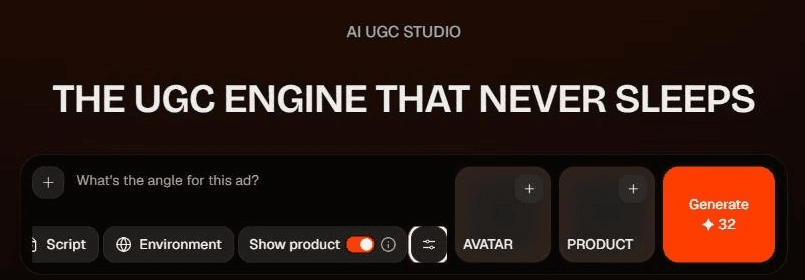
Screenshot from our own HeyOz test on a free account, October 2026.
Where the free tier stops you: the signup offer reads "Get 3 Free Image Ads," so it covers images only. Our account showed 0 credits for video. A Discord bonus of 50 credits exists, but our Discord account had to clear an email check first, and the test stopped there.
What one usable ad actually costs: Starter is $19.99 a month for 100 credits. A 15-second ad at 720p costs 32 credits and a 30-second one 62, so Starter covers three 15-second ads a month, about $6.66 each.
What users report: HeyOz's Trustpilot page shows a single review as of October 2026.
Where it falls short for AI UGC ads: there is no way to see a video from your own product before paying. At about $6.66 per 15-second ad on Starter, it also costs more per ad than the other three subscriptions we priced.
Fits: longer ads, up to a minute, from one studio. Not for you if: you want to test before you subscribe.
The Other Five AI UGC Video Generators Worth Knowing
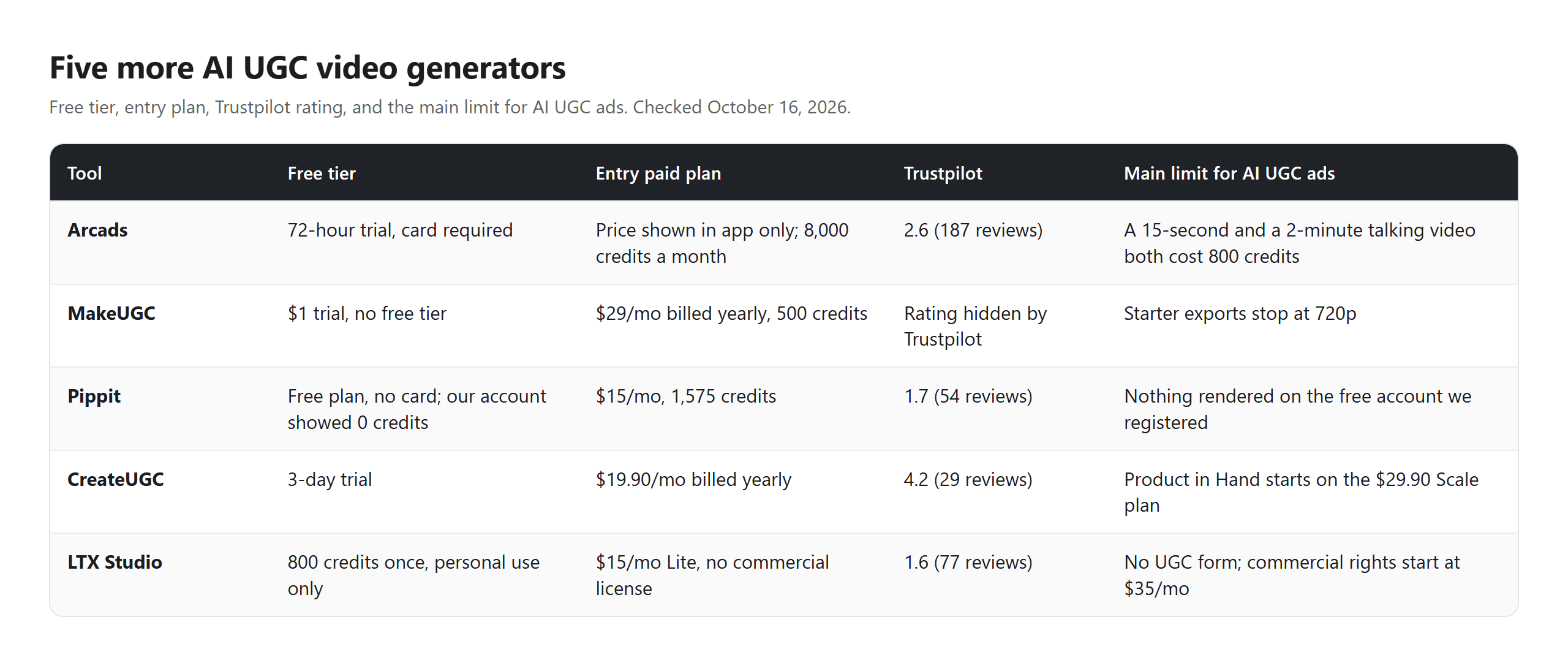
None of these five produced a test video for us. Arcads and MakeUGC ask for payment details before the first render, CreateUGC offers a trial instead of a free tier, Pippit's free account held no credits, and LTX Studio has no form built for this job. Each is described from its own pricing and help pages.
6. Arcads
Arcads casts from a library of 1,000+ AI actors, and its help center describes product video ads as two steps: an image of the actor holding your product, then a talking video. The 72-hour trial includes 1,000 credits but needs a card at signup.
A talking video costs 800 credits for anything up to two minutes, so a 15-second ad costs the same as a long one. Our Arcads credit math breaks that rounding down.
7. MakeUGC
MakeUGC's Product in Hand feature takes one product photo and places it in an actor's hands. There is no free tier, only a $1 trial on any plan. Starter is $29 a month billed yearly for 500 credits, and its API docs price a standard talking video at 100 credits. Starter exports stop at 720p.
8. Pippit
Pippit advertises a free plan with no credit card required, and its avatar videos can hold a product. The free account we registered showed 0 credits and offered an upgrade or referral credits, so nothing rendered. Starter lists at $15 a month for 1,575 credits.
9. CreateUGC
CreateUGC targets dropshippers who paste a product link and upload images. It offers a 3-day trial instead of a free tier. Product in Hand sits on the Scale plan at $29.90 a month billed yearly; the $19.90 Launch plan leaves it out.
10. LTX Studio
LTX Studio has no dedicated UGC form. You build a character image, add your product, and write the dialogue into a prompt. The free plan gives 800 credits once for personal use only, and even the $15 Lite plan carries no commercial license. Commercial rights start on Standard at $35 a month.
Do AI UGC Video Ads Need a Synthetic Performer Label?
If your AI UGC video ads run in New York, the answer has been yes since June 9, 2026. New York's synthetic performer law, signed on December 11, 2025, requires an advertiser who knows an ad contains an AI-generated performer to "conspicuously disclose" it. Penalties are $1,000 for a first violation and $5,000 for each one after. Audio-only ads and ads for films or other expressive works are exempt.
The law covers a digital human who isn't recognizable as any real person, which describes the stock presenters these tools cast for you. The open question is format. As Cooley's analysis points out, "The statute does not define 'conspicuous.'"
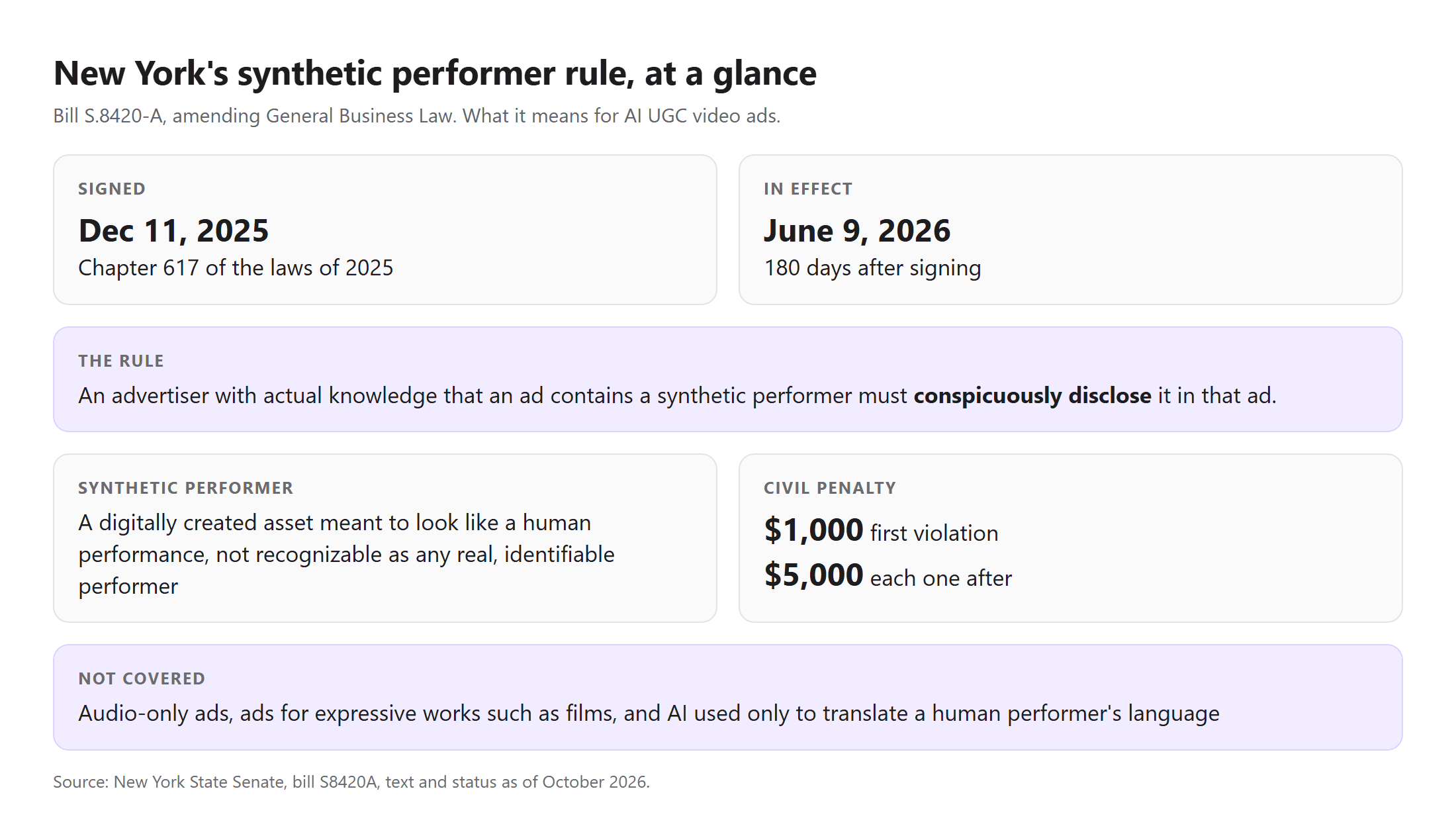
Summarized from the bill text and status on the New York State Senate website, October 2026.
Platform rules add a second check. TikTok's ad policy on misleading content lists ads that show a product inconsistent with the product's website, and before-and-after comparisons that leave a distorted impression. Arcads' own help center tells customers that "AI actors must not be presented as real or verified customers."
What to do instead: put a short on-screen line such as "AI-generated presenter" in the opening seconds. Keep the product exactly as photographed, which is why product fidelity sat in our criteria. Skip before-and-after results you can't back up. Write the script as a recommendation, not as a verified purchase.
What Does Reddit Say About AI UGC Ads?
Reddit is split, and the split is about shelf life more than quality. In one r/FacebookAds thread, an advertiser who had run AI UGC video ads for a few months, mostly testimonial clips and voiced avatars, asked whether anyone else was seeing fatigue. The top reply said it set in faster than expected.
Authenticity is the other recurring worry. The top answer in a 54-reply r/DigitalMarketing thread argued that the AI part undercuts what makes UGC persuasive. A separate r/FacebookAds request for the most realistic tool asked for video that isn't scripted, robotic, or obviously AI-generated, which sums up what buyers want.
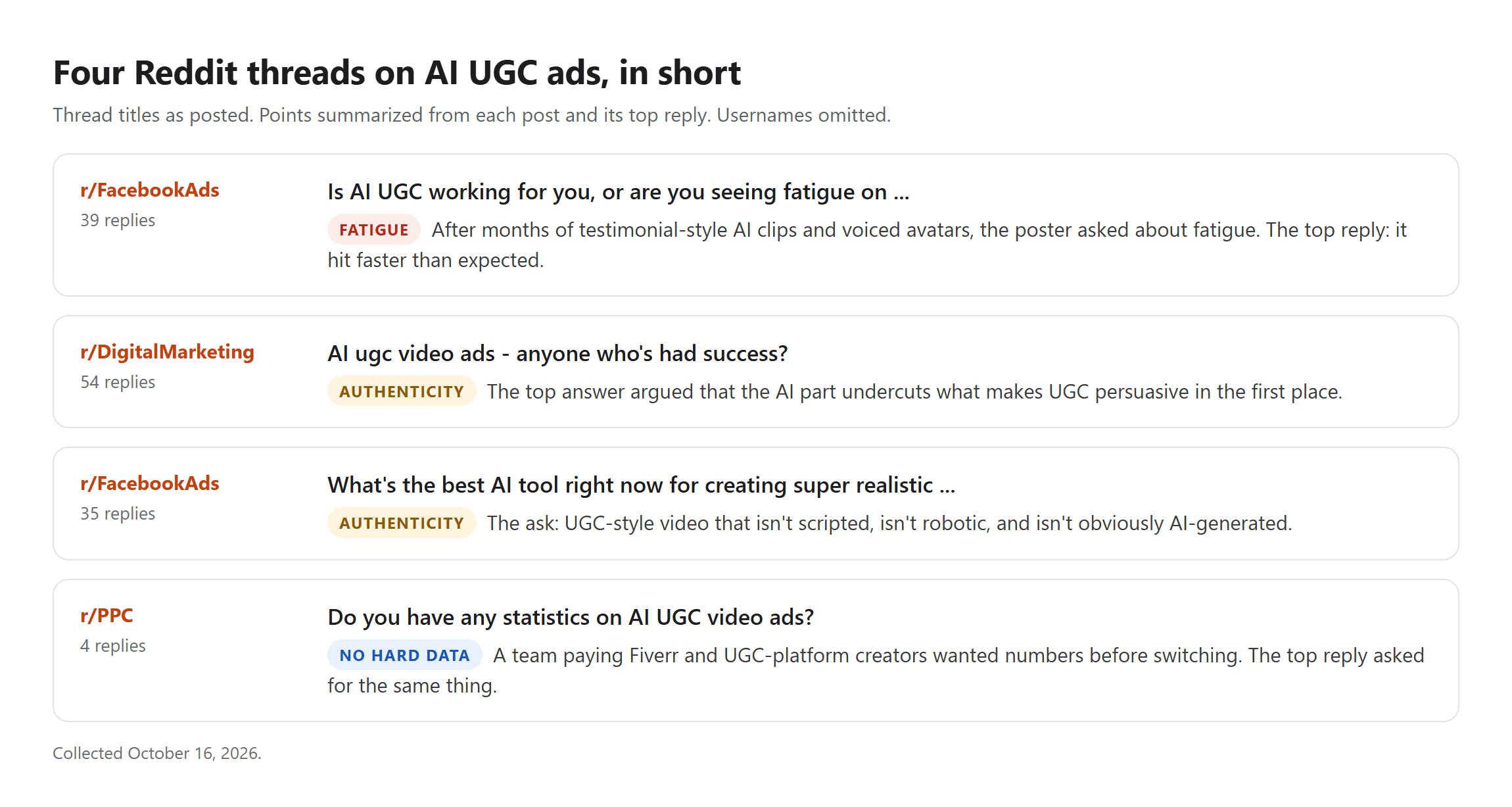
Hard numbers are scarce. When a team in r/PPC that had been paying Fiverr and UGC-platform creators asked for statistics on AI UGC video ads, the top reply asked for the same data. So treat AI UGC as a cheap way to test more hooks, retire each creative sooner than you would a human one, and keep the product and the claims real.
Frequently Asked Questions
Which AI UGC ads tool costs the least per 15-second ad?
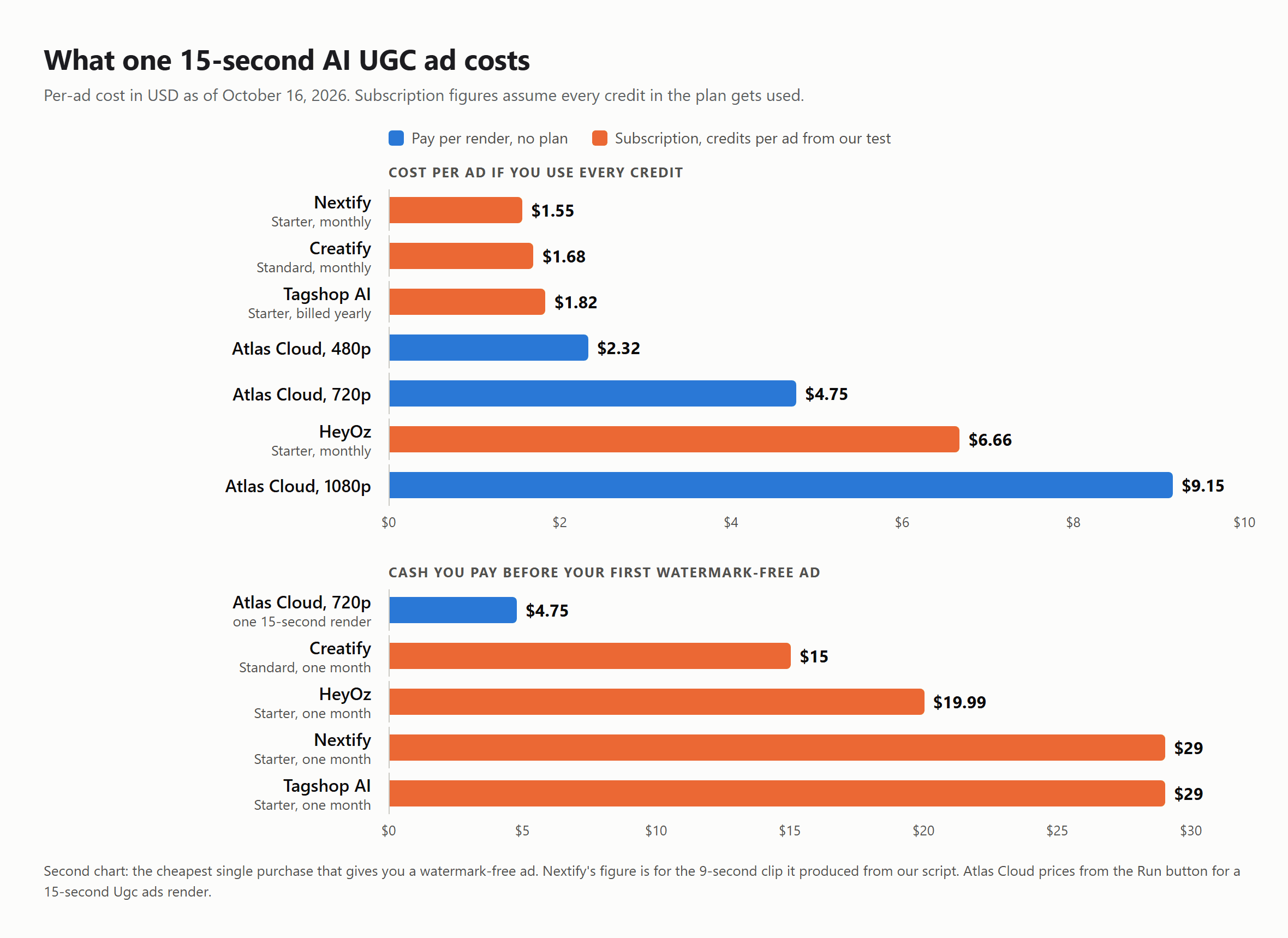
On paper, subscriptions win on unit price. The three in our test land between $1.55 and $1.82 per ad, as long as you spend every credit before it resets.
Atlas Cloud charges per render with no plan: a 15-second ad costs $2.32 at 480p, $4.75 at 720p, or $9.15 at 1080p (Run button price, October 16, 2026).
The gap closes at low volume. Your first watermark-free ad costs $4.75 at 720p on Atlas Cloud, against $15 to $29 for the cheapest plan on the other four. Three 15-second ads still total only $14.26, so pay-per-second beats Creatify's entry plan until you ship more than three ads a month.
Can you run ads made on a free AI UGC plan?
Check two things before you post: the watermark and the license. Both free test videos we got, from Creatify and Nextify, came back watermarked, so neither could run as a clean ad without an upgrade. LTX Studio's free plan is limited to personal use, so its output isn't licensed for paid ads even when it looks clean.
Can I use my own face or a real creator's face as the presenter?
Yes, on most tools, with written permission. Atlas Cloud's Model image slot takes the presenter photo directly, Creatify treats your own photo as a premium feature, and Arcads and MakeUGC sell custom avatars on higher plans. A recognizable real person also falls outside New York's synthetic performer definition, so their likeness is governed by publicity rights and your contract with them instead.
What kind of product photo gives the cleanest AI UGC ad?
Use one product on a plain background, with no small print the model might redraw. Then show the feature you want demonstrated. Our photo already had a square snapped off with the caramel visible, and every finished ad in this test kept that caramel center.
Conclusion
Five tools got the same chocolate bar and the same three lines. Only three handed back an ad, and only one did it without a watermark, a subscription, or a rewrite of the script. The rest turned into a lesson in credit math: Tagshop and HeyOz wanted credits before rendering anything, and Arcads and MakeUGC wanted payment details up front.
If you test a handful of hooks each month, start with pay-per-second rendering and your own product photo, then judge every tool by the clip it makes from your product, not its demo reel. That one habit will tell you more about AI UGC ads than any pricing page.





