Bitstudio's Pro plan advertises 1,000 AI clothes changes a day. Read one line further down the same pricing page, and a separate cap limits its best-quality output to 20 runs a week. That gap between the headline number and the fine print is roughly where most bitstudio AI clothes changer alternative searches start. Bitstudio itself is a real product, a fashion-focused platform with named founders and hundreds of paying brands behind it, and its clothes changer does what it advertises: upload a person and a garment, get a composited try-on back. The friction shows up elsewhere, in a watermarked free tier, a $39 climb just to unlock commercial use, and a pricing page that separates credits from daily swaps without ever explaining how the two connect. Here's what that looks like up close, and how Atlas Cloud's free clothes changer handles the same request without any of it.
Key Takeaways
- Bitstudio's Pro plan pairs a 1,000-a-day swap allowance with a quiet 20-a-week ceiling on its best output quality, two numbers on the same pricing row that don't obviously agree.
- Atlas Cloud's free clothes changer runs one full-resolution, watermark-free swap right after signing in, with nothing metered by the day or the week.
- Bitstudio's pricing page tracks monthly credits and daily clothes-changer uses as separate counters and never states how many credits one swap draws, so its real cost is hard to pin down in advance.
- Commercial use on Bitstudio means clearing two lower tiers first; paying per generation on Atlas Cloud doesn't carry that extra gate.
Bitstudio's AI Clothes Changer, and a Pricing Quirk Worth Knowing About
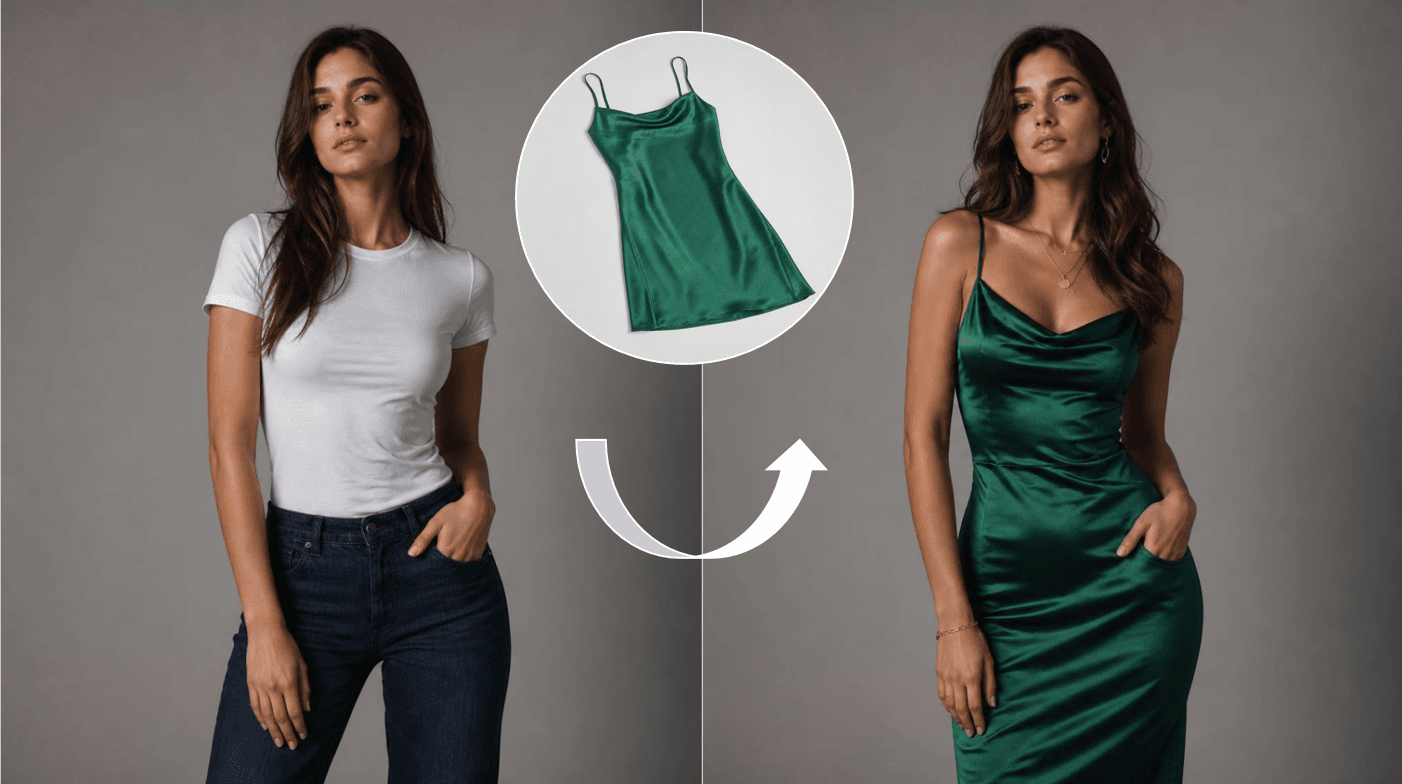
Bitstudi is called the result an AI Fashion Photo Studio, a platform used by more than 500 brands to generate over 4 million photos, including a case study crediting Bitstudio with saving one customer, Graphene-X, $30,000 and six weeks on the way to a Kickstarter campaign that closed at 1,060% of its funding goal. The AI clothes changer is one feature inside that studio: upload a photo of yourself, upload a separate photo of the outfit, add an optional line of instructions, and the tool composites the two into a rendered try-on.
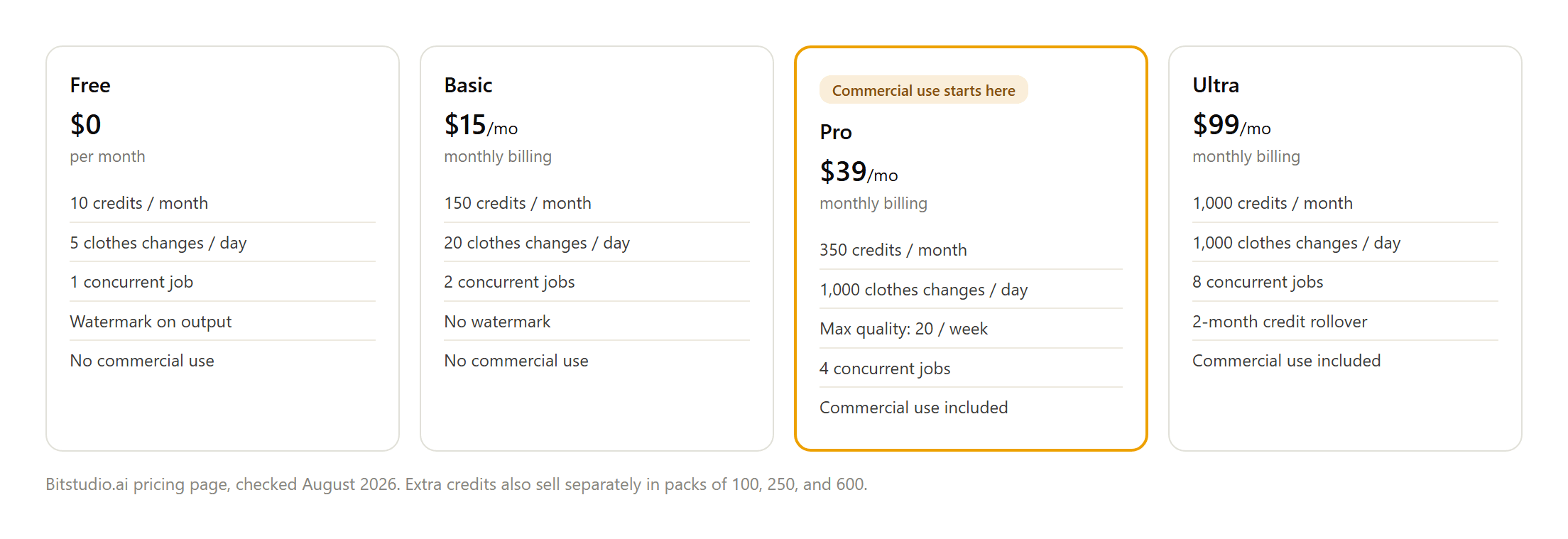
Four tiers carry that feature. Bitstudio never states how many of those monthly credits one clothes change actually spends either, so the daily counter, the weekly quality cap, and the credit balance are three numbers on one pricing page that never quite reconcile into a single price.
Run a Free Swap on Atlas Cloud Instead
Atlas Cloud's Free Change Clothes AI tool asks for one photo and one sentence, not a second reference image. Upload yourself, describe the outfit you want instead, and the model redraws only the clothing, leaving face, hair, and background alone. New accounts get the first run free, delivered at 1328 by 1776 resolution, no watermark, in about 40 seconds.
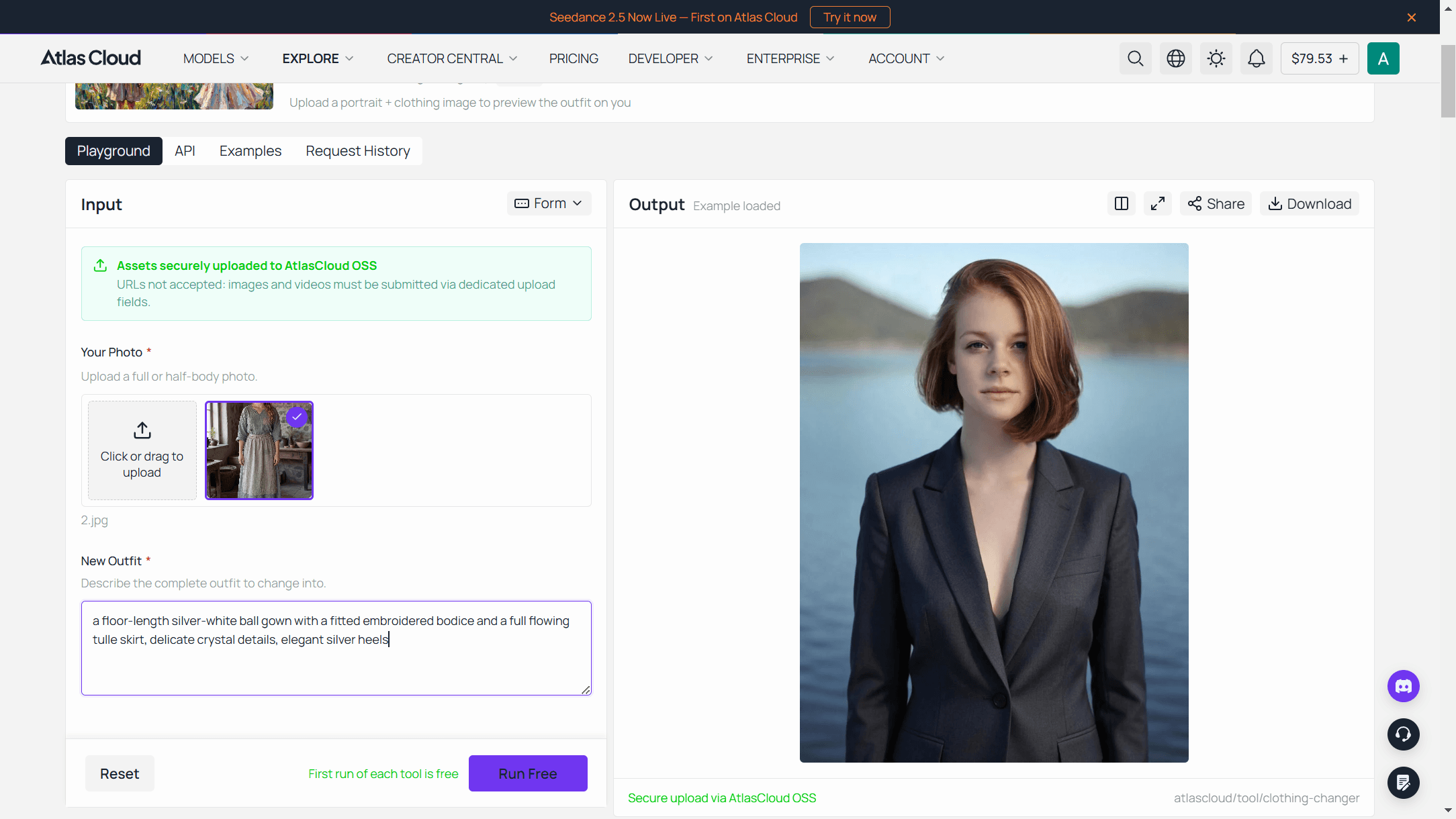
A quick sign-in with Google, GitHub, or email unlocks that free run. After it, adding to your balance keeps you going rather than waiting on a monthly reset. The tool sits alongside a dozen or so other free utilities in Atlas Cloud's AI tools collection, each one built to run a single hosted model without a separate account or app for every feature.
Scaling Up Clothes Changes with Seedream v5.0 Pro Edit
The free tool handles one photo and one instruction at a time. A boutique prepping twenty product photos for a seasonal drop needs more room than that, and the model behind the free tool, Seedream v5.0 Pro Edit, is available two ways: directly in the playground, or through the API for anything running at volume.
Method 1: Run It in the Playground
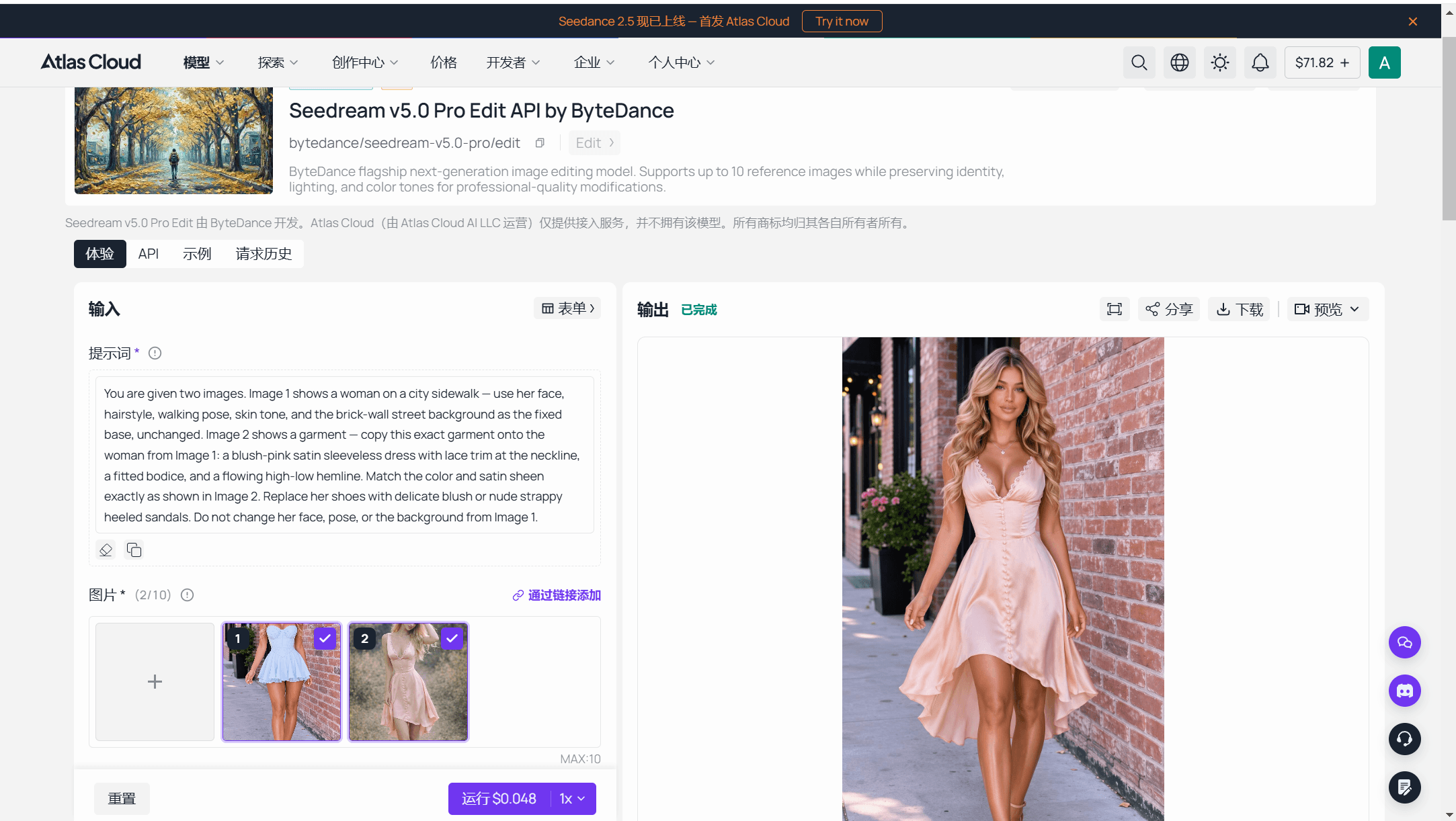
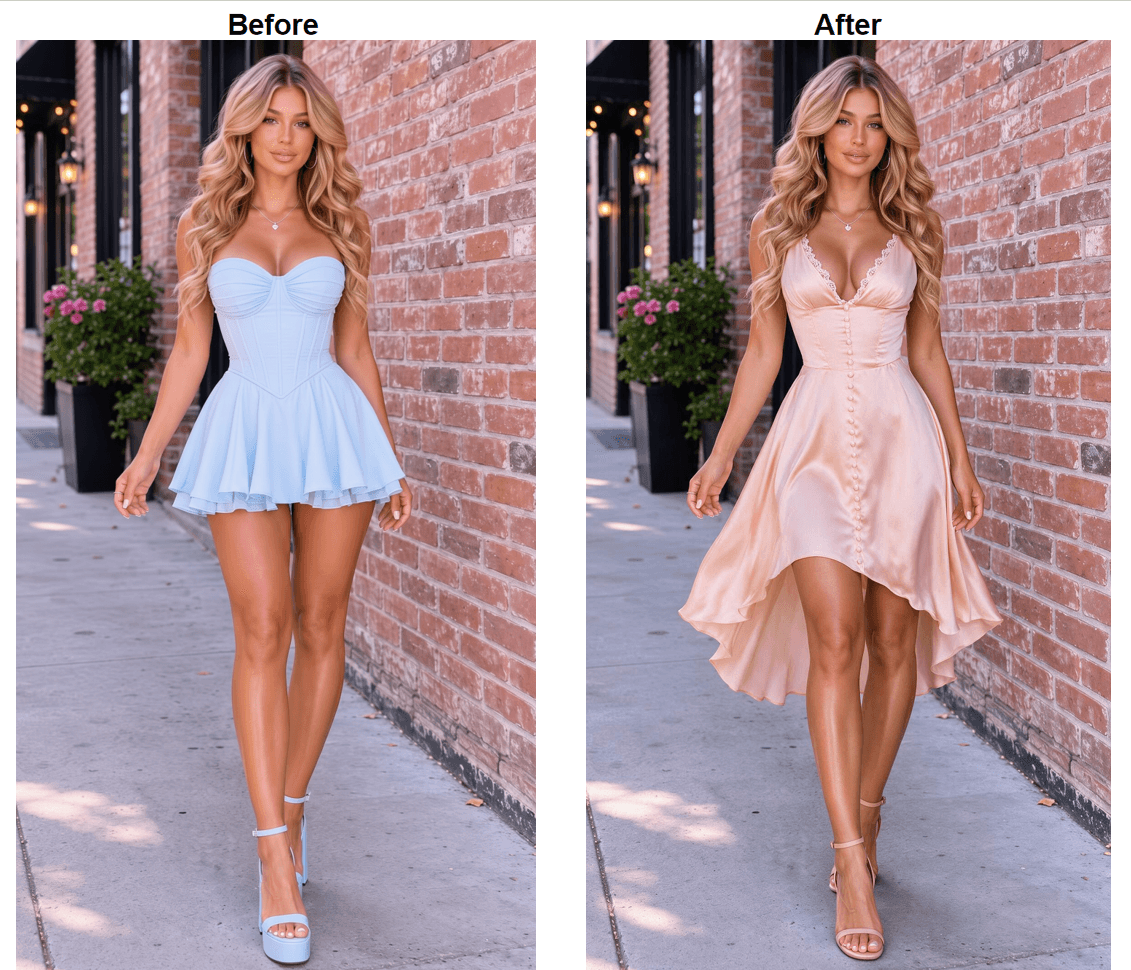
Upload a photo of the person and a separate photo of the garment into the Seedream v5.0 Pro Edit playground, up to 10 reference images in one request if a style board or extra angle is needed. Write the swap as a plain instruction, something like "put the dress from image 2 onto the person in image 1, keep the face, hair, and background unchanged," pick the 1.5K or 2K output tier, and run it. The playground shows the exact price for that combination before the request goes out.
Method 2: Call the API Directly
For a real batch, the same request moves into code.
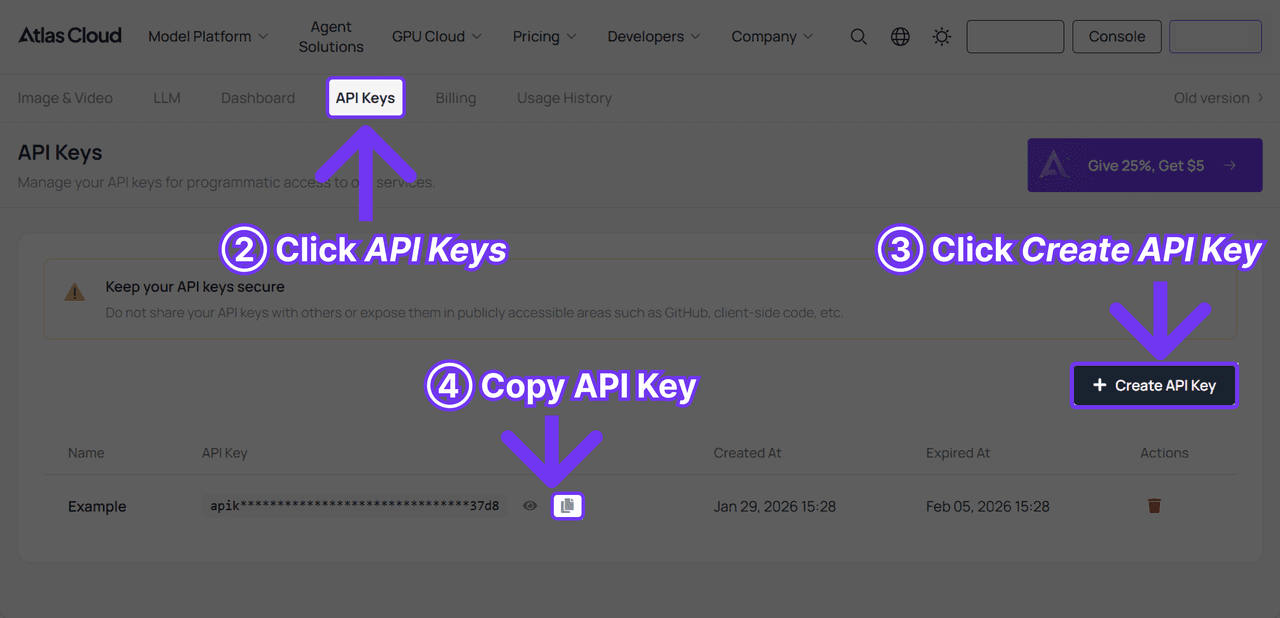
Step 1: Create an API key. Generate one from the Atlas Cloud console. It's a server-side key, and the same one authenticates every model on the platform, not just this one.

Step 2: Check the request shape. The API documentation lists the parameters this model accepts, and the API tab on the Seedream v5.0 Pro Edit model page shows the same shape filled in with a working example.
Step 3: Send the request and poll. Submit the two reference images and the instruction, then poll the prediction id the response returns:
plaintext1curl -X POST https://api.atlascloud.ai/api/v1/model/generateImage \ 2 -H "Content-Type: application/json" \ 3 -H "Authorization: Bearer $ATLASCLOUD_API_KEY" \ 4 -d '{ 5 "model": "bytedance/seedream-v5.0-pro/edit", 6 "prompt": "Put the coat from image 2 onto the person in image 1. Keep the face, hair, pose, and background unchanged.", 7 "images": [ 8 "https://your-cdn.com/boutique-model.jpg", 9 "https://your-cdn.com/boutique-coat.jpg" 10 ], 11 "size": "1328*1776" 12 }'
Once status comes back completed, the finished image sits in outputs. Twenty product photos run this way come out to twenty billed generations, a fixed number known before the batch starts rather than drawn against a shared monthly credit pool.
What Bitstudio's Pricing Page Doesn't Quite Tell You
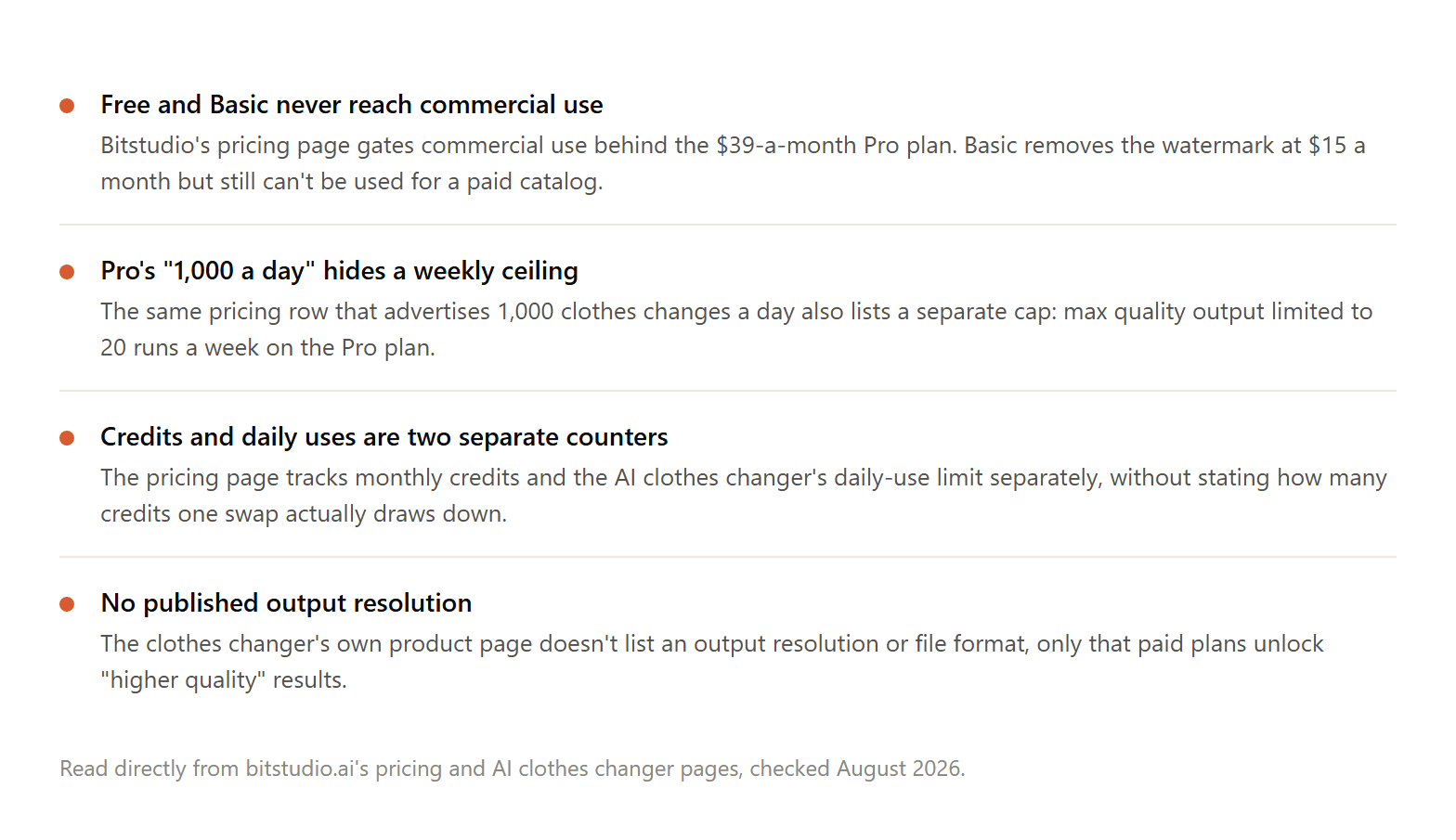
Bitstudio AI's clothes changer page doesn't publish an output resolution or file format either, only that paid tiers unlock "higher quality" results without saying what that means in pixels. That silence compounds the credit question from above. Extra credits sell separately in packs of 100 for $15, 250 for $30, and 600 for $65, working out to roughly $0.15, $0.12, and $0.108 a credit as the pack size grows. None of that converts into an actual price per swap, though, since Bitstudio never states the exchange rate between a credit and a clothes change. Someone trying to compare real costs before picking a plan is left multiplying against an unknown.
Bitstudio or Atlas Cloud, Side by Side
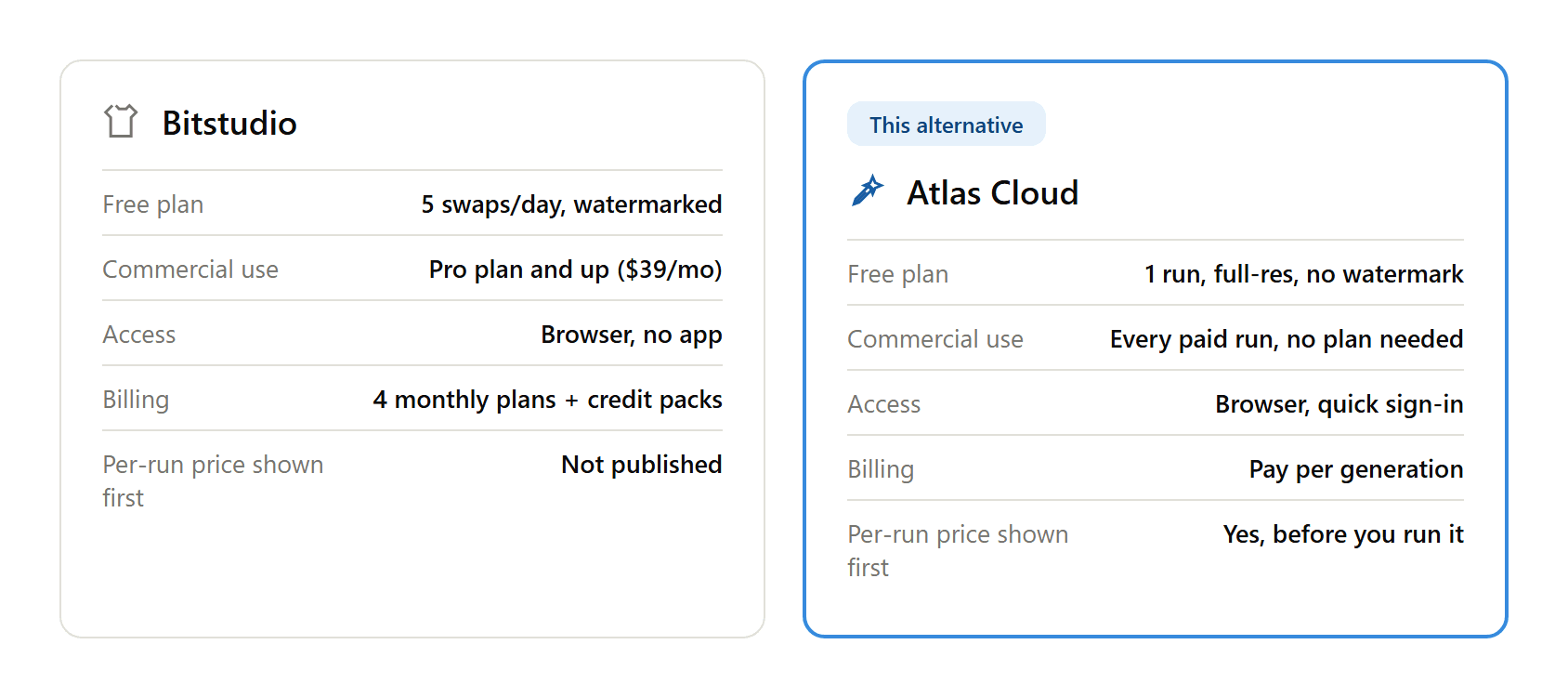
Set side by side, the two split along one line: what you can see before you commit to anything. Atlas Cloud's playground names a price for the exact tier and reference-image count before the request runs. Bitstudio's page names four subscription prices and three credit-pack prices, but never the one figure that would connect them, credits per swap.
Input requirements split the same way in reverse. Bitstudio expects an actual photo of the garment already in hand. Atlas Cloud's free tool asks for a sentence instead, useful when the outfit exists only as an idea rather than a product shot sitting on a hard drive somewhere. Commercial rights follow the pattern already covered above: available on Atlas Cloud's paid generations from the first one, gated behind Bitstudio's $39-a-month tier.
Deciding Whether to Switch From Bitstudio
None of this argues for dropping Bitstudio outright. Someone already deep into its wardrobe presets, model library, and Pro-tier commercial rights has a working setup, and a comparison table alone isn't much reason to rebuild it.
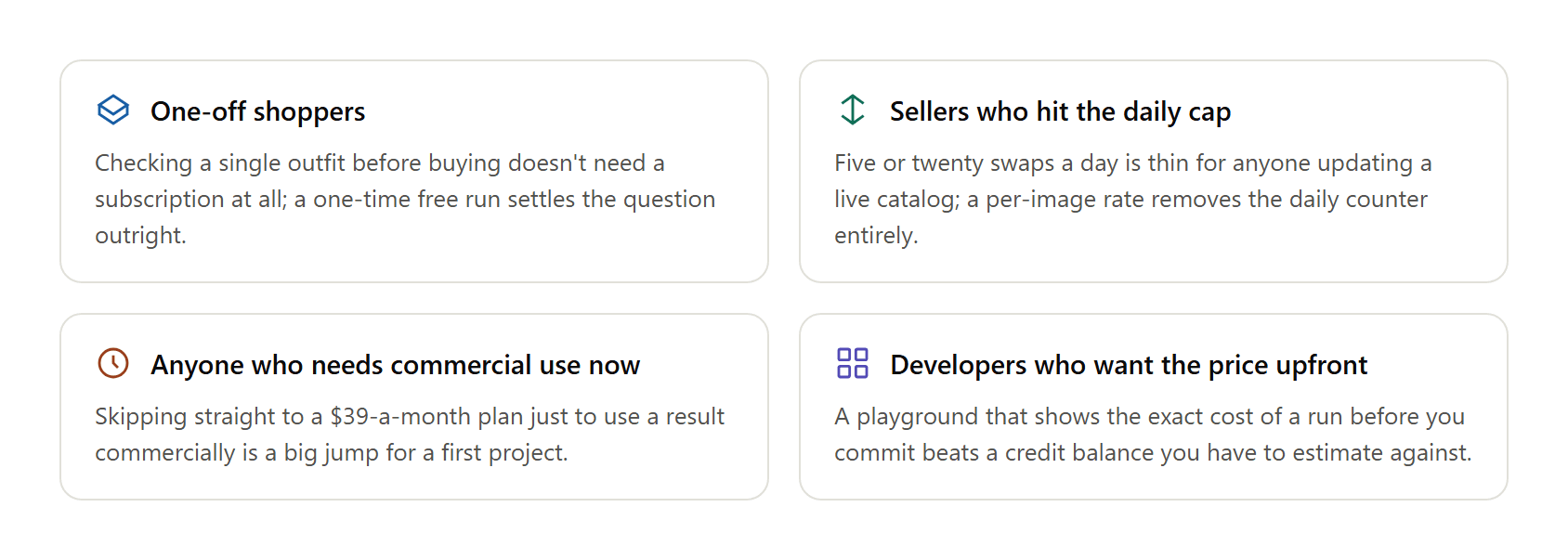
The case for switching gets stronger in a few specific spots, though. A single outfit check before a purchase doesn't need any of Bitstudio's four tiers; a free run answers that directly. A boutique or reseller updating a live catalog runs past 5 or even 20 changes a day fast, and per-image pricing removes that ceiling instead of racing toward Pro just to keep up. Anyone who needs commercial rights on day one, not after clearing Free and Basic first, gets there through a single sign-in. And a developer who wants to model costs before a batch runs gets an actual number from the playground, not a credit pack priced in units nobody defines.
Frequently Asked Questions
What is Bitstudio's AI clothes changer?
It's a tool on Bitstudio's platform that takes a photo of a person and a separate photo of an outfit, then renders that outfit onto the person, matching fit, texture, and pattern where the model can.
What does Bitstudio's platform include besides the clothes changer?
Bitstudio markets itself as a full AI Fashion Photo Studio: an AI product-photo generator built from store or product URLs, a virtual fitting room for shoppers, and the clothes changer and photo editor covered here.
Is Bitstudio's AI clothes changer actually free?
The free plan requires no sign-up and allows 5 clothes changes a day, but every result carries a watermark and commercial use isn't included at that tier.
Is the Bitstudio clothes changer worth paying for?
That depends on volume and whether commercial rights matter to you. Basic removes the watermark for $15 a month but still blocks commercial use. Pro unlocks commercial use and a much higher daily cap for $39 a month, with a quieter weekly ceiling on its highest-quality output.
Who makes Bitstudio?
Bitstudio is run by co-founders Kristo Ojasaar, a former senior software engineer at Wise, and Owen LaCava, who has an AI research and startup background including Y Combinator. The company says its tools serve more than 500 brands and have generated over 4 million photos.
Does Bitstudio's clothes changer have an API?
Yes. Bitstudio publishes API documentation covering virtual try-on, image generation, upscaling, inpainting, and editing images into video, billed through the same account and credit system as its website.
Is there a free Bitstudio AI clothes changer alternative?
Yes. This free clothes-swap tool on Atlas Cloud runs one full-resolution swap with no watermark and no daily counter to wait on, right after a quick sign-in.
How much does Atlas Cloud's API cost per outfit-swap image?
Checked against Atlas Cloud's pricing calculator on August 25, 2026: Seedream v5.0 Pro Edit runs $0.045 per image at the 1.5K output tier and $0.09 at 2K, both covering the first reference photo, with each additional reference photo adding $0.003 regardless of tier. There's no active discount on this model at the time of writing.
Conclusion
Bitstudio isn't a shaky product propped up by good marketing. Two founders with real track records, a fashion-photo platform with paying brands behind it, and a free tier that does produce a usable result all point to that. What trips it up is disclosure: a Pro plan that leads with 1,000 daily swaps and buries a 20-a-week quality cap in the same row, and a pricing page that lets you calculate everything except the one number, credits per swap, that would make its actual cost knowable in advance.
Setting up a bitstudio AI clothes changer alternative mostly comes down to whether that opacity bothers you enough to act on it. A single free run on Atlas Cloud settles a one-off outfit question without a subscription in sight. Anyone moving real volume gets a firmer answer from the developer docs than from either company's pricing page, and the 9 best AI clothes changers roundup and the outfit swap guide are the next stops for a wider comparison or better prompts.





