154,302 stars. Every review I read told me the same three things: everything is a plugin, the session log is append-only, and it is a developer preview.
Not one of them told me how much disk it eats. Or how much RAM an idle session holds. Or what happens when you point it at an endpoint that is not DeepSeek's own.
So I installed it and gave it one job, three times: build a live ISS tracker in a single self-contained HTML file. Three different provider configs, same prompt, same model. All three finished. All three printed a confident "Done" with a bullet list of everything they had supposedly verified.
Then I opened the three pages in a browser. Two of them were broken.
Key takeaways
npm install @deepseek-ai/dshpulled 531 packages and 306 MB on macOS. Not 1.5 GB, but not small either, and thedshpackage itself is 172 KB of that.- The dsh web server idled at 35 to 40 MB RSS with a live session open, after peaking around 212 MB at boot. The 500 MB figure people quote is not the server process.
- The Trajectory view is the real thing in this release. It is a plain append-only JSONL event stream on disk, and it is what let me diagnose the config problem in minutes instead of hours.
- Two YAML lines (
compat.thinkingFormatand a realmaxTokens) changed the same task from a 36-step, 422-second run to a 15-step, 152-second one. Neither line is on the docs site. - Every run reported success. Only one produced a page with zero console errors. Read the output, not the summary.
- It is a developer preview, and the README says so in capital letters. Contained pilot, yes. Production control plane, no.
Here is the whole article in one image. Two ISS tracker pages, same prompt, same model, one config difference. Left is the run I tuned. Right is the run I did not.
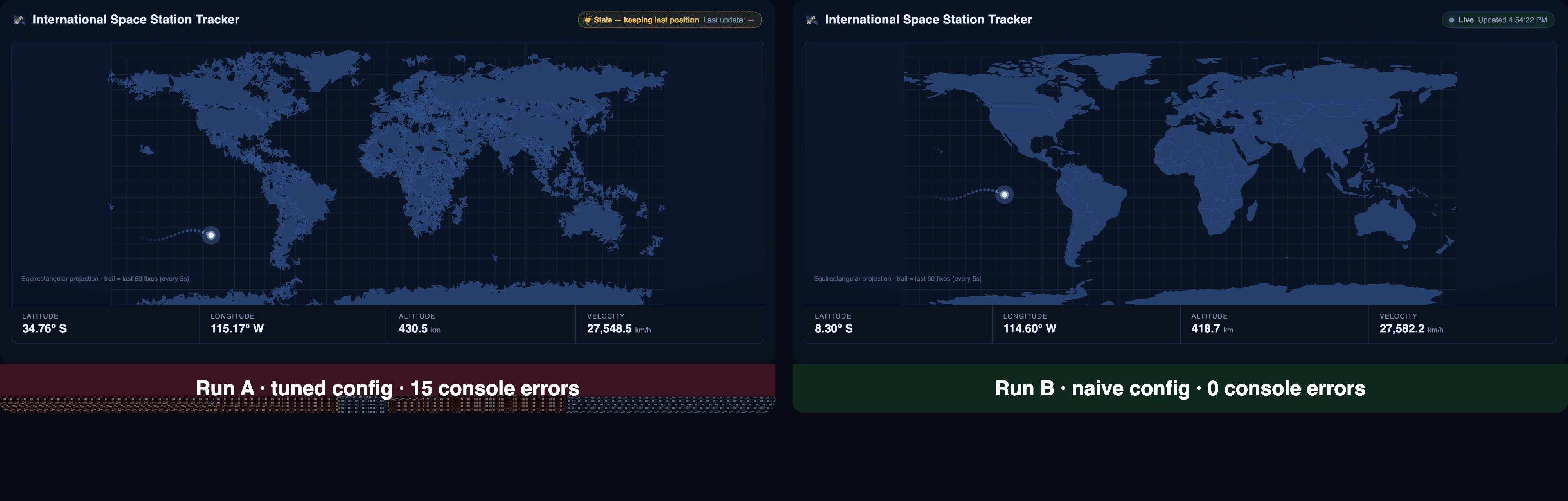
Side by side comparison of two ISS tracker pages built by DeepSeek Harness, the left with a mangled world map and a stale badge stuck on, the right rendering correctly with a live marker
Left: the tuned run, 152 seconds, fifteen malformed SVG paths and a badge frozen on "Stale". Right: the naive run, 422 seconds, zero console errors. Both reported done.
Why Every DeepSeek Harness Review Says the Same Three Things
The repo went up on August 13 and by the time I started writing it was at 154,302 stars and 15,960 forks under an MIT license (GitHub, August 2026). At that speed, most coverage is a reading of the README, because there has not been time for anything else.
So the existing DeepSeek Harness review landscape splits into three camps, and all three have the same hole. The source-audit writeups pick apart the plugin seams and never run a benchmark. The data writeups compare token counts and explicitly skip install size and memory. The enterprise-procurement pieces reach a verdict with almost no measured numbers in them at all.
Nobody installed it, ran a task end to end, and then opened the result.
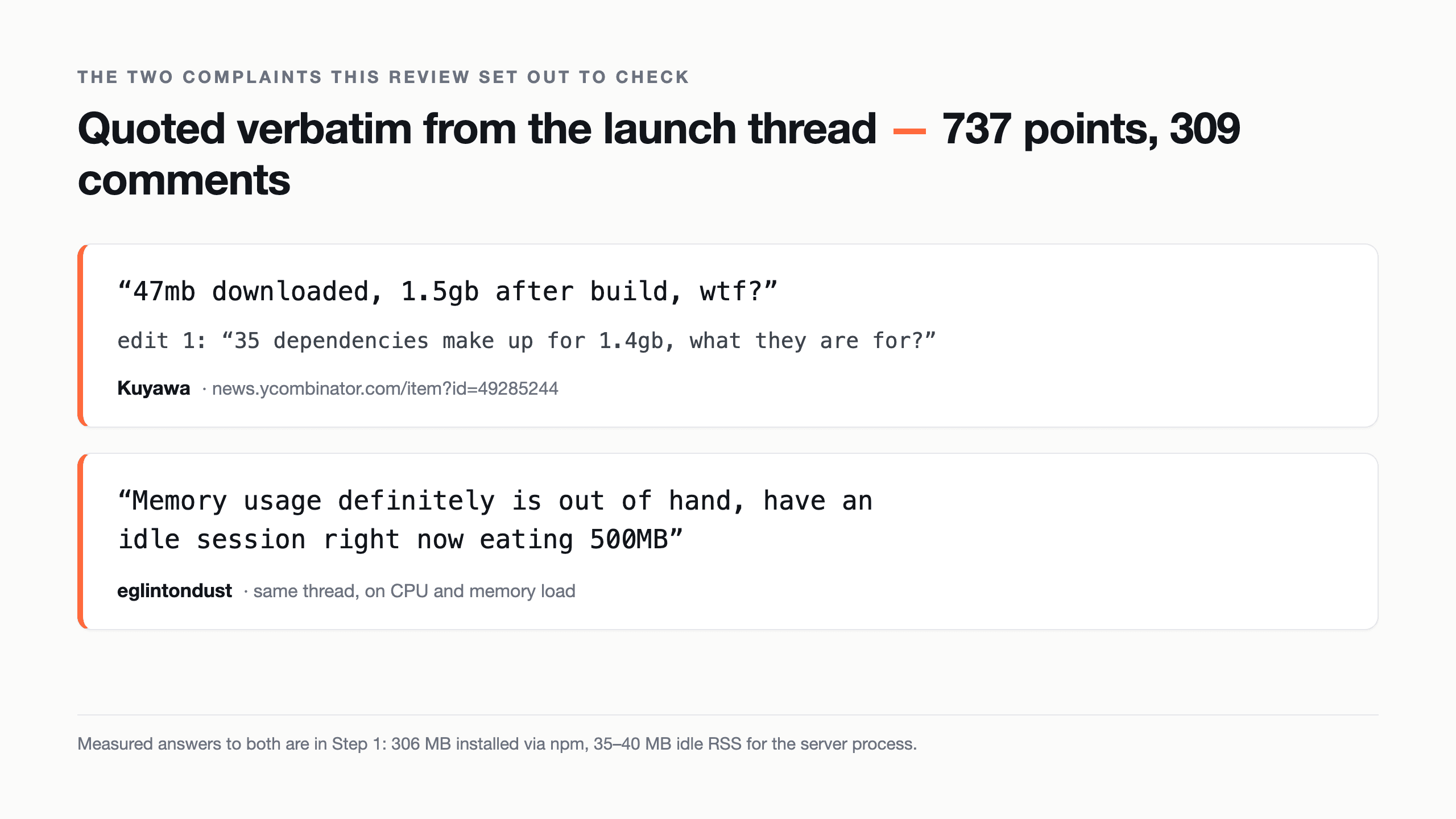
Meanwhile the sharpest criticism was not in any review. It was two comments in the launch thread, which drew 737 points and 309 comments in four days.
Two verbatim Hacker News comments about DeepSeek Harness install size and idle memory usage
The two complaints this review actually tries to check, quoted verbatim from the launch thread.
User Kuyawa: "47mb downloaded, 1.5gb after build, wtf?" and, in an edit, "35 dependencies make up for 1.4gb, what they are for?" User eglintondust, in a subthread about CPU load: "Memory usage definitely is out of hand, have an idle session right now eating 500MB" (Hacker News, August 2026).
Those are the two numbers I wanted to check first, because they are the two that decide whether this thing lives on your laptop. Both turned out to be more complicated than the quotes suggest, and one of them is measuring something different from what people assume. If you need the architecture primer before any of this makes sense, that is a different article: what DeepSeek Harness actually is.
How I Set Up This DeepSeek Harness Review: One Task, One Endpoint
The setup is deliberately boring so the variable is the config, not the task.
The task. Build a live ISS tracker in one self-contained index.html. It needs an external API, a map render, a polling loop, and error handling, so it forces a real multi-step tool loop instead of a one-shot code dump. And crucially, I can open the result and see instantly whether it works.
The model. deepseek-ai/deepseek-v4-flash-0731, the same model in all three runs, so nothing in the comparison is a model difference.
The endpoint. This is the part people skip. Harness ships no model. It needs an OpenAI-compatible base URL and a key, full stop, and the config surface for that is where all three of my problems came from. I ran it against a hosted OpenAI-compatible endpoint with flat DeepSeek pricing and no peak-hour surcharge, which matters when you are about to run the same task repeatedly and want the bill to be comparable across runs. Any compatible endpoint works the same way.
| Endpoint | Protocol | GET /models | Billing shape | 1M-context V4 |
|---|---|---|---|---|
| DeepSeek first-party API | openai-completions | Yes | Peak and off-peak split, 01:00 to 04:00 and 06:00 to 10:00 UTC are peak, off-peak is half (DeepSeek API docs, August 2026) | Yes |
| Atlas Cloud | openai-completions | Yes, returned 200 with 135 models when I checked | Flat per-token, no peak surcharge | Yes, $0.14 in / $0.28 out per 1M on V4 Flash |
| Local Ollama | openai-completions | Yes | Free, though the built-in web search still needs Ollama cloud | Depends on the local model |
One honest note on that middle row, because it bit me later: it returns {"code":200,"msg":"succeed","data":[...]} rather than the standard OpenAI {"object":"list","data":[...]} envelope. The data array is there, so a lenient client is fine, but do not assume every "OpenAI-compatible" endpoint is byte-identical to the spec.
Prices were read off the V4 Flash model page on August 18, 2026. No discount badge on any DeepSeek model right now, so nothing here is a limited-time rate.
Step 1: Install DeepSeek Harness and Measure What It Actually Costs
Everything from here is reproducible on macOS with Node 22.19+ or 24+ (there is no 23.x support, and plenty of guides get this wrong). I ran Node v24.15.0 and @deepseek-ai/[email protected].
Start with the quickstart, which is one command:
bash1node -v # ^22.19.0 || >=24, not 23.x 2npx @deepseek-ai/dsh web # Web UI on http://127.0.0.1:3080 3
To get a number you can actually compare against the 1.5 GB claim, install it into a clean directory instead and measure:
bash1mkdir dsh-size && cd dsh-size && npm init -y 2npm install @deepseek-ai/dsh 3du -sh node_modules 4du -sh node_modules/* | sort -h | tail -8 # where the weight lives 5
Here is what that produced on my machine:
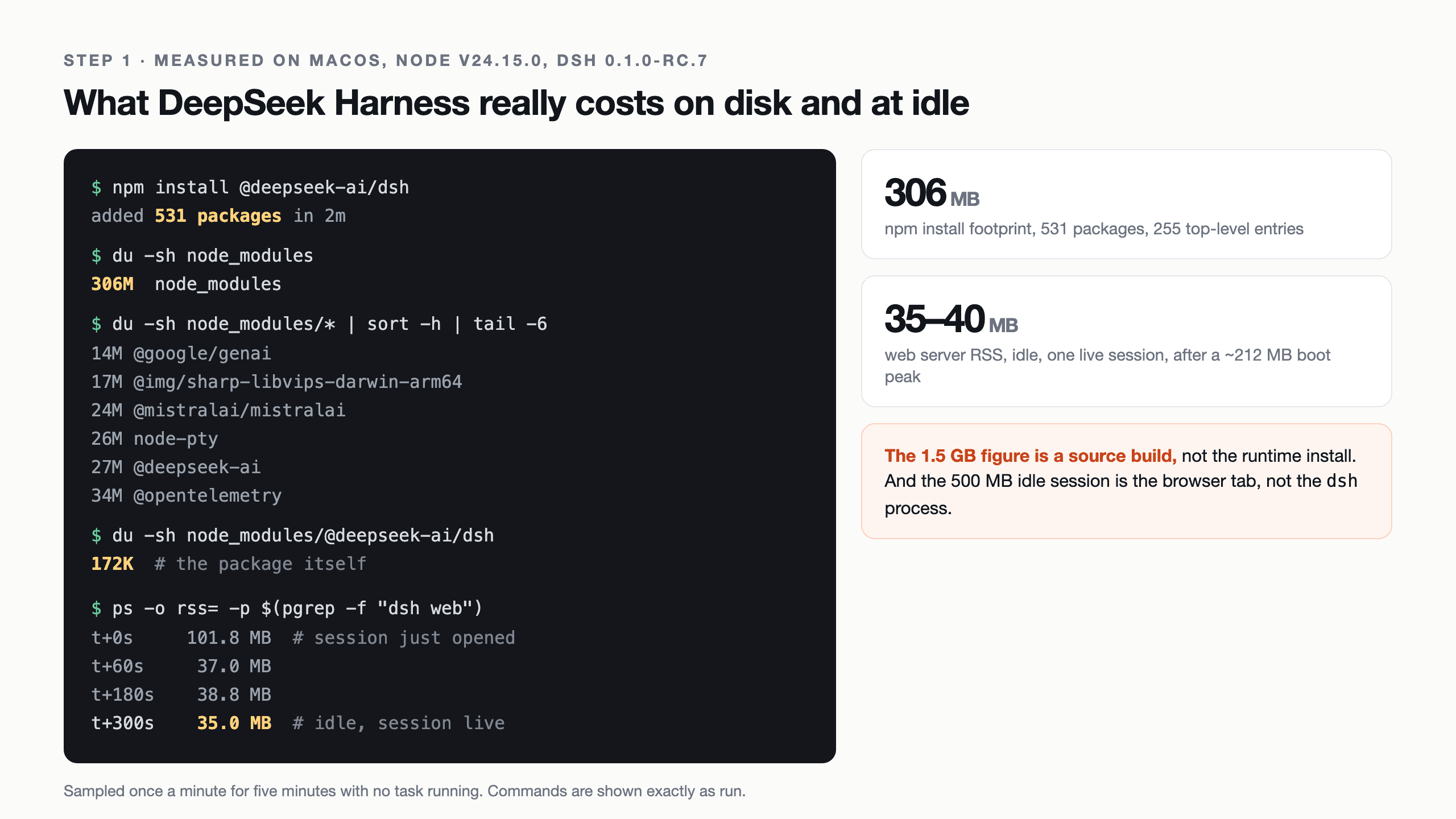
text1added 531 packages in 2m 2306M node_modules 3255 top-level entries in node_modules 4172K node_modules/@deepseek-ai/dsh <- the package itself 5 6 13M node_modules/@shikijs 7 13M node_modules/openai 8 14M node_modules/@google/genai 9 17M node_modules/@img/sharp-libvips-darwin-arm64 10 24M node_modules/@mistralai/mistralai 11 26M node_modules/node-pty 12 27M node_modules/@deepseek-ai 13 34M node_modules/@opentelemetry 14
So: 306 MB, not 1.5 GB. The 1.5 GB figure in that Hacker News comment is a full source build, which drags in dev dependencies and build output across the whole monorepo. The runtime install is a fifth of that.
That said, 306 MB for a coding agent is still a lot, and the breakdown explains exactly why people are annoyed. You are installing three vendor SDKs you may never call (openai, @google/genai, @mistralai/mistralai come to 51 MB between them), a full OpenTelemetry tree, a native sharp binary, and a syntax highlighter. "Everything is a plugin" has a shipping cost, and right now you pay all of it up front whether or not you use those routes.
For idle memory, boot the web profile, open a session, leave it alone, and read RSS:
bash1npx @deepseek-ai/dsh web --port 3099 2# then, in another shell: 3ps -o pid,rss,command -p $(pgrep -f "dsh web") 4
Sampled once a minute for five minutes with a live session open and no task running:
text1t+0s 101.8 MB (right after the session opened) 2t+60s 37.0 MB 3t+120s 39.8 MB 4t+180s 38.8 MB 5t+240s 35.8 MB 6t+300s 35.0 MB 7
It touched about 212 MB during boot, settled to ~102 MB as the UI connected, then the garbage collector took it down to the 35 to 40 MB band and it stayed there. That is not "out of hand".
But eglintondust is not necessarily wrong, and this is the part worth understanding: the dsh web profile is a local server plus a browser tab. The 35 MB is the server. The UI is a full web app in your browser, and that memory is charged to Chrome, not to dsh. If you are watching a 500 MB idle session in Activity Monitor, check which process it is attributed to before you file the bug. Full install detail lives in the 10-minute install walkthrough.
Real terminal output showing the DeepSeek Harness install footprint and idle memory measurements
The actual measurements, with the commands visible. 306 MB installed, 35 MB idle.
Step 2: Point DeepSeek Harness at Your Own Endpoint
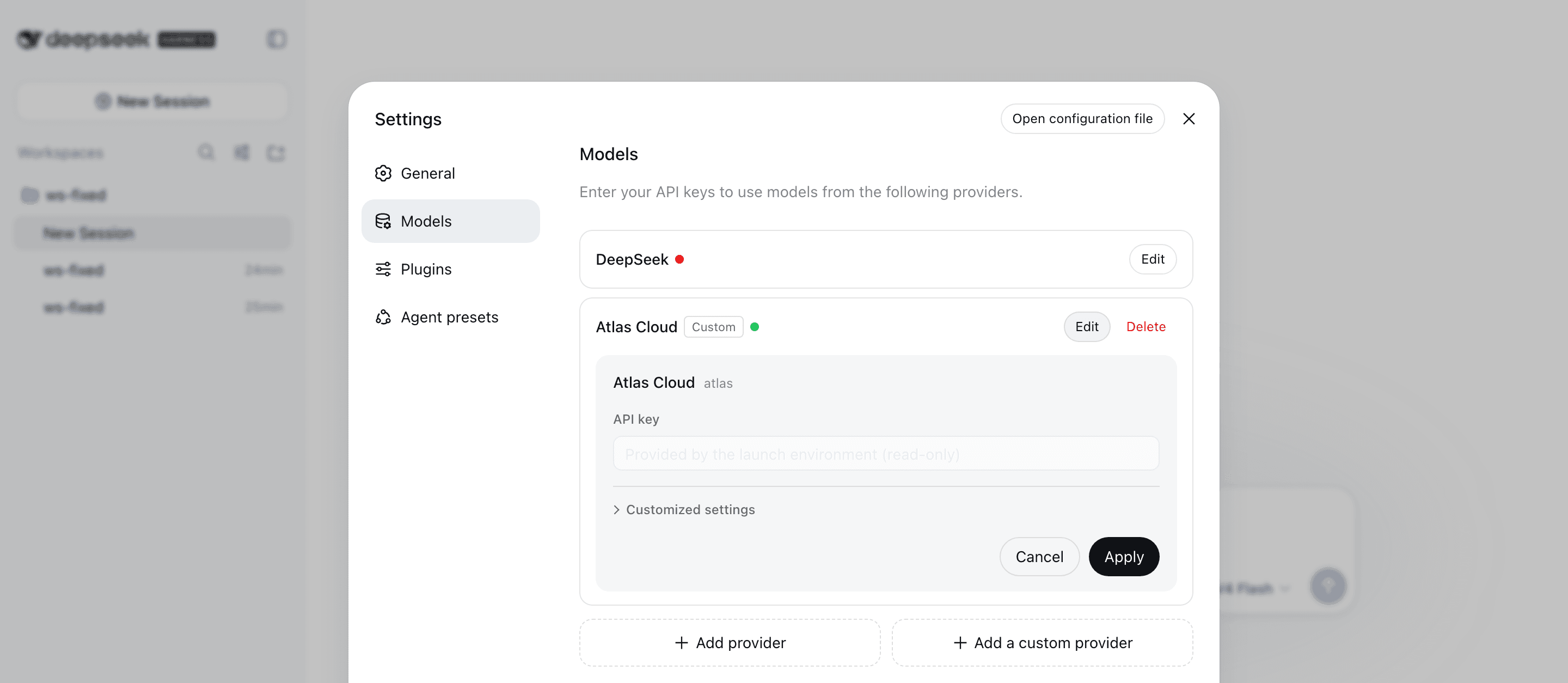
In the UI this is Settings then Models then Add a custom provider: provider ID, base URL, protocol, key, model list. You can also write it straight into $DSH_HOME/settings.yaml (default ~/.dsh/settings.yaml), which is what I did, because the file version is what you can diff between runs.
Sections in that file are keyed by plugin ID, which is not obvious the first time. The provider dict belongs to llm-pi-ai, and the default model selection belongs to agent-default-model:
yaml1llm-pi-ai: 2 providers: 3 atlas: 4 displayName: Atlas Cloud 5 api: openai-completions 6 baseURL: https://api.atlascloud.ai/v1 7 apiKeyEnv: ATLAS_API_KEY 8 models: 9 - id: deepseek-ai/deepseek-v4-flash-0731 10 11agent-default-model: 12 provider: atlas 13 model: deepseek-ai/deepseek-v4-flash-0731 14
That is the naive config, and it is the one I started with. It works. Grab a key from the Atlas console, export ATLAS_API_KEY=..., and the run goes through. Note that apiKeyEnv is a reference, not the secret, so no key ever lands in this file.
One detail from the UI that is easy to miss and genuinely good: when the key comes from the environment, the API key field renders as Provided by the launch environment (read-only). The green dot next to the provider means the route resolved. The red dot next to the built-in DeepSeek provider means it has no credential. That is a two-second health check you do not have to go digging for.
Two things about this config are quietly wrong, though, and I did not find out until I compared trajectories. Hold that thought until Step 4.
The DeepSeek Harness Settings Models page showing a custom OpenAI-compatible provider named Atlas Cloud with a green status dot and its API key supplied read-only by the launch environment
Settings, Models, custom provider. Green dot means the route resolved; the built-in DeepSeek provider above it is red because it has no key.
Step 3: The DeepSeek Harness Review's Three Runs, Side by Side
Same prompt every time. Paste this verbatim if you want to reproduce it:
text1Build a single-page ISS tracker in one self-contained index.html. 2 3Requirements: 4- Fetch the ISS position from https://api.wheretheiss.at/v1/satellites/25544 every 5 seconds. 5- Render a world map with a marker at the current lat/lon, plus a fading trail of the last 60 positions. 6- Show altitude (km), velocity (km/h), and the current lat/lon in a readable panel. 7- No build step, no npm install, no API key. Vanilla JS + inline CSS only. 8- Handle fetch failures without breaking the page: keep the last known position and show a stale badge. 9- Write the file, then report done. 10
Run it headless so the transcript is clean:
bash1export DSH_HOME=$PWD/dsh-home 2export ATLAS_API_KEY=<your key> 3dsh --profile headless "<the prompt above>" 4
Three configs:
- Run A, the tuned one:
compat.thinkingFormat: deepseek,contextWindow: 1048576,maxTokens: 131072. - Run B, the naive one from Step 2: the model entry is nothing but
id. - Run C, the plausible mistake: same as A but with
maxTokens: 4096, a number I lifted straight out of the adapter's own README example.
All three exited 0. All three wrote an index.html. All three printed a summary claiming verification. Run C's summary even bragged about self-repair: "A couple of bugs I caught and fixed during the build: an undefined variable in the trail fade, incorrect N/S-E/W suffix logic..."
Then I opened all three files in a real browser with the console open, and let them poll for two cycles.
| Run A (tuned) | Run B (naive) | Run C (maxTokens: 4096) | |
|---|---|---|---|
| Wall clock | 152.7 s | 422.5 s | 50.2 s |
| Steps | 15 | 36 | 8 |
| Tool calls | 14 | 35 | 7 |
| Tool mix | 6 edit, 4 read, 2 bash | 19 bash, 8 read, 3 grep | 4 edit, 1 write, 1 bash |
| File size written | 19,569 B | 10,812 B | 11,326 B |
| Console errors on load | 15 | 0 | 12 |
| What was broken | every continent path malformed, no ISS marker, "Stale" badge stuck on forever | nothing | trail circles all cx="NaN", marker parked at 0,0, latitude printed as -34.76° S |
Read that table again. The fastest run and the run I had carefully tuned both shipped broken pages. The slow, naive, most expensive run is the only one that worked.
Run A's failure is the instructive one. The telemetry panel was perfect: 431 km altitude, 27,547 km/h, correct lat/lon, updating live. The map underneath it was a green blob, because all fifteen continent paths ended in a stray L with no coordinates ("... L48.0 624.0 L Z"). And the badge said "Stale, keeping last position" with "Last update: -" while three successful fetches sat in the network tab. It got the hard part right and the visible part wrong.
The reason is sitting in its own reasoning log, at step 12, in its own words: it had deleted a variable that its map builder was still using, noticed, and moved on anyway. That kind of self-inflicted regression late in a run is exactly what an append-only trajectory is good for, which is the next step.
Run C is funnier and worse. It claimed to have fixed the trail fade bug and the N/S suffix logic. The trail is exactly what is broken (twelve NaN circles, no trail renders at all), and the latitude label reads -34.76° S, which is double-signed. It fixed neither of the two things it said it fixed, and it verified its work with node --check, which parses JavaScript syntax and knows nothing about whether an SVG path is legal.
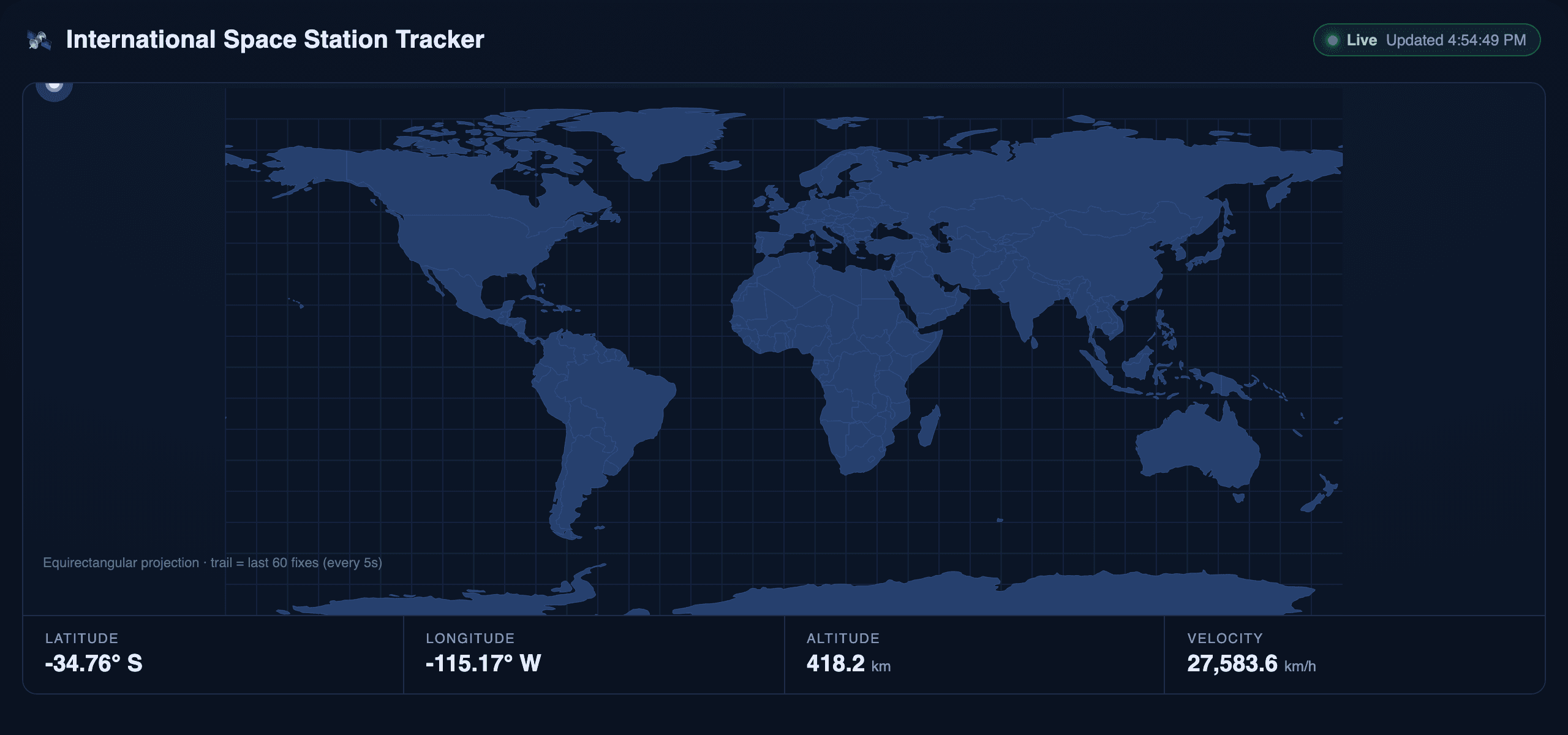
The third run's ISS tracker page with a NaN-positioned trail, a marker stuck in the top-left corner, and a double-signed latitude label
Run C, the 50-second run: pretty, live, and quietly broken in the two places it claimed to have fixed.
None of this is really a Harness bug. It is a coding-agent bug that Harness faithfully executed and then faithfully reported as success. Which brings us to the one part of this release that genuinely impressed me.
Step 4: The Two-Line Fix, and the DeepSeek Harness Trajectory View That Found It
Run B taking 2.8x longer than Run A made no sense to me. Same model, same task, and the only difference was a few lines of YAML. So I went to the Trajectory.
The official description is accurate, which is rarer than it should be: "Everything the model sees is recorded in an append-only session log: system prompts, reasoning, tool calls and results, subagent scheduling, and every context injection... In the Trajectory view, you can inspect these records by source. Resume, fork, search, and replay all operate on the same event stream" (DeepSeek Harness, August 2026).
It is not marketing. The stream is a real file:
bash1ls $DSH_HOME/sessions/<workspace>/session-<uuid>/session.jsonl.zstd 2
One JSON event per line, zstd-framed, append-only. Run A produced 606 events; Run B produced 1,709. Filter by source in the UI, or just grep the decoded file. The event types are exactly what the sentence above promises: turn/start, step/start, request/header, request/context, assistant/chunk, reasoning-chunks, tool-call-chunks, tool/call, tool/result, step/end, turn/end.
The request/header event is what solved it. It records the config actually put on the wire:
jsonc1// Run A 2{"config":{"provider":"atlas","model":"deepseek-ai/deepseek-v4-flash-0731","maxTokens":131072}, 3 "adapterDefaults":{"maxTokens":true}} 4 5// Run B 6{"config":{"provider":"atlas","model":"deepseek-ai/deepseek-v4-flash-0731"}} 7
Run B sent no output cap at all, and its reasoning ballooned to 72,420 characters across 33 blocks against Run A's 6,094 across 9. That is where the extra 270 seconds and the extra 44,170 output tokens went.
The cause is documented, but not on the docs site. It is buried in packages/llm/llm-pi-ai/README.md: the thinking dialect is guessed from the endpoint URL. In the maintainers' own words, compat.thinkingFormat is something "pi-ai guesses from the endpoint URL; a private gateway's URL says nothing, so a DeepSeek-dialect gateway would be spoken to in the OpenAI dialect with no way to correct it."
My endpoint returns reasoning_content, the DeepSeek spelling. Its hostname says nothing about that. So on Run B the adapter fell back to the OpenAI dialect, could not send a thinking level, and the model reasoned at its own default on every one of 36 calls. Separately, a model entry that declares only id inherits the route fallbacks defaultContextWindow: 262144 and defaultMaxTokens: 32768, so a 1,048,576-token model silently loses three quarters of its window.
Both are two lines:
yaml1llm-pi-ai: 2 providers: 3 atlas: 4 api: openai-completions # compat.* exists ONLY under this protocol 5 baseURL: https://api.atlascloud.ai/v1 6 apiKeyEnv: ATLAS_API_KEY 7 compat: 8 thinkingFormat: deepseek # stop guessing from the URL 9 supportsReasoningEffort: true 10 models: 11 - id: deepseek-ai/deepseek-v4-flash-0731 12 contextWindow: 1048576 # override the 262,144 fallback 13 maxTokens: 131072 # leave reasoning real headroom 14
Two things to keep in your head. The resolution order is model, then route, then the installed catalog entry, then pi-ai's URL guess, so a model-level value wins. And compat.* exists only under api: openai-completions; put it anywhere else and resolution fails outright. The adapter also deliberately does not support Bedrock, Vertex, Azure, or Codex, because their auth needs more than a key, an endpoint, and headers.
Set that, and Run A's wire config is right, its token bill drops 3.5x, and it still ships a broken map. Which is the honest summary of this whole exercise: the config fix is real, and it fixes the bill, not the code review you still have to do yourself.
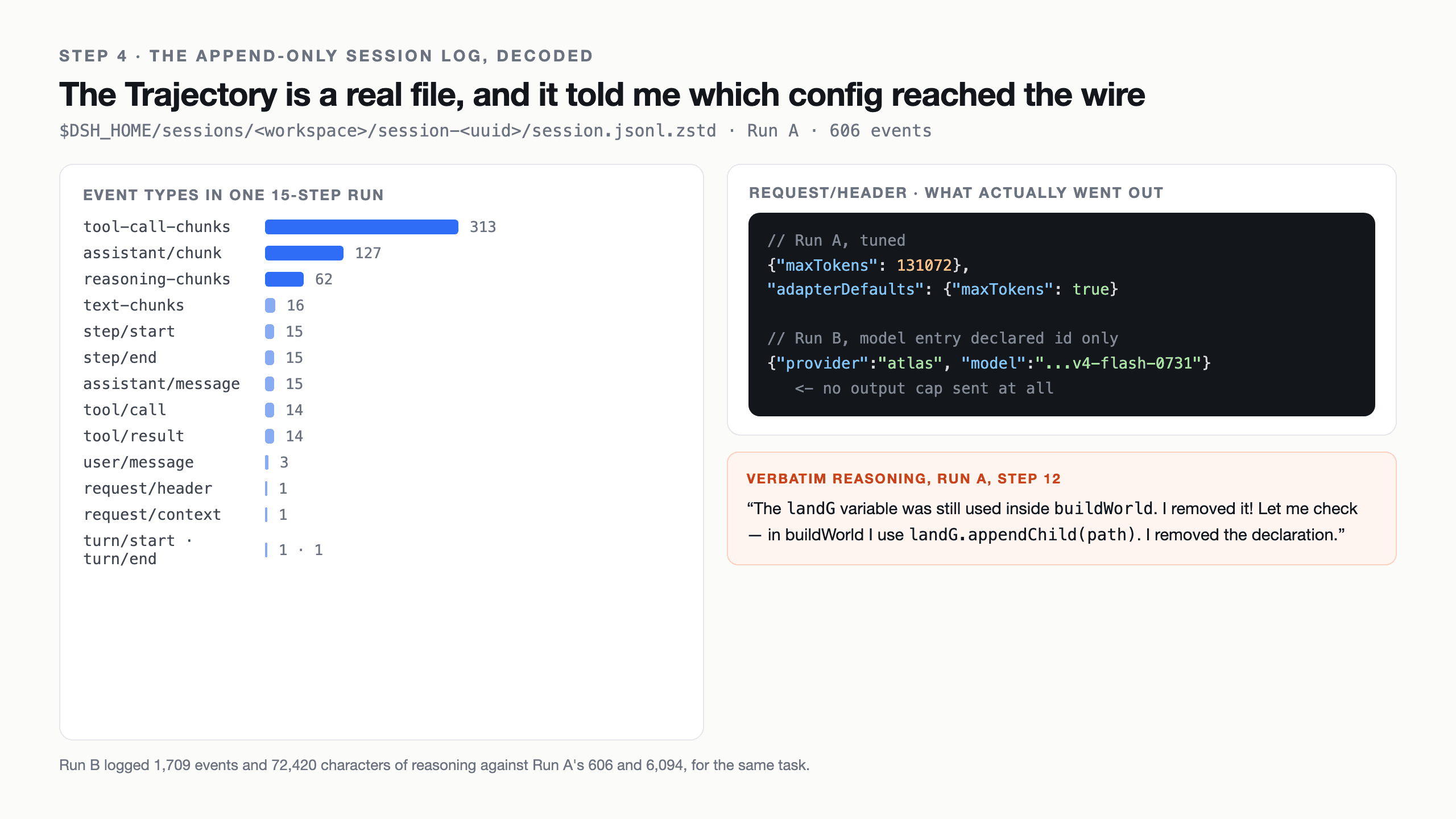
The append-only session event stream from a real DeepSeek Harness run, with event counts and the request header that revealed the config problem
The Trajectory event stream from Run A: 606 events, and the one that exposed the missing output cap.
What This DeepSeek Harness Review Cost, and Whether It Is Production Ready
Three full agent runs of a non-trivial task, straight out of the trajectories, at the flat $0.14 in / $0.28 out per 1M rate:
| Run A | Run B | Run C | Total | |
|---|---|---|---|---|
| LLM calls | 15 | 36 | 8 | 59 |
| Uncached input tokens | 38,452 | 109,408 | 20,781 | 168,641 |
| Output tokens | 12,740 | 56,910 | 6,969 | 76,619 |
| Cache-read tokens | 280,832 | 2,150,144 | 108,800 | 2,539,776 |
| Cache share of prompt | 88.0% | 95.2% | 84.0% | 93.8% |
| Uncached input + output | $0.0090 | $0.0313 | $0.0049 | $0.0452 |
| If every cached token billed at full input rate | $0.0483 | $0.3323 | $0.0201 | $0.4007 |
Two things worth pulling out of that. First, the cache numbers are real and the endpoint reports them: 93.8% of all prompt tokens across the three runs came back as cache reads, which is what makes an agent loop affordable at all. Second, the misconfigured run cost 3.5x the tuned one for a task of identical size. That is the actual price of the two YAML lines.
Notice the shape of the first call in every run: around 11,000 input tokens before the agent has done anything. That is the system prompt, the tool schemas, and the skill catalogue that "everything is a plugin" implies, and you pay it on every new session. It is why the cache hit rate matters more on this harness than on a thinner one, and why a Minimal-mode run (bash plus a file editor only) is worth trying if your task does not need the full toolset.
So can you put it in production? No, and the project agrees with you. The README's own words: "DeepSeek Harness is currently in developer preview and is iterating rapidly. THERE WILL BE COMPATIBILITY-BREAKING CHANGES." The Web UI opens with a modal saying "DeepSeek Harness 0.1 remains in testing for Harness developers." MIT license means you can do what you like with it; it does not mean the API you build against will exist next month.
| Who you are | Verdict | Why |
|---|---|---|
| Individual developer who just wants to ship code today | Skip for now | Two of my three runs shipped broken output with a confident "done". You will spend your time on the harness, not the work. |
| Infra team that wants to modify the agent loop itself | Pilot it | This is the one tool where the loop, the tools, and the UI are all swappable config. That is genuinely rare and worth your time. |
| Enterprise standing up a production control plane | Not yet | Breaking changes are promised in writing, plugins and MCP servers run outside the sandbox, and the docs site is missing config that decides your token bill. |
| Plugin and tooling builders | Yes, now | The extension seams are the whole point, the ecosystem is small, and early plugins will have the field to themselves. |
The rest of the risk list is short and real. There is an anonymous telemetry UUID. Plugins and MCP servers execute outside the bash sandbox, so a plugin is code you are choosing to trust. And as this review found the hard way, the settings that control cost and correctness are documented in a package README rather than the guide, which means your first bill can be several times what it should be for reasons no error message will tell you about.
DeepSeek Harness Review: Frequently Asked Questions
Is DeepSeek Harness production ready?
No. The README states it plainly: "DeepSeek Harness is currently in developer preview and is iterating rapidly. THERE WILL BE COMPATIBILITY-BREAKING CHANGES." The Web UI repeats it in a startup modal. A contained pilot on a non-critical workload is reasonable today. A production control plane your team depends on is not, because the API surface you build against is explicitly unstable.
How much disk and memory does DeepSeek Harness actually use?
On macOS, npm install @deepseek-ai/dsh pulled 531 packages and 306 MB, of which the dsh package itself is 172 KB. The widely quoted 1.5 GB is a full source build, not the runtime install. The web server process idled at 35 to 40 MB RSS with a live session open, after peaking near 212 MB during boot. The UI's own memory is charged to your browser, not to dsh.
Why is my DeepSeek Harness run so much slower and more expensive than expected?
Most likely your model entry declares nothing but id. That inherits the route fallbacks defaultContextWindow: 262144 and defaultMaxTokens: 32768, and it lets the adapter guess the reasoning dialect from your endpoint's hostname. In my test that combination produced 36 steps instead of 15 and 3.5x the token cost for the same task. Set compat.thinkingFormat, a real contextWindow, and a real maxTokens.
Does DeepSeek Harness work with non-DeepSeek endpoints?
Yes, any OpenAI-compatible base URL works, and that is how most people will run it. The catch is that the thinking dialect is inferred from the URL, so a DeepSeek-dialect gateway on a neutral hostname gets spoken to in the OpenAI dialect. compat.thinkingFormat: deepseek is the fix, and it only exists under api: openai-completions. Bedrock, Vertex, Azure, and Codex are deliberately unsupported.
Is the Trajectory view actually useful, or is it marketing?
It is useful, and it is the strongest thing in this release. The session log is a real append-only JSONL file you can filter by source, resume, fork, and replay, and the request/header event told me exactly what config reached the wire, which is what solved my problem. What it does not do is explain why the model chose something. It records what the model saw, not why it decided.
DeepSeek Harness vs Claude Code or OpenCode, which should I use daily?
If you want something to write code reliably today, not this, not yet. Choose Harness when the agent runtime itself is what you want to change, because swapping the loop, the tools, or the UI is configuration here rather than a fork. For a numbers-first comparison on token usage, see DeepSeek Harness vs OpenCode, and for the extension layer, which plugins are worth installing.
Runs performed August 18, 2026 on macOS, Node v24.15.0, @deepseek-ai/[email protected], model deepseek-ai/deepseek-v4-flash-0731 served over an OpenAI-compatible endpoint on Atlas Cloud. Every token count, wall-clock time, and console error in this article came out of the session logs and browser consoles of those runs.





