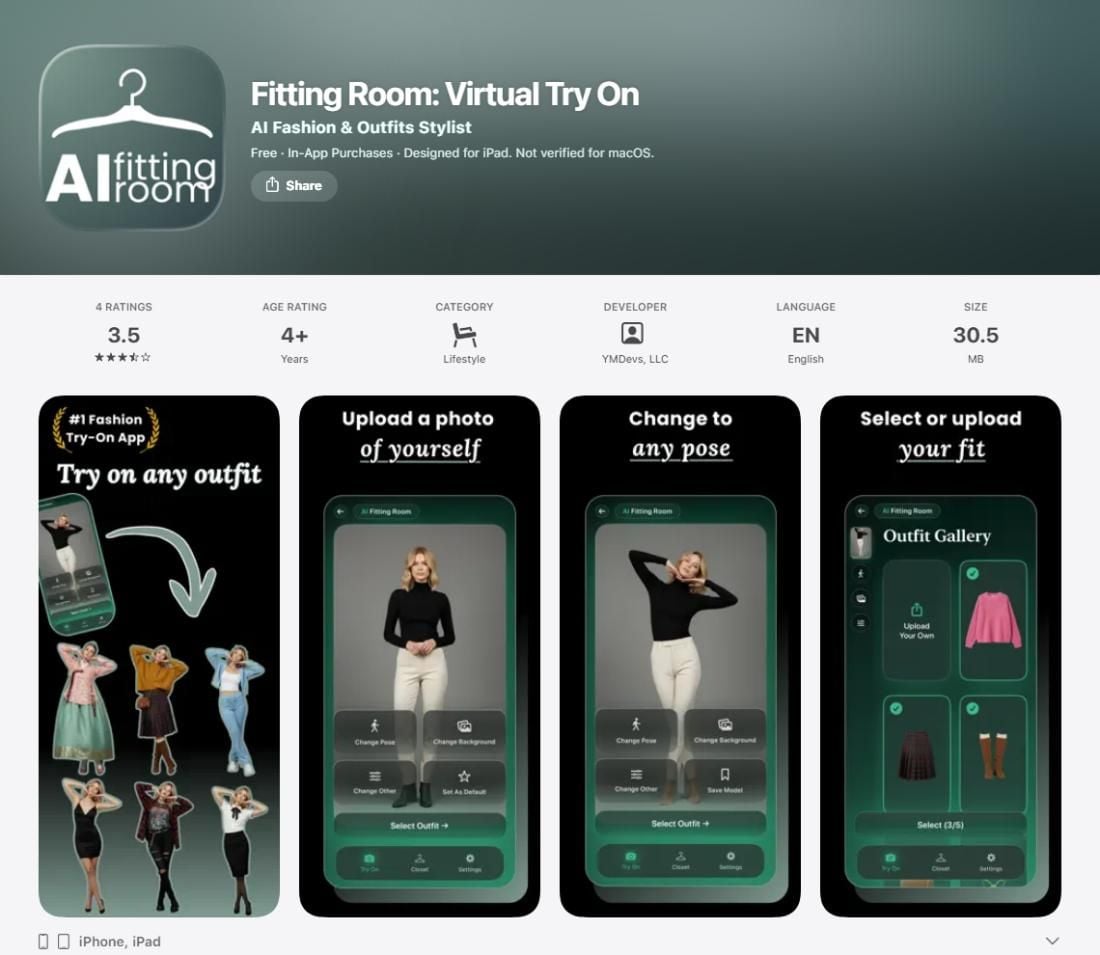
Type fittingroom.com into a browser and you land on a parked domain that is up for sale, not a try-on tool. What most people hunting for a fitting room com alternative actually have in mind is Fitting Room: Virtual Try On, an iPhone app that dresses your photo from a template gallery or an uploaded garment picture, with unlimited generations locked behind a subscription. If that workflow is what sent you searching, there is a lighter route. Atlas Cloud runs a free AI clothes changer in the browser: one photo goes in, one sentence describes the outfit, and the finished image comes back at full resolution with no watermark and nothing to install.

Key Takeaways
- Thefittingroom.comdomain itself is parked for sale; the product behind most fitting room com searches is the Fitting Room: Virtual Try On app for iPhone, which builds try-ons from outfit templates or garment photos.
- TheAtlas Cloud free clothes changerworks from a text description instead, in any browser, so there is no app to install and no garment photo to find.
- Results download at 1328 by 1776 pixels with no watermark, the same resolution on the free run as on any paid one.
- The Fitting Room app centers on wardrobe planning and outfit management; the Atlas Cloud tool is built for fast individual try-ons.
- Neither the app nor the parked domain offers an API; for batch try-on work, a per-image API route exists on the browser side.
One Prompt Beats a Template Gallery
Here is the core difference in a single image. The Fitting Room app asks you to pick clothes from its outfit gallery or upload a photo of the garment, then renders the look onto your picture. The Atlas Cloud tool skips the picking and uploading entirely: you type what the new outfit should be, and the model redraws it onto your photo.
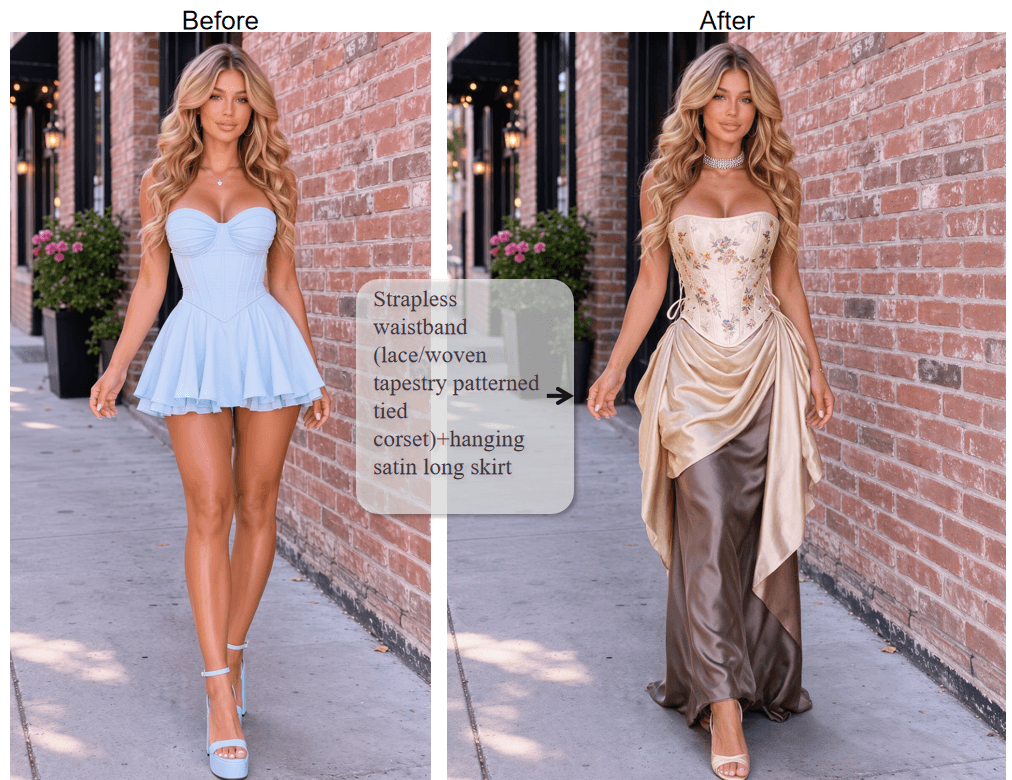
A sentence like "Strapless waistband (lace/woven tapestry patterned tied corset)+hanging satin long skirt" is all the input the outfit needs. The Atlas Cloud tool keeps the face, hair, pose, and background of the original photo and rewrites only the clothing.
Using it takes three steps:
- Open the free change clothes tool in any browser, phone or desktop.
- Upload one photo and type the outfit description.
- Wait roughly 40 seconds (the page's own estimate) and download the result.
Writing a Description the AI Can Actually Use
Two habits separate a clean swap from a muddy one. First, match the description to what the photo shows: if your photo is waist-up, describe a top, not a full outfit with shoes. Requests that extend past the frame force the model to invent body parts, and proportions suffer. Second, name concrete garment attributes, fabric, color, and cut, rather than a vibe. "Emerald satin midi dress with thin straps" lands; "something elegant" wanders.
Need an API? The App Stops Where Atlas Cloud Starts
Sellers and developers searching for a fitting room com API come up empty: the Fitting Room app has no published API, and a phone app is a dead end for anyone who needs try-on images generated in bulk for a storefront or a catalog. This is where the browser route stops being merely convenient and becomes the only one of the two that scales.
Seedream v5.0 Pro Edit: The Model Behind the Scale-Up
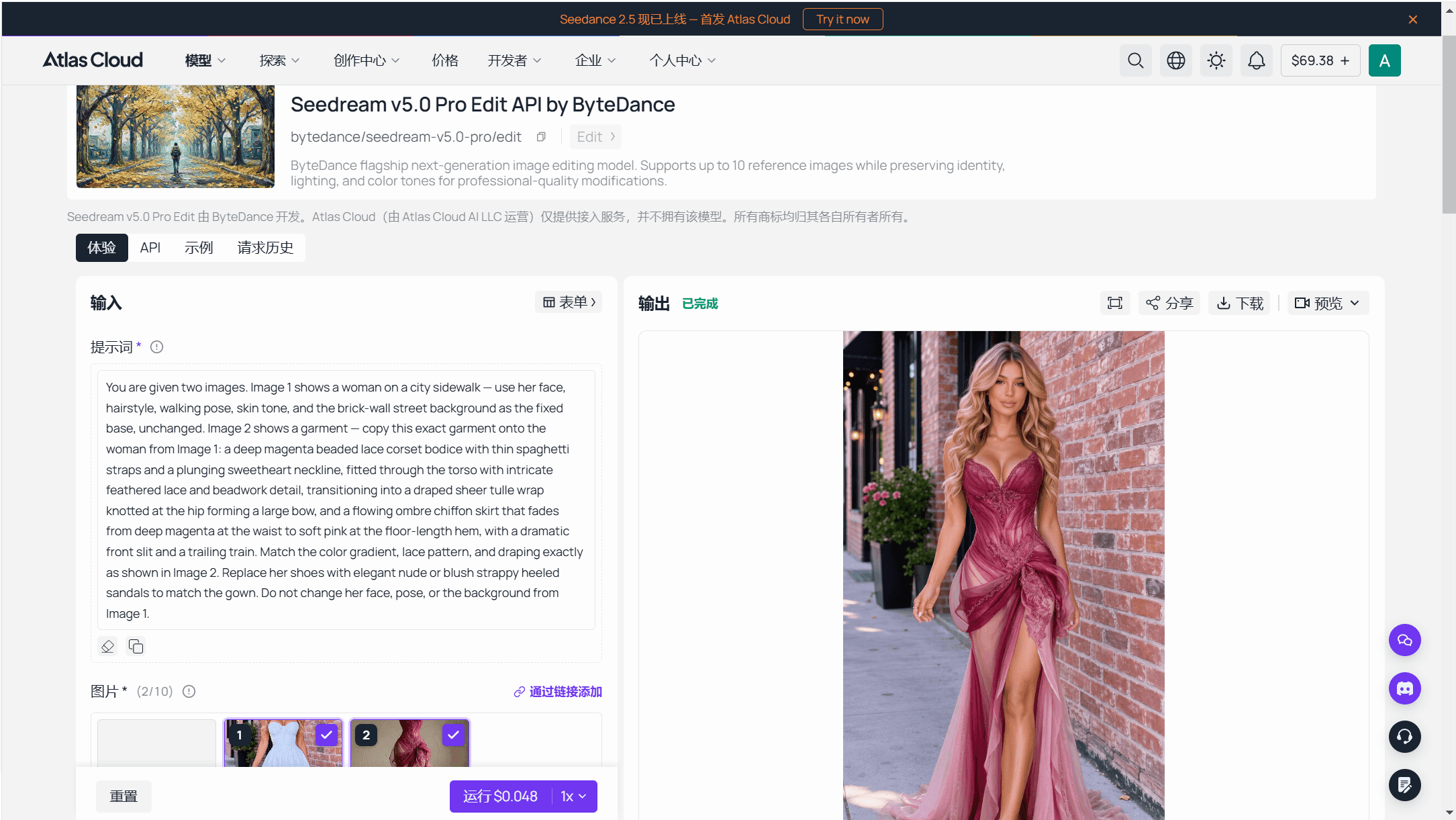
The Atlas Cloud clothes changer sits in the same product line as ByteDance's image editing models hosted on the platform. The flagship editor there is Seedream v5.0 Pro Edit, ByteDance's next-generation image editing model: it accepts up to 10 reference images per request while preserving identity, lighting, and color tones, which is exactly the property an outfit swap depends on. Give it your customer photo as reference one and a garment shot as reference two, and the instruction decides the rest.
Test a Swap in the Playground First
You can rehearse the whole thing without writing code. The Seedream v5.0 Pro Edit playground accepts a photo upload, a garment reference if you have one, and a plain instruction.
Call the API in Three Steps
Production is three steps from the playground:
Step 1: Create an API key. Generate it in the Atlas Cloud console; one key covers every model on the platform.
Step 2: Check the request shape. The polling contract lives in the API documentation, and the model page's API tab shows the exact request body next to where you tested it.
Step 3: Send the request and poll.
plaintext1curl -X POST https://api.atlascloud.ai/api/v1/model/generateImage \ 2 -H "Content-Type: application/json" \ 3 -H "Authorization: Bearer $ATLASCLOUD_API_KEY" \ 4 -d '{ 5 "model": "bytedance/seedream-v5.0-pro/edit", 6 "prompt": "Change the outfit to a charcoal business suit with a white shirt. Keep the face, hair, pose, and background unchanged.", 7 "images": ["https://your-cdn.com/customer-photo.jpg"], 8 "size": "1328*1776" 9 }'
The response carries a prediction id; poll it until status reads completed and collect the hosted image URL from outputs. For a deeper walkthrough of batch outfit work over the same endpoint, the AI outfit swap guide covers reference-image transfers and the common failure points.
Fitting Room Pricing: What the Free Tokens Cover
So what does the app side of this comparison cost? The structure matters more than the free label. Checked on its App Store listing on August 26, 2026, the fitting room com pricing picture looks like this:
- Free download with free tokens for new users; the listing does not publish how many tokens or what one generation costs in tokens.
- Unlimited try-on generation requires a subscription: AI Fitting Room Pro at $9.99 a month or $29.99 a year, and the in-app purchase list also shows a $4.99 AI Dressing Room Pro item.
The app's own description states the trade plainly: free tokens for all new users, unlimited feature access behind the paid plan. That is a fair model, but an unpublished token count makes the free tier hard to plan around, and the answer to "how many free tries do I get" only arrives after the download.
If you are weighing more tools than these two, our tested roundup of the best AI clothes changers compares nine of them on identical photos, free tiers and watermark rules included.
Fitting Room App or Atlas Cloud: Which Fits Your Workflow
Mechanism and price are two pieces of the decision; the table below puts the whole picture side by side, drawn from the app's own App Store listing and the tool's own page, checked on August 26, 2026.
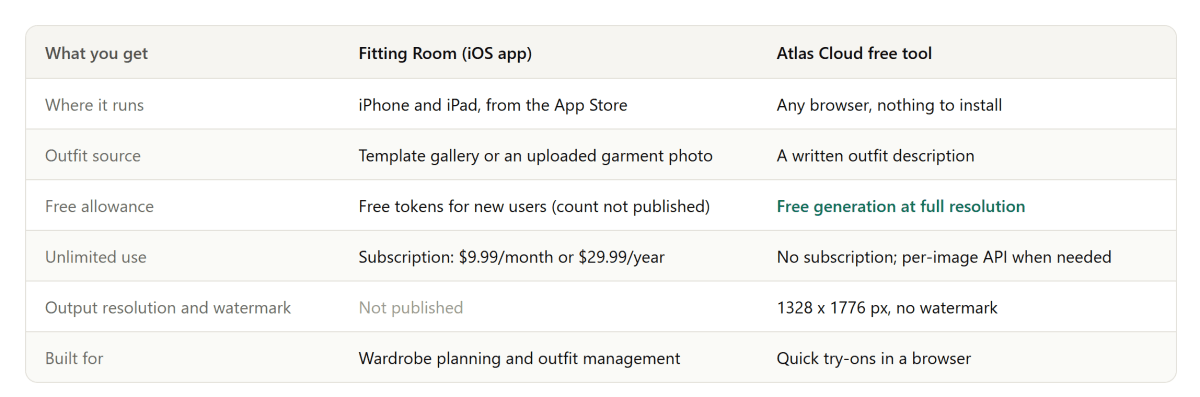
The platform row decides more than it seems to. An iPhone app suits someone building a digital closet they return to weekly: the Fitting Room app bundles an outfit planner and wardrobe management around its try-on, and that bundle is the product. A browser tool suits the opposite moment, a one-off "would this work on me" question that deserves an answer without an install, an onboarding flow, or a new subscription.
The outfit source row is the mechanical split. Template galleries end where their catalog ends, and garment-photo uploads assume you have a clean picture of the exact piece. A written description covers anything you can put into words, including clothes that exist only in your head.
More Wardrobe Tools Worth Bookmarking
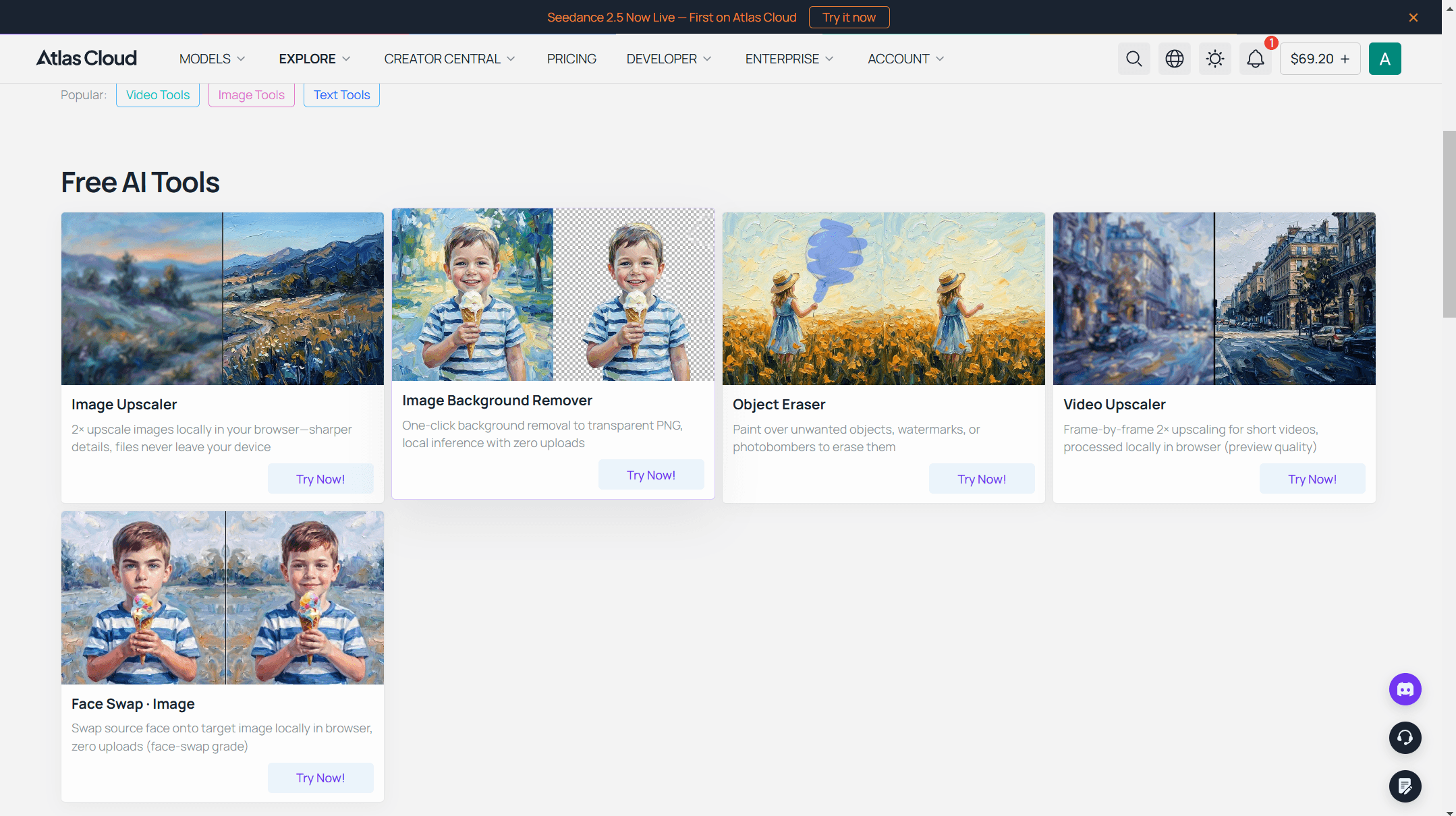
The clothes changer is one entry in a larger set of free AI tools on the same platform, and a few neighbors pair well with wardrobe photos: an image upscaler, a background generator for dropping a try-on result into a cleaner scene, and an eraser for removing a photobomber before the outfit edit rather than after.
And if you want the wider picture of how browser-based try-on works before committing to any single tool, the virtual try-on guide walks through the technology end to end.
Frequently Asked Questions
What Is Fitting Room Com? Is the Website Real?
There is no product at fittingroom.com; the domain currently redirects to a for-sale page at a domain marketplace. The try-on tool most searchers mean is Fitting Room: Virtual Try On, an iPhone app by YMDevs, LLC on the App Store. The two are easy to conflate, and neither is related to Atlas Cloud's browser tool.
Is the Fitting Room App Free to Use?
The download is free and new users receive free tokens, but the App Store listing does not say how many. Generating unlimited try-ons requires the AI Fitting Room Pro subscription at $9.99 a month or $29.99 a year. The Atlas Cloud clothes changer offers a free generation at full resolution as its entry point.
Can I Try On Clothes Without Uploading a Photo of the Outfit?
In the Fitting Room app, the outfit comes from its template gallery or a garment photo you upload. With the Atlas Cloud tool, the outfit comes entirely from your written description, which is the main mechanical difference between the two.
Does the Fitting Room App Have a Web Version?
Its App Store listing describes an iPhone and iPad app, and no browser version is published. If you want a try-on that runs without an install, the browser-based Atlas Cloud clothes changer is the direct route.
What Resolution Do the Free Results Come In?
The Fitting Room app does not publish output resolution or watermark rules on its listing. The Atlas Cloud tool states its output at 1328 by 1776 pixels with no watermark for every run, free included.
Conclusion
An app with a template gallery or a browser with a text box: that is the real choice behind this search. The Fitting Room app earns its place for someone who wants a digital closet with try-on built in, and its subscription is priced around that ongoing use. But the free tokens are uncounted, the output specs are unpublished, and the whole experience lives inside one phone platform.
For a quick answer to "how would this look on me", the stronger fitting room com alternative is the tool with no install step at all. The Atlas Cloud clothes changer takes one photo and a description, returns a full-resolution image with no watermark, and scales into a per-image API when a project grows past one photo at a time. Try the free run first; the result will tell you more than any listing can.





