Ask AI for a summary
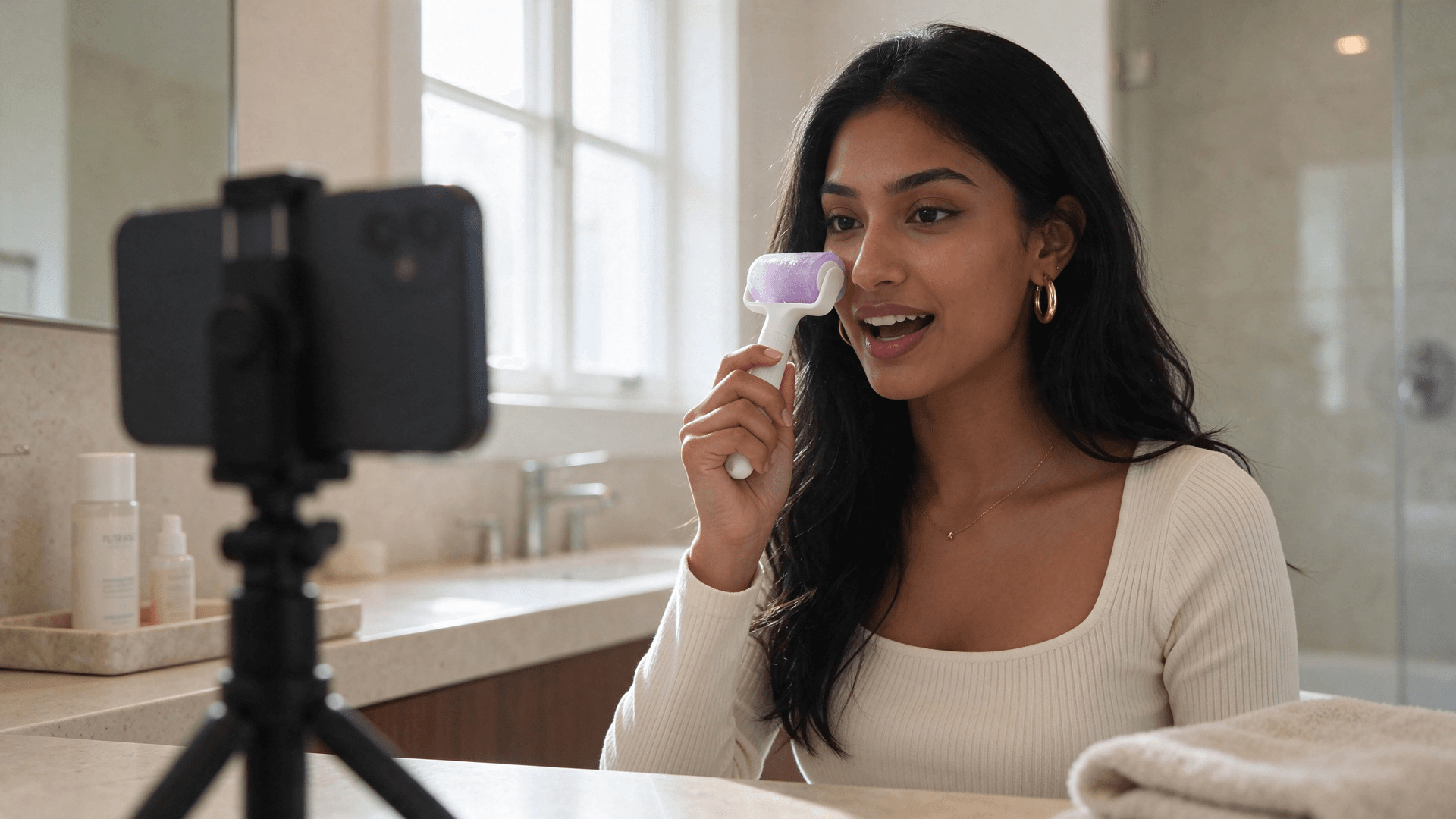
The clip opens on a woman at her bathroom vanity. She rolls a frosted ice roller up her cheekbone and complains about a 7 a.m. call she took on four hours of sleep. Nobody pointed a camera at her. The video came from one portrait, one product photo and an eight-second voice line.
This guide walks through how to create an AI influencer like her for brand videos: a face you can reuse in any scene, hooks borrowed from videos that already went viral, and a talking clip you can regenerate whenever the script changes. We built this one while writing the article, so every step shows the real inputs and outputs.
Key Takeaways
- An AI influencer is one consistent face you reuse across videos, built from a single reference photo.
- Start from proven TikTok hooks: break down one viral video before writing a single script line.
- Seedance 2.5 turns one portrait, a product shot and a voiced line into a lip-synced talking video.
- Write three hook lines, run each as a clip, then keep the one whose first three seconds land.
- Label AI-made presenters on TikTok, and only use a real face you have permission to use.
What an AI Influencer Is and Who Builds One
An AI influencer is a generated person who appears on camera again and again with the same face, voice and style. The "again and again" part is the whole job. One good-looking frame is easy. A presenter who looks like the same woman in a kitchen on Monday and a car on Friday is the thing people actually search for.
Two groups build them, and they want different things:
| Persona account | Brand presenter | |
|---|---|---|
| Goal | Grow followers as a virtual person | Front product videos and ads |
| What has to stay fixed | Face, personality, life story | Face, voice, delivery style |
| Typical output | Daily posts, stories, lives | 10 to 30 second hooks and demos |
| Success metric | Audience size | Watch time and clicks on the product |
This guide covers the second column. If you are new to the format itself, our explainer on what AI UGC is covers the basics first.
Turn One Photo Into a Talking AI Influencer on Atlas Cloud
Here is the finished clip before any theory: ten seconds, vertical, with her voice, a close-up of the roller working, and the product held up at the end.
It was made on Atlas Cloud with Seedance 2.5 Reference-to-Video. As an AI influencer generator, it starts from your inputs: you bring the face, the product and the voice, and it builds the shot around them.
It accepts up to 30 reference images in one request, including photos of real people, and a single audio clip can drive the lip sync on its own.
That matters for a brand presenter. The face stays yours across every video, and when the script changes you swap one audio file instead of booking a reshoot.
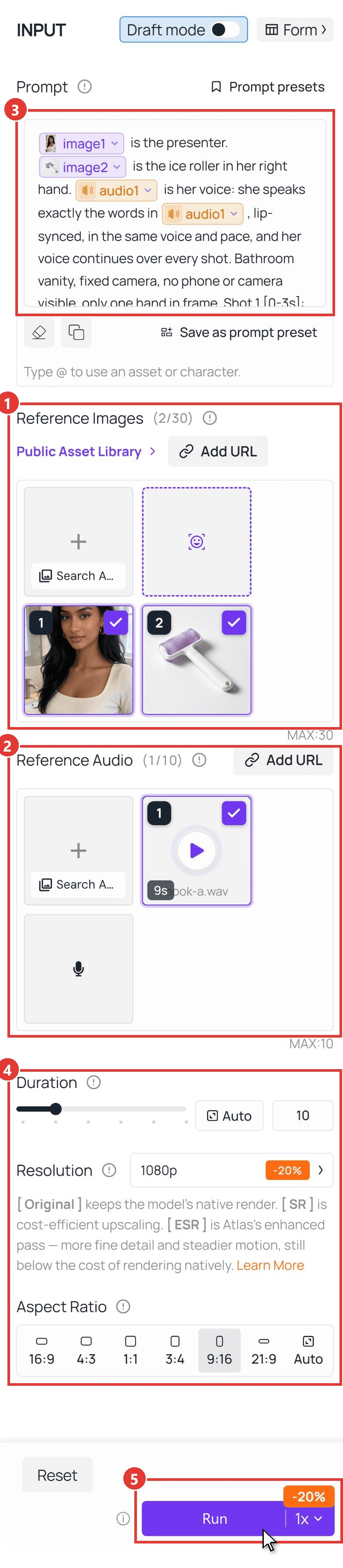
The whole run happens on one page of the Seedance 2.5 Reference-to-Video playground:
- Upload the portrait first, then the product photo, under Reference Images. Order matters: the first file becomes Image1.
- Upload the voice line under Reference Audio.
- Paste the prompt, then retype each @ mention and pick the matching file from the list so it turns into a tag.
- Set Duration to 10, Resolution to 1080p and Aspect Ratio to 9:16.
- Click Run.
How to Make an AI Influencer in 5 Steps
The playground is the last click. What decides whether the video stops a scroll is everything you feed it, so here is how to make an AI influencer from research to finished hook.
Step 1: Break Down TikTok Hooks From a Real Viral Video
Do not start with a blank script. Pick one short in your niche that already pulled views, and take it apart.
We used a 19-second routine from the channel All You Can Face, One Routine For A Puffy Face, Puffy Eyelids And Puffy Under Eyes. Instead of watching it ten times, we handed the link to Gemini 3.5 Flash through the Atlas Cloud API. A public YouTube link works directly as the video input:
plaintext1curl -X POST "https://api.atlascloud.ai/v1/models/google/gemini-3.5-flash:generateContent" \ 2 -H "Authorization: Bearer $ATLASCLOUD_API_KEY" \ 3 -H "Content-Type: application/json" \ 4 -d '{ 5 "contents": [{ 6 "role": "user", 7 "parts": [ 8 {"fileData": {"mimeType": "video/mp4", "fileUri": "https://www.youtube.com/shorts/V_rNa1iOuXA"}}, 9 {"text": "Return the 0-3s hook line verbatim, the hook type, each shot change with its timestamp, all on-screen text, and the hook as one reusable template sentence."} 10 ] 11 }] 12 }'
Here is what came back, condensed:
| What we asked | What the video does |
|---|---|
| Opening line | "Do this 20 times if you wake up with a puffy face." |
| Hook type | Pain point phrased as a direct instruction |
| Structure | Four shots, one per problem, each opening with the same sentence frame |
| On-screen text | A checklist that adds one item per shot |
| Framing | Chest-up, eyes on the lens the whole time |
| Reusable pattern | [Action] for [amount] if you wake up with [problem] |
A list of TikTok hooks gives you first lines. The useful part of a breakdown is the structure under the line: one repeated sentence frame, one visible payoff per shot, no intro. That is what we carried into the script.
Step 2: Lock One Face and Reuse It Across Scenes
Your influencer is only real to viewers if she looks like the same person every time. Start from one portrait you have the rights to use, then change everything except the face: outfit, room, light.
Any image model that edits from a reference can do this. We used Seedream on Atlas Cloud: the 5.5 Edit model to turn a studio portrait into a bathroom-vanity master shot, and the 5.0 Lite sequential editor to spin three more scenes from that master in one request.
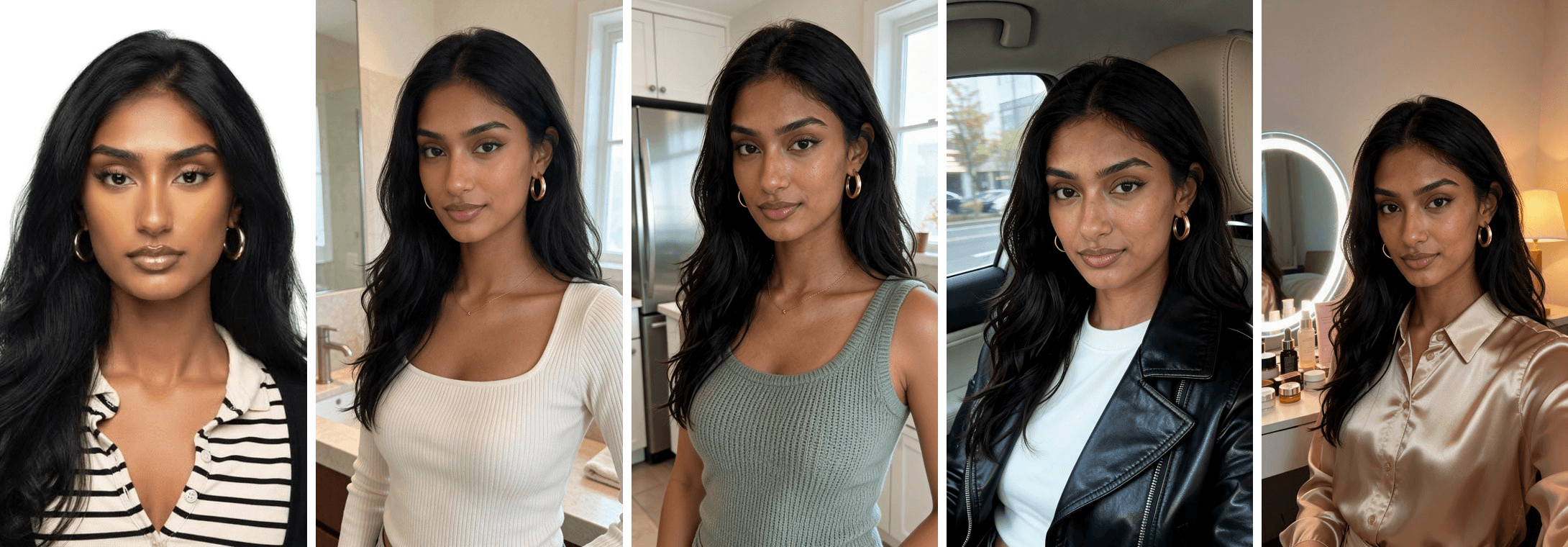
Three things kept the face stable for us:
- Pin the identity, free the styling. Name what must not change (face, skin tone, hair, earrings) in the first sentence, then describe the new outfit and room.
- Describe the camera, not the gadget. "Shot from a fixed camera at chest height" gives a clean selfie-style frame. Mention a phone on the counter and the model tends to draw the phone.
- Dress her like a creator. Basic sweatshirts read as stock footage. A ribbed square-neck top or a satin shirt reads as someone who films herself on purpose.
Step 3: Write Viral Hooks for TikTok on a Proven Pattern
With the pattern from Step 1, writing becomes fill-in-the-blanks. We drafted three lines for the ice roller, each borrowing a different opener:
| Hook | Line | Opener type |
|---|---|---|
| A | I slept four hours and had a seven a.m. call. Two minutes with this thing and nobody asked if I was tired. Here's how I use it. | Stunt plus a number |
| B | Do this for two minutes if you wake up with a puffy face. Roll up from the jaw, under each eye, then across the forehead. That's it. | The pattern from Step 1 |
| C | Stop buying eye cream for puffiness. I put this in the freezer overnight, roll for two minutes, and the difference shows on camera. | Contrarian advice |
Then give every line its own voice track. Seedance 2.5 lip-syncs to the reference audio itself, so the audio is the script: record or generate each hook as a separate file in the same voice.
We generated ours with Gemini 2.5 Pro TTS on Atlas Cloud, using the Sulafat voice and a one-line style note before the text asking for a casual, warm, slightly playful read.
Step 4 (Method 1): Generate the Talking Video in the Playground
Run the five clicks from the screenshot above once per hook. Only the audio file changes between runs. The prompt stays the same:
plaintext1@Image1 is the presenter. @Image2 is the ice roller in her right hand. @Audio1 is her voice: she speaks exactly the words in @Audio1, lip-synced, in the same voice and pace, and her voice continues over every shot. Bathroom vanity, fixed camera, no phone or camera visible, only one hand in frame. 2Shot 1 [0-3s]: chest-up, she talks straight to the lens, holding the roller near her chin. 3Shot 2 [3-6s]: extreme close-up on her cheek. The roller head is pressed flat against her skin and rolls slowly upward along her cheekbone. The lilac cylinder turns on its axle as it moves, the white frost streaks on its surface rotating up and out of view, while the white handle stays still. Her skin gently dips under the roller. 4Shot 3 [6-10s]: back to chest-up, she holds the roller up beside her face toward the lens and finishes the line.
Two choices in that prompt do most of the work. The middle shot is a close-up because small mechanical details, like a cylinder turning, read best when the product fills the frame. And the voice line explicitly continues over the cut, so the close-up feels like B-roll inside one take.
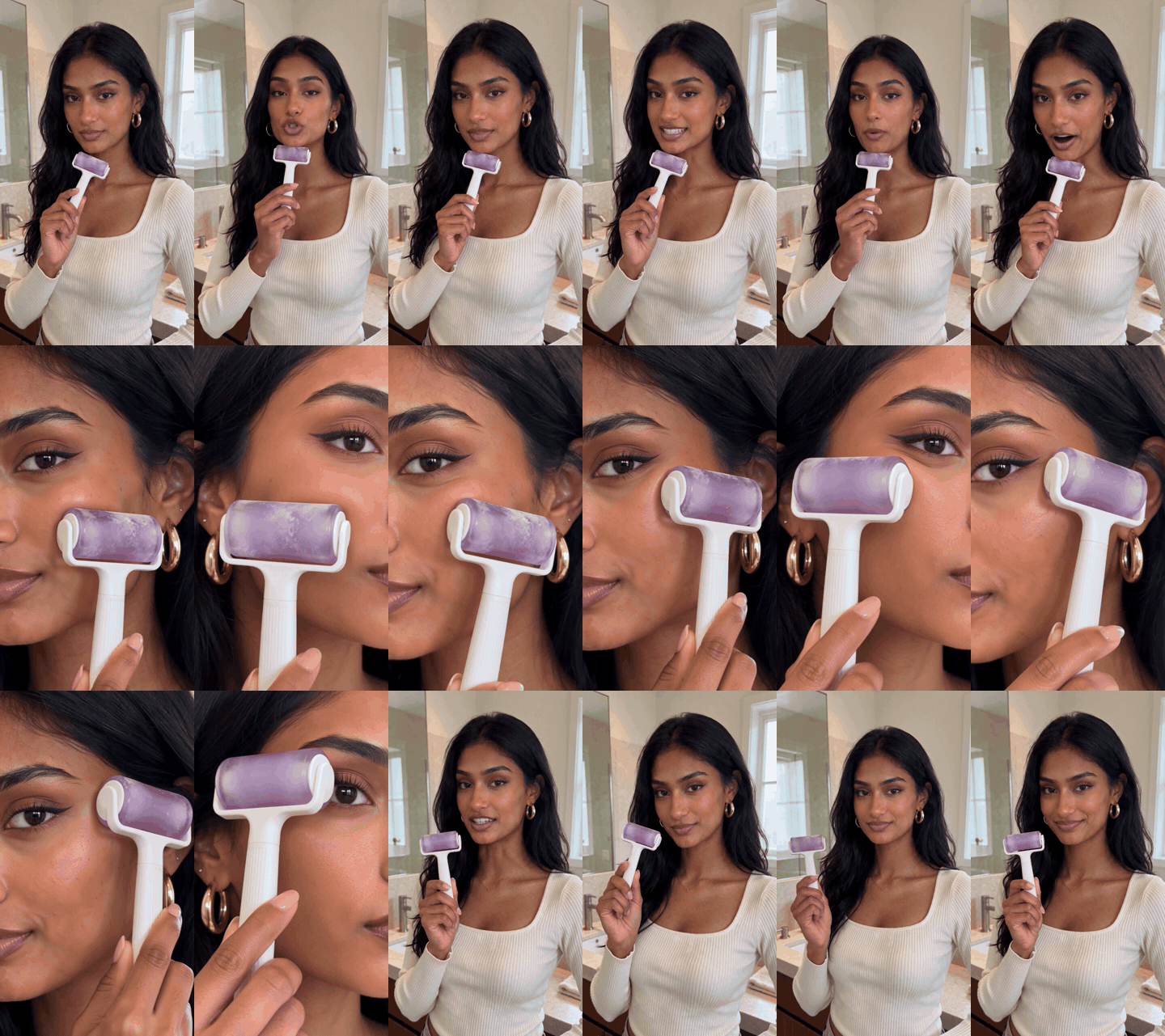
We kept hook A for the 1080p version. Its first two seconds carry a number and a stake (four hours of sleep, a 7 a.m. call), so the viewer knows the payoff before the first cut. If you would rather hand-write every frame and shot list, our 20-minute AI UGC ad workflow takes that route.
Step 5 (Method 2): Batch Hooks Through the API
Once one hook works, the API turns the other ten into a loop over audio files.
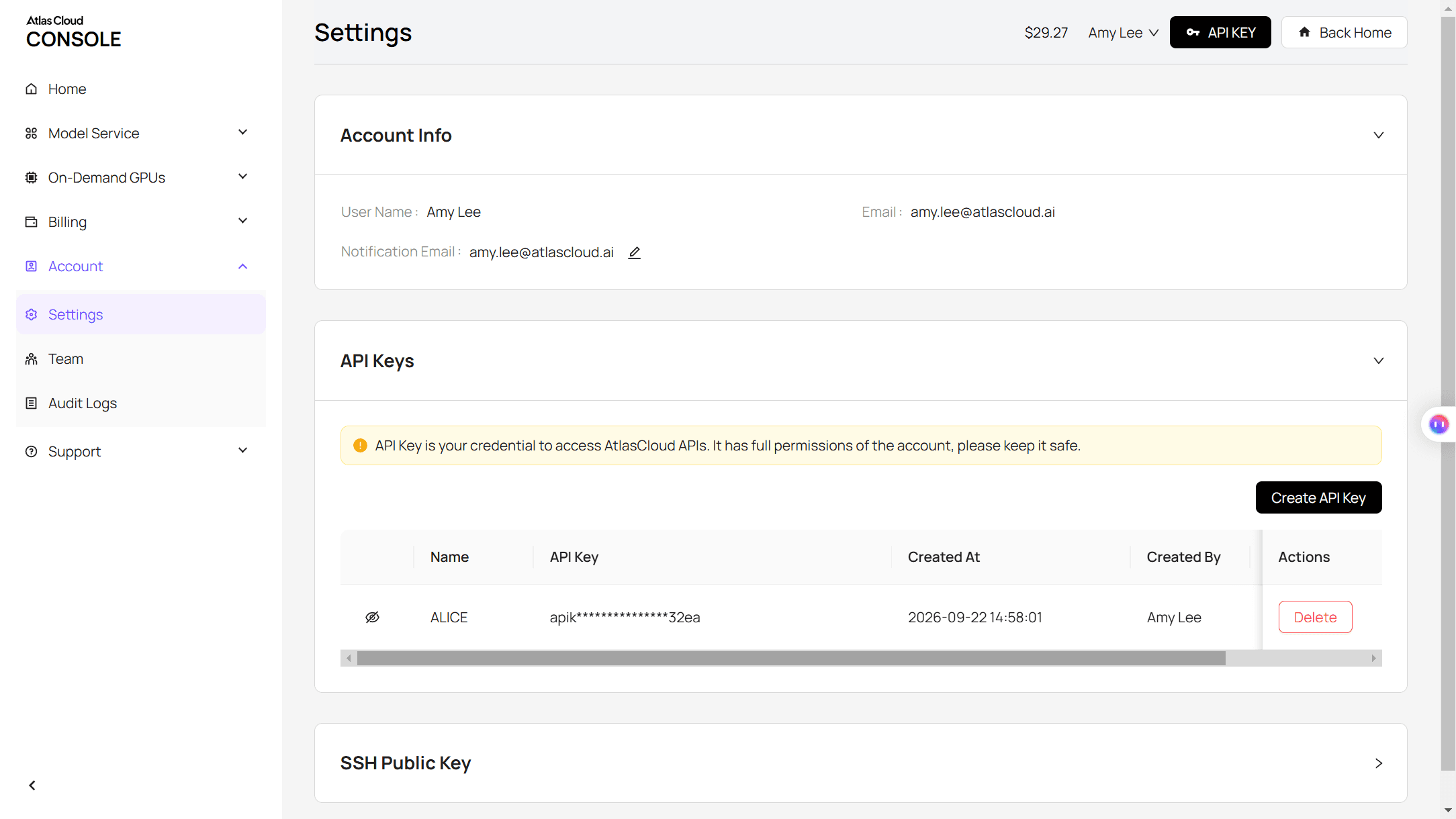
Step 1: Create and copy your API key. Open the Atlas Cloud console, go to Settings, then API Keys, and click Create API Key.
Step 2: Check the API docs. Parameters for every model, including the reference fields used here, are in the API documentation.
Step 3: Make your first request. Submit one hook:
plaintext1curl -X POST https://api.atlascloud.ai/api/v1/model/generateVideo \ 2 -H "Content-Type: application/json" \ 3 -H "Authorization: Bearer $ATLASCLOUD_API_KEY" \ 4 -d '{ 5 "model": "bytedance/seedance-2.5/reference-to-video", 6 "prompt": "@Image1 is the presenter. @Image2 is the ice roller in her right hand. @Audio1 is her voice: she speaks exactly the words in @Audio1, lip-synced. Shot 1 [0-3s]: chest-up, talking to the lens. Shot 2 [3-6s]: extreme close-up, the roller pressed to her cheek, the cylinder turning on its axle as it rolls upward. Shot 3 [6-10s]: chest-up, she holds the roller beside her face and finishes the line.", 7 "reference_images": ["https://your-cdn.com/presenter.png", "https://your-cdn.com/ice-roller.png"], 8 "reference_audios": ["https://your-cdn.com/hook-a.wav"], 9 "duration": 10, 10 "resolution": "1080p", 11 "ratio": "9:16", 12 "generate_audio": true 13 }'
The response returns a prediction ID. Poll it until the status reads completed:
plaintext1curl https://api.atlascloud.ai/api/v1/model/prediction/<prediction_id> \ 2 -H "Authorization: Bearer $ATLASCLOUD_API_KEY"
To batch, keep the body fixed and swap the reference_audios URL for each hook. Atlas Cloud runs one API across its models: every video model shares this endpoint, key and polling loop, so switching models means changing the model string. The image and voice steps above use the same key and the same submit-and-poll pattern.
For a full hook-by-format test grid, see how to scale UGC ad production.
AI Influencer Rules: Labels and Likeness
Before she sells anything, check two kinds of rules: platform labels and laws on synthetic people in ads.
| Where | What it asks | What to do |
|---|---|---|
| TikTok | Label AI-generated content that shows realistic scenes or people | Turn on the AI-generated label or add a caption or sticker when you post |
| New York State ads | Disclose a synthetic performer in an ad when the advertiser knows one is used | Add a clear, visible disclosure to the ad |
| Real faces as references | Permission from the person whose likeness you use | Get written consent, or start from a portrait you own the rights to |
TikTok introduced its AI-generated content label in September 2023 and asks creators to use it on realistic AI content. New York's synthetic performer law, S.8420-A, was signed on December 11, 2025 and took effect on June 9, 2026, with civil penalties of $1,000 for a first violation and $5,000 for each one after that.
On the model side, Seedance 2.5 on Atlas Cloud accepts photos of real people as references and registers them as assets automatically. Its documentation asks you to use a real person's likeness only with their authorization, which is the same rule you would follow with a human creator.
Frequently Asked Questions
How much does it cost to create an AI influencer?
The portraits came to about $0.03 each with Seedream 5.5 Edit at 9:16. Seedance 2.5 video is priced by resolution and length: a 10-second vertical clip with two reference images and one voice file runs about $3.02 at 720p and about $5.94 at 1080p on Atlas Cloud.
Those prices are as of November 13, 2026, with a 20% discount applied. Since every hook is its own clip, the main AI UGC cost is how many hooks you test before you pick a winner.
Is there a TikTok hook generator I can use?
Any text model can generate hooks, but output improves when you give it a pattern instead of a topic. Break down one viral video first (Step 1), then ask the model for ten lines in that exact sentence frame for your product. Picking three to film beats generating fifty and filming none.
Can my AI influencer speak other languages?
Yes. Seedance 2.5 generates speech natively in more than 10 languages, according to its model documentation. For the tightest lip sync, generate the voice line in the target language first and pass it as the reference audio, exactly as you would for English.
How long can one AI influencer video be?
One Seedance 2.5 generation runs from 4 to 30 seconds. Hooks work best short: our three clips are 10 seconds each, which leaves room for one line, one close-up and one product hold. For longer ads, generate scenes separately and cut them together.
Conclusion
The face is the easy part now. What separates a presenter who sells from one who just looks good is the work around her: a hook pattern lifted from something that already went viral, a single portrait reused across scenes, and a voice track for every line so the lips match the words.
If you are figuring out how to create an AI influencer for your own product, start small. Break down one video, write three lines, run three clips, and keep the one that earns its first three seconds. Then let the API repeat the loop for every hook that comes after.