

Somewhere in your niche, a competitor has an ad that has been live since June. They pay for it every single day, and that tells you more than any view count. Knowing how to find winning ads comes down to reading that kind of evidence in the two free libraries the platforms publish themselves: Meta Ad Library and TikTok Creative Center.
We searched both for portable blender ads in October 2026 and found three signals the top-ranking guides we read don't mention: impressions order, creative reuse and EU reach. One four-month-old ad had reached fewer than 1,500 accounts in the EU. Then we cut a stand-in ad in a classic four-beat UGC order and rebuilt it around a blender of our own with Video Clone.
Key Takeaways
- A winning ad is one the advertiser keeps paying for, so spend signals beat view counts.
- In Meta Ad Library, sort by impressions and favor creatives that several ads reuse at once.
- Check EU reach before trusting a months-old ad, sincerunlength alone doesn't prove a big budget.
- TikTok's Top Ads analytics chart clicks and conversions second by second, showing which beat to keep.
- The Video Clone workflow rebuilds a 4 to 20 second reference ad around one photo of your product.
How to Find Winning Facebook Ads in Meta Ad Library
Meta's Ad Library is open to anyone, logged in or not, and it lists the active ads running across Facebook, Instagram and Meta's other apps. What it won't tell you for an ordinary product ad is spend or clicks. So you read proxies instead, and the library hands you three of them.
Pick a country, leave the ad category on All ads, type a product keyword, then filter to Active ads and Videos. Here is what we got for "portable blender" in the US.
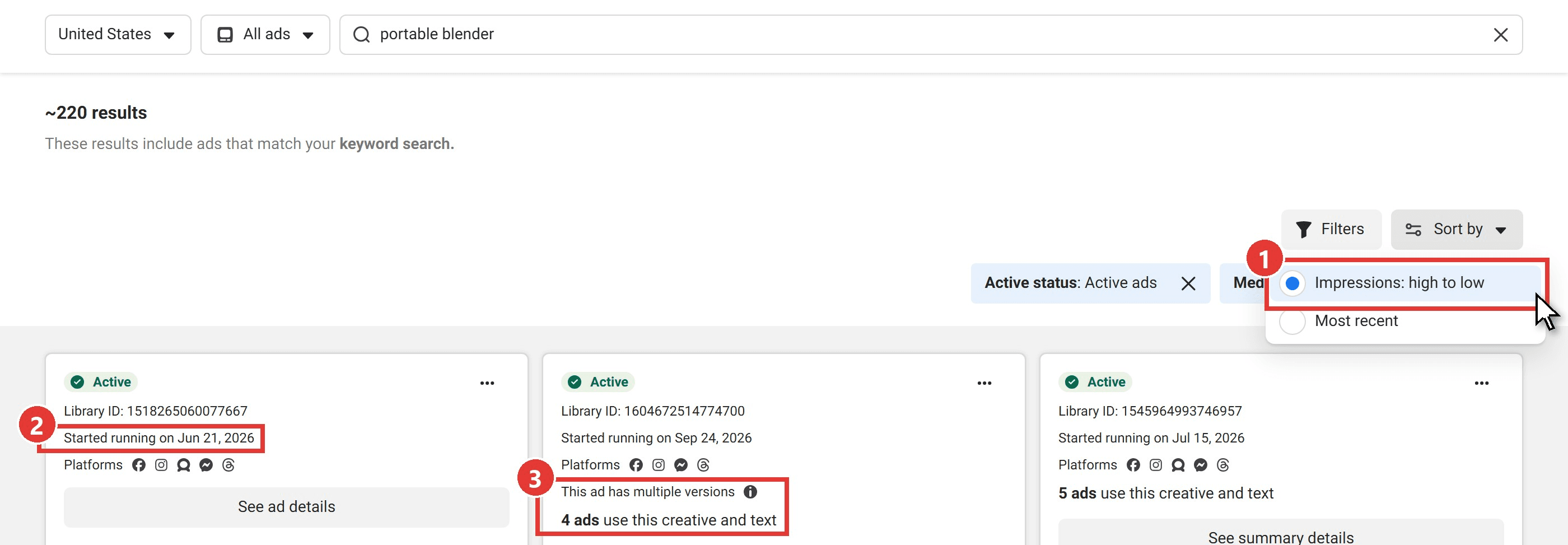
- Sort by Impressions: high to low. The only other choice is Most recent. Impressions order puts the ads Meta has shown most at the top, which is as close to a spend ranking as the library gets.
- Read the start date. "Started running on Jun 21, 2026" means someone has funded that creative for four months. Ads that lose money tend to get switched off, so a long run is a good hint. On its own it proves less than it seems, as the next section shows.
- Look for reuse. "4 ads use this creative and text" means the advertiser copied the same video and copy into several ads, and "This ad has multiple versions" means it runs in more than one variation. Brands rarely duplicate a creative that isn't pulling its weight.
When one ad shows all three, it goes on your shortlist. Our UGC ads guide breaks down the formats those shortlisted ads tend to share.
Check EU Reach Before You Call a Long-Running Ad a Winner
Some cards carry an extra label: EU transparency. The ad has been shown in the EU, and Meta publishes more about those ads under the Digital Services Act. Open See ad details, expand Transparency by location and stay on the European Union tab. You get the targeting (countries, age, gender) and a number other commercial ads don't show: reach.
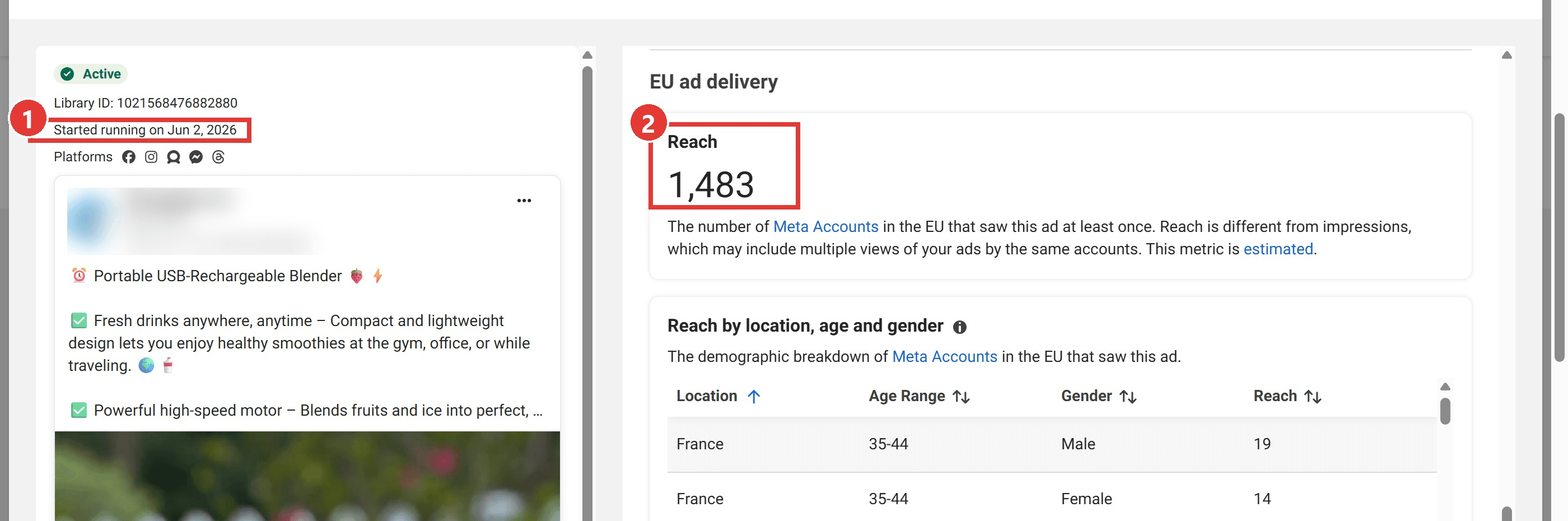
The advertiser's name and logo are blurred
Meta defines reach as the estimated number of accounts in the EU that saw the ad at least once, which is a different count from impressions. The ad above started on June 2 and targets France, Germany, Ireland, Italy and Spain. After four and a half months it had reached 1,483 accounts across all five. Long run, tiny audience: not a model to copy.
The figure covers EU delivery only. A low number on an ad aimed at US buyers says nothing, so use it when the targeting includes EU countries, as this one does.
How to Find Winning TikTok Ads in Creative Center
TikTok's equivalent is the Top Ads dashboard in Creative Center. TikTok describes Top Ads as real ads that met performance thresholds and that advertisers authorized for display. The page footer adds that the selection "may not reflect all top-performing auction ads," so treat it as a curated shelf of winners rather than the whole market.
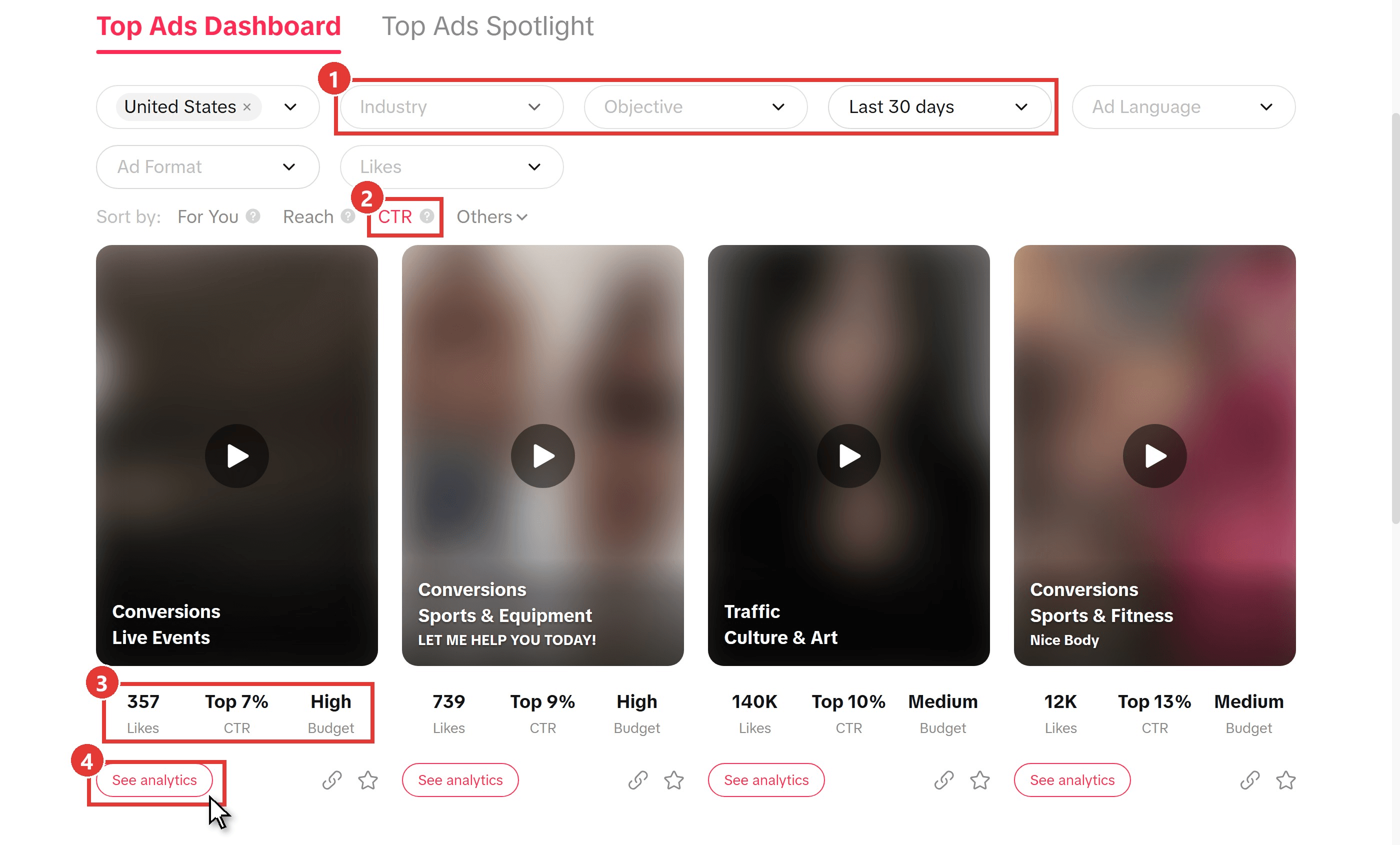
Captured on October 16, 2026; ad thumbnails are blurred
- Filter byIndustry,Objectiveand date range. The range defaults to Last 30 days. Region, Ad Language, Ad Format and Likes narrow it further.
- Sort by CTR. The other options are For You, Reach and an Others menu.
- Read the card. Each ad shows its Likes, a CTR benchmark percentile such as Top 7%, and a Budget level of Low, Medium or High. Likes measure taste. The CTR badge and the Budget level are the ones that track performance and spend.
- Open See analytics on ads that pair a strong CTR percentile with a Medium or High budget.
Read Interactive Time Analysis Before You Copy a TikTok Ad
See analytics opens the ad's detail page: region, industry, objective, landing page and caption, then Likes, Comments, Shares, CTR and Budget. The section worth your time sits at the bottom. Interactive time analysis plots the video second by second across five tabs: CTR, CVR, Clicks, Conversion and Remain.
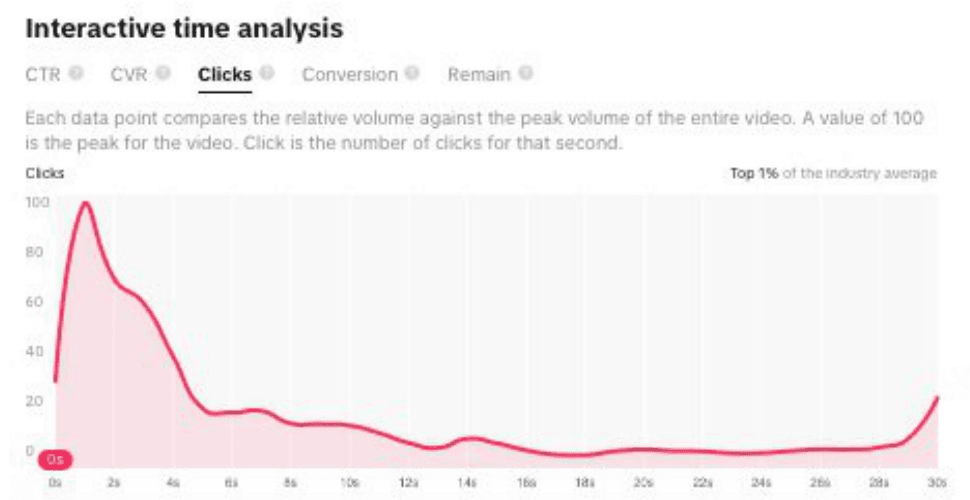
Image from TikTok's Top Ads one-pager for Creative Center
Every point is indexed against the video's own peak, so 100 marks its best second and says nothing about other ads. In TikTok's sample, clicks spike in the first second and fall away within five. The hook does the selling.
That shape is your editing brief. Keep the seconds where the curve peaks, protect anything that also peaks on CVR, and squeeze the flat middle. A 30-second ad whose clicks land in the first three seconds is a good candidate for a 12-second rebuild.
Recreate a Winning Ad With Your Product Using Video Clone
Finding the winner is half the job. The other half is making your version without booking a shoot. Video Clone on Atlas Cloud takes a short reference video plus one product photo and returns a new ad with your product in it. Reference on the left, our remake on the right:
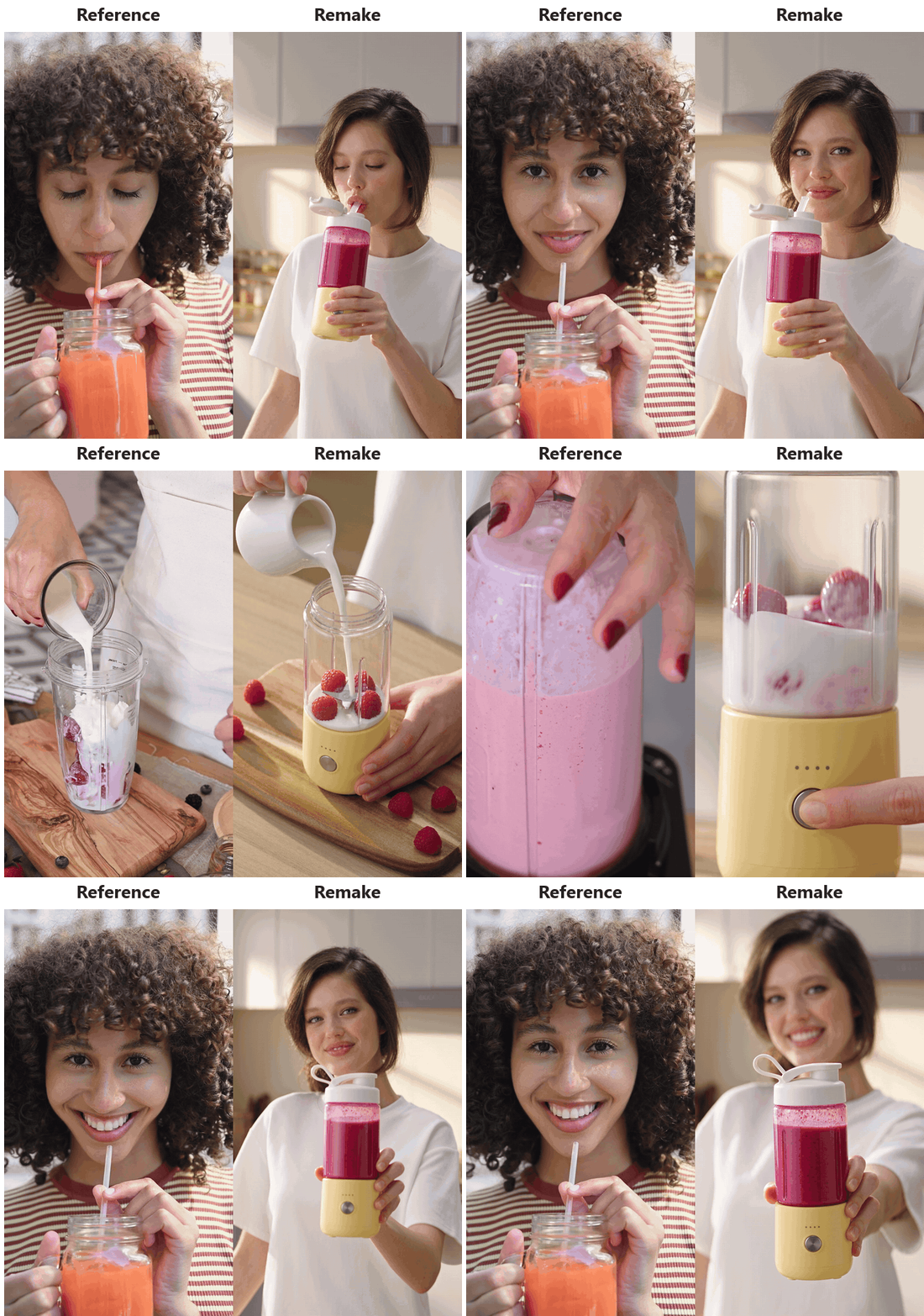
The remake kept all four beats and the 12-second length, and both the bottle and the creator match their photos. Video Clone borrows a reference's structure and pacing without copying its frames, while the model image fixes who appears on screen. Our reference was a stand-in cut from free Pexels clips, not a real competitor's ad. You can remake a reference ad in the browser after signing in.
Reference clips by Blue and Nicola on Pexels
Method 1: Turn the Winning Ad Into a Shot List and Remake It
Write the shot list before you open the form. Watch the winner with its time analysis chart open, then note what happens in each beat and which beat carries the clicks. Our stand-in breaks down like this:
| Time | Reference shot | Keep | Swap |
|---|---|---|---|
| 0 to 3s | A creator sips a pink smoothie, looks up and smiles | Result-first hook, eye contact | Creator and bottle |
| 3 to 6s | Hands pour milk over raspberries in a clear cup | Overhead angle, tight crop | The cup becomes your bottle's jar |
| 6 to 9s | Close-up of the blended pink drink | Texture shot | Your base and power button |
| 9 to 12s | The creator smiles and winks at the lens | Warm, personal ending | Bottle lifted toward the camera |
Then fill the form in this order:
- Upload the winning ad, or your stand-in, as the Reference video. MP4 or MOV, 4 to 20 seconds, up to 20 MB.
- Upload one photo of your product as the Product image. A clean shot on a plain background gives the workflow the clearest read of color and shape.
- Paste the shot list into the Prompt box as one brief (ours is below).
- Add a Model image if a specific person should appear. Without one, the face on screen isn't fixed from run to run.
- Under Settings choose 9:16 and 1080P, and set Duration to 12 seconds to match the reference. Leave Generate audio on for room sound and light music.
- Press Run.
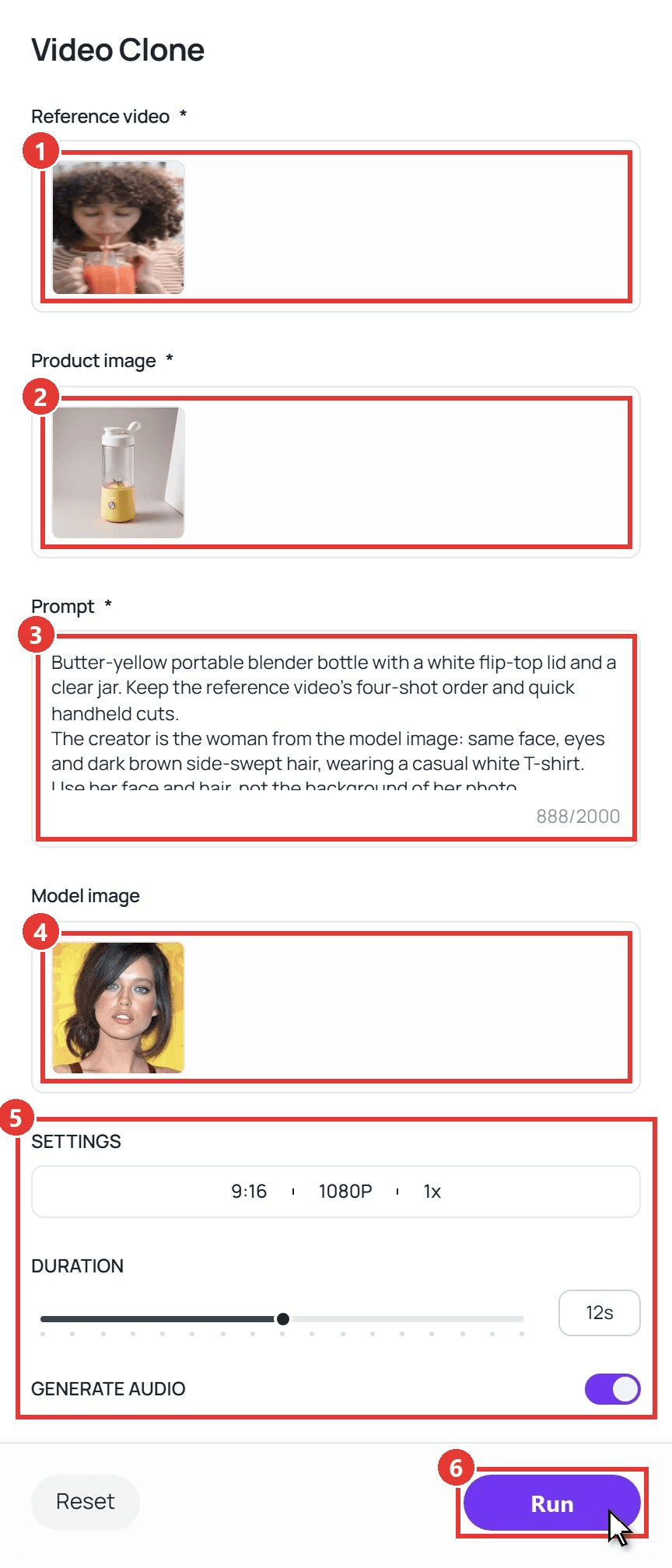
The brief we used, ready to adapt:
plaintext1Butter-yellow portable blender bottle with a white flip-top lid and a clear jar. Keep the reference video's four-shot order and quick handheld cuts. 2The creator is the woman from the model image: same face, eyes and dark brown side-swept hair, wearing a casual white T-shirt. Use her face and hair, not the background of her photo. 30-3s: in a bright kitchen, she sips a pink berry smoothie from the bottle's flip-top spout, looks up and smiles at the camera. 43-6s: close-up from above as hands pour milk over raspberries in the bottle's clear jar on an olive-wood board. 56-9s: tight close-up as a finger presses the round button on the base and the berries blend into a smooth pink drink. 69-12s: back to her in the bright kitchen; she lifts the bottle toward the lens, smiles and winks. 7Keep the bottle's color, lid and button exactly as in the product image. No logos, no on-screen text.
Method 2: Run Video Clone Through the API
Researching winners every week? A script can turn a reference URL and a product URL into a finished ad.
Step 1: Create an API key. Generate one on the Settings page of the Atlas Cloud console and keep it on your server.
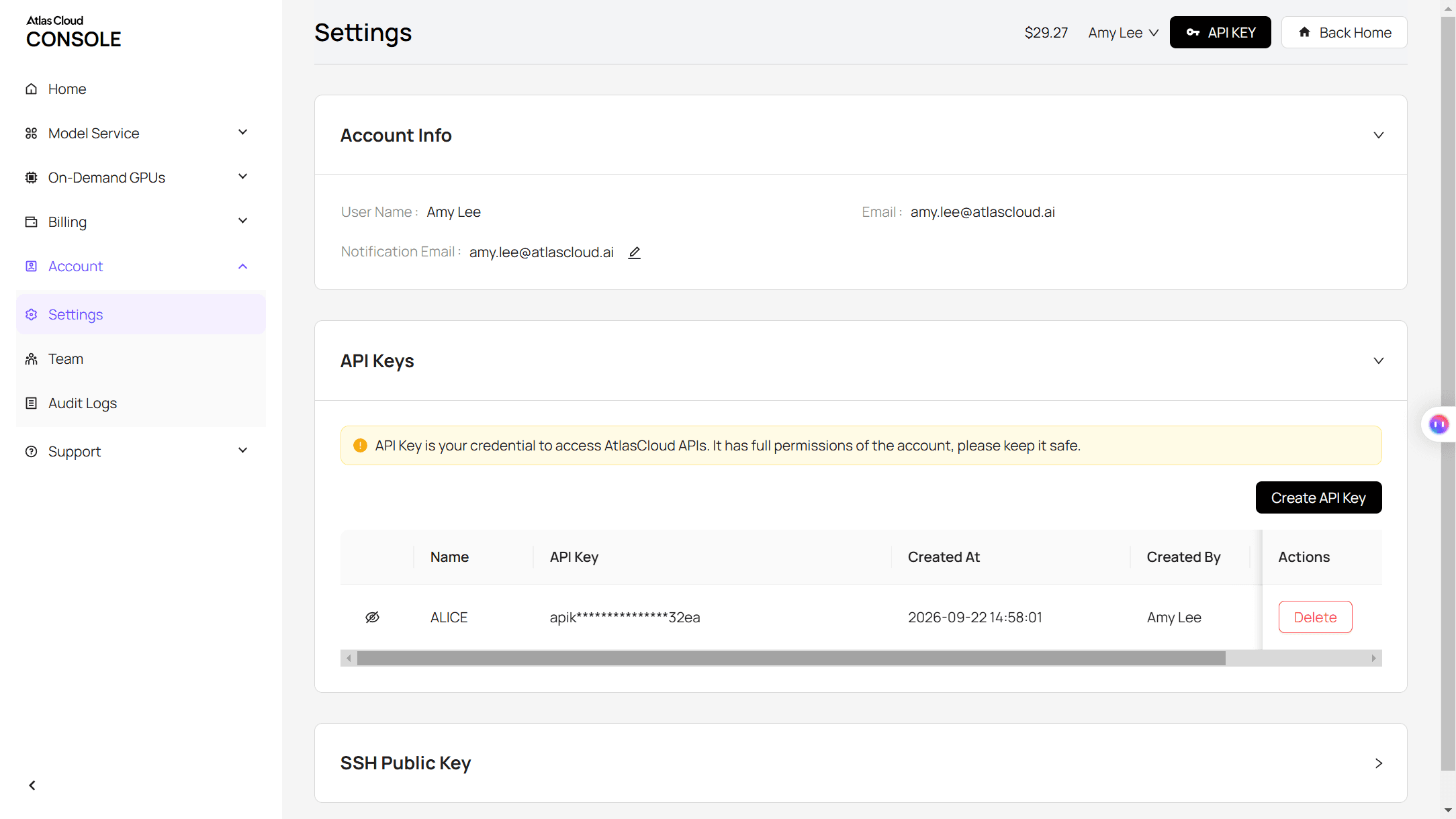
Step 2: Check the API docs. Authentication and polling are covered in the API documentation, and the Video Clone model page lists every field. The required ones are reference_video, product_image and user_prompt, with each file passed as a one-item list. Leave duration out and the output matches the reference length.
Step 3: Send your first request. This one asks for a 12-second vertical remake with the creator locked:
plaintext1curl -X POST "https://api.atlascloud.ai/api/v1/model/generateVideo" \ 2 -H "Authorization: Bearer $ATLASCLOUD_API_KEY" \ 3 -H "Content-Type: application/json" \ 4 -d '{ 5 "model": "atlascloud/studio/trend-remix", 6 "reference_video": ["https://your-cdn.com/research/winning-ad-reference.mp4"], 7 "product_image": ["https://your-cdn.com/products/portable-blender-yellow.jpg"], 8 "model_image": ["https://your-cdn.com/talent/approved-creator.jpg"], 9 "user_prompt": "Butter-yellow portable blender bottle with a white flip-top lid. Keep the reference video four-shot order and quick handheld cuts. The creator is the woman from the model image. 0-3s: she sips from the flip-top spout and smiles at the camera. 3-6s: hands pour milk over raspberries in the clear jar. 6-9s: a finger presses the button and the berries blend. 9-12s: she lifts the bottle toward the lens and winks.", 10 "duration": 12, 11 "ratio": "9:16", 12 "resolution": "1080p", 13 "generate_audio": "yes", 14 "count": 1 15 }'
The call returns a request ID right away. Poll it until the status reads completed, then take the video URL from the outputs array:
plaintext1curl "https://api.atlascloud.ai/api/v1/model/prediction/<request_id>" \ 2 -H "Authorization: Bearer $ATLASCLOUD_API_KEY"
The same endpoint and key serve Atlas Cloud's other video models and workflows, so moving to a studio-style commercial means switching the model string to atlascloud/studio/tvc-maker and filling its fields.
What Your Remake Should Borrow From the Winning Ad Creative
A reference ad hands you a structure that has already been paid for. Everything that makes it someone else's has to go.
| Borrow from the winner | Replace with your own |
|---|---|
| Beat order and shot lengths | Product, packaging and colorway |
| The seconds where the time analysis chart peaks | Claims and selling points you can back up |
| Camera distance and movement | Offer, price and call to action |
| The kind of setting (kitchen, gym, car) | Creator, voice and music |
| Caption length and tone | Logo, brand name and on-screen text |
Logos, exact footage, licensed music and a recognizable creator never cross over. Our AI ad cloning tools roundup covers where the legal lines sit.
One remake is also one data point. Test two or three hooks against your current best ad; our hook-by-format testing matrix shows one way to organize that.
Do You Need a Paid Spy Tool to Find Winning Ads?
Paid ad research tools such as GetHookd, Minea and TrendTrack index ads from Meta, TikTok or both. Here is what each source shows, going by each vendor's own product pages:
| What you want to know | Meta Ad Library | TikTok Top Ads | Paid research tools |
|---|---|---|---|
| Which ads are live | Every active ad, any advertiser | Ads advertisers authorized that met performance thresholds | Each vendor's own collected database |
| How long an ad has run | Start date on every card | Not on the card | Days-running counts on GetHookd and TrendTrack |
| Spend | None for product ads; EU reach for ads shown in the EU | Budget level: Low, Medium or High | GetHookd says it doesn't estimate spend; TrendTrack's spend and reach data is limited to the EU and UK and sourced from Meta's transparency report; Minea advertises budget estimation |
| Which second works | Not shown | Interactive time analysis | Varies by vendor |
| Saving ads | Your own sheet of Library IDs | Star to favorite | Boards, folders and swipe files |
| Cost | Free, no login | Free; log in for the full list | Paid plans, some with trials |
The TrendTrack line is the telling one: by its own account, its Meta reach and budget figures are built on the same EU transparency data you can open for free.
A subscription buys speed, with saved boards, days-running counts and search across many brands at once. For one product in one market, the two free libraries and a spreadsheet will get you to a shortlist. Agencies tracking dozens of competitors are the ones who earn the fee back.
FAQ
How long should an ad run before you call it a winner?
There's no official day count. Meta says an ad set usually leaves the learning phase "after about 50 results in the week after the ad set's last significant edit," according to its learning phase help page. An ad only a week or two old may still be in that unstable stretch, so wait until it has run a few weeks and still shows reuse before you study it.
Can you see a competitor's Facebook ad spend?
Not for regular product ads. Meta's Ad Library publishes spend ranges only for ads about social issues, elections or politics, and Meta stopped delivering those in the EU in October 2025. For a commercial ad, the nearest public numbers are EU reach on Meta and the Budget level on TikTok, so read them together with run length and reuse.
Why does TikTok Creative Center only show a few Top Ads?
Usually because you're logged out. TikTok's help center says logged-out visitors see only five ads, and our session showed four before a log-in prompt. Logged out, the time analysis chart on the detail page didn't load for us either, so sign in with a TikTok for Business account before you start researching.
Can you turn a vertical TikTok winner into a square Facebook ad?
Yes. The reference can be vertical while the output uses any of Video Clone's five ratios: 16:9, 9:16, 1:1, 3:4 or 4:3. Run the same reference once at 9:16 for Reels and Stories and again at 1:1 for Feed, and the workflow renders each shape directly, so you never crop a vertical clip into a square and lose the product.
Conclusion
A winning ad leaves a paper trail. In Meta Ad Library it shows up as a high place in the impressions order, a start date months back and a creative copied across several ads, with EU reach as the check that the money is real. On TikTok, the CTR percentile, the Budget level and the second-by-second chart tell you which beat is earning the click.
Once you have that shortlist, the remake is the fast part: turn the winner into a shot list, swap in your product and your creator, and test it against what you already run. That's how to find winning ads without a spy tool, and how to make one of your own from what you found.





