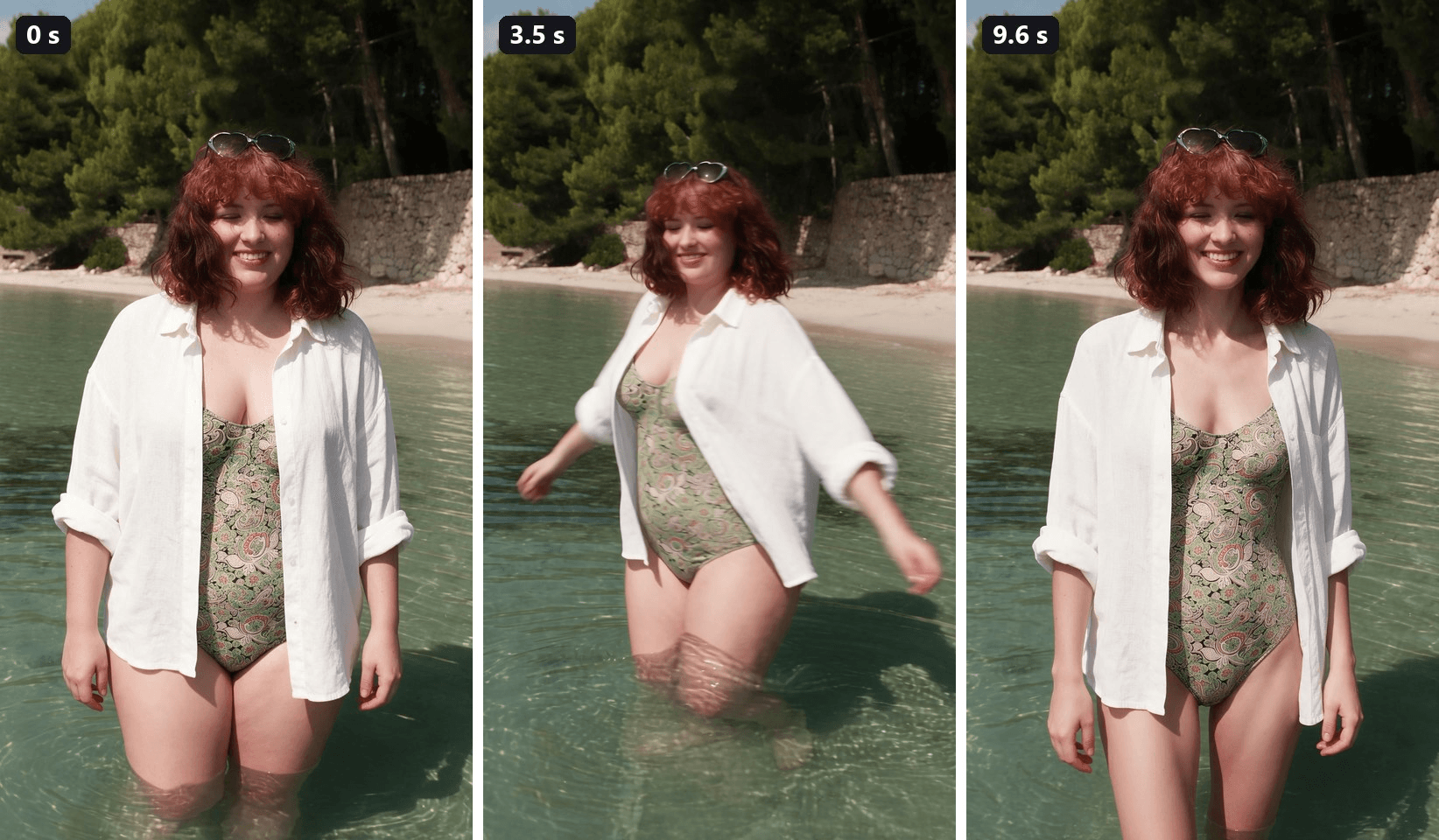
A woman in an open linen shirt wades toward the camera, spins once in the shallow water and finishes the turn noticeably slimmer. Same freckles, same smile, same heart-shaped sunglasses on her head. That ten-second clip is what a skinny filter usually means now: an AI edit that shows a lighter version of one person.
The phrase has meant three different things since 2021, and the CapCut templates that made it viral in March 2025 are only partly gone. This guide matches the trend to the templates still online, then shows how we made the clip above, and a second one, from a single photo each.
Key Takeaways
- Today a skinny filter usually means an AI template: your clip first, then a slimmer AI version after a quick transition.
- The most-used skinny template we traced on CapCut, Slim AI Filter, is still online, while several others from the March 2025 wave now open as empty pages.
- You can make a one-take versioninthe Atlas Cloud video generator with Seedance 2.5 and two frames.
- Edit the slim last frame from your first frame, so only the body changes and the face stays put.
- Treat the result as a what-if preview of one person, and only edit photos you have permission to use.
What Is the Skinny Filter on TikTok and CapCut?
On TikTok since March 2025, the skinny filter has mostly meant a CapCut template. You upload a clip of yourself, the template cuts to an AI-made slimmer version of you, and the caption does the rest. The most-used one we found still online is Slim AI Filter, created on March 17, 2025.
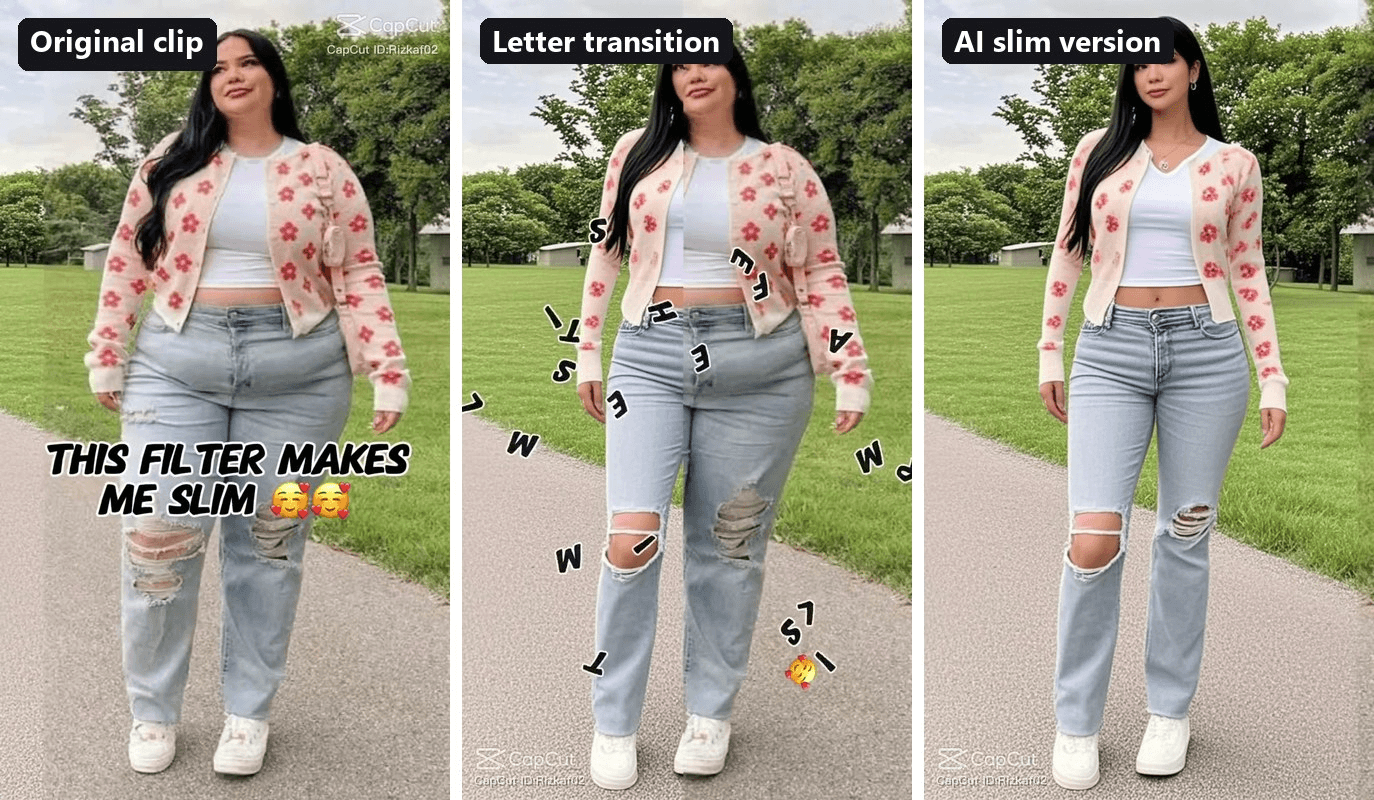
The template runs 13 seconds in two segments. The first five seconds play your own footage under the caption "THIS FILTER MAKES ME SLIM". Then the caption breaks into flying letters, and the second segment shows the AI version walking the same path in the same clothes. It appeared the same week as the chubby filter, its mirror image, which we covered in the AI fat filter guide.
Skinny Face Filter, Slim Filter and AI Skinny Filter Are Not the Same
Search the term and you will land on three kinds of effect, plus the band Filter's song "Skinny". They do different jobs:
| Type | What changes | Where it lives | Around since |
|---|---|---|---|
| Skinny face filter | Cheeks and jaw only; the body stays as it is | FaceApp's Small Face, Snapchat's Slim Face Filter lens | 2021 |
| Live slim filter | Your body is squeezed in the camera while you record | TikTok effects such as No Filter Slim and -10kg | Still posted in 2026 |
| AI skinny filter | A new, slimmer version of you is generated from a photo or clip | CapCut templates, AI photo and video tools | 2023 in photo apps, March 2025 on CapCut |
The first two warp pixels. That is how the face version became a meme: Dexerto reported on April 10, 2021 that TikTokers were stacking FaceApp's Small Face filter until their faces looked alien. The AI kind draws a new image instead, so the result looks like a real person and can also drift away from you.
The Skinny Filter CapCut Templates Still Online
We opened every skinny and slim template we could trace from TikTok posts. On November 10, 2026, five still loaded and accepted new uses:
| Template | Creator | Created | Uses | How it switches |
|---|---|---|---|---|
| Slim AI Filter | Rizkf_02 | March 17, 2025 | 29,487 | Letters scatter, then the slim clip plays |
| Slim filter | yakwave | March 19, 2025 | 10,927 | Sideways slide at 5 seconds |
| skinny filter | Juned_21 | August 25, 2025 | 3,771 | Quick transition at 2 seconds |
| AI SKINNY FILTER | Uud | March 20, 2025 | 3,544 | A three-second gradual morph |
| Skinny Filter AI | Massan | March 4, 2026 | 453 | Letters scatter in a 3:4 frame |
Five other template pages, the ones linked from March and May 2025 posts, now open empty: no title, no creator, zero uses. The survivors all follow the same recipe of two segments and one transition, and two of them put the word motivation right in the caption. AI SKINNY FILTER is the only one of the five that morphs instead of cutting.
What Would I Look Like Skinny? Make the AI Video From One Photo
The templates answer that question with a cut. The two clips below answer it in one take: each starts from one full-body photo and changes shape behind a twirl or a straw hat.
Both clips run 10 seconds at 1080p with sound, made on Atlas Cloud with Seedance 2.5. The model takes a first frame and a last frame, fills in the motion between them and generates the audio in the same pass.
That two-frame setup is the whole trick. You approve the slim version as a still before you pay for any video, and both frames come from one edit chain, so the face stays the same person. The twirl and the hat give the change somewhere to hide, the way the letters do in the CapCut template.
The frames come from the image generator's Image Edit tab and the clip from the video generator.
Method 1: First and Last Frame in the Video Generator
Step 1, the first frame. In the Image Edit tab, pick Seedream 5.0 Pro, upload a full-body photo and set the size to 9:16 at 1584 by 2816. This edit keeps the body exactly as it is and only reframes the shot and the outfit. We swapped a bikini for a one-piece and an open linen shirt:
plaintext1Turn this into a vertical photo of the same young woman, keeping her body exactly as it is in the reference: the same plus-size, curvy figure, the same face, wide smile, rosy cheeks, shoulder-length curly red hair and the sunglasses pushed up on her head. She now wears a one-piece swimsuit in the same green paisley print and an oversized white linen shirt worn open over it, sleeves rolled to the elbows. She stands in clear, shallow turquoise water up to her knees, facing the camera, arms relaxed, smiling. Behind her are the same pine trees, the same stone wall and a quiet sandy shore with no people on it. Bright Mediterranean midday sun, camera at waist height with a 50mm lens, she is framed from the knees up and fills most of the frame height, realistic skin and fabric texture, natural travel-photo look. No other people, no text, no logos, no watermark.
Step 2, the slim last frame. Reset, upload the frame from Step 1 rather than the original photo, and paste:
plaintext1Keep everything exactly as in this image: the same water, shore, pine trees, stone wall, sunlight, camera position and framing, the same pose, the same smile, curly red hair with bangs and the heart-shaped sunglasses on her head, and the same green paisley one-piece swimsuit and open white linen shirt. Change only her body: she is now a clearly slim version of herself, about 30 kg lighter, with a slender, toned build like a fit US size 4: a slimmer face with a defined jawline and visible cheekbones, a slim neck, slender arms, a small defined waist, a completely flat stomach under the swimsuit, narrow hips and slim legs. The swimsuit lies flat and smooth on her slim body, and the open shirt hangs loose and wide around her so her small waist shows between its edges. Healthy and fit, not bony or underweight. Her eyes, nose, smile, teeth, freckles and hairstyle stay exactly the same; she is clearly the same person. No other people, no text, no logos, no watermark.
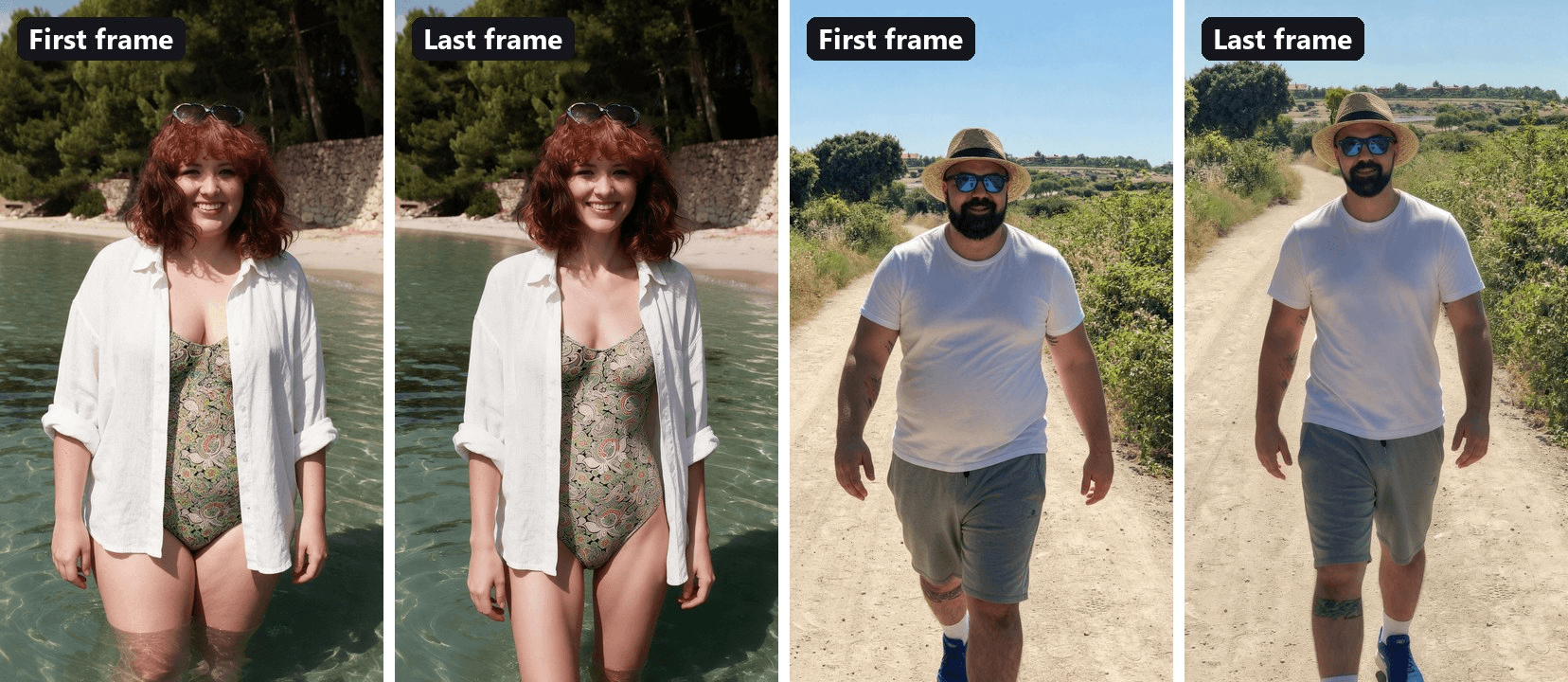
Four habits from our own runs made these frames work:
- Give it a number. "About 30 kg lighter, like a fit US size 4" gives a clear, visible change.
- Pin down the clothes. If the swimsuit or shirt changes style along with the body, run one more edit on the slim frame: "Change only the swimsuit: a classic one-piece with no cut-outs."
- Let the before show. With loose clothes, say the shirt "stretches over his round belly", so the first frame keeps the starting shape.
- Name every tattoo. List them in both frame prompts and they survive the edit.
Step 3, the video. Open the video generator, keep the Video Generation tab and Seedance 2.5, then follow the numbers:
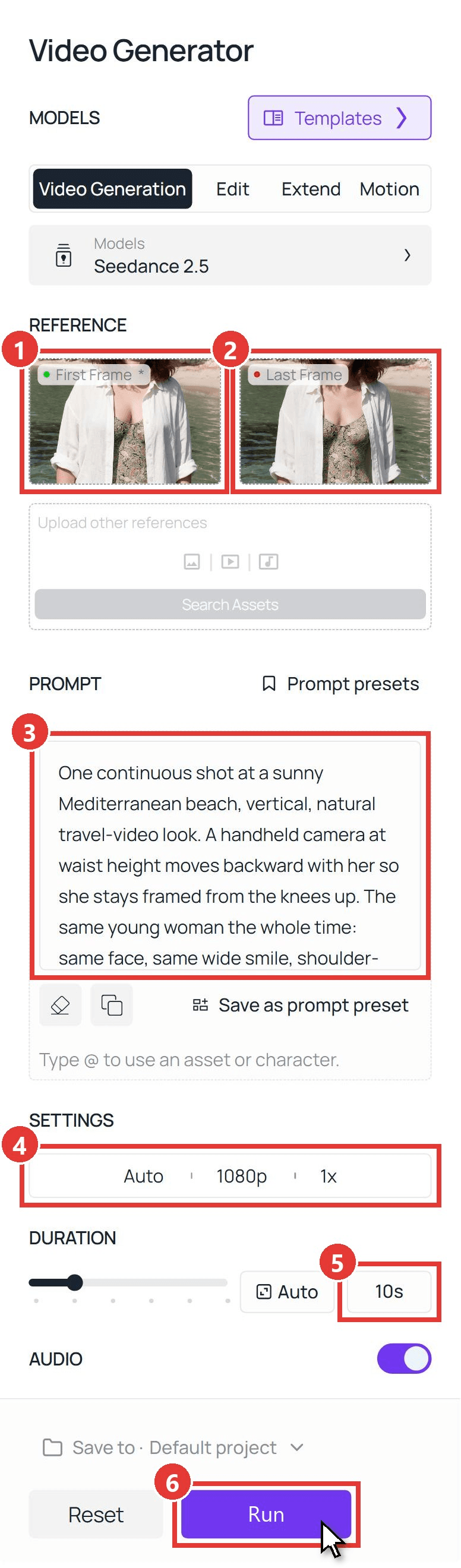
- First Frame: upload the frame from Step 1.
- Last Frame: upload the slim frame from Step 2 and check the thumbnail, since this slot decides where the clip ends.
- Prompt: paste the video prompt below.
- Settings: pick 1080p.
- Duration: type 10. Audio stays on.
- Run. The clip lands in the panel on the right a few minutes later.
plaintext1One continuous shot at a sunny Mediterranean beach, vertical, natural travel-video look. A handheld camera at waist height moves backward with her so she stays framed from the knees up. The same young woman the whole time: same face, same wide smile, shoulder-length curly red hair, sunglasses pushed up on her head, green paisley one-piece swimsuit and an open white linen shirt. She stays alive the whole time: she blinks, breathes, and the breeze moves her hair and shirt. 0-3s: she wades slowly toward the camera through the clear, knee-deep water, smiling into the lens. 3-5s: she does one full twirl in the water, her open shirt flaring out and water splashing around her legs; while she spins, her body becomes slimmer, and when she faces the camera again she is her slimmer self in the same swimsuit and shirt. 5-10s: she laughs, settles the sunglasses on her head with one hand and keeps wading toward the camera into shallower water, so more of her legs come out of the water, and she stays slim to the final frame. Her eyes, nose, smile and hairstyle never change; only her body shape changes, and only during the twirl. Nobody else is in the frame. No text, no letters, no logos. Sound: gentle waves, splashing water and her laugh, no music.
The timed beats follow the structure in our Seedance 2.5 prompt guide. For the trail clip, the hat replaces the twirl: at 3 to 5 seconds he sweeps it down in front of his body "like a magician's cloth" and is slim when it moves away.
Method 2: Seedance 2.5 API
Running it for a batch of photos? The API takes the same two frames and the same prompt.
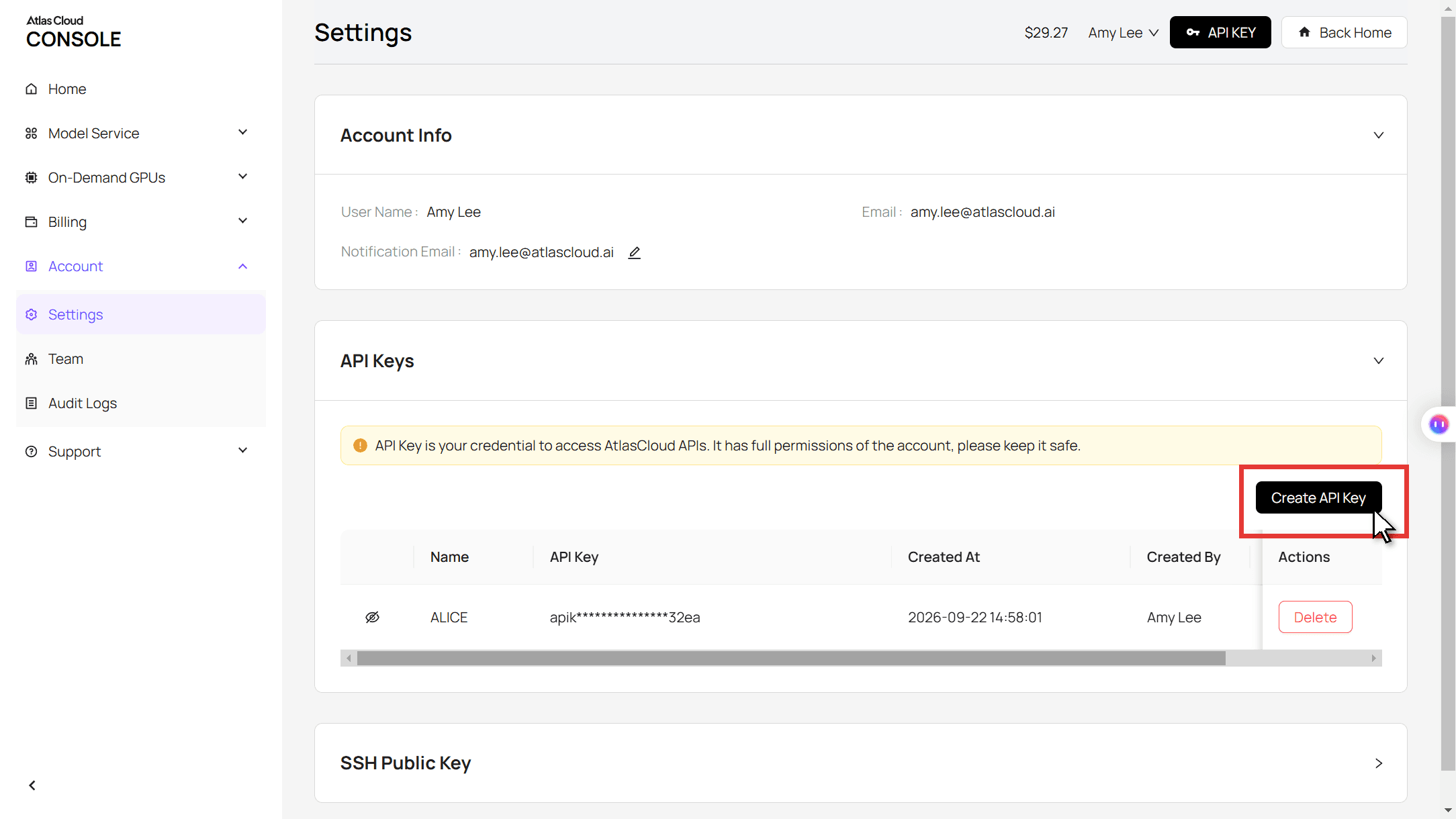
Step 1: Create an API key. In the console, open Settings and create a key under API Keys.
Step 2: Check the request format. The Atlas Cloud API docs list the authentication header and the image-to-video fields.
Step 3: Send the request and poll. The first frame goes in the image field and the slim frame in last_image:
plaintext1curl -X POST https://api.atlascloud.ai/api/v1/model/generateVideo \ 2 -H "Authorization: Bearer $ATLASCLOUD_API_KEY" \ 3 -H "Content-Type: application/json" \ 4 -d '{ 5 "model": "bytedance/seedance-2.5/image-to-video", 6 "prompt": "<paste the video prompt here>", 7 "image": "https://your-cdn.com/first-frame.jpg", 8 "last_image": "https://your-cdn.com/slim-last-frame.jpg", 9 "duration": 10, 10 "resolution": "1080p", 11 "generate_audio": true 12 }'
Poll the returned prediction ID until the status reads completed, then download the clip from the outputs array:
plaintext1curl https://api.atlascloud.ai/api/v1/model/prediction/<prediction_id> \ 2 -H "Authorization: Bearer $ATLASCLOUD_API_KEY"
The endpoint and the key stay the same for every video model on Atlas Cloud. To try another one, change the model string.
Weight Loss Filter Options: Live Effects, Photo Tools and AI Video
Which weight loss filter fits depends on what you want to post: a quick joke, a still, or a clip.
| Option | Example | Input | Output | Model named |
|---|---|---|---|---|
| Live effect | TikTok No Filter Slim and -10kg | Front camera | Warped live video | None |
| Photo tool | Dreamina AI Skinny Filter | 1 photo, strength 20 to 40 | One slimmer image | Seedream 5.0 |
| Video template | Magic Hour Lose Your Weight | 1 photo | 6 s clip | Kling 3.0 |
| Video template | Vidu Slim Shift | 1 full-body photo | Short clip | Not stated |
| Two-frame video | Atlas Cloud video generator | 2 edited frames | 4 to 30 s at 1080p, with sound | Seedance 2.5 |
Live effects are instant but squeeze everything in the frame, and posts using the -10kg effect in January 2026 joked about alien-looking faces. Photo tools give you a single still, which is enough for a side-by-side. The one-photo video templates generate both ends themselves, so you see the slim version only once the clip is done. With two frames, you check it first.
Why the Skinny Filter Trend Split TikTok in 2025
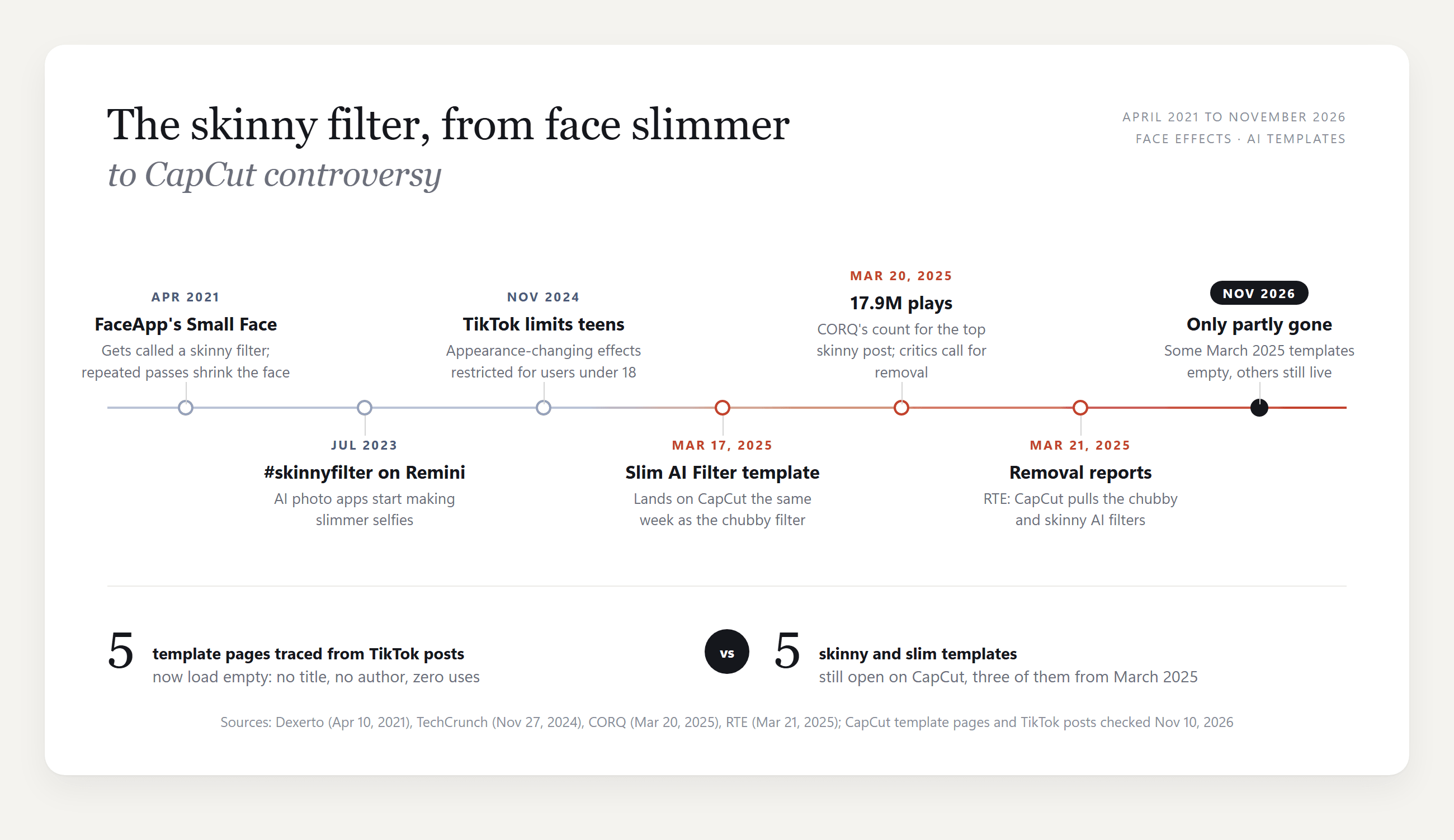
The March 2025 wave was huge and short. CORQ counted 17.9 million plays on the top post on March 20, 2025, under captions like "seeing how I'd look skinny for motivation". The pushback came within days: one creator asked viewers to report the videos and tagged TikTok and CapCut, writing "THIS IS NOT GOOD ENOUGH".
On March 21, RTE reported that CapCut had pulled the chubby and skinny filters over concerns about body image and mental health. TikTok had already said in November 2024 that it would restrict some beauty filters for users under 18.
What stayed online tells a messier story. The biggest posts from that week are gone, and so are several templates that week's posts linked to, yet Slim AI Filter kept collecting uses. If you post one now, caption it as a what-if, leave "motivation" out, and switch on TikTok's AI-generated content label before you publish.
Frequently Asked Questions
Is a skinny filter the same as a weight loss simulator?
No. A weight loss simulator, such as the NIDDK Body Weight Planner, works from your height, weight and activity to estimate calories and a timeline. A skinny filter only edits a picture. Neither one predicts how your body will actually look, so use the simulator for planning and the filter for fun.
What is the No Filter Slim effect on TikTok?
It is a live TikTok effect that slims your body in the camera while you record, and creators have posted with it since at least early 2025. The -10kg filter does a similar job. Search the effect name in TikTok's effects tab and record with it; nothing is generated, so there is no wait.
Did CapCut remove the skinny filter?
Partly. The March 2025 reports did not take every template down, so it depends on which link you have. If one from an old TikTok post opens a blank template, search the template name inside CapCut instead.
Why does the skinny filter change my face or tattoos?
AI templates generate a new version of you, and anything the model is not told to keep can change. One TikTok user posted that the only thing the template changed was her tattoos. Our trail prompts list his tattoos by position, "on his right upper arm and forearm" and "just below his right knee", and they carried over to the slim frame.
Is there a free skinny filter?
TikTok's live effects and Snapchat's Slim Face Filter lens cost nothing to use. AI tools usually run on free credits for a few tries, then charge per image or clip.
How much does a 10-second skinny filter video cost on Atlas Cloud?
About $5.98 for 10 seconds at 1080p with a first frame, a last frame and audio, which is 20% off the $7.47 list price, as of November 10, 2026. At 720p the same clip is about $3.04. Each Seedream 5.0 Pro frame edit at 1584 by 2816 is $0.072, also 20% off. The Run button shows the exact price before you generate.
Conclusion
The skinny filter started as a face squeezer, turned into a two-clip CapCut template and lost part of its catalog in one week of backlash. What survived is the format: you, a transition, a lighter you.
To make your own, edit the first frame, edit the slim frame from it, and let Seedance 2.5 move between them behind a twirl or a hat. Keep the caption a what-if, and the skinny filter stays a bit of curiosity about one person rather than a goal for anyone.


