


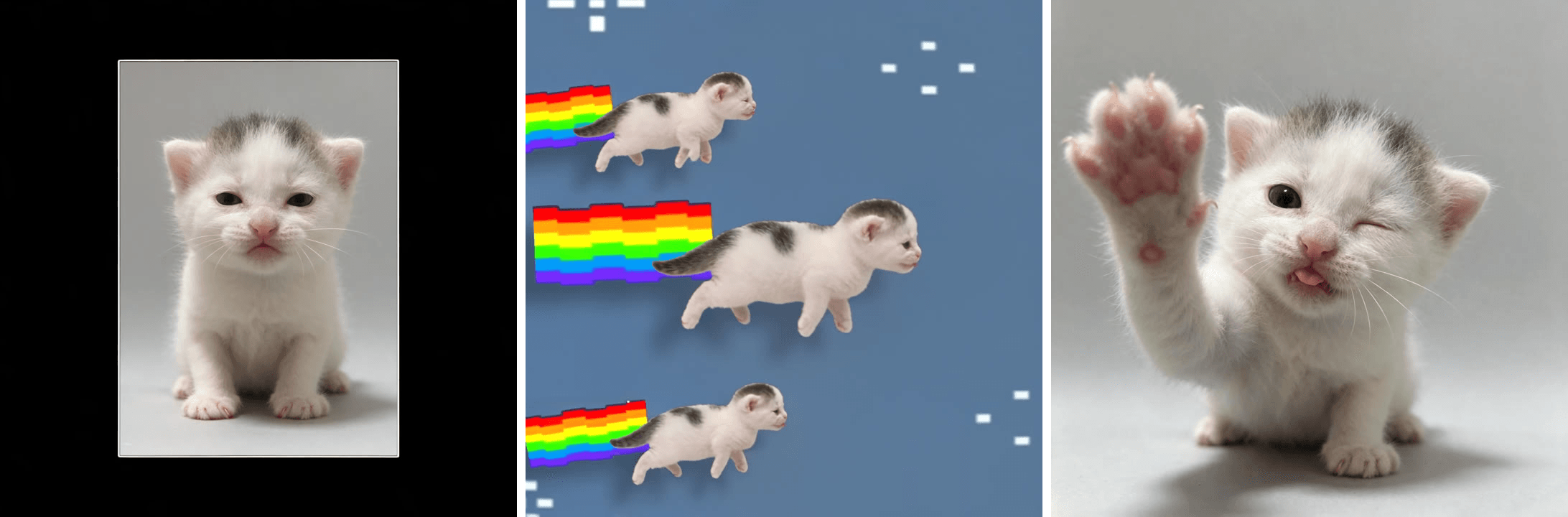
A snack can stretches to twice its height, snaps back, spins, and flies off in a row of copies, all on one kick drum.
That is tweenslop: tweening plus slop, a style of over-the-top animation where one picture gets pushed around on every beat of a Brazilian funk track. It started as an insult from animators and turned into a busy TikTok edit format this fall.
We traced the posts that set the look, checked for a CapCut template, and turned a kitten photo into a 15-second tweenslop clip with AI.
Key Takeaways
- Tweenslop joins tweening and slop: one picture bounced, stretched and spun on every beat of a Brazilian funk track.
- The look traces to a CheezeDibblessnack-can editfrom August 2026thatpassed 20 million views.
- Three looks share the name: CheezeDibbles-style product edits, cut-out photos flying in rows, and drawn characters jerking between poses.
- No high-use CapCut template carries the tweenslop name, so the top posts we checked were keyframed by hand, many in Alight Motion.
- One photo plus a reference edit in the Atlas Cloud Video Generator gives you a 15-second tweenslop clip.
What Is Tweenslop? The Meaning Behind TikTok's Tween Slop Trend
Tweening is the animation shortcut where software fills in the frames between two key poses. Slop is internet slang for cheap, mass-made content. Put them together and you get the joke: animation that leans entirely on the software, with nothing drawn in between.
Animators first used the word to mock lazy motion. Then they started making it on purpose, pushing the in-betweens so far that the result turns funny. The format that made this obvious is "my tweening style vs tweenslop": a creator shows a gentle animation first, then the same picture losing its mind when the funk drops.
| Normal tweening | Tweenslop | |
|---|---|---|
| Movement | Small sways, blinks, weight shifts | The whole picture tilts, stretches to double height and snaps back |
| Timing | Smooth, eased between poses | Hard cuts and zooms on every kick drum |
| Extras | Usually none | Color flashes, copies flying in rows, rainbow trails |
| Sound | Anything | Brazilian funk, often a custom track credited in the caption |
| Made in | Any animation app | Often Alight Motion or CapCut keyframes |
The posts we checked each ran on their own original funk track, which is why no two edits sound quite the same.
How to Make a Tweenslop Animation With AI From One Photo
Hand-keyframing a tweenslop edit can eat an evening. Our version took one photo, one reference edit and one run.
Atlas Cloud runs Seedance 2.5, ByteDance's video model that accepts reference photos and reference clips in the same request and lets you tag each one in the prompt. Give it your photo as @Image1 and a tweenslop edit as @Video1, and it rebuilds the edit shot by shot with your subject in every frame and every flying copy. The kitten above also blinks, yawns and sneezes between beats, which the static photo never could.
Method 1: Make a Tweenslop Video in the Atlas Cloud Video Generator
Start with the photo. A plain background keeps the cut-out readable when it spins, and a pose with some character gives the edit a punchline. We cleaned up the kitten's background and then gave it a raised paw and a tongue-out face with Seedream 5.5 in the Image Edit tab of the Image Generator.
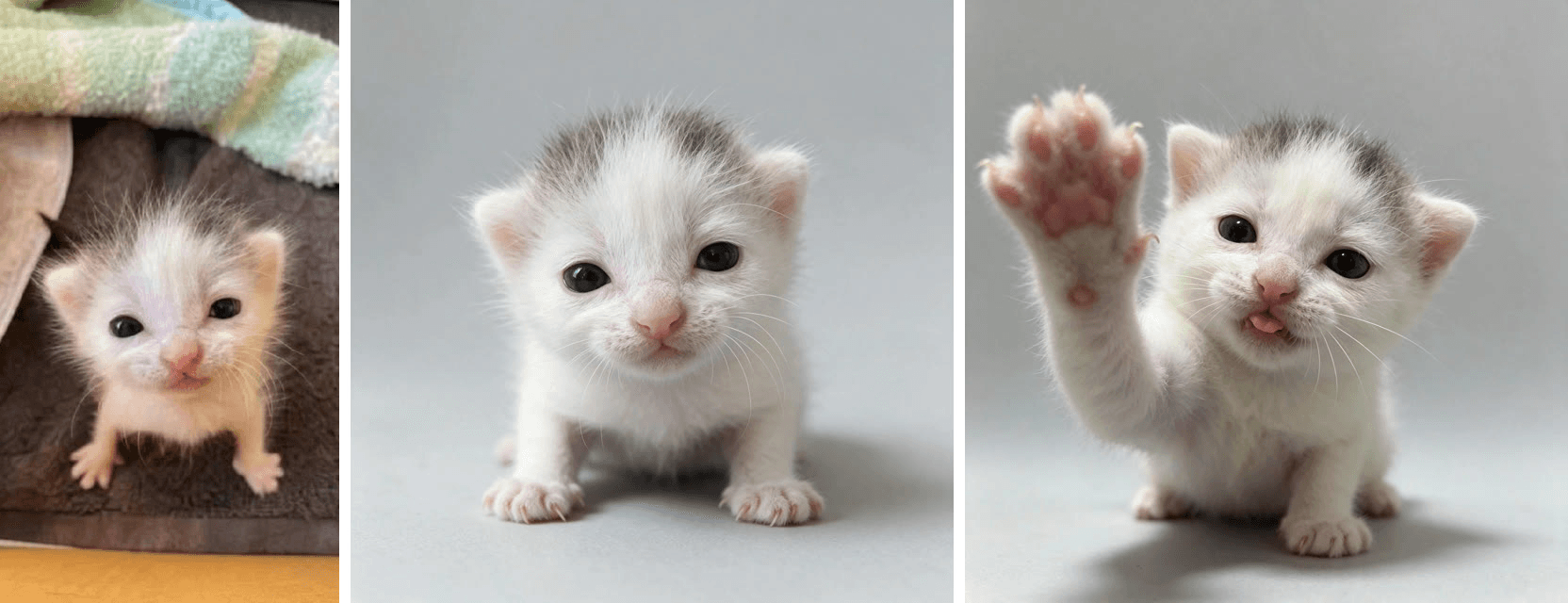
Then sign in, open the Video Generator, and follow the numbers.
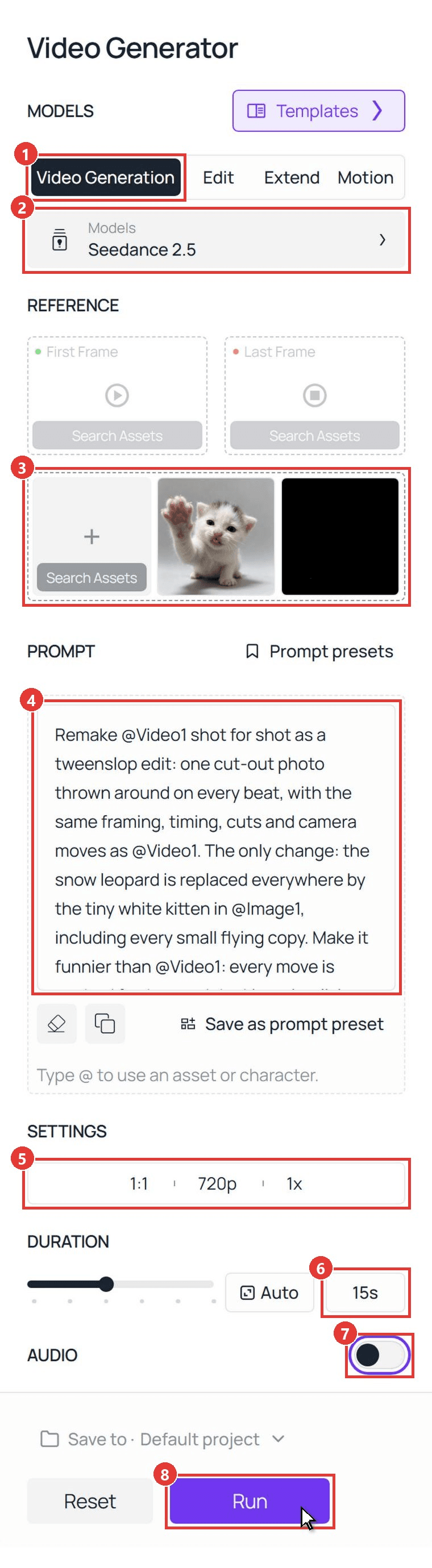
- Click the Video Generation tab.
- Keep the model on Seedance 2.5.
- Under Upload other references, add your photo first so it becomes @Image1, then a tweenslop edit about 15 seconds long as @Video1. We used a snow leopard edit posted on November 1. Mute the clip before uploading, and pick one with a clean frame: Seedance 2.5 follows the reference closely, so a clean clip gives a clean result.
- Paste the prompt. Ours, written for a pet:
plaintext1Remake @Video1 shot for shot as a tweenslop edit: one cut-out photo thrown around on every beat, with the same framing, timing, cuts and camera moves as @Video1. The only change: the snow leopard is replaced everywhere by the tiny white kitten in @Image1, including every small flying copy. Make it funnier than @Video1: every move is pushed further, and the kitten is a living photo sticker, so its face, eyes, ears, tongue and paws keep moving with a new little action on almost every beat instead of holding one expression. 2 3The cut-out: a sticker-like photo cut-out of the kitten in @Image1 with a thin clean white edge, keeping its exact face, dark eyes, small pink tongue, grey patch on top of its head, pink nose, pale pink ears and fluffy white fur in every frame. It stays a tiny kitten, never a grown cat. In the side-on rainbow shots it is the same kitten seen from the side, flying horizontally like a sticker. It never turns back into the leopard: no spotted grey coat, no thick tail, no large round ears. 4 5Follow @Video1 second by second: 60-1.5s: a small framed photo of the kitten sits in the middle of a black screen and jumps bigger on each beat. Inside the frame the kitten comes alive: it slowly blinks both eyes, licks its nose with its tiny pink tongue, then tilts its whole head far over to one side like a confused puppy and holds the tilt with the tip of its tongue sticking out, staring at the camera. 71.5-3.5s: a white flash, then the big cut-out on a plain grey background stretches up to twice its height, snaps back, squashes flat like a pancake and springs up again. On each beat it does one new thing: its ears flick, its head tilts to one side, it gives one quick wink, then it opens its mouth in a big wide yawn. 83.5-5s: a white flash; the cut-out in front of a green hill and a blue sky lifts its left front paw high and waves twice, then spins flat like a flipped coin and flies off as a flat picture. 95-8.5s: a white flash, then a dark blue background with tiny white pixel stars: a sideways cut-out of the kitten slides across with a pixel rainbow trail behind it, its little legs paddling as if it is swimming through the sky. More and more copies of the kitten pop in above and below until the screen is crowded, each with its own rainbow trail, and the copies do different things: one yawns, one licks its paw, one blinks. 108.5-12s: extreme close-ups of the kitten's face filling the frame while the colors flash on each beat: grey-green, lilac, white, peach and pink. Each flash shows a new face, and in between them the kitten keeps tilting its head far to one side and grinning with squinted happy eyes and the tip of its tongue out: eyes wide in shock, then a head-tilted squinty grin, a scrunched-up sneeze, then tilted the other way with the same grin, a slow sleepy blink, the tongue licking its nose. Then it tilts and flies off over a purple sky and a green hill. 1112-15s: a white flash, then rows of the kitten with rainbow trails slide across while the background color changes on every beat: teal, green, olive, brown, purple, every copy waving a paw. On the very last beat one single kitten bonks into the camera with its paw up, stops dead and gives one slow blink. 12 13Keep the cheap 2D tween-animation look of @Video1: hard zooms, bounces, squash and stretch, white flashes, flat color backgrounds, pixel stars and rainbow trails, all on the beat. The kitten's small face and paw actions are quick and cute, like a real kitten, while the cut-out is thrown around. One head per cut-out, four paws only, kitten paws only, no human hands, no person anywhere, no text, no captions, no logos, no watermark letters in the corner. No music, no singing, no lyrics.
- Open the settings bar and pick 1:1 and 720p, the same square frame as the reference.
- Type 15 into the duration box.
- Switch Audio off. The funk goes back on when you post.
- Click Run.
The second-by-second block keeps the result on the beat. Swap the subject lines for your own photo. Our Seedance 2.5 prompt guide covers more timing patterns.
Method 2: Generate Tweenslop Clips Through the Seedance 2.5 API
Running a "make your pet a tweenslop" button in an app? The same request works over the API.
Step 1: Create and copy an API key. Open Settings in your Atlas Cloud console, click Create API Key and copy it right away; the list masks it afterwards.
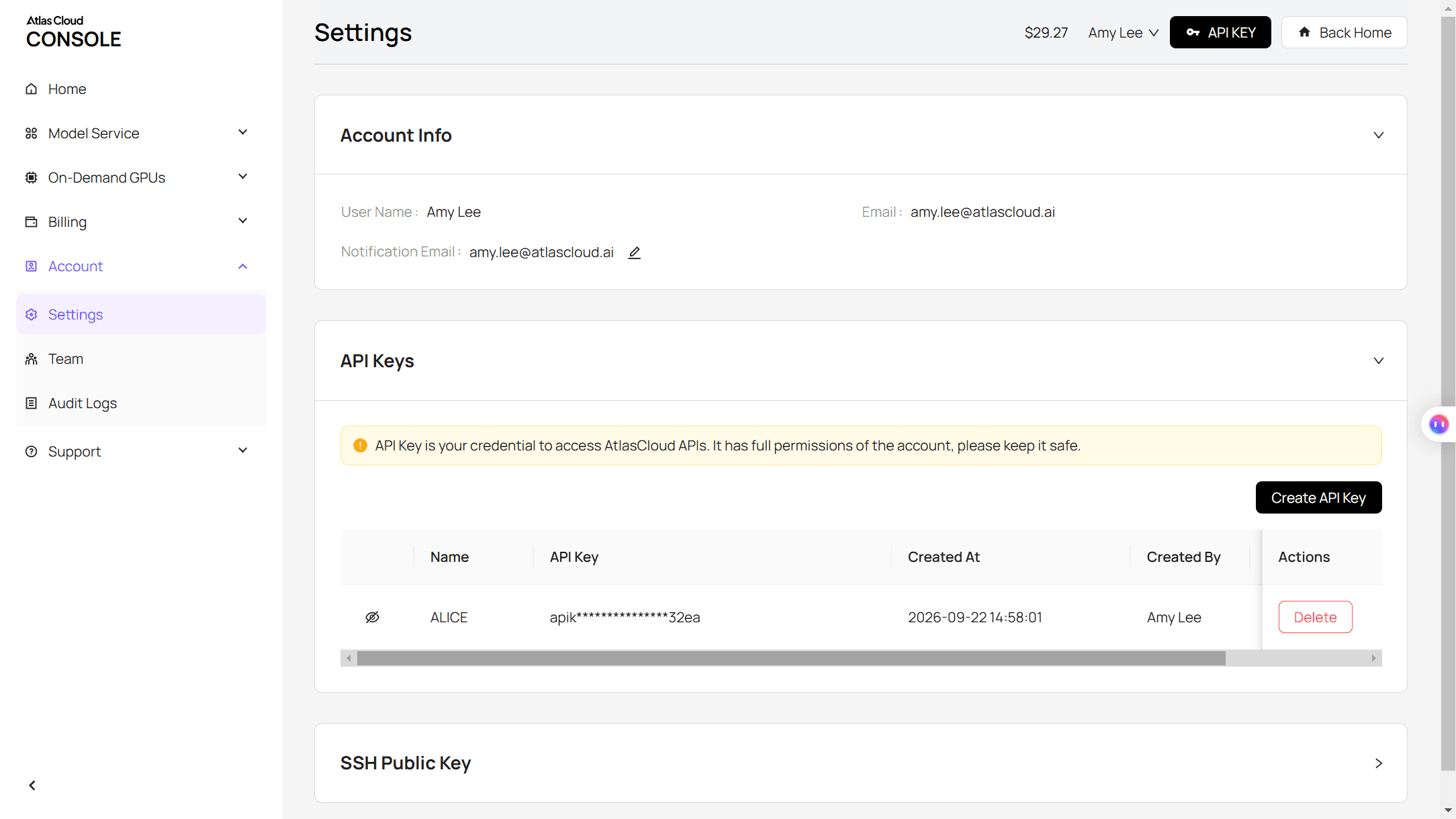
Step 2: Check the request format. The Atlas Cloud API docs list every field for the Seedance 2.5 reference-to-video model, the one the Video Generation tab calls when you add references.
Step 3: Submit the job and poll for the result. Put the photo in reference_images and the edit in reference_videos so the tags match the prompt:
plaintext1curl -X POST https://api.atlascloud.ai/api/v1/model/generateVideo \ 2 -H "Authorization: Bearer $ATLASCLOUD_API_KEY" \ 3 -H "Content-Type: application/json" \ 4 -d '{ 5 "model": "bytedance/seedance-2.5/reference-to-video", 6 "reference_images": ["https://your-cdn.com/kitten.jpg"], 7 "reference_videos": ["https://your-cdn.com/tweenslop-reference-muted.mp4"], 8 "prompt": "Remake @Video1 shot for shot as a tweenslop edit... (paste the full Method 1 prompt)", 9 "duration": 15, 10 "resolution": "720p", 11 "ratio": "1:1", 12 "generate_audio": false 13 }'
The response carries a prediction ID. Poll it until the status reads completed and the clip URL appears in the outputs array:
plaintext1curl https://api.atlascloud.ai/api/v1/model/prediction/<prediction_id> \ 2 -H "Authorization: Bearer $ATLASCLOUD_API_KEY"
Video models on Atlas Cloud share this endpoint, key and polling loop. Change the model string and its fields, and the same code runs a different model.
Tweenslop Styles: CheezeDibbles, the Cut-Out Photo Edit and the OC Dance
Scroll the tag and you will see three looks under one name, all sharing the funk and the over-pushed motion.
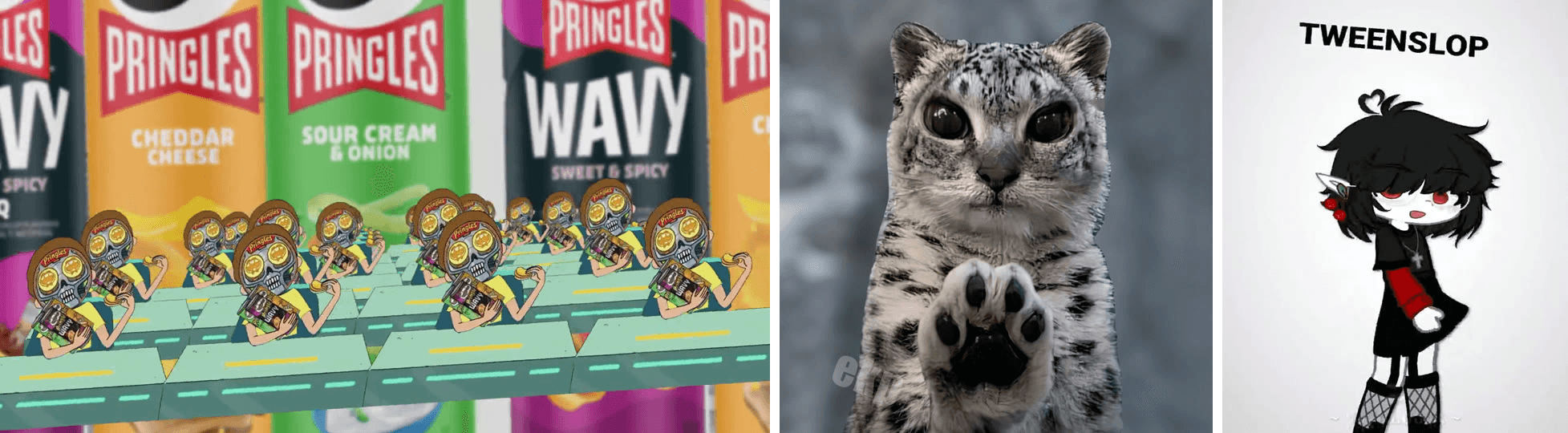
Left to right: the CheezeDibbles edit from August 11, the snow leopard cut-out edit from November 1, and a "my tweening style vs tweenslop" post from October 24.
- CheezeDibbles style. Product shots and a cartoon character cut out and slammed around in rows. Remakes tag the creator's name, and other animators now treat it as a named style to imitate.
- The cut-out photo edit. One real photo, often a pet, turned into a sticker that zooms, squashes and flies in rows with rainbow trails. This is the version that works from a single picture, and the one our kitten copies.
- The OC dance. A drawn character, from stick figures to Gacha OCs and Roblox avatars, jerks through head tilts and hip swings between a few key poses. The "my style vs tweenslop" comparison posts mostly live here.
Where the Tweenslop Trend Came From
The word is older than the trend. TikTok's ID for the #tweenslop tag dates it to July 2025, when it still meant lazy animation. The look that took off this fall came later. View counts below are as of November 16, 2026.
| Date | What happened | Reach |
|---|---|---|
| July 2025 | #tweenslop tag appears on TikTok, while the word still meant lazy tweens | Not tracked |
| August 11, 2026 | CheezeDibbles posts a Pringles cut-out edit | 20.8 million views |
| Late September 2026 | Creators remake the style with photos of themselves in Alight Motion | Up to 2.3 million views |
| October 24, 2026 | "My tweening style vs tweenslop" comparison format spreads | 4.8 million views |
| November 1, 2026 | Snow leopard cut-out edit with rainbow-trail copies | 1.4 million views |
| November 8 to 14, 2026 | At least five new posts each pass 10,000 saves | 14,000 to 51,000 saves each |
By mid-November the tag held close to 30,000 posts, and the top posts we checked were all made by hand.
Is There a Tweenslop CapCut Template?
Not one built for it. CapCut's template pages for tweenslop returned nothing when we checked on November 16. One template account tagging #tweenslop links to a head-bopping template with 57,237 uses, a different meme; its other tweenslop posts point to a deleted template.
| Route | What you need | What you get |
|---|---|---|
| Alight Motion or CapCut keyframes | A cut-out picture, a funk track and time to keyframe | Full control over every bounce and flash |
| A CapCut tween template | A photo for a fixed slot | Someone else's motion, often from a related meme |
| AI video model | One photo and a reference edit | Your subject rebuilt into the edit, with small live actions between beats |
If you prefer a one-photo edit with a fixed beat pattern, our wassup in a minute guide shows a related cut-out format.
Frequently Asked Questions
What song is used in tweenslop?
There is no single tweenslop song. The sound is Brazilian funk, a bass-heavy style close to phonk, and the posts we checked each used an original track, with the producer credited in the caption. Our AI clip was generated silent; we added the reference edit's funk afterward, starting at 0:00 so the white flashes hit on the beat.
Can I make tweenslop of my pet or my OC?
Yes. Pets are the closest match to the cut-out photo style, and a front-facing photo on a plain background works best. For an OC, upload the character art as @Image1, describe its colors and outfit in the prompt, and use an OC dance edit as the reference. For more pet clips, see our AI cat video guide.
How much does a tweenslop AI video cost on Atlas Cloud?
Our run, one photo plus a 15-second reference edit at 720p and 1:1, showed $5.45 on the Run button, 20% off list, as of November 17, 2026. The reference clip is billed by its length, so a shorter edit costs less; the Run button shows the exact total before you start.
Conclusion
Tweenslop is the in-between frames turned into the punchline. Strip away the funk and the flashes and what is left is a simple rule: one picture, pushed further than it should go, on every beat.
Pick a photo with a clear outline, choose an edit you like as the reference, and paste the prompt. Add the funk back when you post, and your own tweenslop is one run away.




