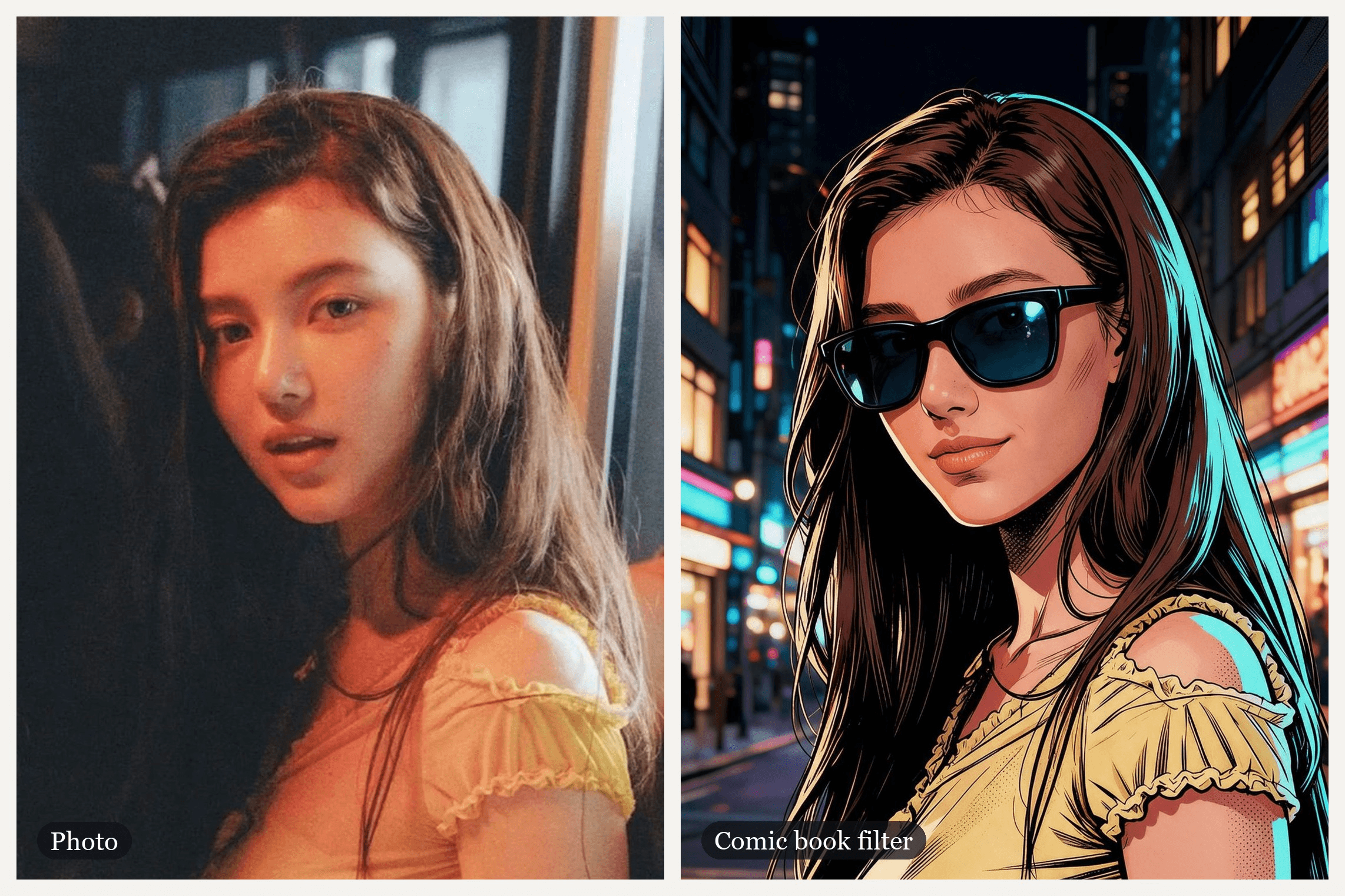
A soft, warm photo of a girl by a dim window. A camera flash goes off, the frame tears open like a page, and she comes back inked and flat-colored on a neon street, sliding on a pair of sunglasses. That before-and-after is the look people chase with a comic book filter, even though the name has belonged to several different effects since 2021.
TikTok has its own AI effect, CapCut has a template past ten million uses, and the iPhone version people remember may not be where they left it. This guide sorts out which is which. Then it shows how to make the whole reveal, sunglasses included, from one photo on Atlas Cloud.
Key Takeaways
- "Comic book filter" covers several effects: TikTok's AI effect is called AI Comic, and the biggest CapCut template we found is MARVEL COMIC.
- MARVEL COMIC showed 10,579,918 uses on November 10, 2026, the most of any comic template we checked.
- In the Atlas Cloud video generator, Seedream v5.0 Pro Edit turns one photo into a comic still and Seedance 2.5 turns both into a moving reveal.
- Name the comic style in the prompt and list the features to keep; the same face works as Marvel, manga, webtoon or vintage halftone.
- A classic comic book effect filters the pixels you already have, while an AI comic filter redraws you as a character.
What Is the Comic Book Filter on TikTok and CapCut?
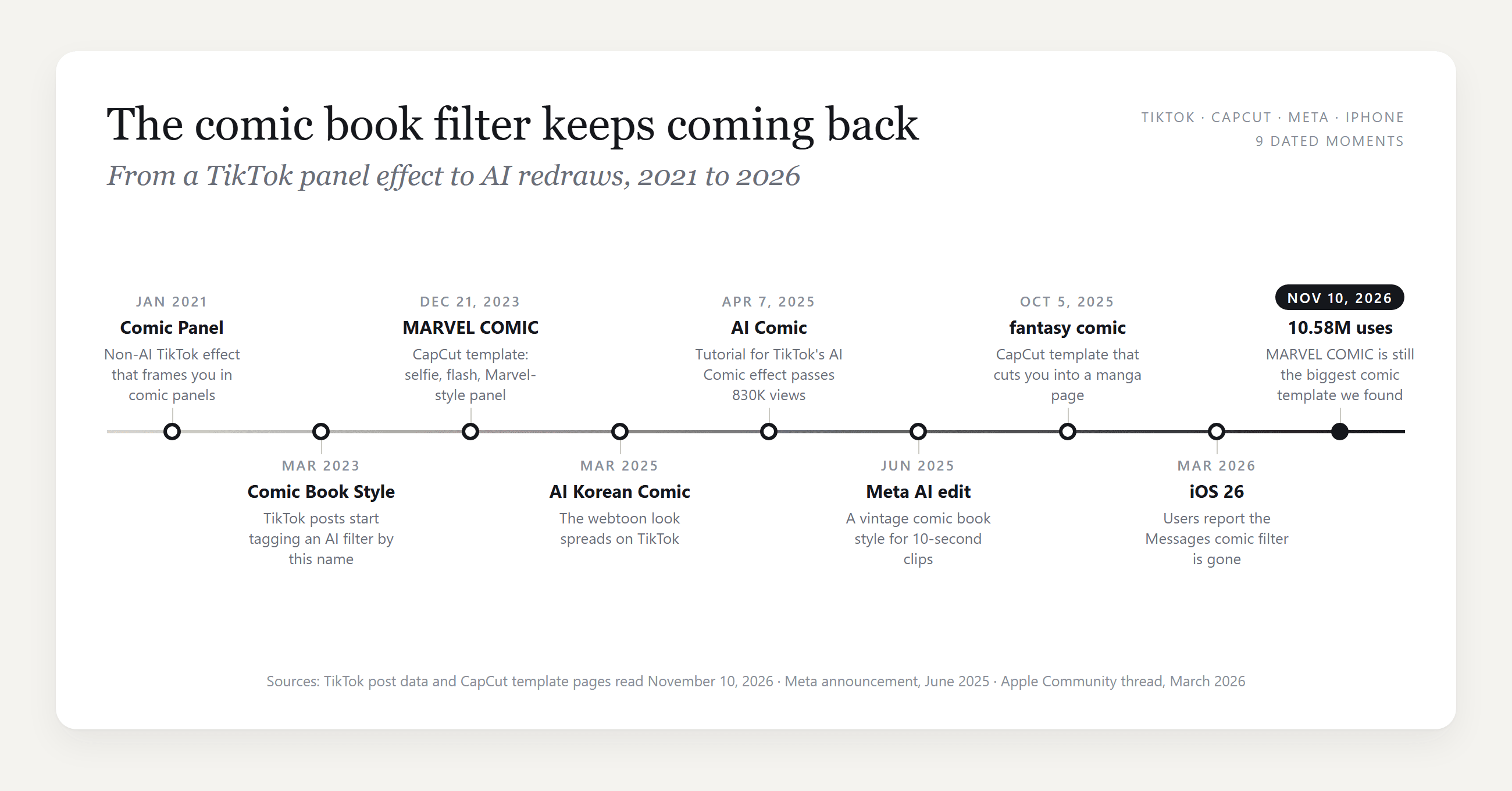
There is no single comic book filter. The phrase is an evergreen search that each app answers with its own effect, and the answer changes every couple of years.
On TikTok it started without AI. In early 2021 a wave of #comicpanel posts used an effect that framed people inside comic panels. By March 2023 creators were captioning posts with an AI "Comic Book Style" filter, and in March 2025 a webtoon-flavored effect called AI Korean Comic made the rounds.
The latest one we found is AI Comic. TikTok labels the posts that use it with that effect name, and @alexa.creations' tutorial, posted April 7, 2025, had more than 830,000 views on November 10, 2026.
CapCut answers with templates. The biggest comic one we found is MARVEL COMIC by niacreated, created December 21, 2023, and its CapCut page showed 10,579,918 uses on November 10, 2026. It runs 6.7 seconds: your selfie, a quick glitch flash, then a Marvel-style illustration of you with heavy outlines and a city behind you.
The newest comic template we found, fantasy comic from October 5, 2025, had 35,185 uses and cuts a manga-style portrait into a full page of panels.
Comic Book Filter App Options on iPhone, Instagram and Snapchat
Outside TikTok and CapCut, three more apps answer the search, and each works differently.
| App | What it is called | Where it lives | What it does to your picture |
|---|---|---|---|
| iPhone | Comic Book filter | The camera inside a Messages conversation, not the Photos app | A camera filter; see the note below |
| Instagram's Edits app and the Meta AI app | A vintage comic book style among 50-plus video prompts | AI video editing in Edits, the Meta AI app and Meta.AI | A generative restyle of 10 seconds of a clip |
| Snapchat | Comic Book lens | Lens search in the Snapchat camera | A live lens over the camera view |
The iPhone row needs a warning. In an Apple Community thread from March 2026, a user on iOS 26 reported that the comic filter vanished from the Messages camera with the update. Dozens of people marked the same problem, and no reply offered a way to bring it back.
Meta's version is built for video. The company announced AI video editing in Edits and the Meta AI app in June 2025, including a prompt that reimagines you as "a vintage comic book illustration". It works on 10 seconds of a clip and was free for a limited time at launch.
How to Make a Comic Book Filter Video From One Photo
CapCut's MARVEL COMIC stops on a still drawing, but a video can keep the drawing moving. On Atlas Cloud the job splits between two models: Seedream v5.0 Pro Edit redraws your photo as a comic panel, and Seedance 2.5 generates the clip that travels from the photo to the panel, with its own sound. The clip comes together in the AI video generator, and the still in the image generator beside it.
For three seconds she is a photo: a blink, a tilt of the head. A white flash and a page tear turn her into ink, and she winks at the lens. Then she lifts a pair of folded sunglasses from below the frame, flicks them open, slides them on and pushes them up with one finger. The clip is two Seedance 2.5 takes cut together, one for the reveal and one for the sunglasses.
Method 1: Make the Comic Still, Then the Reveal in the Video Generator
Start with the still, because the video needs it as its last frame. Open the generator's Image Edit tab, choose Seedream v5.0 Pro under Models and upload your photo. A chest-up shot with the face clear works best, since both ends of the video share that framing. Paste the prompt below, set the size to 1584*2816 for a 9:16 result and press Run.
plaintext1Turn this photo into a single panel of a modern American comic book, drawn and inked by hand, not a photo filter. The same young woman: same face shape, same eyes, eyebrows, nose and lips, the same small beauty mark on her cheek, lips slightly parted, the same calm look straight into the viewer. Same long straight dark brown hair falling over her shoulder. Same pose and framing as the photo: her body turned toward the right side of the frame with her shoulder to the viewer, head turned back to look into the lens, framed from the chest up, vertical 9:16. She wears an opaque pale yellow cotton top with small ruffled cap sleeves. Style: bold black ink outlines with varied line weight, flat cel-shaded colors, crosshatching and Ben-Day halftone dots in the shadows, a warm key light from the left and a cyan rim light on her hair, saturated colors. Behind her, a comic-drawn city street at night with lit windows and neon glow, simplified and slightly out of focus, no people. Natural adult proportions. Only one person. No text, no letters, no speech bubbles, no sound effect words, no logos, no superhero costume, not any existing comic character, no watermark.
For the sunglasses ending, we ran one more edit on that comic still. It asked the model to keep the panel exactly as it was, add black square-framed sunglasses with dark blue lenses, and close her lips into a slight smirk.
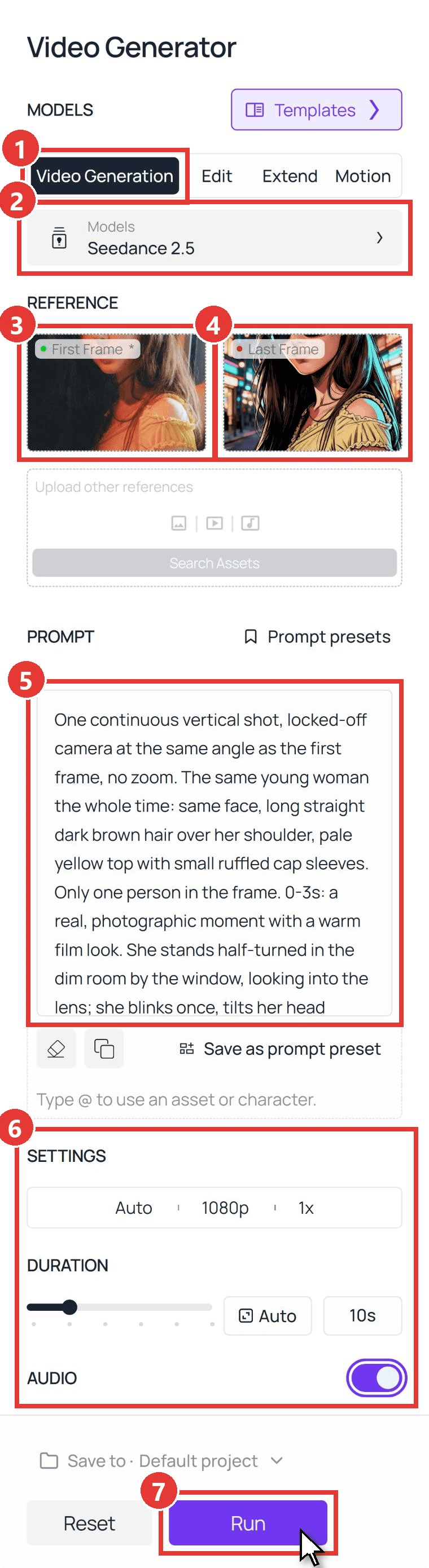
Now the clip. Follow the numbered controls in the screenshot:
- Switch to the Video Generation tab.
- Open Models and choose Seedance 2.5.
- Upload your original photo, cropped to 9:16, as the First Frame.
- Upload the comic still as the Last Frame.
- Paste the reveal prompt below into Prompt.
- Under Settings, pick 1080p, set Duration to 10 seconds and keep Audio on. There is no ratio to pick, because the clip follows the shape of the first frame.
- Press Run.
The first take used this prompt, and we kept its first six and a half seconds, through the flash and the wink:
plaintext1One continuous vertical shot, locked-off camera at the same angle as the first frame, no zoom. The same young woman the whole time: same face, long straight dark brown hair over her shoulder, pale yellow top with small ruffled cap sleeves. Only one person in the frame. 0-3s: a real, photographic moment with a warm film look. She stands half-turned in the dim room by the window, looking into the lens; she blinks once, tilts her head slightly and her lips part as if about to say something. The dark out-of-focus shapes at the edges of the frame stay still. 3-4s: a bright white camera flash fills the whole frame; as it fades, thick black ink lines sweep across the frame from left to right, and everything they pass turns into a comic book drawing: bold black outlines, flat cel-shaded color, halftone dots in the shadows, and the room behind her becomes a comic-drawn city street at night. 4-5s: she is now a comic book illustration and keeps moving as a drawing; she looks straight into the lens and slowly raises one eyebrow. 5-8s: one hand rises from below the bottom edge of the frame holding a pair of folded black sunglasses with dark blue mirrored lenses, drawn in the same comic style; with a quick flick of the wrist the sunglasses snap open, and in one smooth move she slides them onto her face, then pushes them up the bridge of her nose with one fingertip. Her hand never covers her mouth, and she puts the sunglasses on only once. 8-9s: her hand drops back down below the bottom edge of the frame; behind the dark lenses she tilts her chin up slightly, her lips close and one corner of her mouth curls into a cool, barely-there smirk, not a smile; the lenses catch small cyan and pink reflections of the neon street, strands of her drawn hair swaying. 9-10s: she settles into the exact pose of the last frame, sunglasses on. She keeps the sunglasses on until the end, the sunglasses keep the same shape the whole time, and she stays a comic illustration until the end and never turns back into a photo. No text, no letters, no speech bubbles, no sound effect words, no logos. Sound: a camera shutter click at 3 seconds, a quick page flip, one punchy comic impact hit, the crisp click of the sunglasses snapping open at about 6 seconds, then soft city night ambience, no music, no voice.
The second take kept the same two frames and settings and gave the sunglasses the whole stage. We cut from the first take to the second at a moment where her pose matched in both, with a quarter-second crossfade, and trimmed the still hold at the end.
plaintext1One continuous vertical shot, locked-off camera, no zoom, the same framing as the first frame the whole time. The same young woman as a comic book illustration: bold black ink outlines, flat cel-shaded color, halftone dots, cyan rim light on her long straight dark brown hair, pale yellow top with small ruffled cap sleeves, a comic-drawn neon city street at night behind her. Only one person in the frame. At the start she is not wearing sunglasses. 0-1.2s: keeping her cool half smile and looking into the lens, she raises one hand from below the bottom edge of the frame; in her hand is a pair of folded black sunglasses with dark blue lenses, drawn in the same comic style. 1.2-2.2s: her hand and the sunglasses are clearly visible in front of her chest; with a quick flick of the wrist the sunglasses snap open. 2.2-3.5s: she lifts them with both hands and slides them onto her face, the arms going over her ears behind her hair, and for a moment she looks at the lens over the top of the frames. 3.5-4.5s: she pushes the sunglasses up the bridge of her nose with her index finger. 4.5-5.3s: her hands drop back down below the bottom edge of the frame; behind the dark lenses she tilts her chin up slightly, lips closed, one corner of her mouth curling into a cool smirk; the lenses catch small cyan and pink reflections of the neon street. 5.3-6s: she settles into the exact pose of the last frame. The sunglasses only ever move with her hands: they never appear, vanish or jump onto her face by themselves, and they keep the same shape the whole time. She stays a comic illustration the whole time. No text, no letters, no speech bubbles, no logos. Sound: soft city night ambience, a crisp click as the sunglasses snap open at about 1.7 seconds, one short whoosh as they slide on, no music, no voice.
The timed lines do most of the work. "0-3s: a real, photographic moment" keeps the before readable, and the flash at three seconds gives the switch somewhere to hide. It is the same first-and-last-frame setup behind the 80s vintage filter, pointed at a comic panel instead of a decade.
Method 2: Run the Comic Book Filter Through the API
A batch of portraits, or a comic button inside your own app, needs two calls instead of two tabs.
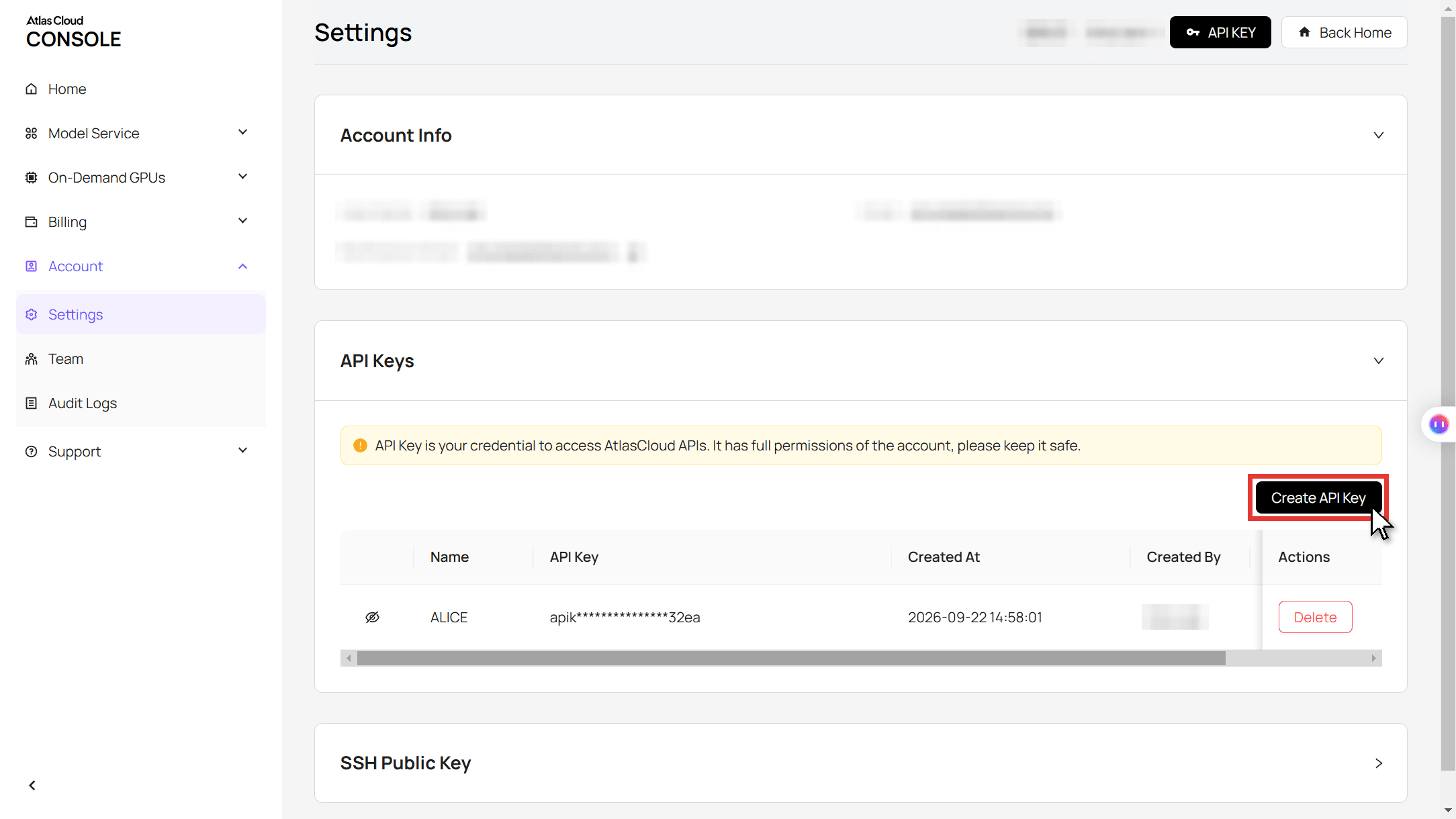
Step 1: Create and copy an API key in the Settings page of the Atlas Cloud console.
Step 2: Check the request format in the Atlas Cloud API docs.
Step 3: Make the still, then the clip, and poll for each file. The image call takes your photo URL and the comic prompt:
plaintext1curl -X POST https://api.atlascloud.ai/api/v1/model/generateImage \ 2 -H "Authorization: Bearer $ATLASCLOUD_API_KEY" \ 3 -H "Content-Type: application/json" \ 4 -d '{ 5 "model": "bytedance/seedream-v5.0-pro/edit", 6 "prompt": "Turn this photo into a single panel of a modern American comic book, drawn and inked by hand. Keep the same young woman: same face, eyes, nose, lips and beauty mark, same long dark brown hair, same pose and chest-up framing. Bold black ink outlines, flat cel-shaded color, Ben-Day halftone dots in the shadows, a cyan rim light on her hair, a comic-drawn neon city street behind her with no people. Only one person. No text, no speech bubbles, no logos, not any existing comic character.", 7 "images": ["https://your-cdn.com/selfie.jpg"], 8 "size": "1584*2816", 9 "output_format": "jpeg" 10 }'
The video call takes the original as image and the returned comic still as last_image:
plaintext1curl -X POST https://api.atlascloud.ai/api/v1/model/generateVideo \ 2 -H "Authorization: Bearer $ATLASCLOUD_API_KEY" \ 3 -H "Content-Type: application/json" \ 4 -d '{ 5 "model": "bytedance/seedance-2.5/image-to-video", 6 "prompt": "One continuous vertical shot, locked-off camera. The same young woman the whole time. 0-3s: a real photographic moment, she blinks and tilts her head. 3-4s: a white camera flash, then ink lines sweep across and everything turns into a comic book drawing on a neon city street. 4-10s: she stays a comic illustration, raises one eyebrow and settles into the exact pose of the last frame. No text, no speech bubbles. Sound: a shutter click at 3 seconds, a page flip, one comic impact hit, soft city ambience, no music.", 7 "image": "https://your-cdn.com/selfie.jpg", 8 "last_image": "https://your-cdn.com/selfie-comic.jpg", 9 "duration": 10, 10 "resolution": "1080p", 11 "generate_audio": true 12 }'
plaintext1curl https://api.atlascloud.ai/api/v1/model/prediction/<prediction_id> \ 2 -H "Authorization: Bearer $ATLASCLOUD_API_KEY"
The same two endpoints and the same key run the other image and video models on Atlas Cloud. To try the comic look on a different model, change the model string and keep the rest.
Comic Book Filter Styles: Marvel, Manga, Webtoon and Vintage Halftone
Swap the style block of the prompt and the same face lands in a different comic tradition. All four panels below came from the same photo, one run each, with the same keep-her-face sentences up front. Any of them can be the last frame of the reveal.
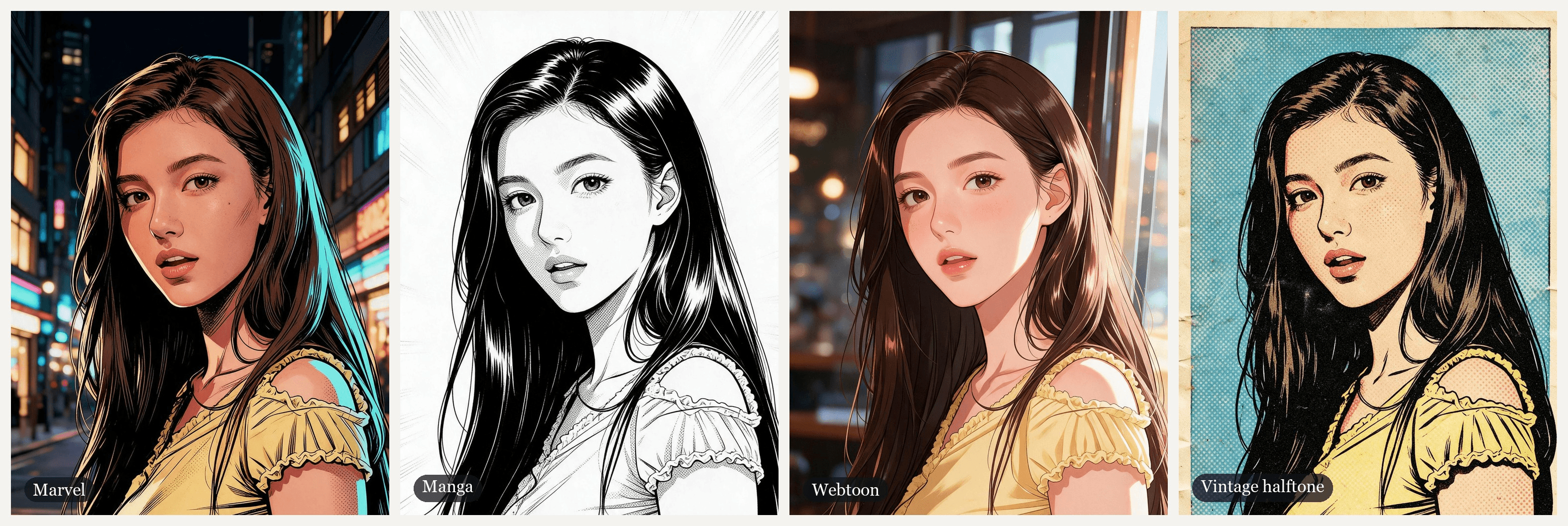
| Style | Closest app version | Prompt words that set the look |
|---|---|---|
| Marvel | CapCut's MARVEL COMIC | Bold black ink outlines, flat cel-shaded color, Ben-Day dots in the shadows, a cyan rim light |
| Manga | CapCut's fantasy comic | G-pen ink, grey dot screentone, speed lines, black, white and grey only |
| Webtoon | TikTok's AI Korean Comic | Thin line art, soft gradients, glossy hair and lips, golden-hour light |
| Vintage halftone | Meta's vintage comic book style | 1960s newsprint, a four-color print palette, large Ben-Day dots, misregistered color, yellowed paper |
Two lines are worth copying into any style. "No text, no speech bubbles" keeps the panel free of lettering you did not ask for. "Not any existing comic character" keeps the model from dressing you as a superhero, which also keeps you clear of someone else's character.
Manga Filter: The Black-and-White Screentone Version
The manga filter is the one style here that drops color, and that changes the prompt more than you might expect.
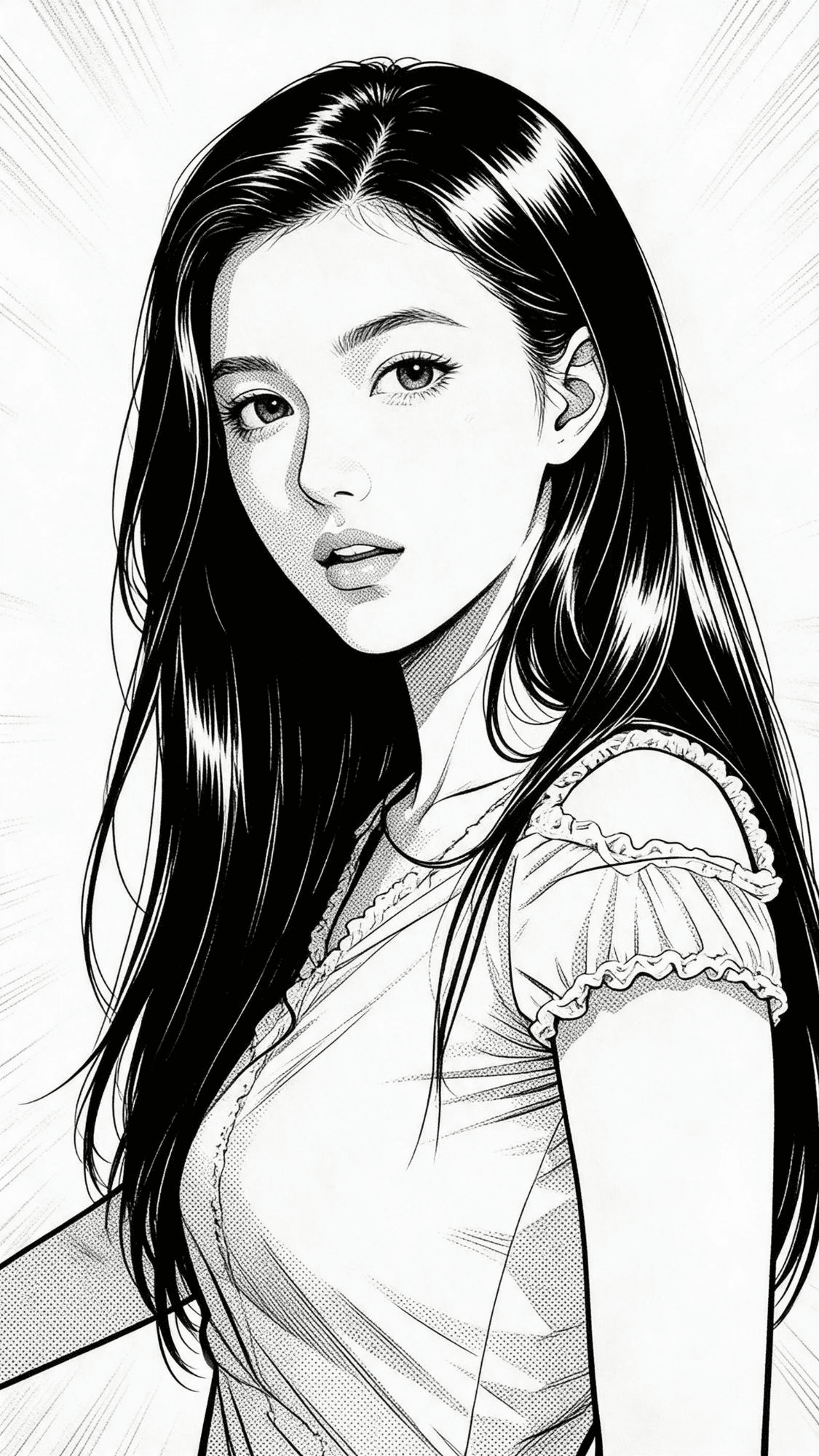
plaintext1Turn this photo into a single black-and-white Japanese manga panel, drawn with a G-pen and screentone, not a photo filter. The same young woman: same face shape, eyes, eyebrows, nose and lips, lips slightly parted, the same calm look straight into the viewer, same long straight dark hair over her shoulder, same pose and framing, framed from the chest up, vertical 9:16. She wears an opaque light-colored top with small ruffled cap sleeves. Style: clean crisp black ink lines, solid black hair with white shine highlights, grey dot screentone for shading, white background with soft radiating speed lines. Pure black, white and grey only, no color. Natural adult proportions, not chibi. Only one person. No text, no letters, no speech bubbles, no sound effect words, no logos, no watermark.
"Pure black, white and grey only" stops color from creeping back in. "Not chibi" holds adult proportions instead of a big-headed cartoon. The speed lines stand in for a background, so the face stays the focus. The prompt also asks for solid black hair with white shine marks, the way manga artists ink dark hair, so her dark brown hair comes back black.
Comic Book Effect vs AI Comic Filter: What Changes in Your Photo
Search for a comic book filter and Google's related searches include "no AI". That is a real split, and the two panels below show it on the same photo.
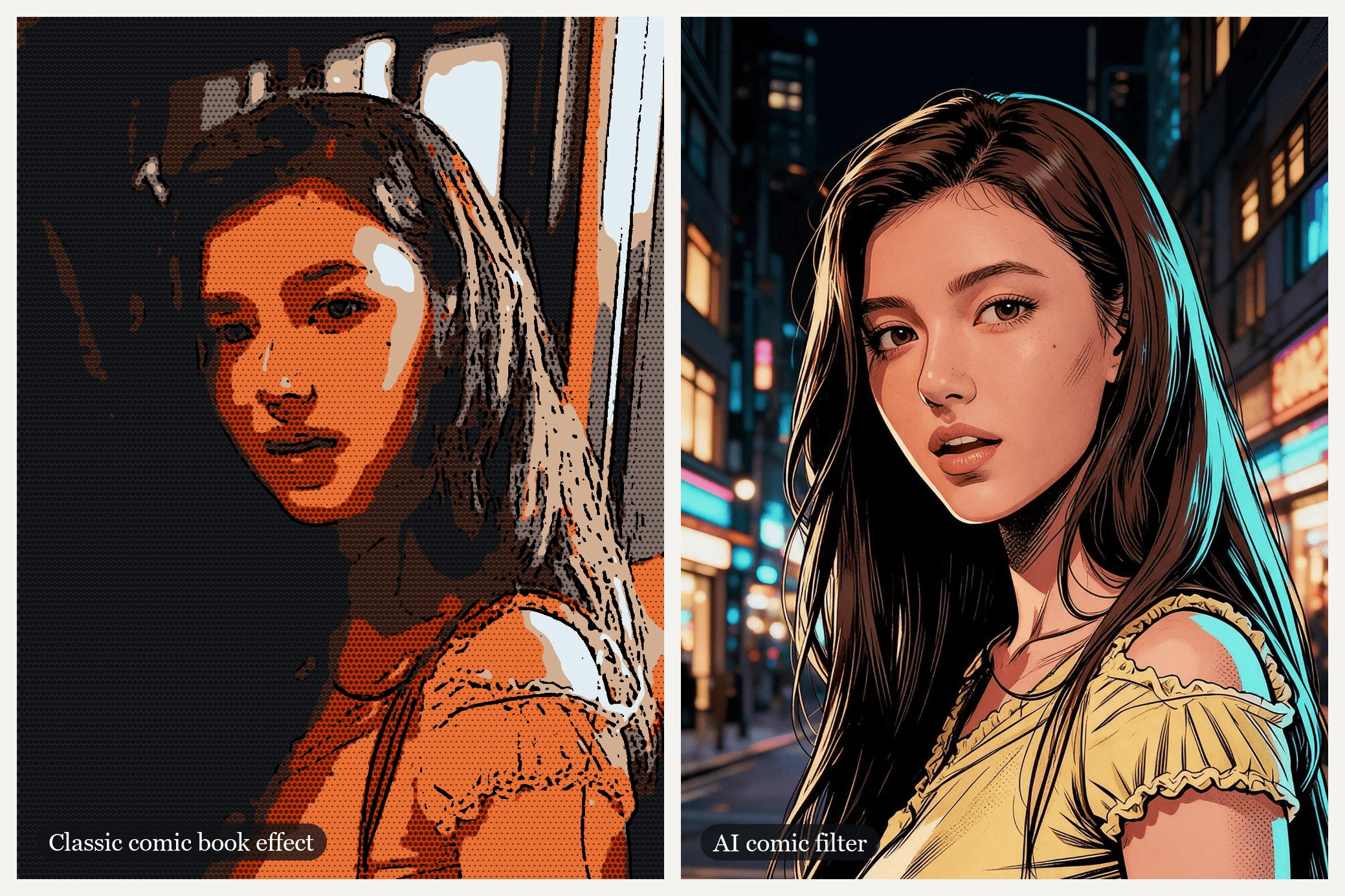
The left panel used no AI. We flattened the photo's colors into seven tones, traced the edges in black and printed a dot screen over the darker areas. The right panel is the Seedream v5.0 Pro Edit result from the Marvel prompt above.
| Classic comic book effect | AI comic filter | |
|---|---|---|
| What happens to the pixels | Kept and filtered into fewer colors, traced edges and dots | Drawn again in the style you name |
| Face | Every feature stays put, including blur and grain | Redrawn as clean line art that keeps the features you list |
| Background | The same room, posterized | Can become a new scene, such as a neon street |
| Speed | Seconds, often on the device | A model run per image |
| Best for | A quick comic book photo filter or a no-AI look | A character version of you, or the last frame of a video |
Pick by what you want to keep. If the photo itself matters (the room, the moment, the blur), the classic effect leaves it intact. If you want to look like you belong in a comic, a redraw gets you there in a way tracing cannot.
Frequently Asked Questions
Is there a comic book filter on TikTok?
Yes. The latest effect we found is called AI Comic: search the name in TikTok's effects, or tap the effect label on a post that used it. Many comic posts on TikTok are CapCut templates instead, and those open from the post's CapCut link rather than from the effects tray.
What is the comic book filter on CapCut called?
Of the comic templates we checked, MARVEL COMIC by niacreated has the most uses, and it is a selfie-to-Marvel reveal. For a manga look, fantasy comic by alexandrite turns your photo into a page of panels. The easiest way in is a TikTok post that uses the template, since its CapCut link opens the template directly.
Can you apply the comic book filter to an existing photo on iPhone?
Not with a built-in tool we could find. The comic filter sat in the Messages camera, and iOS 26 users report it is no longer there. For a picture already in your library, upload it to Seedream v5.0 Pro Edit with one of the style prompts above and save the result back to Photos.
Is there a free comic book filter?
For the classic effect, yes: plenty of browser tools posterize a photo and add dots at no cost, and the iPhone filter was free while it lasted. An AI redraw on Atlas Cloud is paid per run, and the Run button shows the price before you commit.
Is there a comic filter for video?
Yes, three routes. Meta's AI video editing, covered above, handles short clips. The two-take method above builds a comic video out of a single photo. To restyle footage you already shot, see how to turn a video into a cartoon or anime.
How much does a comic book filter video cost on Atlas Cloud?
As of November 10, 2026, after the 20% discount shown on the model pages, a Seedream v5.0 Pro Edit still at the 2K size used here is $0.072, or $0.036 at 1.5K. A 10-second Seedance 2.5 first-and-last-frame clip with audio is estimated at $3.04 at 720p and $5.98 at 1080p. The two-still, two-take version in this guide comes to about $12.10 at 1080p, so it pays to settle the prompt at 720p first.
Conclusion
The comic book filter has been a panel effect, an AI style tag, a template with ten million uses and an iPhone camera trick that may now be gone. Under all those names sit two techniques: a classic effect that filters your pixels, and an AI filter that redraws you as a character.
If you want the drawing to move, start with one clear chest-up photo and the Marvel prompt in Seedream v5.0 Pro Edit, then give Seedance 2.5 the photo and the panel as first and last frames. Add a second take for a closing beat like the sunglasses, and your comic book filter keeps going after the reveal, where the templates stop.


