Demander un résumé à l’IA
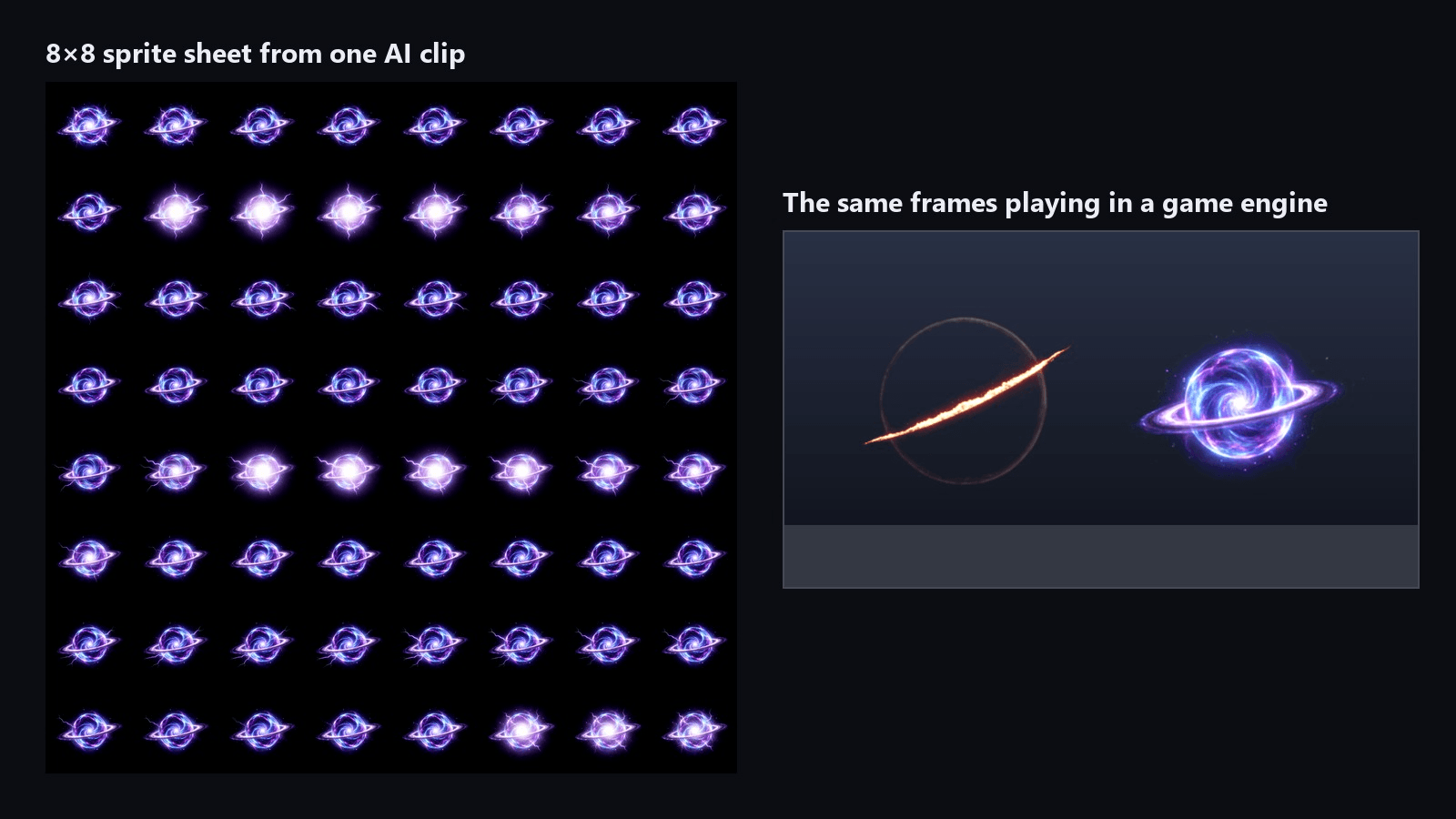
A solar slash that charges, cuts and burns out in five seconds used to mean a weekend in a particle editor or a paid VFX pack. We made one in an afternoon: one still image, one AI clip, one FFmpeg command.
The route is video to sprite sheet. A video model draws the motion on a black background, FFmpeg packs the frames into a grid, and the engine plays that grid as a flipbook. We ran the whole chain twice, once for a slash impact and once for a looping energy orb, and both ended up playing in Godot. The settings we used are below.
Key Takeaways
- A video to sprite sheet workflow turns one short AI clip into a flipbookthata game engine plays frame by frame.
- Seedance 2.5 in the Atlas Cloud video generator takes a first and a last frame, and the last frame decides how the effect ends.
- A pure black last frame makes a one-shot effect fade out, while reusing the first framegaveus a seamless loop.
- One FFmpeg command turned each five-second MP4 into a 64-frame, 8 by 8 sprite sheet.
- With an additive material in Godot, the black background disappears and no alpha channel is needed.
What a Video to Sprite Sheet Workflow Looks Like for Game VFX
A flipbook is a grid of frames stored in one texture. The engine shows one cell at a time, the same way a paper flipbook works. Game VFX artists use flipbooks for flames, explosions and similar effects.
What changed is who draws the frames. In late October 2026, the open-source effekseer-vfx-skill project added a video flipbook route in its v0.3 release. Its README says the route was verified with Seedance 2.5 and that any image-to-video model with first and last frames works. The idea: an image model paints one frame, a video model paints every in-between.
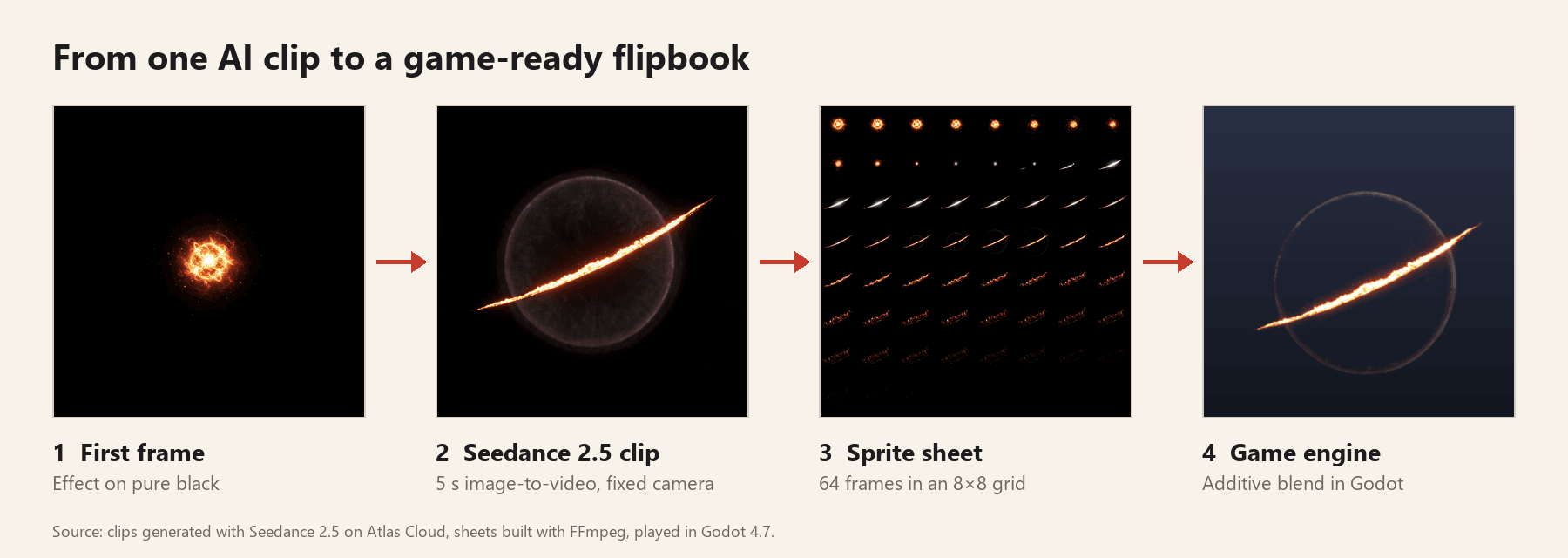
The project's guide explains where this helps: effects that change shape. Layered particle primitives can scale, fade and scroll a picture, but they cannot turn fire into smoke inside one silhouette. A video model draws that change in a single clip.
Generate the Spell Effect Clip with Seedance 2.5
The clip is the part that used to need an artist. Atlas Cloud hosts Seedance 2.5, and its image-to-video mode accepts both a first and a last frame. For game VFX that pair is the control you want: the first frame fixes the look, the last frame fixes the ending.
Here is the slash impact we got from one still and one prompt:
Method 1: Atlas Cloud Video Generator
Before opening the generator, prepare two square images. The first frame is your effect on pure black; any image model can paint it. The last frame is a plain black square.
Keep the element small. The bright core in ours spans about one seventh of the frame width, because the effect grows from that size and anything that touches the edge becomes a hard line in the sheet.
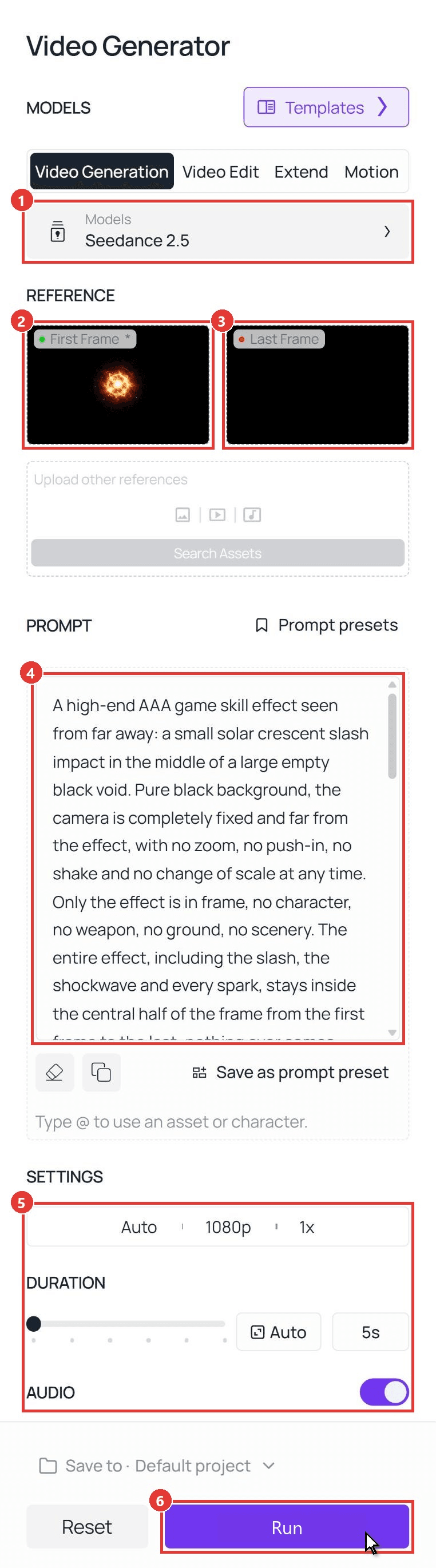
Then, in the Video Generation tab:
- Keep Seedance 2.5 selected in the model row.
- Upload the effect image to First Frame.
- Upload the black square to Last Frame.
- Paste the prompt.
- Set the resolution and a 5-second duration. We used 1080p.
- Click Run.
The prompt we ran:
plaintext1A high-end AAA game skill effect seen from far away: a small solar crescent slash impact in the middle of a large empty black void. Pure black background, the camera is completely fixed and far from the effect, with no zoom, no push-in, no shake and no change of scale at any time. Only the effect is in frame, no character, no weapon, no ground, no scenery. The entire effect, including the slash, the shockwave and every spark, stays inside the central half of the frame from the first frame to the last: nothing ever comes near the frame edges, and a wide band of pure black stays visible on all four sides in every single frame. No full-screen flash, no white-out, no haze, no fog, no grey or lit background at any moment. 20-1 s: the small solar core from the first frame implodes: its embers and thin golden streaks are pulled inward along curved paths, and the core shrinks to a tiny blinding white point. 31-2 s: a short razor-sharp crescent of plasma, no longer than one third of the frame width, flicks diagonally through the core from lower left to upper right within a few frames and stops. It has a white-hot leading edge, a molten gold body and thin trailing ribbons of orange fire. Both tips of the crescent are clearly visible inside the frame, surrounded by black. 42-3 s: one thin bright shockwave ring pops out from the core, expands to about one third of the frame width and fades there, while the crescent tears into short curling tongues of fire and a spray of fast sparks that travel only a short distance. 53-5 s: the fire tongues thin into glowing filaments, the sparks slow, cool from gold to deep red and die out one by one until the frame is pure black, matching the last frame. 6Look: modern AAA real-time VFX, cinematic HDR bloom kept tight around the effect, fine particle detail, fluid fire motion, fast attack and slow decay. Color: white-hot, molten gold, amber, deep crimson. The background stays pure black in every frame; no ground, no reflection, no text.
Three parts of it carry over to any effect. Say where the effect stays and how far away the camera is. Name the cliché you do not want, such as haze or a full-screen flash. Give each second range one change and its end state. For a hand-drawn look instead of this glowing one, our Seedance 2D animation guide goes deeper.
Method 2: Seedance 2.5 Image-to-Video API
A game needs dozens of effects. Once a prompt works, the same job runs as a request, so a script can loop over fire, ice, poison and lightning.
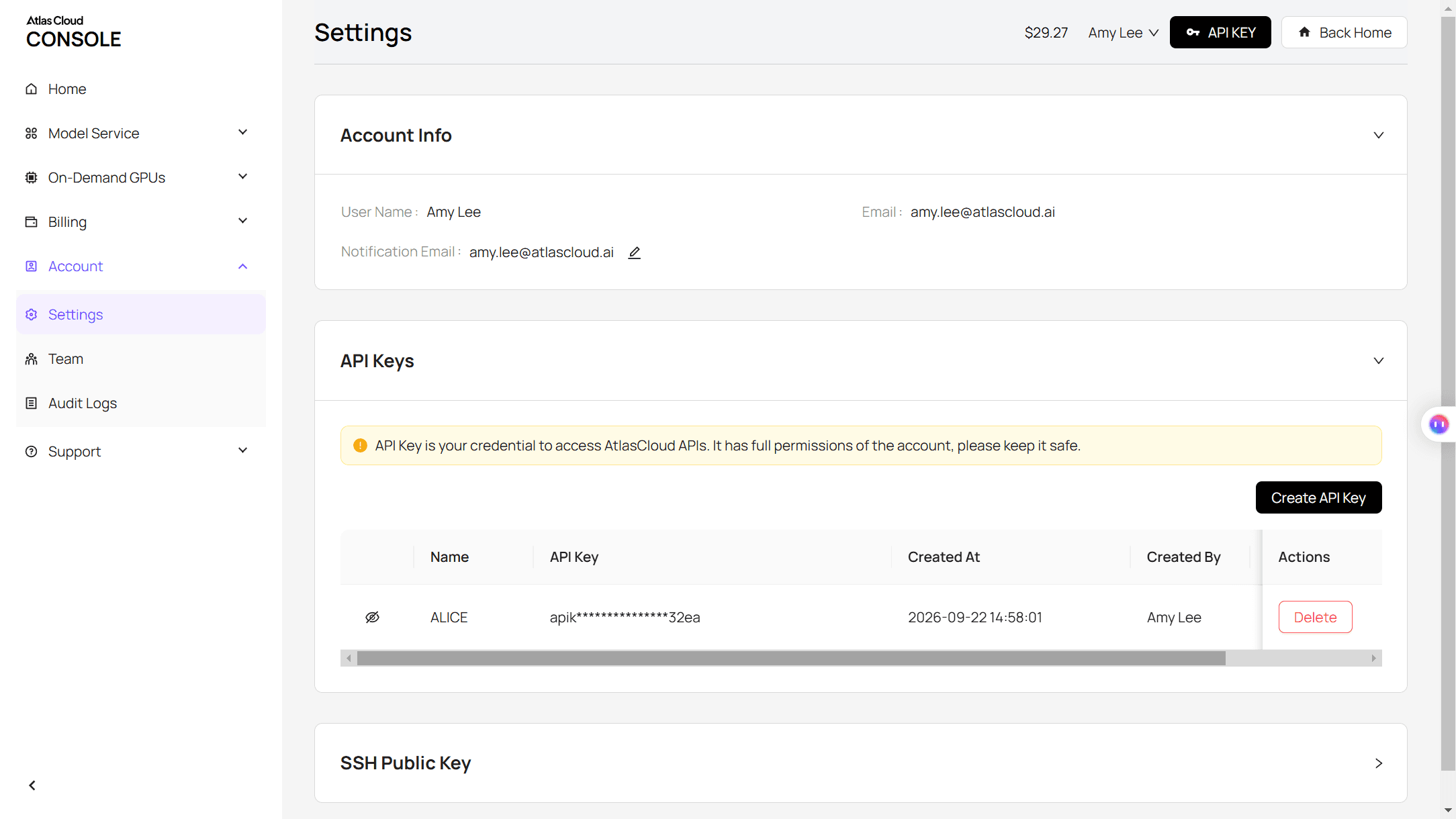
Step 1: Create and copy an API key in the Settings page of the Atlas Cloud console.
Step 2: Check the request format in the Atlas Cloud API docs, or on the API tab of the Seedance 2.5 image-to-video page. The first frame goes in a field named image and the last frame in last_image, both as URLs.
Step 3: Submit the clip, then poll for the file. The prompt is abridged here; paste the full one from Method 1.
plaintext1curl -X POST https://api.atlascloud.ai/api/v1/model/generateVideo \ 2 -H "Authorization: Bearer $ATLASCLOUD_API_KEY" \ 3 -H "Content-Type: application/json" \ 4 -d '{ 5 "model": "bytedance/seedance-2.5/image-to-video", 6 "image": "https://your-cdn.com/solar-core-first-frame.png", 7 "last_image": "https://your-cdn.com/black-last-frame.png", 8 "prompt": "A high-end AAA game skill effect seen from far away: a small solar crescent slash impact. Pure black background, fixed camera, only the effect is in frame. 0-1 s: the core implodes to a white point. 1-2 s: a short crescent of plasma cuts through it. 2-3 s: one thin shockwave ring expands and fades. 3-5 s: the fire dies out until the frame is pure black.", 9 "duration": 5, 10 "resolution": "1080p", 11 "generate_audio": false 12 }'
plaintext1curl https://api.atlascloud.ai/api/v1/model/prediction/<prediction_id> \ 2 -H "Authorization: Bearer $ATLASCLOUD_API_KEY"
Poll until the status reads completed, then download the MP4 from outputs. The same endpoint and key reach the other video models on Atlas Cloud, so testing an effect on another model means changing one string.
Convert the MP4 to a Sprite Sheet with FFmpeg
Our 1080p clips came back as 1440×1440 MP4 files with 121 frames at 24 fps. A flipbook does not need all of them. We kept 64, enough for an 8 by 8 grid, and packed them with one command:
plaintext1ffmpeg -i orb.mp4 -vf "fps=12.8,format=gbrp,colorlevels=rimin=0.08:gimin=0.08:bimin=0.08,crop=1180:1180:113:108,scale=256:256:flags=lanczos,tile=8x8" -frames:v 1 orb_sheet.png
Read the filter chain left to right:
- fps resamples the clip to 12.8 frames per second, which is 64 frames over 5 seconds.
- format and colorlevels raise the black point, so faint glow near the edges becomes true black and no cell shows a border. Our clips were 10-bit, and the conversion to RGB has to come first.
- crop trims the empty black around the effect so each cell is well filled. Measure your own clip and change those four numbers. The slash already filled its frame, so we left crop out for that one.
- scale sets the cell size to 256 pixels.
- tile lays the frames out in the grid.
The output is one 2048×2048 PNG.
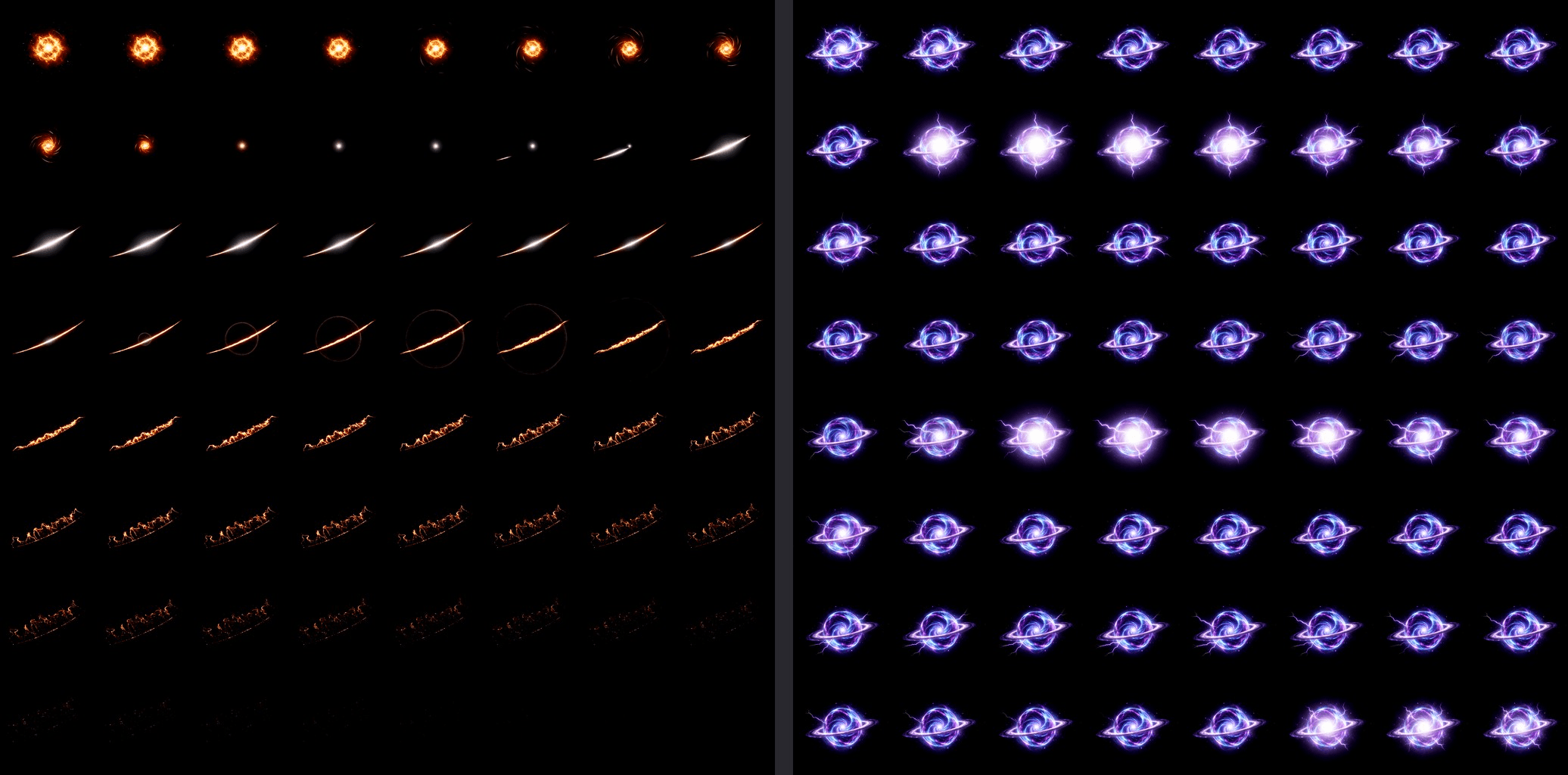
The MP4 to sprite sheet step is also where you set the playback speed. Play 64 frames at 12.8 fps and the effect lasts the original 5 seconds. Play them at 24 fps and the slash snaps by in under 3.
Explosion Sprite Sheet or Looping Orb: Two Last-Frame Setups
Game effects come in two kinds. One-shots play once and vanish: a hit spark, a slash impact, an explosion sprite sheet. Loops run for as long as the spell is held: an orb in the caster's hand, a torch, an aura. The last frame is how you tell the model which one you want.
| One-shot burst | Seamless loop | |
|---|---|---|
| First frame | Effect on black, small | Effect on black, final size |
| Last frame | Pure black square | The same image as the first frame |
| Prompt ending | Fades until the frame is pure black | Returns to exactly the first frame's shape |
| What we measured | Brightest pixel in the last frame is 3 out of 255 | Frame 121 differs from frame 1 by about 0.8 on a 0 to 255 scale |
| In the engine | Play once, then free the node | Loop on |
For the loop we uploaded one energy orb image to both slots and asked for plasma that spins in place.
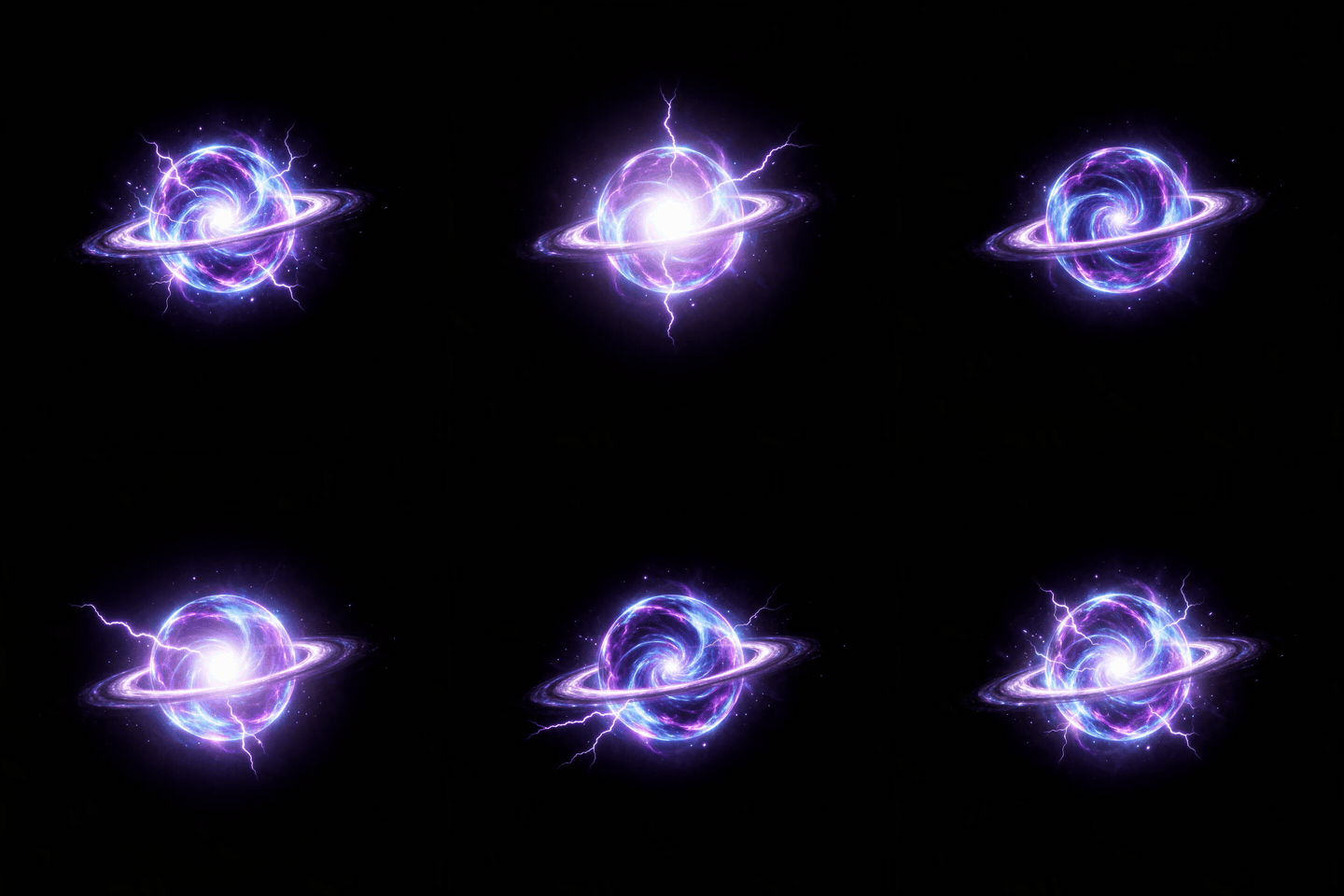
Because the clip ends where it starts, the 64-frame sheet loops with no extra work. Sample the whole clip at an even rate, as the command above does, and the last cell hands back to the first.
Godot Sprite Sheet Animation Setup for the Flipbook
Godot's own 2D sprite animation tutorial covers a sprite sheet on a standard Sprite2D node driven by AnimationPlayer. That is the setup we used in Godot 4.7, plus one material change for the black background.
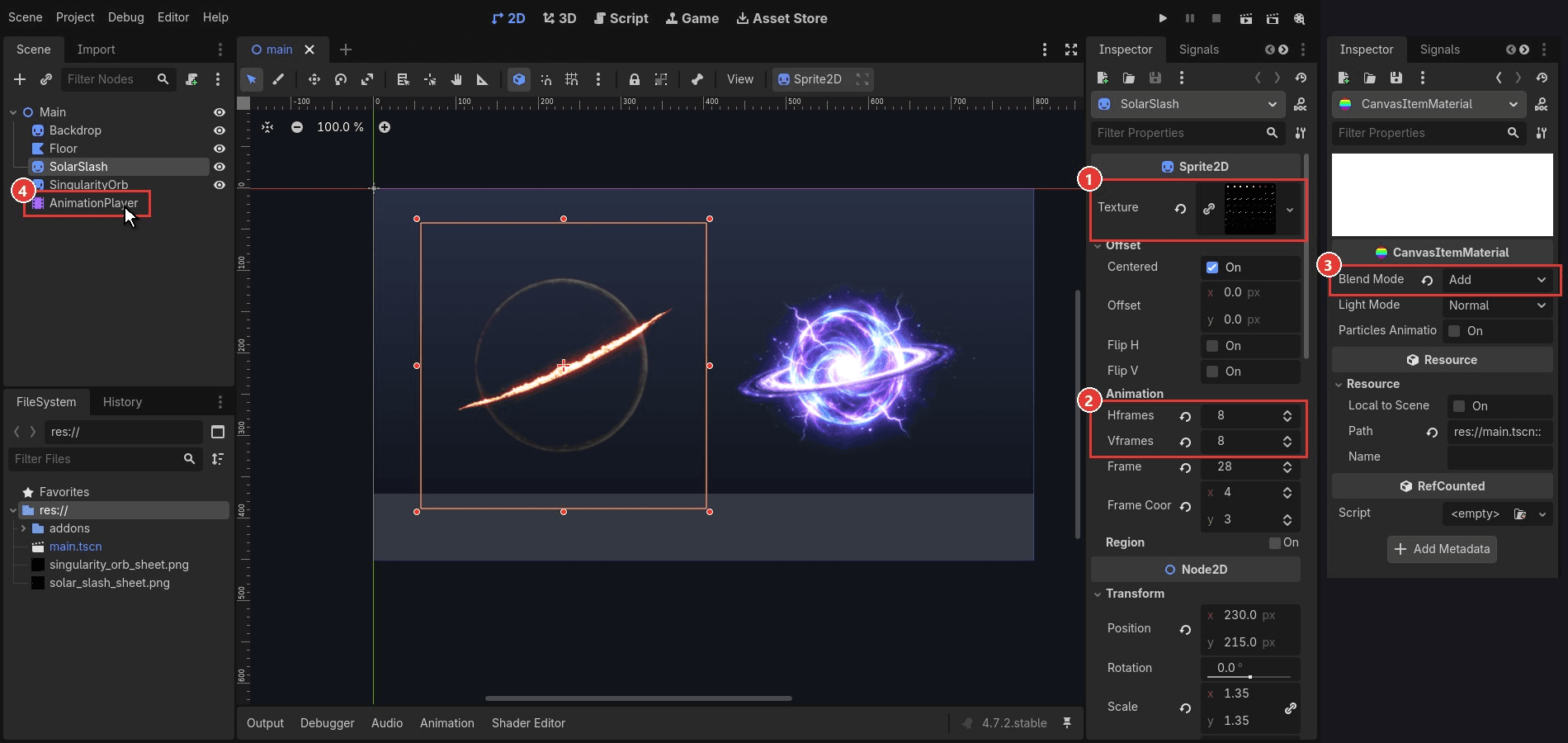
- Add a Sprite2D and drag the sheet into Texture.
- Under Animation, set Hframes to 8 and Vframes to 8. The sprite now shows one cell.
- Under Material, create a CanvasItemMaterial and set Blend Mode to Add.
- Add an AnimationPlayer and key the Frame property from 0 at the start to 63 at 4.92 seconds.
Step 3 is why the clip was shot on black. Additive blending adds each pixel's color to whatever is behind it, and black adds nothing. The background drops out with no keying and no alpha channel.
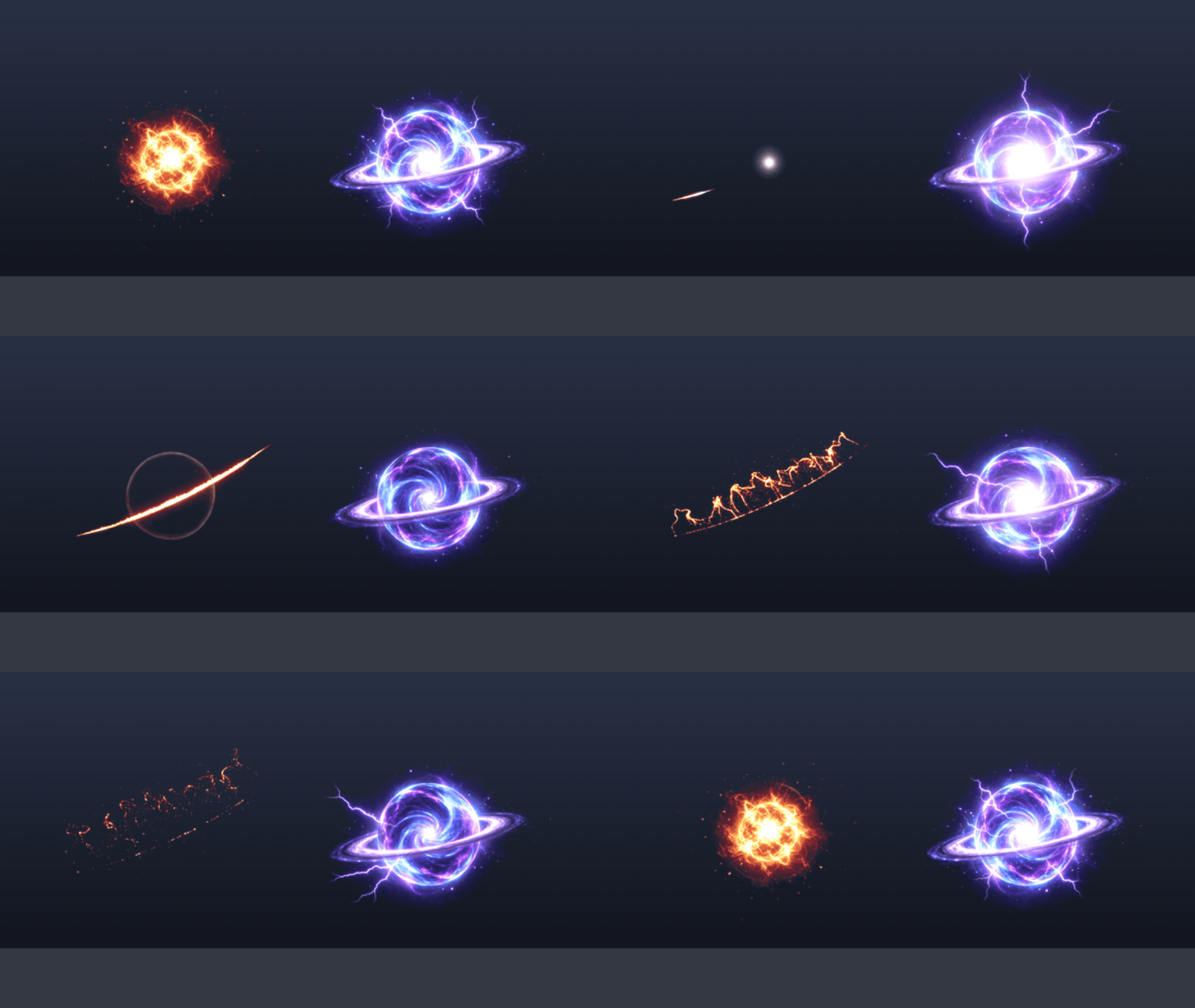
Where an AI Sprite Sheet Generator Fits Instead
Search for an AI sprite sheet generator and most of the first page is built for characters: walk cycles, idles and attack animations. That is a different job with different rules.
| Character sprite tools | Video to sprite sheet for VFX | |
|---|---|---|
| Typical subject | A character that must stay on model | Fire, ice, smoke, energy |
| Frames per action | A walk loop can be 8 | 64 in each of our sheets |
| Background handling | Transparent PNG | Black, removed by additive blending |
| Hard part | Identical proportions in every frame | Keeping the effect inside the frame |
So pick by subject. A hero's run cycle belongs in a character tool, where consistency between frames is the whole point. A fireball that boils into smoke has no proportions to protect, and a video model's continuous motion is exactly what it needs.
FAQ
Can I turn a GIF to a sprite sheet the same way?
Yes. FFmpeg reads GIF files, so the same command works with a GIF as the input. Expect rougher color, because GIF is limited to 256 colors per frame. If you have the original MP4, start from that.
How many frames should a VFX sprite sheet have?
It depends on how long the effect is on screen. We used 64 frames in an 8 by 8 grid for a 5-second clip. A quick hit spark can get by with 16 in a 4 by 4 grid. More frames mean a bigger texture, so a small effect that flashes by rarely needs 64.
Does this work in Unity or Unreal?
The sheet is a plain PNG grid, so it is not tied to one engine. In Unity, the Particle System's Texture Sheet Animation module takes the same 8 by 8 tile counts. In Unreal, Niagara sprites use SubUV settings for the same purpose. We tested playback in Godot only.
What if my engine needs a transparent background?
Add FFmpeg's colorkey filter before tile, for example colorkey=black:0.12:0.1. It sets pixels near black to transparent, and our test output was an RGBA PNG. Dark edges of the effect turn partly see-through, so additive blending on the untouched black sheet usually looks cleaner.
How much does one effect clip cost?
A 5-second 1080p Seedance 2.5 image-to-video clip was priced at about $3.00 on Atlas Cloud as of November 13, 2026. That is a promotional price, 20% below the $3.75 list price. The same clip at 720p was about $1.52 and comes back at 960×960, which is still far larger than a 256-pixel cell.
Is an AI VFX generator the same thing?
The label covers more than one kind of tool. Some generate a sheet straight from a text prompt. The workflow here is narrower: a general video model draws the motion, and you control the cell size, the frame count and the blending yourself.
Conclusion
Two effect stills, two prompts and one FFmpeg command per clip gave us a slash impact and a loop that play in an engine. The last frame did most of the steering: black for effects that end, the first frame again for effects that repeat. Shooting on black meant the engine removed the background for free.
If you want to try video to sprite sheet on your own game, start with one effect and one 5-second clip. Check that it stays inside the frame, pack it at 8 by 8, and drop it on a sprite with an additive material. Once that one plays, the rest of the spell book is the same steps with a different first frame.